Leaderboard




Popular Content
Showing content with the highest reputation on 12/28/23 in Posts
-
@LukeThe new way that you've developed for playing library items from VirtualTV as a live tv source is really great, but it's missing some features: The playback should auto advance to the next program in every available Emby app. There should be a way to start the current program from its live position instead of from the beginning. Ideally, the decision whether the program playback starts from the live position or from the beginning should not be a "static" channel setting in the plugin. Instead also the program itself should behave like a normal library item. That means that the program info dialog that we get from the EPG before playback and also the context menu should display a "Resume" and "Play From Beginning" button. Where "Resume" would start the program/library item from the live position and "Play From Beginning" from the start of course.4 points
-
New version 2.0.0.0 in the plugin catalogue: General: Redesign of the settings web page Channels: Unlimited number of channels Added an option to cache program data until the guide data runs empty As an alternativ to Channel Rules, you can now also choose between Collections and Playlists Playback: More granular control over playback progress reporting Improvements to "Continuous" playback with Roku devices New playback method "Native (Archive)" This new playback method was created by the Emby Devs. Similar to Playlist playback it will play the real library videos, but with the big difference that playback is purely initiated by the client app, without any remote command execution. This is why it also works for Roku devices on a WAN network. And although the real videos are played, the whole thing is treated like live TV. This means that channel zapping is possible and no dialogs for playing the next episode are displayed. Unfortunately, the new playback method does not yet support all features. As the name "Archive" suggests, it will currently always start all videos from the beginning. In addition, only very few Emby apps automatically advance to the next video. If you want it to be improved even further, each of you should raise your voice in this thread. Export API: New security concept that should simplify some things while making the API endpoints more secure. Because of all the changes, I expect there will be bugs. That's why it will only be available for Emby 4.8.x.x installations. Regardless of that, before you install the new version from the catalogue, it's important that you delete the previous VirtualTV.dll and also the VirtualTV.xml config file! As usual, you should also clear your browser cache.3 points
-
This is a simple plugin that adds a Scheduled Task to Emby that will prob/extract media metadata from STRM file targets. Why do you need this? By default, when you use STRM files in Emby it will not prob the target file that is pointed to by the STRM, this is mainly for library scan performance reasons but does leave holes in your library media metadata like durations, stream info etc. This plugin will try to plug the holes by prompting Emby to do a deep remote prob on the strm target files. This is going to be slow if you have a lot of Strm files in your system, and even slower if the streams are remote. The scan only needs to happen once for each strm file so if you run this daily then you should be ok as it will only process new strm files with no media metadata. To use it install the plugin from the catalogue and look in the Schedule Tasks, there should be a new one. Source Code https://github.com/faush01/StrmExtract
 2 points
 -
That worked thanks.2 points
-
Two new projects have been added in OneSky under Emby Server: EmbyHome EmbyHome-Alexa These string sets are used for both Google Home and Alexa. If you can help translate those then we can support more languages on those platforms. Thanks everyone.2 points
-
They won't play automatically, you must specify where/when (which season/before which episode) you want them to play, either by obtaining that information from online providers or inserting it manually. Else they'll just sit in your Specials folder/season waiting for you to intentionally play them.2 points
-
Salut Emby n'est PLUS open source. La version de jelly fin est un fork de la dernière version d'emby open source (3.14 si je ne dis pas de bêtise) Je paye rarement des abos, mais je suis lifetime depuis 2 ou 3 ans, et franchement si je devais repayer, je le ferai, ça marche vraiment bien je trouve. Et les évols sont cools (pas toujours certes mais y'a un excellent support @Lukeest un bot mais on l'aime bien )2 points
-
*Deleted*1 point
-
Update. I just noticed today my living room tv is now running 1.6.4 version of emby. It says the update was processed in October but I use my emby every day and just today realized functional changes. It seems the 2019 samsung model was approved for app updates.1 point
-
@svdaseinthanks for the "workaround" that is quite crazy and yeah I'm with dual screen on both computers where I have the problem !1 point
-
Hi, we have not been producing this for linux 32-bit. The repo is here: https://github.com/MediaBrowser/emby-theater-electron But I don't know how much success you're going to have.1 point
-
Tick/enable The Open Movie Database, Refresh Metadata on the movie.1 point
-
Hi guys, i can help with italian If you need it!1 point
-
I think there is a problem with the Beta 1.0.10 of the Emby Kodi Plugin. I went back to 1.0.7 and I can already tell there are some big differences. Things which used to work in Kodi seem to work, such as clicking Movies takes me to Movies and not my Sources location and then I select the Movies source. The covers are working and the Sort by: option actually has all of the options. Before I had about 4 and it wasn't sorting as I had expected. I also had added a new Main Menu in Kodi called New Movies and it was blank prior. I believe it said something like source://videodb or video.db or something. Now it actually has the recently added movies. I'll stick with 1.0.7 stable and see if that fixes the problems. Thanks1 point
-
This is enough. I'll move it to feature requests. Thanks.1 point
-
How are the NFS shares mounted on your Emby server? Show your fstab entries. What do ownership and permissions look like for the full path to the media on the Emby server host. Example path from above, run: namei -l /media/synologynas/tv/Banacek1 point
-
HI, we'll take a look at it. Thanks for reporting.1 point
-
Hi there, what exactly happens when you try?1 point
-
I was trying some alternatives and hacks. Couldn’t makenit work. We can close the case. I am sorry for not responding for a while. thanks for the effort and keep up the good work.1 point
-
Oh, didn't realize you don't see the whole thread. * Native support for Hauppauge PCIx tuners without the need for WinTV *1 point
-
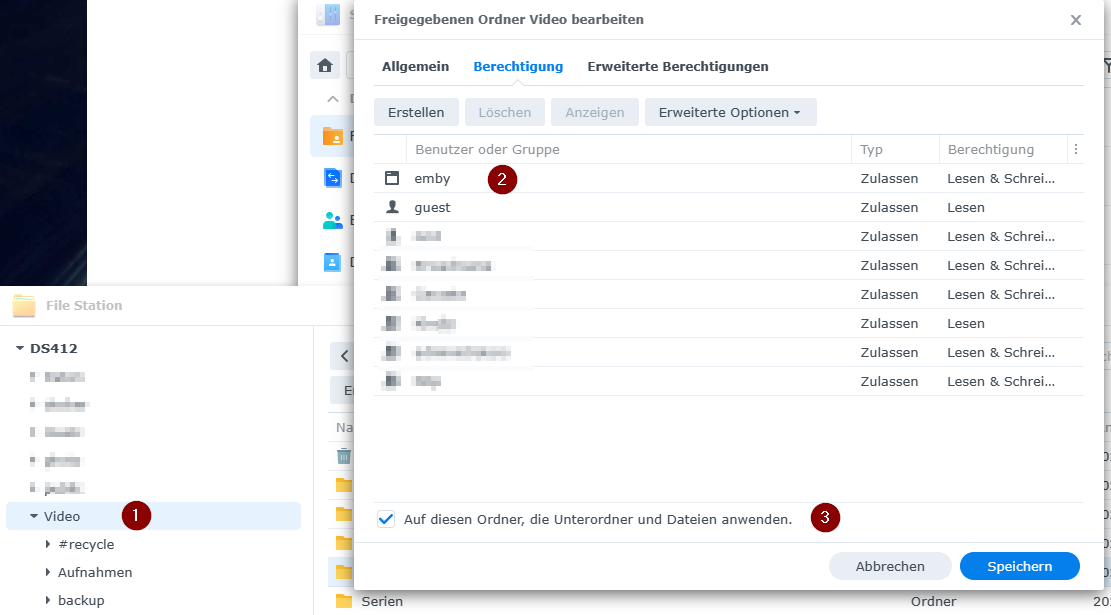
found the soloution first you must click your Media folder, right click Propertys,(1) aft that check, if the emby user is aviable (2) and the add the hook next to all folder and subfolders (3)
 1 point
 -
Problem got solved automatically. Thanks1 point
-
HI, yes it it will.1 point
-
Has there been any updates for this feature request, or the option to disable the Live TV DVR/Time-Shift or limit it to only 1 hour of record time or X amount of GBs to keep the disk from filling up. By the way I would also like to take a minute to give praise to the Dev team, I last used Emby back in 2020 and Live TV was very buggy with tuners not releasing if clients where not closed properly and such but you guys seemed to have ironed out a lot those bugs for the most part. Very impressed with the amount of work put in over the years so i bought a lifetime premiere this morning and will be migrating all my friends and family over to Emby from plex in the coming weeks. Great job guys!1 point
-
Yes I’d agree the boxes are laggy from when I’ve toyed with them (I work for a repair/install company) This is a Pioneer TV with Xumo as the interface though. For a cheaper basic 4K TV it’s running great. Not any slower than my Rokus around the house. It’s got Dolby Atmos capabilities, Dolby Vision, HDR10+, good 50 inch for under $200. There has been a few little nuanced things like no Emby, a few settings hiccups but nothing that necessarily makes me want to exchange it for another the picture quality is very good.1 point
-
Hi. It looks like your server cannot access the location for your transcoding temporary files. System.UnauthorizedAccessException: Access to the path '/config/transcoding-temp/880650c589ac4ddd9839fb1cc709edcc.ts' is denied. ---> System.IO.IOException: Permission denied1 point
-
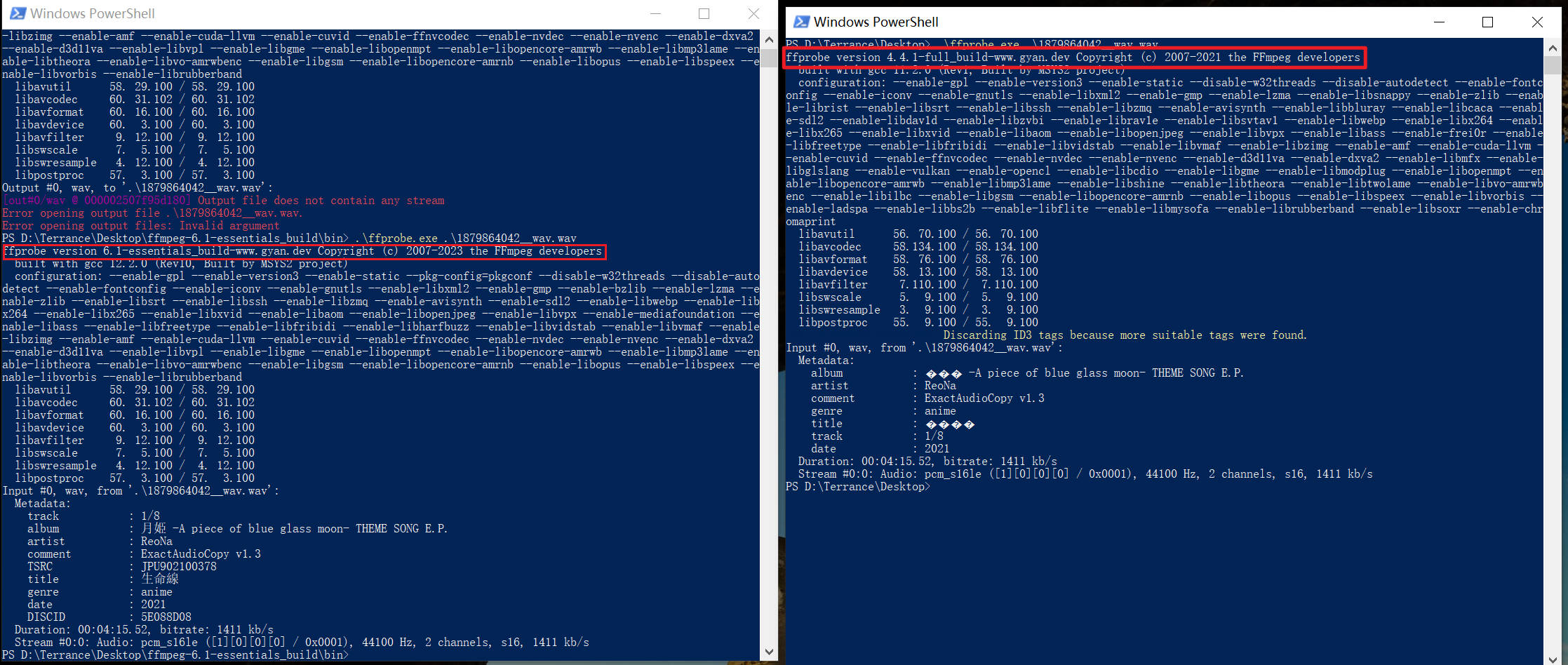
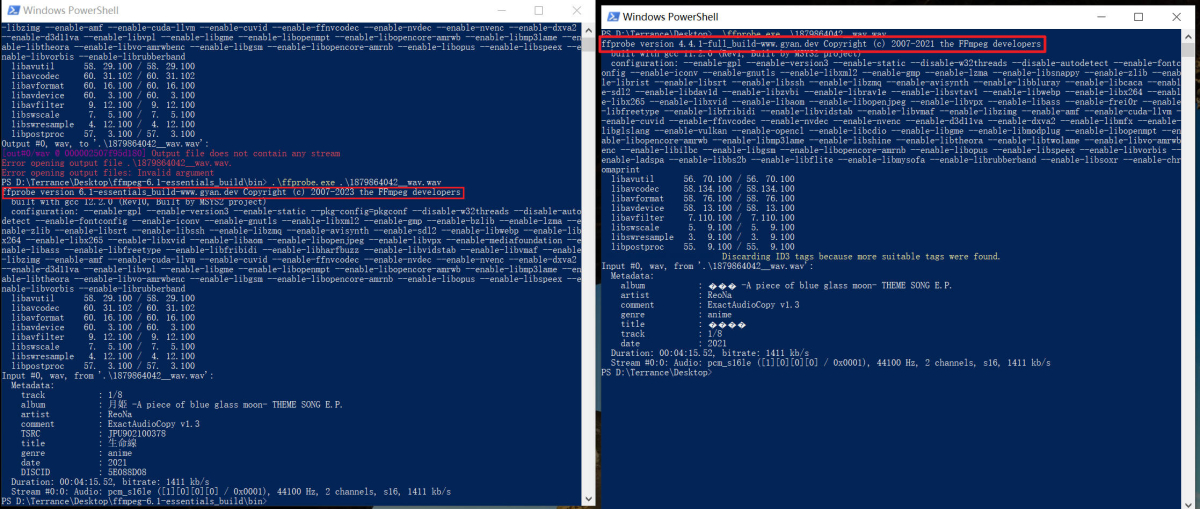
> As in my test, the latest (6.1) ffprobe works fine, and the previous release (4.4.1) garbles Thank you very much. The emby/embyserver:latest docker container was experiencing character encoding issues with ffprobe v5.0. However, after updating to emby/embyserver4.8.0.64, the problem was resolved with ffprobe version 5.1-emby_2023_06_25.
 1 point
 -
There is nothing wrong using native mode, but it's more tricky to configure (mount/access native folders) and has very few upsides. Addon mode is plug and play.1 point
-
As in my test, the latest (6.1) ffprobe works fine, and the previous release (4.4.1) garbles Maybe Emby can consider upgrading the integrated ffprobe?
 1 point
 -
The easiest way to configure all of this is by setting up multiple Pushover API services in Pushover itself - and give them multiple names/profiles. ie a 'Emby Playback' one - for those notifications, just turn off all the alerts/sounds in the end client. Normal alerts will come through on a 'Emby Alert' profile - those have sounds configured etc. I have this setup myself for normal alerts that don't alarm/make a sound, and auth failures that do (and make a noise about it .. )1 point
-
@LukeAh- I'm away at the moment - will check when I'm back next week1 point
-
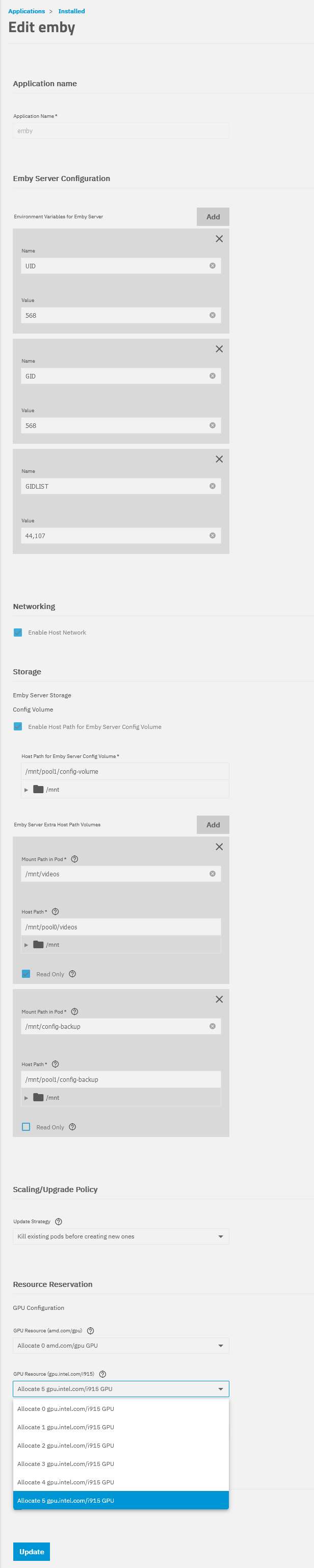
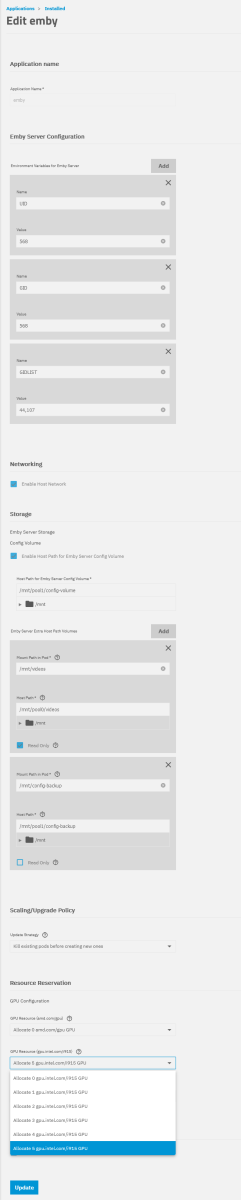
First, you need to activate it in BIOS/UEFI. I assume you already have when you ran it previously in Unraid. Second, configure emby more or less like this... When you correctly activated the iGPU, you should be see something like this (drop down) for the intel option. I did select the "5" option. Also, it is important to add the "GIDLIST" environment variable (groups video & render). I have used "UID" and "GID" to run this app as user "apps", like all other SCALE apps do by default (no idea why this one is different...). Then, your iGPU should be detected by emby server.
 1 point
 -
Merci pour votre réponse rapide. Je vais faire les essais. Merci1 point
-
hi Luke for prompt reply! I have now installed the app fro the link you have given. after installing it ,it works better now. would you still still like to have logs ?1 point
-
Well my solution was to drop a 4060 in my server to transcode better/faster WORKED!1 point
-
This will all be improved in the upcoming 4.8 server release. Thanks.1 point
-
Post hardware detection log also, as for the session in your log, transcoding was done in software only with no HWA adapters listed, hence high CPU usage. Edit: Ryzen R1600 has no integrated graphics, so no HWA, what you're seeing is the best you can get with that setup. You should strive to either pre-encode/re-encode your media in a format that will DirectPlay to all/majority of the devices you use or use client app that wouldn't require that content to be transcoded.1 point
-
Two new projects have been added in OneSky under Emby Server: EmbyHome EmbyHome-Alexa These string sets are used for both Google Home and Alexa. If you can help translate those then we can support more languages on those platforms. Thanks everyone.1 point
-
Two new projects have been added in OneSky under Emby Server: EmbyHome EmbyHome-Alexa These string sets are used for both Google Home and Alexa. If you can help translate those then we can support more languages on those platforms. Thanks everyone.1 point
-
Two new projects have been added in OneSky under Emby Server: EmbyHome EmbyHome-Alexa These string sets are used for both Google Home and Alexa. If you can help translate those then we can support more languages on those platforms. Thanks everyone.1 point
-
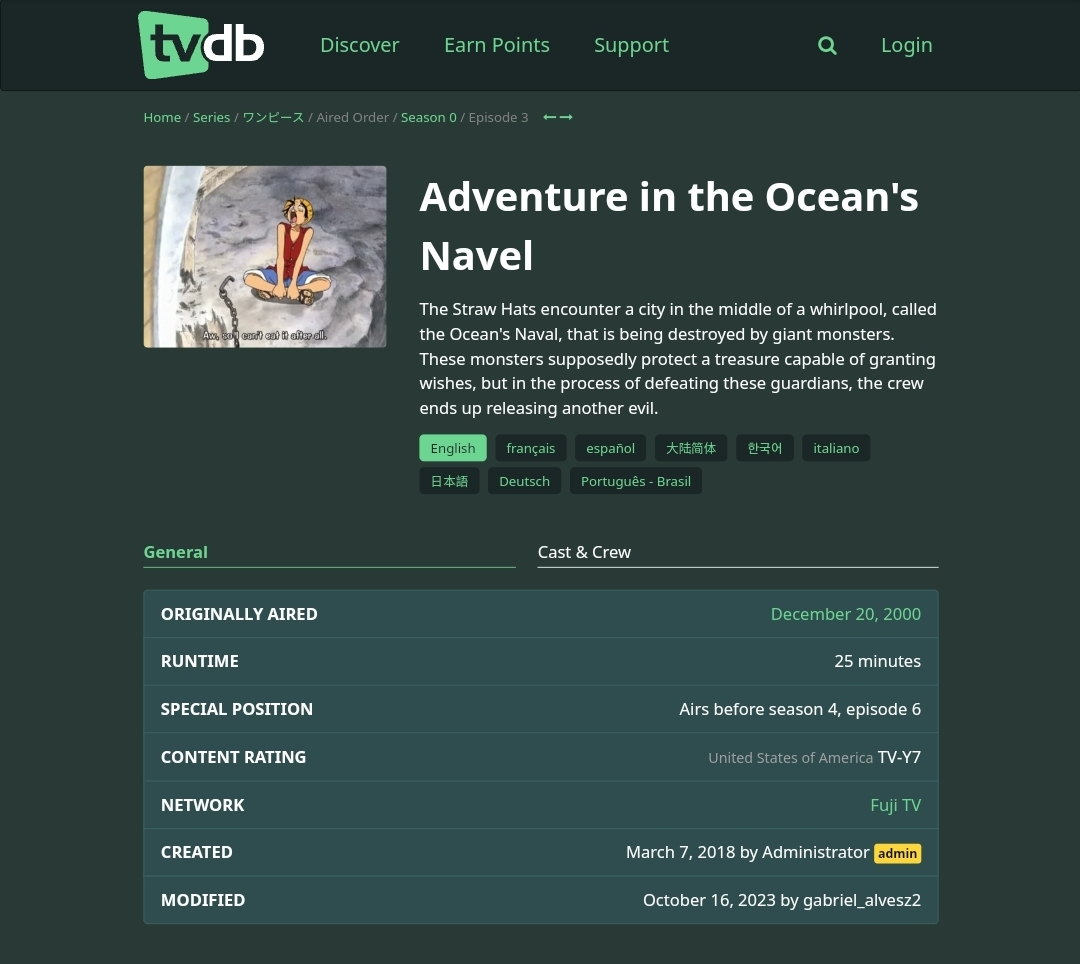
They're Uncategorizied (meaning not labeled as Movie/OVA/Season Recap), not unordered. Number of those episodes still have Special Position, i.e. You can always check that manually in episodes Edit Metadata dialog, whether your episodes contain same data - or simply Refresh Metadata on Season level so all the specials that have Special Position can download it, if not already.
 1 point
 -
i dont think this param has been increased to where people are asking. and this is what others on here have been asking for. currently its set to -reconnect_delay_max 8. if it was a setting people could change, i believe that would help the eliminate the talk about that setting and maybe fix some issues.1 point
-
it helps some but i agree this is a provider slash ffmpeg issue. if ffmpeg would send proper exit then maybe emby would pickup. but emby thinks its complete and marks the recording as complete instead of in progress. emby does do a much better job of holding onto the stream, so i say it has been improved on the beta.1 point
-
That would be great, thanks.1 point
-
*Moving to Testing Area* It was. Though you should see the same if your Specials have proper metadata, they'll be played in sequence within season.1 point
-
We'll continue to keep an eye on it as it gets closer to releasing, but since firefox doesn't support mkv it will never truly direct play.1 point
-
@Luke So I actually removed the option to automatically adapt the frame rate to the source in the appletv settings in fact without this option there is no longer any sound/video delay but it's a shame because this option is very useful for juggling between European TV apps, streaming and films on emby because there are frequency differences between the sources and without this option we have problems on certain frequencies so the lag problem seems to come from the processing of the frequency by the appletv (the sound is always ahead of the image). But why no delay in netflix and other streaming app ! @Luke is it not possible to add an option in emby player to adjust the delay? (like infuse?)1 point
-
Yes, I installed again to try it on a test system and it's duplicating movies on my system. Same file (path on disk). Metadata looks the same... Doesn't happen to every movies but feels like about 1 in 25 to 1 in 50 gets duplicated. Haven't looked into much but just wanted to note what I've seen. Any consideration to adding STRM back? STRM should not make any difference to this working and up until the this beta cycle (I think) it always supported STRM files just like files on disk and worked well. Carlo1 point
-
Would LOVE to see this happen. Tautulli just seems to embody all the good things about these separate Emby plug-ins. If the current developers of these various Emby tools would come together to make this happen, I'd have NO PROBLEM sending them some cash. Should we crowdfund a bounty and turn the money over once it's ported and working?1 point
-
Very cool. Pseudo TV for Emby! Thanks very much!1 point