Leaderboard




Popular Content
Showing content with the highest reputation on 12/27/23 in Posts
-
I don't know if I may be the only one, but I never care about the songs list appearing on top when going into an artist. It would be great if there was a away to either remove the songs section, or change the order so albums can be on the top?2 points
-
Hi, I installed the beta and turned subtitles back on. Movie played without any issues with subtitle displaying. I have uploaded the log files. Much appreciated Phil embyserver (1).txt ffmpeg-transcode-d585e998-e6cc-4031-9678-46b7f2db1491_1.txt2 points
-
I'm running version 4.8.0.64, and I don't have any problems hardening PGSSUB with this version! Sorry I was so busy a while ago, I just saw your reply, thanks!2 points
-
Thank you, yes that was correct, using a different file with HDR10 tone mapping woks correctly.2 points
-
@darkassassin07Well friend, you were spot on. New router provisioned today by my ISP and the issue is resolved. A bizarre hardware issue! Thanks all so much for the help & input, even though it turned out not to be an Emby issue at all!2 points
-
New PUBLIC TESTING version available 9.1.3: Delta changelog 9.1.3 -> 9.2.0 fix favorites content playback use helper folder for dynacmic nodes including mixed content fix sync issue for mixed content libraries fix dynamic node for audio content fix music sync issue option to sync livetv channels on Kodi start Comment: A mandatory database reset required due to mixed content sync issues.2 points
-
Please add these two filters to Movie filter view: - Decades - Country1 point
-
So basically this. I have TV Shows, Movies, and Anime libraries. For anime; I'd prefer to set the default to Japanese with Subtitles. For movies, English and no subs unless forced. For TV Shows, the same. However, Emby only allows one overall setting this for this, for all libraries, instead of just one. I think it'd be a pretty nice little feature.1 point
-
@bigican you please try the latest server version along with the Emby Dlna 1.3.0+ plugin update. Please let me know if these are still issues. Thanks !1 point
-
1 point
-
Ok, thanks for the quick response Luke, I appreciate it and all the Emby team does for us. I will keep watching for an update and digging for a solution to sideload the android app on the kids profile if possible.1 point
-
Yeah I'll try that and let you know.1 point
-
I would suggest a two-tiered approach: 1. get the runtime from the same sources as the other movie data 2. Allow for edits to the .nfo file being shown in emby and populate the user interface with the changed data If that would be possible we could a) edit runtimes if they differ from the one that was pulled from the online database and b) add languages / audio tracks1 point
-
Salut Emby n'est PLUS open source. La version de jelly fin est un fork de la dernière version d'emby open source (3.14 si je ne dis pas de bêtise) Je paye rarement des abos, mais je suis lifetime depuis 2 ou 3 ans, et franchement si je devais repayer, je le ferai, ça marche vraiment bien je trouve. Et les évols sont cools (pas toujours certes mais y'a un excellent support @Lukeest un bot mais on l'aime bien )1 point
-
To add to this. I am having the same issue with my S22 Ultra when connected via usb-c to pretty much any external display. Also, I've tested with VLC connected to my server and it does the same, blank screen and plays only the audio. If I cast to DeX on my computer w/o cables, it works. It was working fine last week on the 20th and I tried again on the 23rd and it stopped working. I did update to the new Samsung UI 6.0 on Dec 21st. I would assume that this has something to do with it. The latest Emby beta version on my phone is 3.3.49 and was installed on Dec 3rd. Please let me know if you need anything from me to test or if there is anything I can do to troubleshoot this further.1 point
-
Yep no problem1 point
-
Yes it is.1 point
-
Hi, are you able to try the 4.8 beta server and see how that compares?1 point
-
我确实需要这个功能,请务必积极考虑,谢谢1 point
-
Yes I know, I don't need the hiding method of *nix systems, I only need the windows attribute, which does not affect the file naming1 point
-
Hi, The problem I believe is the move is buffering as the blue circle appears at a curtain playtime and the movie stops playing. I turned subtitles off and the movie plays correctly plays pass the playtime correctly.1 point
-
Different operating systems use different mechanisms to make files / folders hidden. For *nix systems, this means the filenames begin with a period; Windows has an attribute. This would possibly mean different file names on different operating systems, and more work for the developers.1 point
-
KSPlayer KSPlayer is a powerful media play framework for iOS, tvOS, macOS, xrOS, visionOS, Mac Catalyst, SwiftUI, Apple Silicon M1 . Features iOS, tvOS, macOS, visionOS, Mac Catalyst, Apple Silicon M1, SwiftUI. Multiple audio/video tracks. hardware accelerator. 4k/HDR/HDR10/HDR10+/Dolby Vision text subtitle/Closed Captions/image subtitle(dvbsub/dvdsub/pgssub) Picture in Picture Record video De-interlace auto detect Spatial Audio 360° panorama video. libsmbclient protocol https://github.com/kingslay/KSPlayer1 point
-
Xfinity sent me one of these a year or so ago. It is an odd device but it probably based on some fork of Android. However, it is a closed system (as far as I can tell). There is no store or marketplace for users to download apps. You have to become a business partner of theirs to get on the platform.1 point
-
Hey @Lukewoild it be possible to get the latest .64 beta build? There were two fixes over the last week I’m hoping to confirm, live TV reconnecting and removing a user from shared libraries.1 point
-
Hi Luke. I tried version 4.8.0.64 and was pleasantly surprised to find that the timeout for ffprobe has been increased from 30 seconds to 60 seconds, which solved most of the problems. However, when dealing with some larger video files, 60 seconds still seems a bit conservative. Is it possible to make this timeout value configurable, allowing users to set it freely? solved: /media/webdav/aliyun/emby/动漫/完结/银魂/S01/银魂.S01E03.mkv still time out: /media/webdav/aliyun/emby/动漫/更新/石纪元/S03/石纪元.S03E20.mp4 /media/webdav/aliyun/emby/动漫/更新/石纪元/S03/石纪元.S03E12.mp4 embyserver.txt1 point
-
Hey @Lukethat's a shame that samsung does that because I see some of the major apps update pretty quickly. I just started switching over to samsung tvs & i hope i dont regret it. Ill try the usb option.1 point
-
FYI link in the first post hasn't been updated yet.1 point
-
Brilliant! Initial testing looks like this works exactly as I asked for. Thank you so much!!1 point
-
What is the problem you're seeing? Is buffering or stuttering, etc? Do you see the same issue playing the same video file if you use a supported subtitle format like srt, or while using no subtitle?1 point
-
"So" should also be "to" (forgot to mention this). Applies to both strings.1 point
-
hey sorry for not replying earlier. But i figured out the trigger what caused that - a change in file path.( and not after a period of time as i assumed earlier) as i was organising my library to not store all content in same root folder, created few top-level subfolder and moved contents inside those.. hence it re-hased all content re-created all chapter images, etc. To mitigate i have used a python script to find all chapter folder in library and resize all images to 360p - which worked. But again manually creating non-black chapter images. so lesson learnt - never change media path1 point
-
Yes, did so and seems to have fixed the issue.1 point
-
1 point
-
I know, I can see the changes in in Kodi's db. I'll review it an decide how to approach. Actually a lot of code can be removed in next-gen plugin's code and is something for 10.X 9.x must keep compatibility with Kodi 20 and 21.1 point
-
Thank you for the link to the backup guidance.1 point
-
Picard's default behaviour is to embed mbz artist ids in an Emby compatible format, no tweaking required. So although Picard can be a bit fiddly to learn if all you want to due is embed mbz id tags it should just be a case of. 1. Open album files in Picard 2. Identify the album/files against Musicbrainz 3. Save files. (picard will imbed the identified ids into the mp3/flac etc) https://picard.musicbrainz.org/quick-start/1 point
-
@Lukeit turned out that somehow the guide data was deselected for all tuners. This was the case for *all* of my guide data (I have multiple guide data sources configured). When looking the Gudie data source both the 'Enable for all tuners' and the specific checkboxes next to the tuners were all deselected. I went though, enabled each for all tuners and the problem was solved.1 point
-
That used to either do nothing or kick me back out to the title page of the video but I tried it again this morning and it said purchase restored and now my settings page says Registered. No idea what changed. All playback seems to work now though, thank you very much!1 point
-
Using app version 2.2.16 - Server version 4.7.14.0 I noticed when downloading a music playlist on my iPhone, it got stuck at 98.8% downloaded. I went and found the file that was stuck which said 'transferring', deleted it, and started another download of a different playlist which is now downloading fine so far.1 point
-
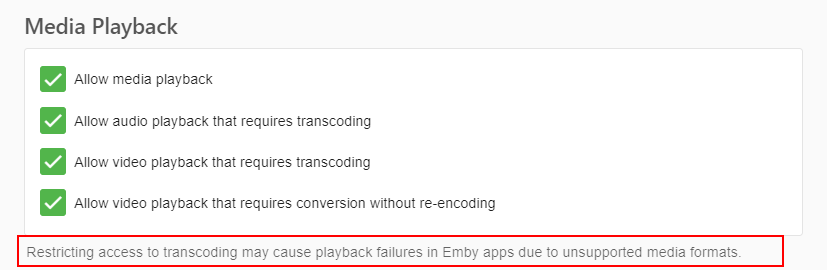
Hi, I would either undo this: Or try Chrome or Microsoft Edge and see how that compares.
 1 point
 -
Regarding the internal metadata folder, the best thing to do is follow our backup guidance and not try to work with the folders directly: Configuration Backup1 point
-
+1; I'm more interested in seeing albums first, too. In fact, it'd be great if songs / appears on would be a separate link (for the sake of loading time). I don't want to remove it altogether, as it is useful for seeing what songs they have on compilations, but that—to me, at least—is secondary to albums.1 point
-
I haven't looked at the logs, but looking at the image it seems that you have a Profile 5 Dolby Vision file. These files only contain a Dolby Vision track, which Emby cannot tone map. Emby only supports tone mapping HDR10 content AFAIK. Dolby Vision Profile 7 and most Profile 8 files would also work because they contain an HDR10 fallback layer for devices that do not support Dolby Vision.1 point
-
1 point
-
Yes - just pass it the folder where all your existing recordings are - and it will convert them all. This hasn't been tested - but assuming your working post processing scipt is called 'script.bat' - then the script below just finds any .TS file in all files and folders below it - and runs the script.bat on that file... As always, test before using .. @echo off setlocal ENABLEDELAYEDEXPANSION FOR /F "delims=" %%x in ('dir /a-s /b /s *.ts') DO ( call script.bat "%%x" ) pause1 point
-
Si tu IP es dinámica, deberías utilizar algún servicio de DNS dinámico como: https://www.noip.com/es-MX1 point
-
I know. But what I mean is like when I play a TV series; at the end of any episode, there´s a prompt that says PLAY NEXT/NEXT EPISODE (or similar, in my case it's set on SPANISH, so it says 'Siguiente episodio'), and I was wondering if there was any option to enable a prompt like that for movies too.1 point
-
Shift to multi-select support is on the way. Thanks for the feedback.1 point
-
Is there a way to sort movies by decade? I can find a way to sort by a single year, but not sure if I'm overlooking the ability to sort by decade. Thanks for any help!1 point