Leaderboard




Popular Content
Showing content with the highest reputation on 12/26/23 in Posts
-
I don't know if I may be the only one, but I never care about the songs list appearing on top when going into an artist. It would be great if there was a away to either remove the songs section, or change the order so albums can be on the top?2 points
-
Update: 1.6.9 work fine to me.2 points
-
TheTVDB now supports more alternative orders than just Aired/Absolute/DVD. Can Emby query these additional orders and add them as options? Two examples of shows I've seen this used are Re:Zero which has a "Director's Cut" display order and Money Heist which has a "Netflix" order. https://thetvdb.com/series/re-zero-starting-life-in-another-world https://thetvdb.com/series/la-casa-de-papel1 point
-
Be able to create playlist based on a certain criteria, like genre and or year, in order to create a dynamic playlist that it refreshes automatically when new content is added. This way you can for example, create a tv comedy playlist from the 90's, or a new sci-fi Movies playlist. Some other criteria for rules could be the rating, watched/unwantched, score, tags, language, audio codec, etc The possibilities could be endless1 point
-
Here are 4 pre-rolls I created using Motion Array templates. (I have a subscription.) Emby-Dark-Tear.mp4 Emby-Explosion.mp4 Emby-Fire-Explosion.mp4 Emby-Space-Trails.mp41 point
-
Hi, first of all thank you for this amazing application. I am using Mandarake chromium builds as a web player because it supports software hevc decoding. But since version 120, Firefox also supports hardware hevc decoding like Chrome, Edge etc. I am on Firefox 121 and I am sure it supports hevc. I have enabled hevc support in Firefox with "media.wmf.hevc.enabled" set to 1 (hevc enabled for media engine and MFT) http://ott.dolby.com/codec_test/index.html reports Firefox can play hevc https://tools.woolyss.com/html5-audio-video-tester/ also reports Firefox can play hevc and all hevc samples there play in Firefox also Firefox can even play local mp4 hevc files, I have tested them with this player https://mediaplayer.chromecrxstore.com/ There is no doubt that I can play hevc in Firefox, but Emby can't play hevc content in direct play, I get Playback Error No compatible streams are currently available. I am using Emby server 4.7.14.0. It would be awesome if Emby could direct play hevc in Firefox too, now that it supports hardware hevc decoding. Then there will no web browser left that I won't be able to use as a web player for Emby. Thank you in advance for any reply.1 point
-
While Emby already has recommendations built in based on previously watched items I find they are not all that helpful. They seem to be based on genre only, for example, because you watched a comedy here are other comedies in your library. I do like how the also directed by/appear in recommendations work though. What would be great is if Emby could incorporate Trakt's recommendations as they are much more sophisticated. Trakt's recommendations are not only based off of what you have previously watched but also what your Trakt friends and other Trakt users have watched. It takes user ratings and trending/popular media into account. Ideally Emby would include full Trakt integration allowing users to rate media after watching, view lists and recommendations, and view upcoming media all from within Emby but for now I think recommendations would be a nice addition. Trakt has the potential to give Emby that community feel and allow users to discover new media, find something to watch, and recommend media to other users. http://docs.trakt.apiary.io/#reference/recommendations1 point
-
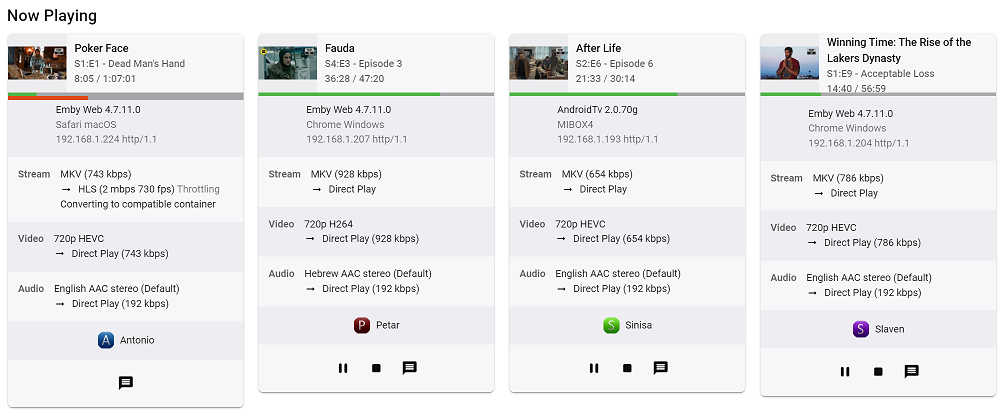
Guess I'm making it official FR: Could we please get parent TV show poster - or at least parent TV show thumb as it is done in Continue Watching Home Screen row - for TV episode playback session in Now Playing Dashboard section, as current implementation with episode thumb is neither informative nor visually appealing. Thanks
 1 point
 -
Hopefully that is in the short term todo list because I've already had to reinstall openssl 1.1.1 3 times. Every time something has an openssl dependency, it installs 3.0 again and remove 1.1.1 so I have install 1.1.1 back after to replace 3.0.1 point
-
I was able to figure this out after a LOT of trial and error. I had set up haproxy on pfsense for one of the servers in my list and the SSL compatibility mode was set to modern which would have enforced a requirement for TLS 1.3. I relaxed that setting and now Firestick and affected smart TVs show the server connection details and allow login as expected.1 point
-
My original thought back when I first posted this idea would be just pulling from online providers that Emby currently uses in order to get things like runtime. I don't know whether things like audio languages would be available from sources like that, though. To me Runtime/Length is the most important and useful, and I personally would be fine if it displayed with a parenthetical "Runtime estimate based on online metadata" (or something more concise).1 point
-
It's the option in each library to save nfo files next to your media files. This is one of the best ways to preserve custom edits.1 point
-
S'il n'y a pas de fichier normal que Emby te dise qu'il n'y a pas de vidéo. Emby est un lecteur de fichier. Il faut effectivement que tu télécharges des fichiers avant1 point
-
I found that when the high RAM usage was occurring, there are loads of intro detection processes taking place. Though, no tasks appear to be running in the dashboard, despite this process running. It looks like this was resolved in the latest beta version of Emby server. Fix Intro Detection scheduled task not being visible Listed under 4.8.0.63 Beta https://github.com/MediaBrowser/Emby.Releases/releases I believe this is my issue which is fixed. I can't wait for the next stable release of Emby Server. So many improvements. I might have to play around with the Beta release!1 point
-
+1; I'm more interested in seeing albums first, too. In fact, it'd be great if songs / appears on would be a separate link (for the sake of loading time). I don't want to remove it altogether, as it is useful for seeing what songs they have on compilations, but that—to me, at least—is secondary to albums.1 point
-
If you use docker with the basic created image, everything is included, you don't need to do anything.1 point
-
No. I'm going to uninstall kodi20 and try kodi21. I will tell you.1 point
-
I will test this this evening or tomorrow morning. but it is not ideal to deactivate this option because the image frequency will no longer be adapted depending on the source and therefore risks having problems with the fluidity of the image (lag, etc.)1 point
-
Hello and Merry Christmas! I did the update this morning. The first tests are quite conclusive. I'm going to test it over several days, but it's very encouraging. Thank you so much for your help and responsiveness.1 point
-
Thanks, let me know if you need any tests, logs, whatever to find out the issue1 point
-
Not a Roku user, but IF it follows same design guidelines as AndroidTV app (as it generally does), you should have particular Library settings behind cog icon top-right once in library view, where you can set Default tab for that library.1 point
-
Thanks,looking forward to the next release.1 point
-
We're close though, so stay tuned.1 point
-
Great, thanks for following up.1 point
-
That is the fix until we move to dotnet 8, which is built against openssl 3.0. But right now we use dotnet 6 and that requires openssl 1.1.1 point
-
I just converted them all to MKV and that fixed the issue.1 point
-
Hi, we'll take a look at this. Thanks for reporting.1 point
-
Hi @Lukethe issue was caused by my custom ffmpeg transcode processing for the stream profile in tvheadend. The issue began when I converted the audio of all stream to ac3 (AAC sounds really awful) and kept the video intact (copy). This setting did not play nice with some TS streams, especially 1080i content and audio started to get out of sync. After ffmpeg converted the video to h264 and audio to ac3 everything plays fine now. But the freezing and pixelated video still happen. I am planning to connect my Nvidia Shield to the TV. I am tired of Samsung TV's limited capabilities. And.... Thanks for coming back. It is Christmas! Merry Christmas!1 point
-
(To clarify, the recut is not a Criterion title. It's an unofficial edit that Steven Soderbergh briefly posted on his blog in 2015. Emby is misidentifying it.) I tried all the options so I could report on what worked and what didn't. ··· > Identify > enter IMDb ID tt0062622 > search/pick; ··· > refresh metadata and/or Scan Library Files rename to put 2015 at end of the file name; ··· > refresh metadata and/or Scan Library Files Either of the above options resulted in the correct metadata chosen, but it still comes up as a separate movie in the library. remove 2015 from file name entirely; ··· > refresh metadata and/or Scan Library Files That worked! Thanks! select both > Group versions That works too! Thanks! OK, so the problem does seem to be that the parser gets rather confused by a year being in the version name. Moving the year to the end of the filename helps prevent the movie from being wrongly identified, but doesn't prevent the items from being separate in the library. Best workarounds are to manually group the versions or just completely remove the year from the file name.1 point
-
Well you need openssl111 installed for dotnet to start correctly1 point
-
ok is solved i have used Docker Repository from binhex and that was problem i switch to official and all function are ok...1 point
-
That should really not be happening, especially if your folder structure is: as that is proper filefolder structure/naming for multi-versioning. Guess all those years - 2001, 1968, 2015 - in the filename are somewhat throwing parser off. Anyway, you can Identify (three-dot menu) that 2015 Criterion version as correct movie and see if the they get merged - if not, you can merge them manually on multi-select (hover over top-left corner of the poster image, mark both items, select Group versions from three-dot menu top-right of the screen). Or try renaming that version to: 2001 - A Space Odyssey (1968) - Soderbergh recut 2015.mp4 or 2001 - A Space Odyssey (1968) - Soderbergh recut.mp4 Scan media library, see whether they'll get merged automatically.1 point
-
Thanks Luke. I guess my best bet is to check with the npvr community to see if there's a workaround on that end.1 point
-
Hi. I've tried to disable "An Bildrate anpassen" in the appletv settings. The video and audio is synced now. If I enable "An Bildrate anpassen" again it is unsynced again. But of course I want to enable it again in the future. Maybe that helps.1 point
-
I've been having this problem as well, for quite a while. I always assumed it was because of something in my virtualization environment, or maybe just crappy wifi. But everything else works as expected, and I have not been able to identify any bottlenecks or issues in my server or network environment. The issue seems to only happen on Roku devices. What I'm seeing is exactly as described by everyone else. Videos will appear to play to the end, but it will stay on a black screen with 1-3 seconds remaining, with the UI offering a pause button, which seems to indicate that it's still playing or trying to play the file. It will not advance to the next video on its own. The next episode must be loaded manually by using the remote. The issue happens randomly. Sometime it's every single video, sometimes it'll play 2 or 3 or more in a row, sometimes it will play all night without problem. I've experimented with different filetypes and bitrates, but it doesn't seem to affect the behavior. I've never experienced any quality issues or buffering issues when playing content from the web interface on my laptop. My video files range from SD to 4k, and I rarely run into playback issues on Android or Chrome on PC. I've had surprisingly good results using the web interface from my laptop to play pretty much any file regardless of resolution or bitrate, even over VPN. This issue is significant to us because we keep the TV on at night to fall asleep. If there are any logs I can produce or anything else I can do to help, please advise. Thanks.1 point
-
So for a Raspberry Pi 5 running Bookworm and using the webclient I did the following: Install the full Desktop OS for Bookworm (and configure SSH, WIFI, etc) using Raspberry Pi Imager (1.8.5 or newer): https://www.raspberrypi.com/documentation/computers/getting-started.html#raspberry-pi-imager On first boot you'll get prompted to configure everything. Make sure you do this as you intend to operate the device as once you have it booting full screen into Emby it will be much harder to setup Bluetooth Speakers or other options. Update the OS and apps if the startup prompts didn't ask you to by SSHing into your Pi and doing: https://www.raspberrypi.com/documentation/computers/os.html#using-apt If using the official touchscreen you need to rotate it by following: https://www.raspberrypi.com/documentation/accessories/display.html Install on-screen keyboard: https://forums.raspberrypi.com/viewtopic.php?t=358147 Once you've verified you can reach your Emby server by opening Chromium and typing in the address you can proceed a couple ways. I'm sharing what I did. Setup the Pi to autostart into the Emby webclient with it maximized by following: https://www.raspberrypi.com/tutorials/how-to-use-a-raspberry-pi-in-kiosk-mode/ I did not follow the wayland.ini exactly as I did not have an autostart segment but created one and only put in a single line: chromium = chromium-browser "https://embyaddress:portaddress/" --kiosk --noerrdialogs --disable-infobars --no-first-run --ozone-platform=wayland --enable-features=OverlayScrollbar --start-maximized This works to run all the 1080p direct play videos I've tried so far (AV1 and x264) and my Emby Server transcodes well enough that the 4K HDR titles work. Testing with Emby Theater using X11 will be tried eventually but this is working really well for my purposes of being a Chromecast control center for the house audio and local video playback via a Bluetooth speaker of instructional videos I've downloaded off YouTube to my Emby Server.1 point
-
My first and primary one (as it would fix many without other options or UI changes) would be able to just have a default 'screensaver' folder that if pictures are placed it then Emby pulls from it alone but if there are none then it follows the current behavior. The UI and customizations you ask for above are great ideas but at this point I'd like a simple change that could happen sooner!1 point
-
Thanks ebr I think you have solved the issue. Just delved into the device specs and max bitrate for H265 is 35Mbps Thanks for your help1 point
-
I figure it out! Thank you @Lukefor the insight! I accessed the database and dumped the entire MediaItems table into a .txt file. I downloaded the dump onto my Windows machine and opened it with Sublime Text Edit (supports big files) the dump was 250MB but I was quickly able to locate the guid string this time. sqlite3 library.db >.output mediaitems_dump.txt >SELECT * FROM MediaItems; >.output stdout A quick find using Sublime Text Editor within the .txt file quickly identified the film in question using the guid as the search string: 7f47ff6354b5640c8275a7ee7ad08d6a|Footloose|0|||||The music is on his side.|Imdb=tt0087277|Tvdb=2571|Tmdb=1788|/media/Movies/Footloose (1984)/ ... boy am I in for a shocker. The film was quicky identified and the explicit media was deleted. My Emby server is family friend once again!1 point
-
I have a LG HU70LS with WebOS 4.5. I cannot find the emby app in the store. @LukePlease add support for the projectors.1 point
-
yes correct, the audio fingerprint (chromaprint), from what i remember, is based on frequency distribution over short time span buckets that are then converted to integers to allow compare. there is no original audio data in the audio fingerprint. its the same technique that the auto song detection systems like picard use.1 point
-
@LukeI try with 3.3.49. It's not working. I think it is because the video player doesn't downmix audio in stereo. Indeed, my video is in 5.1 and I think it must be in 2.0 if you want to accelerate.1 point
-
This would be amazing. It is so annoying having to scroll through hundreds of channels to find one to map to guide data. Could you also possibly look into adding a search field to filter in channel setup?1 point
-
Hi Luke is this version including the hardware acceleration? If so I could not get it to work. I also can test the Mac version on a couple of M chips models if it would help.1 point
-
Any update? I would love the iOS app to support Siri Shortcut. For example, play.a specific Playlist would be great.1 point
-
So long as at least one of the instances is NOT set to save metadata with the media, there should be no conflict. Emby does not mess with the media files themselves. Paul1 point
-
"A delayed game is eventually good, but a rushed game Is forever bad” Shigeru Miyamoto It will be ready, when it's ready. Or would the community prefer a buggy POS that deletes all your files or makes your system explode, or worse? I can't believe the amount of people whining about it taking so long.1 point
-
Hi, expect to have more home screen options in future updates. Thanks.1 point
-
From current research and mentioned in other topics, this information is currently only accessible via their web site. Their is no option via their api to get this info. I would assume when they release v4, it will be availble. unanswered topic https://forums.thetvdb.com/viewtopic.php?f=118&t=63620&p=173843&hilit=api+netflix+order#p173843 Another topic with a answer https://forums.thetvdb.com/viewtopic.php?f=41&t=57220&p=166068&hilit=api+netflix+order#p1660681 point