Leaderboard




Popular Content
Showing content with the highest reputation on 11/27/23 in Posts
-
I don't believe this is correct - I use downloaded trailers and they play instead of the YT ones when I click on the Trailers button on the emby client ? As above - Movies - need to be filename-trailer.ext in the same folder TV Shows - need to be ..\trailers\trailer.ext as a subfolder in the root of the TV Show You'll need to re-scan the item, but then it will use the locally stored trailer instead. and you could do this, by just using a 'backdrops' folder instead of trailers - it would then play the Trailer as a backdrop ... This assumes of course that the client can play backdrop video - some cannot .. https://emby.media/support/articles/Theme-Songs-Videos.html3 points
-
you to all that helped. Tailscale worked. I can now access my server on my phone off of my network. Will put it on my firestick that i take on trips. Thank you again2 points
-
OK, update......... Got it sorted. Turns out the side loaded version was the issue I'd say. I deleted it and reinstalled the version from the app store on the firestick directly. Then after I synced the content, it was there. (I didn't do that previously) With this version, the drop down menu appeared and gave me the option to purchase the unlock. For some reason the drop down list didn't work on the side loaded version. Paid my $5 and she's all good. Trial period is gone. Thanks so much for your help.2 points
-
TVDB did actually have "The Star Beast" identified as a new series "Doctor Who (2023)" but that was quite quickly removed and it now identifies as S00E162 with a TVDB ID of 9788971. Interestingly I have just seen that The Star Beast has now shown up in S**arr as S14E01 as well as S00E162 I guess there are a few contributers to TVDB and TMDB that are a bit confused2 points
-
You are correct - I have 10,000+ local trailers and they all play on Trailers button press in all the clients I use (Web app, Win Theater(s), Android app, AndroidTV app). Or in \trailers subfolder, whereas for TV shows it works only with subfolder, as you've stated:2 points
-
Tried to search for this feature request but couldn't find it. It would be very good to be able to sort and filter the content of collections. I have some collections with a lot of movies (1001 movies you have to see before you die, Criterion collection, etc). As of today you can sort and filter the collections themselves but you can't sort and filter the content. So if I want to find an unseen movie from my 1001 collection I will have to scroll through a lot of movies. In the collection view you also separate categories (movies, tv, ...) and it would be great to be able to choose to not separate them also.1 point
-
Hi, I am a new Emby user and I can say I am impressed with it. I have been using Kodi for a long time and I rely to nfo files (it's my preferred choice for dealing with my media). Since Emby can't parse artwork from NFO files, I decided to give a try to local artwork. My problem now, my artwork is not in jpg and png files, I prefer it to be in webp format (smaller filesizes, massive savings especially in png files since png is lossless and huge in filesize). If I rename the webp artwork to png (for example poster.webp to poster.png) Emby reads and displays the webp artwork fine. So what I am requesting.. is it possible for Emby like Kodi does to read more image formats for local artwork and not only jpg and png? It's only an import issue, Emby imports and displays the webp artwork fine if I change the extension to png. Thank you in advance for any reply to my request Emby devs.1 point
-
For future proofing, it would be great if Emby added general support for JPEG XL (.jxl). It could be used for multiple things, like: Storing and viewing photos Media metadata (album art) Recompress existing JPEG and PNG losslessly to shave down the metadata database More info on the format: https://jpegxl.info/ https://cloudinary.com/blog/the-case-for-jpeg-xl Decode support is probably dependent on support in browsers and OS-es? Apple will have JPEG XL in their next major OS version. More about adoption: https://caniuse.com/jpegxl https://github.com/libjxl/libjxl/blob/main/doc/software_support.md https://en.wikipedia.org/wiki/JPEG_XL#Official_support1 point
-
I don't know about you guys, but I find it very helpful to know where a particular series was broadcast (by region is even better) AND what network is broadcast (primarily) on. There's been an "technical bug" in Emby since as far back as I can remember, where TV Series only have fields for "Studio", which translates to "Network" on the navigation bar. I mentioned this in a longer post about 18 months ago. Especially with Streaming Networks, it's worth dividing these two things up for both TV Series and Movies. I know this split might cause some havok for some people's libraries, though I think a simple addon that moves "Studios" to ACTUALLY "Studios" for TV Series should be something that's rather easy to code upon release. I suspect moving the fields around in the UI is probably the biggest headache. Could we take a look at this?1 point
-
Hello, I'm an Emby Premiere user since multiple years and love it. When I switched to an iPhone and started using Carplay, I was so happy to see Emby supports it. But when I found out it does not work with the files downloaded to my phone, I was honestly shocked. Most apps which offer music content allow offline downloads to be working with Carplay. It's even more strange to me, since Carplay is an advertised feature working with Emby Premiere only. Please add offline media support, at least for music, to Carplay. It's a very important feature to many I guess and I think it's missing way too long.1 point
-
It appears that any playlist that any user creates is public--all other users can see it. I can appreciate the benefit of a public playlist. I could create a playlist called "Harv's Favorite Horror Films" for example, in case other users are interested in checking out what I like. However, the way most of my users are using playlists is to keep track of things they want to watch in the future. They are typically things that the user has not watched yet, so it's not meant as a recommendation to others, just as a way of them personally keeping track of what they want to watch. Having that kind of playlist be public is of questionable benefit to other users. Additionally, it is not clear when you create a playlist that other users will be able to see it. That has the potential to cause some embarrassment. He hasn't created one yet, but I wouldn't want to see my nephew's "movies to fap to" playlist, for example. If I could make a suggestion, I would suggest associating each playlist with the user who created it, and giving that user the ability to make the playlist private or public. For example, the following two checkboxes could be shown when creating or editing a playlist: Allow other users to see this playlist Allow other users to edit this playlist Initially, both checkboxes would be unchecked. Since another user cannot edit a playlist they cannot see, the second would be allowed to be checked only if the first were also checked. (You could grey it out to make that clear.) Depending on your UI preference, it could also be a drop-down menu. Playlist visibility: (Only me | all users can view | all users can view and edit) Thanks for considering this.1 point
-
Hello again ! Hope you're doing great. I have a suggestion that might be useful to some of us, or at least make the general look a tiny bit more "organized". [ for those that don't use this ] When a film has multiple versions, the way it works currently, as far as I understand, is that both the files have the same name (also same as the parent folder) with a different "ending". For example: Folder: The Movie (2023) Files: The Movie (2023) - 1080p Version.mkv The Movie (2023) - 4K Version.mkv So using this structure, Emby would show each version as: "1080p Version" and "4K Version" accordingly in the UI selector. [ the problem with the current mechanism ] Some of us, keep out films using this folder structure, but the file naming is different. It's something like: Movie Title (year) - {imdbid} [resolution] [audio format] [encoding]-releaseGroup For example, for the film "Dune" the actual file naming is: Dune (2021) {imdb-tt1160419} [Bluray-1080p][TrueHD Atmos 7.1][x264]-LEGi0N.mkv The 4K version though, is named: Dune (2021) {imdb-tt1160419} [Bluray-2160p][HDR10][TrueHD Atmos 7.1][x265]-Tigole - 4K Version Since both file names start with the Film's name, its year and imdbid, they are the same up to that point. Everything beyond that, is different, always depending on the specific file. So, for my case the UI shows the two versions as such: // SideNote // As a bonus, I don't even keep those two files in the same folder. I have seperate folders for FullHD and 4K files. The subfolders are named exactly the same though, so Emby figures that out and it works great. [ what I'd suggest ] The thing I would suggest, and definitely like, is for us to be able to somehow set a Custom Name for each version, IF NEEDED. I know I can do that by keeping the filenames up to the version, exactly the same, but that defeats the purpose of naming them according to what they are. I don't know HOW would that be possible or how it should be implemented. Maybe in the nfo file ? Maybe using a custom TAG in the filename? Such as: {embyver-4K Version} (same as the imdb tag). That would be up to the devs. What I do know is, that this would be a nice quality of life update that's not breaking anything. PS. The current Version naming system, could obviously co-exist, and if NO CUSTOM NAME IS SUPPLIED, then revert to default naming. I'm suggesting a NEW feature. Not the replacement of a current one. Thank you. Have a nice day buds.
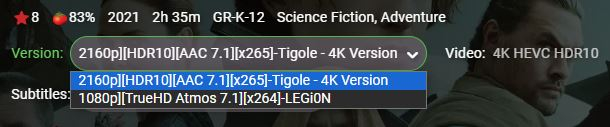 1 point
 -
I think it should be supported now in the season nfo file1 point
-
There are plenty of free online converters. I use this one to convert to PKCS #12: https://www.httpcs.com/en/ssl-converter1 point
-
Yes, it does. Thanks for the tip!1 point
-
I will report it as a problem on Wednesday but in the meantime I have 2 questions? on one of the shows I was watching emby had successfully detected the intros, I now see that on rediscovery of the same shows now the network connection has been restored the intro detection has been lost. 1, If I were to do an emby restore would that be restored? 2, I am guessing all the artwork is not backed up (I do not store it in media folders for performance reasons)1 point
-
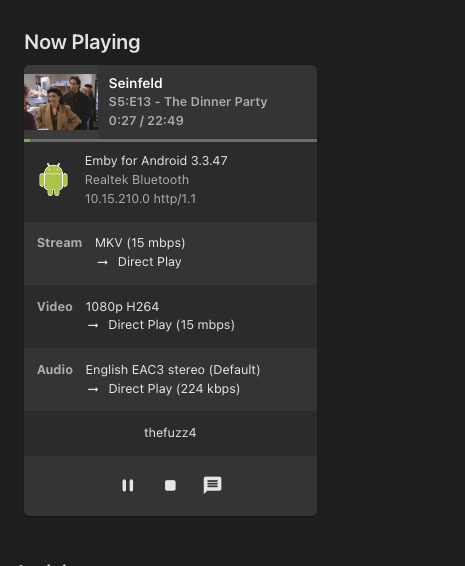
Well what do you know. This works Now I need to go sideload this on the rest of my tv's lol. This app actually looks nicer than the one from the playstore.
 1 point
 -
OK that worked. Thank you so much. I never knew that & I'm guessing it was always enabled by default. I just git a samsung q80c as my main tv wasn't even smart & my roku box was on its way out. I really only used basic alexa commands for the roku so i was hoping to be able to do the same with the samsung. Again thank you for your help.1 point
-
Ah I see! Thanks for the explanation - I hope you add this feature in future. Keep up the awesome work1 point
-
Hi, so this is someone else's server? You'll need to contact them for instructions on how to login.1 point
-
Right the problem is that not everyone likes the extra wide channels, so it's trying to only use it when absolutely necessary.1 point
-
I gave another round of watching today after plugging the TV through direct ethernet connection. Worked with no issue for today. This now looks very much like a wifi issue on the TV itself. I guess the thread can be closed, because this is not Emby-related anymore. I will try to replicate the issue, fetch the logs with LogCat and dig through them if I can. Thanks for the help !1 point
-
thank you very much, good luck1 point
-
OK yes we can look at improving it. Thanks for the feedback.1 point
-
Hi, this is to preserve any changes you might have made using the emby web interface, but we plan to provide more control over this in future updates. thanks.1 point
-
Will be addressed in 9.X version.1 point
-
The free plan is enough. It's quite simple to use. Make an account, install the software on each client, connect them using the account credentials you just made. Then make sure to disable key expiry for each machine, as this gives you static tailscape-ips. Now you already can connect via your tailscale-ips or the hostnames tailscale generates, you can modify the machine-name and generate semi-random host-names if you don't like the pre-defined. There is no need to open ports on your router, but you might have to allow emby to listen on your server's tailscale ip and whitelist client's tailscale-ips. It's possible to give other users access, but that's the next level. There are two ways for that. If you want it easier, then make sure you register your account with your own domain (you need to give other users an email-account there). Registering through a gmail-account blocks this route. You can still give other users, with their own tailscale-accounts, access to emby, It's just different, slightly more complicated, but also probably more secure, and it doesn't make you hit tailscale's limits so quickly. But as I said, next level.1 point
-
Detected local ip addresses: 192.168.1.24, 2601:14d:4a00:1b70:110f:617c:e03a:558a, 2601:14d:4a00:1b70:7566:83a7:1ab7:6423, fe80::4df2:cc55:fe28:cfe7%5, 100.64.100.6, 127.0.0.1, fe80::6562:d309:1db:7a78%24, ::1 Force emby to use only your local IP - dashboard > server > network > local ip address Enter 192.168.1.24 then restart emby Emby should then only 'listen' on 192.168.1.24 - (it will ignore the VPN - 100.64.100.6 - which is the local VPN adapter) -- If you want emby to actually use the VPN itself - then you probably need to start messing with routing/metrics to give routing priority to the LAN (as there is no routing on a lan on the same network/subnet) but generally out the box, that is how it should be anyway. try a 'route print' from a command box - a lower value means it has preference.1 point
-
I’ll try to recreate the issue again and grab the log files afterwards. As far as the scan of the library, it is set for real time monitoring so I believe it picked it up right after the copy finished but I will check it when I recreate the issue.1 point
-
Try using channel up/channel down on the remote control. It should play next/previous episode.1 point
-
Yeah I am just doing it now... to remux it to a new file without changing any quality. I only selected No compression option. The new file is being copied to my NAS now and I will test it once the copy is completed.1 point
-
Yes! Thank you, it has. What threw me off was testing vs full installation. I already had an established version of Jellyfin installed when I then installed Emby. I have found Emby to be the superior option and I did a FULL removal of Jellyfin (and Plex.) In that side-by-side installation with Jellyfin, Emby "found" and set up all my media VERY fast. I realize now that Emby must have used the existing Jellyfin metadata for things to go so quickly. When I installed it again AFTER I had removed Jellyfin, it had to actually find and configure all the media. But, yes, it's working fantastically well. One of the greatest things for me is that Emby handles external .SRT files perfectly, where Plex would all too frequently be slightly out of sync. Another is that Emby is somehow making the videos look much better. The old Rod Serling version of The Twilight Zone is a dramatic example of that; I've seen the episodes before and after Emby and the difference is significant.1 point
-
@MagicDoubleMand @mohoelxmay have some TailScale tips.1 point
-
I recently got a new lifetime subscription, because I felt I'd had the value from my first and so should buy another to help support the future. Paul1 point
-
Great, this works,thanks1 point
-
For the Apple TV using the ip of the server instead is the domain seemed to fix it. my domain points to my local network but since the dns routes through the internet Emby assumes it's external (I'm assuming)1 point
-
The internet and even Emby itself has recent detailed experience about innocent users getting punished because people using a service chose to violate laws/standards and that forced/allowed all of that service to be blacklisted. In all areas of law enforcement a few trouble makers ruin things for everybody. That is people can only be trusted to screw things up and get everyone inconvenienced. There was a park near where I lived in Dallas many years ago that I really liked taking my dog to for late night frolics and fun. He loved it and so did I. But the police cracked down on drug and other illegal activities in another park and that caused the criminals to move to "my" park which made it less fun but that was not the end. The city ended up closing all parks sundown to sunset in the area and arresting everybody they saw in the park after dark. It is just how our system works. Everybody loses rights when a few people abuse them.1 point
-
yeah my "smart" Samsung tv nagged me until i set it up, them it started showing me adds in the interface so i disabled its internet and plugged in a raspberry pi1 point
-
My feeling is that the ONLY reason to buy a smart TV is because they tend to be a LOT less expensive than their dumb counterparts. I just had to replace my old TCL TV and, after a LOT of research, the least expensive decent replacement was a Fire TV based TCL TV. I do NOT use, in fact I have never set up, the internal "smart" part of the new TV. I do not see any real advantage to internal smarts and there is the disadvantage of if the smart part of the TV breaks you lose the use of your TV to get it fixed. I just find the best TV I can and then, only making sure there are enough inputs, just ignore the smart part. Actually, after rereading what I wrote I realized that what I said was not completely accurate: I did set up part of the "smart" part of my new TV. I had to because it kept nagging me every time I turned the TV on or often when I switched inputs. Once I did enough to make the nag screens stop I did nothing more. I am very happy with the new TV and the price was quite low as well. I guess as long as companies want to sell "smart" TVs for a lot less than dumb ones I will buy the "smart" and let the foolish companies subsidize a bit of my purchases.1 point
-
HI, yes we plan to have even more control over this in future updates. Thanks.1 point
-
Emby Server 4.8 will support the .actors folder in a read-only fashion, meaning it will be able to use images from the .actors folder underneath a series or movie folder. The Emby Server database is still the same as before, meaning it's still one image per actor. That means if you have an actor that appears in multiple movies or series, it will be one shared image that is used in all places, and it will be whichever one happens to get scanned in first. But this will allow for basic support of the .actors folder convention.1 point
-
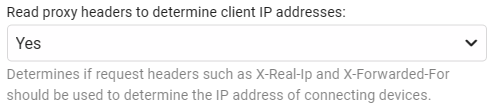
just confirmed this is working as expected in the Beta (4.8.0.49) All internal local address are reported correctly as the connecting device
 1 point
 -
Hi, could it be made possible to add custom sorting to collection items? If I'm trying to mirror a "tmdb trending" list, I want my collections to mirror their sorting instead of the default "Title" and "Release" options. Another example could be someones personal list on Trakt or MDBlist. The collection order should mirror the trakt/mdblist order. I can think of hundreds of different examples for why collections should have custom ordering. Cheers.1 point
-
It's an interesting point on using MediaInfo data in the actual file 'naming' and personally I've come to the conclusion that is is simply not worth adding any of this data into the filename - as it serves no useful purpose because I rarely look at the 'filesystem' but instead look at the metadata. I even now remove TV episode names - leaving just the show name, season and episode number. Currently - emby DOES use the filename to determine multi-versions - and anything after the last '-' is shown as a 'version' in the multi-version drop down, BUT, as you have found out - this only works if the filenames are identical up to this point AND the folder is called the same thing. Perhaps there should be an option to use the metadata TITLE instead or that in combination with the known resolution to produce an auto 'multi-version' in the drop down.1 point
-
I've had a look and it seems a pretty common complaint that parental ratings are using the wrong nationality. It's known that this is due to the volunteer metadata system, but I wonder if it would be possible to assign multiple allowed ratings for Kids accounts. Alternatively, having a function allowing parents to identify which ratings are equivalent may be easier?1 point
-
As discussed on the linked thread, intros named after tags (and stored with the appropriate name in the 'Tags' directory) play in addition to the random clip from the Custom Intros directory. Similarly, as Cinema Intros can be selected for the 'Movies' and/or 'TV Episodes' content type, there is no way to apply more nuanced controls. I would like to request the ability to select which intro clips should be played/selected from based on either the library or tags.1 point
-
Hi Guys Isn't it possible to develop or somehow show a how to develop a script for Emby to catch subtitles for Legendas.TV !? I used to have this in Ember MM, but it does not work anymore. Even if Kodi already have a plugin or addon for that, its not good to enter on each movie / series on my data to download subs ( or go to website ) A plugin just like opensubtitles for legendas.tv would be a great add-on to Brazilian users Thanks1 point
-
I have the same issue and have created emby sync to synchronize user data between my servers. https://github.com/towel42-com/EmbySync1 point
-
The Roku app shows backdrops for the currently selected item so you would never see a movie backdrop in your music library - unless your backdrops are not assigned to the proper items.1 point
-
Good answer. Thanks. This actually does make more sense, otherwise it can become a black hole of content types.1 point