Leaderboard




Popular Content
Showing content with the highest reputation on 11/22/23 in Posts
-
As requested for years elsewhere in these forums, the ability to download a usable playlist (the audio files and a modified m3u or whatever that points to those downloaded files where they now reside on the device) is what's needed to make the download function fully useful. I hope that's actually going to happen soon, please. Even without that functionality, using Emby via Android Auto doesn't make the "dowloaded" files directly accessible from the main Emby dashboard screen, which diminishes the benefit of downloading before a road trip to avoid heavy wireless data usage and/or dead zones. Please add "Downloaded files" as a main-screen selection button, in addition to "Recents," "Favorites," etc.2 points
-
Hello, I'm an Emby Premiere user since multiple years and love it. When I switched to an iPhone and started using Carplay, I was so happy to see Emby supports it. But when I found out it does not work with the files downloaded to my phone, I was honestly shocked. Most apps which offer music content allow offline downloads to be working with Carplay. It's even more strange to me, since Carplay is an advertised feature working with Emby Premiere only. Please add offline media support, at least for music, to Carplay. It's a very important feature to many I guess and I think it's missing way too long.2 points
-
Get a Nvidia Shield.2 points
-
I know this is specified for Android Auto, but it is the same thing and we would be doing this at the same time for both implementations.2 points
-
Feature Request: Have User Groups and all settings applied at the Group Level That way you can just assign users to the appropriate Group and all settings will be inheritated.1 point
-
I'm a big fan of services such as Rifftrax, and I hate having to manually mux files every time I purchase another release. Much in the same way that external subtitle file support was added, it would be nice to have external audio track support for TV and movies added as well. I wouldn't expect Emby to handle the offset calculations needed to sync the audio. It's not too difficult for me to modify that now.1 point
-
Hello everyone. I also tried my hand at designing a bit. I actually wanted it to be simple and in Emby green, but the more I look at the icons, the more I don't like them. Maybe someone is interested or has ideas to improve it. The icons are now only designed in German. Ideas, tips or requests for changes are welcome. embflix.zip Best regards Dicken
 1 point
 -
Hi, I was thinking that it would be great if the original movie title would be shown on the main movie page. below the localized one.1 point
-
I'd like to have the option to clear 'alerts' in the dashboard. I realize that they go away on their own, but if I can clear them then it's more obvious IF a new alert comes through.1 point
-
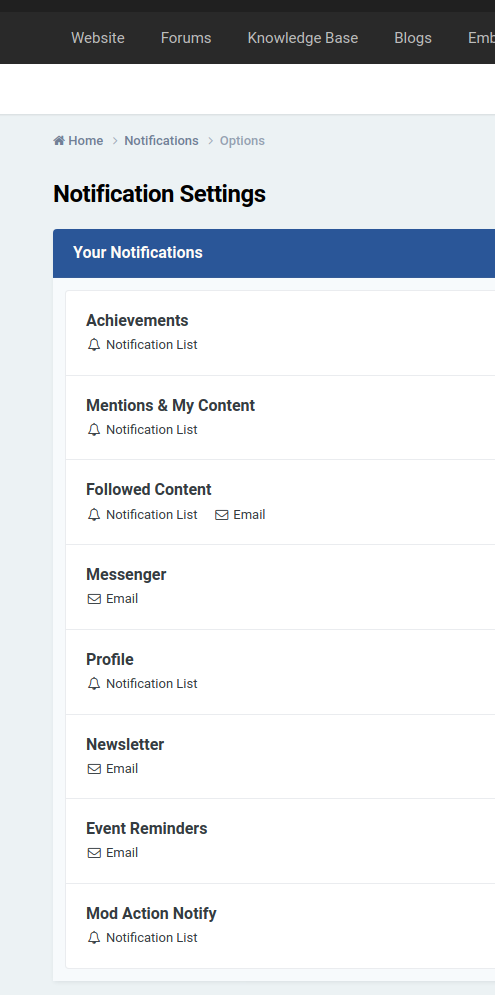
Sure, has not changed in 5 years but here it is. And note, yes, I am following this thread and every other thread I comment in.
 1 point
 -
I would have said the Tizen app is better as you can just use the TV remote and not worry about casting which is probably more useful for the bedroom TV. Both options have their pros and cons, it just depends on what you specifically prefer as been the better feature. You've mentioned that Tizen is (slow) - do you mean the TV is slow in general, or the app is particularly slow? I would just try both and decide which one you enjoy most!1 point
-
Thank you so much for fixing this. I just got the updated app and confirm it is working well :)1 point
-
Awesome, thanks! I'll get back to cleaning up the dozens of other cases caused by my own bad tags then1 point
-
HI, this should be resolved in the upcoming 4.8 server release. Thanks.1 point
-
Thanks. I'll give it a try between the years.1 point
-
@LukeSo weird thing -- I just updated from .58 to the .60 beta version of Emby and after installing and restarting the 2 files that I knew I was having the playback errors with -- played fine Weird1 point
-
via HDMI only (a UHD Blu-Ray Player for example) - yes, but earc is not supported from any TV App - thus the Emby App within the TV cannot pass TrueHD. You can of course use an external device to do this (via HDMI) such as a Nvidia Shield Pro running the emby App - this WILL then pass True-HD via your earc HDMI connection to your earc HDMI connected soundbar. But if you are using the TV App on the TV itself, then Dolby Digital+ with Atmos is the best you are going to get (as it uses ARC). see - https://emby.media/support/articles/LG-Why-not-Atmos.html btw - the above doc refers to an LG TV, but all TV's are the same.1 point
-
Oh, yep, that was it. No, I don't have SSL setup yet. Confusing because the error message says to try the unsecured link, which I did click on... but like you said, browser forced me to the same secured link apparently, and I didn't realize it. Thanks for the help.1 point
-
Do you have SSL setup on your server? Chrome is likely force redirecting you to https://app.emby.media, try using http://app.emby.media (drop the "s" from "https"). Check that that address is actually shown in your address bar (http, not https and you have no lock icon).1 point
-
Yes, as long as your TV supports all the codecs within your MKV files it will direct play. If not, then it will need to be transcoded. Take a look at the charts in your user's manual for audio, video codec, and subtitles. They should look something like the one in the link below. https://developer.samsung.com/smarttv/develop/specifications/media-specifications/2023-tv-video-specifications.html You will notice things like TrueHD, DTS, PGS subs, etc are not listed and will need to be transcoded.1 point
-
Hi, Removing the old nfo's does the trick. Furthermore, I have limited the library manager strictly to TMDB. Now I have two entries as expected. Thanks to everybody who has tried to help, Thomas.1 point
-
I fixed this problem! I totally deleted the program, then I reinstalled it. I, also, went into my nighthawk giga switch, and changed some ports, and switched some connections to different ports. Well, whether it was the first, or the second action, or a combination of both, the problem is now solved. G' Day, DJ1 point
-
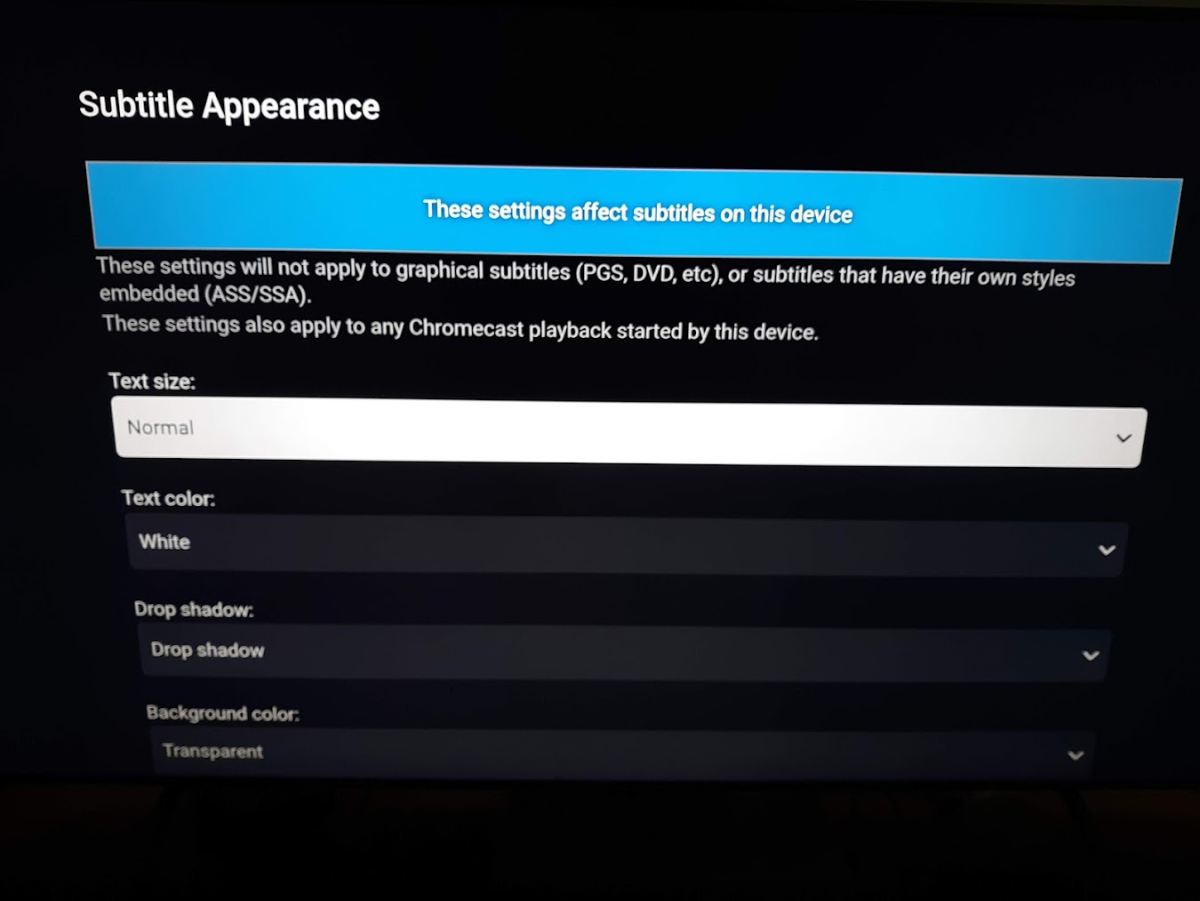
What version did you get in the store? This is what I see in 1.6.7.
 1 point
 -
cool. then the topic belongs to "android tv" rather than windows and my problem is solved by not using the android tv app thx everyone1 point
-
Thanks for the info. What we really need is a comprehensive test of all the 'high end' codecs to see what Exoplayer (the Android player) will passthrough or play. I'm personally interested in it's ability to play/passthrough - MKV container Dolby Vision - Profile 5, Profile 7.x and Profile 8.x If any of these drop back to HDR10, then that's a big fail. True-HD with Atmos (standard) True-HD (96Kbit) with Atmos DTS-HD DTS-HRA DTS-X AAC 7.1 HDR10+ AV1 decode in hardware Thanks !1 point
-
Sorry all. I realized I did not have embyserver in the applications folder per the macOS install instructions. All good now!1 point
-
It's the same app, but the USB version is newer than the store version and there have been some changes to the app between versions. Regarding the position of the CC button, try changing this setting in the app (Playback settings): The only actual difference between the two versions is the app icon. In the USB version it is part of the app package, but the icon for store version is part of the submission process, otherwise the app is identical assuming you compare the same app version numbers.
 1 point
 -
You can use Subtitle Edit to shift the times of the second file and then merge with the first; finding the necessary offset precisely enough might be a little tedious. It would probably be easier to embed the subtitles in the video containers using MKVToolNix, and then append the episodes which will append the included subs; you can extract the subs from the combined file afterwards if you need them to be separate. (It may be possible to do the merge and append in a single step, but I'm not sure if the sub timing would be handled correctly in that case.) Paul1 point
-
Hi, Thanks for all the hints. I will try (using season sub folders and removing nfo's before re-scanning) and come back when I have results. Thomas1 point
-
Hello Emby Team and Esteemed Community, I hope this message finds you well. I am reaching out to share a suggestion that I believe could enhance the user experience for those of us utilizing M3U IPTV lists with Emby's Live TV feature. Currently, when an M3U file contains multiple entries for the same channel with different resolutions, Emby lists them as separate channels. This can lead to a channel list that feels somewhat cluttered. Enhancement Suggestion I was wondering if it might be possible to introduce a feature where Emby could identify and consolidate multiple resolutions of the same channel into a single channel entry. This could potentially be based on additional properties specified in the M3U file, or dynamically using ffprobe. The ultimate goal would be to enable users to either manually select their preferred resolution or to enjoy automatic resolution switching directly within the player, akin to adaptive streaming. Suggested M3U Format To assist in this endeavor, I am more than willing to add extra properties to the M3U file to denote the resolution of each stream. Below is an illustrative example: #EXTINF:-1 tvg-id="TF1.fr" tvg-name="|FR| TF1" tvg-logo="http://host/tf1.png" group-title="FRANCE TV" resolution="SD",|FR| TF1 http://host/53375 #EXTINF:-1 tvg-id="TF1.fr" tvg-name="|FR| TF1" tvg-logo="http://host/tf1.png" group-title="FRANCE TV" resolution="HD",|FR| TF1 http://host/366 #EXTINF:-1 tvg-id="TF1.fr" tvg-name="|FR| TF1" tvg-logo="http://host/tf1.png" group-title="FRANCE TV" resolution="FHD",|FR| TF1 http://host/443 In this scenario, the `resolution` property would explicitly state the resolution for each stream, allowing Emby to consolidate the entries into a single, user-friendly channel, with options for resolution selection. Benefits - A more streamlined and intuitive channel list - Enhanced user experience with straightforward resolution selection - Optimal bandwidth utilization, particularly in varied network conditions I truly believe that this enhancement could significantly improve the way we manage and interact with channels of varying resolutions within Emby. Thank you so much for taking the time to consider this suggestion. I am very much looking forward to any thoughts or feedback you might have, and I am excited about the potential positive impacts this could have on the Emby community. Warmest regards,1 point
-
Ja, man kann eine m3u erstellen. Damit sollte das ja gehen.1 point
-
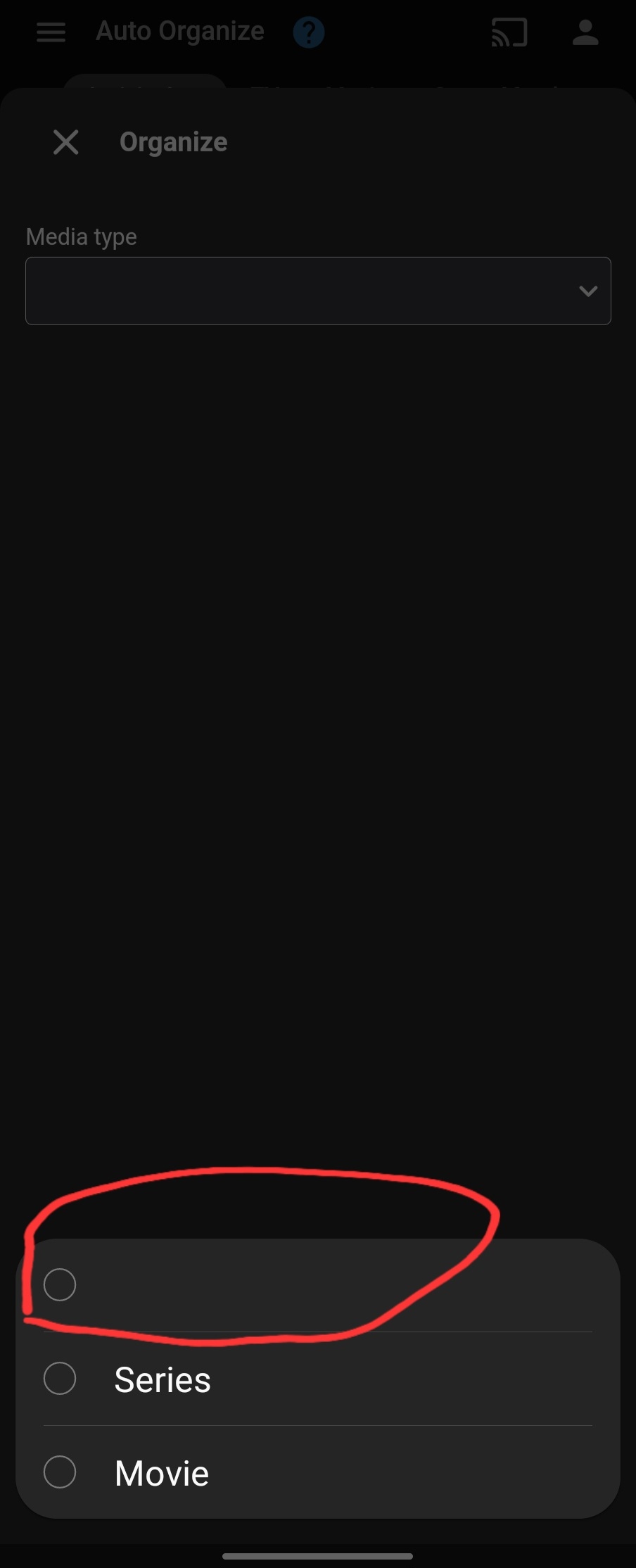
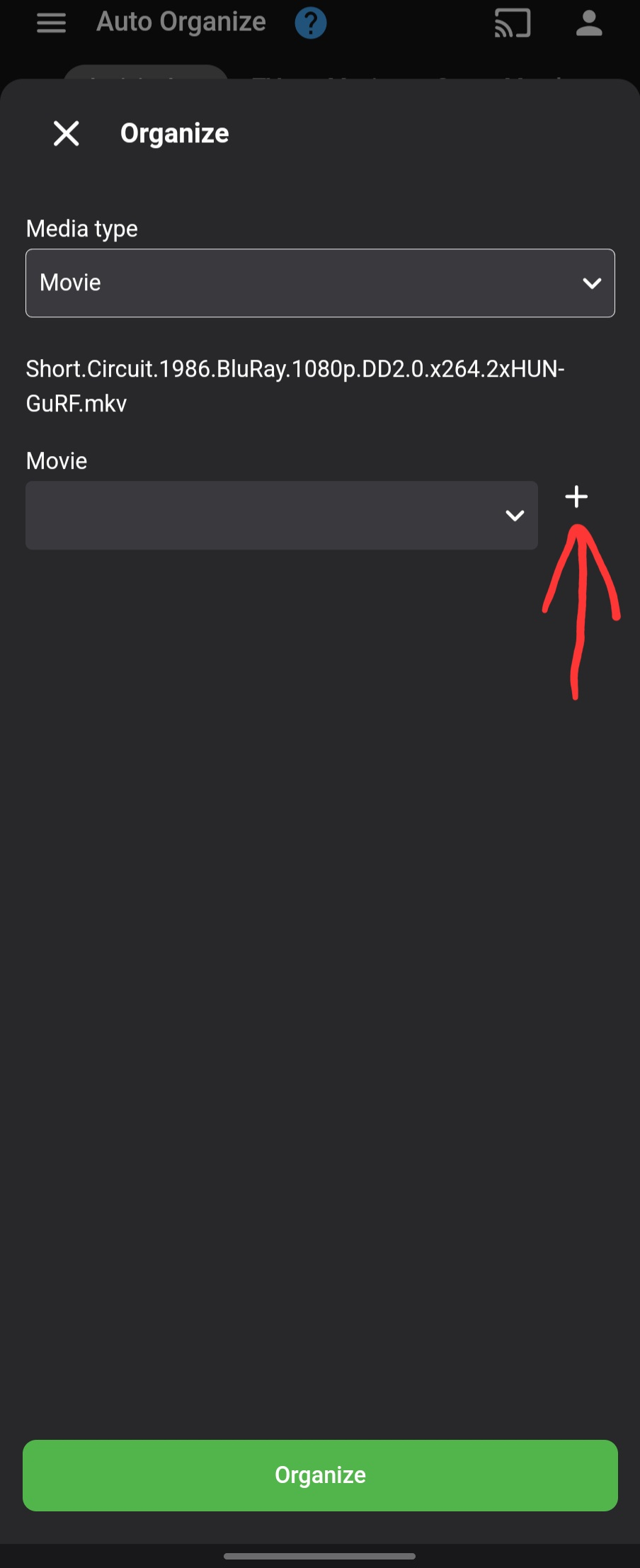
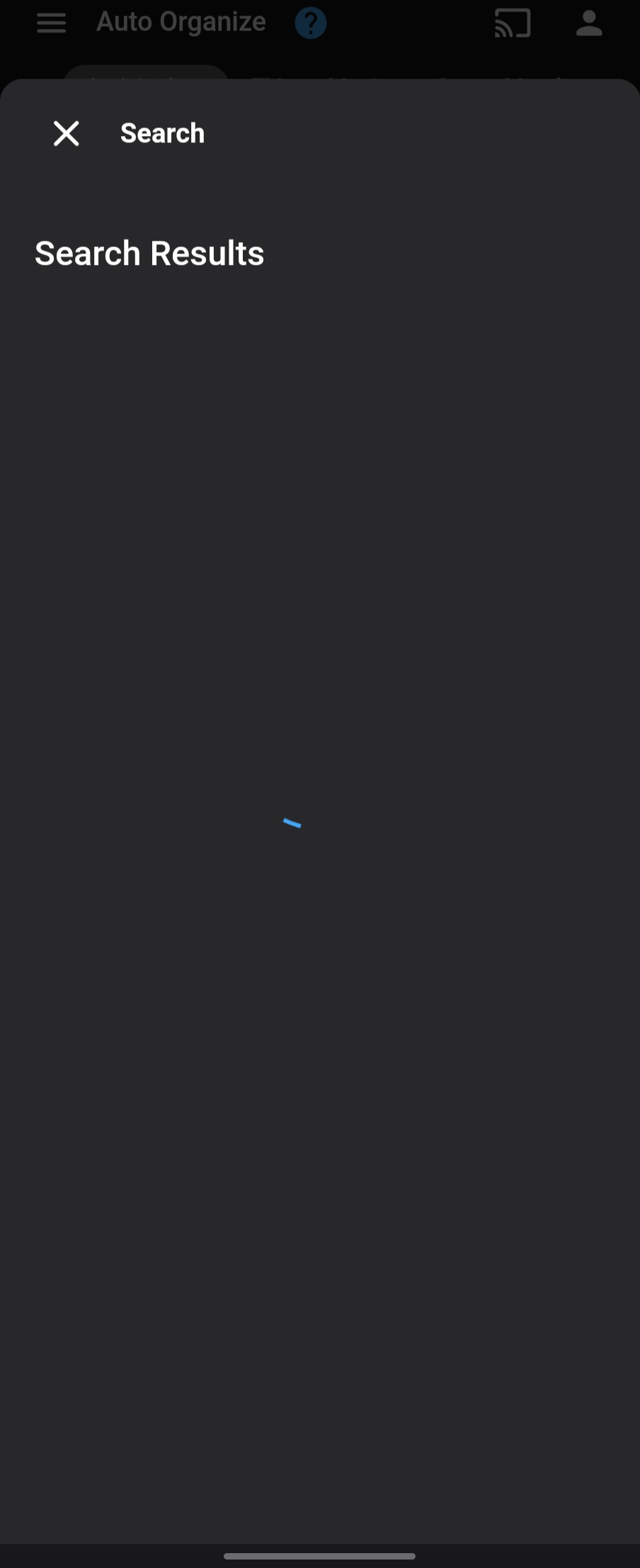
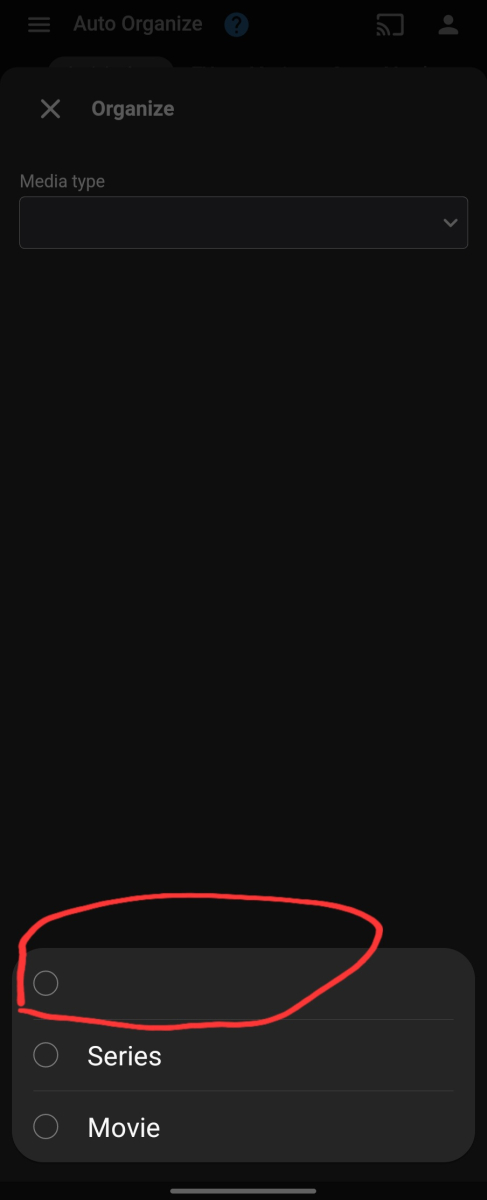
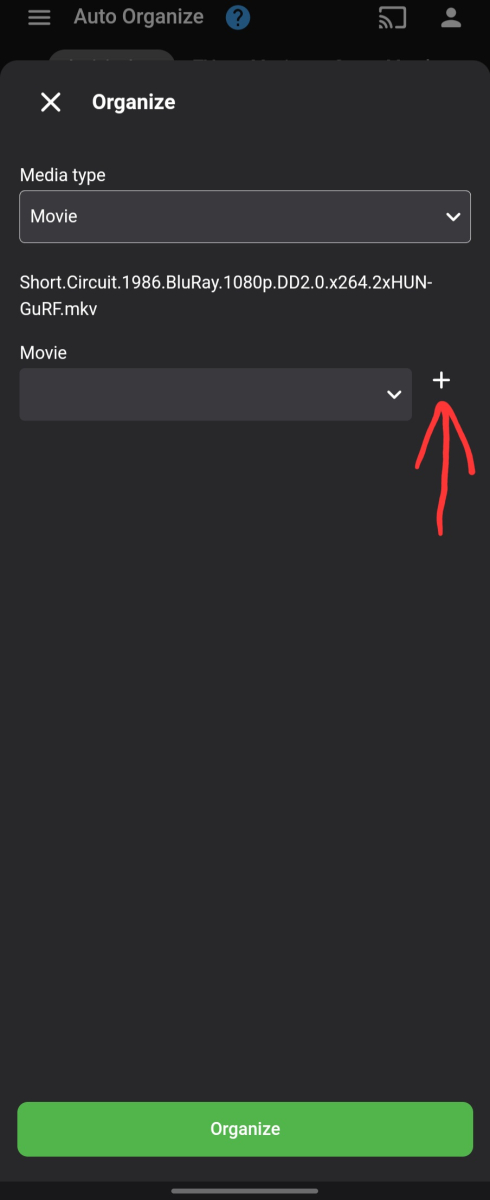
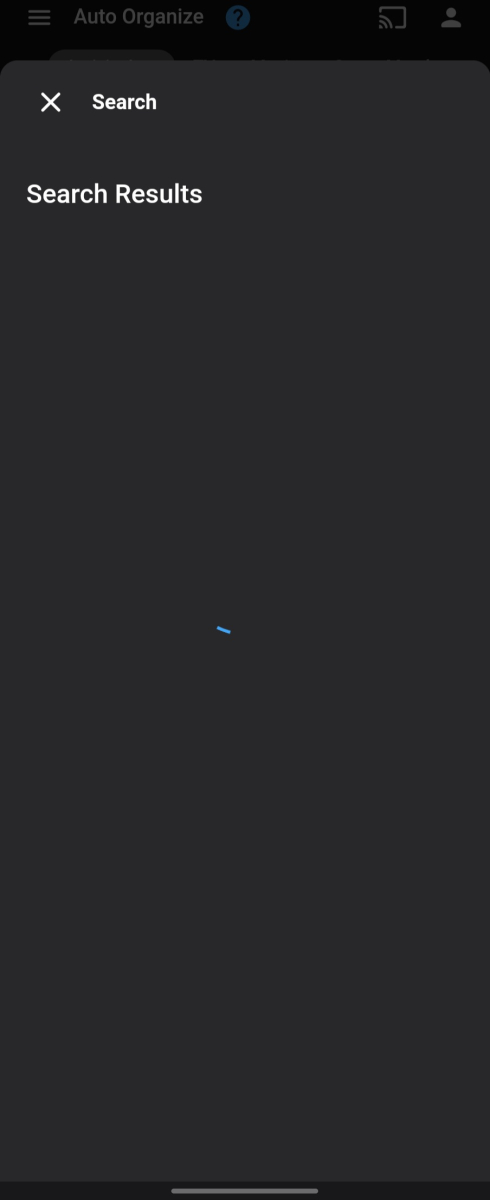
Hi @Luke! Just got updated, and yes it looks really nice. Thank you! I found a few minor UI issues and one blocking one: 1.) We have empty list items. They look pretty awkward: 2.) Add button here is not aligned correctly: 3.) Blocking: once I touch on the above "add" icon, spinner goes forever without finding anything (searching for "short.circuit"):
 1 point
 -
i change the episode name to "Age.of.Awakening.2021.S01E01.2160p.WEB-DL.H265.AAC-LeagueWEB", it works! thank you!1 point
-
and you can use 'Bulky' from the Plugin Catalog to get those custom edits done quicker, allowing you to select multiple items and add new genres in one go.
 1 point
 -
Have a look at the TV Naming guide.1 point
-
Yes, that's right, i use two clients, my tv and my computer. Thanks a lot.1 point
-
so on the android tv app it would just fai, not move and eventually crash. the sideloaded app would go into it but would just not load any files. they would show up but when you click one it would just sit there then pop up "playback error" did find out that emby was reporting the wrong local ip address on the web browser interface. reinstalled and used my actual local Ip and now its working. appreciate the help as it led me in the right direction1 point
-
I have bought Zidoo ZX9 Pro and am pleasantly surprised. Thought it wont be possible to install android apps but it is. So apart from internal media player you can have others available from play store.. so far no issues with the playback and am pretty satisfied. Thanks for the recommendation!1 point
-
Hi there, let's look at an example. Please attach the information requested in how to report a media playback issue. Thanks!1 point
-
Media info of the file you're trying to play, any ffmpeg/transcode logs and server log would help.1 point
-
Naja, aber 1. Wie lange wird das wohl noch dauern? 2. Wer sagt denn, dass es Emby und dergleichen über kurz oder lang nicht auch für das neue OS geben wird? ("[...] soll in Vega das React Native-Framework zum Einsatz kommen. Dieses wurde von Meta entwickelt und soll es Entwicklern ermöglichen, in einem Zug Apps für verschiedene Mobile-Plattformen zu programmieren.[...]") 3. Im Zweifel kriegt man sicherlich auch über Umwege da wieder Android drauf, bzw Android Apps ans laufen. Also wenn das jetzt n 300€ Gerät wäre, würde ich dir zustimmen. Aber so kann man da denke ich erstmal nix falsch machen.1 point
-
Aktuell übrigens im Black Friday Sale! Der 4K für 34,99€ statt 69,99€ und der 4K Max für 44,99€ statt 79,99€ noch günstiger werden die diese Woche nicht mehr denke ich.1 point
-
1 point
-
HI, yes more control over channel grouping is planned for future updates. Thanks.1 point
-
@Luke ive been using and testing media server software over the past 15 yrs. every few years all end up tring all again to see which is the most straight forward and low maintence and complete media software. like many other folks out there. we really dont like having half dozen pieces of software for media. i just tried emby again today and im extremly pleased with how they have refined it in so many ways. i started the monthly subscribe to test out the livetv/record. but evently added movies and shows. super easy and layout is great. but like others have said this is truely the missing link that keeps people from switching over from plex. im still going to keep emby for everything except music because if i cant sync music playlist to my phone then whats the point. i would just drag and drop the music to a folder on my phone or a usb to plug into car. its not a deal breaker though. i understand it is tricky to convert a playlist from one file system to another and map properly. this software has now replaced channelsdvr and most of the reasons i use plex for except music playlists. i still use zaptomcl for guide and xteve to fine tune and map livetv channels. but hopfully i will be able to replace them too after learning more about how emby does the guide and channel editing. but i will say, when emby gets offline music playlist sync working. plex will be no more! and i will do my happy dance lol1 point
-
Hi, yes these are both planned for future updates. Thanks for the feedback.1 point
-
We are actively working on it. Thanks.1 point
-
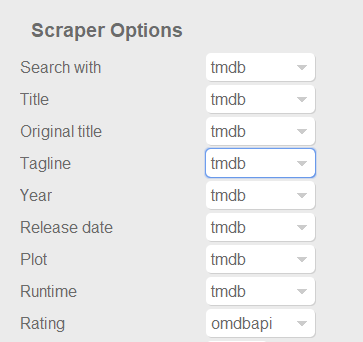
Dont know if this was already posted. For example something like the capture below at least for ratings, to use omdb or another scraper as first priority for this field, and similar for tvshows with the available scrapers for that library type of course. Also It would be nice and handy to have some language options per field, at least for Title, Tagline, Plot, Episode Title, Episode Plot and Genre fields. Handy if you want to have your tagline/plot/episode-title/episode-plot in spanish for example or your native speaking language but want to use the title of the movie or tvshow in english for english movies, or the title on the native language of the movie (spanish, french, german, etc). With the current setting you get absolutes, english: everything english, spanish: everything spanish. And would be nice to apply this language options to images too. I scrape my data with TMM before adding it to emby to have this type of settings, but I would be really good if emby could handle some of this variables. Update: Also, give the option for "None" to skip scraping for this field and "NFO Only" as @picotrain1 suggested.
 1 point
 -
Most IPTV providers that offer EPG data, follow this format for the M3U URL: http://SERVER_URL:PORT/get.php?username=YOUR_USERNAME&password=YOUR_PASSWORD&type=m3u_plus&output=ts And this for the EPG URL: http://SERVER_URL:PORT/xmltv.php?username=YOUR_USERNAME&password=YOUR_PASSWORD&type=m3u_plus&output=ts To get your EPG data try duplicating the M3U link, but changing this part of it: http://SERVER_URL:PORT/get.php? To this: http://SERVER_URL:PORT/xmltv.php?1 point
-
We work very hard on Emby. We'd kinda like people to know what it is...1 point