Leaderboard




Popular Content
Showing content with the highest reputation on 11/19/23 in Posts
-
Side loaded with USB and am now on version 1.6.4. sound worked instantly. Thanks so much!3 points
-
Just tested... it was quick though but no more errors so far... I'll come back to this once i watched a movie completely so i'm sure2 points
-
Yes Emby Connect works, and is a service that runs with or without TLS. It simply allows your remote users to access your server instance without them having to know the specific details, just their email + password (assuming you have correctly configured remote access)2 points
-
We had recently talked about that and it seems the reason why there's no explicit shutdown handling, is that all the mobile platforms are doing this so well - and far better than desktop platforms - that there hasn't been much need to do anything more. We're currently in the process of moving the Windows apps to a different platform which allows to handle those transitions better than with the current Electron App. I'm not quite sure what you are expecting to happen, though: Do you expect playback to continue playback right after waking up? Personally, I don't think that's a good idea (for desktop/TV setups), for a number of reasons: Privacy: One might not want others to see what you were watching (e.g. when you invoked sleep, forgot about it, and somebody else switches on later) Getting shocked unexpectedly: One was watching an intensive and loud scene, and put it to sleep. Even for the one who did that could it be an inconvenient surprise which gets annoying when it happens repeatedly (had such setup at some time) Responsive wakeup: When the client would be trying to continue whatever has been playing before, you'll always get the feeling that it's slow and unresponsive: you wake it up and you see a spinning circle, which you cannot always dismiss and you don't even know what you're waiting for: Is it the network connection, is the Emby Server down or does it take a long time to start transcoding, etc. For quick stop and resume, there's Pause already. I think it's safe to assume that when one initiates sleep, they are at least planning to keep it off for a while. For all those reasons I think it makes more sense to stop playback (not just pause) when entering sleep mode. This allows the server to tear down resources (for transcoding) and get into a clean state, and when you wake up again, you are still where you left off, and everything gets engaged quickly. Then it's your choice whether you want to continue or not. Wouldn't you agree that it happens less frequently that you want to resume than that you want to do something else?2 points
-
Similar to this old post, I'm suggesting a tab that would be titled Watchlist and could be placed in between Suggestions and Favorites. The functionality would pretty much be a copy of Favorites, just with a + symbol added next to the heart and other symbols that let you favorite a movie etc. The previous post had mentioned extra functionality such as automatically removing a movie from Watchlist after it has been watched. This would be nice, but is unnecessary because after watching a movie you can simply click the + symbol a second time to remove it from Watchlist. I would imagine this would be very easy to implement as a rebranded copy of Favorites. Adding other features could come later. Edit: added link to old post1 point
-
Not sure if this has been requested yet or not, I did a little searching before posting so forgive me if this has been requested already. A nice feature to have would be something along the lines of a Kids Mode, some changes that i would forsee in this mode are: Simplified Playback (Instead of selecting the item then having to hit the play button just have it so when an item is selected it just plays.) Simplified Menus (Instead of separating Movies and TV (yes i know if i change my libraries i could accomplish this) have it more along the lines of maybe Character selections (i.e. Mickey Mouse) without having to search Move the Series and Movies selection to a main screen (i.e. Currently to browse for a movie you have to select the movie library then select the movies tab.) The option could be, if you wanted movies you can just hit movies, then all of your kids movies are displayed. Infinite scroll (Self explanatory, but the ability to keep scrolling instead of having to hit pages would be helpful for this mode) If anyone else has ideas for this mode feel free to add on. Thanks!1 point
-
While Emby already has recommendations built in based on previously watched items I find they are not all that helpful. They seem to be based on genre only, for example, because you watched a comedy here are other comedies in your library. I do like how the also directed by/appear in recommendations work though. What would be great is if Emby could incorporate Trakt's recommendations as they are much more sophisticated. Trakt's recommendations are not only based off of what you have previously watched but also what your Trakt friends and other Trakt users have watched. It takes user ratings and trending/popular media into account. Ideally Emby would include full Trakt integration allowing users to rate media after watching, view lists and recommendations, and view upcoming media all from within Emby but for now I think recommendations would be a nice addition. Trakt has the potential to give Emby that community feel and allow users to discover new media, find something to watch, and recommend media to other users. http://docs.trakt.apiary.io/#reference/recommendations1 point
-
yes, I know. That tends to be how & where I weed out the dupes.1 point
-
I had the same problem 1.6.7 fixed the problem1 point
-
I see, thanks! I will send you a pm.1 point
-
Hi, I don't have an ETA but it's something that we're looking into. Thanks.1 point
-
Yes to more details please, for admin and user. I don't think having a message that new device sign in requires approval gives the hacker useful information. I've never seen Emby block or restrict excessive logins. It would be up to the admin to contact the user and verify if they want they were trying to login. I've requested Emby get support for SSO/OpenID but was told that isn't going to happen. Having that support would allow for security platforms like Authentic or Authelia to be the front end defence for hackers. If possible can we have the device restrictions reviewed please for new design.1 point
-
Hi, this is resolved in the upcoming 4.8 server release. Thanks.1 point
-
If you go into display settings and disable showing logos as titles, then you'll see a plain text title, and that can also be selected like before.1 point
-
When direct playing, the file is handled differently. When transcoding, we use the HLS streaming protocol which works by chopping the output into individual segments, each of 3s length. It is normal that the audio is a little earlier than video, because players use audio as the synchronization source (clock) and present the right video frames accordingly. But two seconds is a bit too large as it's 66% of the segment time. Also it's outside the spec for Broadcast TV signals, which is provisioning for the most downlevel (cheap) devices, and those are unable to store 60 video frames in memory before showing the first frame. Means in turn, something has been done to the video during or after recording which has caused that. We see that case being reported sometimes but not very often, so it's definitely an issue with the video material, even though some players can take it. Would you be able to (privately) provide one of the videos for testing? We are updating the client-side HLS implementation soon, and I don't know whether I still have an example file for this case. Thanks1 point
-
HI, we are looking into it. Thanks.1 point
-
I'm using an Intel NUC (i7-cpu/Windows 11/Emby Theater with WMC gui) and was able to use the remote control to go into S4 standby mode, turning the NUC into sleep mode and returning back by 'wkare up' from sleep mode into normal Emby Theater WMC gui mode: that works* OK, but doing so during viewing a movie of live-TV, frustrates the system....a fresh start of Emby Theater WMC gui is the solution.... Question: is there a solution for this matter ? (other then forcing users to first stop the movie of live-TV, return to the mainmenu and then pushing the Off/On button on the RC......?) Note*: global setup: I'm using the original MCE RC+IR-receiver and drivers: works OK, except that several WMC gui buttons are not jet working (see my other postings about this matter here:the Emby community will work on this Emby core issue ASAP, via Luke and Softworkz) it. Wake-up mode: I enabled the BIOS setting in the NUC to boot on USB (and thus also USB IR-receiver), works great & fast Sleep mode: I experimented with the good-old tool: Mediacenter Standby Tool (from mst09091): pressing the power button on the RC, lets the NUC go into sleep (active > S4 sleep mode) within 2-3 seconds Via CEC driver, it turns my Sony TV and the Sony Receiver automatically on/off, most times.....(sometimes, the receiver doesn't wake-up....but I understand that the CEC seems to be not always reliable....I'm looking into this matter) This way, the combination of Emby Theater WMC gui on NUC + TV + receiver works as it should and has a high WAF (Wife Acceptance Factor) Result sofar: a Remote Control wake-up time of approx. 12-14 seconds, a going into sleep time of approx. 2-3 seconds: great, isn't it ? Question: is there a way, to further improve it, if going into sleep modus during streaming or live-TV and wake-up ? Thanks & best regards, Peter1 point
-
Hey, sorry for the late reply, I ended up doing a clean reset of the server, that was something I wanted to do anyways, and that issue is gone now, thanks.1 point
-
Have you done everything here? -- https://emby.media/support/articles/Remote-Setup.html Note the check at the very end - if you have cgNAT, you may simply not be able to connect. Paul1 point
-
Indeed that helped. Thanks!1 point
-
Lots of variables that have been hashed out before: firewalls, network profile, CGNAT, IP address or domain, how testing, etc. ... You didn't give hardly any info to work with.1 point
-
Dear Softworkz, first of all: many thnx for your very professional responses: great ! I personally build+used MCE already since Windos XP MCE (since 2003-2005?) systems with a high WAF (Wife (and family) Acceptance Factor) factor, and standby-sleep mode, etc. has always been a special point, mostly a combination od the right motherboard/BIOS and BOOT setup possibilities there, but also a tool which somebody made: 'Mediacenter Standby Tool (MST) mst09091' years ago... Your solution seems to be a correct approach: Sleep: stopping playback and going into S4 sleep mode, using CEC to sleep your TV and audio devices as well Start: enabling BIOS to start, booting Windows, login (automatically with user+password if neccessary), startup Emby Theater WMC gui (automatically with user+password) and finally ending in the mainmenu Status: it's in my opinion not realistic to expect that Emby Theater WMC gui comes back on exactly the same point of the live-TV stream.....make it possible to choose a continue watching the same Live-TV channel (thus not the same live-TV program, which probably ended hours ago....). For Movies, TV-series, Video-audio, etc. which comes mostly from local storage, leave as it already is: return back to exactly the same point and continue. Thanks & best regards, Peter1 point
-
Do you want Emby to concentrate on playing media efficiently in a huge range of circumstances, or do you want it to compromise that feature by spending time duplicating the excellent name-handling abilities of programs like FileBot, which already specialise in doing that? Emby, like all groups, has a finite amount of effort available, and would prefer use most of its efforts on its core functionality, leaving unusual name handling to others, at least for now. And many Emby users also use a program like FileBot to help them curate their library. Note, I said "unusual", because it is clear that most Emby users have little problem naming their files in ways that Emby already handles just fine. Paul1 point
-
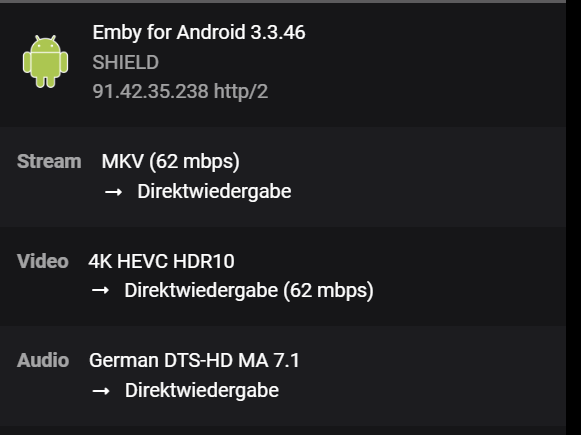
would you look at that! the app for "reguar android" works fine. just tested the android-tv app again, still the issue. but fpor the regular app the dolby vision logo notification pops up and does not fail back to hdr 10 same user, same server, same file. so there is something wrong with the emby-app.
 1 point
 -
Yes, now it works fine, I added another 3 movies and they show up correctly in German language. As described above, I think restarting and optimising the database did the trick. Without that, I had no chance to get Mission impossible in German language.1 point
-
Is it always with the same file? The one in the logs has an issue: The Start-Offset between Audio and Video is > 1.200ms The video start-time is 2.068ms The audio start-time is 30ms => Offset is 2.038ms This is often an indication for badly authored files! When audio and video stream have different start times, then there's something missing at the start from one or the other. This can cause problems with certain output formats - specifically HLS. The segments need to be aligned and synced and when a larger part from one stream is missing, the muxer has to decide about how long to wait for (potentially late) frames. With segment sizes of 3 seconds, there's not much time to wait. This CAN but DOESN'T HAVE TO BE an indication for a large muxing offset between audio and video, even though this is something very different: - Start Offset Difference means something is missing at the beginning from one of the streams - playback will start with with the earlier stream (solo) and the other stream will join and start to play slightly later - Muxing Offset means the timestamp difference between packets from one and another stream at the same/adjacent point in the source-bitstream - All cases are possible - No muxing offset but start-time offset - No start-time offset but muxing offset - Both combined Identifying the Cases When it's a pure start-time offset issue, then it should be possible to play the video after seeking or skipping forward, as the start-time offset won't matter anymore in that case. Otherwise it's probably a combination of both1 point
-
1 point
-
Thats nice, thank you very much. Then let the Journey begin, and see where i get Stuck1 point
-
In my case... I did NOT have local network access enabled. I enabled it, and now the casting targets appear. Thanks for the help!1 point
-
It should work. The 1GB of RAM seems a bit anemic to me, though. That said, I'd recommend one with an Intel processor. This is from the review Luke posted: You can pretty much assume Emby will be a similar experience to Plex. I have the AS5304T and it works great. It also supports up to 16GB of RAM, which is user serviceable. Of course, the extra horsepower comes at a price.1 point
-
thanks Luke… will be chatting with the user later tonight so i’ll see if he can get some more images of the experience.1 point
-
OK yes, supporting this is a good idea for future updates, just like we have for Apple Watch.1 point
-
Found Time to fix this, re-uploaded to Post 11 point
-
Ich kenn mich zwar nicht mit Unraid aus, da mein Server auf einer Synology läuft, aber ich würde Dir, neben SSL, den Reverse Proxy dringend ans Herz legen. Vorteile: 1. Du musst keine dedizierten Ports offen lassen sondern kannst alles über 443 und 80 regeln. Der Reverse Proxy sorgt dann auch für die Verteilung der Anfragen, für den Fall, das Du mehrere Services, z.B. Emby und Calibre, am laufen hast. 2. Die Weiterleitung auf Deinen Server erfolgt nur mit der richtigen URL. Beispiel: Deine Adresse lautetet Emby.test.de... dann werden auch nur Anfragen, welche genau dieser URL entsprechen, weitergeleitet. Eine reine Abfrage über die IP hingegen landet im Nirvana. Das schützt schon mal vor den breiten und wahllosen Scans im Netz nach offenen IPs 3.Dein Router sollte am Besten über ein IPS verfügen. Dann wird als kritisch markierter Traffic, da gibt's Listen die sich mein Router selber zieht, automatisch blockiert. 4. SSL, damit schützt Du bestehende Verbindungen, da diese verschlüsselt werden. Vor einem gezielten Angriff, von jemanden der sich auskennt, wird das vermutlich auch nicht schützen. Allerdings, welcher guter Hacker ist schon an Dir interessiert? Der Aufwand ist dann schlicht zu groß, wenn es einfachere Ziele gibt. Just my 2Ct1 point
-
I actually went through this very process about a month ago (Emby Server on Windows 10 > UnRAID) so I have a little experience on it. I would say the simplest, cleanest and minimal ongoing management would be to use a reverse proxy like NPM or SWAG (which includes Fail2Ban) Here is a helpful guide from one of the community members on that very process: If you are a Premiere user, using the Backup/Restore plugin will come in handy to backup your general settings, users, watch history, etc. However I would probably start with clean libraries instead of trying to change their paths (they'll need a full scan anyway) - you can minimize the required bandwidth by storing image and NFO metadata alongside the media. Give it a read through and tackle it when you're ready. Happy to answer any questions you may have. Good luck!1 point
-
Nah, just wanted to eliminate/minimize possible network interference, but actual conditions would still be the same. What you could do, though, is sideload standard Android app to your Shield and see how does that compare? https://emby.media/emby-for-android.html1 point
-
Sorry, sei mir nicht böse, aber Du haust irgendwie immer zusammenhanglose Satzbausteine raus. Wie soll da irgendwer schlau daraus werden? Ich kann Dir zu 98% nicht folgen und verstehe nicht was Du meinst oder willst. Wie soll das z.B. Luke tun, der hier auf den Google Übersetzer angewiesen ist. Nimm Dir mal ein Problem vor und beschreibe was nicht geht. Geh nach dem folgenden Leitfaden vor: 1. Was wolltest Du erreichen. 2. Was hast Du getan um es zu erreichen. Also welche Funktionen hast Du aktiviert bzw. deaktiviert. 3. Beschreibe was passiert bzw. schief gelaufen ist. 4. Beschreibe was Du getan hast um den Fehler zu reproduzieren. Ggf. auf einer anderen App. Grenze also das Problem ein. 5. Lade die Logs zum Vorfall hoch. Starte dazu am besten einen eigenen Threat je Fehler.1 point
-
I dont want a playlist, and I assume I dont want a view, but since there is no info on what a view is, we want collections. I dont disagree but its not my product, hence I just use plex, there are a bunch of issues that emby has when it comes to like DV/HDR with appleTV, these collections, not knowing whos using a premier license, there also isnt any formal time frames on things so I just check back every now and then but keep driving plex as it works better. There is obviously a way to add recently added/released to the homescreen so it seems like there is some kind of mechanism for it, not sure why that couldnt be applied to collections or whatever the new item is even if just only in the API for now until the more enhanced feature set is rolled out. Im not sure how they decide what features to add, it doesnt seem to be user feedback driven, it also wouldnt surprise me if the devs said yeah we dont even use emby on the daily, we tend to just use netflix or xxx streaming service. Many game dev/designers dont always play the games they design so I wouldnt be shocked1 point
-
That's very strange. What is this device? Did you try the sideloaded app to see if it behaves the same? If you set the audio option in the TV app to "Convert unsupported audio to DD" or "Mixdown to stereo" the sound should work.1 point
-
HI Luke, Thx the port forwarding on my Fritzbox was the neccesary hint it seems somehow that got lost during an Update. After setting up the forwarding for my WD Nas and restarting it i was finaly able to reach the Configuration page and to play from clients on my ipad Hallo rogaven, brauchen tue ich wenn ich mal soweit bin natürlich nur einen. Wie gesagt ich experimtiere noch ziemlich viel rum und das seid 3 Jahren. Mein Problem ist einfach da ich tagtäglich im Anwendersupport sitze und wenn ich dann heimkomme einfach oft keinen Bock mehr habe mich auch noch daheim mit dem Computer rumzuärgern, deshalb vergehen oft Wochen und Monate bis ich mal wieder was mache und in der Zeit habe ich natürlich andere Idee, die ich teste. Derzeit wird es vermutlich darauf hinauslaufen das der Sever letzendlich auf meinem WD EX 4100 laufen wird und wir dann von unseren iPhones, iPad, apple TV oder Wohnzimmer PC darauf zugreifen. Der Wohnzimmer PC ist ein anderer Teil des Projekt derzeit bin ich soweit das mein iPad Pro dort als 2. Bildschirm läuft der erste Bildschirm läuft auf den Beamer. Ich bin jetzt soweit das ich über das iPad (da ich das mit Emby bisher nicht hinbekommen habe) Playnite (https://playnite.link/) starte dann so auf dem iPad mein Spiel auswählen kann, das dann auf dem Hauptbildschirm startet. Dort wäre der nächste Schritt dann entwerder über den zweitschirm oder die iPad app einen Film/serie zu starten die dder/die dann auf dem Hauptbildschirm läuft. Auf dem Hauptschirm soll aber solagne kein Content läuft nur ein schwarzer Bildschirm angezeigt werden. Mal schauen wie viele Jahre ich noch brauch, wenn unsere Regierung nichts mehr ändert geh ich in 10 Jahren in Rente , dann hab ich ja Zeit ;-D Gruß Omni1 point
-
@LukeWhen I put the option "audio output" is on "downmix stereo" on Emby for TV , I have software transcoding and I can run faster. When I don't put this option, it is direct playing and I can't run faster. On EMBY standard, I don't have this option, it is direct playing and I can't run faster.1 point
-
Hey, I decided to install Emby beta in the mean time and it worked! Im on the latest beta version and haven't faced the issue anymore. I tried to go back to main version thinking if the fix is just because of a re-install but I was unable to do say, the server wouldn't start, due to some major config changes may be I guess. But I think its the re-install that fixed it1 point
-
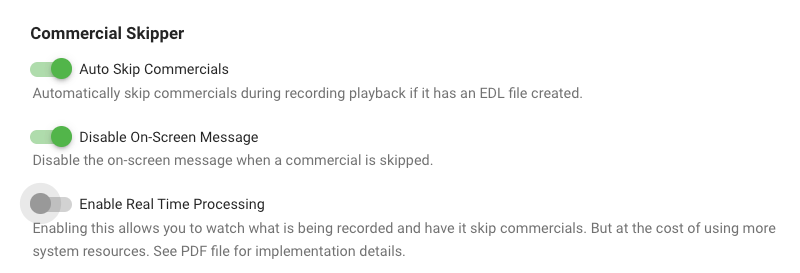
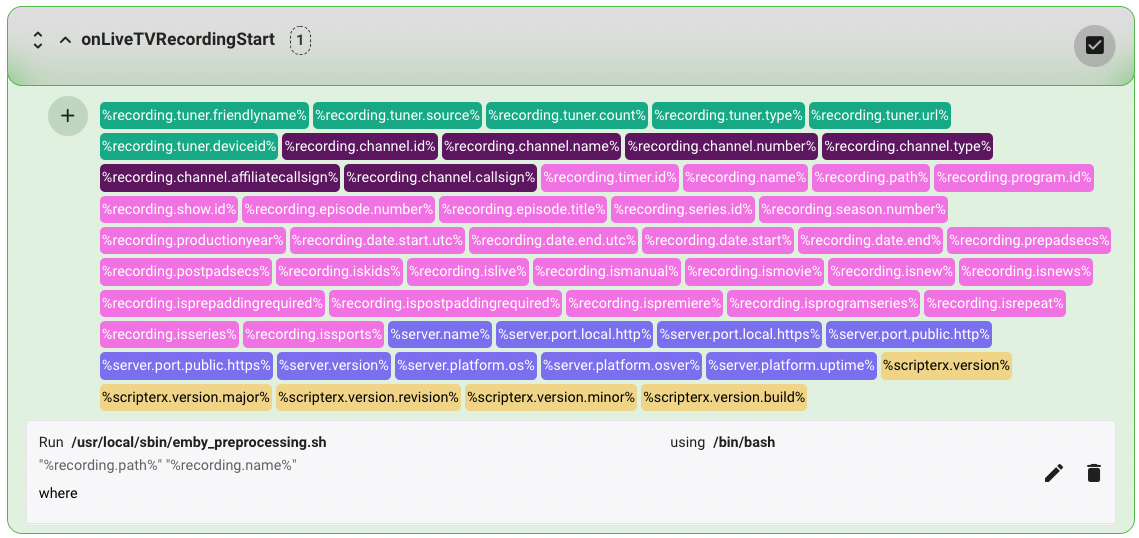
Detecting & skipping commercials on Ubuntu I wanted to contribute by sharing the details of setting up comskip on Ubuntu 20.04.3 LTS. Other flavors of linux will be similar I suspect. I'm a bit new to Emby, so this how-to is very detailed as I was learning and experimenting as i was going. I hope you find it useful! Step 1 — Preparation Before starting, you should have Live TV working in Emby and be able to record TV shows. You will also need to know the location of your emby server. Mine is installed in "/opt/emby-server". To check where your is installed, you can use this command from your terminal. $ sudo find / -type d -name "emby-server" And since you will be testing in some steps, it will be helpful to have already recorded a show and know the full path. I will use the example file path below, but you should replace it with the real path to your file: /mnt/Emby/TV Shows/Seinfeld (1981)/Season 8/Seinfeld S08E05.ts Step 2 — Install comskip In this step you will install the "donator version" comskip. I strongly recommend that you support the author my making a donation here. This step does not involve Emby in any way. The instructions were borrowed from here. From a terminal, enter the following commands. $ sudo apt-get update $ sudo apt-get install ffmpeg libavcodec-dev libavformat-dev libavutil-dev autoconf automake git libargtable2-dev libtool $ git clone git://github.com/erikkaashoek/Comskip $ cd Comskip $ ./autogen.sh $ ./configure $ make $ sudo make install Verify that comskip is working by entering the command below. The basic instructions for using comskip should be displayed. $ comskip -h Verify the path of comskip by entering the command below. If different than shown below, be sure to substitute this path when needed in Step 5. $ which comskip /usr/local/bin/comskip Step 3 — Create a comskip configuration file comskip requires the use of a configuration file to accurately detect commercials. For example, here is a basic configuration file that specifies some parameters: detect_method=107 output_edl=1 live_tv=1 edl_skip_field=3 max_commercialbreak=300 verbose=0 output_default=0 delete_logo_file=1 These parameters are stored in a file called comskip.ini. You need to create a comskip.ini file and note the full path to this file for use in Step 5. Download the attached comskip.ini file to your downloads folder. Copy the file to your /etc folder with the following command: $ sudo cp ~/Downloads/comskip.ini /etc The path of your config file will be: /etc/comskip.ini Step 4 — Test that comskip is working as expected This step does not involve Emby in any way, but it is important to help troubleshoot any issues later on when we ask Emby to trigger comskip (Step 5). We will now use the path to your recorded show from Step 1 and the path to the comskip.ini file from Step 3 to test comskip. From your terminal, enter the following command: $ comskip --ini=/etc/comskip.ini '/mnt/Emby/TV Shows/Seinfeld (1981)/Season 8/Seinfeld S08E05.ts' If comskip is working as expected, the output should be similar to that shown below with a slowly increasing progress indicator. Wait for this process to finish. "Commercials were found" should be the last line of the output. Comskip 0.82.010, made using ffmpeg Donator build The commandline used was: comskip --ini=/etc/comskip.ini "/mnt/Emby/TV Shows/Seinfeld (1981)/Season 8/Seinfeld S08E05.ts" Setting ini file to /etc/comskip.ini as per commandline Using /etc/comskip.ini for initiation values. 0:41:16 - 148470 frames in 685.90 sec(216.46 fps), 1.00 sec(248.00 fps), 99% 148549 frames decoded in 704.88 seconds (210.74 fps) Commercials were found. Using your file manager, navigate to the folder containing your recorded show. You should now see a file named "Seinfeld S08E05.edl" (note the EDL filename extension). You can view the file contents to confirm the start and end times (in seconds) for the commercials. 0.00 77.54 0 2167.10 2293.04 0 Step 5 — Launch comskip when a recording is complete. This is where we start to connect Emby and comskip. In this step we will configure the LiveTV section of Emby to launch the comskip application you installed and tested above. There are two ways to go here: (A) launch comskip when a recording completes, or (B) launch comskip when a recording begins and look for commercials in real time. CHOOSE ONE METHOD OR THE OTHER, NOT BOTH. Step 5(A) — Post-processing: running comskip when a recording is complete. From your Emby instance, navigate to the Advanced LiveTV settings as follows: Manage server > Live TV / DVR > Advanced. Scroll down. Locate the following 2 fields and enter the values shown (see Step 2 for the correct path for comskip and Step 3 for the path to comskip.ini): Post-processing application: /usr/local/bin/comskip Post-processor command line arguments: --ini=/etc/comskip.ini "{path}" Click the Save button at the bottom to save your changes. To test that this is working, record a new show. When the recording is complete, wait a few minutes and then check for the presence of a new EDL file in the folder containing the show. The EDL file should be created shortly after the recording completes. However, comskip can take a while to completely process every frame of your video. The longer the video, the longer it will take to finish. Thus, the EDL file may not be finalized for 5 to 30 minutes after the recording is complete. Step 5(B) — Live-processing: run comskip in real time during a recording. MASSIVE thanks to @reneboulard for his excellent work on live-processing in Linux. Live processing requires the installation of the Emby Scripter-X plugin. This allows you to execute scripts and commands when specific events occur such as the start of a recording. It also requires the use of a bash script (attached) called emby_preprocessing.sh. The attached bash script is very powerful. It logs activity, and allows you to use show-specific comskip.ini files on a per-show basis (see Step 8). Install the Emby Scripter-X plugin: From your Emby instance, navigate to the Plugins area as follows: Manage server > Plugins. Click the Catalog tab at the top. In the General section, locate and click Emby Scripter-X. On the plugin detail page, click the Install button. When installation is complete, reboot your Emby server. Create and test the bash file: Download the attached emby_preprocessing.sh file to your downloads folder. Copy the file to your /usr/local/sbin/ folder with the following command: $ sudo cp ~/Downloads/emby_preprocessing.sh /usr/local/sbin/ Make the bash file executable with the following command: $ sudo chmod +x /usr/local/sbin/emby_preprocessing.sh Test that the bash script is working by launching the script along with the test file above and looking for the production of EDL files. Here are sample commands: $ cd /usr/local/sbin/ $ ./emby_preprocessing.sh '/mnt/Emby/TV Shows/Seinfeld (1981)/Season 8/Seinfeld S08E05.ts' Combine the Emby Scripter-X plugin with the bash script: Ensure that the live_tv parameter in /ect/comskip.ini is enabled: live_tv=1 In the Emby Plugins area, ensure that the Real Time option is enabled. Navigate to the Emby Scripter-X settings as follows: Manage server > Scripter-X → Actions. Scroll down to locate the onLiveTVRecordingStart section. Click the section title to display the details. Click the "+" icon at the top-left of the long list of variables and then the edit/pencil icon on the right. Complete the following: Script file: /usr/local/sbin/emby_preprocessing.sh Parameters: "%recording.path%" "%recording.name%" using (dropdown): /bin/bash Click the save/check icon on the right to save the changes. Test that the the Emby Scripter-X plugin is properly launching the bash script by recording a show and looking for the production of EDL files. Since the bash script includes a 1-minute delay, wait a few minutes and be patient. Once the EDL file is created, you can observe this file during the recording. Entries should show up in real time as commercials are detected. Step 6 — Installing the Com Skipper plugin for Emby Server Now that your system is properly configured and tested, it's time to install the Com Skipper plugin and enjoy the ability to skip commercials while watching a recorded show! Note: This plugin is not (yet) in the existing plugin catalog and must be installed manually. Once installed, it will appear in the Plugins section of Emby and you can manage it from there. Download the com_skipper plugin from the first post in this thread. I recommend subscribing to this thread to get notified when updates are released. You might also consider watching this repository on Github for the same reason. Extract the ZIP file to your downloads folder. Copy the DLL file to the Emby plugins folder with the following command (update to your emby path from step 1 as needed) . $ sudo cp ~/Downloads/ComSkipper.dll /opt/emby-server/system/plugins Restart Emby from the dashboard. Review the plugin settings by navigating to Manage server > Plugins > Com Skipper > Settings. Note 1: The setup described above does not support the Real Time Processing option shown in the plugin. Note 2: For AppleTV users, you MUST enable the first 2 options for things to work as you expect. Step 7 — Test commercial skipping in your Emby client! If everything is done right, you can now watch either the show you used for testing in Step 4, or the new show you recorded as a test in Step 5. Commercials should be skipped based on the times (in seconds) noted in the EDL files created by comskip. If many of your commercials are not detected, or if the start/end time for the detected commercials is not accurate enough for you, feel free to experiment with the values in /etc/comskip.ini until the desired accuracy is achieved. Google is your friend in this pursuit. For example, this thread, and this one regarding country-specific INI files. Step 8 — Using series-specific comskip.ini files If you followed the live-processing instructions in Step 5(B), you can put a comskip.ini file in the parent folder for any series you are recording. This file can have different parameters than the default file in /etc. This is useful for problematic shows that need specific optimization. Using the Seinfeld example above, use this command to copy and then modify your default ini file: $ cp /etc/comskip.ini '/mnt/Emby/TV Shows/Seinfeld (1981)' $ nano '/mnt/Emby/TV Shows/Seinfeld (1981)/comskip.ini' comskip.ini emby_preprocessing.sh
 1 point
 -
Hi, what version of the server?0 points