Leaderboard




Popular Content
Showing content with the highest reputation on 11/11/23 in Posts
-
1.6.6 is up. Thanks.2 points
-
Probably yes, but if this https://github.com/xbmc/xbmc/pull/14972 ever gonna make it to a Kodi release (PR is from 2018?), it would mean I could remove the multiversion workaround and use the native Kodi implementation. Would be a good thing, but let's wait.2 points
-
Hi, it will be up shortly. Thanks.2 points
-
Yes from nearly day one. I really hope they make this change, and the sooner the better. We will be right on top of it.2 points
-
Bump I'd like to be able to remove some unused tabs to. For me I'd remove Artists, Composers, Tags and Folders from the music top navigate bar. I find that Album Artists provides a better list for me considering I download albums of artists that I like and don't care too much about those that feature on the tracks. They'd be a few tabs I'd remove from TV and Movies to. I hope this is a feature at some point. I guess you'd add this as checkboxes in the Library settings. Thank you.2 points
-
It would be great to add bookmarks, so that if an audiobook is 5 hours long you can easily annotate it. for example: at 5:20 I bookmark "Chapter 1" in minute 10:00 I add a bookmark with the words "remember to smile" etc.. In addition to this, the "listen again for 10 minutes" function is missing, so that on one listen to meditation music for sleep, the audio automatically switches off after the preset time. I hope you add these settings because I think they are great thanks2 points
-
So basically this. I have TV Shows, Movies, and Anime libraries. For anime; I'd prefer to set the default to Japanese with Subtitles. For movies, English and no subs unless forced. For TV Shows, the same. However, Emby only allows one overall setting this for this, for all libraries, instead of just one. I think it'd be a pretty nice little feature.1 point
-
Also, It would be cool if we have various m3u lists and have the option to choose/assign each m3u list for each user.. Example. In user settings we can choose which library to give them for VOD so this shouldnt be hard enough to do it for live tv too no? USER 1 - Playlist 1 - Playlist 2 - Playlist 3 USER 2 - Playlist 3 USER 3 - Playlist 1 - Playlist 3 Etc etc.... *** Delete this message from another topic I opened because I posted it by accident there1 point
-
I would like to request a sleep timer function for the Emby app. For example, when a song is playing, it should be possible to quickly and easily set a sleep timer to shut off the song after a desired interval. Options could include 5, 10, 15, 20, 30, 45, 60, 120 minutes. If it had this, I would be happy to purchase Premiere.1 point
-
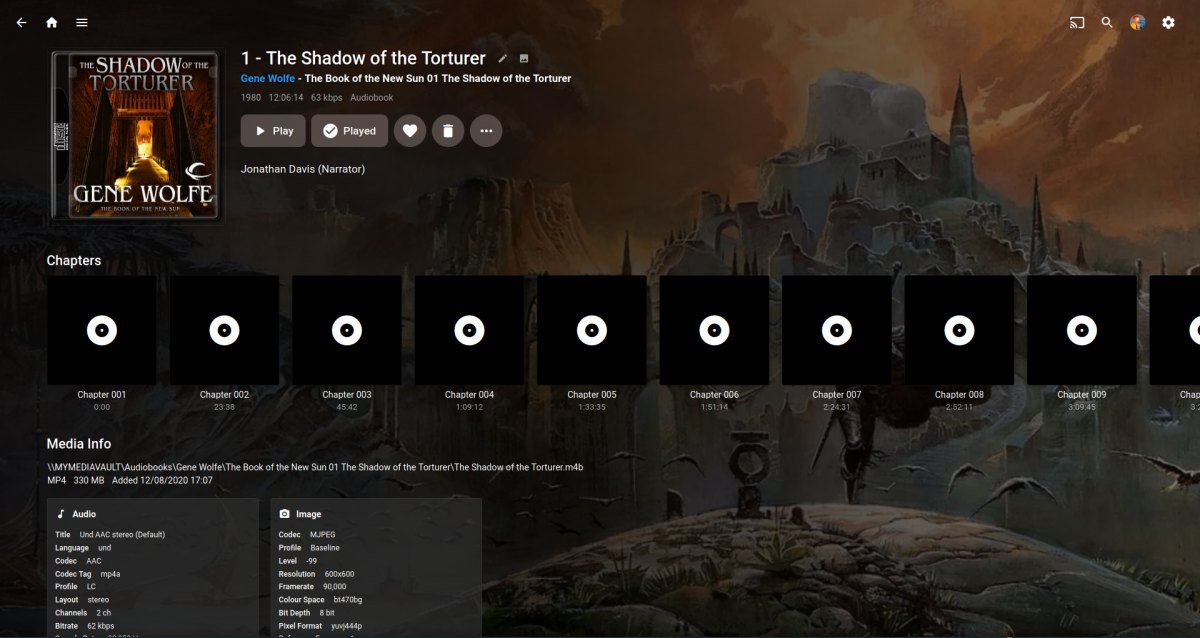
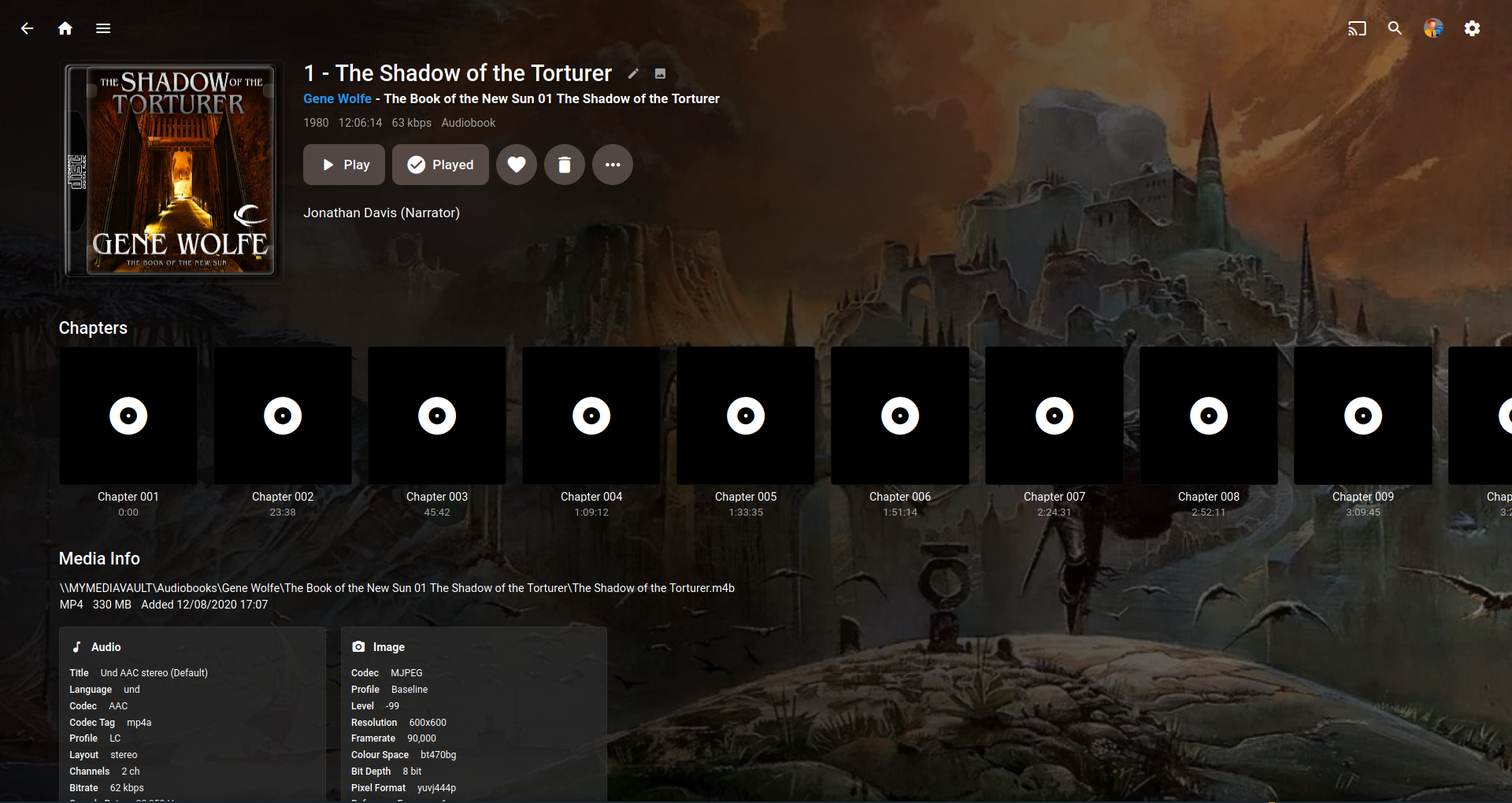
I was reading this thread.. https://emby.media/community/index.php?/topic/117901-audio-books-are-not-resuming-from-last-position-played/#comment-1248464 Then it occurred to me that the chapter info of a .m4b could look better. I know it can't scan the file for a image frame like video but maybe it could just use the main audiobook image? It's a bit OCD for sure..
 1 point
 -
I have a lot of films and TV shows that I don't watch (yet?) and, therefore, don't want to see on my home screen but others do watch and, therefore, do want to see on their home screen. The only way I can work around this is to mark all content as watched which (1) isn't accurate, (2) is misleading if I eventually decide to watch / continue watching a TV series, and (3) doesn't apply to future content (new episodes of an existing series). An option to hide content from the home screen or mark as "Don't Want to Watch" would be useful.1 point
-
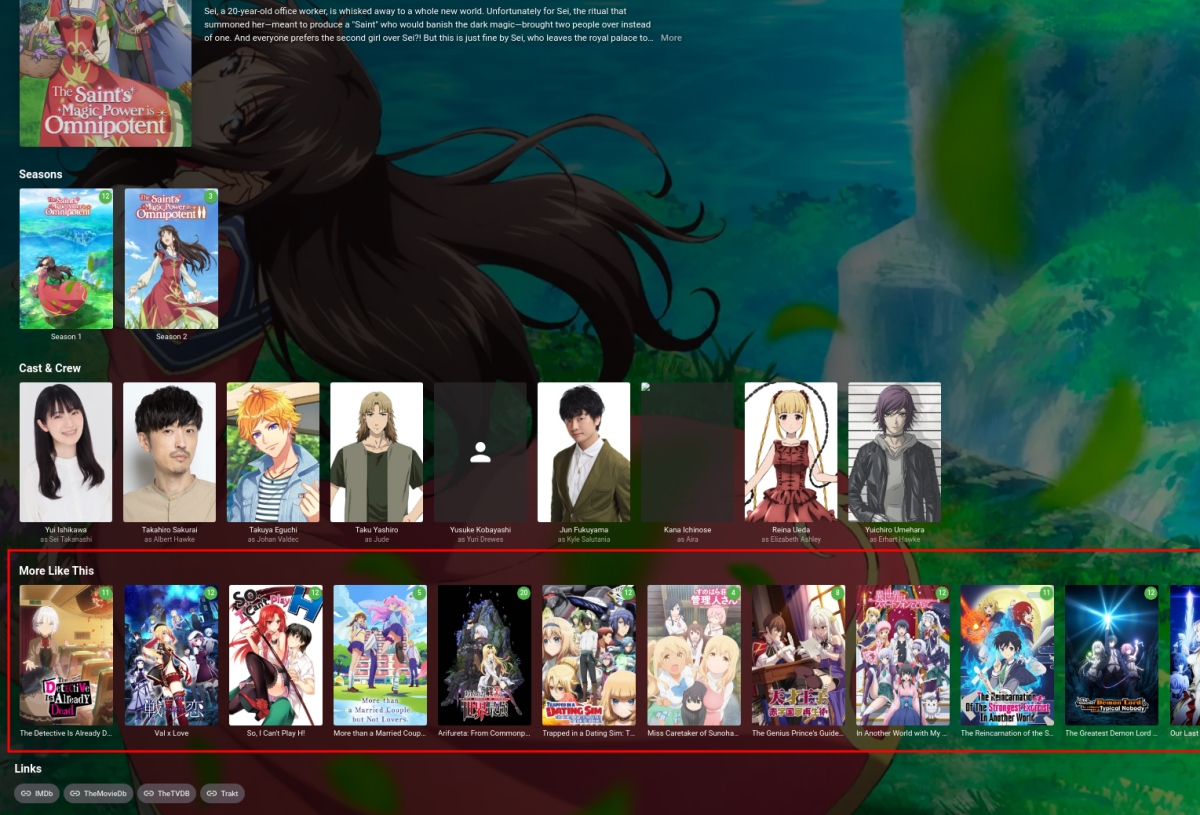
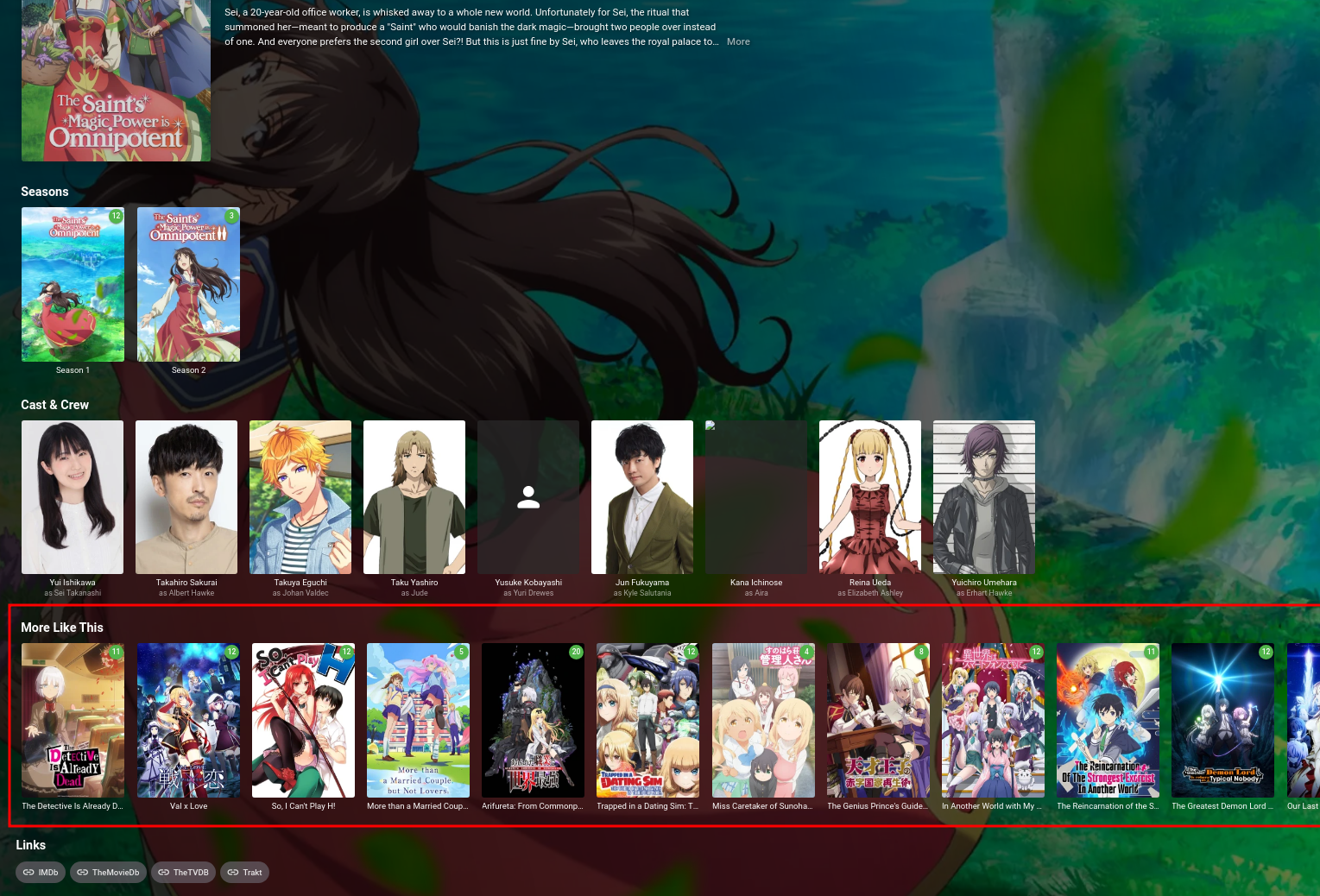
Hey all, i'm a former full-stack javascript dev now doing data science with machine learning and im a big fan of emby. Been using it for years and i've always wanted to do a "passion-project" where I either clone or expand on the "More Like This" section under on a show's page using a variety of ML/data science techniques for generating a lot of different but relevant recommendations. Pic below of what i'm talking about with the "More Like This" section: I've read through a lot of https://github.com/MediaBrowser/Emby/wiki/How-to-build-a-Server-Plugin assuming that's still current a lurked the boards for a bit, and i'm able to make a general plugin, but I'm confused as to what interfaces i'd need to implement to accomplish what i'm looking to do with making a second "More Like This" row on a show populated by recommendations i'd grab from a separate backend i'd release, or if it's even possible with the interfaces that i've seen so far? Looking through the list of interfaces here: https://github.com/MediaBrowser/Emby/wiki/Automatic-Type-Discovery https://github.com/MediaBrowser/Emby/wiki/Dependency-Injection https://github.com/MediaBrowser/Emby/wiki/Other-Interfaces As far as i can tell i don't think any of these would let me add a row of shows as "Recommendations" under a show's "More Like This" or "Seasons" or "Cast & Crew" sections, unless i've missed it? Are there other interfaces for that, or is it one of the above and I just missed that from the descriptions? Is this only possible with client side code modifications? If so, is there a client side plugin ecosystem i can contribute to? As far as the rest of the design, i already have a rudimentary node.js REST api that i know i can use the http interface for in my emby plugin to fetch the recommendations from, so i'm not worried about the rest of the design or architecture, i just don't know how to insert these recommendations into a "shows" page. I've seen in the frontend repo the actual "More Like This" sections code is dated, but assuming it hasn't been changed specifically it's <div id="similarCollapsible" class="verticalSection itemVerticalSection verticalSection-extrabottompadding hide"> <h2 class="sectionTitle sectionTitle-cards padded-left padded-right">${HeaderMoreLikeThis}</h2> <div is="emby-scroller" class="emby-scroller" data-mousewheel="false" data-centerfocus="true" data-horizontal="true"> <div class="scrollerframe padded-top-focusscale padded-bottom-focusscale"> <div is="emby-itemscontainer" class="scrollSlider focuscontainer-x itemsContainer padded-left padded-right similarContent"></div> </div> </div> </div> from MediaBrowser.WebDashboard/dashboard-ui/itemdetails.html which i can make sense of, but i just can't tell what backend interface is injecting the data there i guess?
 1 point
 -
Hello... another one whose screen also freezes and does nothing. Furthermore, trying to install the previous version 1.6.5 already gives an error. TV model UE32K55001 point
-
@RendboellWhat model TV do you have?1 point
-
Same problem as Dickydodah! Tizen / Emby app version 1.6.6 freezes when loading. It gets stuck on the start-up screen. Rendboell1 point
-
1.6.6 loads/plays fine on my 2018. However, I'm not seeing any background images in enhanced view anymore. Also, I can't select episode subtitles before clicking Play when opening episode details from enhanced screen. In order to see the drop menu I have to open the library and season first and then episode details.1 point
-
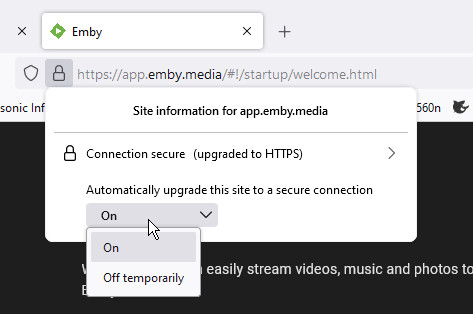
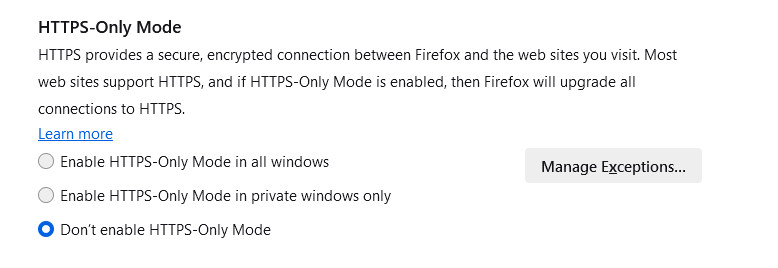
@LukeYes, the browsers may learn - but that's really inconvenient, and it's preferable to make the setting explicitly. You may want to put these settings in the wiki. Firefox: When the site has opened in secure mode, you can click the closed padlock and get an option to allow insecure, but only temporarily: However, it's preferable to do it permanently; for this you can go into settings, find "HTTPS-Only Mode", and tell Firefox to turn off secure mode permanently for any specified site by clicking the Manage Exceptions button: Note that when I tried it, saying "Don't enable HTTPS-Only Mode" in the first screen wasn't enough - in fact that was the setting I already had; going through to the exceptions was required to have the desired effect. Chrome: When the site has opened in secure mode, you can click the closed padlock and go to the site-specific settings, where you can allow insecure pages; this is not only the main page, but also allows insecure links from secure pages: Although my screenshot doesn't show it, this is, as I said above, a site-specific setting. If you go to the main settings page, you can find your way to the same option, but in that case browser-wide, which it would be better not to enable this for. Paul
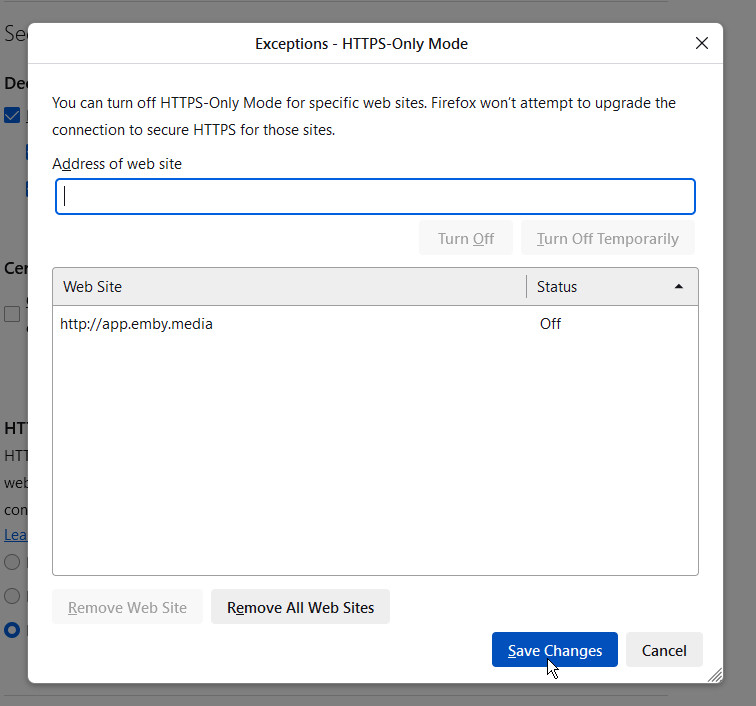
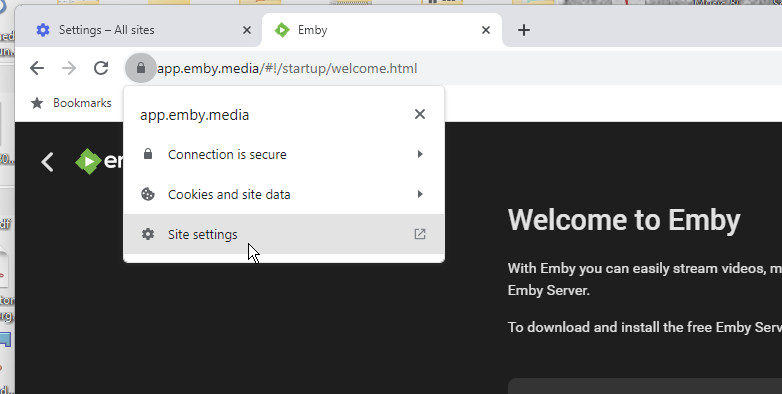
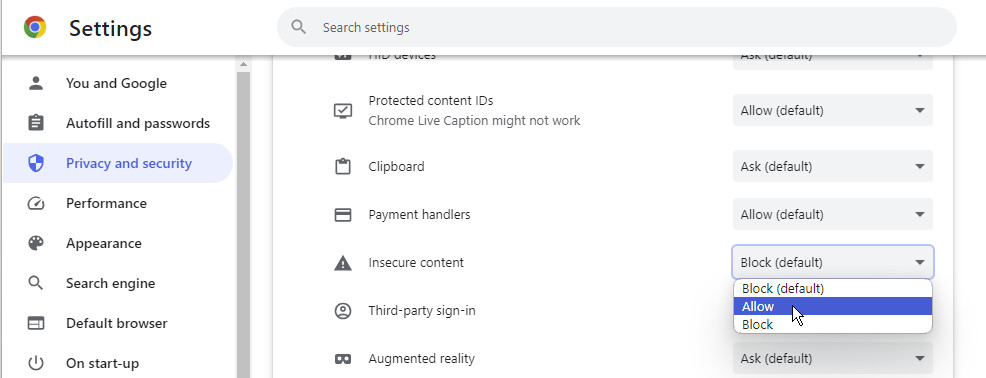 1 point
 -
@LukeSorry my mistake.. I forgot to add the target to the project. EVERYTHING IS WORKING... Yea!!!! I am now working on the JS frontend. Thank you so much...Vic1 point
-
Solved with version 1.1.518.01 point
-
OK please pull down the changes I just made to the example repo and see if that resolves it. Thanks.1 point
-
Hi Luke! Yeah, I started my plugin project a while back (link in original post). I was just throwing a question out there to gauge interest, wondering if it'd be worth it to continue :)1 point
-
In the library.db database file.1 point
-
I'm pretty sure you already figured out what I was referring to, as the issue has been resolved with version 1.6.9 of the plugin. But just to close things out, with version 1.6.8 of the plugin I was see the following: Media was being moved to the correct location. But the plugin showed the result to be "Success: undefined". With version 1.6.9, it just shows "Success". So all's good.
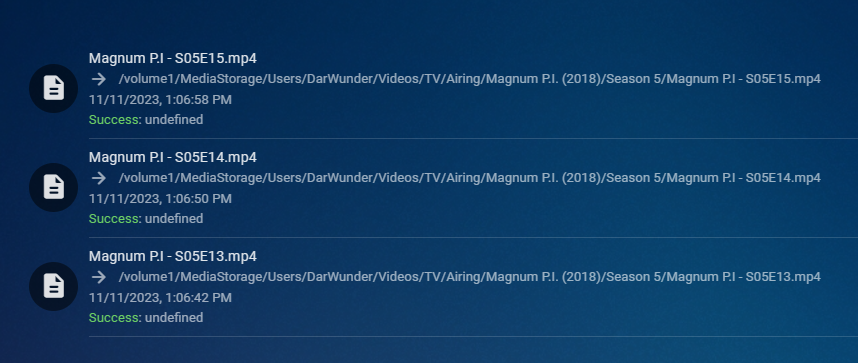 1 point
 -
I made an absurdly simple password and it works, so will adjust on a variation on that, evidently it was too overly complex, thanks to @Q-Droidfor pointing that out1 point
-
I am realizing this for the first time. Thanks for the clarification!1 point
-
I sorry for not pointing out all changes there were made sinde 4.4.30 It looks like the change was made here. But you can see all the changes here Announcements - Emby Community1 point
-
I'm agree with that1 point
-
Thanks for reporting. We'll take a look.1 point
-
I have found the error I will fix it soon1 point
-
Let us know how that goes. Thanks.1 point
-
It wouldn't solve my case. There is no matching metadata provider entry for my file, story critical or otherwise. Emby needs to be smart enough not to try to identify at all if the extra is in one of the new folders and doesn't use the SXXEXX convention at all.1 point
-
1 - Rookie: 0 to 50 posts Search flood control: 20 seconds Display Name Changes: Need to PM me or any other admins to change it for you. Bypass flood control? No (members need to wait 3 minutes before posting again). Can edit own content?: Yes. Edit time restriction: 15 minutes after posting. Can hide (delete) own content?: No. Need to PM an Admin or a Moderator. 2 - Regular: 51 posts and up Search flood control: None. Display Name Changes: Yes. (Can change display name: 1 every month). Bypass flood control? Yes. (Flood control prevents users from making two posts in quick succession). Can edit own content?: Yes. Edit time restriction: 180 minutes after posting. Can hide (delete) own content?: No. Need to PM an Admin or a Moderator. 3 - Top Contributor (this special group that selected by): Mod's team recommended. Help reporting bad posts. His/her answer selected as best answer. Same as Regular group for Display name change, Search flood and Bypass flood control. Can edit own content?: Yes. Edit time restriction: Unlimited. Can hide (delete) own content?: Yes. Plus: Can close his poll. Can lock and unlock own content. Gets access to Emby Support application.1 point
-
Thanks Vis looks like that was a win10 issue; I'm on Win 11 (for my Emby server), so not sure it would apply to me (?) i'll scan through my log to see if I see similar debug messages related to what you're pointing out. appreciate the input!1 point
-
Related: I have fixed the problem but it required down grading windows from version (1903) to (1809) and then carrying out a Windows Reset. I think my system messed up the drivers or something, not really sure how or when it happened but the Reset has fixed all my problems. From: https://community.intel.com/t5/Media-Intel-oneAPI-Video/MFXInit-returns-MFX-ERR-UNSUPPORTED-since-Windows-10-1903-update/m-p/11313551 point
-
One of the problems I see is your overly complex passphrase that is using characters which may be interpreted by the shell and screwing things up. If you look at both passwords you can see something missing from the output: You could try the openssl test again but using the second password from the output instead: a8TqL*oE$FUod@fXWTP#kgLegB@Hw8#dc6CL Another option is to use a long password with alphanumeric characters only while keeping in mind that some symbols are interpreted by the shell whether on Linux or Windows. Quoting the password may help but at this point you don't really know which was used to create the keystore.1 point
-
Another minor, but semi pet peeve with the discogs plugin, is the way it pulls the metadata text. It will mark the hyperlinks with [I=text] other times it will include the discogs page code for what it is linking to. While I much prefer the discogs meta, it is a minor annoyance. here is an example https://www.discogs.com/artist/94789 That will look like this when pulled to the artist page
 1 point
 -
Thank you very much for the update, please confirm that the personalized menu in the TV shows (the first id) does not appear.1 point
-
Hi, we're taking steps to address this so that in the near future this won't happen anymore. Thanks.1 point
-
HI, we are looking into improving our trailer sources. Thanks for the feedback.1 point
-
Dearly beloved, I am a loyal user of Emby, which I have been using for years on my Terramaster nas with great satisfaction. Recently, however, I started to include an audiobook section and realized that Emby handles them as if they were actually records of music. So I would like to propose to the authors of this magnificent software to devise a dedicated audiobook management and a book management based on the characteristics of a book rather than a disc. Sort of like Calibre does, for instance. And it would be important to be able to use a specialized metadata search engine on books when making the association, like GoodReads, Anobii and the like (Calibre and its plugins can be a great source of inspiration). Your first promise to implement these features was in 2019. It would be nice if you put together a team of programmers dedicated to this project, which would make Emby definitely superior to Plex Thanks1 point
-
I resolved this by running "pkg install ca_root_nss" in my Truenas jail. I was able to reinstall the Emby Guide plugin and get my guide data back!1 point
-
After working on it for years, @Luke What does the timetable look like? When can we expect? Are we talking months or years here. Please give an honest answer. A simple we are working on it is difficult, especially when this was years ago.1 point
-
My hopes are "zero", 0, nada, not present, ... since years1 point
-
This is a related but not identical comment/request. For me, Emby always loses the progress in a partially listened to audiobook. As FF does not work either, this means the audiobook must be listened to all in one go or not at all. Frankly, I suspect I am missing this functionality somewhere, but I have not found any solution. The bookmarking of this thread would be a great workaround for my problem. Note, I am using Fire and Chromecast to listen through TV speakers.1 point
-
This is similiar to a lot of requests for a 'hide' function - essentially the opposite of a 'favourite' It obviously needs to be user selectable from the clients and maybe even an option to be done on a genre or other group level.1 point
-
it would be nice to have something that allows you to ignore a show, and unignore (just as with played/unplayed) so that when you have multiple users i can block out the shows they like but that i have no absolutely interest in seeing. a simple filter option for it would be fine. using played isnt exactly viable (i've tried) as when a new season of that show starts it pops up in your list of things to watch - because you played it so you must want to see it again logic single account systems would obviously have no need for this but it would be very helpful in multi user systems - i dont need to see those reality/romance shows, nor do other users wish to see all my sci fi shows. not sure why this hasnt been requested more often unless multi user is an exceeding low use case for emby, or people using it have the exact same tastes in shows? maybe not an entire special section but you would need the ability to undo it, as with played/unplayed, due to mis-clicking, or just general user clumsiness in general. plus people change their minds and may want to try it out later so would need some way to be able to see it again.1 point
-
Not yet, sorry. We are monitoring this for community feedback. Thanks.1 point
-
I know this is probably going to be an easily answered question by the community. I cannot figure out how to disable the audio track and subtitle track prompt when selecting a movie. My local Kodi set up direct plays and doesn't do this (it probably knows what the default audio and subtitle track already are). But my remote client (mom's house) prompts for an audio track (there are usually two to choose from) and after selecting the audio track it prompts for the subtitle track - all before beginning the movie. What setting will allow Kodi and/or Emby addon to force the default track and stop prompting?1 point
-
There's no such thing implemented. If you don't want the prompt, you'll have to increase the video quality in the add-on settings > playback, so it doesn't force the content to transcode and instead lets it direct stream instead. The reason is that you can't switch between tracks once the transcode is started.1 point














.thumb.jpg.21d888786f2104b4f688825203ce7598.jpg)




.thumb.jpg.7d793de0dff08bf27c2d089379dfdfb1.jpg)