Leaderboard



Popular Content
Showing content with the highest reputation on 11/01/23 in Posts
-
Thanks for confirming. I'm excited to try out 4.8! Brian.2 points
-
I hit "play all" on a collection and it doesn't show the next film in "Next Up" after I quit out of it. This is apparently intended behaviour, and the same applies to playlists. This is absurd. Why even have the "play all" option? Who's sitting down to watch a full collection's worth of films, or a full playlist? I have playlists for The Prisoner for its various episode orders, and there's no way I'm getting through them in one sitting. I was going to make that my next show to watch but if I'm going to have to keep track manually of my progress through the playlist it makes the playlist fairly pointless TBH. There's no reason playlists or collections shouldn't show up in Next Up.1 point
-
Telegram Notifications Plugin for Emby Finally after using it by myself for over 3,5 years and "supporting" it in another Thread https://emby.media/community/index.php?/topic/42912-telegram-notification/ i decided that with the latest Version it would be good to have a destinct Plugin Thread for it. Nope it is not in the Plugin catalog, because there are only plugins by developers which are "willing to fully support it. That means keep it up to date with server versions as well as fix any issues and respond to user help requests." Because of the closed source code of Emby and the lack of Plugin development documentation that is something i cannot ensure. What it does? It simply forwards the Messages of the Emby Notification Framework to a Chat or Channel. Not more, not less. Sorry no fancy posters etc. because the Standard Notifications of Emby dont support it. That could be hacked into, but those things can break easily on every update and i dont want to spend more work on this. How to install? Install the Plugin by downloading the DLL (or build it yourself using VS2019) and putting it into your Emby Plugin folder Restart your Emby Server Talk to @Bodfather with your favorite Telegram Client to create your Telegram Bot Start a chat with your bot (or place it in a channel) and send a message to it Fire up your browser and type the following URL: https://api.telegram.org/bot<BotTokenGoesHere>/getUpdates (without the braces) and find the ChatID Use the Settings Page of the Plugin to set Bot Token and Chat ID Activate the Telegram Notifications Plugin in the desired Server notifications Known Issues? There are no issues with the Plugin itself because it is really simple. The problems are inside the Emby Notification Framework for example if you want to use it to keep your Family and Friends up-to-dat with the newest Additions to your server. For every scan Emby only sends 10x New Media Notifications so if you add 100 Movies you only get the first 10 send to you. That is something that should have been worked on for quite some time but nothing happened. Where to get it? You can download the Source and DLL v1.4.0.0. here: https://codeberg.org/bjoerns1983/Emby.Plugin.TelegramNotification/releases Have fun with it. If you have a cool idea simply open an issue. To be honest i dont know how long this Plugin will be maintained. I mean it works since nearly four years without any problems. I am really waiting for the New Notification Webhook feature which would make these kind of notifications way more easy.
 1 point
 -
Hi, Actually when i activate the notification when someone starts a movie, this also happens if someone starts a local trailer. It would be great if this could be improved in an update and exclude local trailers from these notifications. thanks1 point
-
I just backed all my changes out in config.txt that I set to use the 7" display, reverting to use HDMI, and disconnected the 7" display ribbon cable. Basically the default config.txt file plus only the two changes noted towards the top to enable the HiFiBerry output. Which had worked then. But it's not working now. So that tells me whatever incompatibility there is, was introduced on first/initial boot and configuration of the system. I think I need to start over with a new image.1 point
-
Hi. There is a release already in the pipeline but we'll be sure to sync translations on the next one. Thanks.1 point
-
you can use the PlaybackInfo call to have the server query the unplayed item https://github.com/faush01/plugin.video.embycon/blob/dfa3d148be89a2aeee1dcd1bc23f6bec39bc60a5/resources/lib/downloadutils.py#L341 this will populate its details. You could script this up using python resonably easy with a api_key using the emby API 1. Query all items that dont have details 2. Call the above on each item to have the details filled in WARNING: This will be expensive and take a lot of time1 point
-
Then I suppose technically it's Android changing only mode not Emby... But the only times I've experienced Android changing the input mode after I've plugged in my USB-C headphones is upon app closure/reopening and on screen lock/unlock. Anyone else finding this thread should know that the temporary fix is too not plug in your accessory until after opening Emby on the affected device. If the input method switches and is interfering with your ability to navigate the app, unplug the USB-C device, lock the phone, unlock the phone, make sure the app is open, then plug your device back in.1 point
-
Hi, yes it's planned for future updates. Thanks.1 point
-
Sorry, I went off on a tear and forgot to say thank you. Thank you. I'm looking into this now.1 point
-
Turns out the real reason behind no audio working on the normal emby android version is because the stupid device does not even support AC3. But emby (normal android version) does transcode the audio to AC3 from EAC-3 but the box is not even capable of handling AC3. Guess thats why other media servers worked because they did transcode audio to opus, and why audio worked on the android tv version is because i mix down to stereo or maybe that app can handle more codecs in the software side? Anyhow i dont have to deal with said device anymore, the family member running it now got a diff box from me that i know handles all the codecs just fine. And the subtitles issue with the android tv version on said box seems to not only be a emby issue, tested with using external video players where some would work and some would not. I think the device really just is E-waste lol.1 point
-
I did a quick test and you are right - all customizations done in Emby are lost, including the sort order. Which means I really need the ability to drag and drop channels to change the sort order back Thanks!1 point
-
Hi, this already happens automatically. When an item is removed from the database, so too is it's folder under the server's metadata folder. If something has gotten left behind, the most common reasons would be: Some type of error when trying to delete them (e.g being denied permission) Defect in an older server version Unfortunately the server does not contain any functions to help you analyze the contents and try to identify folders that are not being used.1 point
-
Hi, we are working on getting it into the store for TV devices, so stay tuned for that.1 point
-
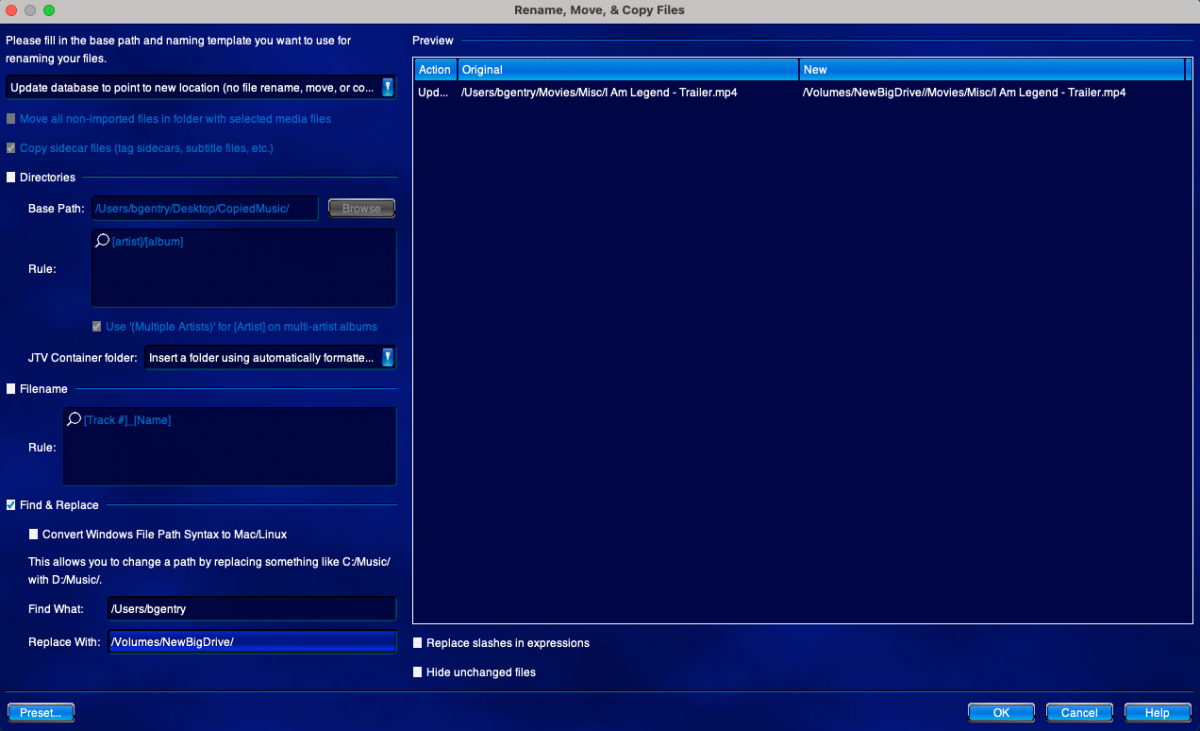
"Good artists copy, great artists steal." You should take a look at the JRiver Rename, Move, and Copy Files tool. It's one of the most powerful features of JRiver MC. It allows you to do Renames, Copies, and Moves of your media. In the screen shot above notice that I am in "update database" mode. This just changes the internal database record for the location of the file. Also note that I am using "Find and Replace" to change part of the path from my User directory to an external drive (/Volumes/NewBigDrive). This works when you have already copied your media to a new place and you just want to tell the program to look for the media in that new location. You can easily use this to change drive letters, leading paths, etc. I have used this capability to move libraries between machines with different drive layouts. I've done this many times and it always works quite well. Of course this is made possible because JRiver MC can make a Database Backup as a ZIP file. I just move the ZIP file to the new computer and do a database restore from that ZIP file. This is a program function; I do not manually unzip or anything. The program does the work. Once I have the database restored to the new machine with different drives, the paths are wrong. So I use the tool pictured above to change the paths to the files. That's all there is to it: My entire collection is migrated. The database backup also contains all user settings and they can be (optionally) restored along with the media data. Emby should have similar features eventually. To really manage the life cycle of a media collection, one has to consider that hardware will change. Servers will be replaced. Drives will be filled and new drives will be added or substituted. Robust tools for doing operations like I have outlined here are essential for a mature media server that you will keep for a decade or more. I hope the Emby team will consider STEALING some of these great ideas and using them. Brian.
 1 point
 -
I'll isolate just the one folder in one library & see if that changes anything.1 point
-
Hi, just a small nudge to sync the Android TV client as well the next time you make a beta release @Luke. Thanks.1 point
-
Thanks, Paul. Yes so here is what has happened. The server definitely has premier, but we all possibly hit the limit. When I download and install emby client from the Amazon app store - I was prompted to get a Unlock to get rid of the limit exceeded message - which I did and got everything working. The only issue I have is the Emby Amazon app is really not that great. Functional, but not great - few issues around DTS-HD passthru and other audio related challenges. When I did sideload the Android version though, on my FireStick TV - the app functions much better than the Amazon app. And this is where I hit the issue of things being unplayable. My question was more about, how do I get it to play. Looks like you are confirming, that if the Android client is not available - I cannot do it? I wish Emby just replaces the Amazon app with the Android app on Amazon app store! Just works so beautifully well!1 point
-
I had the exact same problem. Luke's solution seems to have done the trick for me too.1 point
-
Thank you Luck for the detailed response. Fingers crossed for the menu to work correctly, so you can bring back the “delete” button. Cheers1 point
-
Yes, the 118 error. I will check the date and time zone when i get home.1 point
-
Hey Luke thanks for getting back to me. I've tried multiple different interfaces with the same result. Standard Emby android app, chromecast app, and web browser. I did try the other suggestion listed here around transcode temp folder and after I deleted my prior and replaced it with a blank one, the livetv feed came back. I'll monitor for the next couple of days and let you know if it's a sustainable solution or not. Thanks again!1 point
-
It seems the system is properly configured to be using my sound card: emby@emby-theater:~ $ aplay -l **** List of PLAYBACK Hardware Devices **** card 0: sndrpihifiberry [snd_rpi_hifiberry_dacplus], device 0: HiFiBerry DAC+ Pro HiFi pcm512x-hifi-0 [HiFiBerry DAC+ Pro HiFi pcm512x-hifi-0] Subdevices: 1/1 Subdevice #0: subdevice #0 And when I used alsamixer the volumes were turned up and nothing was muted. But wait, when alsamixer starts the Card and Chip are "PulseAudio". Hrm... that doesn't seem right.1 point
-
HI, yes we'll add this to our to do list for the app. Currently we're only handing this on windows. Thanks.1 point
-
Hi, yes the next update to the Emby android app will improve support for remembering the android auto play queue.1 point
-
Yeah doing well! Don't check the forums often at all as everything has been working well, but its a struggle to keep WMC running on Windows 10 these days... So I finally given up and switched to Kodi with the Emby backend a few days ago. So was just checking forums for info as I haven't really used Kodi at all... Obviously looking at the code a bit to make my theme tweaks Anyways I hope you and your family is doing well.1 point
-
Well <explicative/> that seems to have worked...at least it has run much longer. Could have sworn I tried that toggled off and on separately but evidently not. If the problem crops up again I will update with new logs. But it's already at nearly the longest time I had so far. Thank you. -bill1 point
-
Sorry to hear the Pi is not working out. I tried Pi4 w/8G RAM but it was 'not quite' powerful enough to be up to the task. My recommendation is to switch to a mini PC platform. I removed my Ubuntu SSD from my Pi4 and installed it into an Intel NUC6i3SYK (or NUC6i3SYH if you need more internal storage). For my particular setup, I used 16GB RAM and have not looked back since. If you need a tiny bit more umph!...you can get an Intel NUC6i5SYK/H for the task. Either way I think you'll be satisfied. FYI, Intel no longer makes the NUC Mini but you can pick one up on eBay usually for less than $100. I love the RPI computers but I find they can handle smaller tasks really well for the money but just don't quite make it for a reliable Emby server. Good luck with what ever you decide.1 point
-
push up... a five year old request, which really didn't take a lot of efforts to implement it. In my opinion the original title can be showed down, next to all the other media informations.1 point
-
I've been having some issues with both the theme song and theme movie grabbing the wrong movie. Is there a better way to specify or choose the search parameters?1 point
-
Thanks! I didn't realize that album artist could work this way. I set for both of them and it now works1 point
-
Yes, exactly. It's kind of pointless to make a list public if you can't adjust who has the rights to edit the playlist.1 point
-
Hi, yes it can be.1 point
-
Try removing the watch history plugin. Then restart the server, run the refresh internet channels scheduled task, and then see how things compare.1 point
-
It can actually handle up to 18 4k transcodes, if HDD speed is unlimited, ie an NVME drive. The ASICS typically don't use the cpu itself for transcoding, other than any audio transcoding that will be done.1 point
-
The UHD770 will outperform the RTX3050 in all aspects of transcoding.1 point
-
Hi all, would be nice to see the following for movie-collections: 1. add the time range automatically under the cover (1950 - 1977) for example. Should be changed automatically also when a new movie is added. 2. add the amount of unseen movies from the collection, same what is displayed by series. 3. add the next movie from collection to "Continue Watching" would be nice aslo.1 point
-
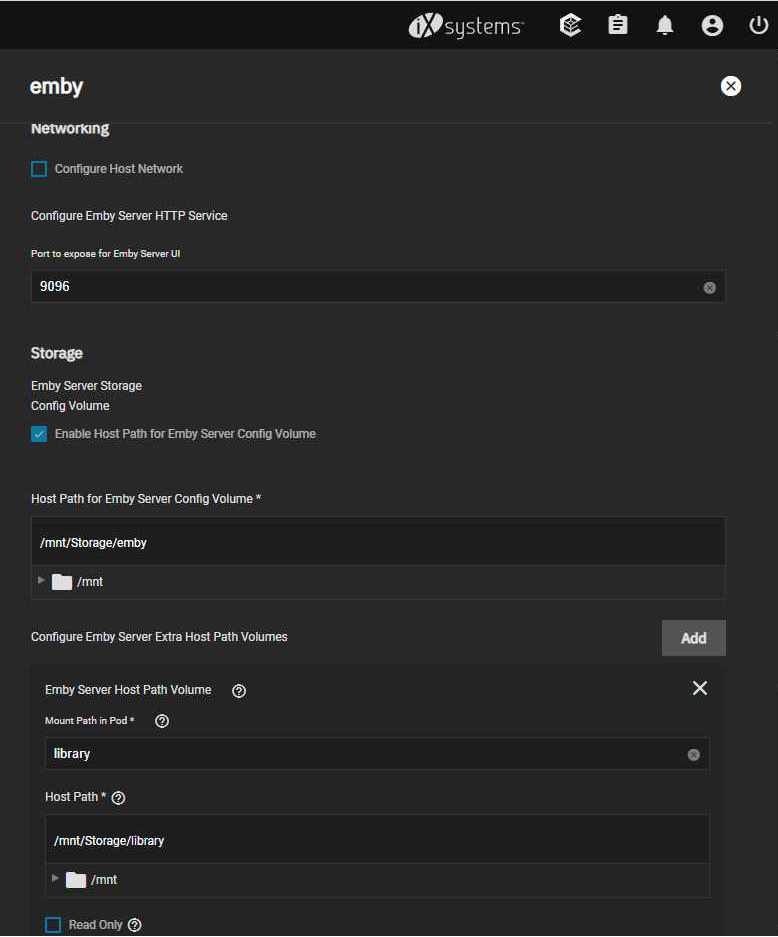
Hey, Those screenshots show exactly what you have to fill in truenas-scale installation, for the user you choose, in my case the user uid:1000 and gid:1000 which is the user i have to access my server also in samba shares. before you start the installation create the 2 datasets or directories if you prefer and change permissions to the user you choose in truenas ui, as you have to select them in installation.
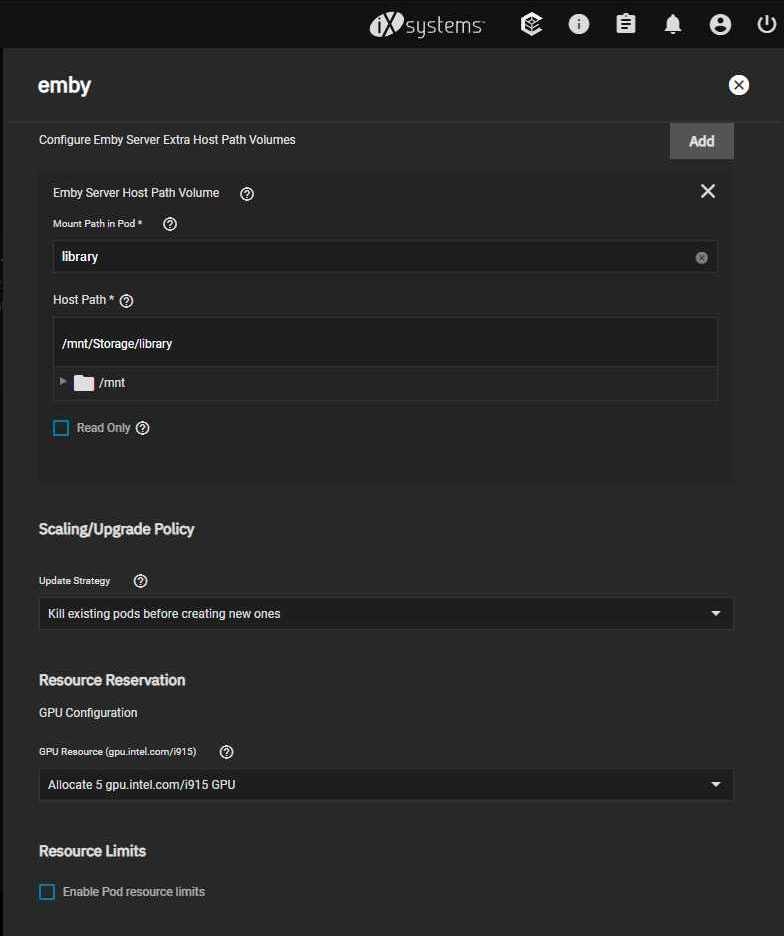
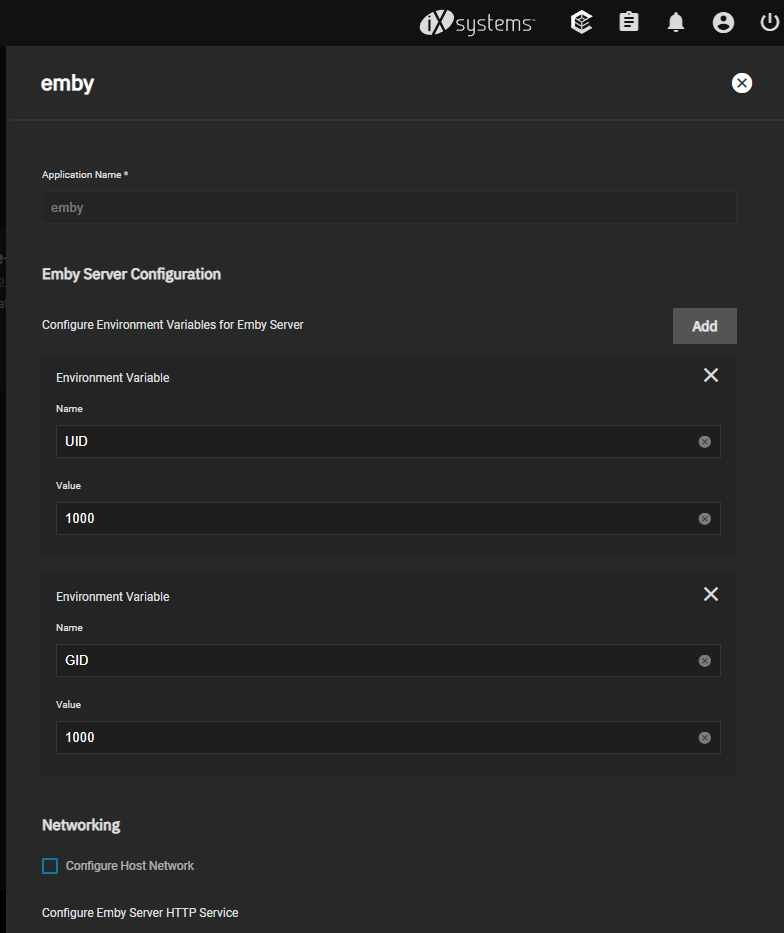 1 point
 -
But it requires a new email address than what I used to create my Emby account! That doesn't make sense. I don't understand Emby Connect.1 point