Leaderboard




Popular Content
Showing content with the highest reputation on 10/31/23 in Posts
-
Greetings from Thailand. Seems the sources.xml was malformed for some reason. I'll check that when I'm back, but I don't think it's directly related to Kodi 21. Workaround would be deletion of the sources.xml file.3 points
-
It might be my impatience, or might be due to the issue of 4.7 as mentioned by Luke. I think Emby could improve here by showing the files being handled, instead of letting users guess what is happening. As a reference, I tried PhotoPrism to index the same set of photos, it did take a couple of hours to finish, but the UI shows which file is being processed, so user can know it is making progress.2 points
-
You could try M4A which is the extension for audio only format just like MKA is the audio only extension for matroska. I have all my Dolby Atmos pure audio music albums in M4A format and it works fine in an Emby music library. Triggers Atmos and all. You can even tag M4A using Mp3tag app and musicbrainz data.2 points
-
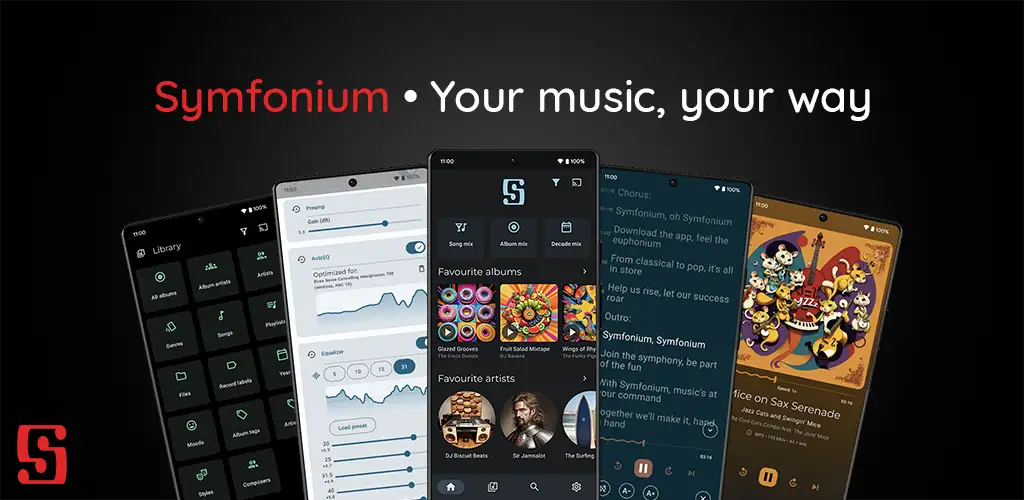
Symfonium is a simple and modern music player, with an unique vision to be your central control point for your music. Add multiple media providers (Your local device, Plex, Emby, Jellyfin, Subsonic, Kodi) then play your music on any supported player (Your local device, Chromecast, UPnP, DLNA, Kodi). Remark: This is a paid application with a free trial to ensure continuous updates without tons of bothering ads. It does not allow you to play or download media that you do not own. MAIN FUNCTIONS • Consolidate all your music from different media providers (Your android device, Plex, Emby, Jellyfin, Subsonic*, Kodi) in a fast, beautiful and intuitive interface. • Cast your music to Chromecast, UPnP/DLNA or Kodi devices. (Support UPnP gapless on compatible devices) • Cache your media for offline playback (Manual or automatic with custom rules). • Advanced Android Auto support. • Advanced custom tag parser for local device (Support more files, more tags, multiple values, separators, cue files, …). • Many functions for audio books like playback speed, skip silence, resume points, … • Smart filters and smart playlists to organize and play your media on many different criteria. • Complete playlist support with sync with most media providers. • Fully configurable interface: organize your tabs, shortcuts, home page, now playing, sorts, use lists or grids with custom sizes and much more. • Transcoding support when casting to Chromecast (And soon UPnP). • Multiple now playing media queues, easily switch between audio books and playlist or albums without loosing your configuration (Playback speed, shuffle, position, …). • Complete file mode support. • Playback cache, no more music stop during network hiccups. • Adaptive widgets. • Composer support for classical music lovers. • Support favorites and 5 star rating. • Lyrics support (Including synced lyrics. Embedded in the media files or provided by the media provider). • Advanced personal and instant "Mix" modes that evolves with your listening habits. • Fully embrace Material You and Android 12+ colored themes, while still proposing many other themes (Or create your custom ones). • Advanced local music player with gapless, volume boost, replay gain and supporting many formats like Alac, Flac, Opus, Aac, Dsd, Aif, Wma, Mpc, Ape, Tta, Wv, … • Advanced equalizer with preamp, compressor and limiter. (5, 10, 15, 31 bands or up to 256 bands in expert mode) • AutoEQ support, with more than 4200 optimized profiles tailored for your headphone model and support for custom ones. • Multiple equalization profiles, with automatic switching on headphone change. • Artist images and biography scraping for local Android media. • Sleep timer, widgets, automatic suggestions and everything for the music lovers. (Missing something? Just request it on the forum) • And much, much more, just install and try everything with the full free trial. HELP AND SUPPORT • Official website: https://symfonium.app • Forums and documentation: https://support.symfonium.app/ NOTES • Symfonium relies on the media providers to provide accurate music library data, it does not directly parse tags nor have metadata editing functions. • Symfonium development is user driven and moving fast, be sure to open feature requests on the forum to have the perfect app for your needs. • Plex pass or Emby premiere are not needed for Symfonium to provide all it’s features. DOWNLOAD • Symfonium is available on Google Play Store: https://play.google.com/store/apps/details?id=app.symfonik.music.player
 1 point
 -
I think it'd be nice if there was an option to bookmark parts of videos so I could quickly jump to my favourite parts.1 point
-
Hello, Perhaps I am not the first one to ask this question but it will be very cool if this feature could be implemented. I have 2 servers one at home and the other at work. ( and soon a third one...) So I have a movies library called movies on each server. I would like to see all the movies from a single 'virtual server location' when I use the app (ios or android ) where I will see only one movies library containing movies informations from the movie library at work and the movie library at home. It's an aggregation of movies informations from the movie library at work and the movie library at home. In fact when a user have multiple servers it will be perfect if another choice in the server list called "all servers" for example appears automatically with a merge of media informations from librairies with the same name on different servers.1 point
-
Hi there, I couldn't find a way to configure which sounds will be used for the Pushover notifications. This means there's no way for users to mute them. It would be nice if there'd be a dropdown menu or a text field for this (similar to Sonarr, Couchpotato or the nzbget script).1 point
-
I personally have all my 2160p HDR HEVC movies in a separate library. I've mapped my i5 3570k CPU and a GTX 760 GPU correctly so that emby makes use of them in the official Docker container but still they don't hardware transcode the 4k HDR content. I suspect I'd at least need a GTX 1050 for that. So what I would wish is that I could prevent transcoding of my HEVC library as my hardware can't keep up if one of my users want to play those movies in the web player. The reason I'm not disabling the library completely for my users is that they still can play them with the Emby iOS/Android apps. Thoughts?1 point
-
Say I have a custom collection of 56 Christmas movies. During the Holiday Season, I would like to show this on the main page as a Library. Now, I could make a drive folder called "Christmas" and put these movies in that folder. However, now we're getting away from using metadata for organization and moving back to using folders for organization. Something you've spent the last few years trying to get away from. So each collection should have a toggle to show it as a library on the Home Page. Then people can make collections for Christmas, Halloween, Summer Romance, Summer Slasher Films, whatever and show them on the front page where they are easily accessible. Don't want to show it anymore, switch the toggle off.1 point
-
So I think I found the issue for the most part..... what was going on is that a lot of release groups were adding in a third Album Artist tag so that you could have it set correctly by Mp3tag or Picard Musicbrainz and that one tag would be there. So you'd have : Album Artist AlbumArtist albumartist And each would show random stuff. So as long as ALL the album artist tags are set, this issue shouldn't come up. Those hidden tags will get you everytime. :)1 point
-
ok solved Thank you1 point
-
OK we use ffmpeg to convert srt to vtt on the fly. I think during this process the srt styles either get mangled or lost.1 point
-
rclone mount --allow-other mygdrive: ~/gdrive/ ??1 point
-
Thanks Luke. Will 4.8 release for macOS at the same time as other platforms? I’ve seen you comment that 4.8 is almost ready to go stable, but with zero beta testing for Mac, will it be ready for launch? Have you been testing it internally? Or is the Mac version so similar to the other versions that you’re not worried about Mac-exclusive bugs?1 point
-
Hi, if you turn this off how do things compare?1 point
-
Hi, the fallback can be improved. Thanks.1 point
-
Thanks for reporting. We’ll take a look.1 point
-
Hi. Make sure the addresses shown on the Emby server dashboard are correct. If they are, try logging out (actually choose "sign out") from the app and then logging back in.1 point
-
That would be a great option to have but would have to be library specific not across all libraries1 point
-
Hi Luke Seems like i fixed the issue by changing the country to germany in library settings. I had the country set to a country which speaks german as native language but is not germany.1 point
-
I saw your comment here: So let's hope de latest version for my Samsung 2019 TV will be available before the end of this year!1 point
-
It seems possible to simply rename *.mp4 to: *.m4a without using a tool for conversion1 point
-
Hi, yes I agree we should add this.1 point
-
Just to update my issue for your reference. Root cause of this error : wrong configuration or corruption in another application (flaresolverr) Which was using the same front as Emby (reverse proxy) That application was hammering the traffic and causing a carsh to all applications using the same front. in emby's logs will be mentioned as (system out of memory) as you highlighted in previous comment.1 point
-
Apologies for the delay. This should be resolved in the next update to our apps and server. Thanks.1 point
-
Hi Luke sorry for not updating. Let me ask my friends for confirmation and i'll update you shortly.1 point
-
There is an issue in the 4.7 server that can cause certain photos to hang the library scan. This has been resolved in the upcoming 4.8 server releaase.1 point
-
I was testing the Android app yesterday and it apparently was working fine with the transcoding, it's just that I still haven't been able to figure out in what moment it stops working with the transcoding situation, I will keep testing it and provide feedback.1 point
-
Luke, I appreciate what you guys do and I pay to fee for Emby Premiere servie to give back but often times I see reported issues recieve the "We'll take a look at it" response and that's where it ends. Again, I understand this free to the public but there are issue that we'd appreciate updates on. Or if the issues or request are unable to be addressed or doesn't fit the direction of Emby you would understand if that's the feedback we recieved. Thanks in advance and Thanks for what you provide.1 point
-
Hi, there's already an open request for this or something functionally equivalent. Please join in and contribute to the existing discussion at:1 point
-
I would like the option to put a limit stream rate limit for in-network devices. We have several houses that have openvpn tunnels which make emby connections appear to be local to the emby servers; so the existing rate limit option won't apply.1 point
-
You won't get an answer, though; but we hope that in time they will be irritated into just getting it integrated at last! Paul1 point
-
what you want to do, is ask about the progress of tvnext. the fully written, but unreleased, solution to these issues and many more1 point
-
A while back I was having pops, clicks and dropouts with TrueHD passthrough audio. As a quick fix I turn off passthrough/bitstreaming for TrueHD and let the mpv player decode the audio as 7.1 PCM. I felt like I was losing out on the object-based meta data being passed along to my processor for the 7.1.4 format. I did a little research and found this patch to mpv which fixes this problem. It's the latest mpv build, 0.36.0, with TrueHD fixes. Here is the thread that explains the problem/fix. Post #951 https://www.avsforum.com/threads/unofficial-mpv-player-support-thread.3274072/page-48#post-62744444 Here is the link to the download mpv.exe player and mpv-2.dll version 0.36.0 with the fix. Scroll past the previous builds until you find the "build-11.08.2023" https://forums.plex.tv/t/dolby-truehd-passthrough-modified-mpv-build/802742/149 I used this build which has the "mpv.exe" and "mpv-2.dll". Google Drive file, -v3 build. "build-11.08.2023-ntruehd+commits-overlay-mod.zip" Just unzip the build, open this folder "mpv-dev-x86_64-v3-20230812-git-76e929c", copy the "mpv-2.dll" to your "AppData\Roaming\Emby-Theater\system\electronapp\libmpv\x64" folder and rename it to "mpv-1.dll" (you will have to rename the old one first). I used "Toy Story 4" as my test movie because it had some serious audio issues at 00:02:32. This build fixed it. In fact, this build fixed all the movies that had TrueHD audio issues. Make sure you have this option enabled. "audio-exclusive=yes" (mpv.config) or "Enable exclusive audio mode" in the ET Audio GUI. Enjoy.1 point
-
There's a new plugin coming soon which will give you complete and structured access to all Mediatheks content, including Swiss, Austria, Arte, KiKa, German 3rd programs and even more. The existing plugins won't go away, though. They are providing the same/similar content views like the official Mediathek clients, focused on the latest highlights and the most popular content, whereas the new plugin will show the content more like an Emby library. Stay tuned!1 point
-
I appreciate you directing my attention to the matrix chart; it's very helpful. I bit the bullet and purchased a monthly subscription, and I'm happy to report that it's performing admirably. A feature that I would want to see in LDAP is selective permission control. Rather than using the global permission, I would prefer to use a group filter for users and admin.1 point
-
Today, we're glad to announce public availability of the new Emby WMC UI Beta. It started out as a spare-time effort of Emby developer softworkz, assumed to target only a niche audience of nostalgia and WMC fans, and hasn't been an Emby roadmap project. But over time, it has turned into something of its own kind, going far beyond just mixing-in some nostalgic visuals like a theme, but rather providing an authentic look and feel, the original modes of operation and behavior, or in short: the original, well known and beloved-by-many user experience from Window Media Center. So we've decided to officially release it under the Emby brand and now we are excited to invite you to join the public beta. Get details on how to participate here and view the introduction video here. View the full article1 point
-
Hello everyone ! Seeing a lot of people want to add Youtube Live channels in their IPTV section, and knowing you can't simply add a Youtube Live stream link in your .m3u because YTLive links change every 3 to 6h (unless you want to edit your playlist and refresh Emby everytime, which would be a nightmare), this is a (quiet long) tutorial to show you how to make Youtube Live (but also Twitch or Dailymotion) streams work like a real TV channel in Emby. I based this how to on my own knwoledge (basically none in Linux, a lot of trial and error), and the tutorial by Carlos Gomes, available here : https://cgomesu.com/blog/Tvhlink/ All the tutorial is setup on a Windows 10 machine. You will need : - a Windows 10 (build 19041 and higher) or Windows 11 machine - Windows subsystem for Linux (can be version 1) - WSL to make short - a Linux distribution of your choice (preferably Debian or Ubuntu) - TVHeadend - Streamink - the TVHeadend plugin from the Emby plugin store 1) Install Windows subsystem for Linux. For Windows 10 below build 19041 : Open Powershell in admin mode, copy/past these commands : dism.exe /online /enable-feature /featurename:Microsoft-Windows-Subsystem-Linux /all /norestart dism.exe /online /enable-feature /featurename:VirtualMachinePlatform /all /norestart The Linux distributions available are : Ubuntu, Debian, kali-linux, Ubuntu-18.04, Ubuntu-20.04, Ubuntu-22.04, OracleLinux_8_5, OracleLinux_7_9, SUSE-Linux-Enterprise-Server-15-SP4, openSUSE-Leap-15.4 , or openSUSE-Tumbleweed. Then, still in the Powershell, download your distribution of your choice : To install Ubuntu 22.04 : curl.exe -L -o ubuntu.appx https://aka.ms/wslubuntu2204 For Debian : curl.exe -L -o debian.appx https://aka.ms/wsl-debian-gnulinux Then restart the computer. Optional : If you want to install WSL 2, check this link by Microsoft : https://learn.microsoft.com/en-us/windows/wsl/install-manual#step-4---download-the-linux-kernel-update-package For Windows 10 build 19041 and higher : In the Command Prompt (or in Windows Terminal, available in the Windows Store) in admin mode, with WSL 2 already installed : (without the < > ) wsl --install -d <Distribution Name> For Ubuntu 22.04 : wsl --install -d Ubuntu-22.04 or, for Debian : wsl --install -d Debian Then restart the computer. 2) Install TVHeadend Go to the download page : https://tvheadend.org/projects/tvheadend/wiki/AptRepositories For Ubuntu, the easy way is to install via PPA : sudo apt-add-repository ppa:mamarley/tvheadend-git sudo apt update sudo apt install tvheadend For Debian, because the distribution can't handle PPA, to have to do this : curl -1sLf \ 'https://dl.cloudsmith.io/public/tvheadend/tvheadend/setup.deb.sh' \ | sudo -E bash Then after, the usual : sudo apt update sudo apt install tvheadend Once TVHeadend, and all its dependancies, donwloaded and installed, the install wizard will automatically be launched. You just have to create an admin ID and a password, leave the rest by default. 3) Install Streamlink ! For Debian, make sure you have backports repositories installed, otherwise you will get an older version of Streamlink and cause Python errors in TVHeadend ! echo "deb http://deb.debian.org/debian bullseye-backports main" | sudo tee "/etc/apt/sources.list.d/streamlink.list" sudo apt update sudo apt -t bullseye-backports install streamlink 4) Start the TVHeadend server : sudo tvheadend Wait a little, untill you see this line in blue (of course, the number version could vary with future update) : [ NOTICE] START: HTS Tvheadend version 4.3-2106~g9e1eb89be started Go to the webserver page of TVHeadend : http://localhost:9981/ Warning ! If after entered your admin ID, the page show you a 403 Forbidden error, type : sudo tvheadend -C It will show you the post install wizard to configure admin ID's (keep the same as the install) and a client ID (you can just keep the same ID as the admin account). Now : a) set up TVHeadend -> https://cgomesu.com/blog/Tvhlink/#basic-configuration b) create an automatically updated .m3u with Youtube Live/Twitch ... -> https://cgomesu.com/blog/Tvhlink/#automatic-network-of-livestream-channels If you create your .m3u from Windows (with Notepad ++ for exemple), I strongly suggest you to save it in your Linux home folder. Once done, you need to modify the permission of your .m3u, otherwise TVHeadend won't have the permission to handle it. To do so : cd path/of/your/playlist/ chmod +rwx yourplaylist.m3u Basically, your .m3u shoud look like this : #EXTM3U #EXTINF:-1 tvg-id="ChannelID.ShortCountryCode" tvg-country="ShortCountryCode",Name of the channel pipe:///usr/bin/env streamlink --stdout --default-stream best --url https://www.youtube.com/user/ChannelName/live 5) Install the TVHeadend plugin You can find it in the Emby plugin store, in the Live TV category. Once installed, restart your Emby server. Then, in the admin pannel, in the Live TV section : Add a new TV source -> select TVHeadend If you installed the TVHeadend server on the same computer of the Emby server, change the Tvheadend Server Web Interface URL with : http://127.0.0.1:9981 instead of http://localhost:9981 If you installed on another computer of your network, enter its local IP adress, and the port number : 9981 Enter admin ID and password -> Save Refresh data guide. Now Emby can play Youtube Live/Twitch/Dailymotion (and many others) livestreams ! (If I have some time, I could edit this post with pictures. if I misspelled or misspoke something, please forgive me, English isn't my mother tongue.)1 point
-
Hi, not yet, sorry, but we still like this idea.1 point
-
We'll take a look at it.1 point
-
https://emby.media/community/index.php?/topic/16380-gamebrowser-guide1 point
-
Hi, yes it would make sense. It's possible for the future. Thanks.1 point
-
It might not be a bad idea to give the user the option of storing the bookmarks as a datafile next to the video (like we have the option of storing NFO files next to videos). Then those that wish to are more able to make manual edits to the list of bookmarks.1 point