Leaderboard




Popular Content
Showing content with the highest reputation on 10/12/23 in Posts
-
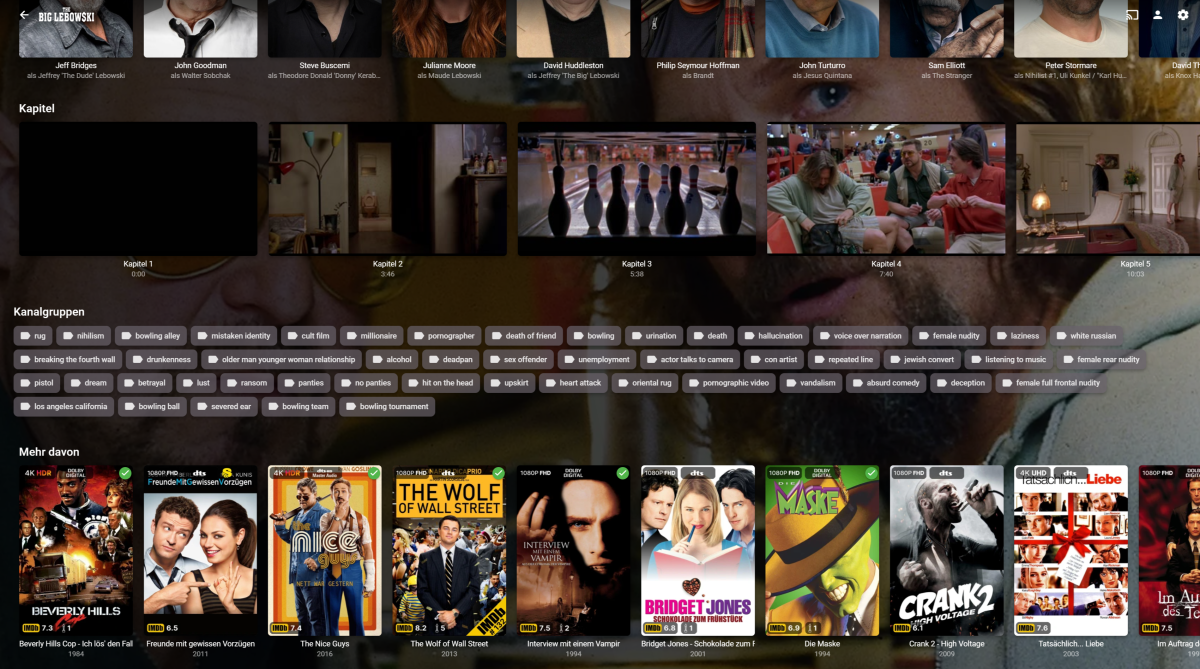
There's so much activity here, that I want to share my efforts too, to replicate the PMM overlay feature in Emby. I also added the possibility to add IMDb Tags to every movie or episode. It's still a lot of work to do, because I want it to be as failsafe and user-friendly as possible. But I intend to share the code, once it's done. Still working on automatic collections, too. If you look at the Overlays you may notice, that I even expanded on some of the PMM features. Instead of just showing the IMDb Top 250 banner, it actually shows the current place. And it will update this regularly based on a cache system, that checks for changes in customizable intervals. I even included an Oscar badge, showing the number of nominations (white oscar) or wins (golden oscar). Could be a bit more visible, but it's a start^^. There is also a mediastinger badge, indicating if a movie has any after-credit scene. Shows and episodes are also included, but that's not finished as of right now.

 5 points
 -
As more and more ISP's are implementing the dreaded CGNAT due to IPv4 availability, there are more and more support requests in the forums on why their emby 'remote access' is not working. Would it be an idea to test for CGNAT when the 'Remote Access' button is selected in emby ? It's a simple test and then the user can simply be warned that emby will not be able to provide a remote access service on this ISP connection. Maybe provide a link to a 3rd party tunnel solution, but advising this is not supported by emby blah blah. For those that are unaware what CGNAT is (Carrier Grade Network Address Translation) - this is the ISP's own 'private' network in front of the 'Public' internet. It effectively 'shares' public IP addresses with all the IP's on their private network. Subsequently you cannot use it for 'incoming' connections - because that public IP is not exclusive or available to you, it's shared with many others behind a 'private' IP address. There are solutions around it - but they involve a network 'tunnel' - and will be beyond a lot of the users networking knowledge and capabilities.3 points
-
I admit I've never thought about your use case before and for sure what the plugin currently is doing is not what one would expect. I'll change this. But it will take some time, because there are also many other things i'd like to adress.2 points
-
When I use search I'd rather see my previous search terms rather than Suggestions. What's the algorithm for suggestions? It seems completely random and I don't recall ever using it. Previous search terms would be much more useful.1 point
-
Believe it or not until yesterday I have never used MB Theater in all the years I have been using MB. I never understood what its purpose was. After installing it on a client PC in my house yesterday I was first amazed at how fast it found my MB server and how simple it got connected. I LIKE IT! At first I was connecting to the server from the client through "shared" processes. Then I switched by using the URL in-home LAN connection. Of these 2 options the in-home worked better for me. Then I decided to make the client its own server as well as having the original server. Now like I said previously, yesterday I decided to try out the MB Theater and by far I like this connection option better than the rest. I do have a question regarding the landing page. The images are so huuuuggge. On the other pages I can use the option from the 3 dots to resize the view to small, small, etc. But on the landing page there is no option for that AFAIK. So how can I mage the landing page to downsize the images. Reason is I have to pan right in order to see the images that do not fit on the page. TIA1 point
-
Thought about doing that but tried to avoid losing all the settings. Finally did that and it worked. No idea how was it broken but thanks alot!1 point
-
Nice thing, but it seems that with this "Solution" there is no automatic grouping of the different versions of a movie. @LukeSo it would be very nice to get support for the Plex way of naming different versions / editions.1 point
-
I'm sorry, I have no examples exept I wrote above, it depends on the size of the library to show up in the startscreen as newest media on the startscreen1 point
-
Thanks!1 point
-
Hi, if it’s reverting back to the default then it’s likely due to the server being denied write access to the location that you configured.1 point
-
I've been experimenting with the 30 second skip functionality that this thread was originally talking about. I have to agree with the Original Poster in almost every way. The AndroidTV app does it weird. It's usable, but I wonder why it was implemented this way? It does not seem intuitive for any type of seeking other than a single forward or backward jump. It would definitely be a good thing to change the jump/seek behavior to work more like the regular Android App does. I like the AndroidTV app better than the regular Android app in almost all ways. Except for this one. Brian.1 point
-
welll...first I thought I did something wrong (was extending a partition) but it seems that TopPicks does not like the new beta .52. 2023-10-12 17:29:38.863 Error GlobalExceptionHandler: UnhandledException *** Error Report *** Version: 4.8.0.52 Command line: /opt/emby-server/system/EmbyServer.dll -programdata /var/lib/emby -ffdetect /opt/emby-server/bin/ffdetect -ffmpeg /opt/emby-server/bin/ffmpeg -ffprobe /opt/emby-server/bin/ffprobe -restartexitcode 3 -updatepackage emby-server-deb_{version}_amd64.deb Operating system: Linux version 5.15.0-84-generic (buildd@lcy02-amd64-005) (gcc (Ubuntu 11.4.0-1ubuntu1~22.04) 11.4.0, GNU ld (GNU Binutils for Ubuntu) 2.38) #93-Ubuntu Framework: .NET 6.0.20 OS/Process: x64/x64 Runtime: opt/emby-server/system/System.Private.CoreLib.dll Processor count: 8 Data path: /var/lib/emby Application path: /opt/emby-server/system System.MissingMethodException: System.MissingMethodException: Method not found: 'System.Threading.Tasks.Task MediaBrowser.Controller.Library.ILibraryManager.RemoveVirtualFolder(Int64, Boolean)'. at Emby.TopPicks.SpotlightServerEntryPoint.CheckUpdateTopPicksLibraryOptions() at System.Runtime.CompilerServices.AsyncMethodBuilderCore.Start[TStateMachine](TStateMachine& stateMachine) at Emby.TopPicks.SpotlightServerEntryPoint.CheckUpdateTopPicksLibraryOptions() at Emby.TopPicks.SpotlightServerEntryPoint.Run() at System.Threading.Tasks.Task.<>c.<ThrowAsync>b__128_0(Object state) at System.Threading.SynchronizationContext.<>c.<Post>b__8_0(ValueTuple`2 s) at System.Threading.ExecutionContext.RunForThreadPoolUnsafe[TState](ExecutionContext executionContext, Action`1 callback, TState& state) at System.Threading.QueueUserWorkItemCallback`1.Execute() at System.Threading.ThreadPoolWorkQueue.Dispatch() at System.Threading.PortableThreadPool.WorkerThread.WorkerThreadStart() at System.Threading.Thread.StartCallback() Source: Emby.TopPicks TargetSite: Void MoveNext() Only way to have a working system is to remove the system before upgrading to .52 and not install the plugin. And I would really like an option where I can really purge anything the plugin created.... If I uninstall the plugin there should not be any TopPicks folder anymore (or rather ANY Plugin ) Also tried to manually remove remnants.... did not help. And after restoring a backup 5 times and trying stuff out...I think I will have to wait till it works again (going back to .51 restores functionality again so it might be some of the changes)1 point
-
I'm pretty sure emby is not doing this - it will just use whatever name it gets from the metadata provider - and it will have no knowledge on the media resolution.1 point
-
this worked as advertised after retesting! Thanks for your patience.1 point
-
Sorry. After further investigation, it appears that the issue was a congested backhaul at my ISP. It took several days to find it and fix it, but it's working now. I'm not sure why it affected tvOS the most and seemed to work on iOS and macOS. Is it possible that tvOS implementation is more sensitive to latency/loss?1 point
-
This resolved the issue. I was using the Windows Store version. The installer version works as expected. Thanks for your help! I really didn't want to have to reencode all of those episodes.1 point
-
Domain queries to DNS respond with IPv4 and IPv6 addresses. The calling application can use either and in recent years there's been a shift in OSs and apps to prefer IPv6 when enabled. All I'm suggesting is a quick test to disable IPv6 on the Shield if it's enabled. The setting is a simple toggle and if it does not make a difference in connection time then it's not the problem and can be taken off the list. nslookup www.mb3admin.com 9.9.9.9 Server: 9.9.9.9 Address: 9.9.9.9#53 Non-authoritative answer: www.mb3admin.com canonical name = mb3admin.com. Name: mb3admin.com Address: 173.230.139.54 Name: mb3admin.com Address: 2600:3c02::f03c:91ff:fed7:7fa81 point
-
going to mark this as solved, surely one of these will work. thanks!1 point
-
You are right in that the 10 second thumbnails mostly fixed my black thumbnail chapter images issue. So thank you. This is a pretty murky area of Emby. It's not clear to me why the 10 second thumbnail process produces CHAPTER thumbnails that are not at the same spot as chapter thumbnails only. I suppose it doesn't matter all that much, but it is quite confusing for someone new to Emby that expects chapter only thumbnails to produce visible images (as opposed to black screen transition images). Thanks again, Brian.1 point
-
Yes, no, maybe, wasting my breath?1 point
-
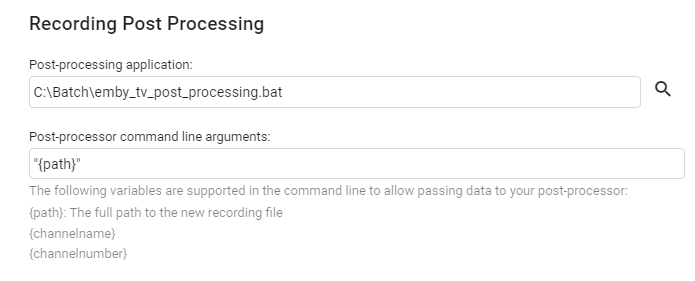
In Live TV > Advanced You just need to write a small script to do this (in my case just a windows batch file) Mine creates a mkv using mkvmerge - but you can replace that with ffmpeg if you like to create an MP4 using the same logic. example batch file - this removes the original .TS recording if there is a sucessfully created MKV of the same name. @echo off set logfile="c:\batch\emby_tv_recordings_log.txt" echo Emby TV Post Processing echo. echo [%date% %time:~0,8%] Info EmbyTV Processing : "%~d1%~p1%~n1.ts" >> %logfile% "C:\mkvtoolnix\mkvmerge.exe" -o "%~d1%~p1%~n1.mkv" --audio-tracks eng --no-buttons --no-attachments --no-global-tags --no-track-tags "%~d1%~p1%~n1.ts" if %errorlevel% equ 0 ( echo [%date% %time:~0,8%] Info EmbyTV Processed : "%~d1%~p1%~n1.mkv" >> %logfile% if exist "%~d1%~p1%~n1.mkv" del "%~d1%~p1%~n1.ts" ) else ( echo [%date% %time:~0,8%] Error EmbyTV File Not Processed : "%~d1%~p1%~n1.ts" >> %logfile% )
 1 point
 -
Hi Luke. Can we maybe get it soon? I’m dying to try the new version Also just for curiosity, why Mac OS beta version is not included like the rest of the version every beta build?1 point
-
Thank you for the answer. I have found the path in my Qnap. If it is useful for someone it is: cd /share/CACHEDEV2_DATA/.qpkg/EmbyServer/programdata/root/default I have seen that the line of ContentType in the "options.xml" file is missing in the affected folders. Later I will try to add the line in one of them and will see. Regards.1 point
-
The short version is, the Samsung video player doesn't support the styles with embedded subrip.1 point
-
Probably browser caching.1 point
-
Hello, Since I was having these issues I've upgraded my hardware, moved Emby into Docker and moved onto the Beta program. I've had no issues since. Thank you.1 point
-
Hello, Since I was having these issues I've upgraded my hardware, moved Emby into Docker and moved onto the Beta program. I've had no issues since. Thank you.1 point
-
For those of you using Nginx for reverse proxying, it had been implemented in such a way to prevent this sort of attack.1 point
-
There are some detailed tests posted on doom9 in regards to this. The thread linked has almost a decade worth of information. Nvidia is faster, but Intel is a close second and is superior in every metric. Though we are at the point where both NVENC and QSV transcoding are at the level of x264 slow (as Emby still doesn't do HEVC encoding, and no idea if or when AV1 will be added) in regards to quality. But even for HEVC, Intel QSV is superior, and their AV1 arguably beats software AV1 (mainly cause it's not a single threaded piece of crap).1 point
-
I would love this feature. And thanks for your help above, pünktchen. You've helped resolve my confusion.1 point
-
This is how it works currently: When the guide refresh happens the plugin calculates the duration between the current time and the last guide refresh time. If that duration is greater than what is set in the plugin for "Suspend ...", then new guide data will be created. In your example the biggest gap is between Sunday and Wednesday with 72 hours. So you should set "Suspend ..." to 72 or less. That is the normal behaviour with "ordered episodes" when a guide refresh takes place. I plan to change all this, so that new guide data for a channel will only be created if that channel runs empty. Other channels that still have program data will be skipped.1 point
-
Hi All, I got a new laptop recently with an i5 1245U CPU (2P cores, 8E cores) and it has the Intel iRIS Xe iGPU. I wanted to see it's transcoding performance vs my Emby Servers i7-12700K with a UHD770 iGPU The test was just a 240 second test from 10 mins in on a 25Mbit 4K HDR HEVC file to an 8Mbit 1080p SDR h264 with Tonemapping. Audio just copied to keep it out the equation. To my surprise - it's identical (~200fps!) - suggesting it's using exactly the same enc/dec silicon inside the chips. (maybe?) I used the emby ffmpeg build and config (modified to write the file, not stream it) The ffmpeg logs/output (+ the syntax I ran) is below for those interested. irisXe.txt uhd770.txt I'm excited to see how the dGPU's (Xe MAX) from Intel (A380 etc) perform now - as they will have dedicated memory etc - so maybe they will be even faster - plus of course AV1 encoding and deep link integration with existing iGPU's ... Anyway - that's it - it's not a great test as it's just one sample - but just thought I'd report on my findings. @softworkz1 point
-
Clean way to do this is with a service unit override. 1. Stop emby and restore the original unit file. 2. Verify that the unit file has the original ExecStart command: $ systemctl show emby-server |grep ExecStart 3. Create a unit override to add the Nice parameter. This will open an editor where you can add Nice=-5 to the service block. $ systemctl edit emby-server Add: [Service] Nice=-5 4. Exit and save the override file. Y and enter for the prompts. 5. Start the Emby server. And run top/htop to verify the new nice value.1 point
-
So there is a C++ version that is working on enhancing subtitle generation to be real time: https://github.com/ggerganov/whisper.cpp However, even before realtime usage is feasible for everywhere (which since transcoding isn't and won't ever be I don't think this should be a limit) it would be a nice to have for offline scanning and building of .srt subs for media that no online database match is available. Emby allows best fit for downloaded subs, even though that results in issues when non-knowledgeable people use it as it can improve things and this could help in a similar way when there isn't even a close fit result online.1 point
-
This really needs to be bumped up, as those Suggestions mean absolutely nothing without context and feel out of place there.1 point
-
I have followed OpenAI's projects, many of which are mind blowing. I'm not sure about this one. Meanwhile it is well-known what can be achieved by training transformer models with gigantic sets of data. In that case, the Google speech recognition and audio transcription abilities are more impressive as these are doing it in real-time with minimal resources. Someone has extracted that functionality to make it work standalone, but it's a kind of hack of course. Still interesting. What would be kind of a holy grail in that area would be to: Recognize speech Recognize speakers Create subtitles from recognized speech Translate subtitles to another language Filter out the original voices from the audio Use text-to-speech to let the actors speak in a different language A while ago, I had made an experiment regarding the latter point: https://user-images.githubusercontent.com/4985349/136570224-88a65ced-bb98-49fa-bcd9-1e766f90af26.mp4 https://gist.github.com/softworkz/3425fc196f5c7eac9e842a655c7e1e5c It's the same language and this version mixes the original and the TTS voices for comparison. Though, all of these things are experimental - only the Google ASR would be production ready, but it's not free to use (it works in the browser, but you are not even able to copy the transcribed text in any way). And generally: features that do not work on all platforms, require excessive hardware, require installation of frameworks like Pytorch, require massive download of data, require manual installation and intervention and eventually cannot even work in realtime as part of Emby's media delivery pipelines - are not a great match for integration into the Emby core server (or Emby's ffmpeg) as it wouldn't reach the masses with all those preconditions. It might be a nice idea for an Emby plugin, though. Also I'm sure that at some time there will be approaches for audio transcription that are more handy and universal to integrate.1 point
-
Hi, yes I think this is a good idea. Thanks.1 point
-
Prowlarr is just a index manager.... not even close to a media server.0 points