Leaderboard



Popular Content
Showing content with the highest reputation on 10/11/23 in Posts
-
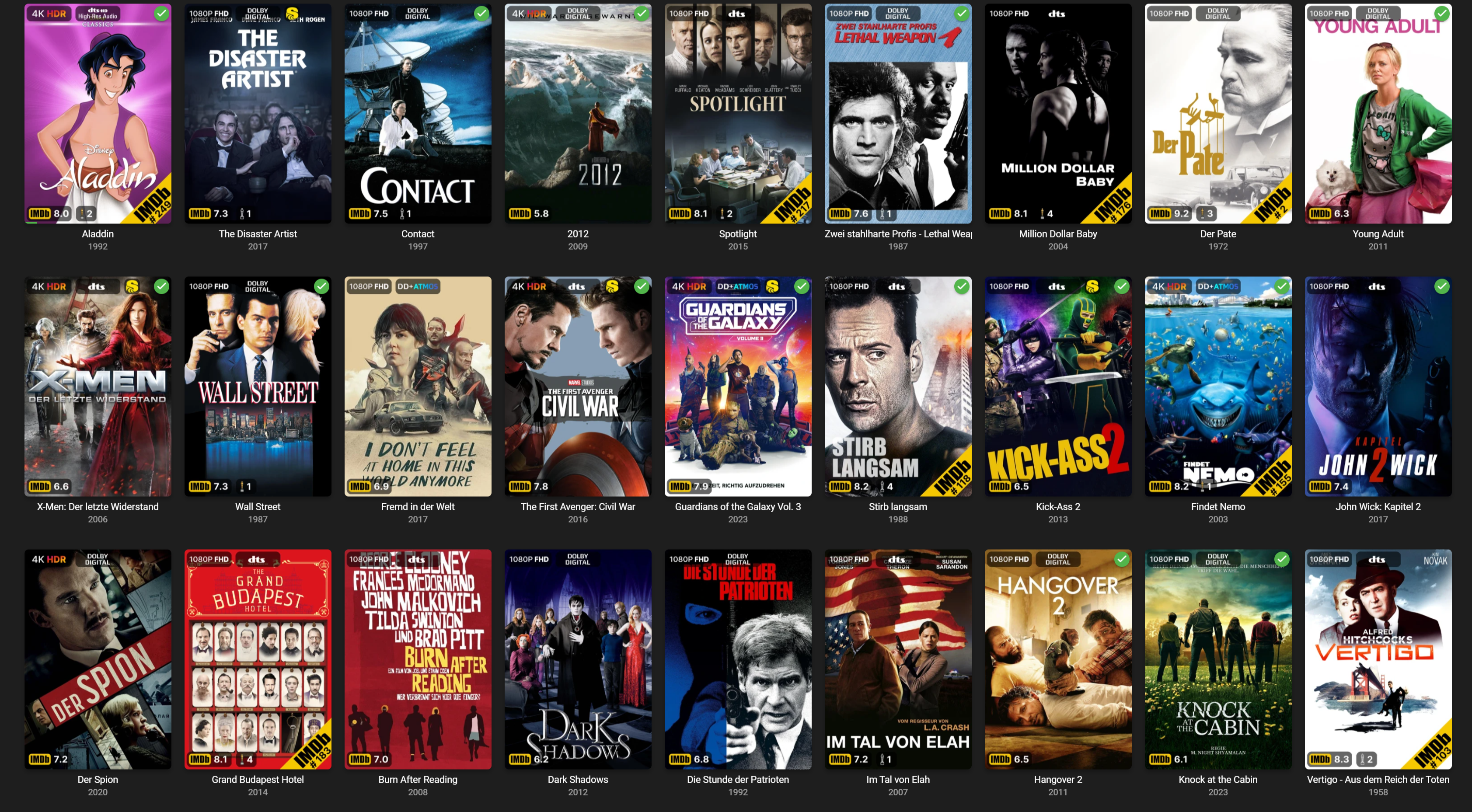
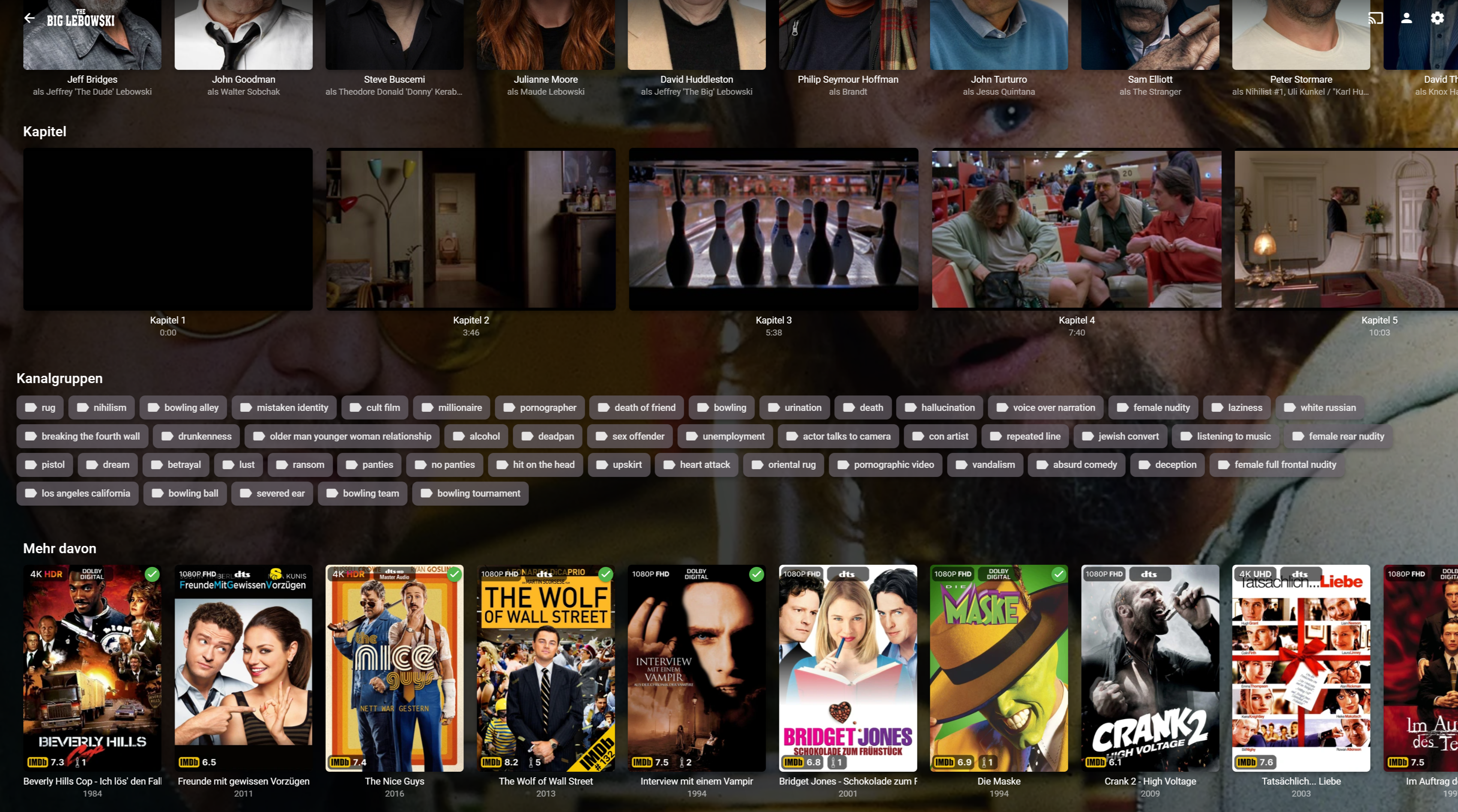
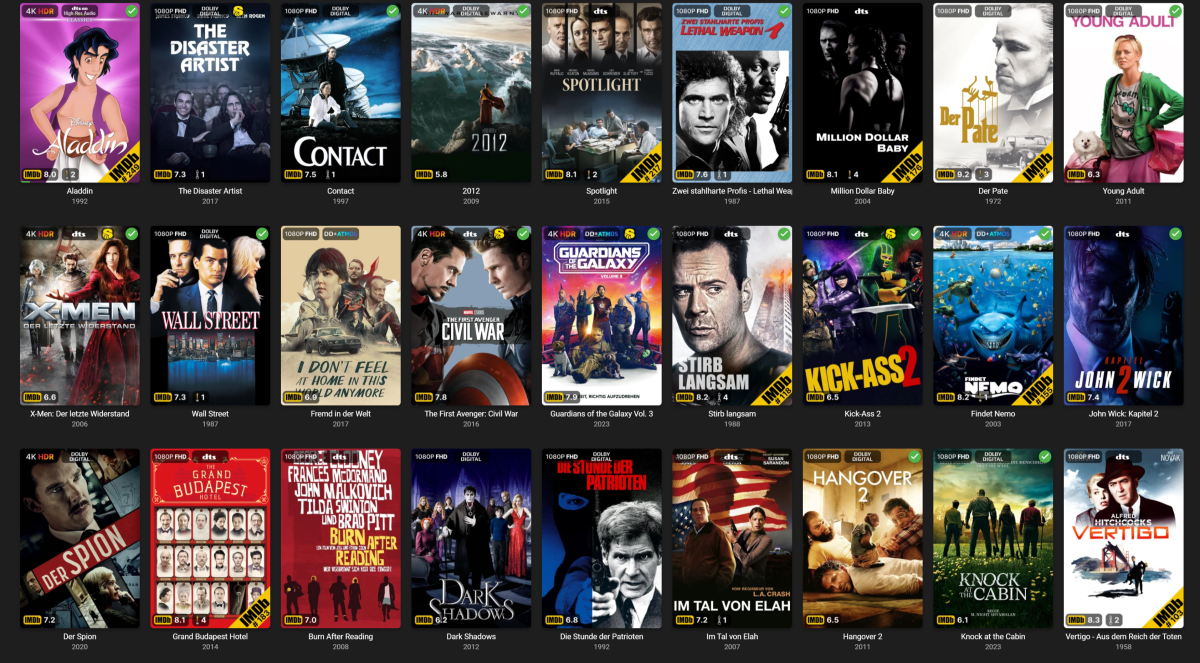
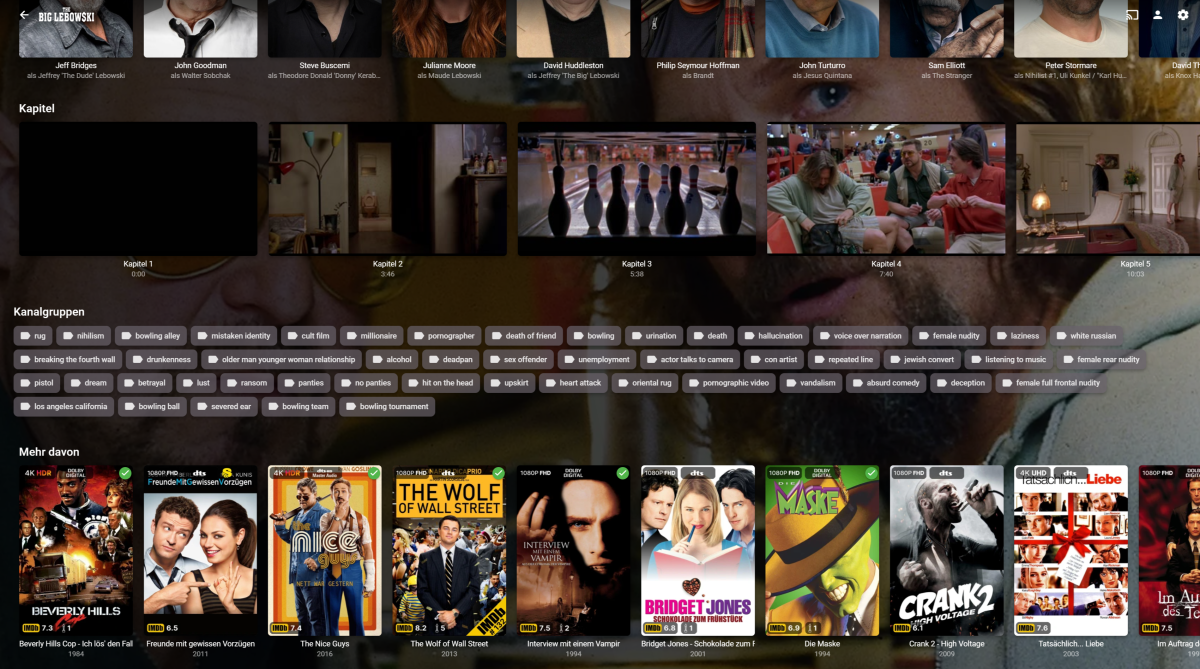
There's so much activity here, that I want to share my efforts too, to replicate the PMM overlay feature in Emby. I also added the possibility to add IMDb Tags to every movie or episode. It's still a lot of work to do, because I want it to be as failsafe and user-friendly as possible. But I intend to share the code, once it's done. Still working on automatic collections, too. If you look at the Overlays you may notice, that I even expanded on some of the PMM features. Instead of just showing the IMDb Top 250 banner, it actually shows the current place. And it will update this regularly based on a cache system, that checks for changes in customizable intervals. I even included an Oscar badge, showing the number of nominations (white oscar) or wins (golden oscar). Could be a bit more visible, but it's a start^^. There is also a mediastinger badge, indicating if a movie has any after-credit scene. Shows and episodes are also included, but that's not finished as of right now.
 2 points
 -
So I got it to work. Using the Browser Developer Tools window, I was able to see the Emby Url. 1. Read the Media Stream to find the index of the subtitle: "Type": "Subtitle", "Index": 3, "IsExternal": true, "IsTextSubtitleStream": true, "SupportsExternalStream": true, "Path": "/Movies2/Movies/C/Carry On Cowboy (1965) [tmdbid=5065]/Carry On Cowboy (1965) [tmdbid=5065].en.srt" 2. Use this url to delete the subtitle: http://192.168.2.16:8096/emby/Videos/419462/Subtitles/3/Delete?api_key=xxxxxxxx6bec4d5dad49b0b448da542 Thanks for all the help.2 points
-
Have to agree - on the SAME HARDWARE - AndroidTV has been significantly faster than Android for a good 2 years+ and still has the edge. The latest Android beta release has got it to 'acceptable/usable' standards, but it is still not as 'slick' as the AndroidTV App in terms of navigation and response from the remote. On new hardware, you may not 'see' the issues with Android, as they are cloaked by the performance of the device - but on older hardware (Gen 2 Fire TV sticks in my personal experience) previous Android releases ran very 'laggy' - sometimes not accepting 'input' until you wait for a second or two, but AndroidTV (for FireTV) ran almost as fast as the Shield - and that's on a 2016 device so 7 years old.2 points
-
It would be useful to have a "Thumbs Up/Thumbs Down" for music files, rather than just a "heart." Some tracks are in our libraries and we don't want to delete them, but we would like to exclude them from play when we queue up a full album or create a playlist by adding full albums. Examples: an awful track on an otherwise good compilation disk, or a spoken-word intro track on a music album. Being able to easily mark such tracks with a "thumbs down" would be very useful.2 points
-
I agree, being able to offset audio would be a great feature.2 points
-
What can I say...I'm trying to hint politely for some news on progress, difficult as it might be after 3 years of bugger all.2 points
-
You've grown up with watching live tv but on television only runs garbage? You have a big library but don't know what to watch next? Then this for you: "VirtualTV" - my new live tv plugin that allows you to create custom channels based on conditions of your Emby library content. What's missing: Maybe codec conditions Known problems: Needs Emby Premier to work (Playback) Emby's live tv and playback api is very limited, so i've had to make some detours to get things working. The plugin has two general playback modes: "continous" and "playlist" playback. With "continous" mode you can also choose between "live", which bahaves like real live tv or "archive", which plays the videos from the start. In "Continuous" mode multiple videos are queued and concatenated to one big file with the help of ffmpeg. To make this happen every video in the queue has to have some common features (video and audio codec). That's why it often happens that the video also has to be transcoded by ffmpeg. For transcoding the plugin relies on Emby's internal transcoding engine. If there's a problem, not uncommon with hardware acceleration enabled, the plugin also has a problem. Nothing i can do about it. The availability of subtitle tracks is mostly dependant of the Emby user playback settings. In continous playback mode only one (the default) subtitle track can be used and this one has to be burnded into the video (transcoding takes place). In "Playlist" playback mode the videos are pushed as a playlist to the Emby clients. It's like you would play your videos directly from your libraries. This way you get all the features you are used to. Audio and subtitle selection, pause, skipping around and similar things. "Native" playback method was created by the Emby Devs. Similar to Playlist playback it will play the real library videos, but with the big difference that playback is purely initiated by the client app, without any remote command execution. This is why it also works for Roku devices on a WAN network. And although the real videos are played, the whole thing is treated like live TV. This means that channel zapping is possible and no dialogs for playing the next episode are displayed. Unfortunately, the new playback method does not yet support all features. As the name "Archive" suggests, it will currently always start all videos from the beginning. In addition, only very few Emby apps automatically advance to the next video. If you want it to be improved even further, each of you should raise your voice in this thread. To get things started install the plugin via Emby's plugin catalog and restart Emby. Setup your channels with a name and number and choose your playback mode. In the channel conditions you'll have to select an Emby account. This account is used to get library access, respect parental rating, reading watched states and selecting the stream language. At least one textual input field of the conditions has to be filled to get some program data. Fields with an asterisk are either evaluated with an "AND" or "OR" condition among each other. Finally, if you've chosen "Continous Playback" for one of you channels, take a look at the transcoding settings. Save your channel line up and manually trigger a "Guide Refresh". Now have fun! Version History: After a plugin update, always clear your browser cache. If your settings still don't load in the config screen, you have to move the "VirtualTV.xml" out of ...\plugins\configurations and restart Emby. Start from scratch. 2.0.0.0 Unlimited number of channels; New playback method "Native (Archive)"; New security concept for the Export API 2.0.2.0 Performance improvements to Guide Refresh; Preview for Add/Edit Channels; Option to disable Program indicators 2.0.3.0 Fixed missing Playlist sort order for some Content Types; Added support for Seasons with Content Source Collections 2.1.0.0 Selectively enable channels for specific users; Create copies of existing channels; Ordered unwatched episode playback 2.1.5.0 Added option to (auto)enable channels on a specific date range; Bug fixing1 point
-
I like to have complete albums but sometimes I really dislike some of its tracks at the first listen. I'd like for them not to appear in the playlist, wether it's from Play All button on the album page or the whole music library Shuffle button, but be able to play them manually (by clicking on it or adding it the to playlist myself). Just like knowing it's here and that I can give it a new try sometimes What do you think?1 point
-
FYI, there's a flaw in the specification for HTTP/2 that is actively being exploited (specifically, DoS attacks). MS has released updates that mitigates implementations such as .NET (Kestrel), though note that I believe the current mitigation disables HTTP/2. The long-term fix will be some sort of rate-limiter: https://www.cve.org/CVERecord?id=CVE-2023-44487 Details of the fix and the two new AppContext properties can be found here: https://github.com/dotnet/announcements/issues/2771 point
-
Resolved in a different thread, thank you. Please close this one.1 point
-
It is working for my Pixel 7 Pro on Android 14. Thanks for the help and sorry to have kept bothering you with this when it was a Google problem.1 point
-
There are some detailed tests posted on doom9 in regards to this. The thread linked has almost a decade worth of information. Nvidia is faster, but Intel is a close second and is superior in every metric. Though we are at the point where both NVENC and QSV transcoding are at the level of x264 slow (as Emby still doesn't do HEVC encoding, and no idea if or when AV1 will be added) in regards to quality. But even for HEVC, Intel QSV is superior, and their AV1 arguably beats software AV1 (mainly cause it's not a single threaded piece of crap).1 point
-
Thx for fixing ASS subs...I use them constantly. Also, I have to say that gray, light gray and dark gray are great options for reducing subtitle blooming (I was using ASS for this, but now I can use SRT subs). There is one tiny issue: gray is darker than dark gray. Not a big problem, just saying... I don't have a problem with SRT subs and format styles... ( Samsung Q9FN + Emby for Samsung 1.6.4. )1 point
-
Because when IPv6 is not in use on a LAN but devices still run enabled with a link-local (fe80::) address Emby will on some platforms and for some reason attempt to use IPv6 even though it's not a valid routable addr. Hence the timeouts when connecting to internet resources. We've seen this on some of the servers when running on Linux and it's possible the ATV app might be doing the same thing. If IPv6 is in use and properly routed then it should work just as it does with IPv4.1 point
-
Good news! Upgraded Pixel 5a from 13->14. Slider bar worked before, and continues to work now. Upgraded Pixel Tablet from 13->14. Slider bar didn't work before, but DOES work now!1 point
-
Not sure if a fix was found but, I figured out that if I disconnect my steering wheel from my PC the problem was fixed1 point
-
Using the browser debugger to monitor requests is a good way.1 point
-
My phone (Pixel 5a) had a working slider, and was running Android 13. I'm installing the update to 14 now and will report back. My tablet (Pixel Tablet) did not have a working slider, and was running Android 13. I'm installing the update to 14 now and will report back.1 point
-
I updated to Android 14 this morning, and I can confirm the brightness slider shows up. It's a bit wonky because the brightness slider partially overlaps with other controls now, but at least it's there.1 point
-
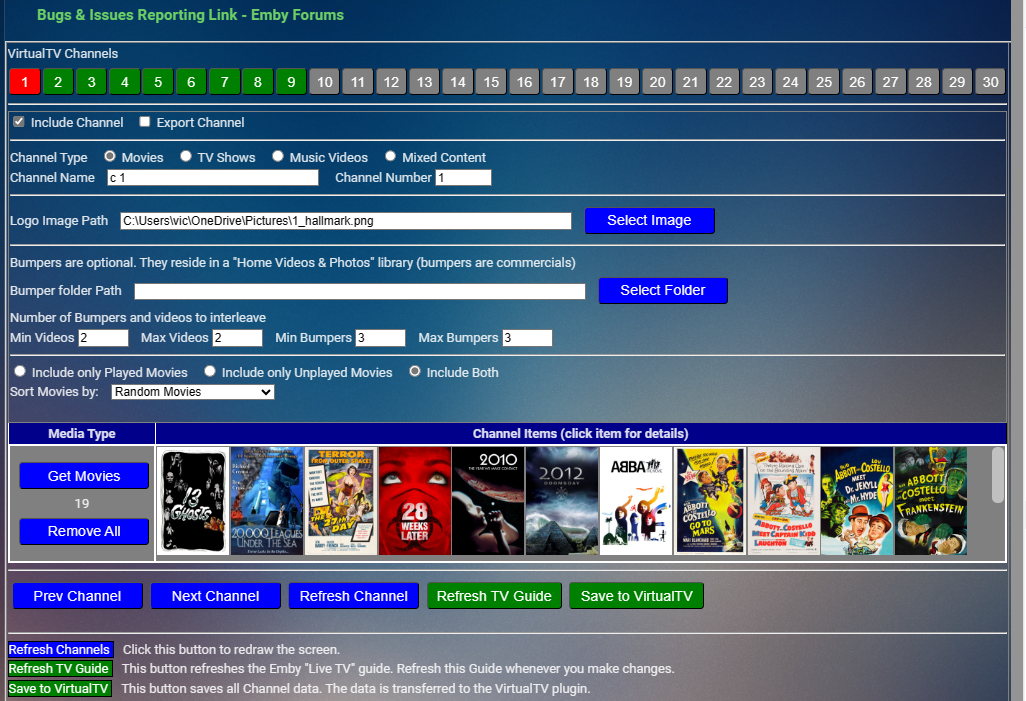
Attached is the channels plugin. It's not perfect but is a good starting point. It will import all of your VirtualTV data except the media selections. You will use this plugin to select the media you want for each channel. When you click "Save to VirtualTV" your media selections and any changes that you make to the metadata will be exported to VirtualTV. Let me know about bugs and recomendations you may have. Vic Emby.Channels.dll
 1 point
 -
Nice! Thank you for your input! I don't and I won't have any AV1 files on my server, so that's not so important to me. Important is just a huge quantity of simultaneous streams in good/best possible quality. I'm already running an RTX 3090 and have already bypassed the inherent transcoding limit. It's just more of an inconvenience to have to sometimes wait for weeks until the maintainers of that Nvidia hack find the time to push their code to a new Nvidia base driver. But actually I think I'll be fine for a bit longer with the current setup. I also did a bit of googling and research on emby's forums as well. The real selling point to me for having an AMD card over an Nvidia one is general "problems" with Nvidia in conjunction with my Linux/Wayland/KDE setup. Despite that, I'm just a tech junkie and those Quadros looked too juicy this morning1 point
-
That depends on whether or not @Cheesegeezerwants to merge the pull request (and make the plugin available in the catalog), which is not my call. But you can compile it yourself. If you don't know how I can send you a compiled version but you would have to trust me not to include anything malicious.1 point
-
Content-Type appears to be an issue. Weird. Thank you everyone for responding. For completeness, this appears to work. curl --location 'http://server:8096/emby/Library/Media/Updated' \ --header 'X-Emby-Token: XXXXXXXXXXXXXX' \ --header 'Content-Type: application/json' \ --data '{ "Updates": [ { "Path": "/mnt/Media/Movies/Movies-Temp/3 Demons (2022) [imdb-tt13173736]/20_14_02.mkv", "UpdateType": "Created" } ] }'1 point
-
Whats the state of play here? Thanks1 point
-
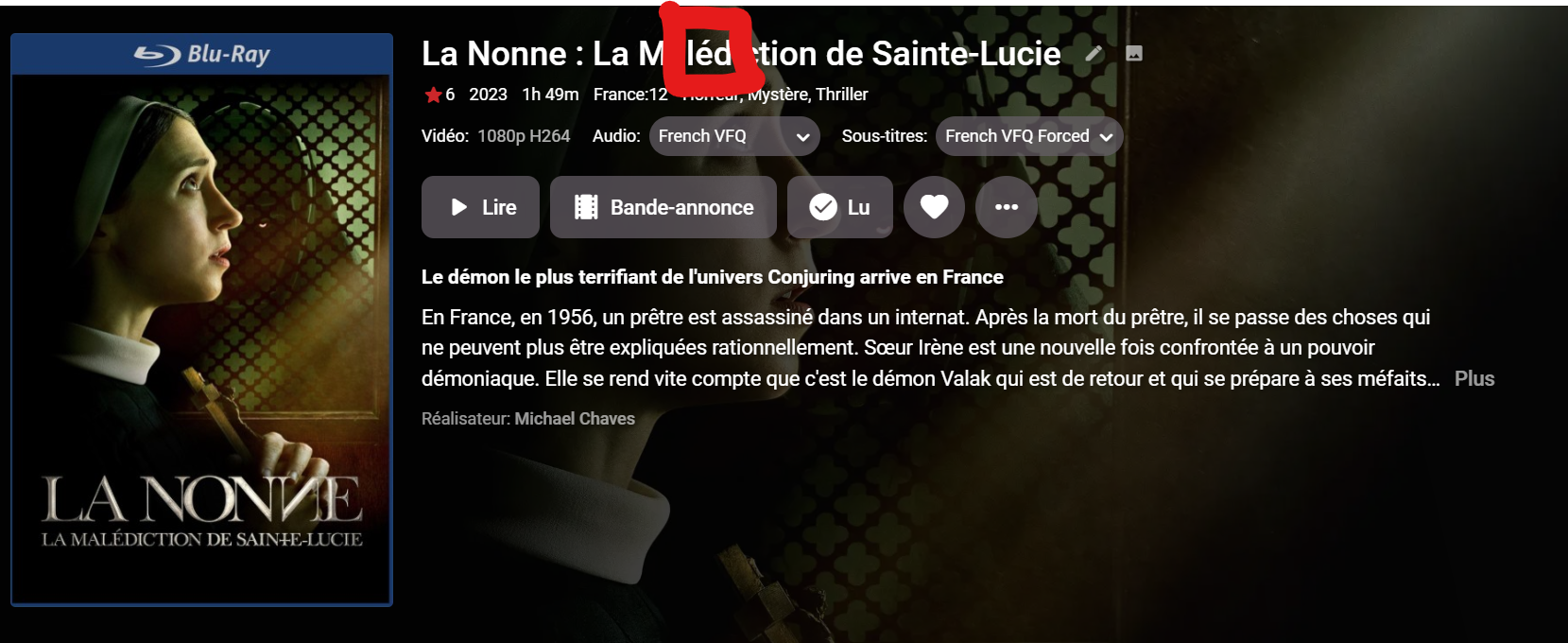
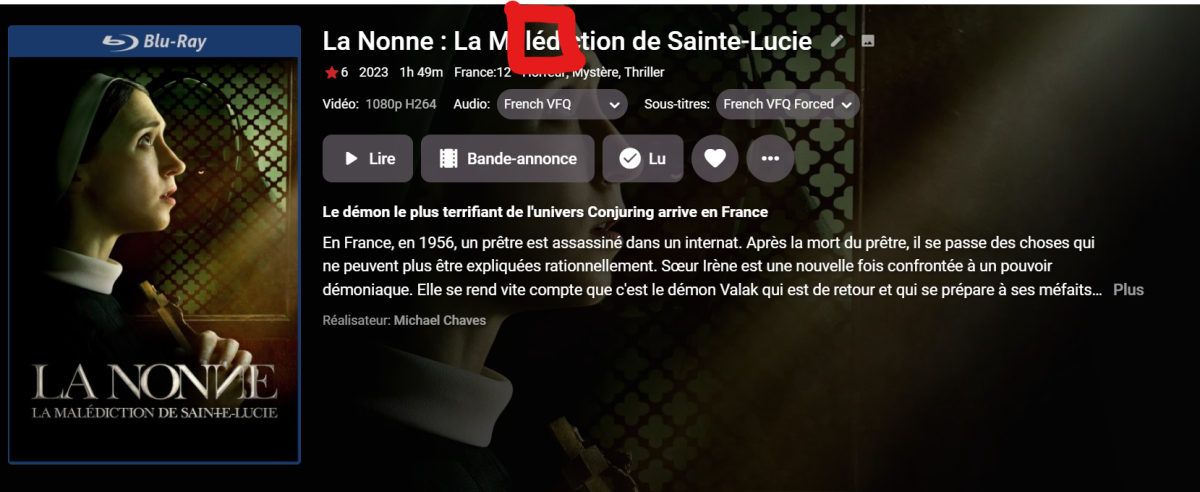
Yes I have this example : La Nonne - La Malédiction de Sainte-Lucie (2023) https://www.themoviedb.org/movie/968051 @rbjtechThanks a lot, I hope this time you will find
 1 point
 -
DRAFT .... v 1.0.1.35 Added support to include any BCP47 extended language codes read from the BCP47 element in the MKV. ie Spanish (Mexican) Set under Audio Settings - Default = OFF If selected, then the BCP47 sub language is inserted - ie If Tag's are selected - then it will also write the full language -- Need to do a little more testing - then I'll post the DLL.


 1 point
 -
The server provides this as a complete string to the clients via a new field in the API response. Most apps will get this with the next update automatically. Some (which auto-update from app.emby.media) already have it, and special clients like Roku and ATV will need to be changed to show it.1 point
-
Great, thank you1 point
-
"Ich habe die Lösung gefunden" means "I found the solution" All fine at the moment, no further support needed.1 point
-
Thanks for giving me a direction. It turned to be an NFO file that was in the wrong place so I deleted it and now all is good. Cheers!!!1 point
-
Sorry. I never got the notification for this. I'm on 3.0.0 and have been since you replied.1 point
-
We'll waddaya know. Went to play it back again to capture log info and it played.... Lol...1 point
-
Hi there, let's look at an example. Please attach the information requested in how to report a media playback issue.1 point
-
Your Just Added folder has been identified as a single TV show. It's not about different views - some item in that folder literally broke parser. Step 1 would be solving that - and then you'll have same display as in MB1.1 point
-
Nothing TVNext couldn't handle, but who am I telling that... For the others, see here and feel free to keep pressure high on the topic:1 point
-
I actually have no TV series on my test server, I will add some and test it as soon as I can to see what is wrong.1 point
-
What a reply. What I'm asking is performance to be more on par of what the Android TV app is. If we want to talk about a performance device, I have an Apple TV 4k gaining dust and only being used for Home Kit purposes until the app is updated to support all the missing features.1 point
-
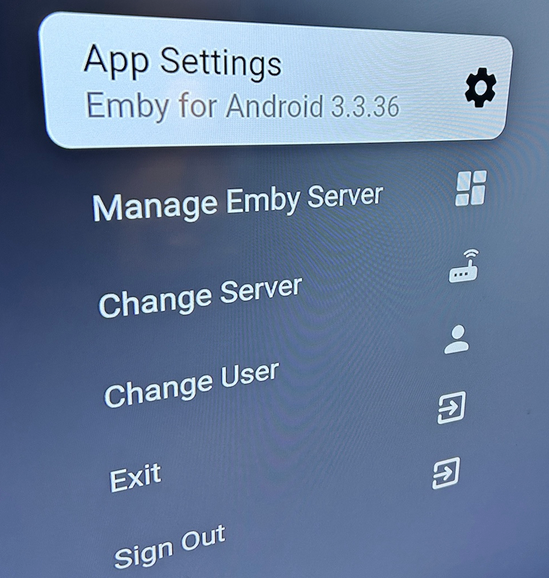
Navigating is sluggish compared to the Android TV app. I've attached a video to show how it operates in comparison. (This is on a fresh reboot of my Tivo Stream 4k stick. Seems to get much worse over time) When scrolling the tv menu, this is me holding the button down. (This becomes even worse when watching live tv and trying to scroll the guide) It's also missing keypad number changing and the channel up/down buttons are backwards. I can provide more examples if needed. Untitled.mov
 1 point
 -
That's plenty to show that the SSL is working as it should. Whether that gives the kind of security you feel you need is another question - but if it wasn't enough, you'd probably already realise that. Paul1 point
-
You'd think this would be easier by now! Those trunas guys!1 point
-
this plugin wont come ;-). they say it will come, since 2011 or so xD1 point
-
@LukeCan you answer this question?1 point
-
HI, you can, by accessing Playlists using the Playlists tab in your music library.1 point
-
Thnx for the change from = to - now it can be fully supported by Radarr and Sonarr. And i can finally update the naming scheme for another Guide1 point
-
My 2 cents, focus on improving TV clients, Plex was by far the easiest and more updated app for those without an external device like ATV or Nvidia Shield.1 point
-
I agree with this. Specific profile levels should be shown in the media info section perhaps but as general display most end users won't know which profile means what. I also don't agree as I'm sure most of the people "investing" in a DV TV did so because the sales guy at the store said "You want Dolby Vision. Its better."1 point
-
yeah i must admit this is one of my main pet hates about emby as i dont want certain tabs to be shown, ie the folders tab as i feel its for the back end admins not the users but i guess time will tell if we can get this request1 point
-
This generic response reminds me of my parents telling me "maybe" when I was a kid. 5 years for a rather simple request just seems pretty crazy tbh.1 point
-
So you had a good quality fast platform that worked well. But you got rid of it because it was "more than you needed". But now your devices that cost a tiny fraction of what the shield cost don't perform well. This should not surprise you. If you want performance, buy performance. If you want cheap buy cheap. Perhaps there is some optimization to be done on the Android Emby app. But asking for optimization make up for poor performing hardware isn't a reasonable expectation. I own a Shield because it performs the best. You probably should too. Looks like they are available used for about $100. That's a nice bargain compared to the new price I paid 3 years ago. Fast, cheap, good. Pick 2. You can't have all 3. This applies to an enormous number of things in life. Brian.0 points