Leaderboard



Popular Content
Showing content with the highest reputation on 09/18/23 in Posts
-
We'll hopefully be switching to the .com soon. We have a nice agreement setup with them so that Emby Premiere users won't need to enter open subtitles credentials anymore.2 points
-
There is no way to stop the buffering when a 4k video needs to be transcoded other than replacing said devices that are causing the transcoding to happen in the first place. If your family are so impatient that they can't wait 10 freaking seconds, then either replace those devices with Android ones, or create accounts for them and BLOCK them from playing the 4k content. Ideally, everyone should be using Android devices as they have the absolutely least problems out of every single device that Emby supports. My i3-1115G4 laptop server has no wait time when direct playing any 4k content, while also transcoding multiple 1080p vidoes for people on crApple devices. As for your setup, the P4000 is fine, as it will do the job at minimum. Your bottleneck is usually the transfer of data between your file server and your rendering server. Again, 4k content should be direct played, and anyone who can't wait for the transcoding to take place either needs to learn patience. If they can't wait, then either replace their devices with ones that will direct play them, or stop them from playing the all together. It's why I keep my 4k content separate, especially DV content. It's easier to keep users who can't play this content out of those libraries than to listen to them constantly complaing about how "this movie sucks and looks like garbage" when the problem is either their stupid internet, or their choice of a horrible device that I absolutely refuse to help them with because I told them the experience would be bad. Just because you can transcode 4k content, doesn't mean you should.2 points
-
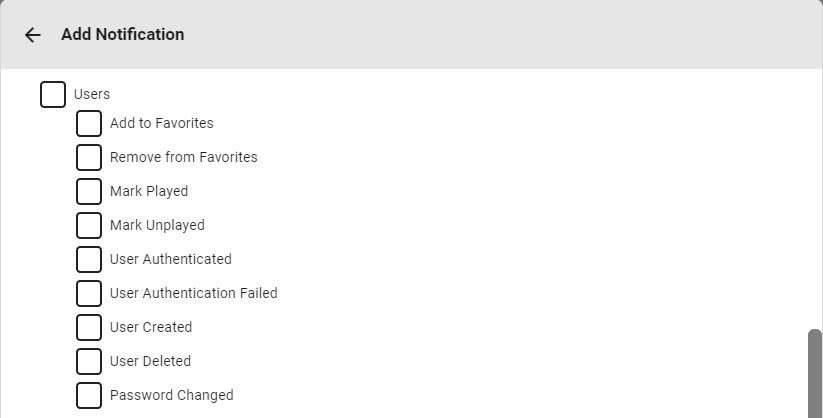
Notification system is reworked for upcoming 4.8 release, it will also expand on User events (already available in 4.8+ beta branch):
 2 points
 -
Hi. Can you please add an option in the settings to hide the "Media Info" section? When using emby on my phone, it pretty much takes more then half of the page. On top of that, not having it be showing, it would clean up the page. At least gives us that option to hide it. Thanks.1 point
-
Luke I honestly think all I did was change my DNS in Synology Network Network Interface Edit Manual Confgiuration Use manual configuration Edit, I did type in Googles DNS 8.8.8.8 and applied. But now I see that it did not stay there and my ISP DNS is back in there, BUT im able to get the GUIDE and its there now. Also, I could NOT view the SYNOLOGY ALL Packages in the package center and now I can. To summarize I have NO idea what I did to resolve. It's working. Sorry I could not be more clear.1 point
-
Thanks for confirmation of continuing development. I'll keep an eye on it for further development. Thanks, Brian.1 point
-
More options to control this are certainly possible for future updates. Thanks.1 point
-
You don't want to do that, because our update notification comes 1-2 days before the Samsung 30 day usb expiration will kick in. If you suppress our notification, then when the usb expiration kicks in you'll get a cryptic error message from Samsung and you might have no idea what's wrong or what to do.1 point
-
I haven't pointed fingers or blame at anyone. I've just been stating facts, and the facts are, they don't allow all app developers to release worldwide, nor do they allow updates to models older than five years.1 point
-
Hi, please take a look at our guide and let us know if this helps: Remote Setup Thanks.1 point
-
That's sad. And not very user-friendly. I think I'll stick to Android TV from now on. At least you can somewhat automate updates there without user data loss even if you can't install them from the store. Also Emby for Android feels better than Tizen and WebOS versions. @LukeCan you at least add some kind of option to disable or make less frequent app update notifications on Tizen? Yeah, it's not so long when you're doing it one time, but every time doing manual removal, then manual install then typing all credentials is frustrating. I can live without updates for several months if I know that it's me who opted out from them.1 point
-
I see this issue constantly on current beta.1 point
-
You're correct FrostByte, even if I attach an external HDD on my Samsung TV and play through there, FLAC audio will always show an odd delay...1 point
-
Oh really? I have audio in VLC 3.0.19 on Fedora on: https://pe-fa-lp03a.9c9media.com/live/NOOVO/p/hls/00000201/716cf4c845225692/manifest.m3u8, but if nothing can be done I understand, like I said before its not even for me, it's for a friend who wanted to record a show on my server, so thanks for trying, cheers1 point
-
You can do that (for a library, not just one show in it) in server 4.8 when that comes out. Or you could put them in a movie library and make a collection of them. Paul1 point
-
Thank you! I've seen ffmpeg running all the time but didn't know what it was actually doing or know you could use it to convert video files. This was exactly what I was looking for and that article was extremely helpful. When I say "plays better" I mean that 4k video's that need to be transcoded take a few extra seconds to start and seem to take extra time if you're jumping ahead or back. Sometimes they take a minute or two if you're resuming a movie halfway through. So if I can get them into a format that plays directly and not have my wife and kids complain when they have to wait 10 seconds, then everyone's happy.1 point
-
A qué limitación te refieres? si pagas los 5€ podrás utilizar la app (cliente) sin límite. Es decir que será totalmente funcional.1 point
-
Cell/Mobile networks use CGNAT - making it impossible to use standard port forwarding - as you simply do not have a 'real' public IP address to forward from. There are ways around this - using tunnels and other remotes hosts - you'll need to use this as your 'public' facing IP - and then all traffic from that host is forwarded over a tunnel - through the CGNAT - to your local emby host. You 'might' be able to get some of these services though the cell provider - worth asking - but out the box, 'hosting' via cell/mobile will simply not work.1 point
-
Just got back to it a few minutes ago. I did a reboot of the server and ssh'ed into it again - and then realized that I have multiple tabs in my terminal window open and - I REALLY hate to admit this - I was trying to find it in a tab where I was logged into my storage server, not the DVR/TV server. So my bad - really mixed it up there and I saw your response just as.I was coming here to say it's my bad.1 point
-
As far as we've seen here, this issue seems to have stopped as of Emby 4.8.0.45. Currently on .46 and still no problems.1 point
-
Thanks for your response and solution.1 point
-
yes working correctly.1 point
-
I deleted the ImagesByName folder and did a Refresh Metadata on all my libraries (I did not check replace images.) and the missing images starting popping up. Looks like I'm all set. Cheers!1 point
-
Sorry @Luke. I've been otherwise occupied lately. I'll try to test it this week. thanks for reminding me1 point
-
They are but that's not saying much... It's a very old video card providing me with an s-video output. Doing a little troubleshooting... The most reliable way of switching between TV's in an automated (press of a remote button) fashion involved disabling/enabling the desired video card in device manager, as opposed to disabling/enabling the monitor in the display settings screen. The latter was my preference but I couldn't get it to work reliably. From trying some things so far, I think if my main video card (the hdmi one which is newer) is disabled, the video plays improperly but if I have both cards enabled but the hdmi monitor disabled, it plays properly on the black and white TV. Maybe after half a dozen years, I could get the monitor enabling/disabling approach to work better. I'll see what I can do there and report back.1 point
-
Have to end TS for the night, will post back tomorrow. Thanks Luke1 point
-
No timeline, but planned for future updates.1 point
-
You are looking at port forwarding, which is required to access a network resource from outside the network. But presumably your TV and your PC are both connected to your internal network, so no router settings should be required. It is far more likely that either, or both, of your PC and TV have been allocated new addresses by the new router. So check what your PC's address really is now (in Windows type "ipconfig" at a command prompt and look at the line starting "IPv4 Address"), and check that your TV is connecting to that address. Paul1 point
-
The naming of the file has an impact on how it looks in emby when grouping. The plugin won't help with naming.1 point
-
Links directly to the item with Emby:// urls. Grabbed image and text from the emby api. Using a python server to do the magic. but without the share button, there is no more magic1 point
-
+1 it would be nice to have the font size option on apple tv as the subtitles look very big.1 point
-
When you edit the video files, the subtitles will no longer match up with them and would need to fix them in programs like subtitle edit. Most editing programs totally ignore subtitles. If you want to mess with files you need to demux them and have only audio and video present, then address any changes you made to the timeline with the subs before muxing them back together.1 point
-
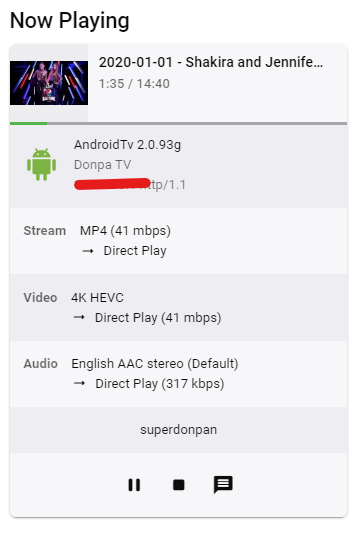
Sorry for my absence. I've been out sick as well as travelling so haven't had the chance to pick this up until now. Tbh this is one of the things I haven't thought about at all, just expecting a top-end TV to support the lot of modern formats. When I look at Sony's page it lists both 264 and 265 as supported. However I can't find information about how high resolution and frame rate it supports. Where did you find this info and what formats a tv natively supports? One thing I know about the two formats though is that 265 is usually heavier for the player to transcode and it's why I've always favoured 264 over it. But after your point about my TV not supporting 264 4k but supporting 265 4k I tried converting this file to 265 and saving it to the server and wouldn't you know, it worked. No logs, no lag, no issues. Flawless. Heureka! I guess I just have to convert all my 264 4k material to 265
 1 point
 -
Thanks heaps - that worked!1 point
-
Hi, we'll take a look at this. Thanks for reporting.1 point
-
Yes you did. Going to Enby and getting away from the QNAP / NAS situation was a huge improvement - much simpler, more robust and we can control it ourselves. There is a learning curve and this was a good lesson in not being careless - always having drives named correctly, where located, and nothing left to chance. Regards, Mike1 point
-
Yay! I'm happy I helped get you to the solution. Take care, Brian.1 point
-
Thank you. We had a cable come loose 2 days ago to that drive, and when we just hooked it back up, Windows renamed it to G Drive. I renamed it correctly back to E drive (in Windows), which is my preference for its letter number, (and the EMBY Library was correct all along) and now all is well. The video I was missing is now present and plays well. THANK YOU SO MUCH FOR BEING SMARTER THAN I AM AND DRAWING MY ATTENTION TO AN OBVIOUS FLAW.1 point
-
If you have library with mixed content then yes but if you seperate your content into specific libraries then a per library default audio language would be perfect. For example if you have an anime library it would be easier to have an option to set the whole library default audio language to Japanese than it would be to individually set each series to Japanese one by one1 point
-
Hi, we'll take a look at this. Thanks for reporting.1 point
-
Luke, Can you request on an update for Emby version in the Samsung app store to something newer than 1.2.6, something like 1.4.8. There is an odd subtitle bug in Emby Version 1.2.6. QN65Q900RBFXZC from 2019 In Canada. Thanks!!!1 point
-
TLDR: This will be in Emby Server 4.8, and actually, it doesn't require a server release, so you'll start seeing this option in Emby apps sooner than that.1 point
-
Would it be possible to add a limit to the number of times a show can be watched for an account? Like a count limiter based on getting a checkbox for the show/ep. I'm wanting my kids to watch new shows I have for them, not just the same few over and over. I know its a habit of young ones, but I figured if I limit it to 2-3 times, then they will move on to explore other things as well.1 point
-
Great news. Emby for Samsung is now available in the Samsung app store for more countries. If you're in any of the following countries, you can now install the Emby app using the Samsung app store: Argentina Australia Canada Czech Republic Denmark Finland France Germany Greece Iceland Ireland Italy Netherlands New Zealand Poland Portugal Spain Sweden Switzerland Turkey United Kindgom United States Virgin Islands We are working on adding more countries so stay tuned! View the full article1 point
-
Yeah, I use grey and dim on android TV with HDR content aswell. But i find it a bit dark for SDR content so I prefer plain white for that. It's just so many clicks to change it. And I do it basicly every day. I agree, the android (non tv) client is basicly useless for use on a TV if you plan on using subtitles.1 point
-
I watch quite a bit of both SD and HDR content with subtitles and watching HDR with white subtitles is not a very pleasant experience. So It would be a very big improvement if one (or both) of these options was implemented. 1. Be able to change the color of the subtitle from the OSD while a video is playing. On AndroidTV I now have to stop the video, go all the way back to the home screen, go to settings, change the subtitle colour, go back to the home screen, choose the video and start playing again. So being able to change the color from the OSD would save A LOT of clicks. 2. Set separate colour for subtitles for SDR and HDR content and automatically choose the relevant one based on the file that's playing. As for colors, in kodi they have added Dark grey #808080. This one is very good at least on LG OLED tvs. Would it be possible to add this. I find that the grey option in the android apps are still to bright. Would it be possible to add this to all apps?1 point
-
thank you boys and no sharing anymore. DANKE SCHOEN! now u guys got blocked, thx.1 point
-
Can ahy devices on your network access the internet via your pfSense router?1 point
-
They're a Samsung partner, and not only can partners release worldwide without the hassle that we went through, but I would imagine they can also submit updates for older models to ensure a consistent experience no matter which unit you have. I don't think there's any technical issue preventing Samsung from accepting updates for older models, but rather I just think they don't want to allocate the manpower to reviewing and testing submissions for them.0 points
-
Hi, not yet, sorry, but since we support it for video, the foundation is at least there.0 points