Leaderboard




Popular Content
Showing content with the highest reputation on 09/02/23 in Posts
-
Welcome to the WMC UI Public Beta! Thanks for your interest in the WMC UI and for being part of this! Your help and feedback is important and essential for getting this to perfection and ironing out all those things that one alone can't find and identify as everybody has different setup and different ways of using Emby. There are two places for interaction and communication: GitHub: Issue-Tracking and Releases WMC UI Forums (here) Issues Issues are used for tracking work that needs to be done Please create a new for every problem you see, no matter which kind - can be errors, unexpected behavior, visual glitches, etc. Please check first, whether an entry already exists for the same problem If you think an existing entry is the same, but the situation is slightly different, you can add a message to the existing issue or create a new one, we'll then find out whether it's different or same WMC UI Forums We’re using the forums as a place for general communication like: Publishing announcements about when updates are published Asking questions about the WMC UI Sharing ideas and suggestions Please always start a new topic for a new subject and let's try to avoid endless conversations which are "about everything" Platform Availability The WMC UI Beta is currently available in the following forms: Web Browser & Installable Web App Emby Theater WMC (Windows) Emby WMC (Android) Web Browser & Installable Web App Web Browser There's an http and an https URL available: http://wmc.emby.media/ https://wmc.emby.media/ Emby Theater WMC (Windows) ClickOnce Installation (auto-updating) Win 64bit: https://softworkz.github.io/etwmc/setup/x64/ Portable Installs These are useful to test or compare specific versions or in case of issues with ClickOnce installation. They can be found in the Releases section: https://github.com/EmbySupport/Emby.WMC.UI/releases Just unzip and run. Emby WMC (Android) The app version can be installed in parallel to the regular Emby Android App and the ATV app. Please side-load the app by using the matching APK. The APKs can be found in the Releases section: https://github.com/EmbySupport/Emby.WMC.UI/releases NOTE The Android app is limited by date, so that it is working within 10 days after release. We'll try to always have a new release ready before the previous one expires.2 points
-
I understand what you mean, but the hurdles are high for any deviations from WMC and there are also some rules that we are following: Deviations from WMC are fine when it's about Emby features for which no matching equivalent exists in WMC (i.e. features that WMC didn't have) Deviations from WMC are also okay when prerequisites are not fulfilled on which WMC could rely on (for example like having an MCE remote with all the buttons, or Emby being client/server or platform not Windows, etc.) Feature requests requiring extra-coding are okay when it's about doing something in a WMC way Not acceptable are requests for features which WMC didn't have and which the regular Emby client doesn't have either We don't want to have any competition in features between the core app and the WMC UI Like in the private beta, the answer will always be: Please request that feature for the regular client, then we can add it to the WMC UI (or it might even become available there automatically) Such strong changes like start menu alterations would require broad consensus from the user base and I think it's a bit too early now to decide or draw a final conclusion on it. Let's see how things develop and what feedback will be given. Thanks2 points
-
Not sure if it helps anyone with a Hisense TV - but my problem started when Hisense did a firmware update. It also turns out (according to Hisense) that they accidentally pushed firmware of a different TV to mine - causing all sorts of other issues. I manually updated my firmware to the right version and the problem is now gone. Chances are this happened to others too. Not saying that applies to everyone though.2 points
-
@Luke @ebr I believe the plan is to add functionality for existing playlists and add edit permissions in beta before releasing this feature to stable. Can you provide a status? I haven't seen this in the release notes for the latest beta.2 points
-
Today, we're glad to announce public availability of the new Emby WMC UI Beta. It started out as a spare-time effort of Emby developer softworkz, assumed to target only a niche audience of nostalgia and WMC fans, and hasn't been an Emby roadmap project. But over time, it has turned into something of its own kind, going far beyond just mixing-in some nostalgic visuals like a theme, but rather providing an authentic look and feel, the original modes of operation and behavior, or in short: the original, well known and beloved-by-many user experience from Window Media Center. So we've decided to officially release it under the Emby brand and now we are excited to invite you to join the public beta. Get details on how to participate here and view the introduction video here. View the full article2 points
-
Here is the latest list of versions for Emby software across the server and clients. Emby Server Stable: v4.9.5.0 (2026/05/18) Release Notes Beta: v4.10.0.14 (2026/06/04) Release Notes For other platforms, please refer to the download page. Emby for Android TV Google Devices Stable: v2.1.23 (2025/12/27) Beta: v2.1.46 (2026/04/15) Amazon Devices Stable: v2.1.23 (2025/12/27) Beta: v2.1.46 (2026/04/15) Stable Release Notes Beta Release Notes Universal Android app Stable: v3.5.16 (2026/01/26) Beta: v3.5.36 (2026/05/10) Release Notes Download the latest Beta here. Emby for Kodi See here for the latest information. Emby for Roku Stable: v4.1.63 (2026/05/04) Release Notes Beta: v4.1.64 (2026/05/13) Release Notes Emby for Windows (Windows Store for PC & Xbox One) Stable Release Notes Beta release notes Emby for Linux Beta Release Notes Emby for Samsung Smart TV (Orsay) E-series to H-series TVs only Release Notes Emby Theatre for Samsung Smart TV (Tizen) Release Notes Emby Theatre for LG Smart TV Stable: 1.0.50 (2026/01/19) Emby for iOS Stable: v2.2.53 (2026/05/16) Stable Release Notes Beta: v2.2.52 (2025/04/11) Beta Release Notes Emby for Apple TV Stable: v2.0.3 (2025/12/26) Announcement Beta: v2.0.6 (2026/04/11) Release Notes Emby for tvOS (Apple TV) Stable: 2.1.6 (2022/12/23) Release Notes - TBA Beta: 1.5.1 (10) (2021/03/02) Beta Release Notes Emby For MacOS Stable: 2.1.6 (2022/05/09) Details here. I will keep this post up-to-date as much as possible, but please send me a PM about anything I haven't updated, or is missing. Special thanks to @Borskfor supplying a lot of the updated information. Thanks.1 point
-
Not normally one to gush but wow! this WMC client is good, better than good its bloody excellent! thank you and well done @softworkz(and team) Love the fluidity of the UI, usability on mouse/keyboard and controller and the 'controllability' of the UI to make it do what you want. I may have to sacrifice my LG TVs working and move to the beta full time. I've just updated my cinema room with an LS12000B (4K HDR10+ projector), modern AV Receiver and Win11/4090 (all HDMI 2.1). Does any one have any recommendations regarding any of the following. Turn on HDR in OS? Configure External Player (MPC-HC+MadVR of any benefit?) Benefit in Bitstreaming? (there are downsides in Other OS sounds not coming through) any other suggestions? (Content is varied up to and including 4K HDR TrueHD). I know i should probably do lots of comparisons and make up my own mind but perhaps someone can save me the time and tell me the answer(s) :-).1 point
-
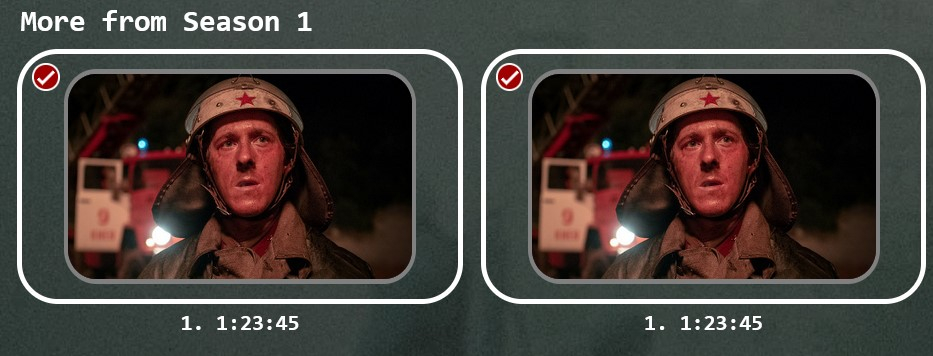
I separated two versions of an episode and to join them back I was just looking directly at the two episodes and clicking on them looking for some kind of rejoin option in a drop down list, or clicking on both and clicking looking for rejoin options - and not even noticing at the top (cause I'm blind apparently) the x2 / multi-select bar when it does have rejoin (or 'Group Versions') option
 1 point
 -
Thanks for avoiding issues afterwards, as I have a fairly big library of video+audio+photos....thus I'll take no unnecessary risks. Thnx for your good quality of support ! Grtz. Peter1 point
-
And: https://thedigitallifestyle.com/w/2023/09/emby-windows-media-center-beta-now-available/1 point
-
I assume you are using the USB Beta version . If so, I believe there is no way to avoid this on newer models1 point
-
Some more: Windows Media Center is coming back! – TheDigitalLifestyle.com1 point
-
Wait a second: You need to be super-careful due to paths. It could be that there are hardcoded (EDIT: I mean non-relative) paths which might cause the server installation on the copied tree to access files at the original location. So - better: make a copy but run the portable server inside the original tree and later: replace the original tree with the copy you made to restore the previous state1 point
-
Seems to be a chicken-and-egg situation....which one was first....but your (@Softworkz) seems to be a workable solution, which I'm going to try: I'll keep you informed ! Thnx for your great idea(s) ! Grtz. Peter1 point
-
Thanks. I've added this to the FAQ post to clarify the situation: Q: Which of the Web App URLs should I use - http or https ? A: The basic rule is simple: If you connect to your server via https and a DNS name, use https://wmc.emby.media/app/ - otherwise use http://wmc.emby.media/app/ The https URL also works when you connect to the server via localhost, but not for other LAN IP addresses (or host names). FAQ: https://emby.media/community/index.php?/topic/121189-emby-wmc-ui-faq/1 point
-
Yes that is correct.1 point
-
The mpv.dll needs to be built with a certain set of components and hardware accelerations enabled. We had our own builds for this for years, so I don't think that the stock version will work. Just recently, we have changed our mpv.dll builds to also use our customized ffmpeg instead of the base versions (for various reasons). In summary, this means the following: the SourceForge dll might work, but probably won't in case it would work (basically), it will definitely not work in the same way as intended (by us) as it doesn't include our fixes and customizations You can try it, but please don't report any issues here, because these would neither be helpful nor actionable for us Thanks1 point
-
Can confirm both http://wmc.emby.media/app/ and https://wmc.emby.media/app/ connecting locally.1 point
-
LOCAL IP Server Access is Fixed! Please retry now: http://wmc.emby.media/app/ Refresh (F5) Try to connect to your server (via local ip address) If it doesn't work, make sure to clear or disable cache and refresh again.1 point
-
The client has nothing to do with it. The client reports support for HDR. The server should be smart enough to go okay the media isn't DV5, it is DV(anything else here), we can send it to direct play since the Roku knows how to procure the HDR metadata from that DV. Right now the server goes, well, no DV support means we transcode this regardless of the DV version it is. The clients send a capabilities profile that does not include DolbyVision in any way. The Roku is just asking the sever "what is the best possible to play this?" and taking the result whatever it is. Android TV can directly tell the server how to playback, it can say listen buddy, do it my way. The Roku is always listen to to the server. It does not have settings to force certain behavior. The Roku does not do this because it was never necessary. It shouldn't be necessary. The server should be smart enough that we just ask "what is the best way possible to play this?" without the Roku having to do this song and dance. @Lukeand @ebrknow what I am on about. I just want to see interest on how many other users wish this would happen. That anything not DV5 is just sent directly to the client when it reports support for HDR. Simple stuff. Asking for simple stuff. tl;dr - The Roku can direct play this DolbyVision file with just HDR support but you have to do the song and dance. It goes like this: The server has the ability to deny video transcoding. When this is done the server sends the DolbyVision to the Roku which can then play it because it understands the underlying HDR metadata within. But doing this for everything isn't feasible since some material must transcode such as DV5. I was hoping for the simple solution. Thanks again.1 point
-
Hello I can help with Spanish1 point
-
Hi Guys Good evening. Problem solved. The latest version of Microsoft Edge unbeknown to me, has a built-in VPN which was blocking access to my Emby server! As I had just updated the server, I thought there was a problem there. So sorry for that. For those interested, go to this section in Edge: Privacy, search, and services/ Secure Network sites & exceptions Hope this clears it up Enjoy weekend1 point
-
Hi rbjtech, Thanks for sorting out the problem I hadn't seen those CC streams in the mkv files, but because the subtitles work on the other Emby apps, I never thought to look for them. Those CC streams do indeed occur in the nfo files generated by Emby. And despite the fact that in the nfo the CC stream items 'default' and 'forced' are 'false', Emby Android TV seems to suffer from this. I will also send EBR the link to the files and the link back to this discussion.1 point
-
I'm following the thread on github to the Exo Devs - they are aware, have acknowledged the issue and are 'working on it'. A few chases last week, but no news yet. I guess Google need to work with Amazon - so we just need to 'wait'. I solved it by removing the HDR10+ metadata, leaving just HDR10. Now I have no issues with HDR10 or DV+HDR10. As I have no HDR10+ devices anyway (only HDR10 or DV) - this is no big deal for me.1 point
-
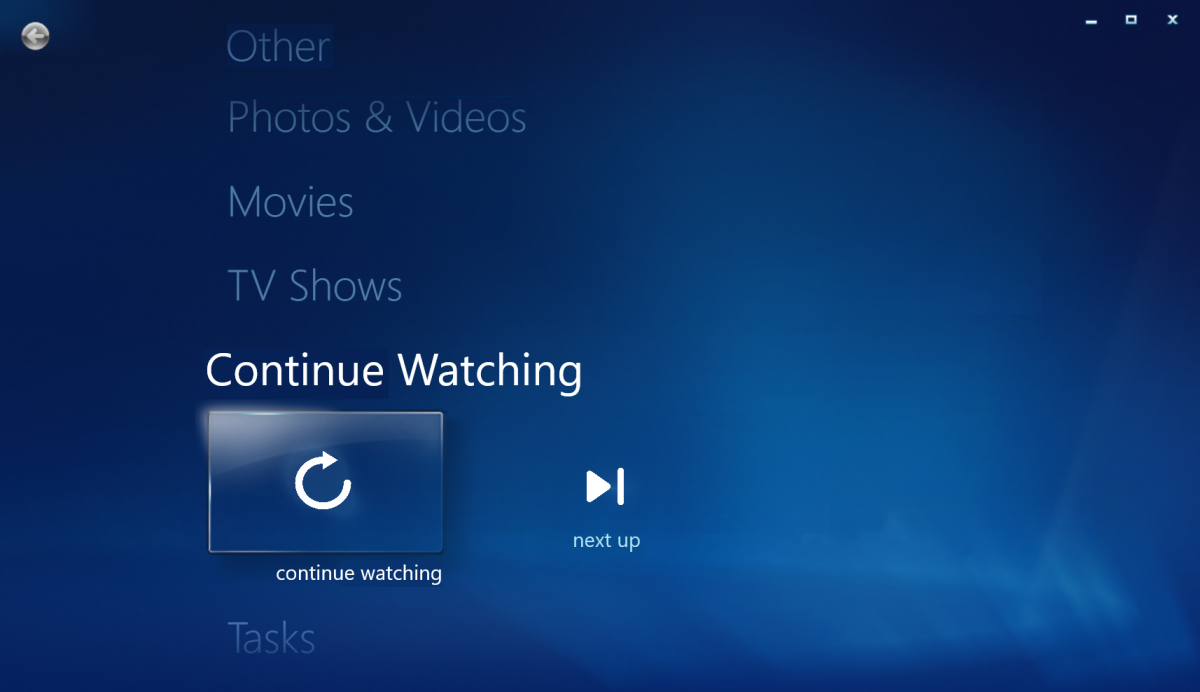
Following above, maybe Continue Watching would warrant it's own hub on main menu, as it IS a bit clunky hunting for particular library and its suggestions just to resume content, too many clicks involved? Crude mock-up attached.
 1 point
 -
Awesome! Just tried this on my Firestick 4k max sideloaded with downloader URL: [redacted]1 point
-
Like others have mentioned, I'm having connection issues when running the app on the same computer that Emby runs, using internal IP or even 127.0.0.1. When I try using external address I have setup it works. Just a few questions 1. Can this interface be using with Xbox or just web based? 2. What does the 3 yellow exclamation in the channel guide mean? 3. When I go into series settings, I see schedule and "seriestimer". Not sure if that is supposed to be "series timer"1 point
-
Hi. I know what change fixed it - just not entirely sure why. The Roku system is sometimes hard to predict . Thanks.1 point
-
Hi, Would be possible to add in a future update a way to customize the upper bar for the Music Library. I would like to have the artist and genre appear first instead of suggestions and albums. Hope this feature can be integrated.1 point
-
Hi, there's already an open request for this or something functionally equivalent. Please join in and contribute to the existing discussion at:1 point
-
Reason morphed into excuses for this a long time ago1 point
-
I know I am going to sound whiny, but I don't see how it's understandable. @softworkzposted the TVNext spreadsheet last year (August 28, 2022) which listed so many of the features as being completed, so I don't see how a full year goes by without it being integrated is understandable. Yes, there was a big security issue that had to be dealt with, but come on...1 point
-
Damn, I'm getting completely fed up by @Lukeand @ebrignoring Live TV users! Almost another month goes by from the last post in this thread and still no comment (on topic anyway) from either of them! What's it going to take?!?!?1 point
-
@roaku @BillOatman @rechigo @GrimReaper @ryzilla @Loefamily @johnnycash @adminExitium For those hoping to use WebHooks with Discord, I've pushed an update to the plugin catalog for the WebHooks plugin to allow you to configure the request content type, which you can now set to either application/json or multipart form data. This should make it a little more Discord-friendly. The update is targeting the 4.8 beta server so you'll need that to test it. Please try it out and report your experience. Thanks.1 point
-
HI, this may be improved in the 4.8 beta server channel if you'd like to try that.1 point
-
Can confirm auto advance feature is still not fully functional on beta .41 . Still has the same random issues. Sometimes it will advance, sometimes it stops the episode with 1 second remaining. It happens totally randomly. One day it will advance almost flawlessly, others every other episode, or sometimes just one or 2 episodes. Even when you watch the same exact series of videos, the advancing seems random.1 point
-
Hallo, bin zwecks Urlaub jetzt erst dazu zu kommen zu Antworten. Wenn ich Musik Abspiele egal ob über die Emby App IOS oder Über Browser zum Azur 851N bleibt die Musik wenn der Titel zu ende ist stehen und spielt nicht den nächsten Titel. embyserver (1).txt1 point