Leaderboard




Popular Content
Showing content with the highest reputation on 08/28/23 in Posts
-
Just thought I’d take a moment to give my thanks to emby and maybe give a few tips for everyone whom needs to use emby when your internet goes down/is unavailable... Background: My ISP alerted me that there will be some outages starting today thru Monday while they upgrade the fiber in my area (not sure why I already have solid 1.5G). But my internet was indeed down for over 2 hours late this morning. Servers were unaffected (4.7.13 and 4.8.0.43). Worked as usual and could connect to my HDHR’s (Quadro and Flex) for Live TV and Recordings. Fire Stick’s (4K & 4K Max): at first seamed like they would not work (no apps available on home screen) → go to settings → apps then launch emby (works perfect). ROKU Stick:(was unplugged because I don't l hate it) complains about no network, just hit continue anyway then emby works fine. Local web access worked fine. My android tablet was/is using my FQDN (so I can access emby on the WAN) No surprise here (there was no way for my router to loop-back when there is no internet available). But the android app worked fine. I also tried switching servers (stable/beta) without any problems (other than needing to give my password). But from past experience if I(or you)(generally speaking) use a combination modem/router supplied by your ISP then when the ISP's internet is out it will not support your LAN and connections will quickly fail! (DNS/DHCP laps or just connection issues) So get your Own router and Bridge your ISP’s device (or if they offer it get a pure modem (without any router capabilities) if availably) so you can use your own router for your LAN when there is no internet. Again emby, Thanks for the hard work…3 points
-
Hi, we have submitted an update to Apple to resolve this, so hopefully that will get through Apple review in the next 24 hours or so. Thanks guys.2 points
-
This is an heads-up fore Dropbox users. Dropbox drops unlimited storage, blames crypto miners and resellers for the change | TechCrunch2 points
-
So for video files we can have multiple versions of a single movie or TV show by having an extra bit at the end of the file name. Could the same be done for music? Some of my devices can handle .flac and others can not. Because of this I want to have .mp3 versions for some devices but not have separate CDs listed for each version.1 point
-
I'd like to have the option to clear 'alerts' in the dashboard. I realize that they go away on their own, but if I can clear them then it's more obvious IF a new alert comes through.1 point
-
Maybe there could be an option to show only unwatched media in the "Because you watched..." and "Because you liked..." sections of the Suggestions Tab? Or is there already? Anyway, I'm using the web client via Firefox on a Windows 7 Ultimate machine...1 point
-
WMC_Teaser.mp41 point
-
Can you change the sorting of countries? Sort in alphabetical order. I have been using EMBY for several years, but I still struggle with the order of country selection. (可以更改一下国家的排序吗? 按英文首字母正序排序。 我使用EMBY好几年了,到现在还是会被国家选择顺序所困扰。)1 point
-
I would love the ability to manually edit the library images. For example, It's the luck of the draw which series get put into the library image and I have to regenerate a bunch to get close to the one I want. Could it be possible to pick which shows or movies get put onto a library image?1 point
-
Hi Luke, thx for the info. Right now my old server is offline..... but I will "reboot" and try as soon as possible.1 point
-
Ok, so a quick update regarding all this. QNAP has done as QNAP does and there's an update to QuTS Hero. Current version is 5.1.1 and this update brings a whole lot of problems because they change stuff of their non standar setup and that usually ends up breaking something. In this case, it breaks pretty much everything. First things first, it will ask you to update container station. This will update the current docker install so "docker-compose" is no longer a thing, you now have to use docker compose. Not only this, but build is broken and while I think it wouldn't be that hard to fix it, I just can't be bothered, especially knowing that it'll probably break again on the next update. What this means is that it breaks my current way of adding NVIDIA drivers to the container. Good news is that the previous way (the one from the first post) actually still works and it would be very hard to break so hey, you can go back to that. The other thing that breaks is, nvidia drivers in several different ways. You'll probably see an error message saying that drivers couldn't be updated and are disabled. This can be fixed, but it took me a while because it's as finicky and obscure as it gets. Uninstall the old driver. Reboot, install NVKernel and WITHOUT REBOOTING install the Nvidia Driver, this may or may not work but that's the most reliable way I found to reinstall those drivers and get those working. You may need to perform this dance a few times, rebooting and trying again, but eventually it'll work. Lastly, because that's not all, they changed the way drivers are loaded at boot. if you try running the container, you'll notice that it'll scream at you that there's no /dev/nvidia-uvm. This is because that gets loaded whenever an application requests access to the GPU in the OS. That doesn't get loaded however when we pass it to the emby container, so it's non-existant up until then, we need to force it to load before running docker compose. https://docs.nvidia.com/cuda/cuda-installation-guide-linux/index.html#runfile-verifications Using that as a reference, add the following to either your startup script or to the script you use to run docker compose: /sbin/modprobe nvidia && /sbin/modprobe nvidia-uvm && D=`grep nvidia-uvm /proc/devices | awk '{print $1}'` && mknod -m 666 /dev/nvidia-uvm c $D 0 This will recreate /dev/nvidia-uvm, now you can run docker compose and hopefully stuff should work. I know this is a lot but hey, blame QNAP! I'm just letting you know how to fix it (until the next major update anyway at least).1 point
-
Basically what I'd done is set the library path to the folder on disk1. This is obviously incorrect as it was only looking at that specific hard drive, so data on the cache pool was ignored until the mover ran at 3am and pushed the data to disk1. Had to change it to look at the array itself. So I had to adjust the docker to be able to access the array, not just disk1, then adjust the library settings in emby to reflect the same. I just gave it admin rights and then made the changes, and it worked.1 point
-
It shows the folders and files but theyre empty most of which have previously not been empty so i dont know but i'll with that tonight and get back to you!1 point
-
Hi, we have submitted an update to Apple to resolve this, so hopefully that will get through Apple review in the next 24 hours or so. Thanks guys.1 point
-
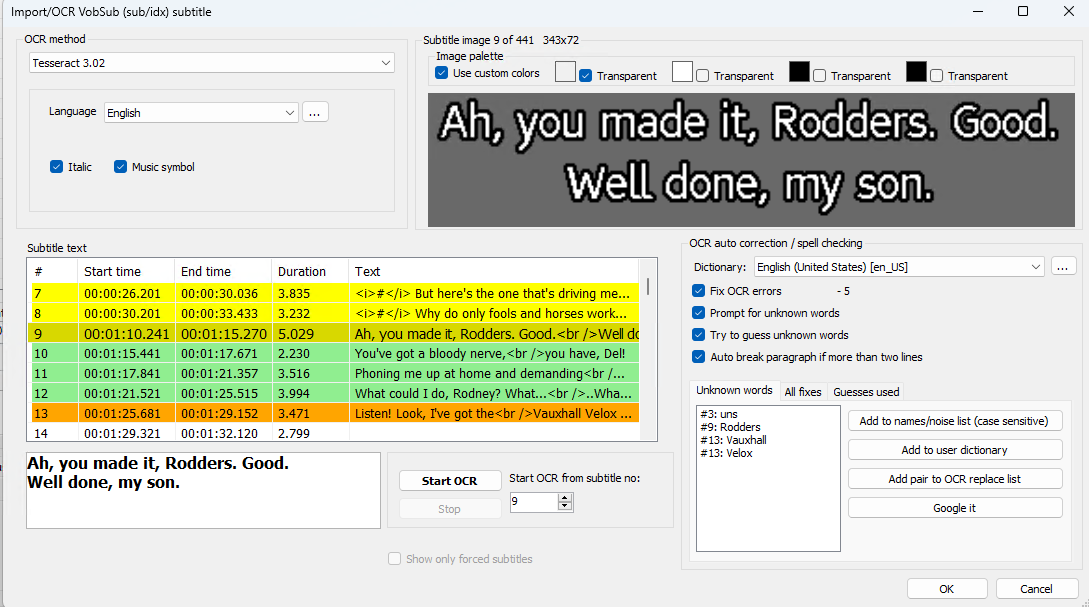
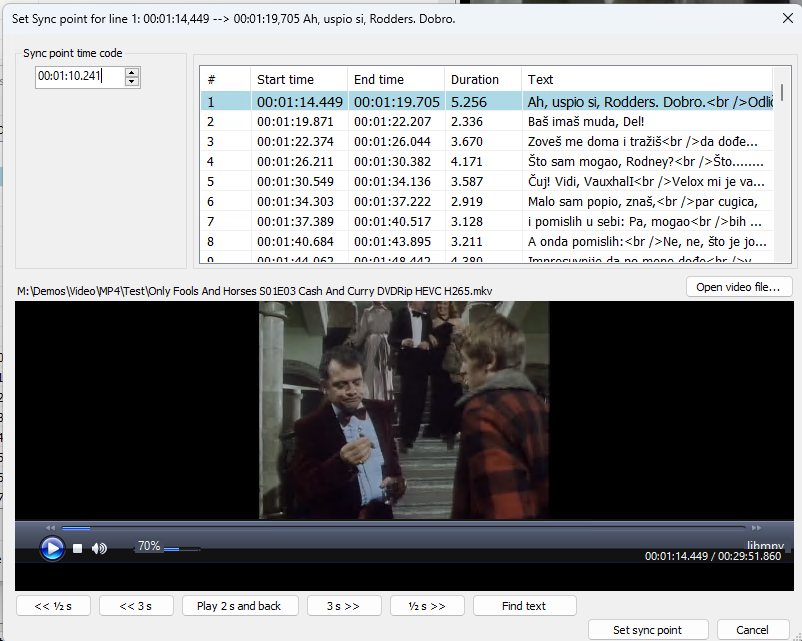
Hmm - haven't used DVD graphical subtitles for years ! Unfortunately, the serbian subs do not start at the beginning, they start after the theme tune.... This means we need to sync the subs manually by the 1st line spoken - @ 1:10.241 is this instance. Once you have it - you can abort the OCR - you just need the initial line spoken after the Theme Intro. Then we need to point re-sync the subs (#1) based off that time ... now - the the resulting SRT file is now in perfect sync. Attached in the re-synced serbian sub from the test file - check to see if it's in sync - I believe it is. But it's a lot of hassle per episode to get them in sync I agree - but OFAH is worth it ... You 'may' be able to re-sync based on fixed time - but that assumes all the titles have the same length 'theme' tune ... 1st line spoken is the only accurate way I can think of tbh ... edit - Maybe try another sub source ... haha @Luke @ebr Is there any other ways you can think to do this ? Only Fools And Horses S01E03 Cash And Curry DVDRip HEVC H265.sr.srt
 1 point
 -
Do as I do - install Emby on a Windows computer, as well as MKVToolnix and MediaInfo, create the same library there as on UnRaid via shared folders, and have the files rewritten in Windows. Activate in the library optin "Prefer Embedded Titles" in Emby, on UnRaid as on Windows. If Windows Emby has done its job, update the metadata on UnRaid in Emby.1 point
-
Thanks! That worked like a charm.1 point
-
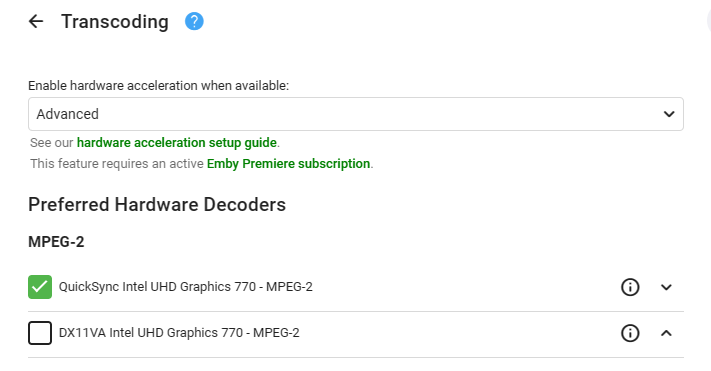
'Here' as I was about to reply anyway ..
 1 point
 -
What you could try is disable the hardware decoders for mpeg2. Most of the US OTA broadcast is mpeg2 while most other sources are AVC/HEVC which would use HW accel for those.1 point
-
The TV app is following Google's standards for 10' UI presentation. Aren't the font sizes very similar to what you see in, say, Netflix on the same device? Also notice that you can see the description without having to scroll...1 point
-
This has been an issue for a long time. A workaround for me is to either switch off Wi-Fi first or download the media you're going to be playing.1 point
-
It actually is now. We have evolved1 point
-
I assume you mean episodes and not tv-shows, right? Multiversion is supported and working for episodes. Check Emby server, if the content is correctly detected as multiversion there.1 point
-
Hi @Lukethanks for checking in and apologies for the delayed response. After a great deal of back and forth with the user, I determined they were using a quite old Fire Stick which didn't support 4K (I'm not honestly not even sure that it supported HEVC). In the end it looks like this was the lynchpin in a series of bottlenecks. I got them to upgrade to a newer Fire Stick that supported 4K and now everything direct plays for them without a hitch. Thanks again for your help.1 point
-
OK thanks for the feedback !1 point
-
Hi, not yet, but we are planning on revamping user settings in future updates to allow for greater server-side control. Thanks.1 point
-
This is currently automated for me so don't want to go back to manual. I did a search through the knowledge base and found a thread talking about library/media/updated where you nominate specific paths that have changed. So far this seems to work and does not take a whole heap of resources.1 point
-
The spanish translation of this feature is not clear, in fact the text says: Something that translated to English says: "Chose the title to visualize the audio and embedded subtitles. It's not recommended to choice embedded unless you are manually selecting the infromation of the embedded track" With the above is very difficult to understand that instead seeing the Type of Video (Codec Info) I'm going to see the embedded title on the media file because all the information is related to the audio and subtitles track, nothing else. In fact I've changed this looking for having the name of the audio and subtitles from tracks read from the file, and I got it but nothing on the feature refllects is going to change any information regarding the Video codec information itself... I believe this can be translated better
 1 point
 -
Hi @quickmicFYI I double checked and path substitution is not (and AFAIK was never) enabled. The Emby server, media storage, NTP source, and Kodi box are actually all GbE on the same switch, same subnet, and everything on that subnet uses that NTP source. No evidence of any kind of network issues outside of what you see in the logs. I've seen this behavior occur while other simultaneous users on different devices (both remote and local) continued their streams without interruption. My gut says this is related to the Roku failure to end playback issue that recently re-surfaced...I have always used the auto-play on Kodi more often than not and this is absolutely new behavior in the past few weeks. I was hoping E4K/Kodi might reveal some evidence that would point towards a root cause.1 point
-
Hi, yes it’s not a bad idea. Thanks.1 point
-
Hi, we're glad to hear about your experience. Thanks for the feedback !1 point
-
Hi, we’re looking into this. Thanks guys.1 point
-
ps. I know it sounds like i am always finding fault - but I am more hoping to help make Emby better by finding them1 point
-
oh hello1 point
-
People like different things. What some call simple / minimalist, others call dull / boring, for example. IMHO the new app looks unfinished, but thats because it is. It has display bugs here and there, it has navigation bugs here and there. The old one looks better and navigates better to me. If the new one really has to replace the old, I guess that'll be fine so long as it still gets refined (before and after its introduction), cause it needs it.1 point
-
4.7.14+ works fine now on FreeBSD 13.2-RELEASE-p2. Thanks.1 point
-
I searched and didn't find anything related to "multi-version" features for music, but this idea came to me recently. I have been gradually ripping my BluRay and DVD-A discs with high-resolution audio versions of albums. These will usually have at least 3 versions of an album - a new high resolution surround mix, a new high resolution stereo mix and an original high resolution stereo mix. Currently I have these as 3 separate album folders, but this is starting to be a little cluttered looking. Often I also have one or two CD versions in addition to the high resolutions versions, perhaps because of different bonus tracks. It would be interesting for Emby to be able to pick up an album folder naming convention that would pull all of those versions into one "Album" and then have the ability to select different versions to play much like you can have with movies named with the "Title - Version" convention. While this has been most obvious for these high resolution discs, as I think about whether to digitize ALL my CDs, this would also be a way of cleanly ripping and organizing multiple CD versions.1 point
-
It just happened. Hope this is what you need. embyserver.txt1 point
-
It tends to happen randomly for me and not on every episode and not just one show. Hopefully it can be resolved soon.1 point