Leaderboard




Popular Content
Showing content with the highest reputation on 08/17/23 in Posts
-
I have checked which of my files were truehd 7.1 only with no alternative 5.1 track and have redone them. They no longer need to transcode and work sweet now.3 points
-
I can help with your first one. In my SS below, I have Specials and the last 4 seasons of a particular show tagged with '!Skip'. That will exclude those items from populating in the channel for me. Using the same example, you can use- !Skip | Another Tag -to exclude items with either tag. Hope that helps.
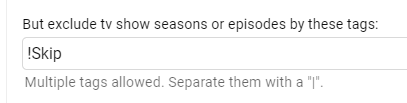 2 points
 -
Here's another one with unreadable text in dark theme: This is how it looks like for me in Chrome desktop:
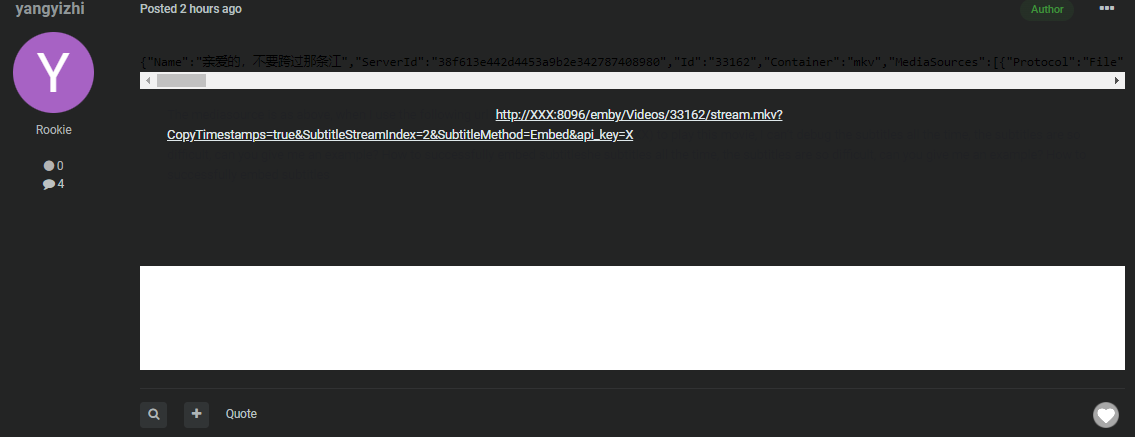 2 points
 -
I rolled back some changes I recently made to the DB code. It was just code clean up and I dont know if or why this was causing issues but for now rolling back. New Version 2.0.0.52 points
-
I've seen this is in the past. Over time the LG TV appears to struggle with large HLS streams. It's cumulative, so the longer you play, the more frequent the glitches get. Maybe their player has a small memory leak? There probably isn't anything you can do other than to avoid the transcode. I've noticed improvements in HLS playback in beta server releases over recent months. Files that gave me quite severe freezing on Samsung now play fine. I expect we have improved how the segments are created, which is helping the TV player. When the next stable release is available I'll be interested to know if this issue is any better for you.2 points
-
I'm a plex life time member, but I have been using Emby for over six years continuously, but there is a feature which I have always thought is missing in Emby which I would like and encourage the developer to consider including especially in this dispensation where families can social or commingle due to COVID 19. Today, I received a notification from Plex about it new feature titled Watch together you can read about it here https://support.plex.tv/articles/watch-together/ The feature allows friends and families at distance to watch same movies together instantly, you simply invite all your buddy, once they signed to the system which can be seeing in the server then play and pause as needed, this I think is cool feature should be added to emby. Let's here your though if Emby developer should consider adding this feature to our beloved Emby Media https://www.bing.com/news/search?q=Plex+Watch+Together&qpvt=plex+watch+together&FORM=EWRE1 point
-
Similar to this old post, I'm suggesting a tab that would be titled Watchlist and could be placed in between Suggestions and Favorites. The functionality would pretty much be a copy of Favorites, just with a + symbol added next to the heart and other symbols that let you favorite a movie etc. The previous post had mentioned extra functionality such as automatically removing a movie from Watchlist after it has been watched. This would be nice, but is unnecessary because after watching a movie you can simply click the + symbol a second time to remove it from Watchlist. I would imagine this would be very easy to implement as a rebranded copy of Favorites. Adding other features could come later. Edit: added link to old post1 point
-
Feature Request: Have User Groups and all settings applied at the Group Level That way you can just assign users to the appropriate Group and all settings will be inheritated.1 point
-
Good morning, recently, a few weeks, I can no longer play some files using the WebApp. I have tried different browsers from different PCs and also in private mode always with the same result. The player screen opens and remains black with the looping loading circle. The problem occurs with MP4, H264 AVC1 files with AAC LC stereo audio. These files work well on the Emby Android App for example. Up to a month or so these files also worked well on the WebApp, it's a series that has always had the same format and I've always watched via the WebApp, now the old and new episodes don't work. The ffmpeg-remux* file is not even created in the logs. Emby Version: 4.7.13.0 Regards1 point
-
You have to create tags (a single word or phrase) on season or episode level in Emby's metadata editor. The same tag you have to use then as exclude condition. In combination with the playback option to "Clear resume points" maybe. But that is unintentional from my side. What you want is "Remove shows from Continue Watching" under the plugins playback options, but currently the plugin will only remove shows from Continue Watching if the user has manually removed the show previously from Continue Watching. In other words, if the show was already hidden and only then, the plugin will keep it hidden. If it's a new show, you'll have to manually remove it from Continue Watching one time. I'm already reworking those options. No. See the thread start post!1 point
-
like @GrimReaperalready stated.1 point
-
Yes that makes sense. Thanks.1 point
-
No buddy.1 point
-
Hi, if you're experiencing high memory usage due to photos in Emby Server, then yes.1 point
-
I just tried, both modes are behaving the same, however the problem might be the space in file path, i can play files as long as there's no space in the path, i assume this has something to do with the space encoding in http urls. (also if the file path contains exotic characters other than english, it can't play, this is also due to the encoding i guess)1 point
-
Hi. Not at this time but it is possible for the future. Please lend your support here:1 point
-
1 point
-
I know about this, but most user do not. Especially if they use the default (white) theme, they do not even notice the problem. As a result users of the dark theme always have to switch back and forth between the themes.1 point
-
thanks Luke - So the behavior has changed since iOS 16? thats great. Yes I would think that getting the device name would be a better solution than the current method. But, as long as it doesn't re-discover it the current method will suffice. One other question from working with this yesterday - My Ipdad and Iphone seem to show up as the same device now? Which is fine, just wondering if that is the expected behavior since they both got on IOS 16 actually as I think about this it would really need to be a path like this: embyusername/devicename to avoid different users from uploading the same place..1 point
-
Should be fixed for the next update, please let me know how it goes1 point
-
This happened to me as well - Canadian lineup as well. The guide data setup was only showing the zipcode, not the provider. Once provider was set up again, the guide started populating1 point
-
1 point
-
I just wanted to confirm I also had the memory leak issue. Was causing my docker in unraid to crash at midnight during the scheduled job i guess? I un-installed the plugin and no more crashing.1 point
-
@KRULLIt was only an idea - I am absolutely happy with the current look. With the separator itself, it would look a tad better from my point of view. But if there are different spellings in other cultures, then of course you can't really please anyone and take the simplest spelling that everyone understands.1 point
-
The problem with that is that the Thousandths separator is not universal. In the case of my country and many others, including the US, your example reads as Three point Nine Five (a value lower than Four), while the use of a comma instead of a period reverses the issue for many other countries. When I first came across Europeans using the period as the separator I thought I was being massively under quoted, not aware that such a difference occurred. Given the bitrate options are only going to be hundreds or thousands and they are not showing anymore than one value, (ie, not a list of many to cause confusion) I personally don’t see the value in trying to solve a non problem. FYI, I do go out of my way to have thousandths separators in my spreadsheets to make taking in all the data easier.1 point
-
Awesome, thank you for looking into it! I have only noticed the icon recently after their redesign, they seem to be adding them more consistently for recent shows & movies (aired/released in the last 1-2 years).1 point
-
Hi, +1 for what exactly?1 point
-
Is there any update? Still not brightness controls for me on Android.1 point
-
Hi, actually this isn't true. What happened is that starting with iOS 16, a new permissions request is required to get the custom device name, and so far, we haven't added that. But wouldn't that also solve this?1 point
-
Hallo triner, nein, mit diesem Parameter geht das so nicht, du könntest aber vielleicht ein Sleep verwenden, Beispiel: [Service] WorkingDirectory=/apps/emby-server ExecStartPre=-/bin/sleep 5 ExecStart=/apps/emby-server/bin/emby-server .... Wichtig ist, wenn du mehr als 90 sec. Sleep einstellst musst du auch TimeoutStartSec=xxx zusätzlich anpassen. Darf ich fragen wozu du genau einen Delay benötigst? pektoral1 point
-
Hi folks, I use Emby 4.8.0.39 beta with Kodi on a Nvidia Shield Pro. One of the things I use is Watch History which works perfectly for me. Now occasionally I download a movie and in Kodi is say's "watched" and I was wondering if it is possible to make a report of already watched bu deleted content. Kind regards,1 point
-
Is this being seriously looked at? I appreciate the responsiveness when new issue are brought up, but this has been going on for close to 8 months and the inconvenience of having to completely restart the app makes the Android app virtually unusable. Can the feature not simply be removed entirely until a solution is found? It's a bit disappointing for a paid user to still be waiting on a fix for this...1 point
-
I have no idea about any of this stuff but to my limited way of understanding, web hooks should just 'work' for non dev types. Everything I have tried works - expect emby :-(1 point
-
I have the same question, but I'm looking for more of an explanation for me and future people doing this same search. I recall a while back someone told me to ONLY enable CUVID, and I have started to see HDR transcode issues (skipping etc). So I tested each decoder one at a time, and found DX11VA seems to give me the highest FPS conversion, NVDEC second fastest, CUVID least fast transcode speed. So I set mine up like below... My question for the video/transcode experts is, can you please explain pro's and con's with each method.. As I understand it decoding/encoding (for the most part) is done on the hardware, the below options are the software handoff's, DX11VA being something by microsoft, NVDEC being nvidia's software, CUVID (no clue). So which is better for normal 1080p stuff? Which is better for HDR HEVC 10 bit stuff? When would emby pick a different decoder from the one in the first position? (like when would ffmpeg or emby move to NVDEC and why?) Should i have different decoder orders for different video types (h.265 vs MPEG-2)? Any other tips for me or others searching?
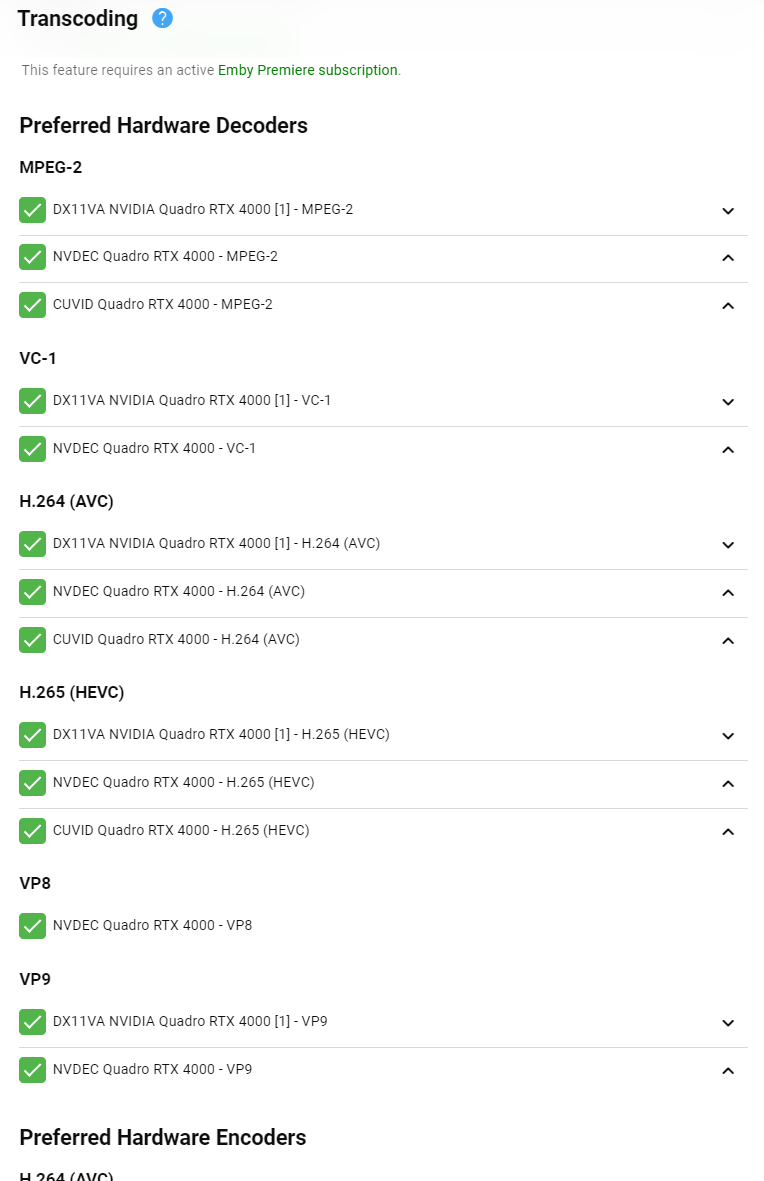 1 point
 -
You were so close. You had everything setup perfectly except the config file. Even that was darn close but has mixed formats in in thanks to the way they do samples (all over the place). I know how frustrating things of that nature can be. I just happened to know the ingress format they wanted since you were routing to another machine. Don't ask how long it took me to figure out. You may want to keep things like they are now. I was just commenting that if you had to leave the PC on for the tunnel it may make sense to just use that for Emby as well. BTW, see if you have an old PC or notebook not being used. A Notebook could be setup with the tunnel running on it which is low powered. You could actually run that from a thumb drive with a headless Linux server even.1 point
-
Often times when I see "Reason for transcodng: Media bitrate exceeds limit." in the info I wonder, what kind of internet connection do they have? I know this can cover multiple scenarios like bandwidth limit set for user, server, client side quality setting, as well as AUTO bandwidth detection... Can you PLEASE add to the dashboard the returned client bandwidth capabilities? The value you are getting from the client that tells emby its bandwidth abilities. While you are at it tighten up the spaces between lines on the transcode items, and align the results to the right instead of center.. MAYBE SOMETHING LIKE THIS :1 point
-
Hello @MrHMMD - this issue is actually fixed in the current packages, but the easier alternative to your method above is to remove the following file manually (I use PuTTY) to be able to install the new one: usr/local/etc/services.d/EmbyServer.sc1 point
-
For users with Samsung Tizen SmartTVs (2015 - Present) who want to test the latest version of the Emby client app before it's submitted to Samsung for release in their app store. These installs should be considered beta until approved by Samsung, however they are the same ones submitted to Samsung monthly for inclusion in the Samsung store. Samsung's policy is that the only official way to distribute apps is through the Samsung store and that usb installs should be used for testing purposes only. Because of this policy Samsung has mandated that usb distributed apps must expire within 30 days of compiling. To help with testing you will be remined to update to the latest beta release as the app expires to ensure you are using the latest version when reporting issues. This install will also work for those who don't have access to the official client app in the Samsung app store. However, the same rules must be followed as indicated above. Release notes and version number For the latest release notes and version number click on this post https://emby.media/community/index.php?/topic/31461-emby-for-samsung-smarttv-release-notes-tizen-orsay/ Installation instructions Download this zip file: https://github.com/MediaBrowser/Emby.Releases/raw/master/tizen/tizen.zip Format a USB 2.0 stick using FAT16 (some larger USB 3.0 hard drives have been found to not work) (newer models may support other formats, check your users manual) Copy the tizen.zip file to the root of your USB stick Extract the contents of the tizen.zip file to the root. (This should create the folder 'userwidget' in the root of the USB stick and the folder should contain the two files needed) Turn on the TV Make sure your TV is connected to the Internet Plug the USB stick into the TV's USB port. Installation should start automatically. (There will be 3 quick messages in the upper right corner of the TV) Click 'OK' once the installation is complete. Optional, add the Emby app as a shortcut to Home Start the app from the Smart Hub or installed apps section of your TV. Troubleshooting If the installation does not start automatically, then please ensure your TV firmware is up to date and try again. If you get an installation error, try the process again with the USB stick formatted ass FAT32. We've received reports from users that installing from USB 3.0 hard-drive devices does not work, so please make sure to use a USB 2.0 thumb-drive device. Also, make sure the thumb-drive is unlocked/writable before plugging it in. The TV will need to write to your thumb-drive. Users with 2015 Samsung SmartTVs may experience an issue where the USB version of the app deletes itself upon restart of their TV. This is a security measure implemented by Samsung in which we have no control. If this is the case you may have to leave the thumb-drive in the TV and reinstall upon reboot, or install the latest release version of the client found in the Samsung app center. Updating from a previous USB install The app will notify you when an update is available. To update a previous USB install just repeat the instructions above. Notes: Certain Samsung SmartTVs have an issue where the app won't upgrade from USB drive if there is already a USB version installed. If this is the case you'll simply delete the old version before inserting the USB and then repeat the same installation process to install the new version. Also, try power cycling your TV after deleting the previous version if you have problems.1 point