Leaderboard




Popular Content
Showing content with the highest reputation on 08/11/23 in Posts
-
I'm hoping to get to smart views and playlists after 4.8.3 points
-
Hello there ! I am a Plex user who discovers this wonderful app! - The number of current streams and computer resources are not displayed in the dashboard, do you think that could be added? For example, if we have 10 current streams, we could display: Now Playing (10) - For CPU and RAM resources, you don't necessarily need a graph but at least display the percentage used by the application? - The messages that we can send to users do not last long enough, it would be nice to be able to customize the duration or to increase it a little. Thank you and thank you again for your work !2 points
-
So a trick I've used for non metadata provider unstructured files, where you want file system 'folders' listed - is to use a TV library and force it by simply creating a Season 0 at the root. If you don't do this, then I've found it will try and put the files all in one folder again. Once the other folders are seen as 'Seasons', then you can remove it again if you like. Any sub 'folder' then becomes a 'Season' - and thus you get your structure without resorting to the 'folder' view in emby. As an example - Library just points to ..\Subscriptions
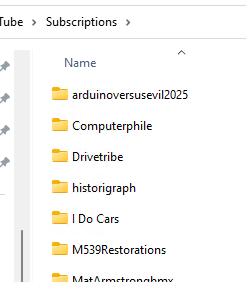
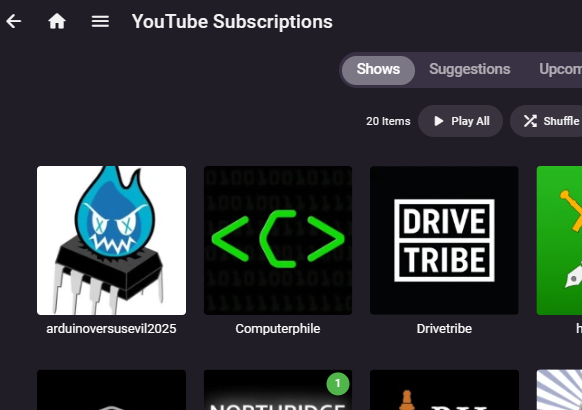 2 points
 -
So all of the above has been attempted to some extent with various solutions over the last couple of years - we have Smart Playlist Plugins, Top Picks Plugins, Recommendation Scripts, Spotlight Scripts etc - but they all ultimately have the same concept - which is to bring filtered content to the 'front row'. Emby 'Channels' allow this fairly easily - but one of the major hurdles has always been 'duplicates' being shown - ie your Channel may show lets say 80's Movies, but all those 80's Movies in your main Movie library now show two entries for each 80's Movie... Excellent - this has been #1 on the FR's forever - and having a Core solution to even a simple filter based system to show the results as configurable Channels will be a game changer for many. I'm still going to play with my Proof of Concept as it's interesting learning - but good to know this feature is finally on it's way in the not too distant future Thanks @Luke
 2 points
 -
It's really the same idea as a smart playlist but with a different layout.2 points
-
So for video files we can have multiple versions of a single movie or TV show by having an extra bit at the end of the file name. Could the same be done for music? Some of my devices can handle .flac and others can not. Because of this I want to have .mp3 versions for some devices but not have separate CDs listed for each version.1 point
-
Well, you can think of this as a watchlist substitute. In large libraries it is much more pratical to see the favorites in the order you have added them. It is unlikely that someone can watch all titles shortly after adding them to the favorites because of the library size (large ++). Over time you lose overview and expect to find the recently added favorites on top.1 point
-
Those on Emby beta should update to the new version 4.8.0.41 once its available.1 point
-
Thanks 8.2.13 fixed the issue1 point
-
Did a quick test - Initial impressions are it's working great for both Radarr and Sonarr. Remember to hit 'Save' if you change the URLs .. ask me how I know .. In your Plugin - this is a one-off action right once you press the Copy button - new titles need to be added manually or via other means such as the Schedule on the MediaInfo Plugin ? There are also a few more 'illegal' characters that need to be removed in creating the Sonarr link (' for example) - but they caught me out too, so I'll get a list together but tbh there are not many shows that are impacted by this.1 point
-
1 point
-
Yeah I'm not sure that makes much sense to me either lol.1 point
-
You mean like the Smart Playlist Plugin? Would that come with more sorting options for collections? Right now, we only have sort title and release date. We can't even choose between ASC and DESC. Additionally, it would be nice to be able to sort them manually, maybe per drag & drop or a metadata setting. I know. And I used many of these for some time. But aside from some downsides coming from the plugins itself, they all share the same flaw. You mentioned it already. They're all create additional libraries and are making duplicates of the items. It produces more fragmentation and can be just confusing for users. For this reason, I don't use the Trailers Plugin either. Also for the reason, that it still can't show trailers in my language, even after all that time. And to date I didn't know of any plugin, that can bring content of collections on the frontpage or make a real dynamic frontpage with fresh content at every visit. I guess I'd just like to have a native solution which gives you more freedom over how the content is presented. Right now it's just the libraries basically, but almost no presentation of content you can browse through. Even the recommendations page is just showing you the same every time, based on the latest things you watched. It adds one row every time you watch a movie, basically putting the "more like that" row from the movie details page onto the recommendation page.1 point
-
It actually worked with Windows on my i7 8700k - but with the TV episode it took me three attempts before it worked. With the first two, it stopped at 20% for hours. With the third attempt at approx. 5900 episodes, it took 1:15 hours until everything was read in. With the Synology itself, it took a week until it was ready. Not the cleanest solution, but the fastest. I can live with that - I wouldn't want to do without the MediaInfo plugin.1 point
-
Maybe some hope on this long overdue FR ... https://emby.media/community/index.php?/topic/120503-add-the-ability-to-add-custom-section-in-suggestion/&do=findComment&comment=12719051 point
-
Hi, success. I deleted emby (again) from my synology nas I then deleted a file in the config folder called system.xml I reinstalled emby and it is now working. I am now able to set-up emby.1 point
-
@Maartensee @rbjtechmedia info plugin in another plugin thread, he's added the function to do what you require to it by refreshing metadata in conjunction with this plugin. It will add your provider ids for sonarr and radar, but you need to also set the link in this plugin for them to show in emby. https://emby.media/community/index.php?/topic/108984-mediainfo-for-emby-pluginhdr-vision-atmos-dtsx/&do=findComment&comment=12717751 point
-
My photo library has 97000 unique photos (excluding the raw files). I dont envy the task of adding 97000 individual files to favourites Luke, if this feature could be added I would be very grateful. Thanks1 point
-
Slightly simpler is to multi-select the items you want, then go to Add to Collection from the 3-dot menu at the top right to choose or add the collection to be used for all the items at once. Paul1 point
-
Fyi, I was having trouble with Disney downloads as well, and I found that the wifi connection was set to "metered". This is what was causing the downloads not to start. I dont know why it was set this way, but changing it to "unmetered" has started the downloads! Thanks all.1 point
-
Actually this will still be an issue in the windows store version.1 point
-
Glad to hear that. But what does "smart view" mean exactly? Just a smart collection as well as smart playlists? Or is this really meant like a customizable Frontend-View like custom pages or frontend rows? Because that's something that is long overdue in my opinion. The only content you can find on the front page is the stuff that was recently added and the stuff you're currently watching. No recommendations, no dynamic content! But having Smart Collections, that doesn't have to be manually updated every time, would be a nice start. I'm currently in the process of writing a script that will automatically create and maintain my collections based on IMDB tags, which I import with another script. So it would be nice to have Smart Collections, so I'd had one script less^^ But the problem persists, that even with a nice bunch of collections, you have to go to the collections library and browse them. That's almost never happen. They have to be used as content for the front page in a way, that you see something new every time you visit it.1 point
-
Yes, but thats not the point. The point is, as I'm sure you're aware, is that one is being worked on, and the other is being ignored.1 point
-
1 point
-
Entonces puedes o no puedes entrar? Intenta desactivar el firewall de windows de manera temporal. Sospecho que eso tenga que ver algo1 point
-
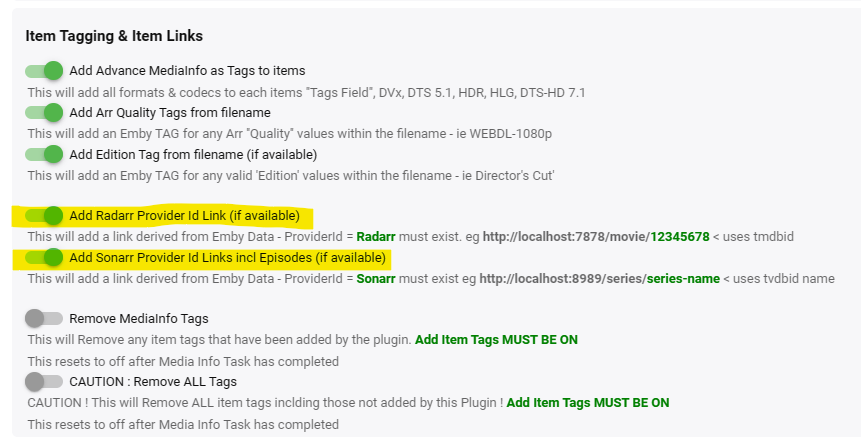
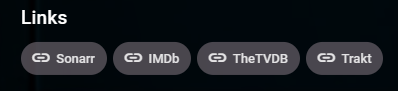
New RBJ version - 1.0.1.32 (Work In Progress - Still testing this but working well thus far ..) Added Provider Links In collaboration with @mickle026Extended ProviderID Plugin - this plugin now creates suitable Sonarr and Radarr Emby links to your local install of these Media Managers. Toggle on/off under Item Tagging & Item Links Sonarr Added to each episode and series - and will take you to sonarr's URL for that TV series. ie http://localhost:7878/series/13-reasons-why Note - Base URL is defined by the ProviderID Extention Plugin - this plugin just adds the metadata. Radarr Added to each Movie - and will take you to radarr's URL for that Movie. ie http://localhost:8989/movie/136400 Note - Base URL is defined by the ProviderID Extention Plugin - this plugin just adds the metadata. ... Applies to New items only out the box - you can re-processed items or all items in the plugin if you wish once tested. To Do Full testing - but spot testing is 100% Need to add to TV Series Parent (as currently only does Movies and Episodes) Post ZIP once tested .. Possibly add the ProviderID Extension (Sonarr & Radarr) directly into the Plugin.
 1 point
 -
This is how it started out actually - but no, not going back there as it was primitive and now well out of date I'm afraid. There is nothing to stop you running a 2nd instance of emby - with the MediaInfo plugin - on any hardware/software - just setup the libraries the same as your main instance - and any file track title changes it makes to the mkv, will be reflected on your main instance ..1 point
-
for me, i solved the problem by connecting the lg-tv via usb-to-lan adapter.1 point
-
No but once in Emby you can have a merged view of your media and you can also have multiple paths in each library. For example: /volume1/media: /media1 /volume2/media : /media2 Library Movies - /media1/Movies - /media2/Movies1 point
-
Ok thank both of you for the answer. Keep up the very good work, love Emby1 point
-
Hi all Well, it's been some time since I last visited the Emby forums, and I must say finding this thread and the work done by @softworkzis a pretty big eye opener. Great job @softworkzand thanks for putting in the hard yards and no doubt countless hours to fill in the biggest pitfall this fantastic bit of software has! What a bloody shame my total awe has turned into total disbelief at the total lack of support from the Emby team to get this into the public arena for testing, get the worst of the bugs ironed out of it and get it released. This should have been fast tracked, not railroaded!!! Really? How about everything @Luke! Emby is great but the live tv set up we've currently got is not up to scratch (not even close!) when compared to the rest of the Emby experience. This TvNext though sounds like exactly what the Emby Live Tv experience should be like - that is to say Next Level! Get it done!!! Chris1 point
-
Hehe, got it... Because I'm a fool, and as I saw the circle turn I went through the Android TV version to launch the Wol, then go back to the android version (lol). Well, yes, it's functional. So, could we have it with the launch of the Wol at the launch of the application? I have a preference for the Android TV version, but I just got a Pico 4 and it doesn't work, when you do Up/Down or Left/Right the posters come back to the start, impossible to see the rest. But in the end, the Android version goes very well on the pico, breathtaking! "By the way, a BIG BRAVO, user since the beginning of Kodi, Emby is the only application that made me forget all the others!!!"1 point
-
it may be this issue? ->1 point
-
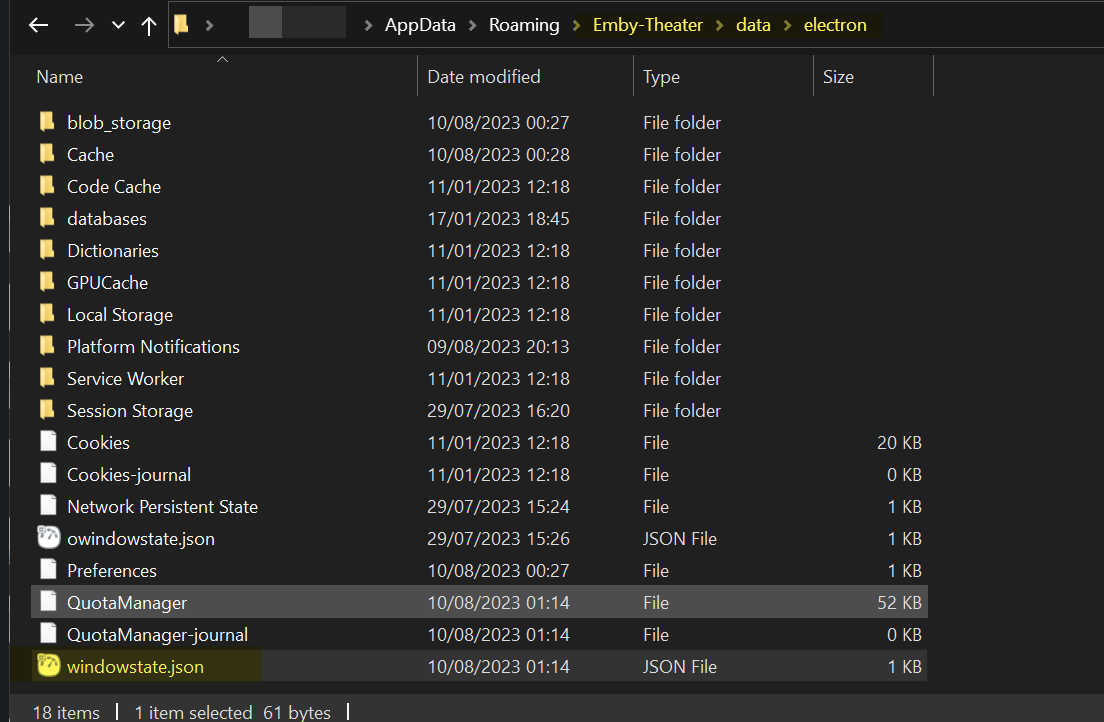
I think this is to do with non-standard display zoom on windows for people with big monitors (happened when I was using multi-monitor with one monitor at 200%), electron gets confused. You can fix like this. Find your electron window state settings. My guess is your settings will be crazy, I think you can delete this file and restart - otherwise put in more normal values. {"x":2341,"y":372,"width":1292,"height":728,"state":"Normal"} Also, if you set your display settings to Desktop rather than Auto in app I get a better experience as well - so you may want to try that.
 1 point
 -
My 2 main points are: 1. Emby Server is to share my media. It is not for users having their own content. Having user accounts with their own content would be something completely different. 2. Not being able to prevent users from uploading to my server is an absolute no-go. The only reason I say this is because I really love Emby and would like to continue to use it and share with others. Addressing this fundamental issue would be very much appreciated and would allow me to finally actually share my library with others. - CHEERS1 point
-
Hi, yes that’s not a bad idea. Thanks.1 point
-
My honest advice is to keep it simple - single TV Library, Single Movie Library - and just use the power of the metadata held on each item to do the 'sorting/grouping' for you. Yes, I agree emby doesn't make this easy to 'present' to users (still no 'smart playlists .. ) but trying to do this manually, is imho just going to end in tears/frustration. Maybe take a look at the Smart Playlist Plugin - or 'Channels' based on Genre etc.1 point
-
Any chance this will make it to server side so it can be ENFORCED as a policy server side for clients? I think Emby is missing ability to check "Enforced" or "Preference" to each applicable user settings, from the server side. If Preference is ticked, the setting is set as a default, but user can change it (this default could be different to Emby's own default out of box). If enforced is ticked, then the user can't change on the client. If both Enforced and Preference are unticked then its just Emby's own out of box default that can be changed on the client. You can't tick both those boxes as web form wouldn't allow.1 point
-
hi, only admins can manage metadata, so that is the reason why it is gone for non-admins.1 point
-
I SOLVED IT! Just in case anybody has the same problem after replacing a router: After the router replacement, for some reason in Windows 11 the network type over Ethernet had flipped from "Private" to "Public". This meant that the server was not discoverable on the network. Changing the network type back to "Private" solved the issue immediately! This is something worth checking if you change your router and have problems connecting like I did. Thanks anyway guys.1 point