Leaderboard




Popular Content
Showing content with the highest reputation on 08/03/23 in Posts
-
They are using a FireTV stick .. I suspect it's an old config that needs clearing and resetting. Just entering an IP (no http) OR http://IP works just fine using FireTV (Android).3 points
-
OK, @rbjtech@Junglejim and @MBSki my first try at "*" searches is attached below. Be kind Give it a try and let me know if it works. Vic Emby.Bulky.dll2 points
-
That seems to have done it, thank you so much!2 points
-
Thanks Vic - the search now works with spaces in the tag - good job I think it might be prudent to just mention in the search it is an EXACT match search only ?2 points
-
@rbjtechand @MBSki I fixed the space problem in Global Search. The new plugin is attached. Vic Emby.Bulky.dll2 points
-
I would think a list or grid would work.2 points
-
TheTVDB now supports more alternative orders than just Aired/Absolute/DVD. Can Emby query these additional orders and add them as options? Two examples of shows I've seen this used are Re:Zero which has a "Director's Cut" display order and Money Heist which has a "Netflix" order. https://thetvdb.com/series/re-zero-starting-life-in-another-world https://thetvdb.com/series/la-casa-de-papel1 point
-
Hello, Perhaps I am not the first one to ask this question but it will be very cool if this feature could be implemented. I have 2 servers one at home and the other at work. ( and soon a third one...) So I have a movies library called movies on each server. I would like to see all the movies from a single 'virtual server location' when I use the app (ios or android ) where I will see only one movies library containing movies informations from the movie library at work and the movie library at home. It's an aggregation of movies informations from the movie library at work and the movie library at home. In fact when a user have multiple servers it will be perfect if another choice in the server list called "all servers" for example appears automatically with a merge of media informations from librairies with the same name on different servers.1 point
-
On some shows like Futurama there are anothers order aivailaible but in Emby i can only choose aired, absolute or dvd. Is there something to do to used Production order or do i need to open a feature request ?
 1 point
 -
Works now, ty !1 point
-
Hi Luke, Yes, Aerial is the default screensaver for the Apple TV device. Based on that last comment in your GitHub ticket link, it seems like the beta version of Aerial now supports artist and song title display for all audio playback: Of course, Apple TV devices use tvOS, not macOS, but hopefully that feature will carry over! Thanks for chasing this down. I'll keep my eye on the GitHub page for the next release to confirm this works with Emby audio playback! Thanks again!1 point
-
Muchas gracias ojala en futuras actualizaciones se pueda encontrar ese filtro1 point
-
indeed i will remove the M3u files from the server, and let the one i want stay. thanks for the help1 point
-
of course i can, if it helps to fix this, i am happy to try anything. I will do so when none of the family is watching so I can make sure it's a clean log.1 point
-
Thanks. Meybe I will buy PCI Express card and put one more ssd for transcoding. Regards.1 point
-
You and the others that asked for this feature improved the global search. I appreciate everyone's comments. Vic1 point
-
HI, do you mean this screensaver? https://github.com/JohnCoates/Aerial If yes, then they actually have to integrate with us, not the other way around. See here for example a request for them to support Vlc: https://github.com/JohnCoates/Aerial/issues/12741 point
-
Yes I got the answer from @GrimReaper, thanks!1 point
-
HI, I would say fanart.tv. It seems like they have the highest resolution.1 point
-
And the Issue in Lan and not Wan.1 point
-
My Apple TV user reports the new version fixes the problem for him! Thank you!1 point
-
I reread the instructions, traced my steps, and made sure to delete or alter each element in turn from a check list. Emby Server 4.7.13 is now up and running smoothly. Carlo is off the hook. A couple of other items about the Emby Server does not start - Security advisory 2023-05-25 instructions. It's heavy on peer-to-peer shorthand, and was clearly written by engineers to an audience of system administrators and Linux professionals. As a noob in the woods, this document left me way out in the weeds. Nowhere does it explicitly state the Hosts file fixes and file deletions had to be done in addition to installing the new version. The document assumes the reader knows this. Under the bottom header Install Emby Server 4.7.12 Security Update appears the wording Watch out for this update and install as soon as it becomes available unless you are already running Emby beta 4.8.0.31+ which also has the necessary fixes Which I read as an alternative instruction to the file fixes. "I can do all the hard Linux stuff," I thought, "or I can wait for 4.7.12 and install that instead because it has the necessary fixes." Perhaps I deluded myself, but I think I didn't know enough to know what I didn't know. I read these instructions literally dozens of times and never thought any differently until yesterday. Also, the patch still isn't available in the Synology Package Center and the latest version download isn't linked on the fix page. I think both are huge oversights. Also, the Linuxize link addressing Host file editing doesn't mention the need to access the NAS as a superuser. That's also assumed. There's no link to the Emby page explaining how to log into Synology as a Superuser in the security advisory page; I had to drill that out myself only after I learned I'd need it, and it wasn't easy to find. Remember, this security breach affected all Emby Server users, not just the most Linux savvy. In all, I'd wager Emby disillusioned many users unfamiliar with Linux who used the Synology server, but dumped it in frustration due to this fix being so vague, complicated, and difficult. The Security Advisory is certainly a map, but the map is not the ground. You must describe the paths and pitfalls in addition to pointing the way. Even though it's months old, please consider editing this page to include these suggestions, to help new users who may yet stagger in the forest.1 point
-
Hello, Thanks for the answer I'll do without cloudflare1 point
-
Yeah this would be nice, "Star*" would include "Star Wars" & "Star Trek" in my tags.. it would make a nice channel..1 point
-
@VicMooreCan you add the use of wild cards to the search?1 point
-
I'd like it to auto-delete any watched recordings with this an option to set. I know there are at least 3 other historic threads around this stretching back as far as 2014.1 point
-
Until we know what Google are actually flagging for - then guessing is just making work for everybody. @LukeAs owner of the original emby domain - can Google not provide you guidelines on how to go about configurating a related self hosted website without triggering these issues ? As a side note, I've made no website changes to emby (beta), have 'emby' in my fqdn and yet I have never been flagged - go figure ..1 point
-
Just checked, after changing certs errors didn't appear. Looks good.1 point
-
done. Thanks to developers1 point
-
Hi Luke, I`ll take a second look when I get home.1 point
-
Thanks guys, I passed the file along to @SamES If it ends up being that this file is technically supported and the playback is just botched for some weird non-Emby related reason, I'm okay with that. Just appreciate that someone with a bit more knowledge than me can take a look. It'd be cool if there's some sort of fix or solution to the problem, but if not I can figure out a plan B. Thankfully I don't have a ton of media that uses OPUS besides this show.1 point
-
I just tried the TV again. I didn't do anything to try to fix it and yet it's working perfectly (at least for now). I've attached the latest logs, if someone can take a look, I'd appreciate it. I'd like to know what caused today's TV "outage" so that if it happens again, I'd hopefully know what to do. Right now, I'm in the dark. Thanks, Les embyserver (2).txt ffmpeg-transcode-8d10d7cf-e29a-4250-b1f5-eda637614738_1.txt1 point
-
I fixed it here is the code to create a discord bot that can be asked to check the last 10 movies added to the server require('dotenv').config(); const Discord = require('discord.js'); const axios = require('axios'); const { Client, Intents } = Discord; const client = new Client({ intents: [Intents.FLAGS.GUILDS, Intents.FLAGS.GUILD_MESSAGES] }); const EMBY_URL = process.env.EMBY_URL || 'http://xxx.xxx.x.xx:8096/emby/Users/API Key would go here/Items?Recursive=true&IncludeItemTypes=Movie&SortBy=DateCreated&SortOrder=Descending&Limit=10'; const EMBY_API_KEY = process.env.EMBY_API_KEY; const DISCORD_BOT_TOKEN = process.env.DISCORD_BOT_TOKEN; const CHANNEL_ID = 'discord channle ID would go here'; client.on('ready', () => { console.log(`Logged in as ${client.user.tag}!`); }); client.on('messageCreate', async (msg) => { console.log(`Received message from channel ${msg.channel.id}: ${msg.content}`); if (msg.channel.id === CHANNEL_ID) { if (msg.content.includes('!recent_movies')) { const url = EMBY_URL; console.log(`Requesting URL: ${url}`); console.log(`Using X-Emby-Token: ${EMBY_API_KEY}`); try { const response = await axios.get(url, { headers: { 'X-Emby-Token': EMBY_API_KEY }, }); console.log('Emby response:', response); const movies = response.data.Items; const movieNames = movies.map((movie) => movie.Name).join('\n'); const chunkSize = 2000; for (let i = 0; i < movieNames.length; i += chunkSize) { const chunk = movieNames.substring(i, i + chunkSize); msg.reply(chunk); } } catch (error) { console.error(error); msg.reply('An error occurred while fetching the movies.'); } } else if (msg.content.includes('!hello')) { msg.reply('Hello there!'); } } }); client.login(DISCORD_BOT_TOKEN);1 point
-
While that numbering "should" work, I think, it is not the best for Emby as the recommended basic form is ShowName - SxxEyy - EpisodeName You can add other things to get better display but Emby really really really likes the dash "-" as a separator. That is the basic functionality and Emby expects that format or something similar. I believe that you could use Series NumberxEpisode Number but the use of underscores as separators is just not reliable. You can do as you please but Emby really likes one structure/naming convention a LOT more than others. While I would like Emby to support all reasonable formats it is just impractical. It is best not to fight the great Emby-o-saurus.1 point
-
if you're converting a normal bluray, tone mapping is not needed. If you are going to go forward with this, I would recommend you get an Intel Arc card, and use that to encode your files as you will get superior speed with very good quality. https://forum.doom9.org/showthread.php?p=1977195#post19771951 point
-
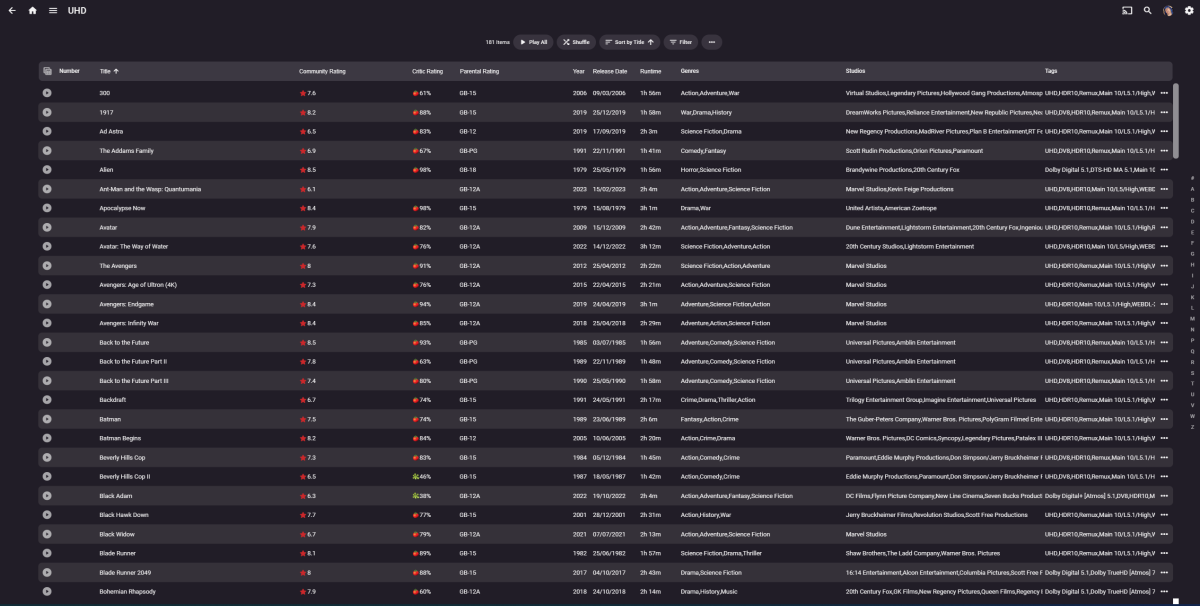
So in Emby - this is a table view as a result of filtering Movies by Tag = UHD There are 181 Items - so all I really want to do is to visually give it a 'once over' that the filter I am using is correct. i can quickly scroll up and down to see the rest. Once 'previewed' THEN I think maybe shown the Bulk Edit options as you do now (for Tags, Genres - Add/remove etc) and then just have an 'Apply/Save' button) I *think* that's probably less confusing than having a detail screen for every item..
 1 point
 -
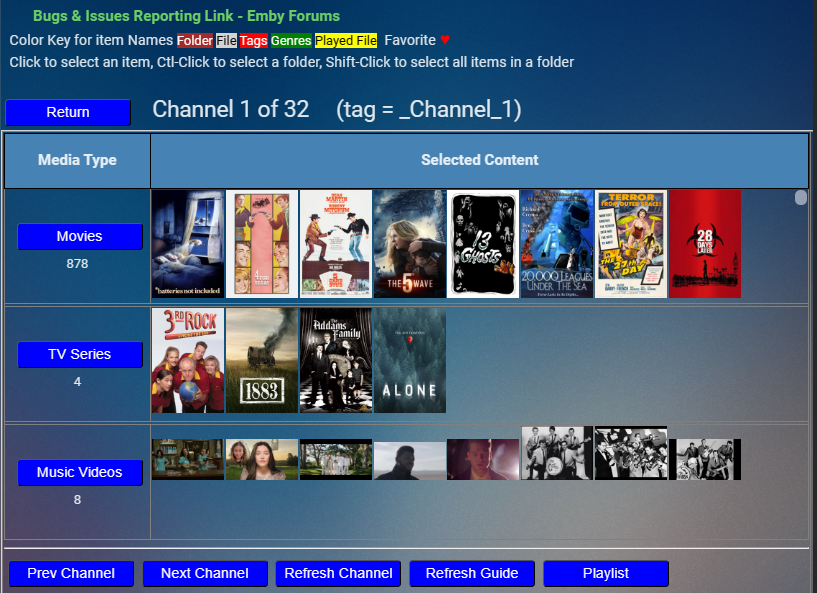
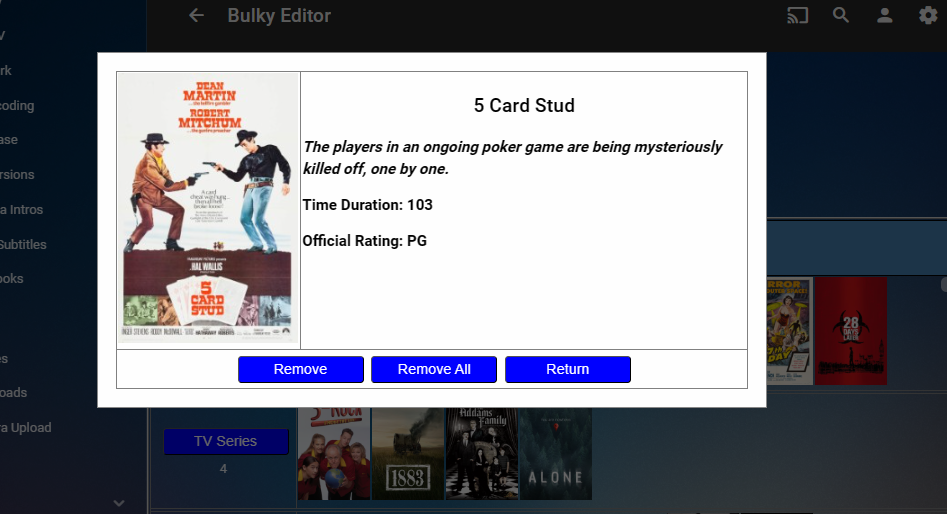
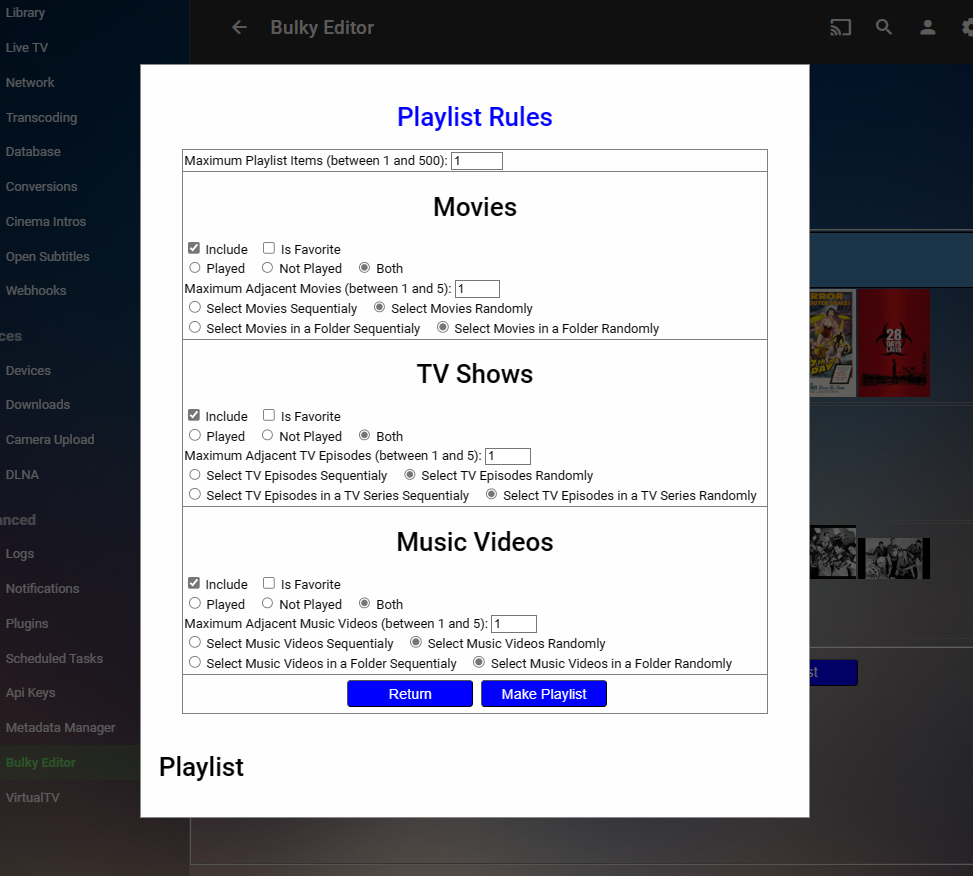
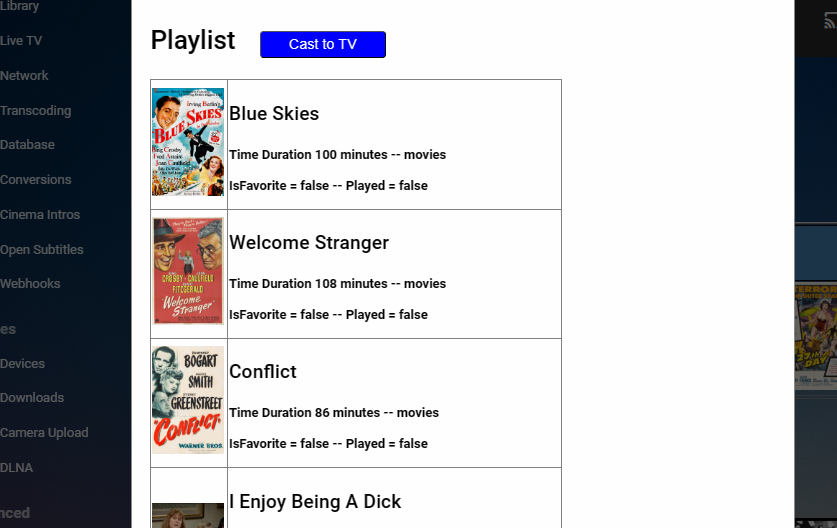
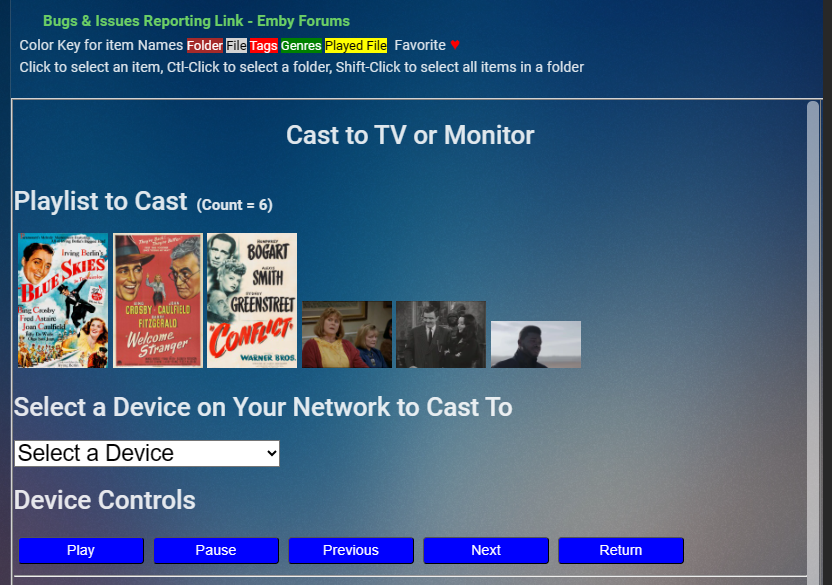
@rbjtechand @MBSkiI will fix the space issue with global search. I will get it done today. I have continued to work on Channels. If you click one of the media icons, you will bring up a menu that describes the selection and gives you an opportunity to remove it from the list. You can also remove all of the selections for that media. On the channels menu there is a Playlist button. Click it and the playlist menu opens up. In this menu you select the rules that govern playlist creation. Click the "make playlist" button to create the playlist defined by the rules. The playlist is displayed below the menu. Click the "Cast to TV" button to play the playlist on you TV or monitor. Just select where you want to play the playlist and click the play button. I still have work to be completed on the rules for playlist creation. Vic
 1 point
 -
Working on adding more.1 point
-
It should be in the latest version. I'm not aware of any such issue when launching the app at this point.1 point
-
Resolvido. Após algum tempo realizando testes, percebi que o que ocasionava os erros era 2 pontos. O primeiro é o que @KoqueSilvae o @Happy2Playcomentaram, que os nomes dos arquivos poderiam está interferindo. Realizei a alteração deixa com o padrão recomendado nas pastas e arquivos. (Ex. Pastas com nome da "Season 01, 02, 03" e os arquivos dentro com o nome de "Episode 01, 02, 03" e assim por diante.) O segundo eram os metadados, que se tiver acima de 100 episódios na temporada, pode acabar atrapalhando na busca automatica e sobrepondo o episódio, fazendo com que alguns não apareça. Para resolver isso, em animes que possui mas de 100 episódios na temporada (Ex. Black Clover, Bleach, One Piece, etc.), eu comecei a transferir os episódios acima do 100 primeiro, corrijo os metadados manualmente, que vão está aparecendo com o episódio 1 em diante, para o episódios corretos. Em seguida eu coloco o restante dos episódios (Que estão abaixo do 100). Assim eles mantem a ordem correta e não fica sobrepondo os episódios. Obs.: Acabei ficando um tempo sem acessar o fórum por isso a resposta bem tarde, mas queria deixar a solução encontrada, para pessoas que estão com problemas parecidos.1 point
-
I don't think the problem is with DNS and my suggestion was more of an exercise of elimination. But let's start with the last thing. Do you have dates on those files? Not important but I'm curious. Regarding those files, what you can do with them is: 1. Stop the emby server. 2. Move those files to another directory, doesn't matter where as long as they're gone from this one. 3. Start the emby server. I suggest you move them just so that we can see their contents after. Then let Emby run and fetch images for a while to see if the errors come back. TL;DR for below - Different DNS service could respond with different endpoints for the cloud/CDN holding the images. Back to DNS. Connections from wget might not be using the same truststore as Emby. In fact I think they don't. The major public DNS providers (maybe all) use anycast addressing for their services. For example, if you and I both used Google DNS from different parts of the country our queries would go to different servers. Servers that are closer to us - in internet terms. The image.tmdb.org service is highly distributed over multiple cloud and CDN providers across the US and maybe even the world. Another feature of DNS services is to respond with the most advantageous addresses for our queries. So a DNS server closer to you is going to respond with CDN/cloud endpoints that are also closer to you. Below are the stats from 500 nslookups from four of the big DNS players. There are a few things you can take from these: 1. They all respond differently. 2. There is overlap in their responses. 3. There may be uniqueness in their responses. 4. Trying a different one might exclude or reduce responses that send your connection to a service with the cert(s) that are failing for your server. image.tmdb.org.cloudflare Total: 153 IPv6: 138 IPv4: 15 image.tmdb.org.google Total: 138 IPv6: 129 IPv4: 9 image.tmdb.org.opendns Total: 164 IPv6: 144 IPv4: 20 image.tmdb.org.quad9 Total: 133 IPv6: 102 IPv4: 31 Total unique: 227 Unique IPv6: 191 Unique IPv4: 361 point
-
I've worked it out. The bitrate limit was more of a coincidence and red herring. It ended up actually being the container conversion. I had transcoding disabled on purpose, but kept changing container formats enabled. My usual setup. It worked fine from the Linux server. But for whatever reason Windows (both install and docker) causes all sorts of problems when changing the container for a Google TV specifically. I dont know why it's so different, maybe ffmpeg has a bug on Windows? But now that I have plenty of horsepower I just enabled transcoding. Not my ideal setup but it's working now I guess.1 point
-
@Luke: Well, since German is apparently not going to be published anytime soon, can we at least get access to the English Alexa Skill? I came to Emby from Plex, and I am inches away to got back to installing Plex just so I can listen to my music. And I am a paying Emby member... This is unreal!1 point
-
This will be added to all of our next app releases as a user option. Thanks.1 point
-
I've had luck in the past force-closing the app, clearing the cache (not app data, that totally resets the app) and then re-opening it. I suspect a crash during a download causes the app/server to become asyncronous, or it leaves partial downloads somewhere that don't get cleaned up. The app seems to be a bit unstable while it's downloading files (especially when telling it to download 1 file, while it's still downloading the previous.) In some cases that I have files stuck in 'queued' or 'waiting to transfer', there will be a 0kb file with the song/movie name, in the downloads folder. Deleting these doesn't fix anything, but it still might be a clue about what's going on.1 point
-
There you go. Only user1 & user2 have access to the data. What you're trying to do is rather tricky for a couple reasons which you might want to rethink. First, users of your NAS using PhotoStation can control who can and can't see their pics. You're now looking to bypass that control by making all pictures and videos public (on your server). Then there is the actual permission issue that is tricky in itself because changes here could potentially break PhotoStation. PhotoStation itself was quirky which in part was why Synology EOL it and replaced it in DSM 7. That begs the question, when are you planning on upgrading to DSM 7 (7.2 at this point)? Your system right now has many known vulnerabilities that were fixed in 8.0, 7.1 & 7.2. You should be trying to get off DSM 6 as quickly as possible which also solves this issue because you won't be using PhotoStation any more.1 point
-
Given the latest events, isn't it about time the development team took this a little more seriously and stopped kicking it down the road? All internet facing systems in 2023 should have the option for MFA.1 point
-
For me I'd like to see @Lukeadd this as an easy switch to turn on/off without needing to do any coding myself For me I do think it reduces clutter and most of my family have no idea what all that tech stuff is anyway.1 point
-
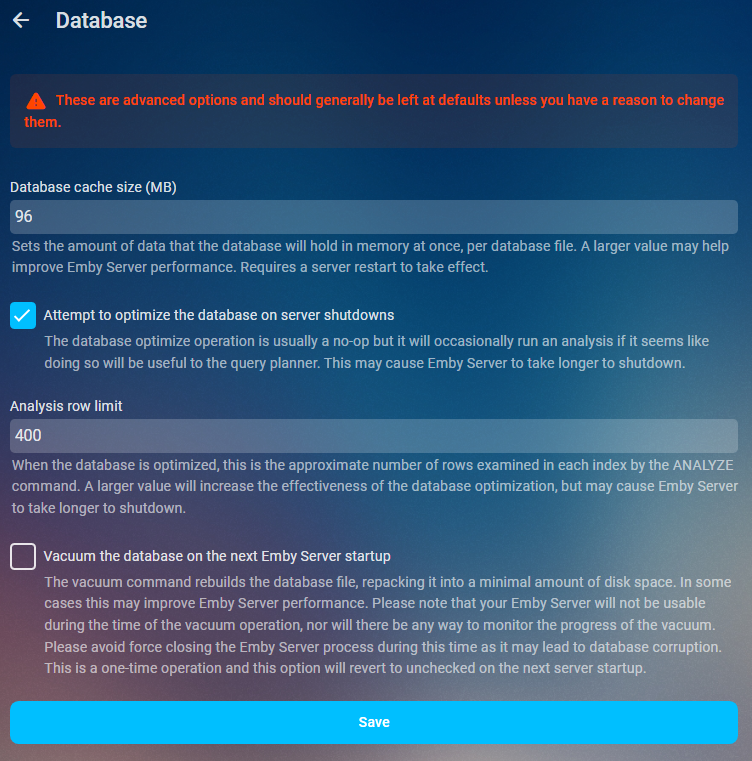
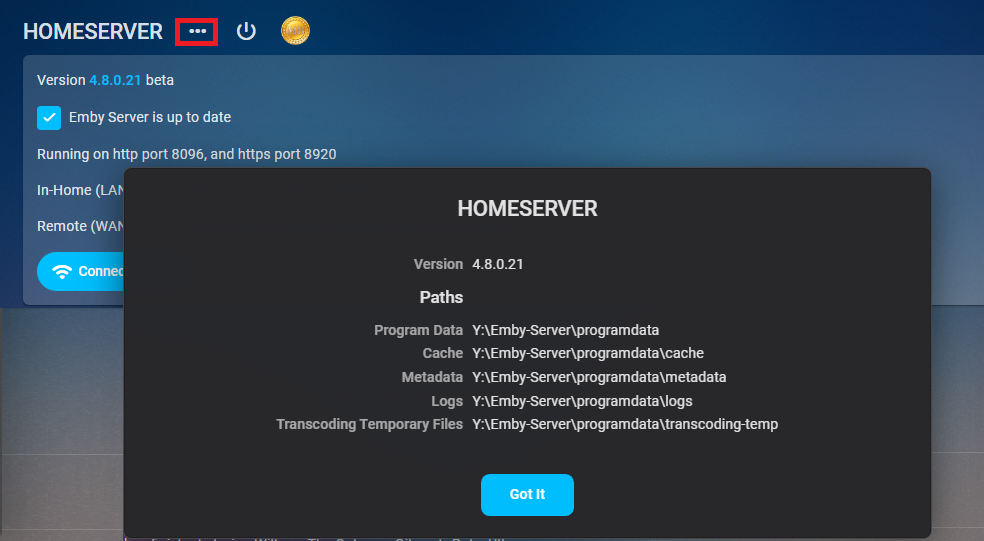
As of 4.9 multiple db connections were added so increasing this value to much could have negative effects on Ram usage. As it could be 5x your value or in some cases from a beta standpoint 20x your value. Will try to update when more info is available. Performace tweaks Database cache size Sets the amount of data that the database will hold in memory at once, per database file. A larger value may help improve Emby Server performance. Requires a server restart to take effect. If you have the available RAM you should set the database cache size to 1.5 to 2 times your library.db size. Navigate to your platform Emby programdata folder and look in the data folder to see its size. You can find your server info on the dashboard three dot menu. App Settings- Database
 1 point
 -
Personally, I know my media collection, my family doesn't need to see techy details polluting the screen estate. Some people like it, but equally, a number do not. Simple option "Show Media Info" - in the UI (administrator options for user accounts) or global option in config file at least.1 point











.thumb.jpg.7d793de0dff08bf27c2d089379dfdfb1.jpg)