Leaderboard




Popular Content
Showing content with the highest reputation on 07/26/23 in Posts
-
So I chage my sorting to DVD in metadata settings and rebuild metadata and it looks correct now2 points
-
Glad to see this appears to be fixed in 4.8 Thanks all!2 points
-
TheTVDB now supports more alternative orders than just Aired/Absolute/DVD. Can Emby query these additional orders and add them as options? Two examples of shows I've seen this used are Re:Zero which has a "Director's Cut" display order and Money Heist which has a "Netflix" order. https://thetvdb.com/series/re-zero-starting-life-in-another-world https://thetvdb.com/series/la-casa-de-papel1 point
-
I have a folder for anime and another one for movies. When accessing the anime folder, I'd like to use an external media player called "dandanPlay" as it provides enjoyable subtitle experiences for anime watching. For playing the files in the movie folder, I prefer using "Emby For Android" due to its superior video quality. However, it's quite inconvenient to switch between the two and adjust the playback options at the bottom of the settings each time. Here are some suggestions for "Emby For Android": 1. I hope to have the ability to choose different media players for each library, allowing flexible selection of players for each library. 2. Furthermore, after setting the default media player for an entire library, it would be even better to have the option to select individual media and apply specific media player settings. Some of my media files are quite old, and only Kodi can decode them successfully. I would like to have separate player settings for these specific media. In summary, the desired feature includes setting a global media player within the app, then being able to customize the player for each library, and finally having the option to set individual media player preferences for specific media files. I hope to achieve this level of flexibility. Thank you. The above content was translated for me by ChatGPT. The original text is as follows: 我有一个动漫文件夹和一个电影文件夹,当我使用动漫文件夹的时候,我希望调用其他播放器(dandanPlay),因为它能提供弹幕让我观看动漫更有乐趣。而播放电影文件夹内的文件时,我更乐意使用Emby For Android,因为它有更好的画质表现。但是每次动漫和电影切换又必须在设置里面调整播放选项的最下面,就很麻烦。 以下是我对与Emby For Android的一些建议: 我希望能对每一个库分别选择播放模式,能灵活的选择每个库是使用哪种播放器播放。 在此基础上,设置完整个库使用的播放器后,还能对单独的媒体选择那就更好了,因为我的有些媒体过于老旧,只能用kodi才能成功的解码,我想针对这些媒体进行一个单独的播放器设置。 整体逻辑如下:app内设置全局的播放器,然后在库中,可以针对库设置播放器,然后对每个媒体设置单独的播放器。我希望能达到这样的效果 谢谢1 point
-
I haven't signed in to Emby in a while, and now I can't - not says my password is wrong (even though I am using the one from my password manager). Attempted a reset, and that doesn't work - I follow the procedure, but after putting in the PIN, it says "Passwords reset for the following users" but none are listed. Signing in with a blank password doesn't work. I also had to create a new account to sign in HERE. I signed up when it could just be a user name, but now you can't recover via a user name or sign in that way here. I am a lifetime Premier user since 5/30/19 and still have my key. I looked in the KB about resets and it still shows the old screen with username or email, but now only email is allowed. How can I recover my server without a reinstall?1 point
-
Sorry In advance if this is a stupid idea, as I am not a developer and have no idea what’s going on, but as jellyfin works fine with all this media that fails in emby - with their default sound option ‘direct’, (they don’t have anti, 5.1, stereo options) and as they are open source, could you not see what they are doing there?1 point
-
Hi, no ETA but we're working hard on it.1 point
-
Doh, I just saw topic title and read the post, short-circuited.1 point
-
He sideloaded the standard app which has the side menu.1 point
-
I find it funny, but people don't seem to look at the meta source to figure out whats going on. Usually if I have a mismatch or problem that's the first place to go. So with Futurama - check the files as ripped in order from the disk, look at meta, figure out which meta matches, ask Emby to use that meta or adjust file naming so it matches meta file naming.1 point
-
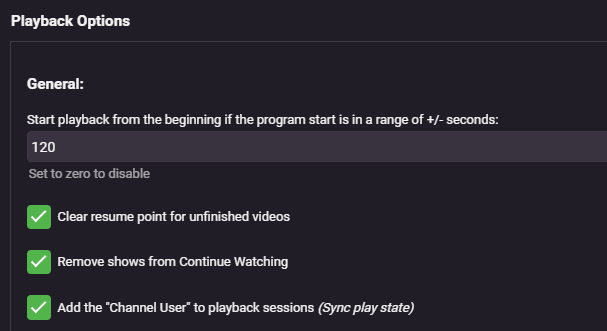
New question - is there any other way to remove the shows played with the plugin from Continue Watching? I have this box checked but it isn't working.
 1 point
 -
Hence the question, as Aired order doesn't have S03E19 nor S04E15, but order of same episodes is: Aired S04E01 for DVD S03E19 Futurama - Roswell That Ends Well - TheTVDB.com Aired S05E10 for DVD S04E15 Futurama - The Farnsworth Parabox - TheTVDB.com and that's what you see occurring, it's as if you order is set to Aired. I'd reselect DVD order on series level and refresh metadata.1 point
-
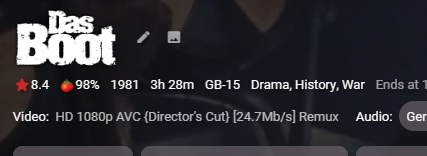
New RBJ version - 1.0.1.31 (zip attached - copy your old DLL to .bak and extract to emby plugins folder) Added Edition - retrieved from filename (added by arr 'Edition Tags' rename for example) ("Extended Cut", "Director's Cut", "Directors Cut", "Special Edition", "Extended Edition", "IMAX", "Anniversary Edition", "Despecialized Edition", "Remastered") Added as {edition} in video title - see below Toggle on/off under Video Display Settings You can also add as an Emby Tag if required (allowing you to filter etc) Added Codec Video Profile as a full Tag (as emby still doesn't have the ability to AND filters, only OR - making it all but useless ...) Included now if you opt to include Arr Quality Tags .. (if people don't want this, then I'll add a configuration option ...) Enhanced Added the Channels to the full Tag for Audio - for the same reasons as above - Emby cannot do an AND filter - so filtering on lets say 7.1 will show both THD and DD+ Items - there is no way to filter on 7.1 AND THD (only). There is now using Tags .. ... Applies to New items only out the box - you can re-processed items or all items in the plugin if you wish once tested. Feedback or suggestions welcome .. edit 27/07 - Added a few more 'Edition' versions such as 'Ultimate' etc. Emby.MediaInfo.dll.zip



 1 point
 -
What is your Display order set to, Aired/DVD/Absolute?1 point
-
i have fix by myself it was the VPN making issue.1 point
-
Thank you, I'll try your suggestions. By the way, no, I don't use Kodi profiles.1 point
-
Although I can't find the thread now, there has been discussion elsewhere in these forums about this: I and others would love to be able to view, for example, a PDF album booklet from within the Emby interface while playing the album it accompanies.1 point
-
Both apps use a version Google's Exoplayer modified by Emby. Though both apps may not be on the same build. You can see the Exoplayer version in the server log though.1 point
-
Just an FYI for those on the older TVs that seem to freeze up if too many sub tracks are included in the media file. I finally got a new TV and the files play perfect now. I still have the old 6 series unit, wish the issue would be fixed, but not holding my breath at this point.1 point
-
This is the one remaining sore spot for me with Emby. And, for that matter, also with my Rokus. If I do not have a computer actually connected I cannot read PDFs or any type of text files on my Rokus even through Emby. I have repeatedly tried various solutions and have yet to find one that really seems to work and every time there is a new generation of Emby I test the "book" type to see if, maybe, the support had been added. So far I have never been able to view any type of document file through Emby. It is a lack but I am not really sure that having PDF or even text support inside Roku would be a good thing. It might be more trouble than it is worth. I will pretty soon need, or at least strongly want, such support but I "think" it might be better to attach another device to my bedroom TV to get text support rather that expecting either Emby or Roku to have support for PDF or TXT files. Sigh........1 point
-
Roger that. I'll be on the hunt1 point
-
Related: CSS print grid styling dev for this feature idea https://www.smashingmagazine.com/2015/01/designing-for-print-with-css/ https://www.jotform.com/blog/css-perfect-print-stylesheet-98272/1 point
-
see - https://emby.media/community/index.php?/topic/120197-core-skip-intro-new-episodes-do-re-scan-of-all-episodes/#comment-1268355 @zodac01- A debug log of the events will show what's going on.1 point
-
I think we've got this resolved for the next update to the Emby Apple TV app. Thanks guys.1 point
-
I would love to see a screensaver like WMC has with the photowall. My wife loves this in WMC and when MBTcomes out and switch everything over from WMC this is a much needed feature.1 point
-
i was going to say the same thing, but i have no more energy or patience for this guys lying in our faces.1 point
-
Hi. There is always room for improvement and we continually strive to do better. We are a small team but that is actually what makes us much more responsive than a lot of larger ones IMO. At times I feel we are kinda between a rock and a hard place here...because we grew out of the open-source environment we have a very strong sense of "community" with this product. That is a good thing but it also seems to set an expectation with our users that they should have detailed insights into our internal operations. There are a lot of reasons why this isn't practical with us no longer being such a project. You don't have these types of insights into any major product from a large company - and you don't have direct contact with the actual people behind the scenes with those companies either. The last two server beta cycles have been very long - way too long - and that has exacerbated things. That is not how we planned them but stuff happens and here we are. One of our primary goals for the future will be to get back to much shorter release cycles of the server. So, thanks for the feedback and we will strive to do the best we can on the communication front but do realize that our internal operations are not intended to be public. We want to keep the sense of community we have built and Luke and I are still committed to direct communications with our users instead of building layers of isolation that would only obfuscate things further. In the end, what we really want to do is build, deliver and support the best damned personal media server there is and that will continue to be our top priority. Thanks.1 point
-
You don't have to disengage any meta-data providers as Emby will still load your NFO info and use this but will also check the meta-data providers for missing info. If however you are confident your existing info is good you can greatly speedup the loading process by turning off the meta-data providers as @Happy2Play mentioned. Any time in the future you can also refresh meta-data and only look for missing info. This was the crux of my question to Luke. I was essentially asking why we can't skip the meta-data check when loading files with existing NFOs as we can always fill in missing data later if needed. This is also really helpful if you run two different Emby Servers as I and many others do. They run on different OS so paths will be different. But I can have one server doing the meta-data grunt work and any other servers just using the existing data. There are lots of great uses of NFO file in various different situations depending on need but to me the single biggest use is when moving media to different drives which can happen for many reasons.1 point
-
Se pueden agrupar manualmente: Pero si sigues las convenciones de nombres, se agrupan automáticamente..1 point