Leaderboard




Popular Content
Showing content with the highest reputation on 06/17/23 in Posts
-
I just change the series title in the metadata: "A Series (1080)" and "A Series (4k)". You can see the technical details on the screen for each episode - not at a higher level, because you might have episodes in different resolutions etc (in fact, I have some old hard-to-find series which are like that). Paul2 points
-
i don't know if it fixes your problem, but you have an error in your advancedsettings.xml 2023-06-16 14:06:41.285 T:19454 error <general>: Error loading special://profile/advancedsettings.xml, Line 7 Error reading end tag.2 points
-
TheTVDB now supports more alternative orders than just Aired/Absolute/DVD. Can Emby query these additional orders and add them as options? Two examples of shows I've seen this used are Re:Zero which has a "Director's Cut" display order and Money Heist which has a "Netflix" order. https://thetvdb.com/series/re-zero-starting-life-in-another-world https://thetvdb.com/series/la-casa-de-papel1 point
-
Primarily to do with this: https://emby.media/community/index.php?/topic/74442-stopping-idle-chromecasts/&do=findComment&comment=752392 I'd like the ability to set a maximum time that an individual client can stay connected to the server and still be idle. By this I mean, - clients that have a stream open, but paused = idle - clients logged into the web app but not doing anything (like an open tab sitting in the background but not streaming) = idle (any activity at all like scrolling down on the page would reset this one) I'd like to be able to set say, a half hour timeout. Then if a user starts a stream, pauses it, then walks away; that client will automatically disconnect half an hour later. Thoughts?1 point
-
While Emby already has recommendations built in based on previously watched items I find they are not all that helpful. They seem to be based on genre only, for example, because you watched a comedy here are other comedies in your library. I do like how the also directed by/appear in recommendations work though. What would be great is if Emby could incorporate Trakt's recommendations as they are much more sophisticated. Trakt's recommendations are not only based off of what you have previously watched but also what your Trakt friends and other Trakt users have watched. It takes user ratings and trending/popular media into account. Ideally Emby would include full Trakt integration allowing users to rate media after watching, view lists and recommendations, and view upcoming media all from within Emby but for now I think recommendations would be a nice addition. Trakt has the potential to give Emby that community feel and allow users to discover new media, find something to watch, and recommend media to other users. http://docs.trakt.apiary.io/#reference/recommendations1 point
-
Projectivy Launcher1 point
-
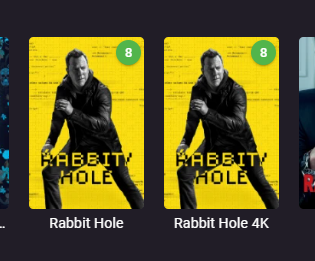
Brilliant! I never would have thought of that, but it makes perfect sense! Now it displays as 4K in the library! Thanks
 1 point
 -
Hi. So that implies that episodes 1, 2 and 3 played fine but episode 4 had an error (numbers are just examples) as opposed to the title of this topic which implies that the exact same file played fine at one point and then not at another. Which scenario is it?1 point
-
Update: sorry i just realized that i need to create scheduled recording with the "create recording" button on a channel's view.1 point
-
1 point
-
It shouldn’t be disabled, right @Abobader?1 point
-
Thanks for the reply, the video with 2-channel audio plays very smoothly and normally. After a few days of trying, I found that video files with 5.1 channel audio with Dolby or DTS sound effects often play fine as well. Only video files with 5.1AAC audio can only hear the background sound but not the main dialogue.1 point
-
This has been happening to me as well for the past couple weeks. The Apple TV Emby app logs me out almost every day. I need to input my local server address and user password every time. Super annoying. Everything is up to date. Running the server in the latest Docker. The Docker or the Apple TV isn't updating or restarting. I can't find a pattern.1 point
-
I tested this a couple months ago on the 4.8 beta channel and didn’t see a problem , so hopefully it is resolved now.1 point
-
Alternatively, just have a separate folder - to make Emby show it separately, ensure that in the setting for that library you have unticked "Automatically merge series that are spread across multiple folders" (near the bottom of the library's settings). I suspect you have that setting ticked, but the file naming doesn't support the drop-down choice already mentioned. Paul1 point
-
@BearclawHave you had any luck fixing this problem?1 point
-
找到问题原因了 不是防火墙或者VPN的问题 因为添加了软路由 网关变更 NAS和app都不能正常运作 重新设置了正确网关后 一切都恢复正常了1 point
-
Oh yes thanks I found it.1 point
-
Hi, that’s odd. Can you provide an example log for the same video when it does succeed?1 point
-
If you really want to tweak it to your liking (which I know you like to do ) - your best bet is to just use a custom launcher. I've heard good things about FLauncher https://www.xda-developers.com/flauncher-android-tv/1 point
-
Well I definitely want to see my backdrops looking as good as possible. I'm not objecting to bug fixing but don't want any dull faded image in the background, I want to see it.1 point
-
Hi rbjtech Thanks for helping, I solved the problem. I was looking in the users.db file to find my username, and was looking at the wrong one (red cross), while I had to look a bit further (green rectangle). Hopefully this helps others
 1 point
 -
Ah ok, that makes perfect sense then because several other apps I searched for were not there either. So no issue loading from USB for now and once it becomes available in the store (and its a newer version) it will let me know and I can update?1 point
-
@JägsThank you very much for your help with this. After running "sudo /usr/builtin/sbin/userdel emby" command, I re-installed Emby Server from App Central and I was able to get the server to run again. It's a hassle to set up the library and user profiles all over but not a big deal. I'm just glad I was able to get it to work. Thanks again!1 point
-
Thanks Luke. At the end I deleted the installation and created a new one. I'll be saving metadata on .nfo files from now on. Thanks!1 point
-
HI, yes ,you can use Emby remote control features by clicking the cast icon in the upper right, and selecting the device that you wish to control.1 point
-
Any updates on this? I'm using 1.7.3 (2) and it still happens to me almost every time I want to use the app. I've heard some people say that there should be an option to remember login, but I don't see that in the AppleTV version.1 point
-
Version 5.4.5 Notes: Please remember that crashes, issues, and feature requests cannot be addressed or resolved through Play Store comments. Added: Long press next button inside Symfonium will skip to next album. Changed: Refactor option Retain shuffle and repeat mode to Retain player state that also keep speed and pitch between play commands. The option no more retain those on app kill, enable the Playback state saving option for that. When offline caching a media, the associated images are now also automatically cached. Tweaked the shuffle result when using the shuffle button in library views. Fixed: Playback cache properly take in account the enhanced replay gain processor. Fix Symfonium setting the volume to 100% on start under a specific set of conditions. Restore missing actions on playlist entries action menu. Proper synchronisation of release date of albums for Emby/Jellyfin. https://support.symfonium.app/t/version-5-4-5-released/21211 point