Leaderboard




Popular Content
Showing content with the highest reputation on 06/13/23 in Posts
-
Yes, I just updated to DSM 7.2-64570, stopped Emby, updated DSM, DSM is reporting that Emby is no longer supported, installed the 7.2 Emby Update, works like a charm.3 points
-
Some browsers will search if just given an IP address alone, but will do what they should if it starts with http:// Paul3 points
-
Love the new radiance blue theme Can we get the option to set the default user theme globally in the admin dashboard?2 points
-
Thank you! It's clear for me.2 points
-
You can have as many devices as you'd like, but only 25 of them can be using Premiere features at the same time (devices drop off the list after about a week) on standard Premiere license. https://emby.media/support/articles/Premiere-Limits.html No, devices that do not use Premiere features do not count against device limit.2 points
-
This would be a great feature. I have had so many of my users comment on how nice the Blue Radiance theme is2 points
-
I'm trying to make a custom xml listing for a channel. I'm using the template below: <?xml version="1.0" encoding="utf-8"?> <tv date="1/1/2021 12:00:00 PM" source-info-url="" source-info-name="" generator-info-name="" generator-info-url=""> <channel id="NAME OF YOUR CHANNEL HERE"> <display-name>NAME OF YOUR CHANNEL HERE</display-name> </channel> <programme channel="NAME OF YOUR CHANNEL HERE" start="20210101000000 +0000" stop="20211231235900 +0000"> <title>CHANNEL TITLE HERE</title> <desc>CHANNEL DESCRIPTION HERE</desc> <sub-title>CHANNEL SUB TITLE HERE</sub-title> </programme> </tv> But I'm wondering how I can add a poster to the program. All of the programs on my EPG currently have posters so I'm wondering what code I can add to this xml to have my custom channel display a poster for it as well.1 point
-
You could do it by user - have a different user for the gym with access only to the libraries you want there. Paul1 point
-
It was my admin account which is the more concerning part. Already changed the pw. Waiting to see what happens.1 point
-
I think so. Thanks, Luke.1 point
-
Thanks for following up !1 point
-
Hi, no ETA, but it's planned for future updates. Thanks.1 point
-
Yeah my admin account isn’t “admin” it’s something else. I can’t figure out why either. Just very odd.1 point
-
So they had your previous 'emby' ip address and username from the vulnerability (now closed) - and may have just re-used that A piece of info missing from the suggestions, is to change the account names as well. Using 'Admin', etc is always a bad idea - change that to be something as random as the password itself. That way, they need to guess both the username and the password, not just the password. The bit I don't get is why would a bad actor openly use this information to watch one of your movies - that just doesn't make sense at all ...1 point
-
This: But I don't know to what extent this now also applies to Ubuntu. Please look in the corresponding forum for the points where Emby does not read in automatically.1 point
-
I would like to see the channels being streamed identified in the guide similar to the way shows being recorded are marked. Then any error message could direct the user to look for that particular mark allowing them to at least stream that channel(s). This really is a frustrating issue with limited tuners. While an admin can hop over to the server dashboard and see what's being streamed, a regular user only gets frustrated.1 point
-
Didn't we test this and you did not see the header being passed even though the test included a spoofed header?1 point
-
If you don't have anything else infront of nginx (cloudflare for example) probably your best bet.1 point
-
Unfortunately, many if not most people don't. The Emby team can't just assume you've already covered all the bases and has to walk thru all the possibilities from least to most consequential. There could always be steps or possibilities/explanations you haven't thought of.1 point
-
The main reason to set this header is that if you don't, it get's passed as-is from the client. As Emby listens to this header first, it would allow the client to send a header with a lan IP in it masquerading as a lan client (pre-patch. Now they can just spoof a different wan ip). If you had that line removed prior to the security breach; you were vulnerable to it as well. Even with X-Real-Ip still present. When it's been explicitly set by your proxy, you know for sure what's in it. It's less consequential now, but would still allow a client to spoof a different ip than what they are connecting from. (ie the ip displayed in your server activity would be whatever the client passes in that header as long as it's not a lan ip anymore.1 point
-
I understand that would be normal but it is also possible to potentially unwittingly connect to your account. Like, using a device that you logged into previously or some weird quirk with Connect setup where maybe the wrong email was put into that field briefly, etc. Just trying to spit-ball possibilities because someone just watching a movie on your server is completely outside the scope of behavior that would most likely be a bad actor.1 point
-
To expand on this - you also need to look at the how any potential unwanted connection is getting to your server in the first place. To get an outside connection to your server, your server (or any other device) needs the following - 1. A way to forward it's request attempt from your Public IP address to the end device. This is what the 'Port Forward' settings do on your router - there is a very outdated protocol called uPNP which does this for you and it takes instructions from devices within your LAN to open up public facing ports. Of course, the concept was great but is ultimately flawed, as it has no security nor control on what can request such ports to be opened. Emby will attempt to make use of this (if available) and open the ports for remote use. BUT of course, any other compromised service can also do the same. This has been a security issue for many many years, and most modern routers will have this 'service' disabled - meaning any local attempt to open ports will not suceed. So, ensure uPNP is turned OFF on your router - and while you are there, also change the Router password. If it was already off - and you have MANUALLY set the port forward then that is good and you have closed down one less area for concern. I would also change the Router password as a matter of course. Also CHECK what other ports are being forwarded - if there are any there that you are not aware of - then take a note of them and disable/remove them. The less ports that are 'OPEN' - the less attack surface you have - if only 8096 is open, then only 8096 can be used. 2. A device needs to be LISTENING to accept an incoming connection request. The emby web server is listening on 8096 and 8920 by default - so only those ports will get a response. You can check what ports Windows is listening on by running the command (as admin) netstat -I | find "LISTENING" This may take a while to run as it probes all the ports. You should see the emby ports there - as well as other default windows ports such as file sharing (TCP 135/445). If there is anything there which rings alarm bells - then investigate. 3. Firewalls These need to open to either the ports or the listening application.1 point
-
It's X-Forwarded-Proto, not X-Forwarded-Protocol Emby evaluates the X-Forwarded-Proto header (none of the others) and provides it internally (accessible to plugins) via the Emby SDK Reference: IRequest.IsSecureConnection property. As far as I can see, it is not further used by the core server code at this time.1 point
-
RP chaining is very dangerous when not done right. Each RP in the chain needs to have an allow-list of known source proxies and the RP must check the physical source IP against this allow list. If using http headers for this check, the whole chain is compromised already. This means that you also should have direct control over any source proxy you want to put into the allow-list - otherwise security is not in your own hands anymore and you can no longer assume that you would be safe. Currently, Emby Server uses the first IP address from the X-FORWARDED-FOR header if available. Only if there's no X-FORWARDED-FOR header, then it will look for X-REAL-IP.1 point
-
Sorry, the correct command to download the emby-server file is: sudo wget https://github.com/MediaBrowser/Emby.Releases/releases/download/4.7.13.0/emby-server-deb_4.7.13.0_arm64.deb -P /opt1 point
-
That would be great... I also have this issue with bluetooth headphones...1 point
-
This would a useful non-automated task to be able to run. Even better if you could toggle it to either scan the entire library or just run for new files.1 point
-
Not everybody believes in that - but I do. I can't say whether it will have a sensational or just moderate effect, but at minimum it will be solid and noticeable. When looking at history it's a kind of weird picture anyway: MB started as a companion to WMC, which was strong in TV but had its shortcomings in management of non-tv media. WMC was architected for local single-user deployment (with a flaky extender concept). MB filled all those gaps but when WMC fell out of the picture, it couldn't provide an adequate replacement for the live TV part (well - it's a complex subject without doubt). Some say - nobody would be interested in all those TV features as the world has moved on and nobody would want these things anymore, rather looking for "modern apps" which are like "N-flix" and Co. - I'm sure the latter part is generally valid, the world is changing rapidly in many ways. Broadcast TV - somewhat - but not that fast, it's still a strong component in media consumption all over the world and what I doubt strongly is that nobody would be interested anymore in a TV experience like WMC had offered. It's rather that nobody's doing it because there is nothing like it available anymore. Many half-baked solutions exist, some better some worse but nothing getting really close while at the same time covering all the new "more modern" demands. To me it even appears to be that the market of TV applications is very similar to the pre-WMC situation. Everything a bit more advanced, but there are those single/local TV apps (like DVBViewer etc.) which still do the same like they always did, and then there are some more htpc-style applications but each with their own sets of drawbacks and weaknesses. Regarding the latter ones - Emby is way better than every single one of them.....if you don't count TV..... This is what TVnext is intended for making a change to: getting ahead of the competition in the one area which has always been its weakest.1 point
-
Further to the solution, should anyone have the same issue: I ended up moving away from the dynamic user to get rid of the read-only issue. I shut down emby-server and used sudo systemctl edit emby-server.service to add the following in the space provided, which will override the default settings: [Service] DynamicUser=false I then used the normal process for adding a user account named 'emby' that is in the 'media' group. Next I made everything under my media directory chown emby:media and also chmod 775. Finally I used sudo systemctl start emby-server.service to restart the service. It came up, and was able to write to the media directory and everything under it (for .bif files and the like).1 point
-
# INSTALL EMBY-SERVER ON RASPBERRY PI LITE OS (64-BIT) (ver 11 bullseye, kernel ver 6.1.21-v8+) 1. Download emby-server-deb_4.7.13.0_arm64.deb or the latest version to the pi's /opt directory OR directory of your choosing: sudo wget https://github.com/MediaBrowser/Emby.Releases/releases/download/4.7.13.0/emby-server-deb_4.7.13.0_arm64.deb /opt 2. Install emby-server: sudo dpkg -i /opt/emby-server-deb_4.7.13.0_arm64.deb 3. Open a web browser to http://localhost:8096 OR the network ip-address-of-your-rpi:8096 and set up emby-server to your liking. When finished, install the EMBY client app on your smart TV or ROKU-like streaming apparatus, and connect via your wired or wireless connection to your emby-server. I hope this works for you as it did for me! # GOOD EMBY-SERVER AND RASPBERRYPI CLI COMMANDS TO KNOW AND USE WHEN YOU NEED THEM: sudo systemctl status emby-server sudo systemctl stop emby-server sudo systemctl start emby-server sudo systemctl restart emby-server1 point
-
@NoWorries1968 No worries (pun intended ). This Dune device looks interesting. I haven't heard of it before. Pricetag is a bit steep for me for TV1 point
-
Thanks again for the help. This did correct the problem. Clearing the Roku cache was the fix. I will step through for completeness. Roku network connection was/is good. Deleted all Roku devices from Emby Server dashboard. Verified private network. No change. Roku still unable to see the server. Deleted the Emby app on Roku (I was not able to access settings without connecting to a server). Reboot Roku device, reload Emby application. Server now detected automatically. I had previously deleted the Emby application and then reloaded it without the reboot. That did not work. I did not realize that some saved state would still carry over. So the problem appeared to be in the Roku application cached data.1 point
-
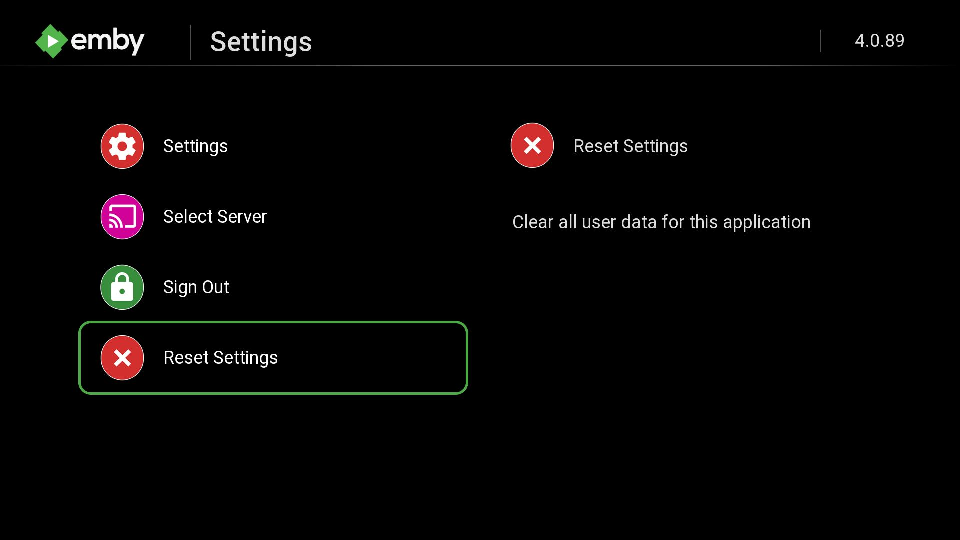
If you press the Home button on your Roku remote and go to the Roku homescreen. Go to Settings >> Network >> Check connection and see if it isn't the Roku itself. Roku recently enabled IPV6 with firmware 12 and this addition might be causing you grief. Having the Roku re-detect the network will eliminate that as a source and let us move forward. Once you make sure the Roku has the correct network settings you can also delete every single Roku device in your Emby server. Go to your server dashboard and choose the device tabs and remove every Roku device. Do not worry. As users reconnect it will readd their device to this screen. Once you have done that if this Emby server is using Windows make sure it is using "Private network" and hasn't reverted to "Public network". When your router disconnects and reconnects sometimes Windows will do this if the event also disrupts the PC like a power outage or similar. If none of the above work you may need to reset the cache on the Roku for the Emby application. You may not be able to get to this option. If you cannot do not worry. You can make the Roku do this by delete all the Emby apps from your device. Then restart the Roku. The Roku will notice you have no applications tied to that cache any longer and wipe that space. Then reinstall the Emby apps on your Roku again. If it still doesn't work after all of the above the problem is part of your network. Likely something on the PC side has blocked the Roku since it tries to connect to the PC. And if Emby is not running it might get seen as an intruder. It will then block the Roku if this is security software. If you use security software you might want to make sure your Roku IP isn't blacklisted.
 1 point
 -
Sorry you are still having problems—and apologies for being redundant—but I just want to confirm that you have done ALL of the following steps: turn off Emby Server from App Central remove Emby Server from App Central run the following command from the terminal: sudo rm -R "/volume1/.@plugins/AppCentral/emby-server" run the following command from the terminal: sudo userdel emby Just to be sure, reboot. Reinstall Emby Server from App Central. Access it via port 8096 with your server's IP address (same address you use to access your ASUSTOR). If you have done all of these steps and are still having problems, I think your only recourse is to do a factory reset. It's a pain, and I've had to do it twice before, but ASUSTOR support can guide you through the process.1 point
-
I found the answer on this page: https://github.com/XMLTV/xmltv/blob/master/xmltv.dtd for those wondering. I put the code in between the <programe> brackets. The code used is: <icon src="https://example.com/url_to_program_poster.jpg" width="100" height="100" />1 point
-
I found having multiple accounts with the same provider works well if you use the same M3U file with each tuner. It will not duplicate the channels in the guide and with each connection set to 1, Emby is smart enough to cycle through the accounts until you run out of tuners. Kudos to the programmer who thought this out to provide this functionality.1 point
-
I restarted the docker container and the cache cleared automatically, i tend to update weekly so this shouldnt be an issue ty for your help1 point
-
So Rabbithole and Silo pulled the posters upon a manual refresh, but another properly identified show (I can't remember which) didn't work. BUT my system wide library scan is almost complete and it looks like stuff is pulling now, so I think it was honestly just turning off NFO as an option to pull data from that did it. Thank you for your help along the way!1 point
-
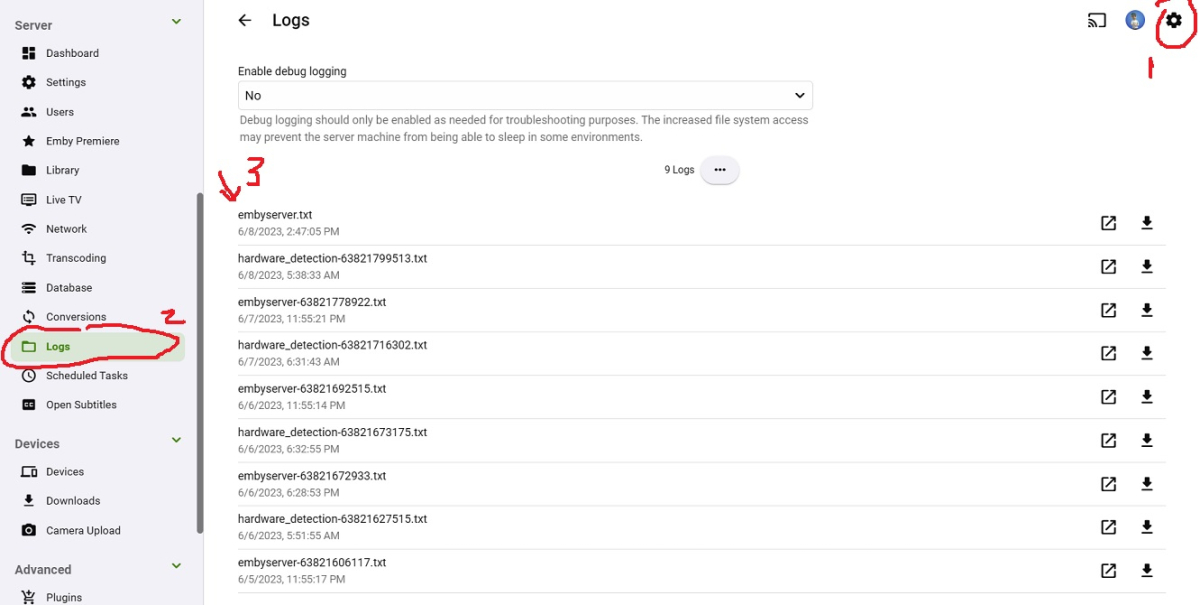
I should have mentioned that's from the Emby server logs, not Synology server logs. You can get them from the Emby server settings page. If you want to see the Package Center logs that's in. This information can sometimes be helpful if Emby won't install and is everything before Emby restarts. /var/log/packages/EmbyServer.log
 1 point
 -
echoing a request for this feature, it would be easy to implement and provide users with large libraries a huge benefit, and could even leverage the existing thumbnail extraction process by saving errors encountered & providing a report page. i was able to script something up to check a questionable series but its annoying and hard to properly parse the output1 point
-
also have some 11/29 - b28adcea-770e-4be6-84e2-14e5d70ff8d6 60/60 - e5369c37-541e-4294-ae72-64279d95d950 Lil 1/2 Dead - f1e169d6-3288-49c3-aa8b-a372c841752d Hunter/Game - 3cd753bd-7cbb-441d-990f-c0245fec3a85 Frankfurt/Main Underground United - 4a04feef-b329-4cf0-9f06-f2f14b1c7043 thanks1 point
-
yes i would like to have the option that the admin can set theme for all users like a default theme for all1 point
-
Well you can test it by fixing all of them just for one grouping, that way you don't have to tag every single episode before seeing results. And for season folders, if you have them, no, not the title, the season number value in the metadata editor.1 point
-
Nothing to update at this time.0 points