Leaderboard




Popular Content
Showing content with the highest reputation on 06/02/23 in Posts
-
Fixed. Thanks, please if you come cross any issue regarding the forum in the future, best to post it in this thread: Thanks again and well done.4 points
-
Not sure if I'm using the right term but I searched every think I could think of. It's likely it already exists so I apologize in advance. Is there a while to filter OUT. For instance if I wanted to see all movies EXCEPT a specific genre for example. I know I can filter to see all action movies for instance but how about filtering so it shows ALL BUT Horror. Is that possible now or even feasible as a future item? Thanks for taking time.3 points
-
This is primarily a bug fix release. Here are the changes: Improve artist splitting for artists that have a / in their title Handle invalid data when parsing video rotation information Fix error with conversion feature and videos that have audio streams with 0 channels Various intro detection bug fixes Fix errors with SMB access on Linux when non-default server port is used Various transcoding related fixes Increase default server database cache size for new installs View the full article2 points
-
@rbjtechill have to give some teams training for github pal2 points
-
I’ll have another look and it should be easy.. we can just exclude library “top-picks” i can’t remember if it uses internalitemsquery. I think it uses a crazy ass Linq expression to return the items. If your looking its at the bottom of the plugin.cs class.2 points
-
Thanks a lot for the pointer. Given that it's a really tiny fix, we can see whether we can backport this into our current ffmpeg.2 points
-
In the sidebar of the forums, there is a "Knowledge Base" link, but it just leads to a 404 page instead of, presumably, https://emby.media/support/2 points
-
I just uploaded a Bulky update to confirm that everything is working fine. My server upgraded without incident. Vic2 points
-
That's not the first time I've heard it should be split into two libraries (tv/movies). Inorder to split it up, I'll have to look at the code again. It's not impossible to do, I was kind of procrastinating the work. It would have to be an option to split the library up. When enabled, Top picks would create two libraries in the system, for each type. That's easy enough. The hard part is toggling it back off. That would involve removing libraries in the code . I think that was the part I wasn't sure if I should write or not. Also wasn't sure if it was possible to remove a library in the ILibraryManager object. I'll take a look, and see what is possible2 points
-
Jellyfin is great - if you are a coder and you want to make it "yours" plus put up with the quirks that inevitably come from open source. Plex is great if you are a mindless drone or such a complete luddite you want to push an button and it all works AND you are willing to put up with totally useless new features and a design that is evolving into mobile use. Emby is for watching media. It lets you set it up based on what you want, its simple but complex where it needs to be. Plus even in the months since I became a premium member there has been positive evolution in the design. But that's not what I'm here for, I'm here so I can decide what meta matches my media - that's one of the biggest reasons. That and pick what you need and want. Plus meta for personal files where you can add Grandma, as a actor, add a picture, and video, and a bio, and click to find all the media with her in it, and add tags to sort by whatever, and make it easy to use, which beats the hell out of the other guys.2 points
-
As I'm transitioning from Volumio and Plex to Emby to centralize my usage to one app, the one thing I'm missing the most is gapless playback. This is particulary annoying when listening to albums like "Dark Side of the Moon" by Pink Floyd. I'm experiencing a buffer of about 1 second in between songs, which really ruins the immersion. Would be awesome if this would be implemented in both the Chromecast, and web player.1 point
-
Could the way User Settings are handled be changed so that: 1 - Every setting that is changed via the Admin/Server - Users settings page becomes the new default for that particular user (instead of the Emby supplied default). 2 - Any setting that is changed appropriate for an end user to change from within that particular user account being signed in is saved at the local device level, and would be used instead of Server specified defaults. This wouild: A - Allow us to adjust the default behavior when NO local settings exist. B - Still have local device specific settings override what have been set as Server defaults. (Allowing the same User to have different settings per Device - as it is now.) It doesn't seem like the logic would be that much different than it is now. Assuming if no local settings already exist today, the Server has to pass along what it has them as for a starting point. The change wouild just be allowing us to alter what any of those base default settings are.1 point
-
Since we can now detect end credits, or manually add them in other cases, it would be nice to see this, rather than an automatic percentage/time remaining, trigger the "next episode" popup and decide whether an episode is resumable or not. Even better if it could expand to movies for the latter point.1 point
-
It would be useful if the server (or perhaps clients) could cache most (if not all) content images (posters, backdrops, logos, etc) for movies, TV series and seasons. This would mainly be of benefit when a portion of someone's content is offline but the users would still like to view the content to know what exists. I think caching on the server would be preferable, then all clients could make use of the same cached images. if you think this would be a useful feature, please click the "Like This" button on this post.1 point
-
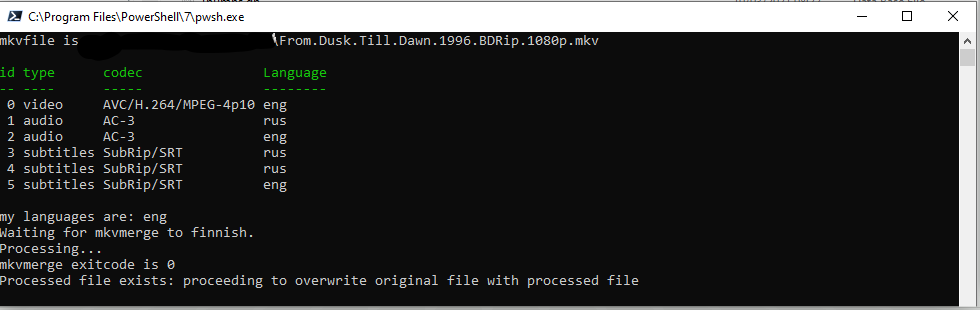
Removes eg. Audio and Subtitle Tracks from selected (in Explorer) MKVs which do not match your preferred language(s) ignores files which do not contain at least 1 audio track with any one of your preferred languages ignores files which do not contain audio tracks other than your preferred languages instances a wait state to prevent multiple mkvmerges running at same time to prevent a disk bottleneck (not spindle aware) Halts processing if Mkvmerge errors or temp processing file not found. (to protect deleting original file if an issue) Test with extreme caution. This script deletes processed files Installation copy script/reg to filesystem. set your preferred languages in the script Edit .reg with path to your script and run .reg to import. Right-click one or more mkvs and choose "KeepLanguage". Changes v0.0.0.7 corrects some behaviour when path contains special characters Keeplanguage v0.0.0.7.zip
 1 point
 -
I just wrote a simple python script to check for any active emby users within the last 10 minutes. You just need to update the top 2 variables (api token and emby url). I call this script from my backup script, so that i can avoid shutting down all my docker containers while people are using emby. I don't bother with the Sessions endpoint as it's not needed. Simply checking the LastActivityDate works very effectively. import json import os import requests import dateutil.parser as dp from datetime import datetime, timedelta, timezone ''' Checks for any active emby users within last x minutes. Prints True if active users found, otherwise False. ''' api_token = "<api token>" emby_url = "<emby url>" endpoint = "Users" minutes = 10 url = os.path.join(emby_url, "emby", endpoint, "?api_key=" + api_token) headers = {'Accept': 'application/json'} response = requests.get(url, headers=headers) json_data = json.loads(response.text) now = datetime.now(timezone.utc) active_status = False for user in json_data: last_active = dp.isoparse(user["LastActivityDate"]) if now - timedelta(minutes=minutes) <= last_active <= now: active_status = True break print(active_status)1 point
-
Thanks for the quick update! I tried the new version and if I start watching a channel and then stop it, it no longer locks the tuner. So it works great! However if I don't stop the channel just switch to another, than the channel I was watching remains locked to one tuner and the new channel starts on the other tuner.1 point
-
Great work, everything looks fine now:

 1 point
 -
The S6 has never had an issue, it comes up with a choice of servers OR downloaded content. I've used it quite a bit on flights. The idea behind using Emby is that anything we watch on vaca will be flagged as watched on Emby.1 point
-
Yes, 1.5.5 is the latest. USB installs haven't always expired. That only started a maybe couple years ago (not sure exact date). Anything compiled before Samsung started adding the expiration you could keep forever just like the version from the store. If your previous install was only 3 months old then that would be odd. Only the store version should not expire.1 point
-
ok thanks...will do1 point
-
try it out, it's an on the fly setting. No need to resync. Worst could happen, mediafiles no longer playable. In this case switch "Use path substitution" back to off.1 point
-
v1.0.1.27 1. Added the alternate DTS-HS HRA back in again (XBR) 2. Added DTS-HD:MA ES (ES XCh XLL) 3. Tamed the logging - debug log mode still writes very verbose logging (as it did before), but standard logging just tracks progress per item now - as logs filled quickly when running on a large library ... Emby.MediaInfo.dll1 point
-
Hi, try running the refresh guide scheduled task. You probably just didn't wait for that to finish. Thanks.1 point
-
Hi, that would be great. Feel free to jump in on OneSky and search for the Emby project. Thanks !1 point
-
Hi. The next version of the server should correct this. Thanks.1 point
-
I'm through my lib for now, and these are the only ones that I could find.1 point
-
so that's a new one on me - that one is 'ES XCh XLL' .. wow If you can check them all - then I'll add them all at once - no point in doing this piece meal ... Thanks !1 point
-
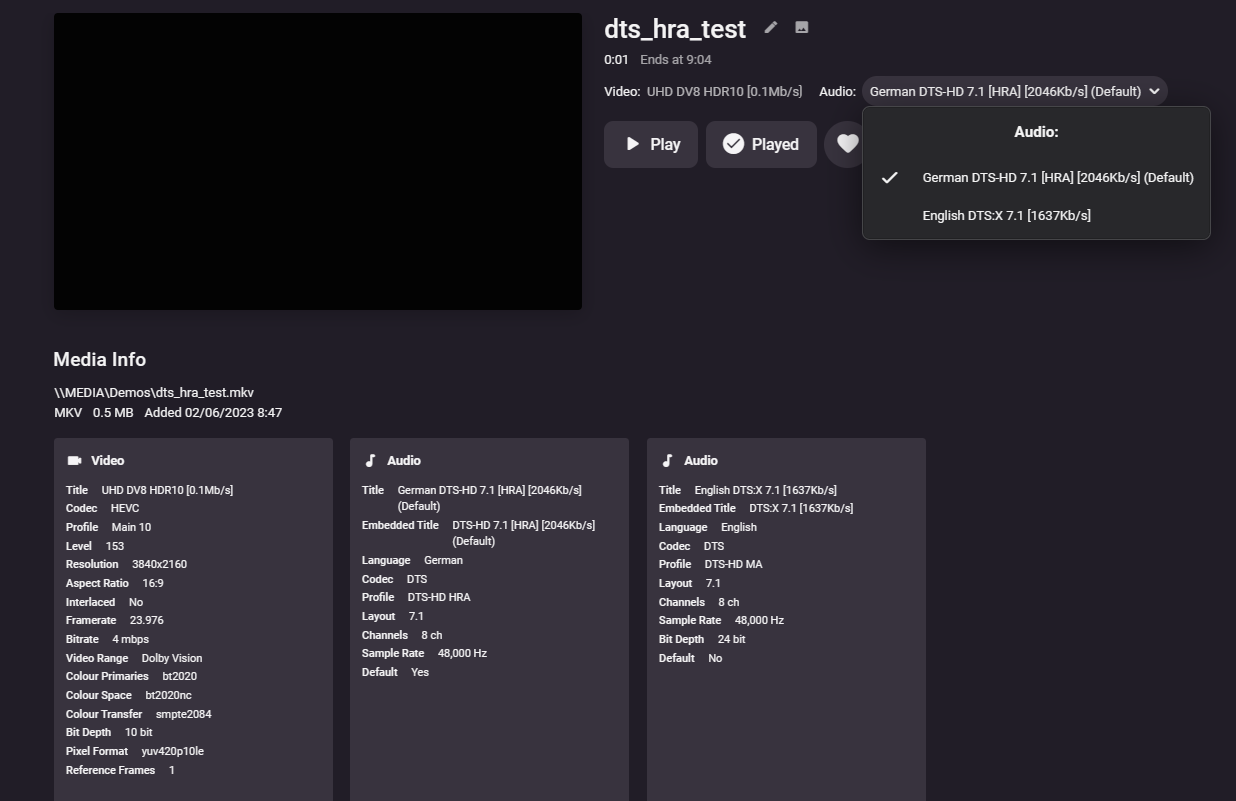
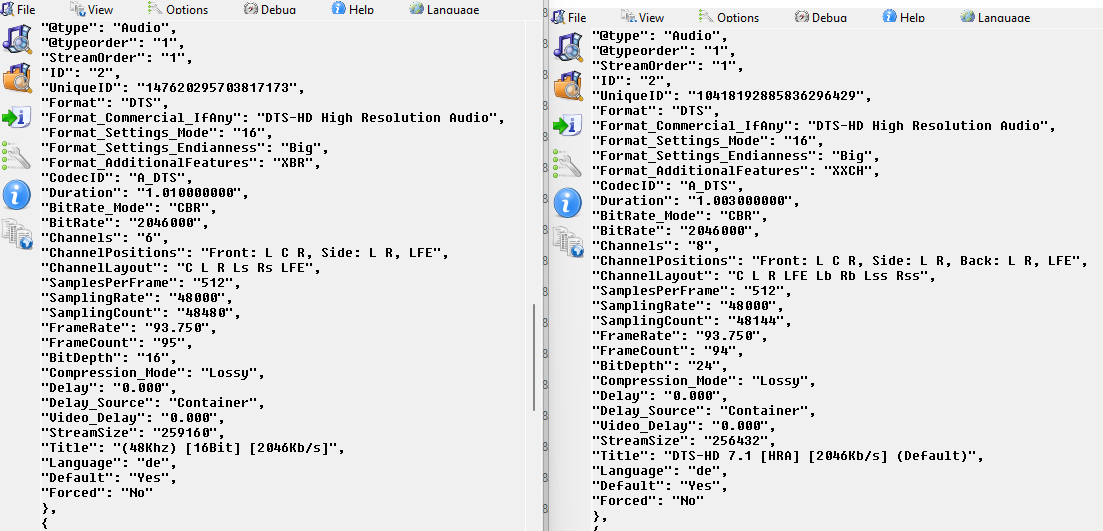
I walked into that one didn't I .. haha ! Yea something odd going on with HRA - I think i'm going to add both the 'AdditionalFeatures' as can be seen by both your samples below - both are DTS-HD HRA - but one uses 'XBR' (what it used to use before I changed it..) and one has 'XXCH' - which is what it now uses ... So gonna add both ...
 1 point
 -
Hi @chef- Yes in my original recommendations hack, duplicate items in 'continue watching' was always a problem. Simply put, the strm link is classed as valid 'media' (and should be), thus it's always going to show. What is needed is another 'link' type that emby recognises, but the 'next up/continue watching etc' ignores it, it's only valid for direct library use. Of preference thought, is for them to actually release a decent 'Smart Playlist' functionality based on viewing video's as opposed to Audio tracks ... After all these years, they keep promising it - but nothing ever happens - The Smart Playlist 2.0 from a 3rd party developer has been carrying their core product as the only solution today (you know all about that ...) The old playlists themselves got a recent 'makeover' - - now you have a concept of 'basic permissions - private or public playlsists' - wow - advanced stuff [sarcasm]. You can't even assign users to them .. fail...1 point
-
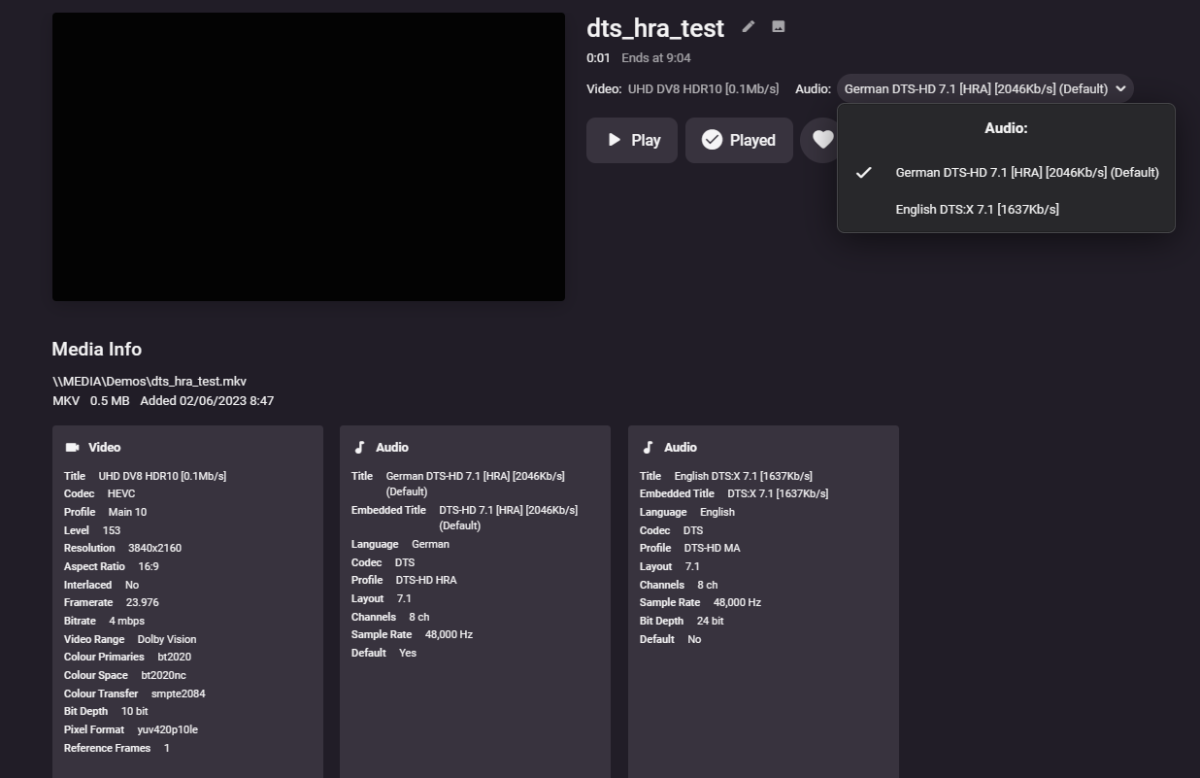
Fixed .. Please let me know of any other specialist formats that may have slipped through the net ! This version contains the following changes (1.0.1.26) :- Fixes/Enhancements 1. DTS-HD HRA detection Fix 2. Add 'Remux' to Video Title if 'Remux' in the filename. (note case) - and the file was not previously classed as a Remux due to the bitrate. 3. Remove Spacing before Kb/s (now same as Mb/s) 4. Remove '-' on Bit Depth 5. Added UHD/4K to written Tags Known Bugs 1. Multi-video tracks do not get updated properly. (I attempted but couldn't get it to work - will need @Cheesegeezerfor this one I think). DLL below Emby.MediaInfo.dll
 1 point
 -
@Abobader1 point
-
Yes, sure Luke! thank you for follow-up! I thought to let it run for a couple days/a week or two to see what's happening and get back here. So far so good! I disabled server's automatic port mapping as you suggested. In addition I uninstalled a couple of plugins that I never used (which were installed 4-5 years ago, as a test, when I first put Emby on Synology). Everything ok to date. Keep U posted. Thank you again!1 point
-
Only certain Roku TV/STB will support Dolby Vision. The entire HDMI chain must support Dolby Vision. If your Roku TV/STB supports Dolby Vision it will pass this through to your TV. Please stay tuned. There will be an update very soon to correct this Dolby Vision issue. We will make a post about the new update in this thread. In the meantime, apologies. https://developer.roku.com/docs/specs/hardware.md Open the above link and scroll down to the section labeled "Current Roku models" and you can see which models support HDR10/10+, HLG, and DolbyVision.1 point
-
I'm fairly certain it doesn't. Every single series in my library (326 shows) follows that convention of year in the folder name, but not in the filename, and hyphens separating the series name, season+epp number (no space between those), and episode title. (as shown in my example) The year is also shown as in the series name, but not the episode names in the tv naming guide.1 point
-
Almost 2 months. We have a few guide updates requested that have had no movement. I'm giving our contact a call in the morning to see what's up.1 point
-
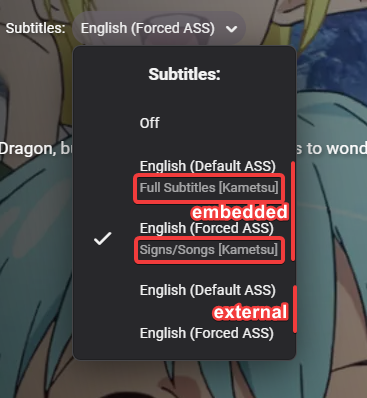
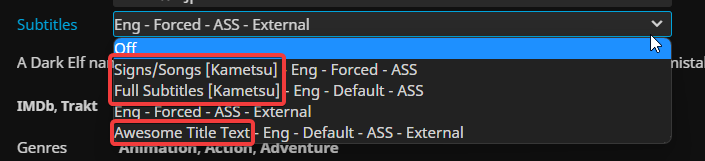
Hello, I think it would be a good addition to support the display of titles when using external subtitles - just like the functionality with embedded ones. Example: Subtitle filename respectively 'GATE - S01E12 - Itami Might Bluray-1080p [sam].Awesome Title Text.default.eng.ass' & 'GATE - S01E12 - Itami Might Bluray-1080p [sam].forced.eng.ass'. It would be great to make it possible to display the greyed out text with external subtitles as well. I know it is possible to add further information to the language tag but this will display in the upper row which will make it look very cluttered when it's longer. The desired behaviour does already exist in Jellyfin, the same files get displayed like this: I hope a change like this is possible, it would solve my last remaining concern from what I can tell now. Thank you!
 1 point
 -
Hi, yes it's not a bad idea. It's possible for future updates. Thanks.1 point
-
Just to recap how I've done it in case anyone else is in the same situation. I've read through the topic @Happy2Playmentioned and found that manually editing the database has no advantage as Emby will do a rescan anyway. Luckily for me I've always stored the metadata (as nfo) and images in the media folders which made the move quite easy. I managed to migrate the complete series folder and update the metadata in Emby using the following steps: Attach the DX517 and create a new volume2 Shutdown Emby Rename the shared folder "volume1/series" to "volume1/seriesold" (you can't have 2 shared folders with the same name) Create a new shared folder "volume2/series" Copy all the files from "volume1/seriesold" to "volume2/series" (did this in batches to prevent issues copying +20TB at once, not necessary but it felt safer ) Do a comparison of both folders to be sure Start Emby and remove the "volume1/series" folder from the library settings (I thought it was editable but you can only add or delete folders) Add the new "volume2/series" folder to the library Trigger a media library scan and wait till it's done (may take a while depending on the size of your library) All media was added again using the local metadata I had before, including images and locked metadata Warning, this will only work if you had the setting for saving the metadata and artwork in the media folders already enabled! @Luke, I presume enabling this will only create the nfo files for newly scanned files. Is there a way to create the local metadata and images for existing items for people who didn't have the setting enabled already?1 point
-
Excactly this for me as well. Can this be fixed?1 point
-
This is a security release which all Emby Server users are recommended to update to. Here are the changes: Fix 172.X addresses always being considered private Don't allow local network addresses to be specified in x-forwarded-for and x-real-ip Adjust web app html tags to avoid false detection from Chrome as impersonating the Emby domain View the full article1 point
-
Hi, It would be great if Synology users was able to select Emby as an application in HyperBackup that would backup Emby settings, metadata etc. Ninko1 point
-
The video is transcoding. The subtitles are being converted into webvtt on the fly. The problem you have is SRT is not supported inside MP4 and cannot be played on the Roku. What ends up happening is every subtitle has to be converted into WebVTT to play on the Roku. 22:59:58.943 Stream #0:0 (hevc) -> scale_cuda:default (graph 0) 22:59:58.943 setsar:default (graph 0) -> Stream #0:0 (h264_nvenc) 22:59:58.943 Stream #0:1 -> #0:1 (copy) 22:59:58.943 Stream #0:2 -> #1:0 (mov_text (native) -> webvtt (native)) 22:59:58.943 Stream #0:0 -> #1:1 (copy) 22:59:58.943 Stream #0:3 -> #2:0 (mov_text (native) -> webvtt (native)) 22:59:58.943 Stream #0:0 -> #2:1 (copy) 22:59:58.943 Stream #0:4 -> #3:0 (mov_text (native) -> webvtt (native)) 22:59:58.944 Stream #0:0 -> #3:1 (copy) 22:59:58.944 Stream #0:5 -> #4:0 (mov_text (native) -> webvtt (native)) 22:59:58.944 Stream #0:0 -> #4:1 (copy) The bigger issue is with transcoding being caused by the "Video Range is not supported" and the video stream not being copied. It must use HLS to sidecar these subtitles. So it must be converted to a new container with these subtitles. But because the video range is not supported this means it wont copy the video stream which means it will not work no matter what you do. We have to update the Roku application for this to work. Apologies. Please stay tuned. Thanks.1 point
-
Hi, a built-in feature like this is planned for future updates. Thanks.1 point
-
Hi, yes I agree it would be a useful addition. Thanks for the feedback.1 point