Leaderboard




Popular Content
Showing content with the highest reputation on 06/01/23 in Posts
-
SUCCESS !!!!! Bulky is in the Plugin Library. I failed to get the image URL from GitHub correct, so the image is missing. @Cheesegeezeris going to help me later today to get the GitHub problems fixed. Vic4 points
-
For your own safety, make sure you revert these settings back.2 points
-
I'm quite positive @softworkzmight disagree there...2 points
-
Yes, as it is no more allowed to link accounts through User name only (which did create occasional mislinking/unintentional linking), full email is now mandatory so someone entered your mail deliberately - or your address is very similar to some user's that they actually wanted to link and it's a simple typo.2 points
-
No, I sort them with IPTV Boss Prior to Emby....too much junk2 points
-
Thanks worked2 points
-
@darkassassin07 I went through the code. There a couple things I have noted. One in particular: There really isn't away to get any feedback from the client that the message was shown. We'll get an 'OK' response from the command over http, but this only seems to tell us that the device accepted the message command, not that it was actually shown on screen. @rbjtech I'm going to update the plugin libraries, and also make sure that any API header attributes are in inline with the new security. This plugin is a good opportunity to test out how the core has implemented the attributes for the custom API's. Should give us an chance to learn and understand what they've done there. I'm diving back into the code again. This was written so long ago, there are many... many code refactors to be made in there... LOL! I was really 'green' at the time I wrote this. LOL!2 points
-
In answer to the title: You have my permission.2 points
-
Actual, the Jellyfin Tizen App works with Emby and can be deployed via docker or sdk. The deployment process keeps all settings and it seems there is no 1 month problem . That is my alternative way atm.2 points
-
I was searching to see if this was implemented and this comment encapsulated my idea fairly well. I enjoy being able to control during which hours viewing can occur each day. I would now like to take that to the next level by defining how much time can be spent. Ideally, it should track the time videos are playing (difference between when they start/stop) and not simply the length of the video(s). I wonder if this type of control has been considered.1 point
-
HI, we've got this resolved. We'll be getting an update out as soon as we can. Thanks.1 point
-
@CBersThere was a change in Android 11 with file permissions, double check this: On Android TV go to Settings -> Apps - Kodi -> Permissions -> Files and Media and select Allow all the time. Then reopen Kodi.1 point
-
Guessing y'all overlooked this part of the post. Avalon, yes, you'll need to speak to the server owner about how exactly to access.1 point
-
Actually - I've just seen the issue - doh! - I put it in the main formatting, but not the RBJ Formating option haha - so I'll add it tomorrow ...1 point
-
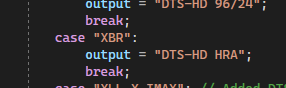
Hmm - Odd - I did include DTS HRA - but the Additional Format for yours suggests it's DTS XXCH .. Let me take a look tomorrow - if needs be we'll just add it as an alternative format - that's easy enough. Thanks !
 1 point
 -
That looks like a font problem with ASS subtitles. Can you supply a small file with the problem so that we can see? Paul1 point
-
Samsung expires the USB builds after 30 days. We alert you 1-2 days prior to that.1 point
-
Just an update. Things run pretty good on the fridge although "pause' pretty much means "freeze" on the fridge. Once the fridge sleeps that's it and the tuner is usually held open until. Guys I'm begging you though, PLEASE MAKE AN APP FOR THE FRIDGE!!!! Browser page is fine and all but an app would be gold. Gui through the fridges' browser is pretty bad.1 point
-
Yep, im Blind.Thats what i searched for ... thanks1 point
-
Sure, it's the same file I've mentioned above. 4_-_Ruin_Us.wav1 point
-
Yes all remote. Getting a single user test is going to be tricky. I have a couple of users from around the world. Currently there are 6 streams at this moment.1 point
-
Hi @HKWangSo sorry for the errors in what I wrote, glad you could work your way around them. If you don't want to start from scratch you can try renaming the data directory first, then starting with a new install, and seeing if Emby is working again 1. Deinstall Emby from the Asustor 2. Rename the data directory You can ssh into the Emby like before Find the Emby data directory which I think is /volume1/home/emby/data so cd /volume1/home/emby ls see if data is there if it is mv data data_backup 3. Reinstall Emby and see if it now works If it's now working, the next thing to try would be to stop Emby, move the library.db from the data_backup into data, restart Emby and see if it still works (a) if it works, good (b) if it doesn't work then the problem is with a corrupted db, there is a utility DB Browser which may or may not be able to help with that1 point
-
Some great thoughts there - thanks. Yea homebrew stuff may screw things up, but language is a good call. I strip everything non English which is why I hadn't thought of that scenerio .. If it gets included, then Yes this is totally optional - I'll add it to a toggle switch now I know how to add them .. haha btw - I've also added the 'Remux' from the filename now .. and also attempting to fix the multi-video track bug that just re-writes video track 0. I can see the issue but I'm just working out how to pass the correct video track to mkvpropedit ... yes I know not many files have multi video but the pesky 'MJPEG' are classed as Video tracks and that screws things up occassionally (I should just delete them..) ...1 point
-
From what I understand the insertion of the expiration only started about a couple years ago. The distro version of the app is compiled on Samsung servers and the expiration is automatically added by Samsung during compiling to begin about 30 days after compiling. The only thing the Emby devs add is the reminder which starts a couple of days before the expiration so that you can start looking for a newer version. Otherwise you can get blindsided when starting the app and it doesn't work. These messages started being added a few months before the expiration started being added by Samsung. So yes, if you find an install file before Samsung started adding the expiration date it won't expire. I've posted a link to one such file on GitHub a few times. And if you can find a version which is even older than the one I linked then you won't get the notice message either.1 point
-
I mean it would keep everyone using the latest version and making it alot easier for bug fixes. Not having to fix bugs caused in an older version while working of a way newer one? Idk that is just thinking after the fact but it's weird right that just some versions work after their "expiration date".1 point
-
I asked him yesterday and he hasn't tried it yet...1 point
-
Found them. I'll send them via PM.1 point
-
It appears they all have broken links to their pages on TheMovieDB. I have updated the links for them and now the issue is resolved. Thank you for the help!1 point
-
@Lukehodgie1has this helped?1 point
-
So what has occurred is they have made admin users (that can do a lot to the server) require password protection it seems. The solution I've used is to create a new user is just for admin (and check Allow this user to manage the server ) then using that account (which has a password and you can check ( Hide this user) after logging in as it and removing the manage server checkbox from your account. This will let you use the passwordless local log in while meeting the new security needs. The only functions you lose are things like creating users (which you can do via your admin account) and adding plug-ins.1 point
-
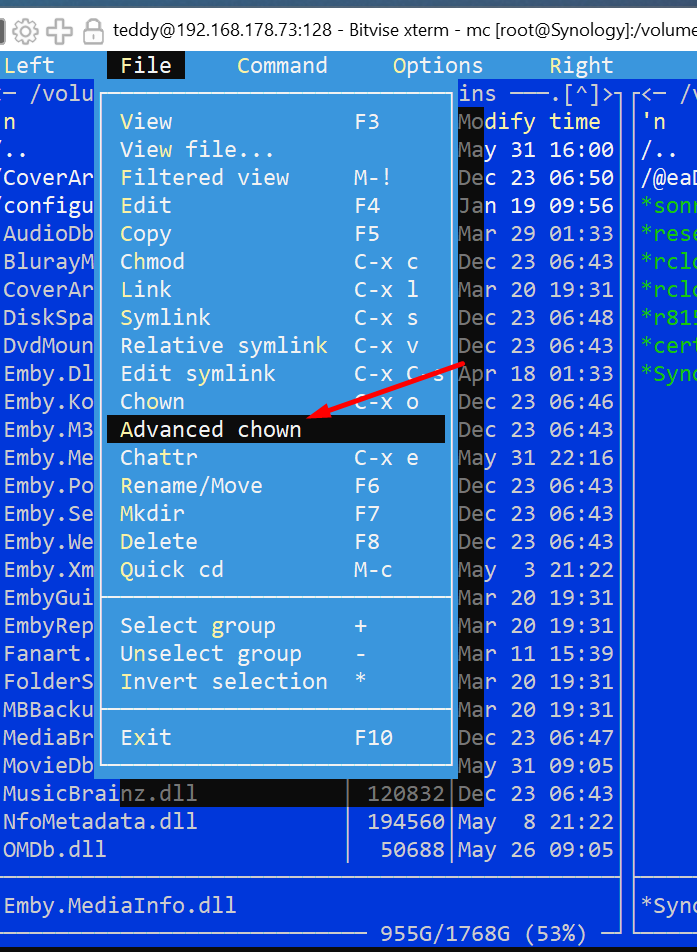
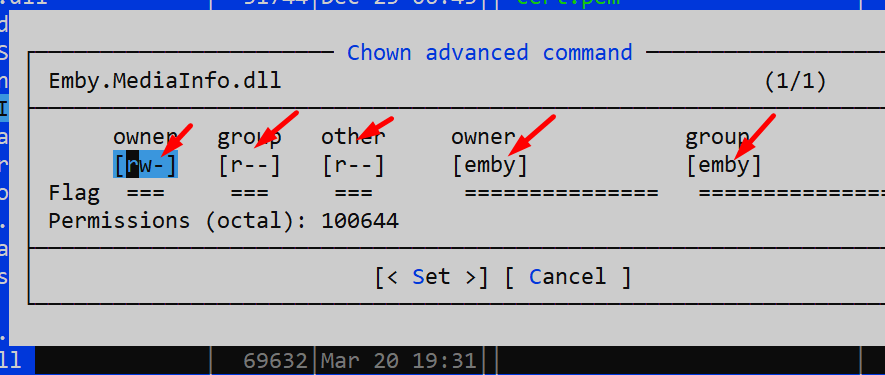
Thank you - worked. But you still have to customize user and group under the synology. Goes with the MidnightCommander (mc) over SSH on the Synology quite well. This must all be set like this - otherwise the plugin is lost in Emby
 1 point
 -
Hi, yes it's not a bad idea. It's possible for future updates. Thanks.1 point
-
I suggest that the best solution would be to add "media type" to the filter view for the playlist library. If you could just filter for TV/Movie/Music/Music Video/Audibook, etc, it would become much more usable.1 point
-
Appears to be working a treat DLL version is 1.0.1.25 Please take a copy of your old DLL before replacing with the attached - and clear your browser cache to re-load it. Toggle on/off the Audio bitrate I don;t use the Sample/Bit depth myself - so feedback on formatting welcome - it's probably a bit much if you ticked them all .. Enjoy.. .. and @Cheesegeezer.. I will learn how to do this in GitHub honest as this is all on my private fork .. Emby.MediaInfo.dll
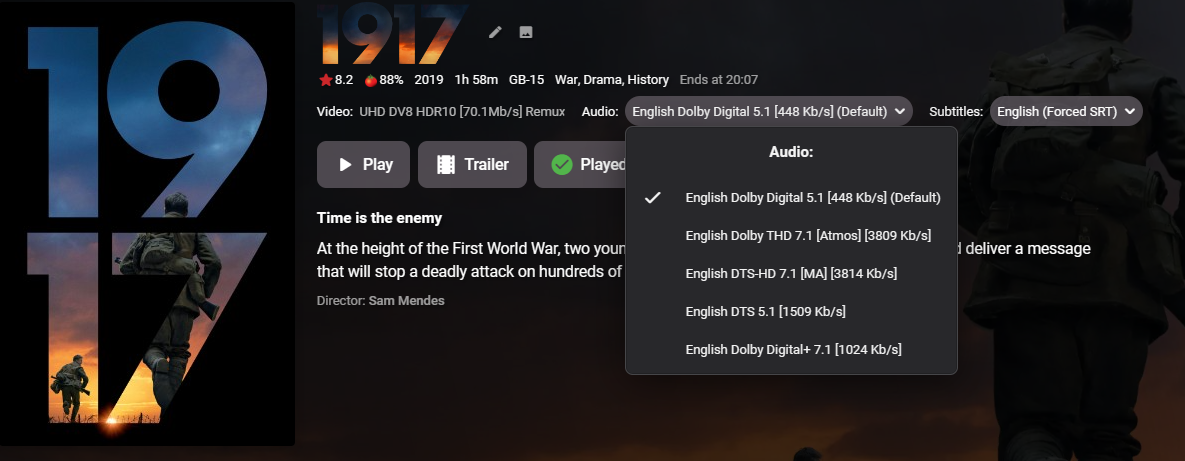
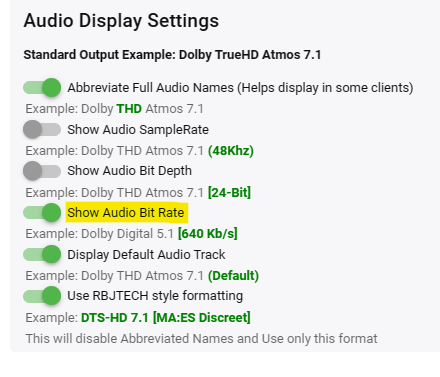 1 point
 -
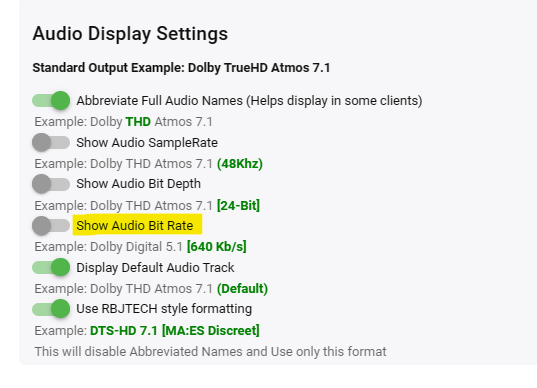
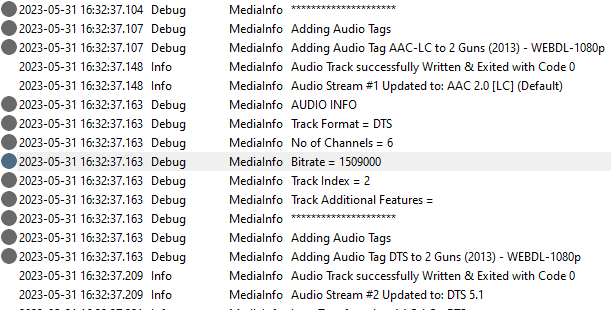
Possibly .. just having a dabble myself to add this - the good news is because @Cheesegeezerwrote such an awsome structured Plugin to begin with - adding ANYTHING from the mediainfo JSON output can easily be added (it gets all the fields, not just those displayed in the Emby config) .. I've got the Audio Bitrate value showing in the debug log and added the GUI (below), now just need to append the value if the checkbox is true.. brb .. edit .. ok - so got there in the end - JavaScript is not nice ... Just need to do a little bit more testing - but there is now an option to add Audio Bitrate - I'll post the DLL shortly ...
 1 point
 -
Hi Luke, I’ve sent you a private message with my iTunes account email, waiting to hear back from you.1 point
-
Hi, I sent force password to your yahoo email account, let me know if you need anything else.1 point
-
So right now it only does it on the main home screen where you have your recently added contact. What I am asking is that on every directories TV shows or movies whatever I create I could have that same enhanced screen. So I could keep it as it is now or people could have the option just like you do on the home screen of as I’m scrolling through a different series or movies the information about that would be up at the top rather than half and actually click on the series or movie to get the synopsis.1 point
-
@chefBefore making any modifications - you may wanna catch up with the Luke et el - as they may have something like this on the radar given the recent security news.1 point
-
Hi, has this helped?1 point
-
I have this same issue. I often watch tv when going to bed and after a show ends and the next episode button appears (but I don't press it because I'm now asleep) and then the screen stays awake all night until the morning. I'd prefer it if the screen would go to sleep like in all other apps.1 point
-
Hello everyone Just thought I'd share what I did and it ended up working. I found this helpful video on YouTube actually. Following this tutorial i was Able to reset the PC AND Keep all my apps and personal files. Pretty amazing actually lol. Didnt have to change anything after it was done. My windows is back and working great again. Thx for everyone's tips.1 point
-
Has been said many times by many people on many topics - a forum sucks for things like 'Feature Requests, bug tracking, release/change management'. Things like Git are clearly more suited to this, but the changeover would be a huge piece of work in it's own right. Emby has long grown out of it's support toolset imo..1 point
-
Given the latest events, isn't it about time the development team took this a little more seriously and stopped kicking it down the road? All internet facing systems in 2023 should have the option for MFA.1 point
-
It still doesn't play on my Windows 10 computer in Edge but it plays on the XBOX now and in Roku so I'm not too worried.1 point
-
@LukeI have seen this happen to other recordings that did not already have "Season" folders that existed. For example, when I record "Match Game" from the Buzzr network they never have any season or episode info attached to them so Emby drops them into the main folder (i.e. "Match Game (1962)" and all the episodes get the same filename with -1, -2 -3, etc appended to them. These I can see when I click on "recordings" in the Live TV section. One frustrating thing with multi-version recordings is that Emby for Roku cannot deal with them as the other clients do. When on the Roku it can sometimes get confusing when it looks like there is only one recording when in reality there may be quite a few. I've since gone to using my Android tablet to split the versions apart if I suspect there are more recordings than what the Emby for Roku app is showing me. Anyway, in the case you were referring to (Covert Affairs) when I started recording the series from a local station the guide included the Season/Episode information, so Emby had already made several Season folders. Then, when the season/episode information was dropped from the guide Emby would record these as multi-versions and drop them into the main folder. However, they were NOT listed in the "Recordings" section of Live TV. So there was several days I had checked the schedule, noted that "Covert Affairs" was scheduled to be recorded, yet when I looked for them (I was using Emby Theater for Windows) they did not show up anywhere. In order to get them to be noticed by Emby I actually had to use Windows Explorer to go to the program's main folder and rename them with the appropriate Season/Episode info, and move them into their respective Season folders. Once I did that in a few minutes Emby would notice them and they would show up in the recordings list. It's like I speculated in the previous message ... if "Season" folders already exist and new recordings are made WITHOUT the benefit of Season/Episode information, they don't seem to be noticed by Emby at all. They don't show up in Recordings unless I do the rename thing and transfer them into their appropriate Season folders. I hope this makes sense to you.1 point
-
We plan on restoring album nfo support in future updates.1 point
-
Would it be possible to include local trailers as a category in Trailers channel, in addition to existing 4? I have 10,000+ local trailers attached to media (both Movies and TV shows) spread accross multiple libraries and getting to them is a bit of a chore, having to drill down to each library each item detail view, Trailers tab feels like a natural place to have them all simultaneously exposed to the end user.1 point
-
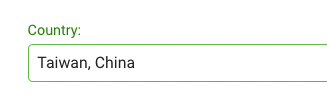
Hi, I just wanted to point out that this used to say just "Taiwan" but now is showing "Taiwan, China". I don't know if you are populating this from some public API or database for countries, but this is incorrect. I won't go any further and will try to keep the politics out of this forum. I just wanted to point out that having it listed as such is not only false information, but is also very disrespectful for an entire nation of people.
 1 point
 -
Hi, it will pick up the images, yes. We don't yet read the album nfo, but we will be adding that in the near future. Thanks.1 point