Leaderboard




Popular Content
Showing content with the highest reputation on 05/06/23 in Posts
-
@rbjtech Ha, I've had my Panasonic Plasma for over a decade now and it's staying as the main screen until it tells me it's time to retire. Those Panasonics really were a special combination of picture quality and price point.2 points
-
No - so the Plugin uses it's own database - and it records all the detection details in there. It writes the fingerprint to the local disk, but it keeps the record of what it has scanned in the database (by ItemId). It does not detect for the existence of the fingerprint (unlike the Core), it simply looks it up in the database. Therefore, unless you a) keep the same Emby database and b) keep the same Introskip Plugin database - then you are going to have a big mis-match, and the Plugin is going to want to scan it again because it has no record of it being scanned. I'm not 100%, but I think the Core is the same - if it's a new ItemId, I'm not sure how it knows what fingerprint that is - there is no other unique identifier.. The Introskip backup/restore plugin is designed for the CORE Introskip - it copies the Core chapter hidden markers only. So if you have run the 'Chapters' task in the Plugin - then of course it will now also inherit all those Core chapter hidden markers as well. So - As you plan to keep the Introskip Plugin - in summary a) Restore the emby db (keep the same Item Id's) b) Restore the Introskip plugin db c) Ensure the Introskip Plugin 'Chapters' task is periodically run (presumably like it was before) and it will keep adding the hidden Introskip/credit markers (as it did before). That's it - you do not need to use the Introskip Backup/Restore plugin - because the markers are already in the main emby db that you have already restored...2 points
-
It is possible to add code at runtime with Reflection.Emit (complicated), but that won't help you here, because Emby is loading types from plugins at the time when a plugin is loaded and before any plugin code is executed. You could probably get some code running before that happens, by using a module initializer (complicated again) - but that still wouldn't work, because even when you would create classes using Emit at that point in time, Emby wouldn't get them, because it reads the types from your plugin assembly and the emitted types wouldn't be part of that. The most natural way for this would be to have a common assembly (library/dll) used by all of your plugins, but Emby doesn't allow your plugin dll to have and bring-in any dependencies. While there is some way (again complicated) to include dependency libs in a plugin, this won't work properly when you have multiple plugins with the same dependency lib. So, it seems to me that you've already found the best possible way: a separate plugin for managing the IDs. You can "switch" those on and of by returning always 'false' from 'Supports' and returning a nonsense Key (be sure to use different nonsense keys for each).2 points
-
It finally works, strange cause i didnt do anything differrently thanks @GrimReaper2 points
-
It could rotate or something, like in the theater Of coarse it would have to be able to be turned off I suppose for people who don't like the idea.1 point
-
Following on from I have no migrated my Windows Server based emby platform (of almost 10 years) to Unraid. However, I cannot access my local media libraries with UNC path names. The media path names resolve if I use the Unraid server IP address but not if I use it's NetBIOS name: \\IP address\Video resolves but not \\Servername\Video. Can anyone point me in the right direction as I am a newbie to Unraid. I do not want to use the Backup & Restore plugin because the Windows Server will continue to function as the backup and slave emby server (as well as a domain controller for my local windows network). By using UNC path names to the library, the emby instances becomes portable and I can replicate the master with the slave every evening using Syncovery. Portability means that I can switch between the master and slave servers at a moments notice using either the master library on Unraid or the backup library on Windows Server. The portability of UNC pathnames is important also as it has in the past made migrating between the 4 hardware platforms before the move to Unraid simply a matter of copying the entire emby instance to the new machine. Thanks in advance for any help.1 point
-
Hello all, With a great deal of help from various online communities including this one, I have been working to create an "interactive" media channel out of my Emby Server. The idea behind this is to create a curated experience more like a paid streaming service, but using your own content and own scheduling preferences. I wanted to share my setup in case this would give others ideas for their own circumstances. Some of the possibilities of this setup include. 1. Adding Christmas content in December, rather than having it in your face year round. 2. Adding batches of campy horror movies around Halloween. 3. Adding documentaries around the date the event occurred. 4. Adding featured content for special circumstances like "Black History Month". REQUIREMENTS ======================================================================================== To do this, I have all my content on an UnRAID server. I suppose you could adapt this to other NAS platforms, but this guide is specific to UnRAID. The first item to check off is to create two shares for each type of content. One share will contain everything, and the other share will contain just what Emby is hosting at the moment. For example, you need an "All Movies" and an "All Television" share which you put every Movie and TV Show you have. You also would create an "Emby Movies" and an "Emby Television" share for your server to read from. This creates a place for all your content to live and be edited, and another set of locations for your Emby server to pull content from. TIP: Depending upon your UnRAID configuration, I keep the shares Emby reads from on a single hard disk. You can keep the other "everything" shares wherever you like, but having Emby read from only one disk means that only one drive needs to spin up to watch content. This can save some wear/tear, and reduce power consumption and your electric bill. Using different ports, you can use two Docker containers to have two Emby servers if you desire. This is what I have done. I point a "maintenance" server to the location for everything. This allows me to edit metadata and images for everything to be just the way I want. I utilize the options to save metadata to NFO files, and the option to save artwork in media folders. This way, I can use specific artwork and customized metadata if I like. I also create a "production" Emby server. This is the one the family uses, and contains only the content you move in and out of it. Because you have saved customized artwork and saved metadata to NFO files on the "maintenance" server, you don't need to tweak anything once it copies in. The media in the "production" server is transitional. Any changes made will be lost next time the content shuffles in/out anyway. Obviously, you need to create the Emby servers, and I assume you know how to setup Docker containers on your platform. This guide is not for specific setup instructions in all the possible scenarios. This is an overview to tweak for your own situation, so let's continue... At this point, you should have two Emby servers setup. One hosting all your content, and one for the interactive content with nothing in it. Let's fix that. INTERACTIVE CONTENT ============================================================================================= In UnRAID, there is a nifty little plugin called "User Scripts". Install it. Using this script functionality, we can make little snippets to copy and remove content from our servers. THIS IS TEDIOUS, AND WILL BE DONE OVER TIME AS YOU DECIDE WHEN TO ADD/REMOVE THINGS. The more granular you decide to add/remove (one movie vs. batches), the more tedious it will be. The good news is that once you schedule a movie or show, it happens automatically for the rest of time. IMPORTANT: Once you begin writing these scripts, it's important to back up your boot media (should be doing this anyhow) because the scripts are stored there, and you wouldn't want to have to write them all over again. What makes the most sense to me is to do most movies independently (with exceptions for batches like Christmas), and TV Shows in "Seasons". So how do we write that? First is to decide on naming for the scripts so you can find things in a long list. "Add Collection: Christmas Movies" "Add Movie: Deepwater Horizon (2016)" "Add Television: Rick And Morty (2013) S01" "Remove Collection: Christmas Movies" "Remove Movie: Deepwater Horizon (2016)" "Remove Television: Rick And Morty (2013) S01" Then, edit the scripts BEING SURE TO CHANGE THE PATHS SPECIFIC TO YOU. "Add Collection: Christmas Movies" cp -R /mnt/user/"All Movies"/"A Christmas Story (1983)" /mnt/user/"Emby Movies" cp -R /mnt/user/"All Movies"/"Frosty The Snowman (1969)" /mnt/user/"Emby Movies" cp -R /mnt/user/"All Movies"/"Yogi's First Christmas (1980)" /mnt/user/"Emby Movies" "Add Movie: Deepwater Horizon (2016)" cp -R /mnt/user/"All Movies"/"Deepwater Horizon (2016)" /mnt/user/"Emby Movies" "Add Television: Rick And Morty (2013) S01" mkdir -p /mnt/user/"Emby Television"/"Rick And Morty (2013)" cp /mnt/user/"All Television"/"Rick And Morty (2013)"/* /mnt/user/"Emby Television"/"Rick And Morty (2013)"/ cp -R /mnt/user/"All Television"/"Rick And Morty (2013)"/"Season 01" /mnt/user/"Emby Television"/"Rick And Morty (2013)" IMPORTANT: BEFORE REMOVING, ENSURE YOUR PATH IS REMOVING CONTENT ONLY FROM THE "EMBY MOVIE/TELEVISION" LOCATION, AND NOT YOUR "ALL MEDIA" LOCATIONS. OTHERWISE YOU WILL DELETE YOUR PERMANENT COLLECTION MATERIAL. "Remove Collection: Christmas Movies" rm -R /mnt/user/"Emby Movies"/"A Christmas Story (1983)"/ rm -R /mnt/user/"Emby Movies"/"Frosty The Snowman (1969)"/ rm -R /mnt/user/"Emby Movies"/"Yogi's First Christmas (1980)"/ "Remove Movie: Deepwater Horizon (2016)" rm -R /mnt/user/"Emby Movies"/"Deepwater Horizon (2016)"/ "Remove Television: Rick And Morty (2013) S01" rm -R /mnt/user/"Emby Television"/"Rick And Morty (2013)"/"Season 01"/ rm -R /mnt/user/"Emby Television"/"Rick And Morty (2013)"/ So yes, this can be tedious and annoying. The good thing is that you can do this with everything, or just selected content like Christmas Movies. How involved you get is totally up to you. You can choose to have a permanent collection always on the main server, and just rotate in more obscure content periodically, etc... This is the framework, not the only option... MINI-SERIES VARIABLE ================================================================================================= I chose one additional share to create for my "production" server, and that is to separate out "Television" from "Television Series". The reason is simple... My goal is to have an ever-changing television station without commercials to replace a paid TV service which is way too expensive nowadays. I want to be able to go into the Television library, hit shuffle, and always have some varying content play. This month you might see Roseanne, next month you might replace that with Married With Children... In the nice weather, maybe some Love Boat... Ever changing. But what about things that are meant to be binge-watched, or watched in order? The Walking Dead, Chernobyl, The Sopranos...? It wouldn't make sense to have the third episode of Chernobyl play at random. That series is 5 episodes and meant to be watched in order. This is where "Series" comes in... Anything mini-series or binge-worthy like Roots or The Sopranos gets added, and stays much longer. I might throw the sopranos in, and leave it for six months. After that, replace it with a different series. This way, when it shows up, you have adequate time to watch it. Every April, Chernobyl will pop in for say two months, because that's the time of year for the anniversary of the incident. It doesn't need too long because it's only 5 episodes. A Walking Dead type addition might get 4/6 months... whatever. So in Emby, you'll have two categories. "Television" and "Mini-Series" or some other names you prefer. Just remember to change the paths in the scripts when copying/deleting... SCHEDULING ================================================================================================ The User Scripts plugin has a field for your scripts, allowing you to determine when to schedule the script to run. The easiest way to figure that out is to use a CRON tool on the web to format the entry. Like this one... https://crontab.guru/ THE CHALLENGES (DATE ADDED) ================================================================================================ The first challenge I ran into was the "date added" entry in the NFO file. One of the primary purposes of this process is to have the "production" server always show content as "recently added". When the server with all content initially writes the NFO it adds the date added as a permanent fixture. This isn't what you want, as it prevents the newly copied content from showing above all the existing items still on your server. To get around this, I went around with some nice folks at a Unix forum here... https://community.unix.com/t/batch-remove-line-from-files-recursively/390725/1 In short, I use the User Script plugin to run the following command once a month. This removes the "date added" line from every NFO file recursively, in every subdirectory below where you point it. Then, when copied to your "production" server, it uses its own date added stamp. find /mnt/user/'All Movies' -name '*.nfo' -type f -exec sed -i "/<dateadded>/d" {} + find /mnt/user/'All Television' -name '*.nfo' -type f -exec sed -i "/<dateadded>/d" {} + THE CHALLENGES (FRIDAY THE 13TH) ================================================================================================ I haven't figured this one out. CRON doesn't seem to have a way to execute on a day/date combination like this. You can run every Friday... You can run every 13th... But not every time the 13th IS a Friday. Any workarounds for this would be appreciated. SUMMARY ============================================================================================== Hopefully, this helps more of you "cut the cord". The more content you have available, and the more interactive and dynamic it feels, the less you feel as though you're "missing television". This approach, with a few free streaming services for other stuff/news is working well for me so far. If any other hiccups along the way appear, I'll update the guide. If anyone has any ideas for improvement, please share. If guru's like @Lukesee any issues, let me know.1 point
-
public class MyExternalId : IExternalId { public static bool IsEnabled { get; set; } = true; public string Name { get { return "My External ID Example"; } } public string Key { get { if (IsEnabled) { return "MyExtId"; } return "dkjgfogihrgtoihn"; } } public string UrlFormatString { get { return "http://my.extid.com/api?redir={0}"; } } public bool Supports(IHasProviderIds item) { if (IsEnabled) { return item is Series; } return false; } }1 point
-
So, I've set my Xbox to automatic IP. I got the IPV4 of the laptop an set emby to that IP addresse. It seems to work fine now. Thanks for your help! (I hope this will work from now on)1 point
-
I'll give it a try and see what happens.1 point
-
Its not open source anymore, but if plugin providers make their source open… it can help you. i have a few open source projects on my github under the same avatar and username so please check them out and star as you feel fit1 point
-
No, I just implemented epub. The CBR format is trivial and easy to do. I didn't implement it because it uses RAR compression rather than zip. I had good JS code for zip but not for rar. I know that open source code is available, but I ran out of time. You might give it a go yourself. It's easy to do. At the moment @Cheesegeezerand myself are busy trying to finish the bulky plugin for bulk editing emby metadata. Look for it in the plugin library soon. vic1 point
-
@EmbyEbookReaderAs @GrimReapernoted an Ebook reader is underway. I have already written and tested the code in JavaScript and need to transfer it to the @Cheesegeezerplugin that he created for Javascript programmers. Now you know that many people are working on this, but we all have other duties. If you are a programmer, I would be more than happy to send you the javascript code. I use it to read Ebooks in Emby via my Emby Tool. You can do the same. The tool is attached below. Just unzip it and click on tool2.html. Signon to your server, then navigate to your ebooks and click on an e-book to read. Vic Tool2.zip1 point
-
I'll take some screenshots when i get home tonight1 point
-
This is my position. I watch mostly old classic movies that were filmed 30-90 years ago. I have noticed that even on Blu-Ray that a lot of these movies aren't really that high quality. I'm not saying they are bad or unwatchable but they just aren't really what one would expect from a Blu-Ray since they were actually shot on real film. Now these days some of these films are coming out on 4K but there is going to have to be a lot of digital enhancement to make them actually better.....but then the question becomes "is that actually better". You kind of have to keep this stuff in perspective and not get sucked into the rabbit hole of constantly seeking that little extra here and there. It's expensive and a waste of time in my opinion. Most of my content is recorded from TV, especially TCM, and even when I have a Blu-Ray copy side by side comparisons are hard to see any difference even though the Blu-Rays are usually at least 2X the size of as recorded. Once encoded the file size is only different because of the size of the audio file and once again....hard to see any difference. I understand the limitations of the content I watch and I am very pleased with the results I get and so are all my users. Yes, some movies are better than others but after exhaustive comparisons over the last couple years when I compare my encodes to the originals the issues I see are actually in the original so I no longer question anything and now I just enjoy my content instead wasting time trying to make limited gains if any. Newer movies encode so well from a 1080P or 1080i source that it is almost impossible to tell they are not off of a disc. Most users can't see the difference. My wife is constantly amazed. I'm happy with my content because I understand the limitations we face here and considering if I have seen them before it was probably years ago on a 4:3 CRT TV with pan and scan so this is an awesome upgrade to say the least.1 point
-
1 point
-
I’m just travelling back from Deutschland.. when i get back… i can make this plugin available in the catalog… most of the quirks are now resolved. @ebr instead of me posting to catalog, would you consider giving vic access to emby Admin. either way I’m happy1 point
-
I don't know, to be honest. You could ask in the MPV forums whether that's possible with MPV. If yes, then we can look how to make it work, but if MPV can't do it, then there's probably not much we can do.1 point
-
agree! The reality is to deliver a robust solution.. and using the emby internal Interfaces are the best way to deliver the plugin, as they have been written to ensure stability. great discussion tho!! And i need to go and look at some concepts I’ve not come across yet… loopbacks is one for sure1 point
-
Sorry, I had missed that. Eventually it really depends on the use case and the things mentioned above should be appropriate for @mickle026's case. Final note: Of course almost everything is possible in some way, but as this is about Emby, suggesting such things would be like shooting in my own foot, so in this context we really need to stick to reliable methods that are easy to understand and easy to implement (and safe for Emby Server )1 point
-
Yep this was my initial thoughts if a low info exchange was required1 point
-
Hence… why you are the guru!! nice solution!! Hope it help mickle out and it maybe useful for me also in the future. thanks fella!! Danke!!1 point
-
Shared file and IP loopback would work cross-platform. But here's a better and easier idea (there are really a lot for ways): var queue = new ConcurrentQueue<Tuple<string, string>>(); AppDomain.CurrentDomain.SetData("MyPluginMessageQueue", queue); All plugins check with .GetData() on load whether the queue exists already, if not it creates on and registers it in the AppDomain. Now, all plugins - once loaded - will have access to the same queue. That queue can be used to send and receive messages between plugins. You can achieve working with typed data by serializing (e.g. to JSON). You can have the same classes in multiple plugins (but important: each under a different namespace!). Then you can serialize and deserialize the data and work with strongly typed classes in all plugins. That's just a rough example, but it's a very robust and reliable method.1 point
-
Are you running stable or beta server. ive been working on the fixes for the trailer issues in the beta, but will not release until the stable 4.8.1 is released. Trailers are still pretty broken for me in beta, so I’m trying to hone in on the new syntax required. are you a premium member also? As the trailers is a premium feature. if you can supply a log, eitger here or in PM it will help me understand where the issues may be. thanks1 point
-
Stopped at a service station just before Hannover Airport and found my dream find!! A Porsche Racing garage!! random Fiat 500 in there lol



 1 point
 -
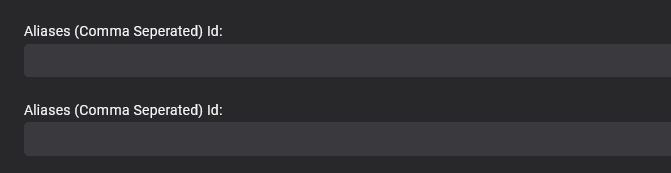
Looks as if the only way for me to prevent duplication in the ui is a standalone dll with them and leave them out of other plugins. Being in the UI part is not strictly necessary, (just convenient) as they work without even being included in the UI, I can add them and read them and write them in code without the class, but I would have prefered them in the UI to be toggled on/off. Thanks for taking the time to reply.
 1 point
 -
They are easy to convert with freely available tools on the net .. Search for reset_9999 ...1 point
-
I would actually say it's the HDR/DV that has improved the 'picture' much more than the resolution. Unless you have a very large screen and/or viewing distances are pretty close - I think Joe Average is really not going to notice the 'resolution' differences. To me - only some 4K HDR/DV's are 'wow' (probably because of the colour's jumping from the screen) others are frankly a big disappointment and there is little to be gained over a well upscaled 1080p on a 4k display. I still get comments to this day on my old 1080p Panasonic Plasma TV - people ask if that is UHD as it looks so good - nothing to do with resolution, but it's 'colour' is deep making even lowish quality 1080p rips look the business. So if you're happy with the quality you watch - then I would say don't get dragged into the 4K 'band wagon' as it opens up a whole new world of pain (especially the HDR/DV 'debacle' .. ) for mixed gains.1 point
-
Ok, have you tried "Include Item Types = Episode" along with "Tag = True" in the general filter? That should show you your tagged episodes as well.1 point
-
its overkill in terms of time taken, but i'd still do it because its set and forget and i don't have time or inclination for this sort of stuff . depends what your personal drivers are1 point
-
There are indicators but not yet filters.1 point
-
Hello everyone - I have been away, but still had time for programming. I added to the plugin the ability to create new and manage existing Collections. I will soon add the ability to create and manage playlists. I have also fixed all reported bugs. Vic1 point
-
To me a list makes the most sense. I have quite a few audiobooks, and none of my content has unique images for a given chapter. Given that Emby historically hadn't had a lot of development towards improving the Audiobook experience, I had made the switch to Audiobookshelf (better metadata sources like Audible, the ability to add a single book to multiple series). I would much prefer to have everything handled by Emby, and some of the recent developments are compelling.1 point
-
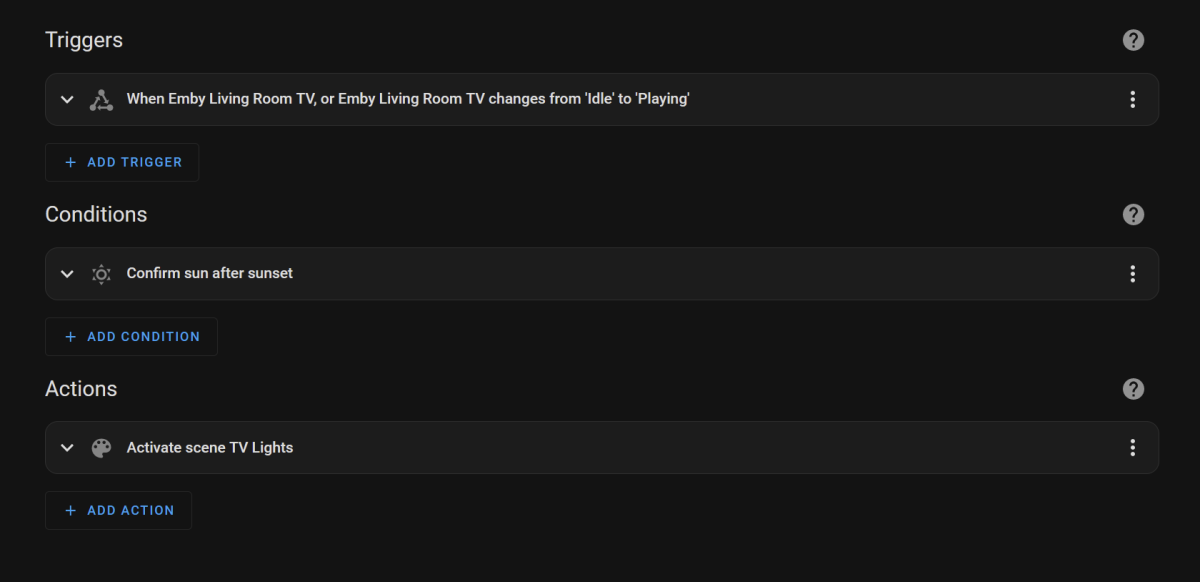
why wouldnt you just do it all in Home Assistant? Automation
 1 point
 -
Hi, the LG review process is long and difficult. I apologize for the delay but we are working on it.1 point
-
You can but there's no need to embed them, just place srt file next to your media, named exactly same as video file, i.e. <videofilename>.en.srt. https://support.emby.media/support/solutions/articles/44001159160-subtitles1 point
-
Any updates on progress? Pixel 7 Pro user here with same issue. This happens on channels of ALL quality but doesn't occur if I use the HDHR app to access the tuners directly.1 point
-
Yes plex is fine emby not so much pixel 71 point
-
We are sorry you are having an issue here (and we are still actively working with you on it) but this is simply not a fair statement. We understand you are having trouble but most users are not having any trouble playing this type of content. Issues that only occur for certain content or environments are the hardest to track down.1 point
-
Hi there, if you're still seeing this issue, can you please try again? I've just pushed an update to our Chromecast receiver to resolve a similar issue, so it may resolve yours if it's the same thing. Thanks !1 point
-
Version 3.2.82 is fine on my one plus running Android 13. And I prefer the skip forward 10 seconds on the middle of the screen compared to 3.2.90 that does not play live tv correctly. And the skip buttons are lower on the bottom left of the screen not related but why move them? Any way to roll back versions on Android?0 points