Leaderboard




Popular Content
Showing content with the highest reputation on 04/22/23 in Posts
-
Ah, you mean for accessing external APIs? Yes, maybe. I can show you another trick for that: Just run an URL from their documentation in the browser For example, in case of TV-Maze: https://api.tvmaze.com/seasons/1/episodes?embed[]=guestcrew Copy the full json output from the browser In Visual Studio, create a new class file and delete the class Then Edit => Paste Special => Paste JSON as Classes3 points
-
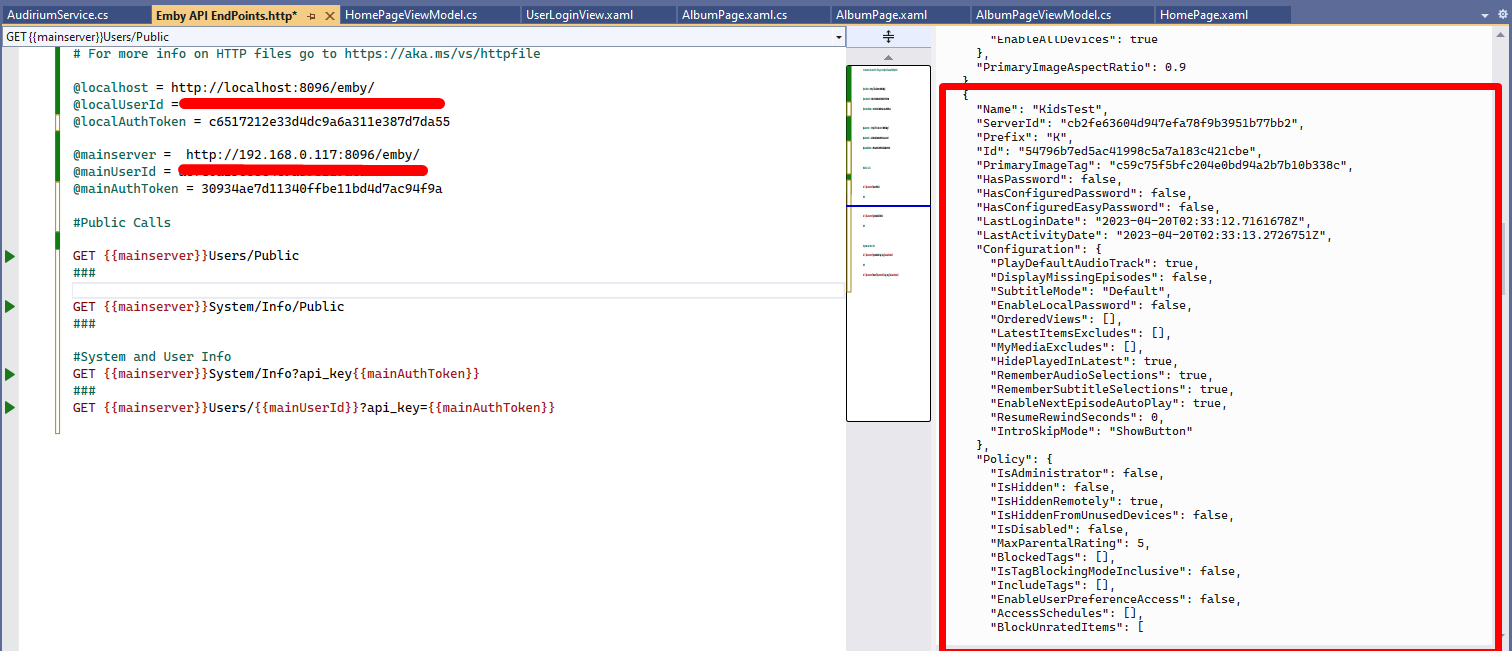
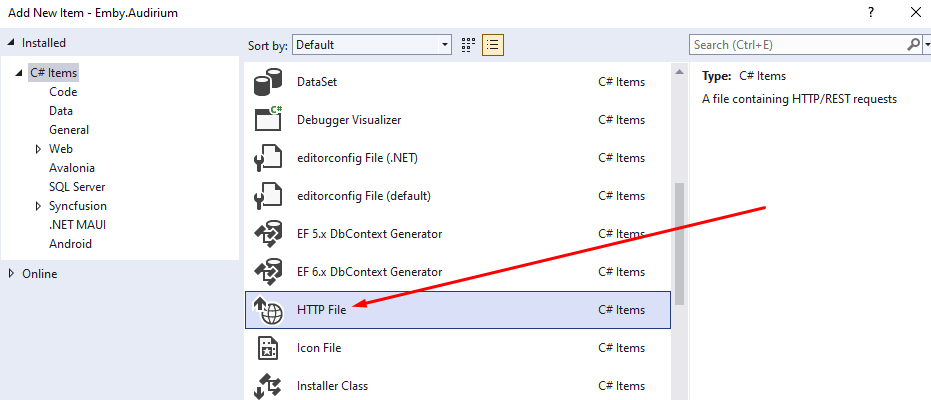
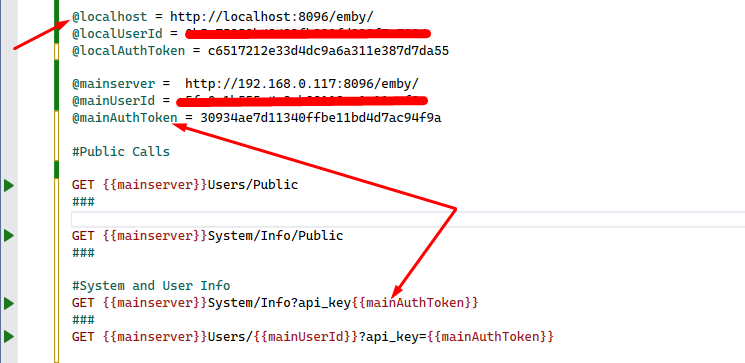
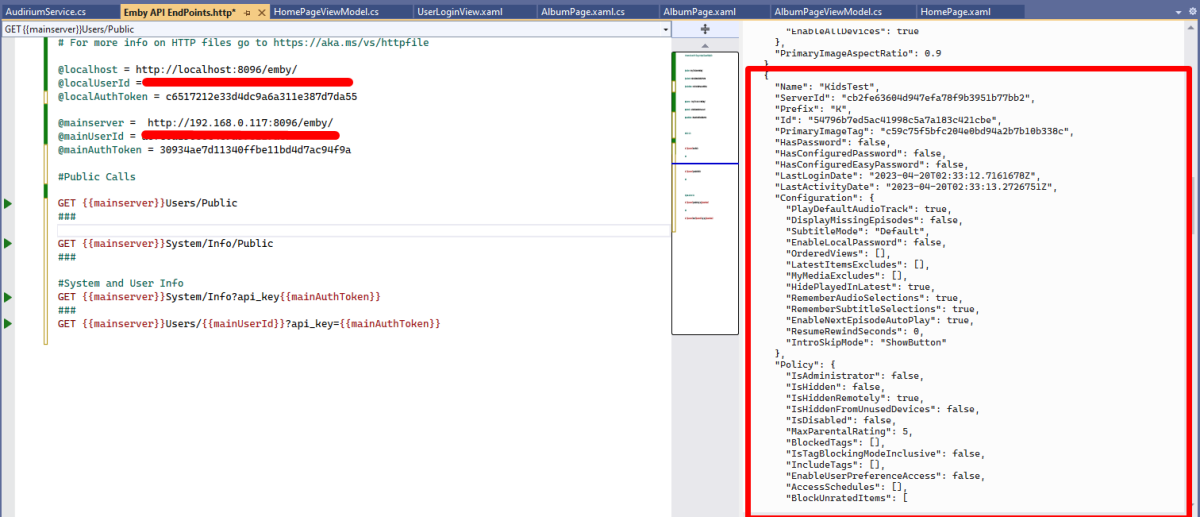
I just stumbled across this excellent "hidden" feature in Visual Studio. Which lets you test api endpoints without having to run code for testing or even use Swagger to return jsons. It's simply a http file extension. Its epic!! Let me show you.... Create a new folder in your project and call it API Playground or something like that Right click folder and add new item and in C# items you should see http file Select HTTP File and give it a name like Emby API Endpoints once created you can use GET POST PUT & DELETE requests to test any endpoint. you can create and use variables. you just need to add the @ symbol before the name of your variable and to use it in your request you need enclose the variable name in DOUBLE curly braces.... {{myVariable}} To add multiple end point tests you need to do a triple hash key under each request ### and to comment you just need a single # prefix Click the little play icon next to the Endpoint you want to test and boom you will get all the info you need in a json right next to it!!! It's so cool, i didn't know about this amazing feature and wow does it speed up work flow. You can also copy the full json and then create new ModelDto's without even leaving VS!!! @chef @VicMoore @TeamB @ginjaninja @mickle026 @BillOatman This is true Wizardry!!! I'm sure you all knew about it, but i just wanted to share this!! Hope it helps someone else out.
 2 points
 -
Just to add when @Cheesegeezerand I made the HDR>SDR BIF Generator plugin (tonemapping) - we did experiments on hw encoding as well and found very little difference. Could have been the speed of my cpu cloaked the advantages but frankly there were too many variables to warrant full testing. It was writing the temp images at a very fast rate anyway - so the bottleneck may have even been the disk I/O. Anyway - all in the past now, as the tonemapping is now done in the core for the BIF images.2 points
-
I remember seeing a big test of NVENC against software which showed that they tracked quite well at lower qualities (CQ > 20), but that at higher quality settings NVENC stopped improving while the software continued to improve. Paul2 points
-
It's been sorted. While the volumes stated read & write were enabled, if you go to control panel > shared folder > edit > permissions and then select "System Internal User" it showed that Emby's read/write wasn't enabled. After giving it permission it automatically worked! Thanks everyone for all your help, I'm really grateful to have access again!2 points
-
Just about to pop a 10yr old bottle of Chianti from Harrod’s lol no time for coding… just happy kitchen party times! lol
 2 points
 -
STOP this is destructive, back up your playback reporting data first. stop emby server and take a copy of the playback_reporting.db DB before you start. In the query tab run this to get a list of all the tables SELECT name FROM sqlite_master It should give you a list like this PlaybackActivity_20230420_134941 UserList deep_search deep_search_data deep_search_idx deep_search_content deep_search_docsize deep_search_config PlaybackActivity the two tables you are interested in are PlaybackActivity and any table with the date sting in the end like PlaybackActivity_20230420_134941 Edit the following query with the name you have in your above results (DONT USE MINE) INSERT INTO PlaybackActivity SELECT *, "" AS RemoteAddress FROM PlaybackActivity_<TABLE NAME HERE> WHERE DateCreated NOT IN (SELECT DateCreated FROM PlaybackActivity) This will import all the old data into the new table.2 points
-
For anyone ripping to 480P with AV1, your Roku may have an issue. I tried the same video on PC and on the Android TV app and it displays 16X9 in both but on my Roku Ultra it displays in a weird 4x3 format. Again - not an Emby issue - just fair warning. Video ID : 1 Format : AV1 Format/Info : AOMedia Video 1 Format profile : Main@L3.0 Codec ID : av01 Duration : 1 h 43 min Source duration : 1 h 43 min Bit rate : 716 kb/s Width : 720 pixels Height : 480 pixels Display aspect ratio : 2.25:1 Frame rate mode : Variable Frame rate : 23.976 FPS Minimum frame rate : 23.974 FPS Maximum frame rate : 29.970 FPS Color space : YUV Chroma subsampling : 4:2:0 Bit depth : 8 bits Bits/(Pixel*Frame) : 0.086 Stream size : 531 MiB (78%) Source stream size : 531 MiB (78%) Encoded date : 2023-04-21 10:52:31 UTC Tagged date : 2023-04-21 10:52:31 UTC Color range : Limited Color primaries : BT.601 NTSC Transfer characteristics : BT.709 Matrix coefficients : BT.601 Menus : 3 Codec configuration box : av1C1 point
-
Thanks Luke....only one of the best Power Pop bands of all time....that most don't know about. LOL1 point
-
Hi. Legality would be conditional on a lot of factors but doing this definitely violates their terms of use:1 point
-
DM'd. As mentioned before Caddy does not append to that header and replaces instead. I'm not sure what the purpose would be for maintaining a trail of IPs like that in a simple RP setup. Perhaps if there was a need to traverse and track multiple zones/subnets in the application but as far as I can tell Emby only cares about the difference between local and remote.1 point
-
I must revise my last post. E4K 8.1.2 with beta server 4.8.0.29/30 does not reliable sync the playback status on tv-show episodes. Syncing from Kodi to emby server works, playback/watched status will be updated on the server, but the client who played these episodes will most time switch back to a former progress state (unseen/in progress,...). Other clients does not sync the playback progess too on startup, only if i set the last sync date eg. 1 day back i get the current playback progress in kodi. Some times i saw following behavior: playing (or ff) a few (5-10) minutes a unwatched episode and stop it shows me for <1sec the in progress symbol, then the symbol switched back to unseen. Im not sure what logs you need for debugging this.1 point
-
I know that one haha use it a lot!! Works for xml files too as there is an option to paste those too! but.. using the http file and running the endpoint inside VS, your json is populated right next to it in a pane. You can copy the json from that pane inside VS and create a new class and paste as you described. Change RootObject class name to something more sensible. I didn’t even leave VS to achieve the same as what you just did hehe1 point
-
Yup, that's surely nice. Hadn't seen this before either!1 point
-
Yes i agree, the point of my post was testing the end points not acquiring the endpoints. Although i used Emby as an example… lets say you wanted to use the TMDB API that doesn’t provide a fully rounded SDK.1 point
-
On the latest QSV and NVENC hardware they are now pretty identical for speed/quality, with software still having the edge on quality but obviously a big hit on speed. As this thread is all about transcoding - ie realtime, then CPU is out of the running unless you really want to drop the quality and/or resolution. In summary, if you are an Intel guy, then QSV is the obvious choice, if you are AMD - then Nvidia is probably your 1st choice but there is now a 2nd alternative - ARC (discreet QSV). AMD seem to be slowly getting there with AMF, and while it's support is growing - it seems to be firmly 3rd in the race with the big 3.1 point
-
Yeah for sure! It would be nice. Maybe Vic could add this. (has rating, true/false) But that's a feature request.. lets get the plugin where Vic want's it to be and in the catalog.1 point
-
OK I missed 20/20. It will be in the next build. Thanks.1 point
-
It was more for intellectual curiosity than anything else.1 point
-
Good suggestions, that's what I currently do, I just thought this filter within bulky would make manually adding missing ratings easier rather than right clicking > Edit metadata for each item.1 point
-
I don't think there is at the moment but you could use the reports plugin and sort/toggle by ratings, that should show the items missing a value. You could also use the table view in the web app and sort by critic/community ratings and that should do the same.1 point
-
Update I can confirm that this issue exists and I share the view that this is a vulnerability in the current implementation of handling incoming HTTP requests - of moderate severity at least. What's happening? The irony is that this vulnerability has been introduced in order to support setups with reverse proxies for publishing Emby endpoints to the internet. Certain features and behaviors in Emby Server are dependent on the ability to detect whether requests are coming From the public internet (external) From the local network From the local machine This distinction can be made easily in case of a regular setup where Emby services are published through a router. In that case, Emby sees the source IP address of the requests and can categorize based on that source IP address. When running a reverse proxy, it is typically either on the local machine or on another host on the local network, and as Emby gets the requests from the reverse proxy in that case, it sees the requests either coming from localhost or from the local network, which means that it would categorize ALL requests coming through the reverse proxy as either #2 or #3. To inform the target about the actual origin of a request, reverse proxies are adding either the X-FORWARDED-FOR or the X-REALIP header to the request when forwarding it to Emby server. And Emby Server in turn needs to rely on these headers being correct in order to determine where a requests comes from. The Cause When requests are not coming through a remote proxy, Emby shouldn't actually trust such headers, but when a reverse proxy is in place, it's mandatory that Emby uses and relies on those headers. And that's a bit of an unfortunate contradiction. Without any configuration switch being in place, Emby cannot know whether requests come from a reverse proxy or directly from the internet. Currently, Emby always trusts those headers if present, which is the cause of the vulnerability. Mitigations For Setups without Reverse Proxy None A fix is currently in development (see below) For Setups with Reverse Proxy Make sure to drop X-FORWARDED-FOR and X-REALIP headers from requests coming from the public internet Important Do not accidentally suppress the proxy's generation of those headers when forwarding requests to Emby Server The proxy needs to generate at least an X-FORWARDED-FOR or X-REALIP header for Emby to know the actual origin of a request These instructions apply, in either case - with or without the fix being installed Emby Server Fix A preliminary fix has been prepared and tested with help from @Q-Droidand is pending internal review. Please PM me if you would be interested in testing the fix (which requires to have Server Beta 4.8.0.30 installed).1 point
-
You can also go the way of say unRaid, or install Ubuntu and something like Swizzin or Saltbox so it's easy to manage then command line stuff?1 point
-
None here. Ready to go into the plugin library IMO.1 point
-
I have an instance of emby that I never use installed on my home assistant Intel NUC. it seems pretty stable but the NUC is too puny to transcode.1 point
-
@chefJust notice your avatar now, I see why you want ... Kali Linux OK scary.1 point
-
+1 on that. The offline mode should be a bit more user-friendly to, at least, be able to put all the song that we have in the current read playlist and play all the song continously. Currently, we need to clic on each song one by one.... Not really user-friendly!! I know you work hard guys! Continue your good work!1 point
-
I’d love to stay, but absolutely need offline support. id pay double the membership if it just had offline support. I just don’t understand why a lifetime membership would require internet connection to see if your membership is current… if I have internet, I’ll be streaming1 point
-
Hey up, Wrote a longish posts few months back, I reckon you'll find most of the answers there (click arrow top-right): One thing worth of note, though: while Emby can run completely offline - and doing it in a great manner - it cannot do it indefinitely as Premiere license will have to be verified every so often, AFAIK it'll run on cached license for about three weeks at the most. But, depending on your choice of clients and your needs, Premiere license ain't actually required at all, in which case it will run offline with no time limit whatsoever.1 point
-
It is not Netflix approved, it is a workaround, and may break at anytime. Although both the Netflix & Amazon Prime apps do work really well. That said, it does use proper DRM and you do need a proper Netflix account. So for the time being, Netflix & Amazon are allowing it. The biggest issue with these addons is the use of the Widevine Library that is needed for non ARM Systems to support the DRM. I believe there is no proper/legal way to repackage the Widevine Library into Emby and would need the user to manually acquire it. This is currently done in Kodi either manually, or through a 3rd party helper script that either extracts the library from Chrome or Firefox, as Kodi can't legally include this library in it's install setup. Perhaps one day Netflix/Amazon/Etc.. will supply them with a proper/official DRM solution in the future..., hopefully... BTW, a big +1 for me to see this implemented in Emby in the future.1 point
-
Hi, there's already an open request for this or something functionally equivalent. Please join in and contribute to the existing discussion at:0 points