Leaderboard




Popular Content
Showing content with the highest reputation on 03/28/23 in Posts
-
Please post bugs, UI issues, functionality issues and feature requests. the bugs and issues are a priority and feature requests will be subject to review. @VicMoorei would actually start a new thread in the plugins area. a format something akin to this chief! https://emby.media/community/index.php?/topic/116062-security-cams-channel-plugin/ we can then add a help and bug link in the Config UI to let people know where to go if they have issues.3 points
-
Hello All, I've bought myself a lifetime licence I'm posting this message with the intention to convert others, share my experience with a licenced Emby server and show that I can do more then complain. A big thank you to all the devs and volunteers! Maximus Naxsus3 points
-
Good morning everyone... @Cheesegeezerand I have been working together to create a plugin version of this tool. We have the first code drop ready for testing. It's not the complete tool. It is a bulk editor and has the same layout as the original tool. We are looking for some testers. Anyone interested? Vic3 points
-
shows I am teachable2 points
-
Great! Another similar thing would be the BACK function that all of my TV's have. That allows me to bounce back and forth between 2 channels using 1 button. If possible, both would be awesome to have. Thanks!2 points
-
Vic, I've recommended dll post in order for it to be more visible/gain more testers/feedback.2 points
-
Guys, The ebook side of Emby/MediaBrowser has been long stalled or rather stagnated. I would like to offer up a couple of suggestions. Many people use calibre as an ebook/comic book tool for scraping data and general management of their collection already. This program is absolutely astonishing in its ability to pull metadata from post calibre scans, as well as draw in metadata from the file source and/or directory structure. http://vaemendis.net/ubooquity/ Its a self contained .jar server/reader combination. And honestly I am very impressed by it's small footprint and wide range of abilities. The other option is COPS , which was written specifically with calibre in mind. It is open source, so making it work with emby I would think would be fairly easy. https://blog.slucas.fr/projects/calibre-opds-php-server/ Ever since the original release of MediaBrowser's bookshelf I have always wanted something that would allow me to 'read' my collection, rather than being basically nothing more than a place-set for images of books I own. I am sure that those who mainly have audiobooks are thrilled with bookshelf , but it's nothing more than an extension of the music library IMHO, not new features. We can have both right? Here I give you two suggestions free of charge.. Just because I love you, and Emby Personally I plan on running the Ubooquity Server along side of Emby from now on, just because of it's massive functionality and tiny footprint. But I sure hope that someone decides -- "yeah, ebook support should be in here too" and do something about it - rather than allow this now very very ancient issue to continue to remain an issue. And so I don't have to have 20 different ports open, some with SSL support - some not, because Emby isn't delivering the 'complete package'. (Please take some of this with humor, I know you have your hands full with improvements/bugs/suggestions/requests)1 point
-
Pretty simple suggestion. I have multiple users for my Emby server. If I want to do continuous maintenance on the media, I have to tell everyone. some of them are harder to reach than others ( i.e. no Facebook or Skype chat etc. ) It would be great if say... on the admin panel, I could hit a check box that enables 'maintenance mode', where the server still runs does everything as normal, but instead of the login screen it displays a maintenance page saying the server is unavailable. Even better if I were able to directly put a reason in a text box that would then display on the login screen as well. Not really sure what others would think of this, but for me it would be quite helpful. mostly if I want to make sure no one is trying to access content I know won't work until I've done a full library scan again. Thanks for reading. -Kyle1 point
-
Hi. Can you please add an option in the settings to hide the "Media Info" section? When using emby on my phone, it pretty much takes more then half of the page. On top of that, not having it be showing, it would clean up the page. At least gives us that option to hide it. Thanks.1 point
-
The Mult-Select in the Server web app is super-useful (I'm so grateful to those that introduced me to it!). But given that the Server web app has some excellent filtering functions (eg, in my case I make use of filtering by Tags) it would be very handy to have a "Select All" functionality, so that I can filter down to the results I'm looking for and then easily add them to a Collection (or, when eventually we have Bulk Editing abilities, open a Bulk Edit view on all the Selected items). Thanks! PS - If this is something you might like to see implemented, be sure to "Like" this top/first post (as well as any subsequent posts in this thread that highlight particular aspects of what you are interested in) -- "Liking" the top/first post helps the Devs to know how much interest there is in a given Feature Request.1 point
-
Can we have an option to flatten series if there are XX episodes or less. Just provides the ability to eliminate one frustrating click. I wouldn't want it on my 1,000+ episode Looney Tunes series. However, when you only have one or two seasons in a series, it helps drill down easier.1 point
-
No, it doesn't even show the playlist.1 point
-
Here you go - the requested log files. embyserver.txt embyserver-63815169746.txt hardware_detection-63815165248.txt hardware_detection-63815169764.txt1 point
-
Good day, Our servers admin @bigjohnSolve the issue with Apple, well done John. Please report back if all fine or still having issue with this, thanks.1 point
-
@MBSkiyou are right - I will fix the problem with selecting multiple folders Vic1 point
-
1 point
-
Hey guys, I finally figured out what the problem was. Thanks to the YT channel "Nascompares", I realized I was uploading the wrong packages. The update package for the DS223 is "ARMv8 (x18 Series)". I was trying to upload 32 bit & 64 bit packages and kept getting error messages thinking I was uploading it incorrectly. Then I was watching a Nascompares video and he specified the "Realtek chip uses the latest ARM technology..." and so it hit me and decided to try to upload the "ARMv8" package and it worked! When I rechecked the specs for the DS223, it doesn't mention anything about using ARMv8 (unless I overlooked it). But all is well now and just wanted to share that info for others who might be dealing w/ the same issues I had.1 point
-
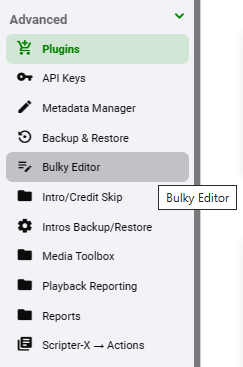
Excited to try this Well done Vic (and assistance from Cheese (aka Dave..) Nice - Do you want feedback on just the viewing and basic editing layout - ie compare to the web version at this stage ? Installing the DLL Copy the DLL from above (you may need to 'allow/accept' the DLL download if your OS is preventing the download) and put it in the main PROGRAMDATA plugins folder in Emby - ie ..\programdata\plugins Do not put it in ..\system\plugins Then restart the emby server The Plugin itself should be in the 'Plugins' folder (green below) and there is also a shortcut to it. (Grey below).
 1 point
 -
Yeah that message plugin will do that. Let me see if I still have it kickin around.1 point
-
Awesome... this is what i thought. i will have to handle these somehow in the code behind. leave it with me. Cheers1 point
-
the dll is attached below Emby.Bulky.dll1 point
-
Maybe… Whether the plug-in supports those codec types (or the names) is another thing. Any other image requests while I’m procrastinating?

 1 point
 -
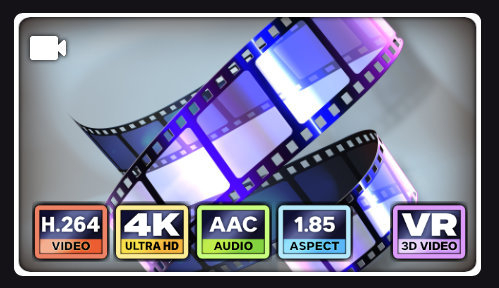
A little more consistency with the font sizes & weights (and I’ve added a few more aspect ratios on the off chance that the plug-in supports them). Resolution & VR are really the most important to me which is why they are the largest text. Ideally, I would love the ability to change the order the Media Info is displayed. (I would personally use: Resolution, Aspect, Video Codec & Audio Codec). Clearly I have too much time on my hands! in case anyone else is interested in brightly coloured squares… Overlays-Craig.zip
 1 point
 -
It looks that after Emby startup via the 'EmbyServer.exe' file, further startup attempts also work via the browser bookmark. However, I will continue to monitor this.1 point
-
It's 2023 snd this issue still persists with the app in the store. Users need to sideload an older version to fix it. How can that be a thing? I feel like with my Emby Premiere i supported a dead project....1 point
-
SOLVED: It was my DNS service pihole.. when switched to 8.8.8.8 it works..1 point
-
No worries. I've updated the Wiki for future users. https://github.com/Cheesegeezer/MediaInfoWiki/wiki/Various-OS-Installation-Help#6-nvidia-shield-server1 point
-
Hi.. yes its in the Plugin Catalogue under Metadata section I believe. There is a wiki link on the help pages if you get stuck as you need to also externally install mediainfo CLI version and mkvpropedit. Ping us if you have issues and we'll try and help.1 point
-
Added the few extras Overlays-Craig.zip




 1 point
 -
There are two options one in library and the other in User-Display. Library option will import into database (tvdb metadata required) User option will then show the database info if enabled. Do you have both enabled?1 point
-
Just replied to your previous post. No, not new. And no, it doesn't actually delete files, just removes the item from appropriate collection. Edit: Same goes for Collection itself.1 point
-
Seems to work! Tried on kodi for windows, now duplicated subs are not present anymore and forced subs are correctly managed. Tried only few minutes so don't know if it correctly works for everything, but ASS subs problem seems to be ok... great!1 point
-
Hey, just to let you know there's this post on running emby using docker and having HW transcoding that could help you out. I wrote it myself so feel free to ask for help either here or through DMs.1 point
-
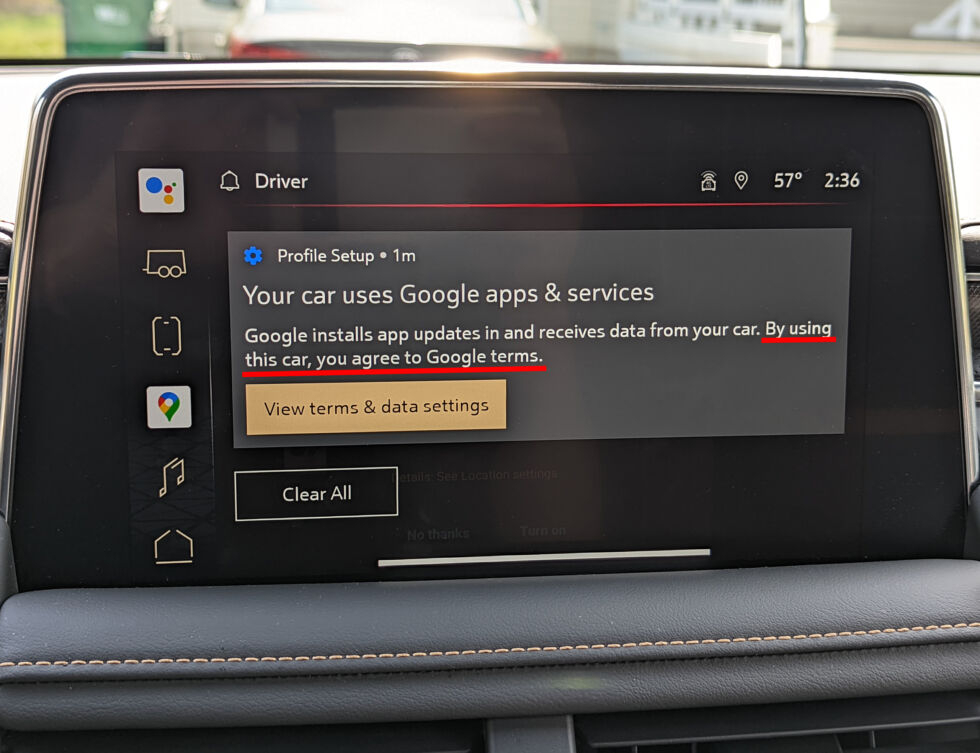
Does anybody else laugh then die inside when they see a ToS notification like this?
 1 point
 -
I use mkv container for all my files. Have a few FFMPEG scripts setup so just a matter of changing CRF values to suite the file that is being encoded. SD is encoded to 540p H264 with AAC audio @ 192kbps (2.0) (DVB 1080p source) All UK drama's, Favourite Movies & Docs are encoded to 1080p H265 with AC3 audio (passthrough for DVB captures otherwise 384kbps for Movies) For the devices that connect to my server, basic firesticks ect all direct play with no issues.1 point
-
Hi, you could check out @chef's messaging plugin.1 point
-
Depends on the icon used. But @ebrwill have to comment as I can't get custom 3D icons to appear. Will guess it could be difficult as there are three icon choices and Custom does not specify an icon choice.
 1 point
 -
@Luke Sorry for the delay got very busy. @alucrydthat worked. Yes exactly as @TenderBabyMeathad said. And yes big thanks to alucryd as that worked almost perfectly. Originally I hadn't realised my pi's firmware wasn't up to date as the scripts run automatically but they couldnt access the wider network. But as well with my limited knowledge and understanding I updated the pi firmware on a separate sd card default pi lite 32bit (not emby sd card) . And then tried the emby image to no success. Checked the firmware under that sd card and it showed the current as the lastest 2023 build, but under its desired latest it showed the 2022 build. Did the whole sudo update and upgrade then ran the firmware upgrade again and it has now booted perfectly. Thanks alot @alucryd For anyone else experiencing this: On the emby image (orange screen black box) Press crtl + alt + f1 to get to the terminal Sudo apt update and then the upgrade commands then run sudo rpi-eeprom-update -d -a and reboot.1 point
-
Courtesy of @Abobader Sort by Most Reactions at the FR forum:1 point
-
I can't reproduce here using rpi-imager. Are you customizing anything when flashing? One thing that comes to mind, could you run the following from a recent raspberry pi os? sudo rpi-eeprom-update This will tell you if your EEPROM needs an update, you can apply the update (if any) by passing `-a` to the same command.1 point
-
He doesn't want to fix it, he wants to complain. Paul1 point
-
Sorry to bring up an old subject but there should be an easy way to disable collections. I personally don't like them. They should never be tied into the media library so deeply that it's nearly impossible to disable them without risk of seriously screwing up the installation.1 point
-
@rbjtech thanks so much for this tip. I have wondered for some time about how this is done. You have taught me a new trick and that made my day. Vic1 point
-
I've recently migrated to Emby and couldn't be happier. If Emby could introduce "Editions" correctly it will be a real breakthrough feature and unique selling point. In my view, the data model would be: A movie can have one or more Editions An Edition can have one or more qualities One edition of the movie is set to the default Movie Edition Quality ----- ------- ------- True Romance -- Remastered -- 4k | \- 1080p | \- Theatrical* -- 1080p | \- 720p | \- Director's Cut -- 720p * = default I subscribe to the "multiple editions of a movie not show up as separate items in the library, but rather a singular item from when the edition can be selected", so the ideal functionality would be: Admin picks the default edition When going into a movie, the default edition is selected You can select a different edition you want, and the normal logic kicks in for selecting the quality for that edition In "resume playing" it remembers not just the film, but the edition which was previously being played (when clicking resume it will do it's normal quality algorithm for that edition) - so the movie only appears once in the resume row and automatically resumes the same edition From previous posts I appreciate there would be complexities changing the data structure, but I'd really favour getting this correct now - even with some short term pain - to make the right product going forward. Aside from my comments, can I just add how brilliant this thread is and how good all the ideas floated are.1 point
-
Was also kinda bummed that with the new updates to the emby server MPC remote ceased to function and I didn't get the tool from this thread to work. But you can basically get the same functionality with Emby Theater. Set it up for external player, minimize it and then you can still use the cast on/play on function from the web client to launch the videos in a player of your choice. The only slight annoyance is that Emby Theater always displays its window on start. If it had an option to start it minimized or maybe even in system tray - it would be absolutely perfect.1 point
-
@Sketchy Yes im having the same issues. Ever since the server update 4750 i think (it might have been the version b4, seems when the intro scanning was added it broke the TV eps working with this app) movies play fine but TV EP will only play S1E1 what ever EP you select. It is very much a shame as this app was pritty much the main reason i use Emby server. Esp as i dont want to use kodi anymore. I also have had to use the beta version of this app to be able to connect to the server. And it worked perfectly until the intro scanning update to the server. I too am no that keen on Emby theater. I really like the way i have MPC:HC setup with madVR and also Video and 5.1 (or other surround) audio of the most used formats (ac3,dts,aac,the HD codecs & 5.1 / 7.1 and others) not needing to be transcoded like in the web browser native. They just stream. Would be nice to have proper audio transcoding options and being able to select it. So proper transcoding to Flac 5.1 from a 5.1 ac3 or DTS 5.1 then i could use the web player but then the video would be degraded because im not able to use madVR on the web player. Sorry getting off topic here. So Pritty Please can we get an update or a server fix? Please? i'll donate some moneys. Unfortually im pritty much broke so can't spear much atm. But i will still do it if we can get something? Thanks to @Bloodred for this awesome app. i just really hope we can get a server fix or possibly a fix for the app. Cheers. DrDoomsLab1 point
-
Emby Server 4.7.11 - New Intuitive TV Guide Improvements & Other Fixes This is the latest point release of Emby Server. It's a small maintenance release, containing improvements to existing functionality as well as a couple fixes for user identified issues. New Intuitive TV Guide Option Panel for Configuring the Display of Your Guide Data. 4.7.11 features a slick new way to quickly adjust the different options used for the TV Guide grid. Click the icon shown below highlighted by the yellow box. This opens a new panel where you can set over a dozen options including the sort order of channels, the channel groups (tags) you wish to see (or hide) as well as the data used in the far left column representing the channel. The rest of the options configure the information displayed with the program data. Setting the Channel Display to Title gives you this look in the first column. This is how it looks using: This is how it looks using: Right next to the icon we used above is our date picker: Clicking on the date gives us this: The number of days shown will depend on the guide data itself. If using Emby Guide data this can be adjusted here: If your provider supports Groups these will be available as shown below. You can also add tags to any channel you wish to edit which will show up here: Other improvements and fixes included in 4.7.11 include: * Fix intermittent scroll problem with Live TV Guide * Improve intro detection error handling for TV Series View the full article1 point
-
I would strongly suggest that multiple editions of a movie not show up as separate items in the library, but rather a singular item from when the edition can be selected. Libraries with a large amount of multi edition movies could look very sloppy. At the very least, give the user the option to show multi-edition movies as separate or grouped items.1 point
-
Hi Guys, I recently moved from Kodi with MySQL for lack of proper multi user management and server side support, I have to say I'm impressed with Emby. Together with the Kodi Plugin it really takes the solution to a whole new level, count me in among the supporters! One feature I would like to see is the ability to recommend movies or shows to other users: I share my Library with close friends and family but it is a big library so they are always calling me to recommend them a movie to watch. It would be really cool if after watching a movie I can click a Recommend button and choose the users I think would like the movie, then it is displayed on their suggested movies at the top with the name of the user who recommended it... Sorry if there is something like this is already there, I am new to the interface and don't fully know it but could not find such feature... Thanks!1 point
-
Hey there, I know this was from a while back but I recently came across this same issue and eventually found the solution. Select your grouped file (most likely from the "movies" section I assume) and scroll down to "Media Info." Click the + and you should now have an option called "Split Versions Apart." Click it and then the "OK" and they will revert back to their original state.1 point