Leaderboard




Popular Content
Showing content with the highest reputation on 03/14/23 in Posts
-
Don't you dare use such metrics! I said it many times already and I will say it again and again and again. DO THIS https://features.jellyfin.org/ Only then will you be allowed to quote metrics! Forum metrics my a**. Things get lost on the forum. It's not easily browsable by feature.3 points
-
To summarize: Transcoding-Temp Path: Never use a RAM disk for it - you just make things worse Cache Path: Don't use a RAM disk (for the reasons @ebrmentioned) - except you have some persistence strategy in place like @GrimReaper2 points
-
I do NOT suggest pointing your cache path to a RAMDrive. That's going to end up costing you in performance more than likely as the entire cache will have to be re-built with a restart.2 points
-
If you have extra RAM, sure you can. Though if your cache is already on an SSD you won't see very considerable improvement (I keep both cache and data folders junctioned to RAMDisk, with daily dumps to SSD). If it's on a spinner, then yes, it might somewhat breathe a new life into your system. As for transcoding in RAM, there's not much point besides saving some wear and tear on your SSD as transcoding is usually CPU - not I/O - limited, and can even have detrimental effects, as stipulated here: Full read starts here:2 points
-
True and would rather the DEV provide a different answer (but they will not blatantly say NO for a feature that will happen in the future. When is never known.), but these requests go on a to do list that changes with every build in reference to priority. So where some would call this a high priority others would say why I don't need it so low priority. Are there other areas that should have priority over playlist yes, but everything can't be done at once and changing already designed features almost always breaks other areas. As a paying customer has absolutely nothing to do with features that do not exist. So it will be ready when it is ready. As you would just as peeved if a beta went out the broke many other areas just to have this feature that I don't believe the majority will every use.2 points
-
please dont tell me u wait 5 years to get your car oil or brake change when u go to the dealer or wait 5 years to get medical attention when you go to an emergency room. this forum is full of "for the future" and vague answers like this, like we the customers who paid a price for a paid product are some kind of ignorants. we deserve a better and more profesional customer service and transparency. maybe publish a timeline of things u have in the pipeline. but i guess this is what u get when a bunch of developers with no sense of customer service run a company.2 points
-
It appears that any playlist that any user creates is public--all other users can see it. I can appreciate the benefit of a public playlist. I could create a playlist called "Harv's Favorite Horror Films" for example, in case other users are interested in checking out what I like. However, the way most of my users are using playlists is to keep track of things they want to watch in the future. They are typically things that the user has not watched yet, so it's not meant as a recommendation to others, just as a way of them personally keeping track of what they want to watch. Having that kind of playlist be public is of questionable benefit to other users. Additionally, it is not clear when you create a playlist that other users will be able to see it. That has the potential to cause some embarrassment. He hasn't created one yet, but I wouldn't want to see my nephew's "movies to fap to" playlist, for example. If I could make a suggestion, I would suggest associating each playlist with the user who created it, and giving that user the ability to make the playlist private or public. For example, the following two checkboxes could be shown when creating or editing a playlist: Allow other users to see this playlist Allow other users to edit this playlist Initially, both checkboxes would be unchecked. Since another user cannot edit a playlist they cannot see, the second would be allowed to be checked only if the first were also checked. (You could grey it out to make that clear.) Depending on your UI preference, it could also be a drop-down menu. Playlist visibility: (Only me | all users can view | all users can view and edit) Thanks for considering this.1 point
-
One thing the streaming community hasn't done well is really create tools that allow us to simulate live TV well. I think the biggest reason that binging on Netflix (and Emby) is so popular is because you push a button and go. I'd like to see Emby create a "To Watch List" that basically allows you to sort shows into a specific order. When you watch that list, it will only play the most recent episode of each show in the list that premier inside that week. Lets pretend I made a DC TV Watch list, it would only play this weeks episode of Arrow, Flash, Legends, Supergirl and Gotham one after another. If an episode didn't premier that week, it gets skipped. Additionally, I'd like to see this system *ALSO* allow us to insert bumpers similar to Cartoon Network or Toonami. In the here and now, it would only insert bumpers between the series, but it would be nice if in the future, a system that allows some method for choosing the appropriate points between each act of an episode where bumpers could also be inserted. Bumpers would be a community thing to create, but inside the "to watch list", you'd choose what bumpers (if any) are used. Bumpers could even be surrounded by previews. Finally, another thought: while Emby already can pull Movie Trailers, it might be another cool future project if we could pull previews of related series not in the "To Watch List" and/or perhaps ones that aren't on your server that are similar to what you are watching. There's a lot of ideas in this post to digest and several should be their own project as part of this concept. Thoughts1 point
-
Hi, I noticed that HLG is not triggering on my LG OLED TV for HLG HDR 4k files. I tried both the latest AndroidTV and Android emby client (Shield Pro) The HLG does trigger when using the Emby LG Client. Does Exoplayer support HLG ? Debug log sent from AndroidTV - 19:20ish GMT - User = Rich I can provide a 60 second sample of the file if you wish - Pls let me know. Thanks.1 point
-
Yes, I did reboot the machine several times especially after the re-install of Emby. No joy. So I took a look at my notes as I usually do when all is lost and can't figure something out. I found that I had newly installed Iobit Malware Fighter a few days ago so just for the hell of it I uninstalled it and any remaining remnants of the program. Now everything works like it should!!! However, I don't understand why some of the movies could play and some wouldn't. The only thing I can come up with is that those that did play were added prior to the Iobit proggy and those movies that were added after the Iobit install did not play. It still leaves me with the question of how Iobit proggy was able to deny access as it is not a firewall component. Now that everything is working again I am going to experiment the issue to figure out just how the proggy is able to deny access. I will re-install the proggy and troubleshoot. If the proggy denies me the access then maybe I can try and use the windows firewall to allow that proggy access. I will report back with any findings. Thanks to all for your assist. Cheers!!!1 point
-
Thank you all very much for your responses! I have seen your names as I researched setting up Emby. I do appreciate the information and help. I have adjusted my database cache for 5000 as I have RAM to spare. I've restored the transcode back to its default now that I reviewed softworkz explanation. At this time I was using Plex, which occupied a great deal of my NVME storage. After recently experiencing a bad Plex update which corrupted a database, I've decided to just move on to Emby instead. I had my Emby server cache in regular hard drives - and to be fair - Emby was already notably more responsive than Plex ever was. I am curious if I copy over the server cache into the NVME drive whether I'll see any further responsiveness. I'll see for myself soon.1 point
-
Thanks, I had to give you permissions for the digital signature1 point
-
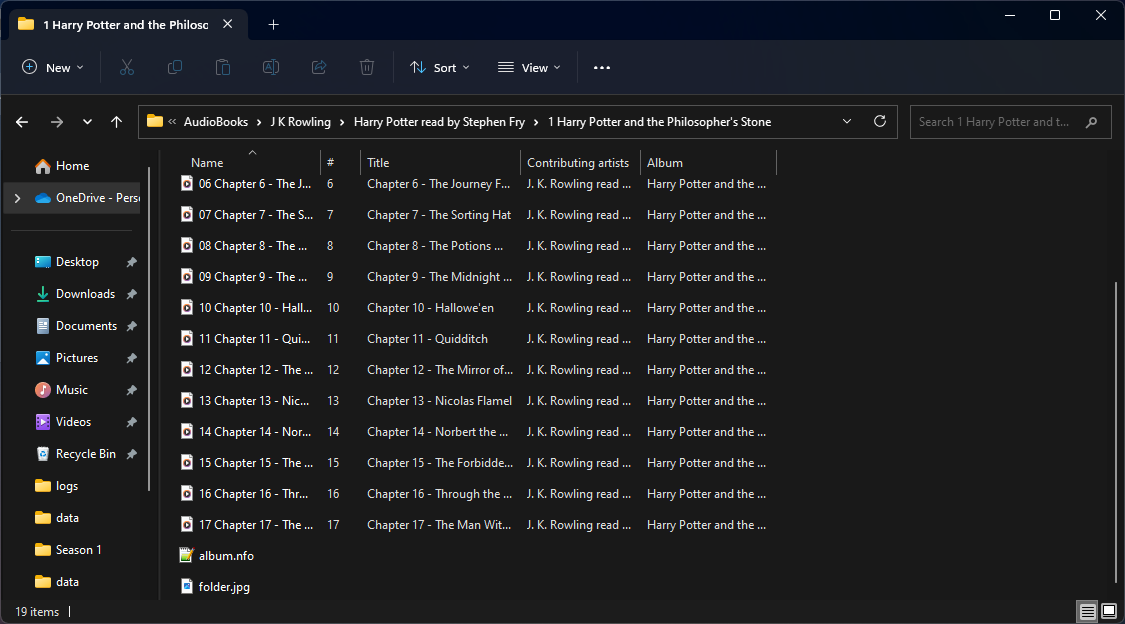
I guess so. But Books shows the books and folder view shows the expected images per folder. But that is how all my test audio books are organized. Per tabs one layer is lost and only visible in folder view. But will guess it can vary as tagging is a variable. But yes odd structure can cause issues saving at the wrong level or just dump into /metadata/musicartist as shown in the J.K. Rowling images above.
 1 point
 -
OK we'll take a look at it. Thanks.1 point
-
What size is your library.db? Have you adjusted your database cache size?1 point
-
It will be part of the 4.8 server release.1 point
-
I believe that would solve the issue, however just to claify, the lights dim when playing and come on when stopping. It does sound like that will do what I need it to do. Any idea on a time line? Thanks!1 point
-
The HEVC tag is 'now' valid as that is what ffmpeg (emby + I guess a recent ffmpeg change, just tested the nightly build) has made for TS files. An older ffmpeg does not use 'HEVC' - it uses codec_tag_string=[36][0][0][0] on the particular ffmpeg version I was testing. So I think emby just needs to accommodate both - or maybe raise a bug report to ffmpeg to get them to revert it to as it was for TS files ?1 point
-
That depends on particular setup and programs boot sequence, wouldn't you say? I don't have custom cache path but have it symlinked - basically same net result - and it ain't rebuilt as dumped RAM image is loaded first.1 point
-
Hi, it's shuffling a folder of folders that is the culprit. We'll take another look at it. Thanks.1 point
-
Thanks for your suggestions. Unfortunately, I am not using a browser, or Windows, or an Nvidia graphics card for anything related to Emby. I have an Nvidia Shield that is streaming from my Synology NAS. The CPU shouldn't be doing much of anything as these files are direct playing, not transcoding. The Shield also supports direct playback of all of the formats I'm using, and I am able to play larger, higher bitrate movies without a problem. It is something specific to Dolby Vision.1 point
-
Just a bit of perspective on the time frame. As of today this request only has 35 likes so it's not exactly super popular or in high customer demand. It wasn't until almost 2 years ago that the 20th person commented in the thread. This of course is only one of many metrics, but I think it shows why other things were done before it as they had a bigger following. Regardless of popularity any idea we think improves Emby will likely make it into the product at some point. If the item is highly popular it will likely get done sooner than something else , all things being equal. By that I mean there is no prep work or foundational work needed first. Even a super popular request might get pushed to later with other requests done first if foundational work should/needs to be done first. For example, both collections and playlists stored their information in text files vs a database and we had both already planned to migrate to a database. We did exactly that for Collections and it takes a lot of design, planning and especially testing to make sure things migrate smoothly for the userbase. We could have followed up the Collection migration right away with a playlist migration, but we also knew we had music library changes planned to improve the music library. Since music is a big part of playlist use it only makes logical sense to do the music changes before any playlist changes. The release that included collection changes and the release including the music changes were the two longest beta cycles I can remember in a long time and maybe the two longest ever. Those two releases really needed to be done first to pave the way for the playlist changes requested. Beside these two completed items there is additional foundational type work that needed to be done in order to have a concept of public vs private access. On top of that you need to have another layer of permissions management in place that isn't limited to admins but controllable by users to grant other users access to their lists or to make them available globally. You need admin control over what a user is allowed to do or not allow to do with playlists. You need the server APIs to understand these new permissions so that search results, displays and any other use of data understand public vs private and be able to quickly apply filters based on these new permissions. If you follow Luke's posts recently, you'll see comments and questions on this new layer of permissions and how they might be handled in the UI. Some users following along probably already understood how it would fit in, as it's one of the last needed pieces to make this type of control over playlists a reality. Hopefully most will understand we design something like this to be useful throughout the system for use with future improvements and new features and not just add it for only one part of the system such as playlists. The logical first use of this is of course new Playlist functionality. So, while you might say the request is 5 years old. I could just as easily say it really wasn't a request with much support behind it until about 2 years ago and we have been working on the foundation of Emby to make this and some other requests possible. The reality of this is probably somewhere in the middle of those two points of reference with the team laying the groundwork needed to add this functionality. Hopefully this gives you a different perspective on things as the team did really like this request and have been working on things behind the scenes for quite a while to make this happen. Carlo1 point
-
204 is a success code, not an error code.1 point
-
Yeah. The only thing I miss is the long press button to bring up stats for nerds... lol! Everything else appears to be working great!1 point
-
Hi Luke, that sounds really great. Thanks for investigating the issue further even if it was already discovered as a problem with the driver of the gfx card... I was quite patient and relentless to get a case at Intel as well (#: 05735724) and they will try to find a solution (as far as I know there is a similar problem with Luminar). Finally I will give the 4.8 beta a chance as well1 point
-
I just wanted to second that reinstalling of the iOS app worked for me. I had been pulling my hair out on this one. I have just build a TrueNAS Scale server. I am using Cloudflare ZeroTrust Tunnels and Traefik to access the server from the internet. I was able to access emby from the internet using a browser, but unable to log into the emby server from the app. I admit that I am out of my depth in setting up this server. I do not have the time or inclination to become a network administrator or linux master, but thankfully there are enough other helpful people writing tutorials or forum posts to guide me along. I have never been a fan of just reinstalling a program or rebooting the system to try to solve a problem, but I am sure happy that it worked in this instance!1 point
-
Well that worked! Turning off IPv6. Now the question is: Why does that fix this and will there be work on this within Emby? Mostly out of curiosity. Thanks for your help! Mike1 point
-
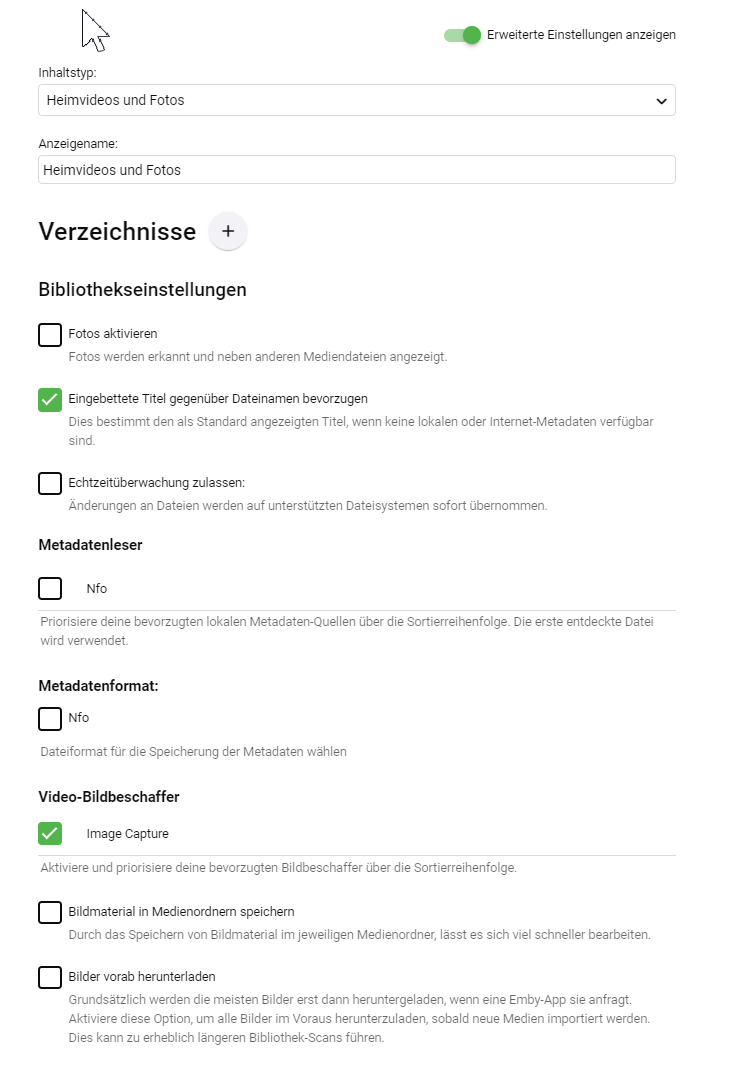
Moin, zu 1. kann ich nix sagen (nutze ich nicht) zu 2. da hast Du entweder den falschen Bibliothekstyp ausgewählt und/oder das laden von Metadaten aktiviert bei Familienvideos usw. kann man ja üblicherweise keine Metadaten aus öffentlichen Quellen (TMDB, TVDB, IMDB) usw. laden, darum macht das aktivieren der entsprechenden Funktion da auch keinen sinn. Wenn doch mal was ähnliches gefunden wird, bekommt der Kinderfilm plötzlich irgendein falsches Cover. Da sollte man als Inhaltstyp Heimvideos & Fotos auswählen. Wenn man nicht zufälligerweise irgendwie nfo's für die eigenen Videos erzeugt hat, kann das häkchen auch deaktiviert werden. Persönlich tagge ich meine Heimvideos (liegen als mkv oder mp4 vor) mit mp3tag und bevorzuge den eingebetteten Namen. Das sieht dann ungefähr so aus Alternativ kann man auch als Typ auch gemischte Inhalte versuchen, dann muss man aber die ganzen Metadaten Dienste deaktivieren. Ich könnte mir vorstellen, dass das bei Dir der fall ist und deshalb irgendwelche Cover angezeigt werden
 1 point
 -
Recent docker compose instructions on Ubuntu 20 (Docker v20) This assumes you have the NVIDIA drivers installed. https://docs.nvidia.com/datacenter/cloud-native/container-toolkit/install-guide.html#docker 1. Follow instructions to install docker-ce 2. Paste the code under "Setup the package repository and the GPG key" 3. DO NOT install nvidia-docker2, it is deprecated. Instead, install nvidia-container-toolkit: apt install nvidia-container-toolkit 4. Install docker-compose-plugin apt install docker-compose-plugin 5. Restart docker systemctl restart docker 6. Configure your docker-compose.yml. Example: version: '3.8' services: emby: container_name: emby image: emby/embyserver:latest # Obviously you'll need to update these environment: - UID=1002 - GID=1002 network_mode: 'host' ports: - '8096:8096' volumes: - "./config:/config" restart: unless-stopped # This is how GPU support is configured with recent docker/docker compose: deploy: resources: reservations: devices: - driver: nvidia count: 1 capabilities: [gpu] 7. Start your container docker compose up (notice NO HYPEN. `docker-compose` coming from the Ubuntu 20 repos is outdated, so you can't use the device reservations above. Instead, we're using the compose plugin from the docker command)1 point