Leaderboard




Popular Content
Showing content with the highest reputation on 03/12/23 in Posts
-
I even got a trailer for the exact movie I was watching the other day.2 points
-
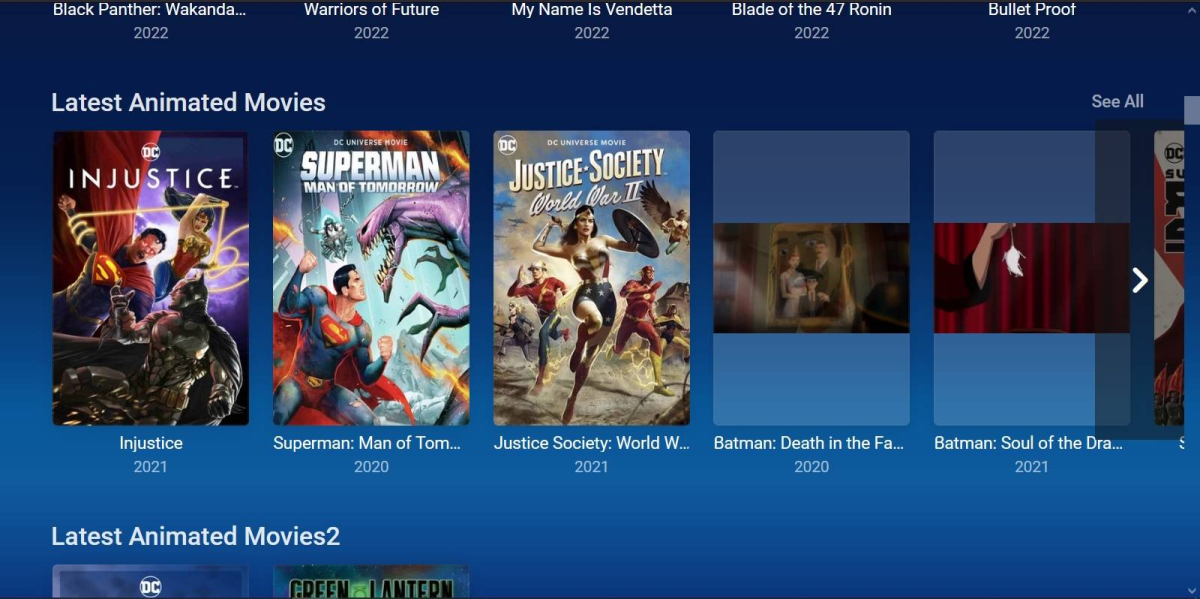
Well i checked the folders and many don't have the posters inside ,i will fix that soon. All my qnaps are offline so emby couldn't download posters, i added some posters for test. All good
 2 points
 -
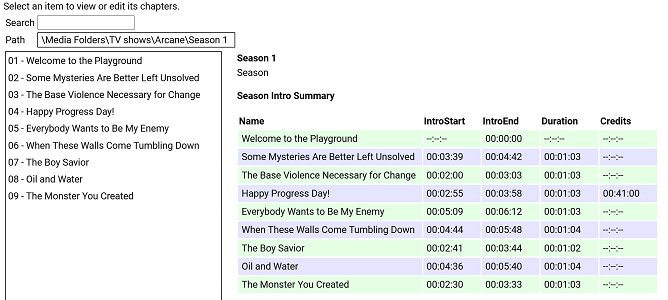
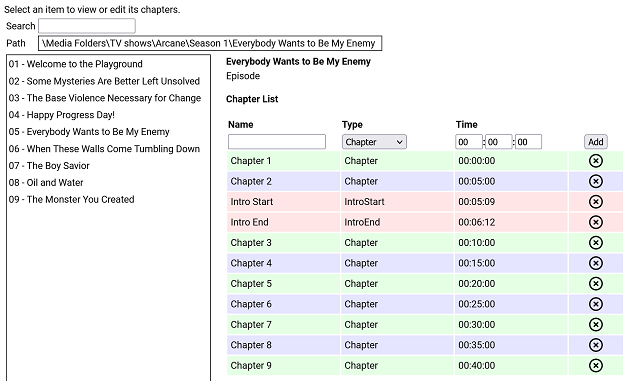
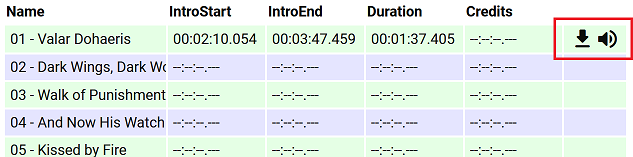
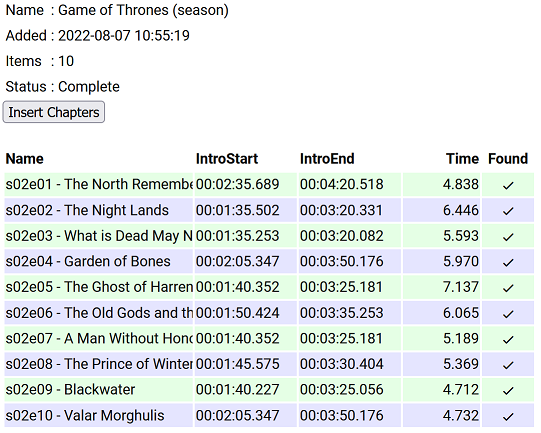
I have put together a simple chapter viewer and editor plugin. The plugin is now in the plugin catalogue. As always, here is the source: https://github.com/faush01/ChapterApi/tree/main/ChapterApi It is very simple and allows you to view chapters for an item (Movie, Season or Episode), remove chapters and add them. It supports all the different chapter marker types. It also has a season Intro summary page, select a season to see if it has intros detected for each episode. Note: All chapters are wiped and reset when you do a metadata refresh on an item. If you spend any time setting up or editing your chapters, keep this in mind. There is no current way of locking chapters. Chapter List Season Intro summary Intro Detection (CTRL-F for Intros) I have added a new way of detecting intros based on theme audio, this is using a very different approach than the core approach, it is using some of the ideas I posted over there: https://emby.media/community/index.php?/topic/107878-audio-fringerprinting-chromaprint-segment-detection/ With this approach, you need the Into Chromaprint info, this is a simple audio fingerprint of the theme song/music/audio. The plugin looks for this and can create chapters based on the results of the search. So where do you get the Chromaprint Intro info file, you can create one yourself for a series, season or episode by adding chapter info for one episode and then extracting that as a Chromaprint Info file. The new icons on the season summary page lets you extract the info file, if you just want to check you have the chapter offsets correct you can extract the audio of the chapter to play back and confirm it. A Chormaprint info file looks like this: { "series":"Game of Thrones", "season":2, "tvdb":"121361", "imdb":"tt0944947", "tmdb":"1399", "duration":107, "extract":10, "cp_data":"ThXy/E4hsdxOIZDdziWA3c9lgNnd/YDI3NyAyNyYwMzcuFHc1L0V3dS1F1/E8xJexOISXsfyMl72UzZe5lM13uZlNN/m7FDddvyT3Hack9xWjJDdR52Q3USWkN0EkvHfFJJz3zT2d98s53ffJO1n/yR8Z/4lTCf+Hgwn/k40N/pOJHH63iBR+/4xUfnuEdP47hXDeH1XgXgcd4B4DP/AeAzf0FkM/VBZDO0QWTzkEFkt9BN7bdASet3RUnqP0UJaj9dFe57WRH2u/kR977pEfO++RXw/vlb8D5Ze/Q+GfvcNgn32TdI99m/iPfbvYjj37jUZ/+4FX73uBN+9fhSfvV40vf1eELT9XjCU3V4hlN1fIZfcfzHW3C0FU9w9DRPYHTkTWA0pElgMLVNYBDVBWARRQBgUcUEYNHFRGCR3ARhk7gAY5e4BGdd+AxqGU0IahkHCCo5AwwreUMEKblDACipwwAsrbIMIGemCCAjKgggIipIYCI7QGBiWUBg4kjAbGIIxGvmDEhqrsQFequAAXq4gAF6uIABevjBDTq8Qwk2vEYLM/wKCxA8Og8QPHpDEH36QxDfe8MQ213HEFtUxxAfFdsTX0XbEt/H2xKPzdcSS0zXAgsI3wYLCJ8KSwyXCprXlwqakpcLnrLTC5ay0wlW09MMFsDXDBZE1wwXTJ8FV0ibB5eJm0e1v9lOta/dTrXn1Up0ZdVKNGXdSjwV1Up8BdFLvEGRS7yBgUusgYFLvIPAS72XwEt1d8wLF2fIDxNlyA8TbcgJ0/3ECZK9wAmSncQJEvyJCBZ4iQweOJwE3iiEAJpphACa74xE2qaMTNryjEia8oBInrGASJ6wgM0W4IjHFmCIwxIgmMJTIJjC0SCcwpVw3MeVtNTHnb3QxY270MXJWtTECRrEwAtKhMALjs3QS47N0I+XxdCPv0Hwh+1B8EfsRfAH7EnwB6xJ9EO9Tf3D1U37wxcN+8cXDfpXFQX6V90F/l+ZAfbfuQX337kN959dDf+dVwH7vVcB+//XQds3103fN91J1Tf5SfV3OUn0vz3N9L93wfy/00H4/5NB+H+RQfg/0En4P9BZ+P0U2f29Hdn/vRvd/nxL3dZ4S9XWOMvV0nzL1fJ8iVVyeIlVcvgLzXO4G8VxvFrFcPy6wXA0ukFgNKpAYDWqQCAz+0AgM11AIHPdRCDXzEQg18wMIVdMCCPfHAgm39wMKsuNBCpLzQwqCUUMKkkFBCqZQwAqmIMAJ5myBCGZogggH+YIIBdmCCASP0ggEh1AINIMwCSSzEAoksxEKZKcTSuWnAUqjYwBKkjEASpIwAU6yEMPOphCCz+YQgs1WAYLFFgWRxTZ1kIUn/dCFN8UwhRfHN4QPxzaEHeZ2xF3m1sTd5pXE3fbUxP1GFMT1RjXExQc2xMUXNkTXNRdEZyXVRGct1EQzLdREAz1VRANVNkQDQTYEA8FnAFPBbwDy8e0BoqHvAaKtbwOzuW8Ck4lvApOJZQKTjWUCkZFlArGxZQKhoWVCoaF0QqGldALhrXACxflzAcTbMgDE2yMA9P8lEOTtIRDk5WFR5fVjUXXfZ1FXjmVRFo5gUBaOYFA2nmBRNq3hUybso1Im7KNSJ/yhUmVc8FLVWHNShBgyE4QZMhCECyYQlA4nELQCZxDlM+cQZSOlEDUjpBAXIqQAFxLkABZO5AQWWuEEFtqmBAb6pgwG6rcMF+6wCBfnUAgF0xcLBcMXCjTTBRrl4QQbpeEEG6XlRBmt/UUZv/1FGZd/RRuOf0cbzlVHGV5VRxkuRMEbL1TBGz9lwRofdcMaD/XDGh3Twxp100Aa5fFAGuXhABmlsUEYrbFDGKe/wxinv8Bct7rAXIa+Q1yGn0Jcx5VCXNeF0l1nhfFfJYXwXzWn8F4Vo/NeBfNyXgfzMl4XUTJeJ0ExX2YcMFzmOFBctinRXIYpw1yGL8NdjhfCXY4Dw1+vA9Nf50HRX2Xhkd014bBdNaGwXTSl8F00n/BdFJ9xWRTtcls1bTJaNTUyWjURMlv1ARJb9QNTWbVTQFi1Y0BYteFAWLXhQFj39UNYV7XCWUadwllGmdJbRtnTW1bZ01pW3VNaXtVRWl7QVV5/QFde/0F2X/9Tdl/3ZnZdpiZU3aYmVN2mZ8TfpuHE3+bwgd/WsILXVoSS1zeFkJc3hZCXNYfQhhfXV4YX0TaHF3E2hSYRMoRmYXecZmXXnOZt15z3XZWUx93UlMffVcXF31fFRY82x1WPftV1/3/VZe181WX1dNUx8XXVEdF21AHBftRBQX7U0BN91OAnfNSgL33QoWt/1aFb/9aTS//Wg0v30oLF5VLCwORS86DkUmOgZFJl4GRSZfQ1cnX8NXIk/DZzNH12cVVpdnBVL3xw/y98cO8vfHHvHn9z7w5fU/9O3VNfztxTXc6UU02+lNMNr5XTDa230xettdNnrbXTZ53d02fLH9Imyx7SZkk+0nY5PtJXLH/SxyTvUscg71LXEH9R1wM+VNcCNlRXAnZUTRJ1VB029BQdavQcPOrwHDzq8Bwc6lAcDO8RGQz1EhsM0RYZHUEXGS1AVRgtZVQYb2XXGG/n1xnO8scbztLHGs7Sxxqew8EbrpVBWa+9QFnvqUBY/7lBWc+9Q1vNlUZbTdFGWg3BV1s9wFZZLdB3WS1hdVgv53dYL+bXWR521ltOUtdaztLFWt/CwFvv1cBb79zA2e/8wNnf/MPZzvzD3c7wQ9/O0EPf3sFT33/BVt1391bd9W/23fVp99/1OXXflT913pUzE96FE1Pe3wNTXu8T0V4vM9BeKyOQXzkjkF85dtBfKUbQXyhXUF84N1B/GCUQewh1ET8JXBM92dwDPbnYQTSZ2EA0iZhANImMRDCJhEUxmYDHM7nQ1jL54dYy6ePWMuuj1nLvo3dy54d0c+WPdHHVjVRxhY1Xc4WPVnPVz1Zz519Xc2YvV3NmL3ZzJiVncSYkY3cuFOF3PkDxdw5QsH8P4PB/DeDQPwz1UzkMrRI5DO0SORztAjk8/QE5PVVBON1TQziPU0IYj1LCGI8Cwxi9AkBYrCZAWKwmwVjcP8JYzF+CSExNg0kNRZBPDdWUT17XtU/+t/VN7pf0TK6XdEyut1VFnvVWx47xUsaG0VLGh0FTVrcBUVbvMVBWbSNQVikj8VYpI/FWKDfwUzge8FMYHnBTCFcwVwjXMVcI1TFXCIVwV9mFYXW5jXF1mZ1zdJi9c3SIvXF1mLRwd7iQMHb4sDP2eLAy9jigMvYsoTL2JeMm9yZiZvQmMmb0Igbv9CIN7PwiCOz8Yhjs/MI4/v2CPP5fghT+XoIRf16GE3delhJ3X7cy912vIrVc7SaUWG0ukEhpaoBIGGqASAjqgEhN/tFITddSSF1DM0hdQzNM/UFxTO9lU0znbdNM9m3ST4Zl0k6GwVJOhsETTpaBEU7ns1BO56PQT2WjwE0lp8BNJK/QTRT/Uk0E9xJNBdcSTRVDE0hlUVBIZWVQSHVt0UhVfdFJ1X3VSdd3VUvXU1dL19NWS9fDd0v3wXdLd+XVSTft1Ek3rVRJN7lXWVe9Fl1G3RdfRsUxX9bFM16mUVNetjFTXrYxU162MUFepjHBXuchgV7lIYFePTGRXz0TkF8sU5BdKFfQGSjfUBkY31AZGP8TGxjtExsZbQEZWfVDGZnVRxiZlUcYmZ1FHbi/RB24v0RfuK9Ed5y3R3ack0Z2nJJGcryy1nK14t5y5/L/cubWfXLmxmxy5sds8ubFbPNW1W3zRtVv8QbVbXEW/W1wFnltcDZ5ZXEmeGdxJmhmdzZs5lYWcOZWBtDiXgfQ814FkHMeBbBSGgWkAhsMrAIZTLwCGdzdAhndzUYZvVUHGb0RBRmfEwUY3xNFGP8yRVh9ModYLRaHWD0GhVg9NpRMXW6UTE3ulEzPntVMzofXTZ6F1U+uldVOrpVVTv7BVU7+0XdO/mFyTv5hc15vMXFeaTNxXigj0V44I9FeODZBXigWQF44FkBeGBdAHwhFUB8IwREdGYAQPXmAMD3ZhTQ9m4V0PbuPd327nnJ9m75yfZmuU3+ZrhF+uLc3/rixNv7o8Tb+6OE2/mkhdvZtIXbXLyF+1DYxftQ2Af/UJgy91HYYrcTWKK3ExiivxIY5r8SGT6XFhsPkx7bC5Me28vTHpuN1xebjNcTm8xDMZ+cQzFXvEEwV71BNBfVTTQRxVk8EUVZPFEF2TxRFd09VXfdNfXn1T+1t1E//ZVVOz3FXTk/BU05/wVBfL5HQXy+l0F8trdBfPanBXg25Q14Nt0JeDZICXk3CAl/dQgZc7QYHXK0vRVSvK8RUrivFVJ4vh9WONcfXhgDH1rYAwda+ENFGniDTQr4hkEOuFZBDrh2QQ68tsEKtZbBCvOXjQtjxYULYsSBD+LEgU1ixIFMYsyFTGbIjVRmyI3U5siF1ObZjdTi+Y3QY/mJ0GF5ifBhfY3wYTWN8WA1jfFgFY3lZRXF7GXX1ehvh93ob4fd6", "cp_data_length":3372, "cp_data_md5":"DDF936E4FD29A02CDA178EBFF37AD2E8" } It's just a JSON file with some info and the Chromaprint data. This can then be used in the Intro Detection tab to create a job against a series/season/episode list. Once complete, you can import the job results into your items. This is a semi auto way of detecting chapters for series that are having issues, because you are supply a good well-known chromaprint of the audio you want to target your results are much more predictable. Sharing intro theme cp data The sharded intro theme cp data is now hosted on GitHub https://github.com/faush01/ThemeCpData To use the hosted data in auto detection in the ChapterApi plugin, you can use the following URL in the "Intro Data External Url" on the options tab of the plugin: https://github.com/faush01/ThemeCpData/archive/refs/heads/main.zip Add the URL, hit download intro data, hit reload intro data and the intro cp data will be loaded for all the series you have that there is cp data for in the shared repository. If you want to add more the to the shared repo, clone it, add your new into cp json items and do a pull request to have your new items merged in and available to others.
 1 point
 -
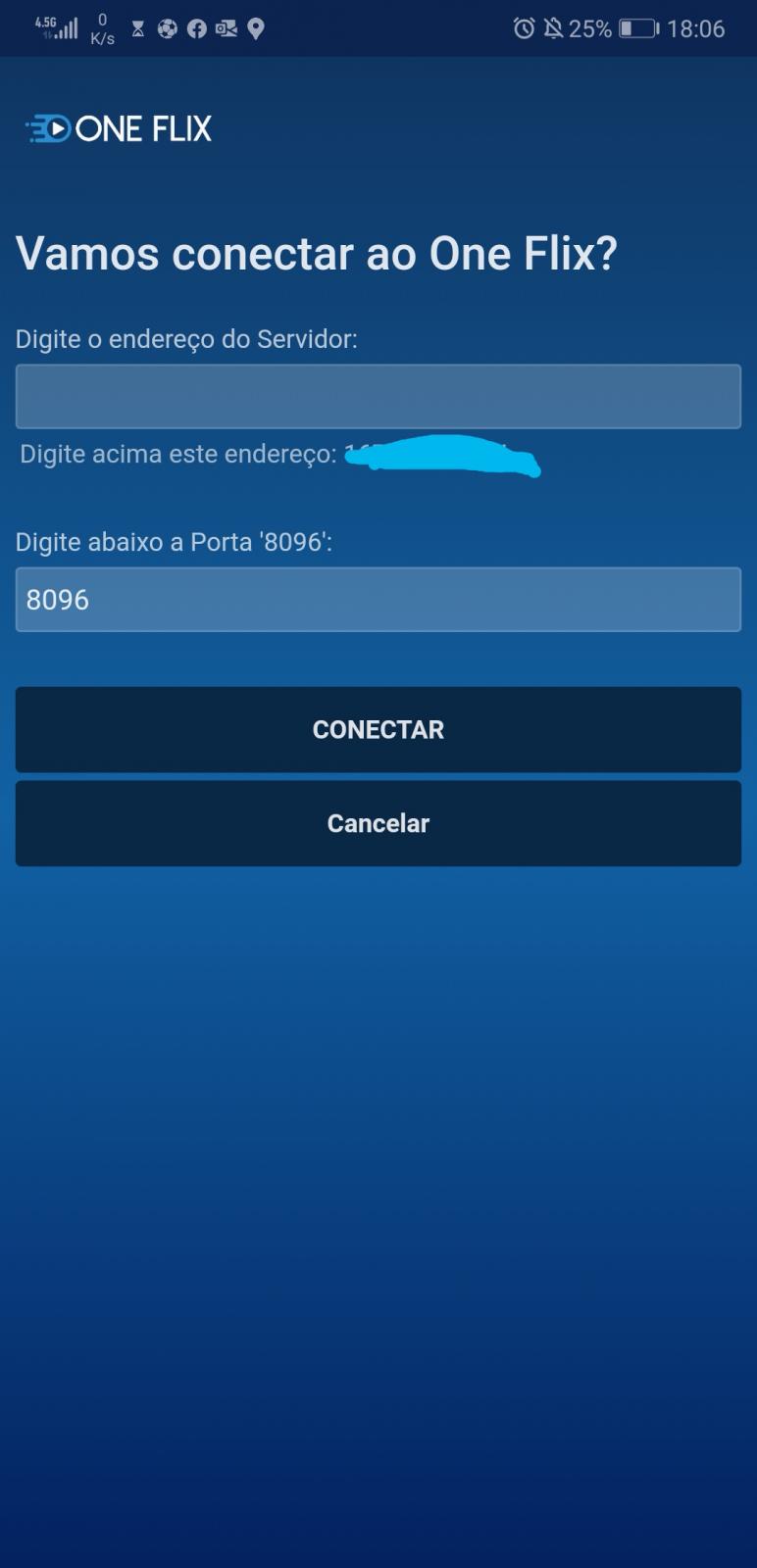
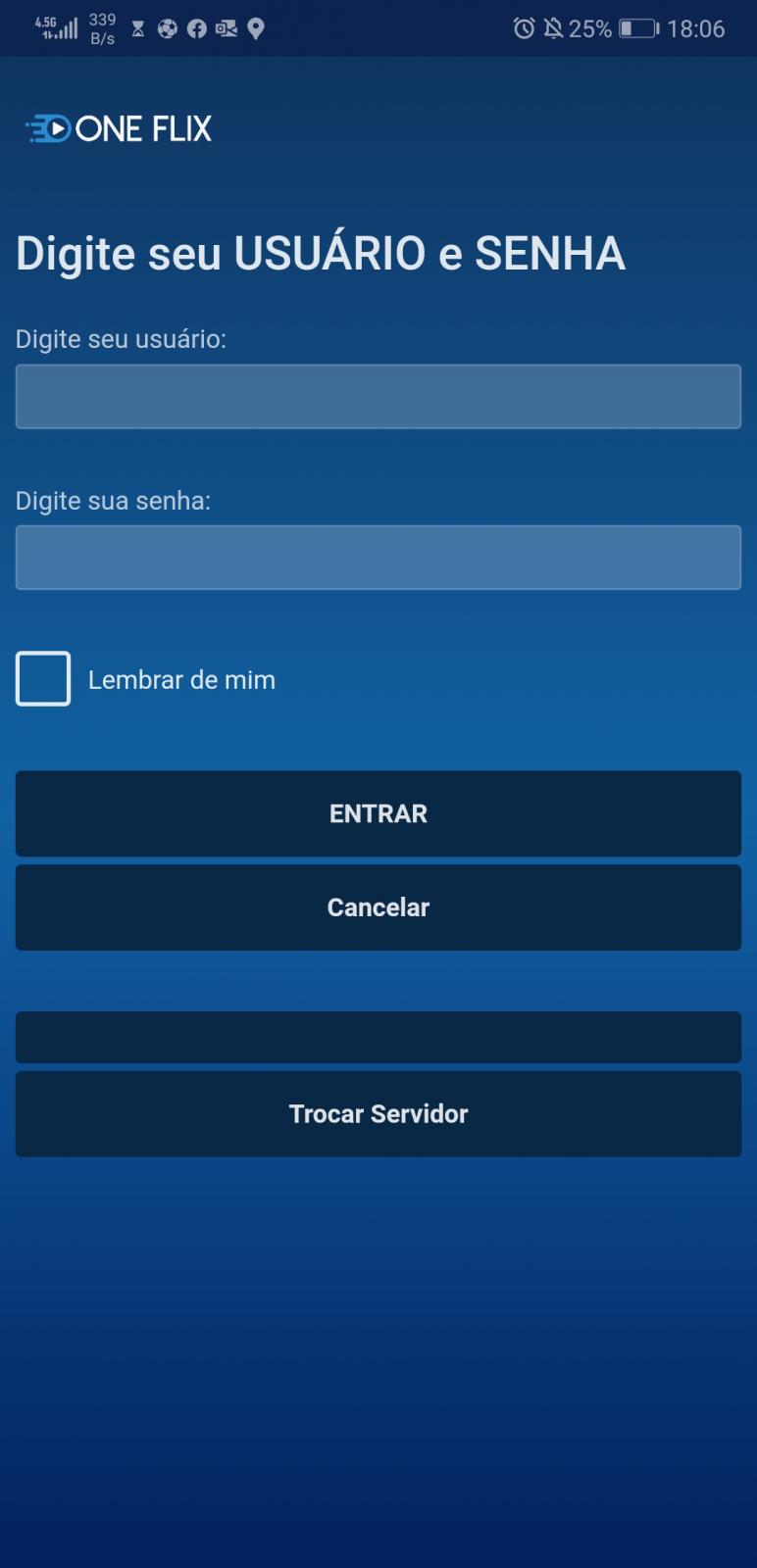
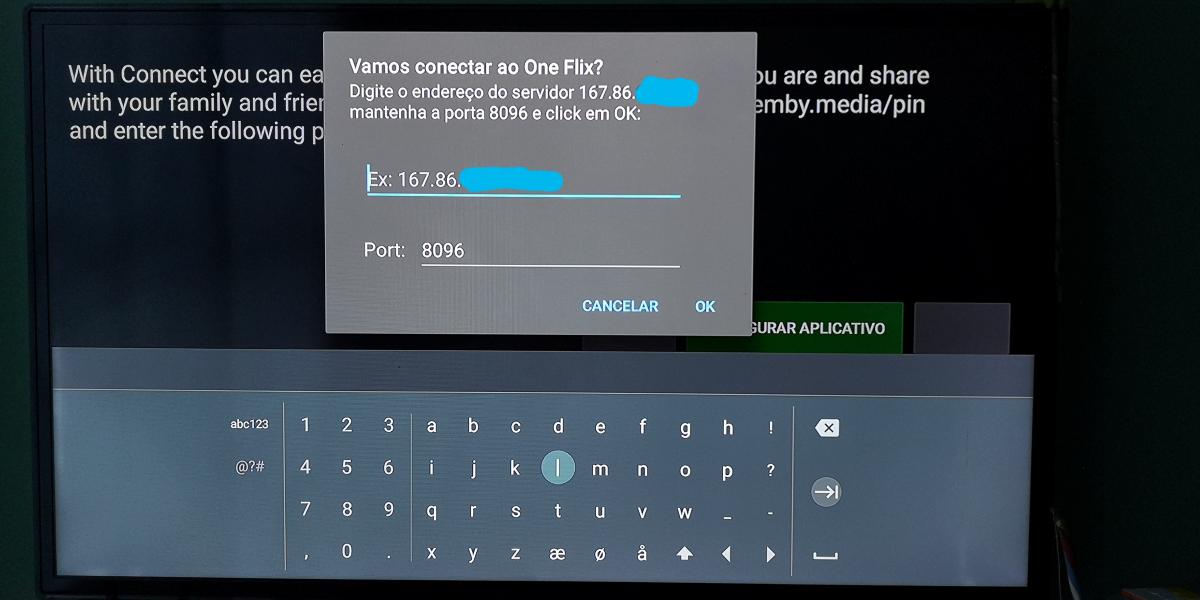
After customizing my Emby Server via CSS, I decided to take a risk in customizing the APK for Android Mobile and Android TV. The customizations I managed to perform were: I changed the LOGO on the Android Icon (list of Apps); I changed the icon's name (list of Apps); I changed the internal LOGOS; In the initial configuration - I removed some texts (including the buttons) in the App to prevent the user from accessing via "Emby Connect". It happens that there is always a friend or family member who disconnects or unintentionally removes the IP from the server and then finds it difficult to log in again (in this case I have to access it, remove it or even go to the friend's house to reconfigure the IP). I would like to know in which file (inside the uncapped APK) I can insert the IP of my server for whenever I perform a new installation or when what I mentioned above happens, the user does not have the trouble of inserting the IP and PORT (in this in case he would just enter the username and password). The idea is that whenever you install the APK, Emby already asks for the User and Password only, as the IP of my local server will already be configured in the APP.





 1 point
 -
I did a search, and the only request that I saw similar was included here: https://emby.media/community/index.php?/topic/76011-music-queue-list-improvements/?hl=%2Bshuffle+%2Bmusic That discussion seemed to be more focused on lyrics rather than the shuffle piece, so I figured I would create a separate FR. One of my biggest pet peeves with using the web interface (when listening to music at my desk) and the android app is my inability to to select a song from a playlist and have emby shuffle the playlist after the current song ends. The current behavior is that after the song I selected finishes, the next song in the playlist is played (which in my case is alphabetical order). The native android music players (the app retro player in my case) allow me to select a song from my playlist, and then click on the shuffle button on the now playing screen and my playlist queue is automatically shuffled. I realize that the simple answer is to just use the shuffle button to randomly start a playlist and shuffle the songs, but sometimes I just want to start listening to one song, and then listen to the rest of my playlist at random. Additionally, when listening to music with my kids, they ALWAYS want to start with a specific song, and then don't really care what happens after that. This causes me to have to select the song they want to listen to, then when that song is over, go back and hit the shuffle button, which is annoying to have to do. Hopefully my ramblings made sense - and thanks for your consideration.1 point
-
I know “playback speed” is supported on many(all?) clients but is most often not available to me/many because of the audio encoding in the recording for most of my videos (OTA, rip etc.)(correct me if that’s not the reason). But if the audio is transcoded to a format that can be ’speed controlled’ than that `option` becomes available. (and yes I know the sound will be degraded) So currently (at least on my fire stick 4k max) I can select (while playing) the settings/gear→Playback correction... it usually takes a few repeats, but then I get the option for “playback speed” (and changing it works!). To say the least this is cumbersome (at least for me) let alone hard to guide an average user (hit down→hit right (until you highlight the gear)→hit select (no, not the hamburger, the big button)→ pick playback correction→ repeat until you can see the playback speed option → pick your speed (no, sorry only the speeds it shows are available… )) But this will likely cause unnecessary transcoding of the video… Maybe one or more idea’s of how this could done? (yes. Knowing some transcoding is needed) An "auto transcode to allow playback speed change" in server settings? Always have the playback speed available on the client but some sort of warning about a transcode being needed? (afterthought: what if transcode is disabled on the server?) I would also like to see smaller speed increment say by +- 5% Thanks (just in general for emby)1 point
-
It seems there hasn't been a new non-beta version of Emby for Android TV for 9 months. There are a few issues that apply to me that I know have been fixed in a beta release, but I tend not to go outside of the main stable branch on things. So is there an ETA for the next release?1 point
-
I tried a few other things but, here's what worked. Get all the disks mounted in properly from fstab. Create an emby user and group with UID and GID that match what's on the source server. Copy everything in /var/lib/emby from the source to the destination server. Install emby. When I fired it up, everything was there. I didn't need to restore the backup at all. I got a warning from the server when I created a user with a UID under 1000. There's probably a standard that I don't know about somewhere that says that range is reserved for applications. The install gave a warning about the /var/lib/emby directory being present but, it looks like it did what I needed. I hit a snag when I tried to connect remotely. After trying a variety of network settings. I did do a backup restore. That didn't fix it either. Then I found the firewall that SUSE put in and disabled it. That fixed the problem. My router is my firewall. I'm not worried about my LAN. Because I did actually do a backup restore, I can't positively say the backup wasn't needed but, I don't think it was. chmod isn't an issue. Remember these files didn't get copied. Their protection mask never changed. Before I put in my $0.2 about other comments. I need to say I retired in 2019 after working about 40 years as a computer professional. The last 20 was as an Oracle DBA. You can always make something faster. All it takes is time and money. It's not just the disks. This is running on an old I5 micro desktop with 16GB RAM I picked up on EBAY for $80. I'm satisfied with the performance I'm getting. If it gets to be a problem, I'll do something about it. I'll agree there's plenty of room for improvement. I prefer to keep as much application stuff off my system disk as is reasonable. I'm not going to fill up /var with a bunch of symlinks to move things other places but, if the application gives me a reasonable way to do it, I will. Emby gave me a reasonable way to do it for some things. Lastly thanks to all for your help.1 point
-
1 point
-
Shall do. May be a few months for research and purchase but, I will report back.1 point
-
Ok. Some more information. My mistake. The problem is to do with the use of OpenVPN and configuration for DNS. The problem is not an Emby problem but a general Linux/Ubuntu networking issue. When the OpenVPN tunnel is up it is not picking up the correct DNS data and connections are being routed out of the local internet connection. This breaks the update of Metadata. The confusion is that inbound connections from the remote domain name work. It's just hat when OpenVPN is running it breaks outbound DNS. I've checked all the settings for the OpenVPN server and OpenVPN client but can't find a fix. I think I may need to adjust the Netplan settings. Following the OpenVPN guidance doesn't seem to fix the problem. Any suggestions for a fix gratefully received. Thanks.1 point
-
Looks like. Though @TeamBappears to be aware of the changes:1 point
-
I know my servers throw this for the plugin or should say removing the plugin removes this error. Error App: LoaderException: Could not load type 'MediaBrowser.Controller.Notifications.INotificationTypeFactory' from assembly 'MediaBrowser.Controller, Version=4.8.0.21, Culture=neutral, PublicKeyToken=null'. The plugin itself works fine but due to Notification system changes other change appear to be needed. But is there a release and beta for the plugin?1 point
-
It's the Emby server doing the transcoding, not the storage (which knows nothing about its content) - so it's the Emby server that needs access to the GPU. Paul1 point
-
He doesn't want to fix it, he wants to complain. Paul1 point
-
I've set it to just tvdb, I'll put the files in an isolated library and try to scan them a bit to try to collect better logging.1 point
-
Sorry for the long delay, just got back from vacation. I installed the emby for android apk in Lukes post above and the videos all direct play.1 point
-
@rbjtech That helps some, in that it would mean I'm buying fewer hammers, but ultimately, I'd like to figure out the path translation, so I can use Library/Media/Updated endpoint in fizzyade's script, to just update the path for the one movie/show. Though, your solution would still get problematic on the TV side, as I have Anime in a separate library from TV, but both come in from sonarr, so I'd have to have logic to sort that out. Thanks for trying, though!1 point
-
Specify the Parentid in the Refresh command and it will just Refresh that library, not all of them. ie curl -X POST "http://embyhost:8096/emby/Items/2237026/Refresh?api_key=*" -H "accept: */*" Where 2237026 is the parentid of the Library in my case (look in a browser for the url when you open that library - it will be at the end) ..... 311d249&parentId=22370261 point
-
Both 8mm and the accountant are objectively part of collections. You may not agree but you don’t provide the metadata. I imagine what happened is you enabled collections initially with a minimum of 1 item, the collections were all correctly created and you later changed the minimum to 2.1 point
-
Pros and cons aside the reason for making the destination exactly like the source system during the migration is so that you don't have to rely on backup/restore and scans when you're done. Copying (sync) the Emby data and preserving the library and custom paths should accomplish that. I do agree with @cayars that the best perf can be achieved with certain things on the fastest storage though with one caveat - the fastest you have ON HAND. In other words if you're satisfied with your current system there's no need to go all out. Adding my 2 cents, access to cache and metadata can be sensitive to latency and noticeable when rendering the UI. The media itself is a trickle in the grand scheme of things.1 point
-
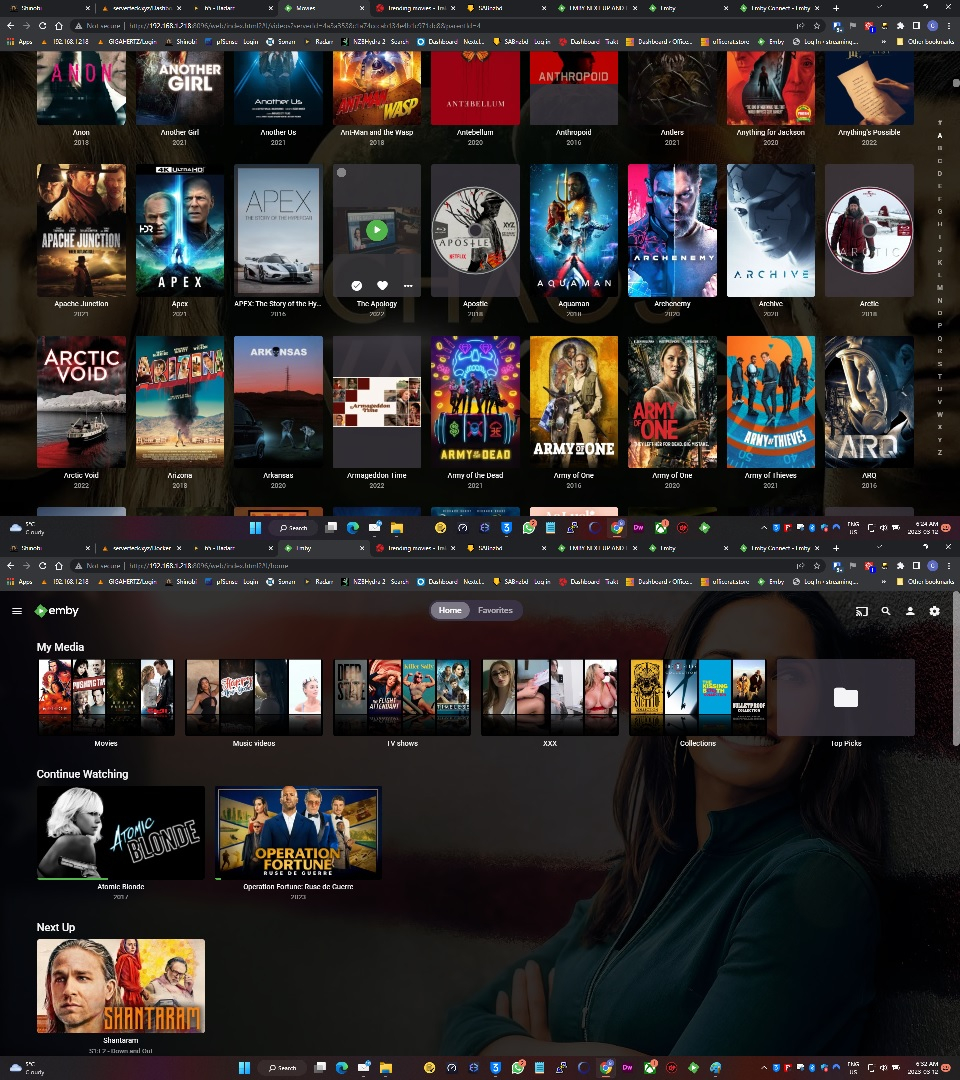
Yes, there is supposed to be content displayed, there were remaining episodes. I am not signed up for Emby Connect, I just use a reverse proxy to view it remotely in hotels and on my fire tablet when I'm away from home. I decided to go with a fresh install and that seems to have fixed it, CW/NU are now displaying once again. I had to delete my entire appdata folder and reinstall all my plugins. I did this because all the settings were correct and it still wasn't working properly, the theme movies plugin wasn't playing theme movies anymore either. Now its all working and theme music. I am not sure about this but maybe it was database corruption. Now I am just dealing with getting all the plugins to work correctly. Top picks I had to restart the Emby several times before it appeared. There is still alot of images missing although it has been scanning all night and I have a rather large library 38TB/89TB used. There is disk Blu-ray images on some of the movies which I don't prefer. and some of them are just a small picture of a scene. But its not done scanning cus all the disks are on and have been all night so I am waiting to see the final results. It is working much faster with a fresh install.
 1 point
 -
1 point
-
You keep talking about bloat - but your problem here is not bloat but some bug or database corruption. With those settings you should not be getting collections automatically any more than I am. So what you need to do is to try to make the system generate a collection (by adding a movie?) and then providing a system log for the time it happened for the developers to try to determine what needs fixing either in the software or in your installation. Personally, with no knowledge of the internals, I would first try to fix it by enabling the metadata collection in all libraries, restart the server (because you never know...), then disable in all libraries and maybe restart again. Who knows, possibly that might get the internals back in sync with the option display? But the devs are probably better able to comment beyond that than I am; maybe they've even seen this scenario before. Paul1 point
-
Thank you very much I had the same problem and I used your CSS code1 point
-
That's 40MB less and a waste of space. I have 40TB, it's not the important point. I will never understand programmers that intentionally bloat their software because 'that's what all the media server developers are doing'. Probably the worst reason to do it. Be exceptional, not part of the problem. Someday, collections are going to be viewed for what they are. For now, I will look at the library on all three of my Emby servers and say to myself "hopefully that will go away some day"1 point
-
Yes you can do it. here are some of the projects u can use to do this task, u can also automate this, however all of this is outside of my skillset for the time being. https://emby.media/community/index.php?/topic/116344-m3u-movies-and-tv-shows-as-regular-movies-and-tv-shows-emby-libraries/1 point
-
Thanks mate this looks great. Sorry.. I'm not on beta so I can't test but will defo give this a go when 4.8 goes live. Data Explorer as well.. your on a roll mate, same as above.. I can wait. Looking forward to testing TGB theme. Thanks again for the invite.1 point
-
Try here https://emby.media/community/index.php?/topic/21348-emby-latest-versions/ ... Beta release notes. It gets updated with each beta release with the newer stuff at the top.1 point
-
I came across this looking for information on running emby under WSL. I figured I would complete some of these questions. You can write your own init script and get this to work, here are two examples where people did just that: https://emby.media/community/index.php?/topic/61826-debian-init-script-for-sysvinit-users https://emby.media/community/index.php?/topic/78433-failed-emby-install-on-armhf/ As to the problem of no systemd in WSL distributions, this has now been rectified by Microsoft: https://devblogs.microsoft.com/commandline/systemd-support-is-now-available-in-wsl/ However, either way after you have an emby install running under a WSL guest, you cannot communicate with it directly from other hosts on your network by default. You can "port forward" from the host system to the WSL VM using this method: https://learn.microsoft.com/en-us/windows/wsl/networking But, the port forward will only function until the next time WSL is restarted. At that time the virtual switch environment and DHCP address of the WSL VM will change and the port forward will have to be set up again. This can be scripted using this method: https://superuser.com/questions/1582234/make-ip-address-of-wsl2-static Or, there is one option for a static setup further down in the responses. Another possibility for a static setup is here: https://gist.github.com/wllmsash/1636b86eed45e4024fb9b7ecd25378ce Then you need to configure the emby server on the WSL VM to auto-start when the host computer is rebooted: https://superuser.com/questions/1343558/how-to-make-wsl-run-services-at-startup Ultimately, since WSL leverages Hyper-V anyway, and setting up a linux VM under Hyper-V, or just running emby directly on windows is way less complicated, I think most should avoid this implementation. Rob1 point
-
Did you try the drivers referenced the link above? All I can say is devs are looking into this as there are server topics on ARC issues. Intel doesn't appear to be much help either per this topic. https://emby.media/community/index.php?/topic/116337-emby-and-intel-arc-a380-3101014091driver-issues Doesn't look like we ar the only ones having issues with ARC.1 point
-
Oh, you don't wanna know. Exorbitant prices. But as with any other monopolistic company, it's either that or no connection at all - so you just try to control yourself. Thanks, unfortunately not for a few months more, I reckon early-mid June. It's an awesome tool - even though I didn't fully appreciate it until being forced to scroll through xy logs every day on mobile phone screen (server log is a story - or better phrased: torture - for itself ) - NOT an experience to recommend.1 point
-
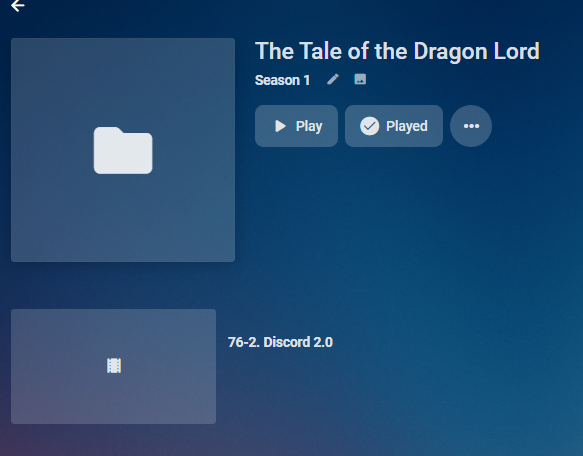
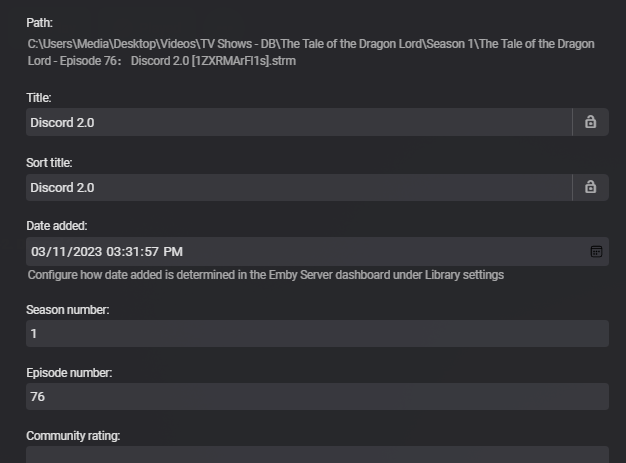
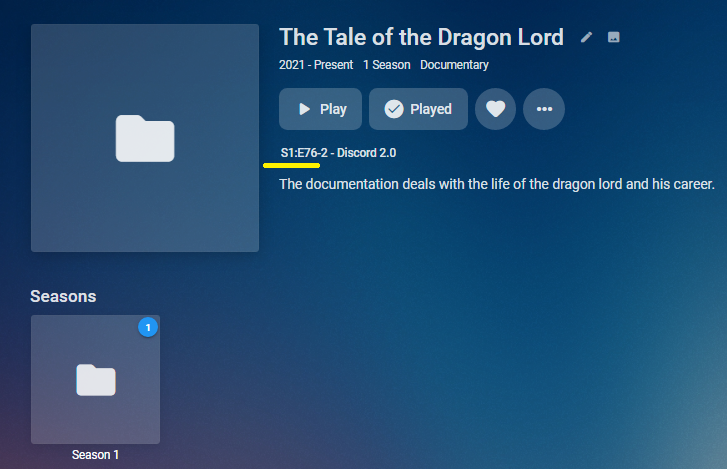
Naming scheme should be okay as it is "02 Episode Name.ext" but would guess conditions of a Season folder as would not identify if not in my test. @Lukewould have to comment but yes numbers in episode name can create issues with multi-episode but the number should never be smaller than the first. TV The Tale of the Dragon Lord Season 1 The Tale of the Dragon Lord - Episode 76: Discord 2.0 [1ZXRMArFl1s].strm But metadata is correct Nfo has episodenumberend <?xml version="1.0" encoding="utf-8" standalone="yes"?> <episodedetails> <plot /> <outline /> <lockdata>false</lockdata> <dateadded>2023-03-11 15:31:57</dateadded> <title>Discord 2.0</title> <year>2023</year> <sorttitle>Discord 2.0</sorttitle> <tvdbid>9627751</tvdbid> <uniqueid type="tvdb">9627751</uniqueid> <episode>76</episode> <episodenumberend>2</episodenumberend> <season>1</season> <aired>2023-02-17</aired> <fileinfo> <streamdetails /> </fileinfo> </episodedetails> Tested on .22
 1 point
 -
Hi Luke, thanks for the feedback. My intend wasn't to say: Please do an update ;) So, there is no way that I can update or change the list by myself in the future? Thx1 point
-
Not sure I follow your question. STRM file can point to media offsite so there is an endless amount of strm file you can generate. Most people I think use them only for VOD files that are part of an m3u subscription used for TV channels. But you can generate strm files to access cloud accounts (as long as you can download the file), you can generate them from RSS sources for things like podcasts or even to video files on archive.net that are in the public domain. You could generate these a bit every day and keep adding to your libraries or creating new libs for different content or you could generate all your STRM files and add them all at once and let Emby process them for hours to days depending on the amount you add at one time. You mentioned "convert every single file" but you typically wouldn't use strm files for local media as you can add them direct. Instead most people use strm files pointed to media on the Internet. There is nothing to convert as an strm file simple holds a single text line which is the URL of the media file.1 point
-
Okay, I see. Yeah, there are a log of songs there that don't have any form of "easy" in their title but are there by virtue of being on an album with that in its title.1 point
-
I've just published a new version: Version 4.8.0.20 (March 11, 2023) Now also provides crew information (people) for series Provides guest-cast and guest-crew information (people) for episodes Requires Emby Server Beta 4.8.0.20 This is the final beta release - please test! If all goes well, then it will be released alongside the 4.8 server.1 point
-
I found the issue in the metadata, lots of them had been identified wrong e.g. NOW 112 identified by discogs as NOW 12 so the release dates and year were all wrong and it was sorting on these dates. I have set these all correctly now and they are showing in the right order1 point
-
Indeed it was! Thanks, I re-built it and now it works1 point
-
Nevermind. Disabled the IPv6 and it started working again. The way I figured this out was pretty easy. SSH to NAS ping yahoo.com "Oh it wants IPv6" (Spectrum disabled my HE ipv6) Turned it off, back to the races.1 point
-
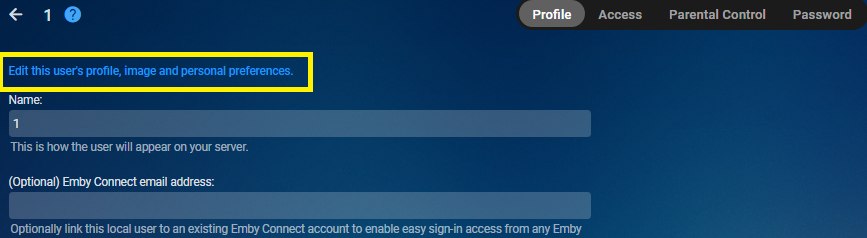
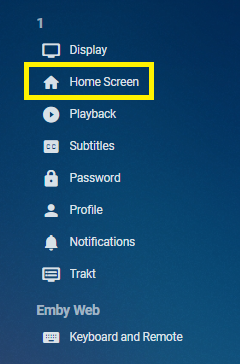
The virtual Collections Library is created globally and apply to all content types by items in your library or you making custom collections but the issue comes when you restrict access causing the library to now become Empty @Lukeshould look at hiding it automatically for the user in this situation. You can hide if for the user per their home screen options. App Settings-Users-select user
 1 point
 -
FYI - I found TV Listings on zap2it.com show the CallSign. Just select a zip/postal code, provider, and boom. It doesn't show the name of the channel, but it does have the channel logo (logos for a channels where either a logo doesn't exist or they don't have one, well, the "missing logo" logo looks *awfully* familiar. . Should help people a lot.1 point
-
Post needs some header set curl -X POST "http://192.168.33.120:8096/emby/System/Configuration?api_key=" -H "accept: */*" -H "Content-Type: application/json" -d "$new_cfg" This will be ok.1 point
-
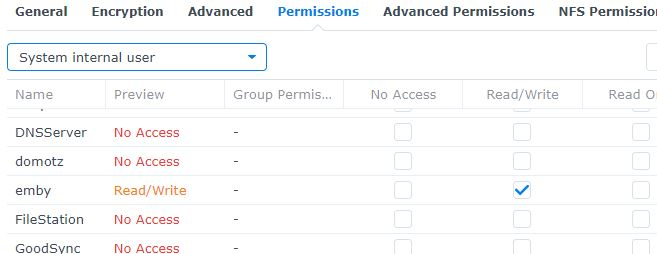
Didn't realize I had to be signed in to view OP guide so went thru the many posts to see if I could figure it out. Then a few minutes ago I stumbled upon the article on how to set permissions on DSM7 which i think is a little different than DSM6. There is the local user permission but there is also a System internal user permission that I didn't remember setting on DSM6 but it was the key to Emby seeing and scanning my libraries. It is quite amazing the help you give people and in my case I don't think my watched data is still retrievable but I can probably live with that. Just so relieved to get this going again.
 1 point
 -
OK, did testing on 4 different scenarios. Each time I tested I reset the M3U file back to the original so I was only changing one attribute at a time. My sample M3U file had 15 entries. 1) Change tvg-name to what I would think would be the name (so Animal Planet in the above scenario) 2) Change tvg-id to ID 3) Change tvg-id to CallSign 4) Change tvg-name to CallSign Scenario 1: Just under 50% accuracy rate. Like I mentioned in a previous post, not knowing what the Emby is looking for as far as a name goes hurts this. Scenario 2: 100% accuracy rate. Finding the IDs (Channel ID?) either requires getting all entries for Live TV out of the Emby log file. Or, for the more adventurous, you can find this information using utilties like mc2xml or zap2xml. There may be other online resources, too. The ID seems to be universal. Not knowing the CallSign makes this next to impossible. Scenario 3: 0% accuracty rate. Just doesn't work. Scenario 4: 100% accuracy rate. Finding the CallSign will require a little bit of detective work. The CallSign seems to be universal (like the ID), but be warned that there are multiple variants of the CallSig: Local channels will like have DT appended to the station name so WSOC will be WSOCDT or KREM will be KREMDT, not all cable or satellite providers will have the DT variant, or only the DT variant, and some may have both. And there are can be HD variants, too: CH5 and CH5HD, for example. Again some cable or satellite providers will have the HD variant, or only the HD variant, and some may have both. (They could, in rare instances, also have slightly different programming - so the guide data may not be accurate.) So, in the end, "guess and by golly" rules the roost. But, I think knowing this much will help. I know it'll help me, but I only have about 150 channels in my playlist - I know some people have a whole lot more. I also did some footwork and I have Call Signs for all of my channels. I would like to think there is a lookup tool online somewhere where you could be a channel name in (or a partial name) and have it return out the Call Sign and the ID. I know it would have saved me a ton of time. I'd build one, but that would take even *more* time! The list of channels worldwide has got to be huge. The file that I built contains about 4000 Call Signs/IDs - no names - and it only has channels for US, Canada (partial list), and Great Britain (may be partial list).1 point
-
Below is the version I customized for Android TV.








 1 point
 -
I was having some issues with getting the script to run successfully via cron. I thought I'd share what I ended up using in case anyone else has any issues. 0 5 * * * /scripts/emby-updater.sh > "/scripts/update-log-`date '+\%Y-\%m-\%d_\%H\%M'`.log" 2>&1 This way the script runs every morning at 5am and will generate a log file with the current date and time. The log file will include the output of the script which is currently this: Now I just need to wait for the next release to ensure it works properly.1 point
-
put a redirect ( a greater than sign “>” ) to write to a file. Then, send it to the special file /dev/null, or if you actually want to save the output somewhere to review later, use a file on your file system ( like /home/username/log.txt ). additionally, you’ll need to pipe error messages also. You can either redirect the errors to standard output ( which by now is also going to a file or null ) or redirect errors to a separate file. Use 2, the error console, and redirect it. To merge it with standard output, do 2>&1. Examples: Drop any and all output update-emby.sh > /dev/null 2>&1 keep a log file , and put all errors in the same log file, too ( always use a full path, not a relative one. Also, adjust the folder to a real one) update-emby.sh > /home/someuser/log.txt 2>&1 keep a log and error messages in separate files ( again, use real folders on your system) update-emby.sh > /home/someuser/log.txt 2>/home/someuser/error.txt keep a log but discard errors update-emby.sh > /home/someuser/log.txt 2>/dev/null this is true of any command, actually. It’s a little bit intermediate shell scripting, but that’s the basic idea.1 point
-
When you give up your right to choose, you are just a tool that makes developers think it's ok to forcefeed 'wasting' ideas. Collections should have been a choice since the dawn of this horrid nightmare. Ask yourself this: You can just about disable everything to do with automatic media metadata, run an 'off-grid' server except for these stupid collections. You'll have them on your library configuration screen 'forever', and they take up bandwidth and drive space no matter if you like it or not. Collections are malware.0 points