
Leaderboard




Popular Content
Showing content with the highest reputation on 03/09/23 in Posts
-
Oh no, my soul I honestly tried it first, because it has such a big imprint and is so well known, it’s the first thing I tried, but it honestly failed at a few things right off the bat that I wasn’t thrilled with. One of the biggest issues is it took all 300+ episodes of a certain series and put them into one lumped folder. Emby easily recognized the tags and/or folder setup and displays them correctly. I’m incredibly picky about such things, and i didn’t spend so much time labeling, organizing, etc just to have things thrown in a big pile; can’t even explain how much that pains me. There are clearly this that Emby excels at, I do appreciate open source, I like the idea if plugins and even working next to kodi etc (once i figure out how to use THAT…whole other can of worms I’m sure) I have good proficiency/understanding of these issues, i just didn’t know that Emby so much required said proficiency. The support base around here is clearly pretty solid; with people around to steer me in the right direction, i don’t think I’ll have much problem doing the work to fix the issues etc2 points
-
I suspect caddy is using it's own web services (maybe via certbot?) to be the approver for any domain ownership challenges required for the TLS certificate creation ? An alternative way to proove domain ownership before was to use .txt DNS records - but these are probably no longer required.2 points
-
OK, I re-read through this thread and it appears that the solution is to add the port 5004 to the end of the IP address of the computer with the Ceton card installed. On my other machine it is not and is entered as http:// etc.....so that is what had me confused. I do not know why it works on that machine but not this one but adding the port 5004 at least mad my tuner available in emby. The fact that it won't access most of my channels is something to take up with my useless cable company....if you can avoid Optimum do so at all costs as they are the absolute most useless and dumbest company I have ever had the displeasure of dealing with.2 points
-
@@Luke stated in a previous post (https://emby.media/community/index.php?/topic/49933-replaygain-music-support/) adding support for this could easily be done for at least the theater client seeing as the player used already supports replaygain. I'm making this feature request in hopes that this support is added, as I have no dev experience myself1 point
-
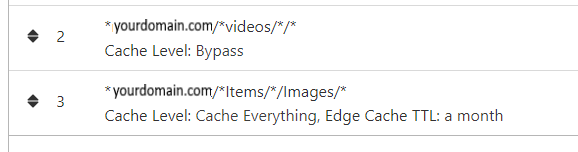
NGINX and emby Config Version 1.0.4 Last Update 1-1-2024 Update by Pir8Radio Why Use NGINX reverse proxy ahead of my application servers like emby? With NGINX or any reverse proxy ahead of an application server you have more control over your setup. You can do things the application servers were not built to handle, have better control over your security and logging, replace lines of code without editing the application server code, better control of caching, etc, etc.... One of the main reasons is so that you don't have to open a new port on your firewall for every application server you host, all you really need to open is 80 & 443 and the internet can reach all of your different servers through one entrance. Will NGINX work on my OS? Most likely, you can find various versions of NGINX for most OS's and they come in different flavors, with options baked in, or just the bare NGINX that you need to compile. See below for download links to get you started. Will NGINX break things on emby? Absolutely if you don't configure it correctly! I HIGHLY suggest when choosing a scheme to setup your domain URL you choose SUB-DOMAIN and NOT sub-directory, more below. Also if you come to the emby forum with things not working, or issues you have and you use a Reverse Proxy, PLEASE make sure that is one of the first things you mention in your forum post. ESPECIALLY if emby works on one platform or client, but not another. So many times people complain "but it works on chrome, so I didn't think it was the reverse proxy". Mention you have a Reverse Proxy please. If the reverse proxy is setup correctly it should be totally transparent to the user and the application server (emby). I'm not going to go into how to purchase and setup a domain name. Lots of how-to's on that out there. Once you have a domain name and its pointed to your IP address, you can go to that domain name and hit your server then continue on.... Sub-Domain vs Sub-Directory: Lets say your domain name is: domain.com there are two main ways you can direct traffic from the internet to your backend application servers like emby. One is sub-directory, something like domain.com/emby or domain.com/other-server This is doable in nginx, but there are some catches and you need to know how your reverse proxy and application server work in detail.. This often breaks different features in emby and other application servers.. To keep with our "Totally Transparent" goal sub-directory doesn't work well, it requires a lot of rewriting and work-arounds to make it work smoothly, if you choose sub-directory you will run into issues you will need to address. The other option is Sub-Domain, this is the cleanest, most transparent, easiest to setup and maintain, it's also what I highly suggest you setup. A sub-domain looks like: emby.domain.com or other-server.domain.com The below config is based on Sub-Domain I will include a sub-directory example as well. NGINX Downloads: Official nginx downloads(LINUX): nginx.org Official nginx downloads(Windows): nginx.org WINDOWS users I suggest this version: nginx-win.ecsds.eu download links are at the bottom of the page. This Windows version has lots of cool features compiled into it already, and is optimized for windows. They keep up with updates, its a FREE (for non-commercial) third party build that I highly recommend. Additional Links: Content Security Policy info (CSP) (For Advanced Users): A CSP WILL break your server if you don't know what you are doing, I suggest reading up, lots of googleing, and understand what a CSP's function is and is not prior to venturing into this area Example NGINX Reverse Proxy Config: 3-29-2020 - ADDED A LINE FOR CLOUDFLARE USERS SO THAT THE X-REAL-IP HEADER IS CORRECTED. THIS ONLY EFFECTS Cloudflare USERS. 4-11-2020 (V1.0.1) - MOVED proxy_buffering off; FROM LOCATION BLOCK TO SERVER BLOCK 12-18-2020 (V1.0.2) - ADDED 301 SERVER SECTION TO FORCE ALL TRAFFIC TO SSL. 9-23-2021 no nginx config change, but cloudflare changed how they cache video files, so emby users that use Cloudflare now need to add a rule like below to make sure video is seekable and playable. 8-18-2022 - added a line for photo sync to cover large uploads of videos and images. (client_max_body_size 1000M;) 1-1-2024 - changed http2 setting per @weblesuggestion in this thread post # 1309363. ** The below "Page Rules" are only needed for Cloudflare CDN users, otherwise ignore. worker_processes auto; error_log logs/error.log; events { worker_connections 8192; } http { include mime.types; default_type application/octet-stream; server_names_hash_bucket_size 64; server_tokens off; ## The below will create a separate log file for your emby server which includes ## userId's and other emby specific info, handy for external log viewers. ## Cloudflare users will want to swap $remote_addr in first line below to $http_CF_Connecting_IP ## to log the real client IP address log_format emby '$remote_addr - $remote_user [$time_local] "$request" ' '$status $body_bytes_sent "$http_referer" ' '"$http_user_agent" "$http_x_forwarded_for" $request_time $server_port "$http_x_emby_authorization"'; log_format default '$remote_addr - $remote_user [$time_local] "$request" ' '$status $body_bytes_sent "$http_referer" ' '"$http_user_agent" "$http_x_forwarded_for" $request_time $server_port'; sendfile off; ## Sendfile not used in a proxy environment. gzip on; ## Compresses the content to the client, speeds up client browsing. gzip_disable "msie6"; gzip_comp_level 6; gzip_min_length 1100; gzip_buffers 16 8k; gzip_proxied any; gzip_types text/plain text/css text/js text/xml text/javascript application/javascript application/x-javascript application/json application/xml application/rss+xml image/svg+xml; proxy_connect_timeout 1h; proxy_send_timeout 1h; proxy_read_timeout 1h; tcp_nodelay on; ## Sends data as fast as it can not buffering large chunks, saves about 200ms per request. ## The below will force all nginx traffic to SSL, make sure all other server blocks only listen on 443 server { listen 80 default_server; server_name _; return 301 https://$host$request_uri; } ## Start of actual server blocks server { listen [::]:443 ssl; ## Listens on port 443 IPv6 ssl enabled listen 443 ssl; ## Listens on port 443 IPv4 ssl enabled http2 on; ## Enables HTTP2 proxy_buffering off; ## Sends data as fast as it can not buffering large chunks. server_name emby.domainname.com; ## enter your service name and domain name here example emby.domainname.com access_log logs/emby.log emby; ## Creates a log file with this name and the log info above. ## SSL SETTINGS ## ssl_session_timeout 30m; ssl_protocols TLSv1.2 TLSv1.1 TLSv1; ssl_certificate ssl/pub.pem; ## Location of your public PEM file. ssl_certificate_key ssl/pvt.pem; ## Location of your private PEM file. ssl_session_cache shared:SSL:10m; location ^~ /swagger { ## Disables access to swagger interface return 404; } location / { proxy_pass http://127.0.0.1:8096; ## Enter the IP and port of the backend emby server here. client_max_body_size 1000M; ## Allows for mobile device large photo uploads. proxy_hide_header X-Powered-By; ## Hides nginx server version from bad guys. proxy_set_header Range $http_range; ## Allows specific chunks of a file to be requested. proxy_set_header If-Range $http_if_range; ## Allows specific chunks of a file to be requested. proxy_set_header X-Real-IP $remote_addr; ## Passes the real client IP to the backend server. #proxy_set_header X-Real-IP $http_CF_Connecting_IP; ## if you use cloudflare un-comment this line and comment out above line. proxy_set_header Host $host; ## Passes the requested domain name to the backend server. proxy_set_header X-Forwarded-For $proxy_add_x_forwarded_for; ## Adds forwarded IP to the list of IPs that were forwarded to the backend server. ## ADDITIONAL SECURITY SETTINGS ## ## Optional settings to improve security ## ## add these after you have completed your testing and ssl setup ## ## NOTICE: For the Strict-Transport-Security setting below, I would recommend ramping up to this value ## ## See https://hstspreload.org/ read through the "Deployment Recommendations" section first! ## add_header 'Referrer-Policy' 'origin-when-cross-origin'; add_header Strict-Transport-Security "max-age=15552000; preload" always; add_header X-Frame-Options "SAMEORIGIN" always; add_header X-Content-Type-Options "nosniff" always; add_header X-XSS-Protection "1; mode=block" always; ## WEBSOCKET SETTINGS ## Used to pass two way real time info to and from emby and the client. proxy_http_version 1.1; proxy_set_header Upgrade $http_upgrade; proxy_set_header Connection $http_connection; } } }

 1 point
 -
I believe P**x makes this startup stuff a bit easier, in exchange for your soul in perpetuity... Paul1 point
-
Whew...I disable upnp as a security issue, so I had to do some manual port forwarding. Done & done, and thank you again. Thank goodness for this forum, because this app does NOT hold hands...there is certainly a technical end to it that I wasn't expecting. Bit by bit though, it's starting to seem like a more viable solution; it just needs some dialing in apparently. You rule, thanks again.1 point
-
Yeah, you'll need to configure your server for Remote Access, try following this guide -- https://support.emby.media/support/solutions/articles/44002137137-remote-setup Let us know if you get stuck on anything.1 point
-
No worries, glad you got it sorted!1 point
-
In my limited testing, yes it occurs straight from a clean session before playback and also after - activity doesn't seem to make any difference.1 point
-
Thank you for the explanation. Then I'll test it1 point
-
Of course, that would be amazing.1 point
-
My upstanding it should be hev1 by default not "CodecTag":"HEVC". But sound like you have to add the tag. ffmpeg -i input-hev1.mp4 -c:v copy -tag:v hvc1 -c:a copy output-hvc1.mp4 ffmpeg - Encode H265 to hvc1 codec - Stack Overflow Not enough info as changing containers is not always that simple.1 point
-
It worked. thank you!1 point
-
I can confirm that with the public 7.2 beta and the latest Emby 64-bit package (both stable and beta) do not appear to run. They will start for a few seconds and then "manually stop". There do not appear to be any entries in the console logs regarding the package after it initially tries to run, i.e., the last entry reads it started but it certainly has stopped.1 point
-
Yeah flicked those on. It’s just the difference in behaviour from earlier versions that’s catching my partner out. She always pushed down to bring up the scrub and then scrubbed. Now I need to teach her to just scrub otherwise it’s down, up, scrub! It was a lower/mid TV back in 2018 so showing it’s age now.1 point
-
Yes, it's better now. Thanks!1 point
-
The themes fixed by our themes designer @softworkz Let us know if all fine now. Thanks.1 point
-
I guess the issue has not been resolved. Not sure what answers or examples I can provide. As per @Crusher11, it appears that I have to do a metadata refresh to get the **cast** to show up. Here is the nfo that is created about an hour ago for an Ironside recording, attached. I will do a metadata refresh and see what happens and will post the updated nfo file. Ironside S07E11 The Hidden Man.nfo1 point
-
Default theme but Dark and Blue have the same low contrast.1 point
-
Did something change recently? There's very little visual difference between unread and read topics. I think there was more contrast between them until very recently.1 point
-
Hi, I hope you will consider adding this feature !1 point
-
I split out to a new topic. Hi. Missing episodes are not limited to admin users. It is a library-level option.1 point
-
That could definitely cause problems. Let's take another look after you get that sorted out!1 point
-
Hi quickmic, you mentioned iso probably broken. Yes all my Emby entrys with iso files are not synced with 8.x1 point
-
My understanding was the public release of DSM 7.2 beta (which I believe was released as 7.2-63134) was just the other day though the toolchain had been released at the end of last year. I could certainly be wrong though. I must be completely blind because the only post I see regarding the DSM 7.2 beta at all is from January in this section. I agree with you, hence why I didn't just manually update to 7.2 and find out for myself. I went ahead and upgraded as there are other packages that need to be tested and it would appear Emby refuses to run. Specifically it runs for maybe 15 seconds and then stops, both with a manual installation upgrade and a fresh uninstall/install.1 point
-
From an IPTV standpoint sure you will be limited by their concurrent connections limit but that has nothing to do with Emby.1 point
-
So just to ask stupid questions....... My new box I just set up - is set up with two mount points for my media hard drives. One set of mount points has rights that makes Logitech Media Server (Squeezeboxes) happy and one that makes Emby happy for rights. Both sets mount from the F-stab at boot. Files on my media drive are all set to owner Nobody and No Group. Should be all good? Everybody is happy and everything works perfectly now.1 point
-
Yes that as well.1 point
-
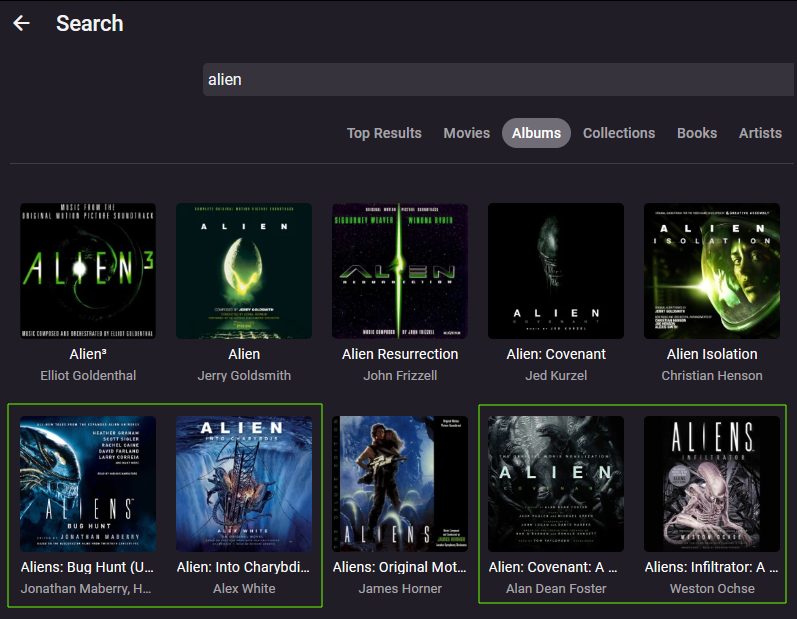
== If you want this bug/feature addressing in Emby, please use the like button == When searching for audio books, there is no group for audio books. Instead they are grouped under "Albums". This is despite the audio books being in their own library with the content type of "Audio books". The highlighted entries are audio books. The rest are albums. Cheers Stephen
 1 point
 -
Hi, what mouse key do you hold down?1 point
-
another +1 here; I love the emby environment but the one feature I am missing is this.1 point
-
Or something like this as 1.8em will is to close to images. @media all and (min-width: 25em) { @media (pointer:fine) { div.alphaPicker-fixed-right { inset-inline-end: 1em } } } or div.alphaPicker-fixed-right { inset-inline-end: 1em } But believe original code need to be something besides inset-inline-end: 0;. .alphaPicker-fixed-right { right: 0; inset-inline-start: initial; inset-inline-end: 0; }1 point
-
Thank you D3stroy, installed and working.1 point
-
Hi, it is in later versions of the Emby Samsung app. Are you able to update to a newer version?1 point
-
When "Live TV" is allowed on the home screen I get an extra, and for me totally useless" row called "On now." I want the "Live TV" buttons but I have no interest in "On now" as, f I want to view any live TV that is on now I can just go to the guide and watch it from there but 99.9% of the time I have no interest in live TV as a real time function. I just want to record shows and then watch at my leisure. Is there any way to accomplish what I want? I know I can have a recordings row but that is not what I want although I can live with it. What I want is just one row of: "Programs" - "Guide" - "Recordings" - "Schedule" Without anything extra. I can, kind of, have what I want by making the "Live TV" row last and then I can just ignore the, for me, worthless row called "On now." I only use "Live TV" to record sporting events that are not aired at a time when it is convenient for me so I could not care less about "shows" or anything else. I just want to record sports and only have that one row of "Live TV" on my home screen. I do not think what i want is possible but it does not hurt to ask. The worst that can happen is I am tole "No" and that would mean I just have to use a slightly less than ideal setup for my home screen. I just need easy access to my recordings and an easy quick way to get to the guide (and a search function) so I can set up recordings. Thanks. But I will not get my hopes up.1 point


















