Leaderboard




Popular Content
Showing content with the highest reputation on 02/27/23 in Posts
-
Sorry, yeah I used once again the hosted webapp on emby.media which is a little bit ahead in the version numbering. today it worked flawlessly on either my Mac or iPhone.3 points
-
There are no stable releases after 4.7.11.0, might be different version numbering for some platform (though that doesn't sound likely) or some insider build (which based on preceeding discussion doesnt sound likely either). Those are online web app.2 points
-
Thanks,manually running Scan media library scheduled task fixed this problem.2 points
-
I would suggest removing all the 'download' elements to this post - Emby Mods will not want a post possibly promoting piracy. using sonarr/radarr just for the file management is of course perfectly legal - so I would focus the details on that. Just a suggestion..2 points
-
Whilst the Sonarr/Radarr/Bazarr combination are somewhat of an overkill for your current requirements they can be used to just do what you want. I'll try to give you a very simple explanation of each and how they integrate to each other. Sonarr is a download/library manager for TV shows. [redacted] If you are getting the raw video files from elsewhere, DVD/BR rips or as in my case BBC iPlayer, Sonarr can also manage these using an undocumented method . Sonarr will take all the files you "send" it and rename them to an Emby friendly format and move them to the location you want in an Emby friendly folder format. It can even send a message to Emby to refresh so that the file turns up ASAP. Not too difficult to setup using the guide found here https://wiki.servarr.com/sonarr You will see that there are other Arr systems in the family, Radarr (same as Sonarr but for Movies), Lidarr (for music), Readarr (for eBooks). Once setup Sonarr can be mostly left to it's own devices as can Radarr. This then leaves Bazarr This is a companion/addon to Sonarr and Radarr. When setting up Bazarr as per this guide https://wiki.bazarr.media/Getting-Started/Setup-Guide/ you add an API Key (Application Programming interface) from Sonarr and Radarr. This allows Bazarr to read the Sonarr and Radarr databases so it knows what TV Shows and movies you have. it then goes off and downloads Subtitles. I'm a beginner with Bazarr but it seems to be quite straightforward. The best way to try it all out is to make up a new test library or two in Emby and use Sonarr/Radarr on them by copying (not moving) files from your main library to the test library. You can then see how it renames and moves the files. for the test I would recommend using the undocumented "blackhole method" I spoke about above.2 points
-
Hey guys, Because of my home renovations and my first baby arriving in one month, the development of EmbyStat is slacking A LOT. I don't have that much time to develop for it, although I did invest some time in improving the existing features. I cleaned up my code as well, and stabilized the sync code a lot. But the most fun new feature is that I implemented the play sync, meaning you can see graphs on what type of media is seen when. This is still in early development, and I'm not sure when I will create a new beta deploy for you all to test. I wish I had more time or a second dev working on the project, so progress would be much faster.2 points
-
I moved from Plex to Emby and even though I think Emby is superior in its flexibility there are some things I like better with Plex, especially in terms of its looks. This theme is trying to fix that by making it a bit more similar to Plex but with some, in my opinion, improvements. The CSS is attached to this post for anyone interested and below are some screens to show it off Good to know I only use Chrome so I can't guarantee this CSS works as expected in other browsers. If you want the sidebar menu to look like in the screens, make sure to pin the sidebar. Watched badge/banderoll is inverted which means that the badge will not be shown if media have been watched, like in Plex. For desired look, please use the "Dark" theme for both Theme & Settings theme in the display settings. Emby-Stable-style-v3.6.txt





 1 point
 -
Assuming I don't expect nvidia to release a new sheild. What is the strongest streamer for watching in 4k with all formats. Dolby Vision Dolby Atmos dts etc. I saw that Dunr HD is releasing an interesting streamer. Dune HD Homatics Box R 4K Plus.1 point
-
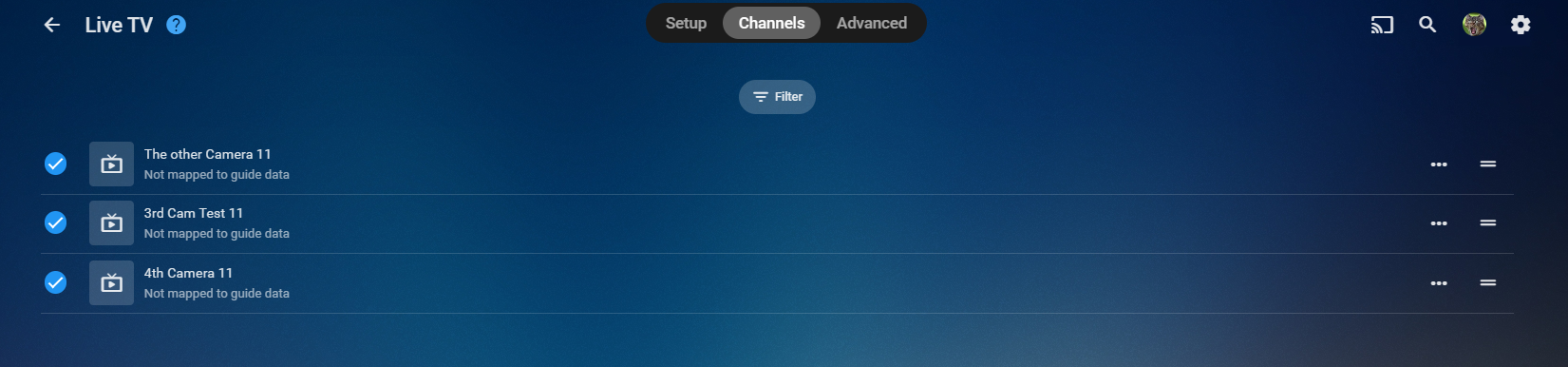
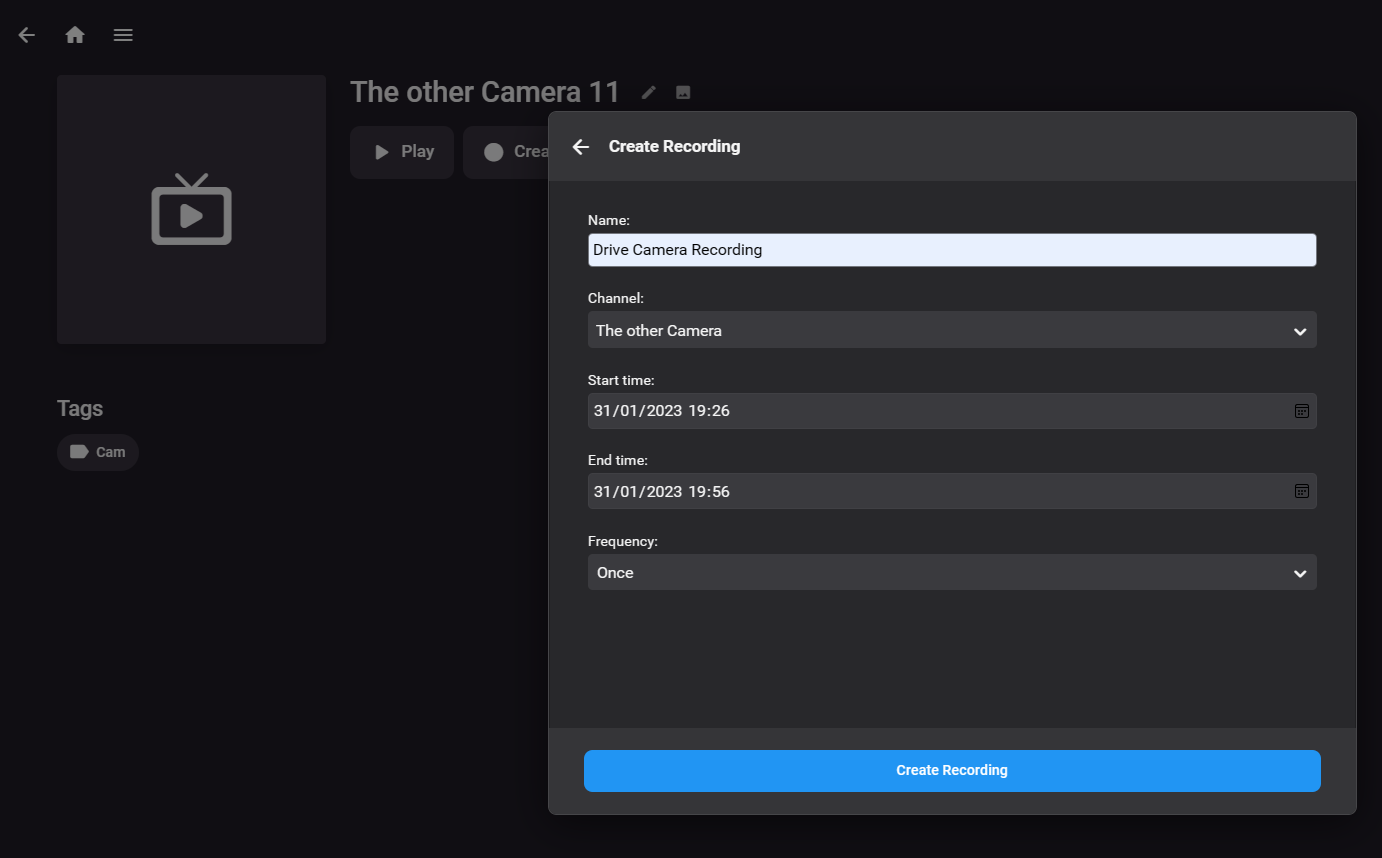
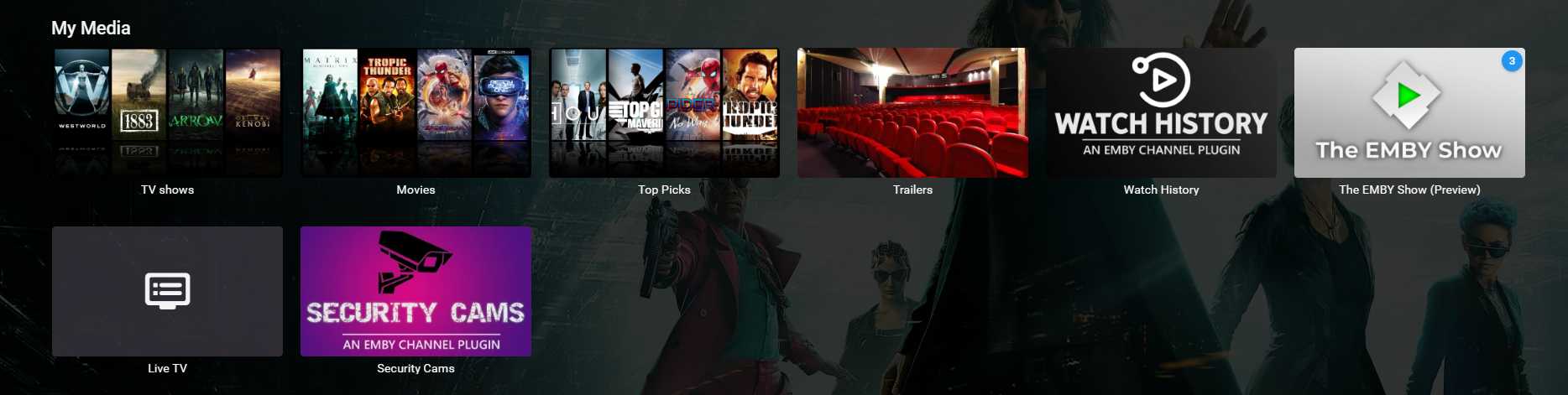
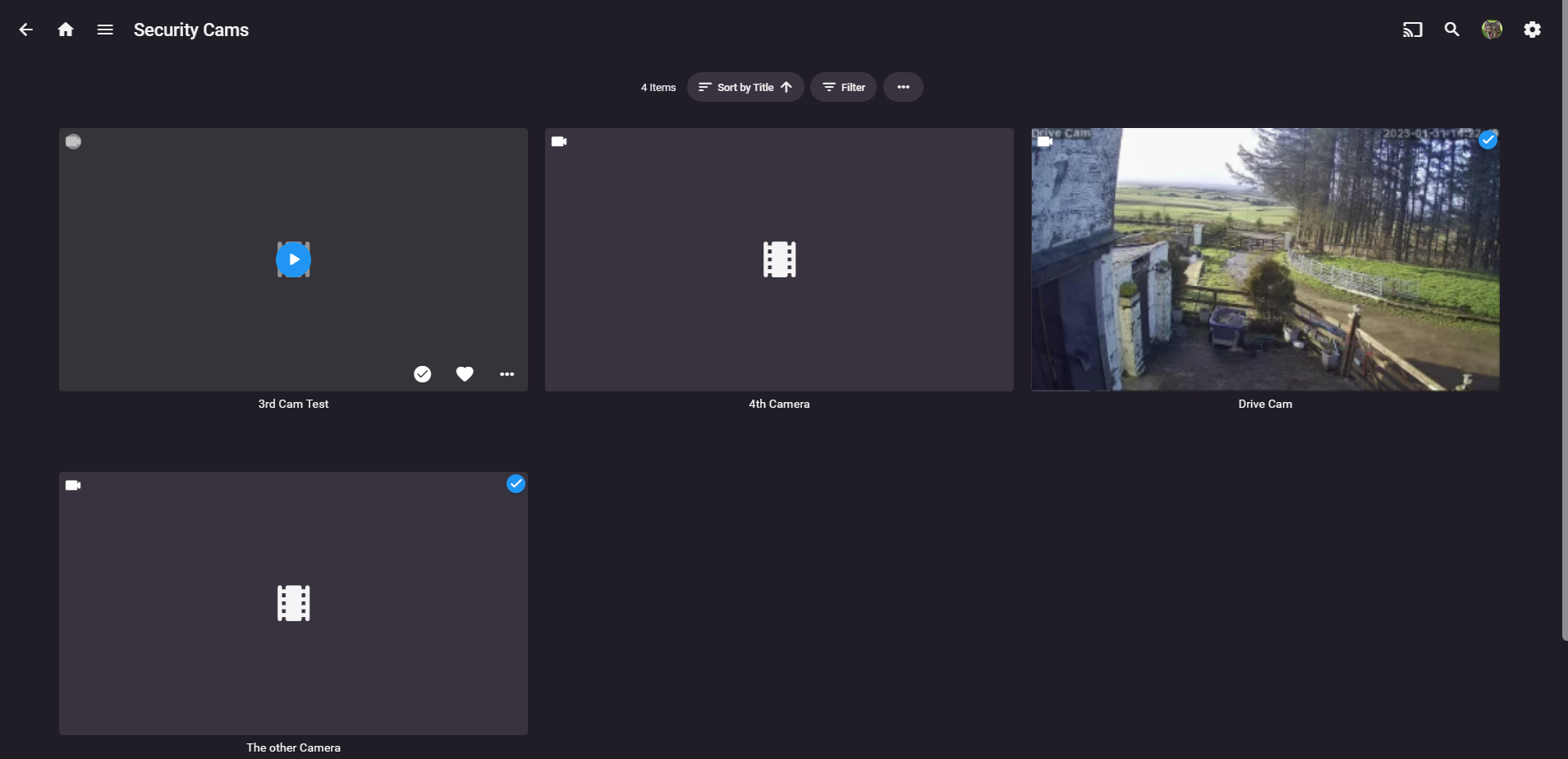
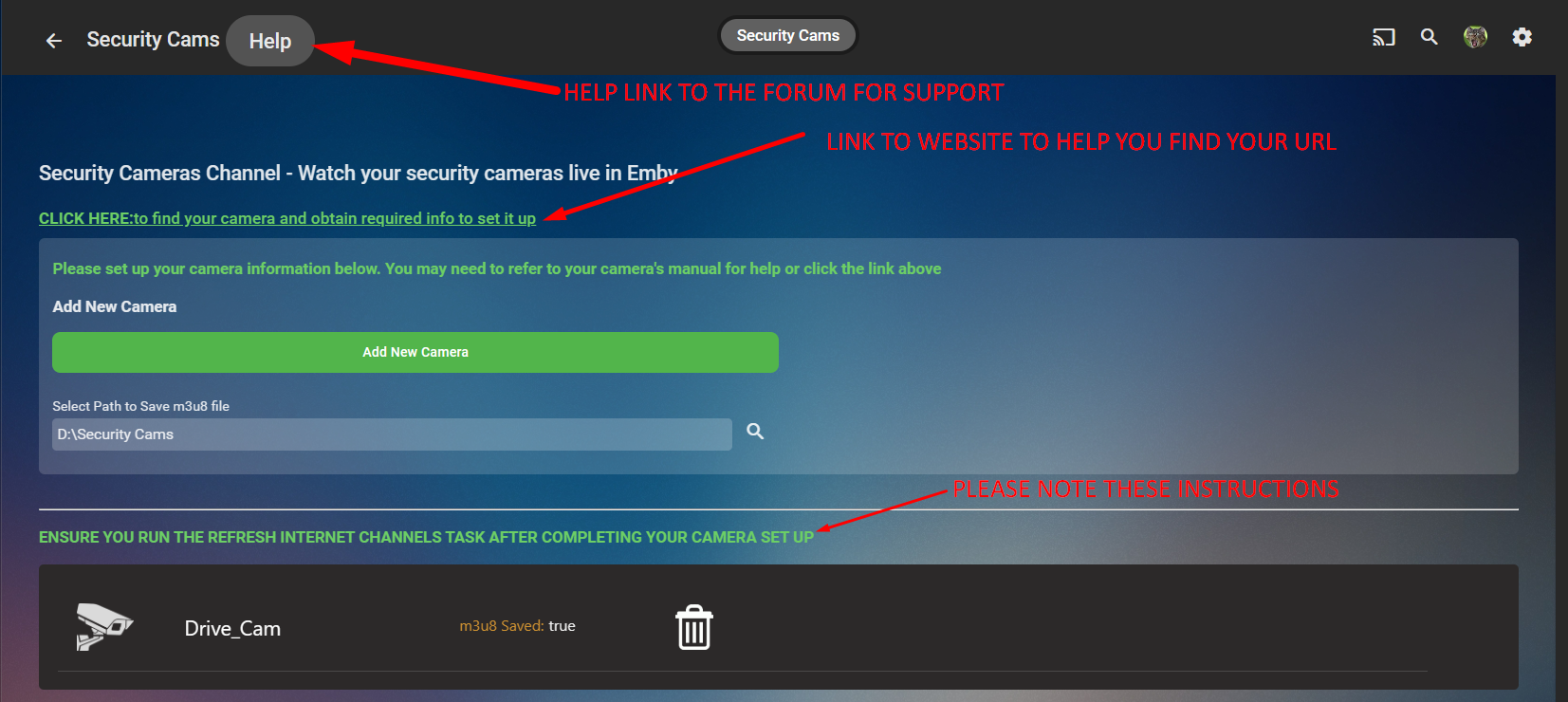
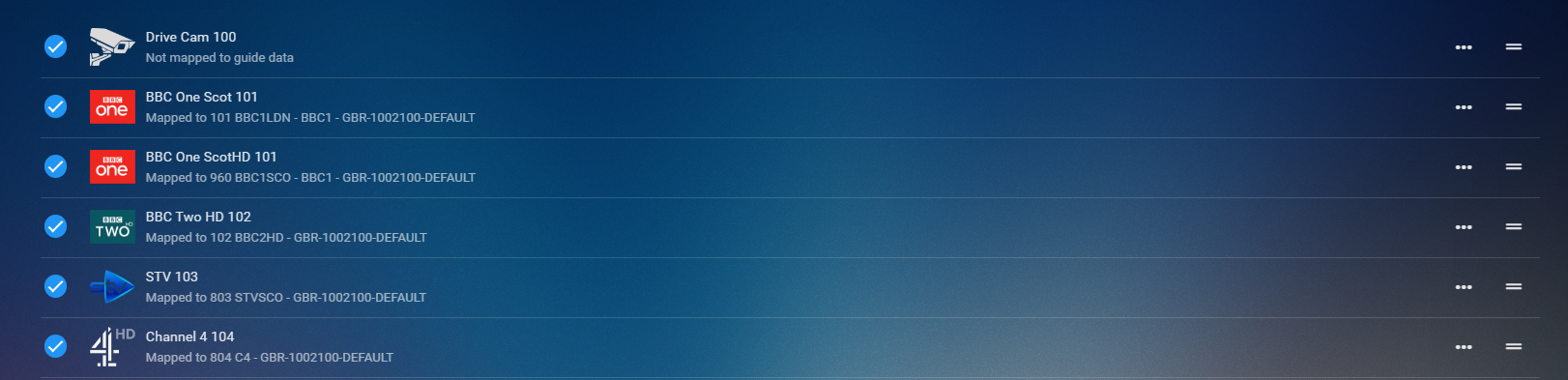
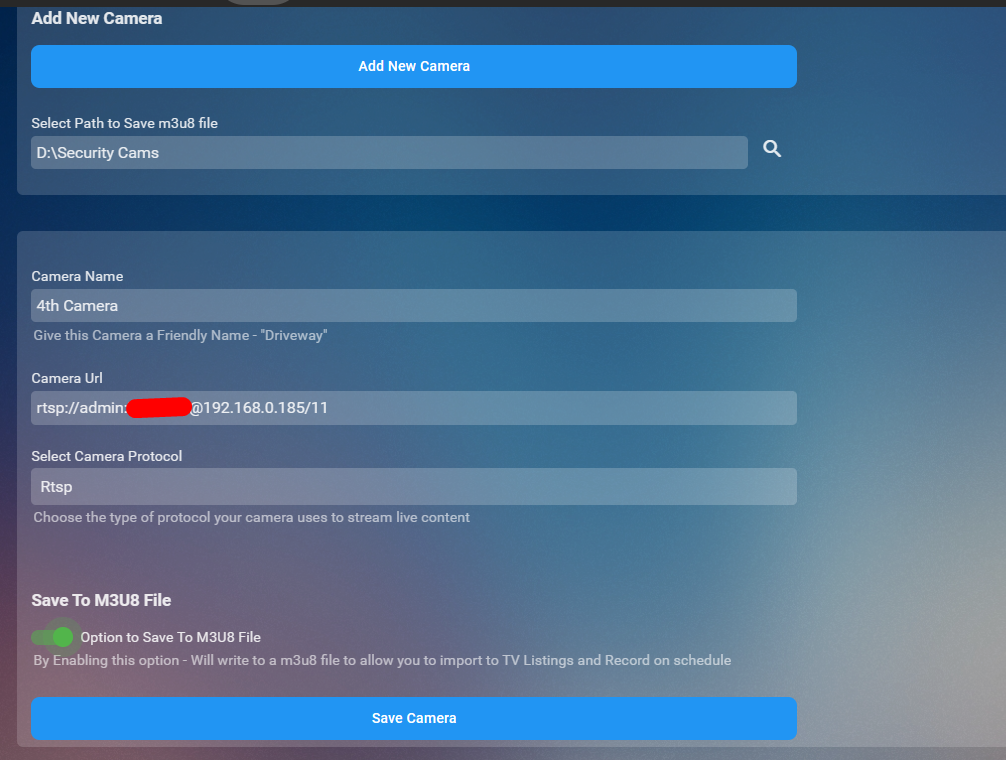
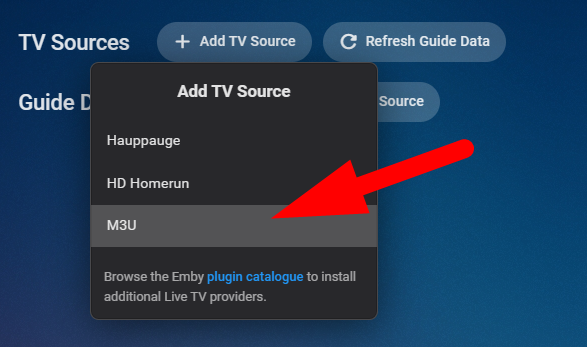
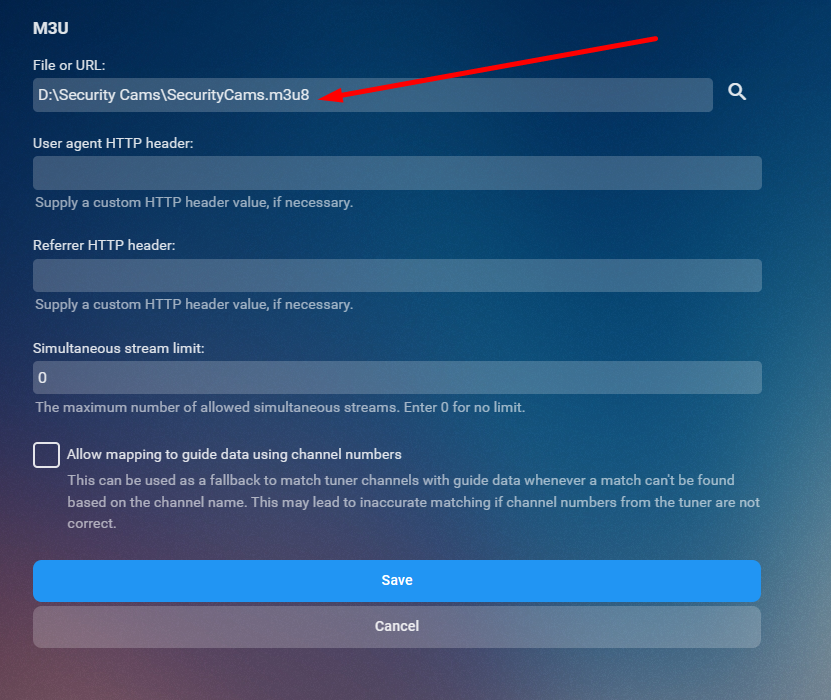
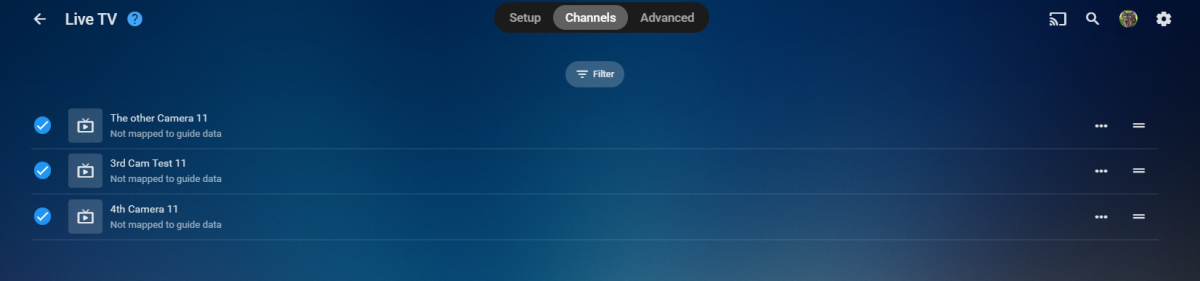
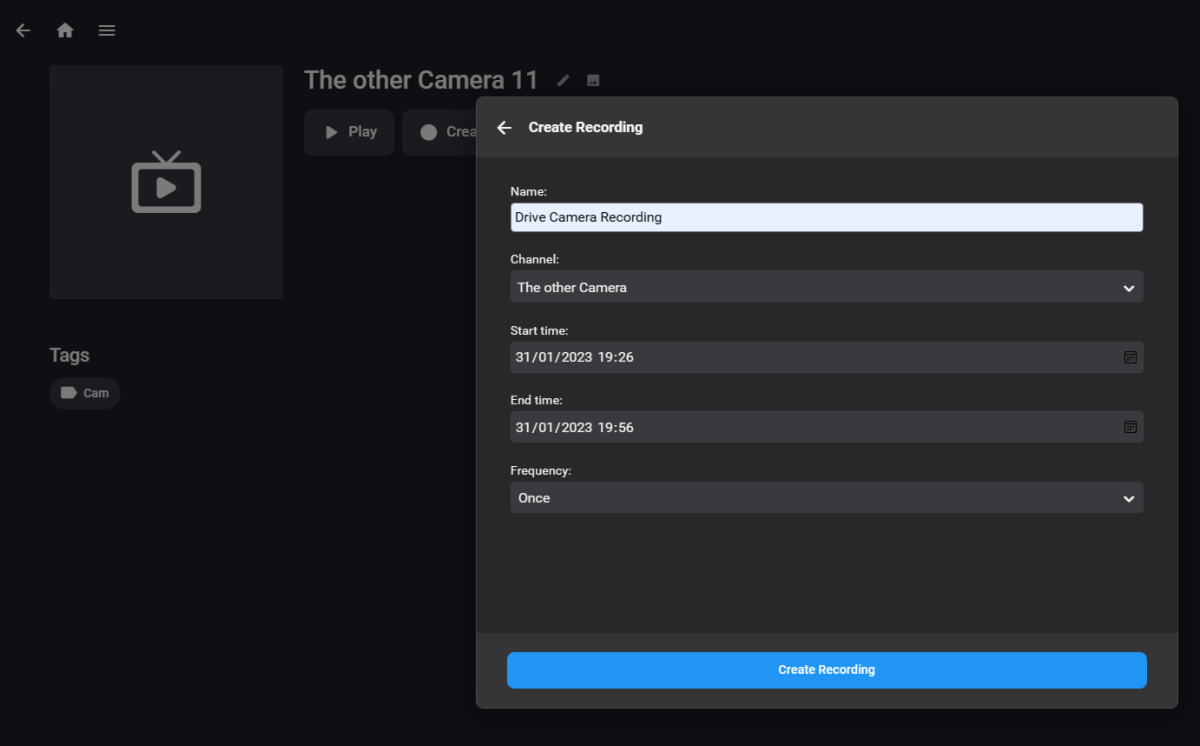
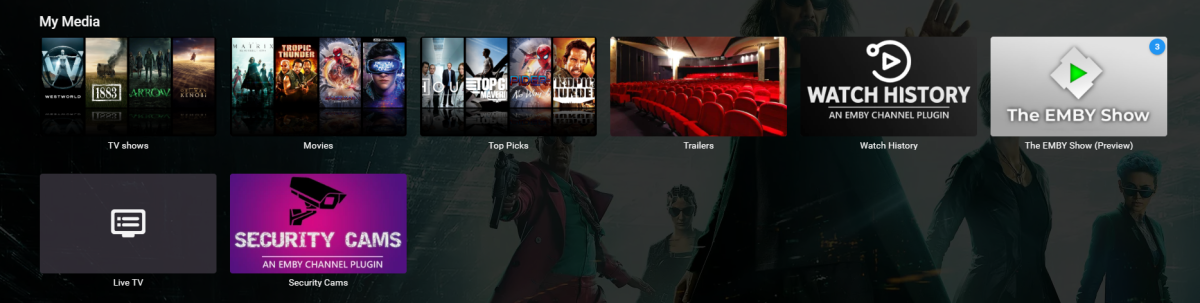
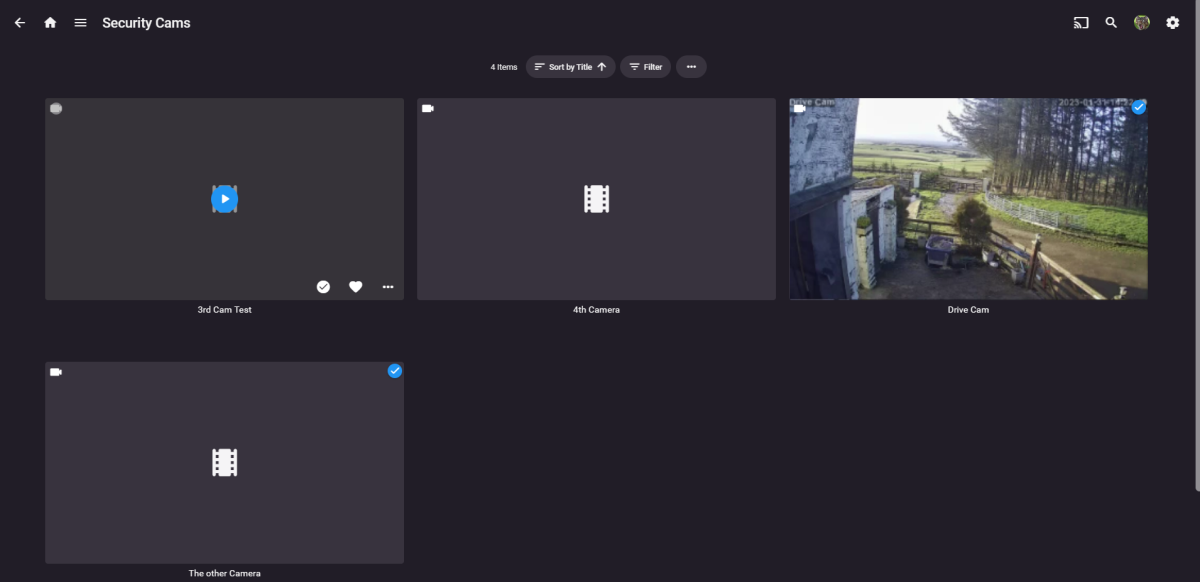
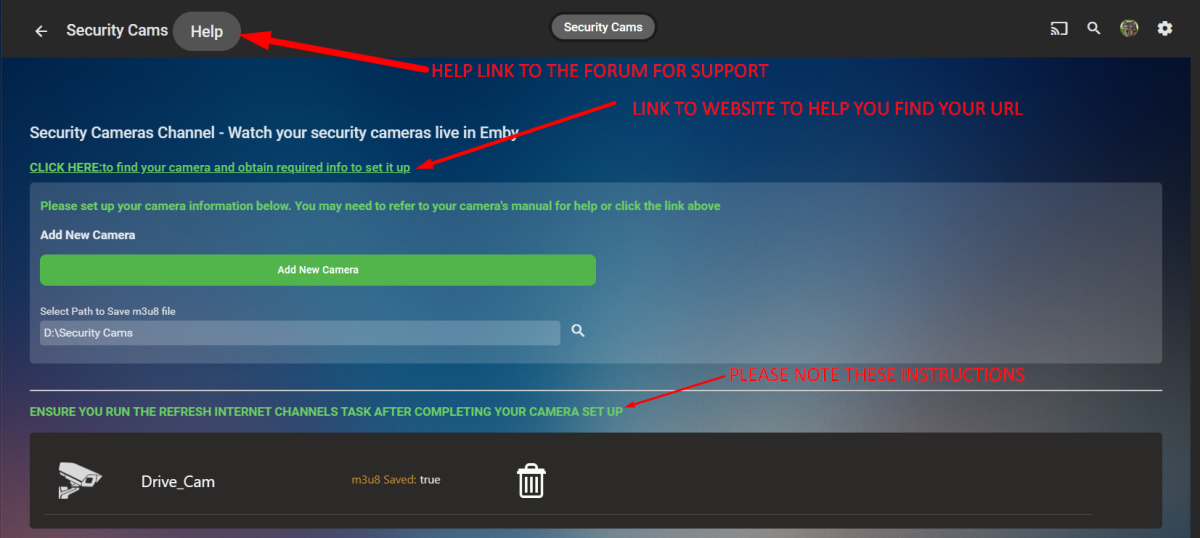
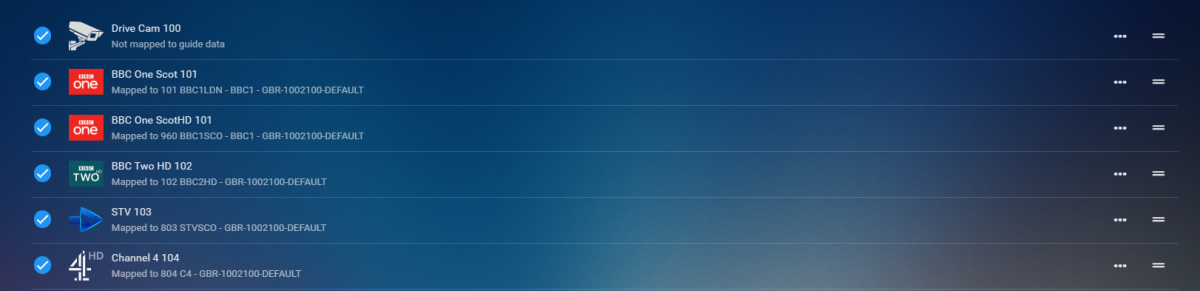
CONFIG UI How it works Click Add New Camera Button you set up an IP camera by giving it a friendly name, the URL to make it work (there is a link in the config UI that will take you to a website to help you) select the protocol and then decide if you want it to be saved to a m3u8 file. Click Save Repeat for number of cams you wish to add Run the Refresh Internet Channels Scheduled Task Advantages for saving to m3u8 file Now..... saving to m3u8 file has a massive advantage. you can now import this into the liveTV as a tuner and set up recording schedules for each of your cameras that are in the list. You will require to install the M3U TV Tuner Plugin in liveTV setup select m3u then just select the m3u8 file that the channel creates on the channel refresh and hit save After you hit save you'll see all your cameras Boom now you can create a recording or watch from you TV guide hehhehe PS it is a Channel so can be watched live and direct thru the channel created on your home page GOOD SOURCE TO FIND YOUR CAMERA AND MODEL TO GET THE PROTOCOL Connecting to IP Cameras (ispyconnect.com) RELEASE VERSION 1.0.0.0 - Initial Release to Catalogue TV Channel Logos Dark Light




 1 point
 -
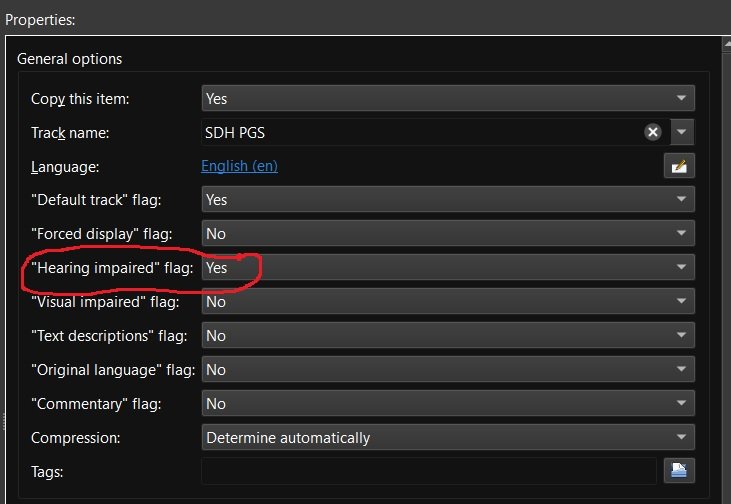
Recently matroska and mkvtoolnix added support for additional subtitle flags including "Hearing impaired" for subtitles for the deaf and hard of hearing (SDH). Request: Emby add some or all of the additional subtitle flags to media info and also as a choice for playback under user user settings. add support for external SDH subtitle naming (ex. moviename.SDH.eng.srt) Reason: my wife and are are getting older and it seems more and more I'm hearing "What did they say" a lot. If I could set certain Emby users to always play the "Hearing impaired" subtitles if available then I wouldn't have to back up and restart playback with SDH subtitles enabled. Other flags like "Commentary" would be nice also as I have several films with those Having this flag would also make it easier to run a script to list which movies have and don't have "Hearing impaired" / SDH subtitles so that I can go out and get the missing ones.
 1 point
 -
what do you mean exactly The dune-hd streamer is with android tv operating system. You can install emby on it and run as usual.1 point
-
Yep, Magically now runs like a charm I've added the ani plugin one time because of one series1 point
-
When I went to this section in the dashboard, I thought it was asking for my Emby credentials, which I would enter and since it gave me no error, I thought it was configured and working. That said, since I've never created an account at open subtitles.com I guess I did not have it configured this whole time. Rookie mistake LOL.1 point
-
Again, thanks so much guys! I really appreciate you taking the time to help me. I will try and digest everything and will eventually do some testing as suggested. Thanks again!1 point
-
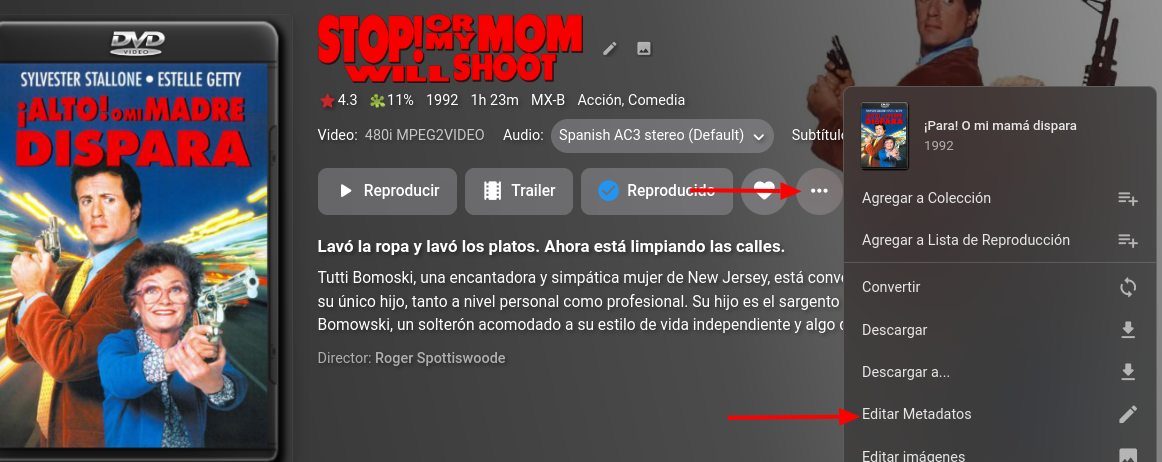
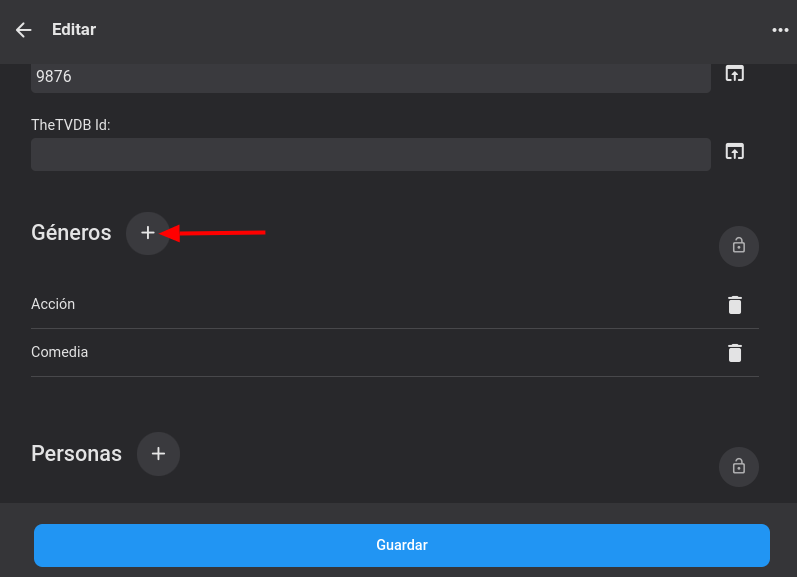
Podrías ser un poco mas especifico en que quieres hacer? En esa pestaña agrupa las películas según los géneros presentes en los metadatos, podrías editar los metadatos de las películas que quieres agregar y agregar un "Genero" nuevo con el nombre que tu deseas, el servidor creara automáticamente un grupo con todas las películas que tengan ese genero presente en el próximo escaneo de tu biblioteca.
 1 point
 -
Actually, something functionally equivalent already exists, you can lend your support here:1 point
-
Here is a thread with a Spectrum tech actually replying, said it doesn't matter, as long as both devices are connected to the coax system, and the usb cable connects them together. Since I have an active splitter/booster/amplifier, I think I will connect each device with it's own direct coax cable. That way, I don't have to worry about the tuning adapter forwarding signal to/from the hdhomerun box, which may or may not cause signal loss.1 point
-
Te refieres a la imagen de cada carpeta de Géneros o a crear tus propios Géneros?1 point
-
No https://support.emby.media/support/solutions/articles/44001160340-emby-connect#:~:text=Does This Mean My Streaming is Passing Through the Cloud%3F It will be a more recent version possibly seeing upcoming beta features.1 point
-
There are no stable releases after 4.7.11.0, might be different version numbering for some platform (though that doesn't sound likely) or some insider build (which based on preceeding discussion doesnt sound likely either).1 point
-
Fantastic, Thank you! Custom images from provider come through m3u instead of guide.1 point
-
You should have Chromecast quality settings in your Android app settings, Playback tab.1 point
-
Just had time to install the plugin and set it up. Thank you for making that easy @Chef Server now reboots on the daily and I have one less thing on my list to worry about. Happy Monday everyone!1 point
-
A full library scan fixed this issue,thanks1 point
-
could be released as a Jellyfin plugin with a port to Emby available for those who know how1 point
-
Sorry for the delayed responses. I have a lot going on here... I thought you guys did something on your end. Not sure what happened, it just started working.1 point
-
Just made the switch and it was easy. I'll keep you posted if there are any long term issues. Thanks again for the support!1 point
-
Don't know the platform but does this help?1 point
-
It will be included (eventually). For the testing period, there will be a separate "Emby Web" with the theme included.1 point
-
Have you configured the open subtitles (.com) and forced subtitles setting in emby ? If yes, then it is basic doing what Bazarr is doing but with a lot less flexibility. #1 - Configure Open Subtitles in Emby 1. Create an account on Open Subtitles.com (not .org) 2. Emby Dashboard > Server > Open Subtitles 3. Enter Credentials 4. If VIP great - if not, I believe you get Ads on the subs - but these are easily remove with Notepad #2 - Configure Emby Libraries 1. Emby Dashboard > Server > Library 2. For each Library - Subtitle Downloads (select language), Select Open Subtitles, Select Forced Subtitles Only, Select Save Subtitles into Media (if possible). #3 - Run the Schedule 1. Emby Dashboard > Advanced > Schedule 2. Download Subtitles - Set to a schedule or run manually #4 - User Options Select to use 'Forced' subs in the client. If they are available, then they will be automatically selected, overwriting any 'Default;. To test it works - you can individually search for the forced subs - just select the movies and 'Edit Subtitles' - then select Forced and it should show the options available. Download one and it should populate the srt file alongside your media file and call it <moviename>.<language>.forced.srt Emby will take a minute or so to re-scan the item (force it by downloading metadata again if you like) and then the forced sub will work. The schedule will just run this in the background on ALL your library - but be aware there is a limit of 100 downloads per day from Open Subtitles (no VIP) - so it may take a while to populate them all. Sonarr/Radarr/Bazarr are indeed 'next level' Apps - but for just getting forced subs, they are probably a little advanced for you at this stage I agree.1 point
-
Right now since a few big 5 commercial networks are already starting to use DRM with ATSC 3 and there hasn't been any statement on Emby for their support of the A3SC standard I think this post https://forum.silicondust.com/forum/viewtopic.php?p=389762#p389762 needs to be factored into purchase decisions. It seems that HDR is the big thing coming with ATSC not 4K, not sure how that is working with Emby Live TV now either. Martin1 point
-
My filenames are quite minimal and they are renamed by Sonarr/Radarr. I've had quite a lot of forced subs downloaded through Bazarr today so I guess that it's working quite accurately. I would suggest installing Sonarr and Radarr and then importing your current library. You [redacted] can use this setup to get your files renamed to a good standard, they sound as though they already are but this new setup will make it automatic. Once you get the idea of how this works you can add Bazarr to the mix and it can grab subs for you and name them correctly, again all automatically By then you will be totally hooked and start tweaking all over the place1 point
-
Not necessarily - if the same info can be got from the source file (via ffmpeg etc) then you have not 'lost it'. But if there is extra info such as lets say a Release Group or perhaps an 'Extended version' in the filename (only) - then this info would be useful to Bazarr to determine the most appropriate subtitle (and thus given the highest percentage). So I would not overly worry about it - Bazarr is still going to match a very high percentage of titles.1 point
-
I have actually setup Bazarr today and I was amazed to find how easy it was. However I am seeing the adverts in the subs. This is at the beginning of all of the files; 1 00:00:06,000 --> 00:00:12,074 Someone needs to stop Clearway Law. Public shouldn't leave reviews for lawyers. And this is at the end; 30 00:43:13,305 --> 00:44:13,636 Watch Movies, TV Series and Live Sports Signup Here -> WWW.ADMITME.APP The provider is Opensubtitles. @Spaceboy Do you have a VIP account as that may be why you don't see Ads?1 point
-
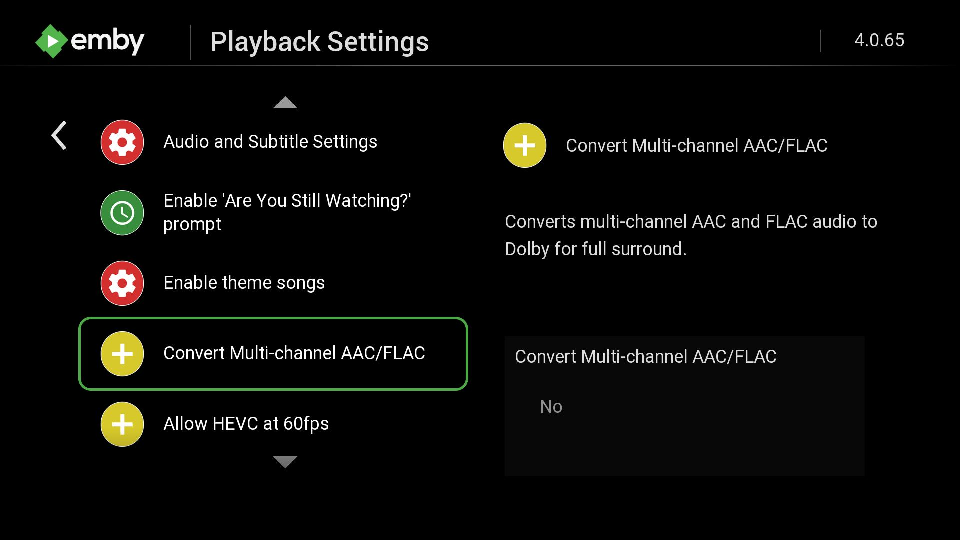
That means the problem is not Emby. You can probably fix this issue by remux with MKVToolNix GUI and repackage as MKV. That will build a new header that the Roku can properly parse and you will get Direct Play. The MOV_TXT subtitles cannot be inside MP4 or they confuse the Roku. Remux into MKV should solve your problem. https://community.roku.com/t5/Features-settings-updates/How-to-mux-subtitles-in-an-mp4-file-so-RMP-will-detect-them/td-p/744943 What I think is happening: There is no DTS showing on your example. Track 1 shows as default and is 5.1 surround in AAC (which an Emby Roku AAC setting can force to transcode automatically). Track 2 is Stereo in AAC. Then there is a Spanish AC3 track. You want to select the First English AAC track. Which might be impossible to do in Direct Play depending on the Roku model. Which is why we have the option to "Convert 5.1 AAC" option inside the settings of the Roku app. You may want to make sure that option is disabled. It will then convert on your Roku device to convert the 5.1 AAC to 2.0 AAC. Roku cannot play back 5.1 AAC it must be converted by the Roku unit itself during direct play or your Emby server while transcoding. Lets use your two Roku 4670. Both must have stats for nerds enabled. One you said honors audio and the other does not. With stats for nerds enabled we can see what is actually happening. You can also watch the Emby server active devices section on your dashboard. My guess is that one of these Roku has a transcode reason right off (likely due to audio channels exceed maximum because of the Emby Roku AAC setting) and since it is repackaged can correctly select the audio stream. But the one Roku that ignores the audio selection is Direct Playing. To make both your Roku 4670 work the same we need to know that both are using the same play method. I am guessing here that they are not and that is the difference. With this setting set to YES: Will Transcode using your Emby server and change the AAC 5.1 audio into AC3 5.1 audio. With the setting set to NO: Will Direct Play the AAC 5.1 into your Roku which will then strip it back automatically and output AAC 2.0 stereo. The Emby Roku AAC setting is required for users to keep surround sound. But it comes at the expense of transcoding audio.
 1 point
 -
Not so: https://www.bbc.com/mediacentre/articles/2022/BBC-One-HD-rollout-England (my emphasis). The point is that adding the regional HD to Freeview only required switching the feed on in the HD BBC1 channel, instead of the "not available" card. On satellite they didn't have the bandwidth without dropping something, and they chose the SD version: On Freeview each transmitter only has to handle its own regional channel, so no change is required, whereas the satellite has to handle multiple regional channels which previously it didn't, which requires extra bandwidth. Paul1 point
-
Hi, not currently but this is an option we will be adding. Thanks.1 point
-
Adding it again, having manual sort would be fantastic! I'm going to add to this, having a way of displaying a collection on the home screen? Say you had a trending movie collection built off imdb, tmdb, trakt of popular movies and/or shows. Having a random sort option with this collection then be able to have this as a strip on the home screen would be fantastic. Also if you had timed collections for hollidays and being able to display these on the home screen would be great.1 point
-
Sorry guys!, it has been busy! But I am here, and the Auto organize plus plugin does need some love. I think we need to strip back on some features. We should find out what is working and what is not, now that it has been used in the wild. I know that the preprocessing part is a useful addition, but has its kinks. The UI also has some useful parts, but perhaps we can streamline the logic a bit. Sounds like, the "file in use" state needs to be looked at. We use a file stream object to attempt to access the file, if the file can be accessed at the time act on it. I will look at that particular code first.1 point
-
i think this would be a nice feature1 point
-
Old topic but I'd also like to see this feature.1 point
-
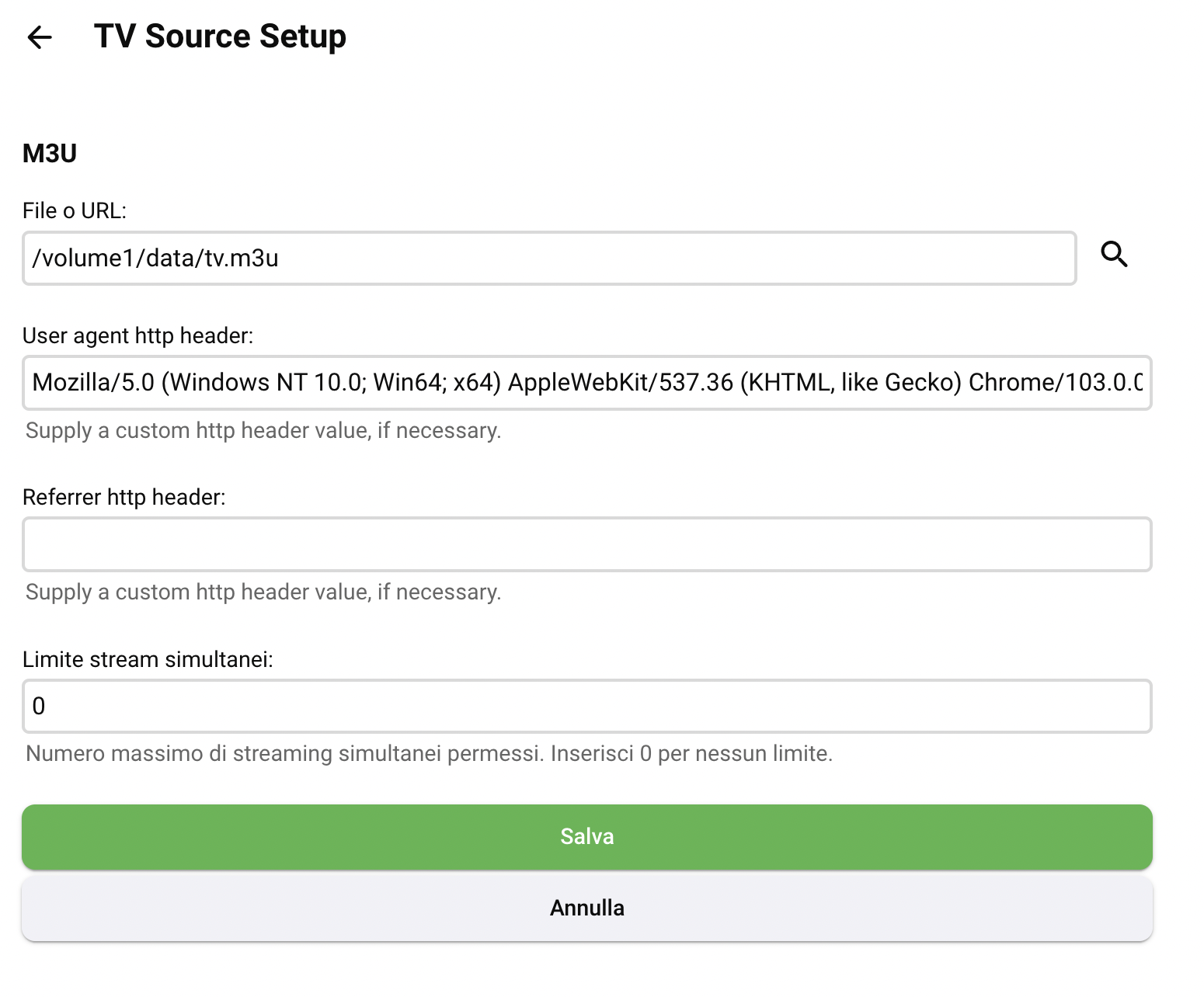
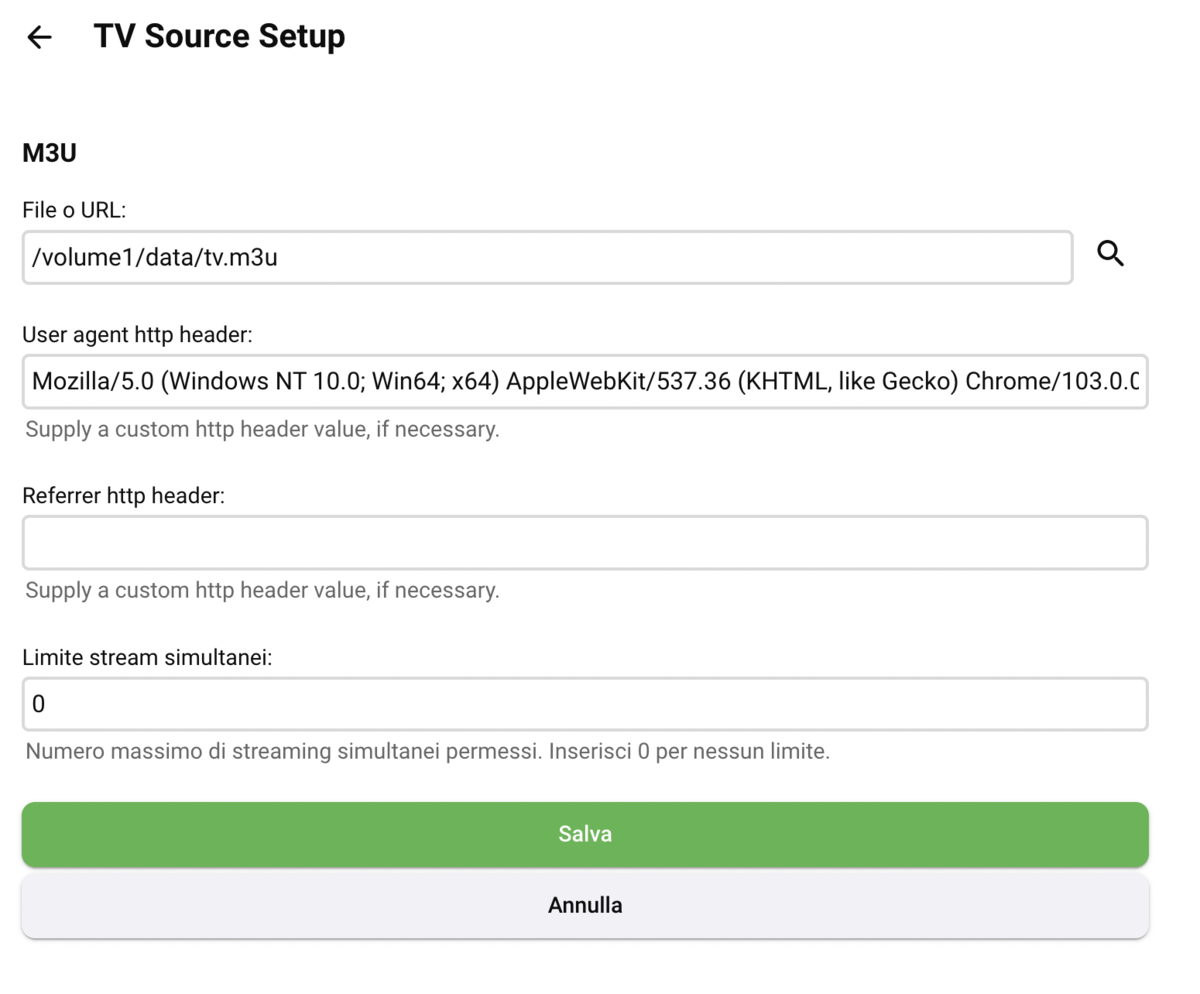
Ciao a tutti, ho seguito con molto interesse gli interventi di ognuno e oggi, per la prima volta, sono riuscito a visualizzare i canali RAI, gli altri andavano anche prima. Qui sotto la mia configurazione. Grazie infinite a TJSNHS04 per il file m3u. La stringa completa in "User agent http header" è: Mozilla/5.0 (Windows NT 10.0; Win64; x64) AppleWebKit/537.36 (KHTML, like Gecko) Chrome/103.0.0.0 Safari/537.36 Referrer http header: vuoto. Grazie ancora!
 1 point
 -
Yeah i don't get this suggestion, would it not as Florux pointed out be easier to just mark the whole season as unwatched and then start over? Otherwise feel free to elaborate on why not and why this would be a good idea1 point
-
Would it not be easier just to mark the entire season you are rewatching as Unseen and start it over? If not it could be interesting with certain funny episodes you'd want to watch again and again without necessarily wanting to rewatch the entire Season? Or how would you envision that?1 point
-
Well thought it was working for a minute. I had added a few episodes and a movie and none of them showed up in collections, then an episode showed up this morning, so still not working.0 points