Leaderboard




Popular Content
Showing content with the highest reputation on 02/25/23 in Posts
-
I still can't bring myself to use the Android version. The white highlights are such a turn off that I don't go beyond a periodic check to see if that has been corrected. If that can be fixed, then I'll give it a fair chance - but as the AndroidTV currently plays everything I throw at it, is very fluid and fast and is 'finished' - I really have no need to use what is still, imo, a beta release version..3 points
-
@ebr@GrimReaper @Luke Thanks for the help guys. Installation of AndroidTV beta 2.0.87g fixed the problem. Tested with 3 separate Philips devices.2 points
-
Guess would be no provider has thumbs for those episodes hence they have no primary image. If you enable Screen Grabber under Episode image fetchers in your library settings and refresh metadata with replace images on those episodes, Emby will extract those for you from actual file.2 points
-
Hello, would it be possible to make scraper for CSFD movie database? Website www.csfd.cz. There is already scraper for MCM and i used it for MB2. There is also scraber for Xbmc. Thanks, Martin1 point
-
Since we can now detect end credits, or manually add them in other cases, it would be nice to see this, rather than an automatic percentage/time remaining, trigger the "next episode" popup and decide whether an episode is resumable or not. Even better if it could expand to movies for the latter point.1 point
-
Hey everyone, I use Tailscale both personally and for my office. They have a new feature called Funnels that allow a device on your Tailnet to be accessed from the public internet via https. I am curios if anyone has tried using it for Emby. I have been using Cloudflare tunnels for about a year, but that may not last forever, so I am looking for an alternative.1 point
-
*Applicable to Emby Theater(s) as well* Following below discussion: https://emby.media/community/index.php?/topic/116382-fehlerhafte-anzeige-beim-scrollen-durch-serien/&do=findComment&comment=1227137 Could we get mainDrawer-mini to automatically expand/flyout on hover and retract subsequently? It would alleviate issues as encountered, and tbh there are several unnecessary (and some unintuitive) clicks required in current implementation and behaviour: - Sidebar pinned in mini-mode - Hover over sidebar mid-screen height: no reaction - (Unwanted) Move mouse top-left and click Expand - Sidebar in Expanded mode - Click Home or any Library > navigates to desired page - (Unwanted) Sidebar remains expanded - (Unintuitive/Unwanted) Point of confusion: Clicking Collapse (the only available button) doesn't collapse it but hides it altogether; clicking anywhere on screen except on Collapse actually collapses it - Sidebar back to mini-mode Flyout on hover and auto-collapse when out of focus would be much more elegant solution, reduce user input, avoid confusion and increase usability.1 point
-
Plugins are really easy to install and use, also really easy to uninstall if you need to. The subtitle plugins essentially add more download options in the library configuration. Your question prompted me to take another look at Bazaar and whilst its not that complicated you do need a reasonable understanding to use it. I already use Sonarr and Radarr so it would be quite easy for me but I reckon it's unnecessary for the number of subs I would need. Manual downloading is very very easy and I only need to do it once in a blue moon It's really easy to start getting obsessive over getting your libraries perfect, I've been there1 point
-
Just to add another layer depending on where you get your files from many have embedded subs that will be correctly in sync. If you download an external SRT this will take precedence over the internal sub. There is another setting in the library "Skip if the video already contains embedded subtitles" which I guess would sort this but I've never used it. Most files that originated on Netflix have subs in loads of languages as well as forced and SDH which I've just learned are sometimes called HI (Hearing impaired) I spent ages trying all sorts of stuff to get my subtitles correct and then realised that only a handful of files in 3500 actually had/needed forced English subs so now don't do much to curate them and just download manually if needed and available.1 point
-
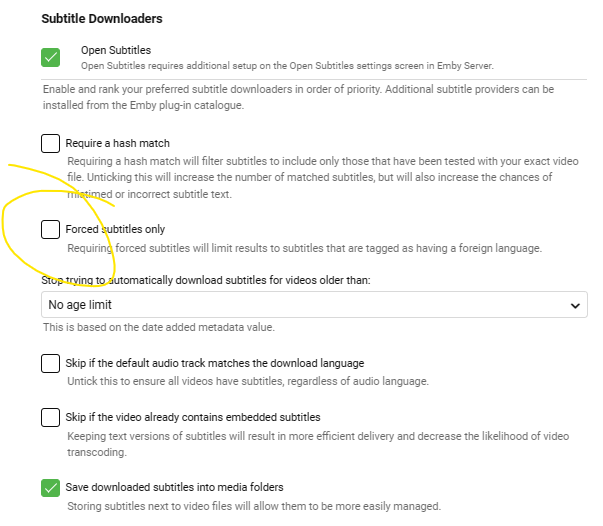
First screenshot Second one I have forced subtitles only selected and require a hash match. I assume you have English ticked. The hash match makes sure that the subs are exactly right for your file but the downside is that less matches are made. I preferred it this way as out of sync subs are more annoying than no subs and I can manually download anyway.1 point
-
There are four extra plugins for subtitle downloading in the catalogue if you'd like to try them but I'd wait until you get to grips with your current setup first1 point
-
That's correct but I often found that you quite often get no subs automatically downloaded as the file naming on the download sites is not always 100%. In the Subtitle section for the whole server choose "only forced subtitles" and any forced subs will automatically be played. If you then get a movie or TV show that has foreign language but no subs you can stop playback and search for subs using the three dot menu in the episode screen. Have a play around with the settings and the downloading and it all will make sense. If you don't select forced subs on the download screen you can see all the possible downloads. I forgot to say that I believe if you subscribe to OpenSubtitles you don't get the Ads but I never tried it myself.1 point
-
The subs downloaded from OpenSubtitles always seem to have have adverts at the beginning and end so just delete these and you're set. You can delete the whole entry including the index, which is 1 for the example you gave. I never found that it mattered. You can just delete the text and leave the index and timing as is and that works as well. If you feel like being really fussy you can change the timing if you want the Subs on screen longer for example however I believe that there are subtitle editors available that would be much better for that.1 point
-
If you use a text editor (Notepad if you are on Windows) you can see the subtitles and easily tell which type they are. If I ever download a separate SRT file I normally open them like this to check that there is no advertising in them and also to remove it if there is. If you are feeling mischievous you could even add your own text very simply1 point
-
Correct, the SRT file is what it is, Full or default, Forced or there is sometimes a third which is SDH. Subtitles for the deaf and hard of hearing (SDH)1 point
-
Aliens (1986) Special Edition 1080p BluRayx 265 HEVC 10bit DTS 5.1 Ch.forced.en.srt is the correct way I believe. edited to include the en1 point
-
I am with @viking19 that with no new updates to either the server or AndroidTV app the issue still exists. I just tested it out on both my Google Chromecast 4K with Google TV and my Hisense TV(Google TV built in) and have the same results. I am doing the same on as @viking19 and wish I didn't have to. Is there anything I can provide that would help with this. I can take videos of it happening I can provide logs or files(which I have previously). Would love to have this fixed so I can start using Emby again on all my devices.1 point
-
Ich war nur der Annahme, die Wiedergabeliste hätte gelöscht werden sollen, wenn die Titel beendet sind und ein neuer über PlayOn gestartet wird.1 point
-
if you want to be doing anything more complex than single language subtitles then bazaar should be used.1 point
-
Watch History Channel plugin maybe of use to you1 point
-
You're using wrong library type, you should be using Home Videos & Photos type for that content and they won't be mis-identified as they won't be identified at all, just presented to you as-is.1 point
-
It doesn't actually matter where the .forced. is - so moviename.en.forced.srt and moviename.forced.en.srt will both work. Unfortunately, the majority of available media files have very mixed standards for subtitles - with many using 'Default' on subtitles (meaning they play whether you want them or not) so I personally set all my clients to 'forced only' and always use external srt files only. As to sources, them emby itself has a 'forced' option to download subs, if you use the *arr suite, then Bazarr is another option but at the end of the day, unless the source Provider has correctly constructed the file (with 'forced' flags in the MKV etc - in which can you can just script to extract them..) but if not, then it's a very manual task. Applications like Subtitle Edit are extremely handy to check subtitles, as it shows the sub stream and video stream side by side - and allows you to edit/re-sync on demand. btw - there is also a downloadable list (do a search on google) that somebody has created of about 1000 films with 'forced/alien/foreign' subs - this may get you off to a good start identifying them. In emby (library settings per library)
 1 point
 -
The file name should match the movie name, but with the addition of extra extensions which describe it. e.g. moviename.en.srt to specify the English language (eng also works). You have "UND" because no language is specified. Following the language with .forced - as in moviename.en.forced.srt tells programs using it that these are forced subtitles. Many standalone players will also recognise these conventions. Paul1 point
-
I have family members that click on the ad, then complain they can't watch the show they were looking for. Stupid, yes. Annoying, very. It just irks me that they can do whatever they want. Today, it's just the ad on the main page. Tomorrow, they could make it worse. Who's to stop them? I guess I'll be happier running something open source that I never have to worry about spamming me with ads.1 point
-
Here's a guide Android Central apps only mode, be aware there are some drawbacks.1 point
-
Click edit metadata on the show to see its path.1 point
-
No so fallback image is used. Corrected above as that was the actual Series Poster. https://artworks.thetvdb.com/banners/posters/77909-2.jpg1 point
-
Nope, but can easily find out tonight. Will revert. Edit: As I've been informed: Safari 16.2 (18614.3.7.1.5) MacOS Ventura1 point
-
Have no idea, I keep Voice search/mic disabled system-wide. Maybe @CBers or @Spaceboy might know.1 point
-
Forced subtitle tracks are the same thing as normal subtitle tracks except that they only contain foreign language parts and are specifically marked as forced. For the ones that don't have them embedded already, yes that's your best bet. Our subtitle download features can help you download forced subtitles. There are filters on the download features to indicate exactly what you want.1 point
-
HI, that's because the content of the subtitle file is not actually just forced subtitles, it's all subtitles. The reason for naming it .forced is simply to tell Emby Server what it is. So it sounds like you want to try and acquire more subtitle files that are actually forced subtitles.1 point
-
Hi, there's already an open request for this or something functionally equivalent. Please join in and contribute to the existing discussion at:1 point
-
For series that is already implemented, opt-in for Automatically play next episode. For Collections, you can lend your support here:1 point