Leaderboard




Popular Content
Showing content with the highest reputation on 01/07/23 in Posts
-
I don't like to be the guy that complains and nags at devs. But it seems rather odd that all this potential is being left untapped.3 points
-
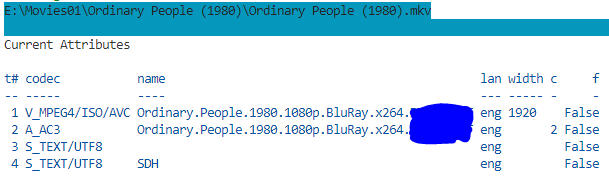
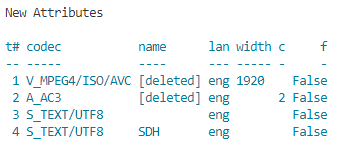
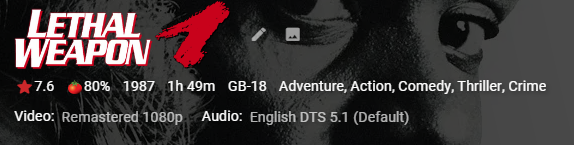
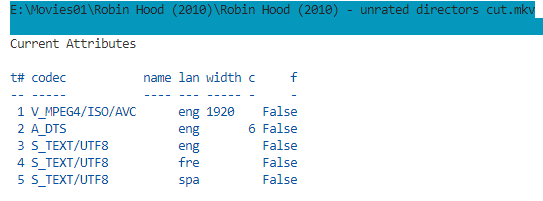
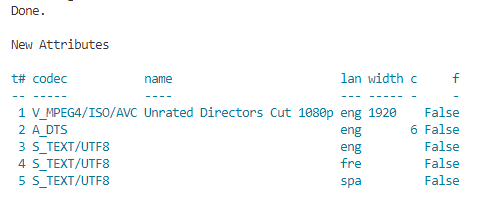
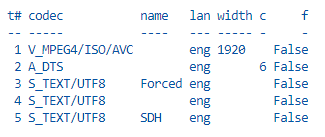
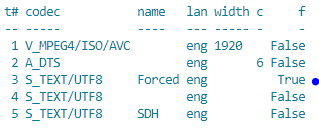
Background I wanted my movie versions eg. "Directors Cut" to show in UI even if only one version available. This is only possible with Global advanced library option and Embedded Titles... .However all my embedded [in mkv] titles were all over the place, so I wrote this script to clean embedded names on Video, Audio and Subtitle tracks Along the way, the script protects track names containing special words [customisable] and if the subtitle has "forced" in the title sets the forced flag (if language is in preferred list). Installation Requires powershell 7 and MKVToolnix (tested with version 73) Review and edit config.psd1 set track naming tokens and protected names $logonly=true - just dumps the current tags in emby and mkvs (belt and braces) < use this first and save log $testmode=true logs what changes would have been made. Notes only works on mkvs. test on a backed up library, mkvpropedit makes changes to track names and removes track properties on the files on your filesystem. Review the naming logic, it may not be to your preference. If there is no version, i remove the name because i am happy with Emby's default for blank trackname. With a bit of tlc a user could write their own set of rules for how they want their tags cleaned up - the script has the bare bones and builds up an array of mkvpropedit commands to send in one go. best to use a monospaced font like courier new to view logs. warning - "mostly only useful for people who have done zero tag maintenance on their mkvs - experienced taggers would probably want to improve the rules in the script". Issues and Suggestions Welcome - The rules are rudimentary to clean ui for most titles and protect tracks with useful data - stage 1 Examples Movie version present but not embedded No movie version, but subtitle has a protected name eg 'SDH' or 'Commentary' Forced Subtitle by trackname but not property in preferred language - now Emby auto selects the forced track Changes SetMKVTitlebyVersion v0.0.0.1.zip

 2 points
 -
I am happy to report that the new version works beautifully! No issues playing TrueHD and/or subtitles.2 points
-
Same as all other libraries. Delete current image and scan library.2 points
-
LOL - the truth is that I had started with the WMC CSS applied and then removed one bit after another (removing is much easier than adding). Finally I reversed the video...2 points
-
Just for fun - here you can watch the Emby settings menu being re-styled to the WMC start/settings menu (the html page is never reloaded): WMC_StarrtMenuTransformRev.mp42 points
-
it was an ugly-ish looking remote (colour wise) but it boy did it work, it was really comfortable to use as well. i really miss WMC and MB for it too. It was the best client by far and i tried to keep using it on windows 10 using that zip file that was available, but it just got too clunky and i had to move to ET. for the Cinema room. Maybe you might be interested in giving me some pointers with my UI client when it gets to an alpha testing phase. I'm not a fan of nesting menus in menus and extra button clicks either, but i am fan of giving users options to make their media look how they want (within reason of course) Thats why i love Emby for WMC, because there were lots of themes to choose from and also each page could save a view type (coverflow, poster, details, thumb, thumbstrip), so when you went into TV shows and were met by the TV Series in your library you could say, show that in poster view, then when you went into the Seasons Page you could show them as Coverflow, then on the episodes page you could use the details layout, it was brilliant. Anyways, i'm getting all nostalgic and reminiscing. Will be great to see how you get on... keep us updated on your progress bud Cheers That's cool!!2 points
-
I moved from Plex to Emby and even though I think Emby is superior in its flexibility there are some things I like better with Plex, especially in terms of its looks. This theme is trying to fix that by making it a bit more similar to Plex but with some, in my opinion, improvements. The CSS is attached to this post for anyone interested and below are some screens to show it off Good to know I only use Chrome so I can't guarantee this CSS works as expected in other browsers. If you want the sidebar menu to look like in the screens, make sure to pin the sidebar. Watched badge/banderoll is inverted which means that the badge will not be shown if media have been watched, like in Plex. For desired look, please use the "Dark" theme for both Theme & Settings theme in the display settings. Emby-Stable-style-v3.6.txt





 1 point
 -
As suggested by @ebr I have split my original request to allow better monitoring of interest and progress. The original request is here https://emby.media/c...brary-overhaul/ If you are interested please like the post. I always wanted to have this feature! This is something that was offered by Flickr. It would use the coordinates where the picture was taken stored in the EXIF and display the picture in the world map. I think that this was a bit specific in the past because we needed to have a GPS module tied to the camera but now every smartphone does this out of the box (without even asking your permission). Here is an example from Flickr where each point is a picture that you can display when clicking on the point:1 point
-
That is why circle images will never fully work as there are zero standards for a person image to the face will never be exactly in the same place. You may get lucky on character images but they truly on represent a specific character not the person overall. So all you can do is change the person image or not round the images.1 point
-
@GrimReaperoh!!!!! It was dumb of me not to check tvdb explicitly to realize that the mugen train arc is what is called S02 (and not the Entertainment Arc). Thank you very much!!!1 point
-
I backed up, then uninstalled, wiped everything and restored it (which took an AGE) and that seems to have done the trick, thanks. That premiere license came in handy.1 point
-
Right ok - now we are getting somewhere. Check the IP of your router - this is the gateway IP - it's probably 192.168.1.1 Put this as the g/w on your synology and the DNS server as well. Then things should start working - fingers crossed1 point
-
Also noticed a few queries on your network gateway - emby says it's 192.168.1.2 ? Is that correct ? As there are also DLNA activity using that IP which doesn't make a lot of sense. Gateway's on these routers are usually 192.168.1.1 or 192.168.1.254 - you may have it manually set ? Worth checking - as this may explain why you can't get any WAN connectivity working (it can't leave by the gateway) but local emby (LAN) is working just fine.1 point
-
The emby 'recommendations' are there to avoid support calls on upgrades, they are frankly wrong .. I run emby as a service and have it set as a service should be .. No logon required (safer) Logon as a Dedicated service account Restart on failure - bonus is if you do a shutdown in Emby (by mistake), it just restarts emby. To shutdown - stop the service. Delayed Startup (to allow time for disk pooling/mounts etc) ie - all the benefits of using a service over a desktop app. For updates, a simple script to shutdown the service, install the latest, and re-start is quick and easy. Infact for a 'Production' system you do not want to auto upgrade to a new release anyway - so that's a bonus !1 point
-
When you search for particular tags, the tool uses the Emby API to ask Emby to search for those tags. The tool just displays the returned results. I will play with the API and look for a way to do what you are asking. Give me a few days. Vic1 point
-
I have the same problem. I only want to play selected episodes, but emby will add the whole season to the playlist.1 point
-
I really loved that remote.. I've still got it, It still works. (libreelec + RasPi) WMC was the starting point for me as far as media servers go and it would be great to get back some nostalgia from those days. Even if it's just a theme (this does look cool ++). Maybe webapp only but I can live with that.1 point
-
Pick one method or the other per system.xml <EnablePeopleLetterSubFolders>true</EnablePeopleLetterSubFolders> reorganized your People folder accordingly and run the Metadata folder task. But in the end people come from Media items metadata fetching and get their ids at that time. But there will always be the bloat of old and new for the exact same person.1 point
-
Yes exactly. Because they thought an average of 4 button presses is already too much. And they were right. That kind of thinking made WMC as good as it was. I often used those buttons and that was just perfect. When I look at the remotes that come with some (luckily just a few) recent TV models and which have a handful of buttons only, I'm just thinking: "hey, each button you are removing is adding up to the sum of button presses I'll need to perform to operate that thing". I'm not "coding" (much). This is Emby.1 point
-
That's the cheapest receiver devices that exist. There has been one positive report of that device and no negative ones. I can't comment on what TvHeadend does. We have an extremely solid low-level backend for interfacing with tuners. The Linux executable is independent of distributions, i.e. the same runs everywhere. When a tuner is working with any other Linux application, I'm confident that it will work with ours. If it doesn't, then it's none of our business. We won't get into low-level development when a user has a non-working tuner. When it doesn't work then it doesn't work. That's why I'm really not concerned about that. It's a fundamentally different from what Emby currently has in every single detail and those are not limited to hw tuner reception. It addresses almost every TV feature request that has been made in the past years. For Emby it's surely a game changer. Beyond that, we'll have to see...1 point
-
Sounds to me like you do not worship at the altar of unnecessary complication...1 point
-
There have been valid answers from a general perspective, but the specific difference to most other menus is that it's a 2D Menu It minimizes the amount of remote button presses to get at what you want Which is made possible by the layout: You can go up, down, left and right. Assuming you have 24 items (like in the video) and they would be arranged in 6 rows with 4 items per row, the average number of key presses required to get at a specific item is exactly 4. In case of a single 1D menu with all a list of all 24 items coming one after another, the average is 12.5 If you would have a nested menu, e.g. 6 top items each with 4 sub-items (=24), then the average would be 5 . But It eliminates the need for submenus: You see everything at once It's not just the difference of 4 vs. 5 average clicks. When you are looking for something or do not find it with the first try, you always need to navigate into the submenu and back ( n x 2 click vs. 0 clicks ) . Avoids unnecessary Navigation Navigation is disruptive with regards to perception. The 2D start menu is just one thing and easy to memorize as such - like a map where you learn your routes quickly and intuitively - which eventually makes you find your way even without looking at the screen. What plays an essential role for that is "The Green Button" (or generic equivalents like 'Home'): No matter where you are and what you are doing: At any time, you can press the Green Button and "drive your route" with the start menu to get where you want as quickly and easy as possible.1 point
-
The goal was - and as far as I'm concerned - still is: to deliver the best TV application on the planet. Everything that has been done has been done aiming for that goal. The state of the project is still unchanged: private testing (with a small number of people) is completed. The next step is to test with a somewhat larger amount of users. Only @Luke or @ebr are able to explain the reason for the holdup.1 point
-
Your view seems focused on the US. The situation is very different at other places in the world (e.g. Europe). I think all the many people that aren't using Emby due to the lack of native tuner support. Full support. Even across machines in a LAN (e.g. Emby/TVnext on Windows or on Linux, tuners installed on a different machine). The remote tuner agent also runs on a number of SAT receivers (even one with MIPS architecture...) DVB driver support on Linux is quite good. Haven't seen any problems in testing. The sat receivers (also Linux) with their custom drivers were challenging, though.1 point
-
You can change the task in it's task options. Currently I believe it runs every Sunday at 4 am.1 point
-
Obtain a domain name or use some free DDNS or have your users use Emby Connect (which requires them having a Connect account).1 point
-
Careful assuming that because it's pointless for you that it isn't pointless for someone else. Everyone has their own use-case. If installing as a service with nssm isn't for you, that's fine, but it does have value to others. And a scheduled task is full of it's own problems. That's kind of the nice thing, you can choose how to administer the server, if you so choose.1 point
-
@Mentalblaze This seems same/related to problem reported by multiple users here: and here1 point
-
Another report of the same problem here: https://emby.media/community/index.php?/topic/115315-problems-resuming-when-casting-to-chromecast/1 point
-
I actually prefer the blank background of the Android TV app, especially with the black theme and the icons I use. This screenshot is actually from the Windows version my server is running but you can see how these icons would look good on a black background. From my previous post: The layout in the movies and TV Shows section lists the title and rating information differently than it does in the Android TV app where it is under each movie instead of at the top left of the section. Also, in the Android app, when you click on a playlist item it just starts to play it. There is no option to open the item to view the plot or change audio or subtitles. So adding the thumbnails and posters to the playlists screen would be a better option for me personally.
 1 point
 -
Go back to your old phone1 point
-
Hi, Thanks for your reply. I know of the music video media type. My suggestion is for the music media type. Currently, while listening to music, the album art is displayed on the "now playing" screen. It would be really cool if emby could load and display the currently playing song's video. Obviously, this would have to be toggled, and videos will not be in sync with the song. It would still be nice to have some visuals when playing music on TVs.1 point
-
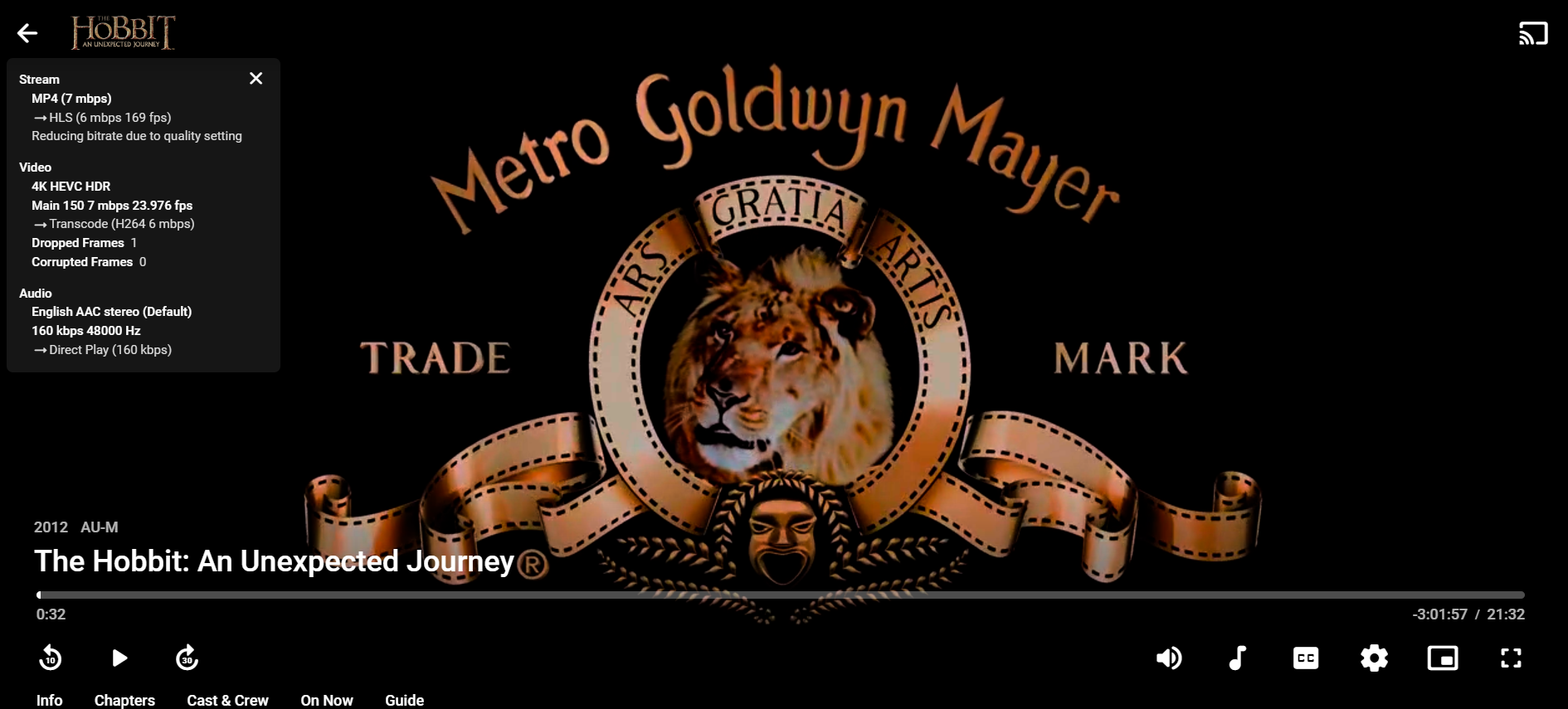
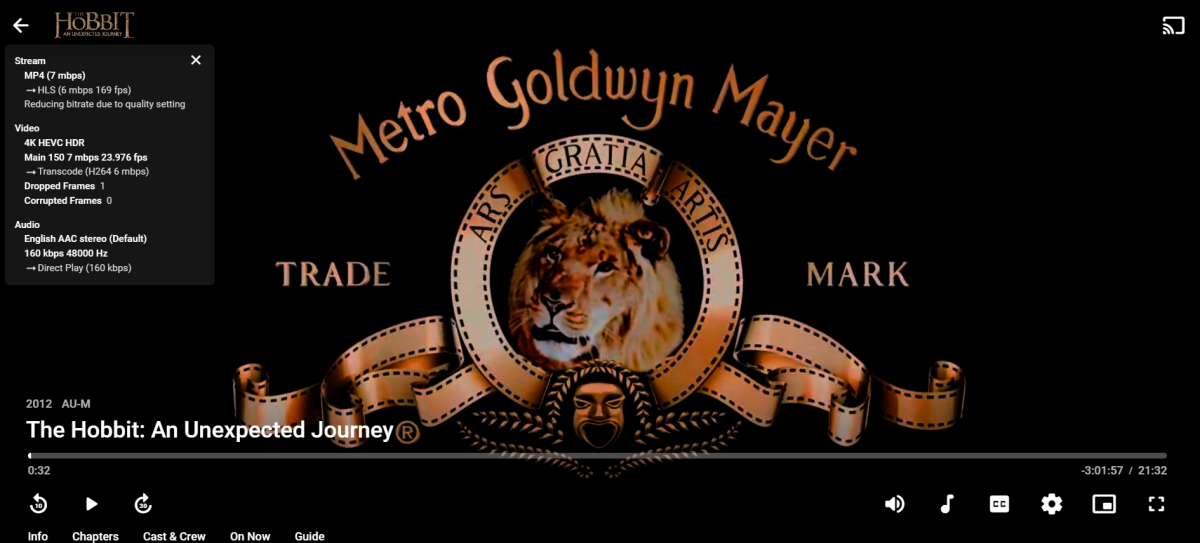
Hi, they way i fixed this unfortunately was to rip the Blu ray again but with handbrake (i cant remember the video encoder i used (h.265 (AMD VCE) i think), the result below streamed over a dodgy internet connection), I could not find a solution with the full sized MKV rip from makeMKV as it would wash out every time it transcoded to a lower resolution no matter what i tried. 4K HEVC HDR
 1 point
 -
What I'm asking is for the channel # to be added to the name/network. E.g., "WAFF 48.1". I understand and can discern channel #'s a lot easier than network names.1 point
-
Have you tried adjusting the client playback quality to something other than Auto?1 point
-
Hi, we'll take another look at it. Thanks.1 point
-
3.1.0 was released before. And releasing quality app means there's just no random version pushed They are beta versions and everything. You can join the beta on Play Store and next beta will have the fix.1 point
-
Version 3.1.0 Notes: Happy new year, thanks all for the support. Just a small reminder that translations are crowd-sourced, you can contribute from the settings. ([Wiki] Help translating Symfonium) Added: New option: Extra transparency to now playing overlay icons. New option: Song second additional information in list. Offline cache status and play count can be selected as song additional information in lists. Widgets now have configurable opacity setting. Widgets can now override the system theme. Changed: Removed the option Show artist names in album song list, it’s always on now, too many providers do not properly report compilation status. Option Ignore remote stop command is now on by default, too many cars send a stop command. Refactor now playing codec info extraction to reduce network usage when possible. (Bitrate value may be missing or different but the risk of OS bug leading to full media reading over LTE was too high) Promoted equalizer, state saving and playback cache to stable. (If you have issues, report them as I’m not aware of any) Widget now offer per widget control for: Tint icon, app icon, hide icon, show track number. You can reconfigure the widgets to update them. Improved multiple word searches. Fixed: Add more security in download manager to prevent downloads when not connected to Wifi. Fix possible state restoration issue when only 1 song in queue. Fix extended trial after update / reinstall. Fix possible unwanted network usage in wifi only mode. If you still have issues contact me with logs and details. Fix possible unwanted server access when playing cached media. Fix smart filter filename does not contain. Fix possible crash when enabling both album artist and all artist in search view. Fix proper equalizer profile not loaded at app start due to small race. Fix possible wrong track played when selected from now playing queue and casting to Chromecast. Fix possible double scrobble in rare occasions. Fix settings backup error if never offline cached any media. Fix large subsonic playlist sync (Push). Add workaround for Funkwhale that does not support album/artist favorites. Properly update connection type when editing hosts. https://support.symfonium.app/t/version-3-1-0-released/11581 point
-
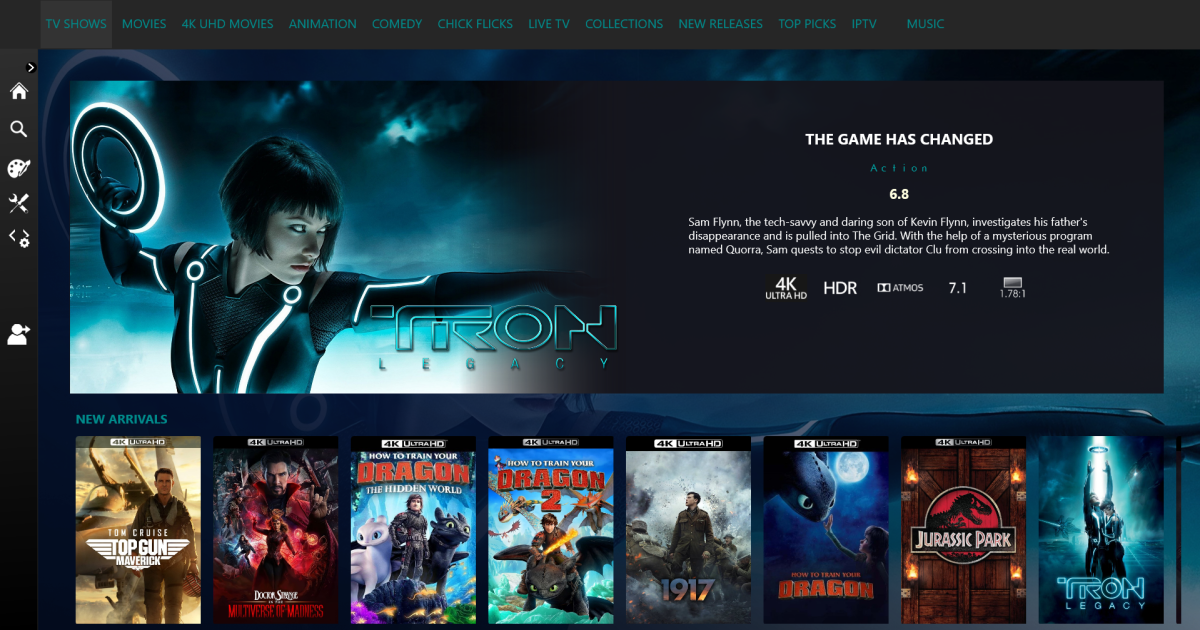
You might be interested in this, x platform Emby client I’m working on.
 1 point
 -
Shield is the BEST for playback, period, until Nvidia releases a firmware that breaks everything, then it's not. The other thing you have to take into consideration is does the other hardware you are hooking your device up to understand the codecs you are trying to passthrough. For example, are you passing it through to an AVR, or are you just hooking it up to your TV? Most older TV's can not passthrough DTS-HDMA or TrueHD nor will they decode it. https://www.rtings.com/tv/tests/inputs/5-1-surround-audio-passthrough and more info here https://www.avforums.com/threads/new-my-best-value-tvs-2021-2022-edition.2389508/1 point
-
Version 3.0.0 Notes: Symfonium is now Android 9+ due to abuse on the ratings about the equalizer not being present before and not enough ratings to counter that. Previous versions will still work fine on Android 5 to 8, but if you want a refund just contact me. Please note that I’m not happy to have to do that, but it’s already hard enough to fight the “app should be free bad ratings”, Play Store is a jungle, your ratings have an impact. Added: New option: Hide favorite button from now playing. (Still accessible from the 3 dots menu) Sleep timer can be set as the additional information row. (With long press to quickly configure) New Favourite playlists home overview row. New option: Automatic offline cache of favorite albums and songs. (Note that smart playlists are often a better way to achieve this) New option: Display playback messages. New backup & restore function. Limited to settings for now but will expand. Chromecast casting now support playback speed too. Chromecast casting now support Google assistant skip next. Added new optional playback controls in the lyrics view. Added new option to configure now playing cover margin. Add new in playlist smart filter to allow playlist merging. Changed: The application is now Android 9+ only. See notes. Try to support more devices for UPnP gapless, as usual if there’s issues contact me. Update the sleep timer dialog to be more convenient. Migrate to ugly Google CAF for Chromecast (No Google I really do not want all the useless things you bring with it ;)). Please report issues with Chromecast casting. Lyrics view should now have less delays and be more in sync for synced lyrics. Updated the wave slider to match the new Android 13 design. Auto play on headset/BT device no more auto play if another music player is already active. Fixed: Workaround Astiga returning invalid data with compilations. Fix some repeat mode possible issues. Add some workarounds to support Ogg files with video tracks. Fix sync issue on some Subsonic servers when no genres are present. Download to Downloads folder could fail with empty downloaded file error. Possible race when Symfonium is restarted in the background, leading to temporary audio focus request causing possible pause of other media players. https://support.symfonium.app/t/version-3-0-0-released/10621 point
-
Version 2.1.0 Notes: Just a small reminder that Play Store ratings and comments are vital for apps, thanks for your help. Added: New option: Hide top filter button. New option: Hide cast buttons. Changed: Prefer internal decoder option is now on by default as more broken devices than expected and users not reading changelogs. (But big thanks if you do) Disabled advanced EQ on Android 9 OPPO devices as their implementation is broken. Tweak add host wizard to better explain when the port value is needed or not. Improved search from voice commands. Removed the abomination that is Glance and returned to normal widgets code. I probably missed some edge case in the transition please report widget issues with details. Fixed: Try to not clear the queue when now playing notification is dismissed. Properly handle more cases of failed sync to avoid data loss. Fix download issue with older Ampache servers. Fix possible crash with Subsonic playlist import when the server returns invalid data. Fix a packaging issue that should improve performance on most devices.1 point
-
Version 2.0.0 Notes: This is a major release, with tons of changes for state saving, performance and future improvements. As always please report issues directly to me and not on Play Store. App icon is changed but you can revert in settings, see below. Added: Full playback state saving (Beta, on by default, see playback settings). Keep playback state and queue even after app kill. (Long press play/pause do stop and clear the queue as before) New default Symfonium Icon, default theme tweak and added new Orange theme. New option: Application icon to change the icon in app, launcher, notification, … New option: Tint home page icons with primary color (On by default). New option: Tint widget icon with primary color (On by default on Android 12+) New option: Auto play on headset plug (On by default). New option: Auto play on Bluetooth connection (Off by default, may require permission). New option: Auto pause / resume media when volume reach zero (Off by default). New option: Enable integration with system Equalizer. (On by default as currently) New option: Smaller header images in detail views. New option: Offload mode. Tries to offload the playback to device coprocessor (if present) to reduce battery usage, may also help with hi-res media on some devices. (Android 10+, off by default, experimental) New resizable widget with proper design for each supported widget sizes (Material You). Network providers now have a Wifi only option to disable communication when on mobile network. Properly register as being able to play media files from other apps. Support for more external lyrics provided by Emby. (If some are still missing contact me). Added support for future Navidrome version that expose lastPlayed value for sync. New toggle to skip existing playlist when importing from a media provider. Added new cleanup duplicates action to playlists. Italian translation, thanks Manuel06p. (Reminder: Translations are crowd sourced you can help for your languages too) Changed: Refactored internals to prepare for more widgets. You’ll need to add again the widget (or try the new one) to your home screen sorry for the inconvenience. Refactored the option Prefer internal decoder to allow more codecs to be decoded by the device. (If you now have issues with Flac, enable the option) Refactoring to try not to use the internal webserver when playing offline cached media on the local renderer. Enabled predictive back gesture. Advanced equalizer is back on Android 9. If you have issues with it please contact me. Use Firebase Crashlytics for crash reports as Google have removed necessary information from Play Console. (Remember that you can opt out in the settings, but it’s really useful for me to fix and improve the app) Detect unsupported token authentication for Subsonic servers and warn during setup. Reorder some main Android Auto entry points to better reflect main usages. Current now playing widget now properly support Material You. This also means that widgets now follow OS colors and no more the app theme until Glance provides the necessary API. Expired trials now also have 1 more trial day after install to test new versions, same as users who update the app. Fixed: Fix image and offline cache when using invalid certificates. Fix repeat one would not work correctly. Fix possible race with UPnP when skipping tracks. Properly detect empty cached files due to provider transcode issues. Fix sort order selection in smart playlists. Increase playlist import timeouts. Revert to local renderer if another app is started on current Chromecast device to avoid trying to reconnect and disconnect other apps. Fix some Subsonic issues (Files > 2Gb, play count not updated) Fix possible issue with Plex server changing IP and plex SSO. Internal decoder is a little more resilient to invalid data in the media.1 point
-
You can always see where via Emby. Go to "Manage Emby Server", and right there on the dashboard on the right it shows the log file paths.1 point
-
If your system is compromised, worrying about encryption on a local connection to something as inconsequential as a media server should be the least of your worries. Preventing compromise in the first place is far, far more important. Paul1 point
-
IDK how many people are going to pay for this as a monthly sub price, if it was like a 20$ lifetime maybe but 7$ a month is overrated when you can see these rating one level in, or just "sort" by ratings. Also arent plex plugins not support and probably violate their TOS, you might want to check that1 point
-
No recuerdo si hay una guía por ahí, pero no debería ser muy difícil, es cuestión de abrir los puertos... pero primero que nada asegúrate que tu proveedor de internet (ISP) te de ip publica. Hay algunos ISP que en vez de darte IP publica te conectan a una subred de ellos, el problema con eso es que si no tienes IP publica no sera posible que accedas a tu servidor desde internet. Si ya has abierto el puerto de emby (8096 para http) en tu modem, entonces debería bastar con que teclearas la dirección IP publica de tu módem junto con el puerto, para averiguar tu IP publica puedes usar paginas como esta https://www.whatismyip.com/what-is-my-public-ip-address/ supongamos que tu IP publica es "188.166.177.199" entonces en el navegador de internet tecleas la direccion "http://188.166.177.199:8096"entonces te debería de mostrar la pantalla de inicio de sesión de tu servidor. Si lo que quieres es conectarte desde la aplicacion de android simplemente pones en direccion la IP (188.166.177.199) y en puerto pones "8096". Adicionalmente podrías conseguir un servicio DDNS para que en lugar de poner tu ip que muy probablemente cambie cada X tiempo puedas usar un nombre mas fácil de recordar como "http://miservidoremby.sytes.net:8096" algunos son gratuitos como lo es en no-ip.com o podrías pagar por tu propio domino .com o .net. Otra forma mas sencilla de conectarse es con Emby Connect usando el mismo usuario y contraseña que usas para acceder a este foro, para esto tienes que ir a tu cuenta de usuario en tu servidor y debajo de tu nombre de usuario hay un campo que dice "Nombre de usuario de Emby Connect o correo electrónico:" ahí pones tu usuario de Emby o el correo con el que te registraste al foro, al momento de darle guardar te enviara un correo para confirmar que deseas vincular ese usuario en tu servidor con tu cuenta de Emby del foro. Una vez confirmado simplemente entra a "http://app.emby.media"o puedes darle al acceso directo que esta justo aqui en el foro en la parte superior derecha en un botón azul, Si tu IP es publica y el puerto 8096 esta abierto en tu servidor debería de mostrarte tu servidor, esto es desde el navegador Web. De nuevo para la aplicación de android le das en "iniciar sesión con Emby Connect". Espero que esta información te sirva1 point