Leaderboard




Popular Content
Showing content with the highest reputation on 12/28/22 in Posts
-
Hello, I ran intoo a new "problem". I turned the option in Emby on, that I have no endless playback when im watching some tv shows. But I guess the same option is also for watching livetv. In my situation my TV is turned on for a long time, when I am doing some other things in my flat. So I do not get it, when Emby is asking if I am still here. If I dont push a button, than livetv stops playing. If I turn the "endless playback" option off, than it works fine, but I have endless playback if I am watching tvshows. Is there a way to seperate that? So, I want no endless playback on tvshows, but I want it with livetv. Is this possible? PS: I don't know how "endless playback" is called in english at emby, but I think you know what I mean by that. best regards2 points
-
Nevermind. Found a blog about how to embed external dll's without the need to extract them afterwards. Pretty simple and working great for me!2 points
-
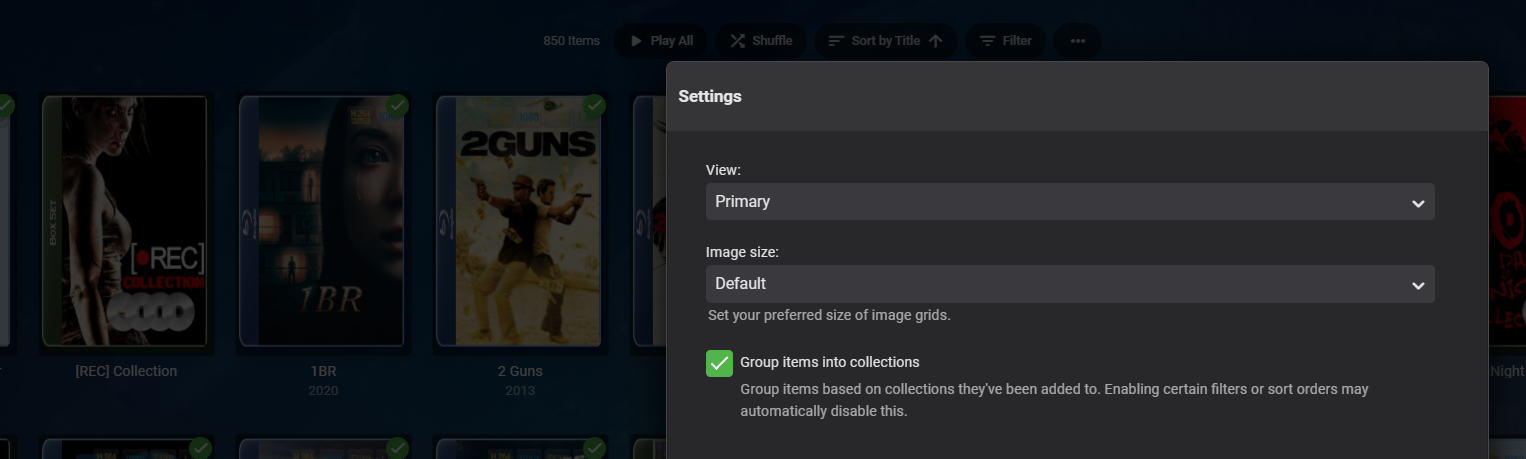
When viewing the Movie library, select the three "dots" at the top of the screen to access the settings. There is an option to "Group items into collection".
 2 points
 -
@alucryd Hi guys, thank you for sharing. Let me spoiler the end first : It was quite an akward procedure but this is what I did. 1. I upgraded the Jail OS version to my current TrueNAS release 13.1 I started the embyServer within the jail and everything was still fine. 2. I upgraded all the packages within the jail with pkg update && pkg upgrade and this automatically upgraded EmbyServer from emby-server: 4.5.4.0_1 -> 4.7.6.0_2 I tried to start EmbyServer but it failed to start service, no matter what. No solution here.. 3. I manually upgraded to 4.7.10.0 but it failed because of missing dependencies: libexif, orc I installed them manually. 4. I tried a manual upgrade to 4.7.10.0 and it succeded. EmbyServer started but I wasn't able to reach the UI. 5. I Searched on the forum and find something similar behaviour which required to set this value on the Jail properties iocage set allow_mlock=1 myjail 6. I started EmbyServer again and this time everything were fine. All well that ends well2 points
-
I'd like to see a feature where on a piece of content there was a button to report a playback error or such. I have a lot of content that I haven't watched that friends have requested - if there was a simple button they could click that pings me a message letting me know there's an issue with the file that'd be great.1 point
-
Lol guess we were editing at the same time.1 point
-
1 point
-
They were there before the update and worked just fine so there is absolutely no reason for them to be taken away. Most of them are just colours not custom icons or anything. Other issues - The loading circle looks borked. It has a break in it so there are 2 different sections spinning around. It's gone from rainbow to blue. Who chooses these colours? If anything it should be green or follow the selected theme. This has been a problem since 1.0.35 but I didn't worry about it too much. When the seeking was changed to make it a lot faster to seek (a good change) you can no longer seek to the end of the episode and have it go to the next episode automatically. It just keeps springing back so you have to let the last 20 seconds or so just play out. Or obviously you can hit the next track button. I've mentioned it before but it's annoying when an update gets released and is always accompanied by "check the blog announcement for details". The only versions to get a blog announcement in the last 3 years are 1.0.20, 1.0.24 and 1.0.35 Most software gets a change log detailing what's been added and bug fixes. It would make it a lot easier to problem solve when something breaks if we could see what was changed.1 point
-
Offset: could not see it, was just to obvious... Blind Yes, both support WoL. But only the app for ATV sends the magic packet at startup. The Android app has to check, before you have to choose to wake it.1 point
-
Pretty please? Isn't Archive Playback that what you want?1 point
-
This afternoon I got some time to test it better. Results are worst then I told last time. With all the 4k or HD media the subtitles doesn't work at all. With SD media the subtitles work only in some cases and not for 100% of files: - if you enable the subtitle before to play the film it works in 90% of cases. - If you are playng the film and you enable the subtitle during the reproduction, doesn't work at all. - if you stop the film, return on the presentation page, enable the subtitle and resume the film it works in 90% of cases. My test system is: server on Qnap TS-230 version 4.7.11.0, player TV LG oled. As in the past, if I use the integrated player of LG with the DLNA streaming of Emby server, all films are working perfectly with subtitles (also 4k) Honestly given the long wait time I was hoping for something better. Let me know if I'm doing something wrong or if I can do some other tests to check in depth1 point
-
Pretty please?1 point
-
Starting from a clean install things are working great as expected. I think my system had a screwy library/database from to much messing with it. Thanks for the pointers and the great add on.1 point
-
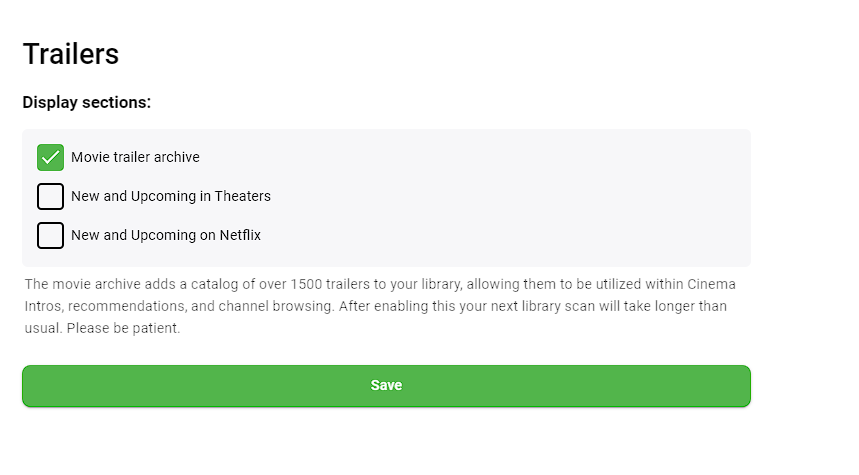
Yes, that i have tried as below. It still isnt what im after. But it has gotten better, its now playing more older movies and no new movies that i dont have/couldnt have already.
 1 point
 -
@softworkz Can you tell us when we might be able to try a beta with the new stuff? I looked at the spreadsheet and there seem to be no (customer-facing) DVR changes yet. Is that the case?1 point
-
1 point
-
I am using an overpowered server, Intel Xeon Silver and over 100 gig memory, OS TrueNas Scale. I do not think load is the issue. Any other suggestions?1 point
-
Es kann so einfach sein, vielen Dank dafür Ich habe wohl vor kurzem zu gut aufgeräumt und das Plugin gelöscht. Nach der erneuten Installation ist alles wieder da. Ja ich brauche hier tatsächlich die Einbindung über xmltv da ich die Daten direkt von meinem E2 Receiver der UNO4K abgreife. Auf die Idee hier erst mal zu schauen ob das Plugin noch installiert ist bin ich gar nicht gekommen. Danke für die schnelle Hilfe...1 point
-
Falls du die Programmführer-Datenquellen über xmltv einbinden willst musst du vorher auch das xmltv Plugin Installieren. Ansonsten wüsste ich leider auch nicht woran es liegt.1 point
-
Die Beta 4.8.0.21 ist scheinbar mit einigen Fehlern behaftet. Bei mir wurde keine Filmsammlung auf der Startseite angezeigt, und dann musste ich noch feststellen, dass die Specials in den Serien auch verschwunden waren. Auf der Synology war kein "Downgrade" zur offiziellen Version möglich - also musste ich Emby komplett neu aufsetzen. Habe das Gefühl, dass hier nichts mehr so richtig überprüft wird, bevor man es veröffentlicht. Beta hin oder her. Beim Server lasse ich daher die Finger davon. Bei den Apps scheinen auch nur noch die von der einfachen Android App (derzeit 3.2.90) dahinter zu sein.1 point
-
Nope, can't change color on different rules on the same library, it's one color for all badges. Did ask for such long time ago, guess that one ain't happening.1 point
-
YES! it works now thank you1 point
-
I can confirm it's working on my 55UK6470PLC (WebOS 5). Thanks for all your energy getting it through LG review!1 point
-
I had started this thread below for it, but nobody but me posted in it: So far I have: series is continuing new release newly added (to my library) based on true story / events my own category "18+" (explained in the other thread) I have many more in mind, but I have stopped adding more rules due to current limitations in iconic that are currently not being fixed (see above: colors, symbols).1 point
-
The problem I described in this post seems to be fixed either by emby LG version 1.0.37 or the new server version . thanx for the update1 point
-
Hello users, For those wondering why the add-on stoped working, unfortunately the legendas.tv service has been shutdown for now. According to service owners, the costs over the years were too high and it was no longer sustainable to keep the service as is. It seems they will try to make the subtitles so far accessible in some way, but no guarantees or details were given so far. Therefore this add-on will no longer work and should be uninstalled. The communication of service ending is available (in Brazilian Portuguese) at their former website www.legendas.tv.1 point
-
Looks similar to the issue here.1 point
-
MPC-BE "work" but whole player freezes when trying to forward. It's the same without Kodi+emby-next-gen, so no issue with the new beta.1 point
-
Right. The logs posted so far show Emby being shutdown, stopped, not crashed. AFAIK Emby doesn't shut itself down so something on the host appears to be doing this. Without other logs from the host like syslog and logs from Docker (if separate) it's hard to know what might be stopping Emby.1 point
-
@Luke It's a very big problem with this last update. All content with HEVC/H265 (HDR or not) is transcoded if the audio codec is not supported by the LG hardware. And, on LG, the DTS, DTSMA, DTS-HD and others DTS codecs are not played by LG. Before your update, the content was played with only the audio in transcoding mode. The video was directly play by the LG Hardware. Now, all content, Video+audio are transcoded by the Emby Server. And, as i didn't have any GPU on the server for the moment, the decoding is made by the CPU. The capacity of this CPU is not enougt to permit a good playing (~15 FPS max). So, with the new update, about 50% of my 4K movies are not playable on LG TV. And for me, it's a very big problem because it's my standard since i'm using Emby, i bought a LG TV for that ! Please, can you propose a urgent update on the server side to force the video to be play directly by the LG hardware ? I know than LG did not validate any update before a long time. Thanks,1 point
-
Not really seeing anything in the log at the time it looks like it Gracefully shuts down, not a Crash. 2022-12-22 19:50:38.051 Info Server: http/1.1 Response 204 to 192.168.178.201. Time: 0ms. http://192.168.178.202:8097/Emby/Library/Refresh 2022-12-22 20:06:19.988 Info Server: Stopping HttpListener... 2022-12-22 20:06:19.992 Info Server: HttpListener stopped 2022-12-23 01:04:40.772 Info Server: http/1.0 Response 200 to 94.246.7.88. Time: 0ms. http://xxxxxxxxxxxxxxxxx/Sync/Data?X-Emby-Client=Emby for Windows&X-Emby-Device-Name=DESKTOP-FJ2LCGK&X-Emby-Device-Id=YimSvMKnUOdIKLVaLLVG8WX7nHpyxJuboW9uvglQBo&X-Emby-Client-Version=1.1.464.0&reqformat=json 2022-12-23 01:10:20.327 Info Server: Stopping HttpListener... 2022-12-23 01:10:20.331 Info Server: HttpListener stopped Maybe enable debug logging would show more?1 point
-
I know those Hauppauge cards, but they are discontinued. Anyway, this wouldn't be doable easily because it doesn't fit into the modeling we have. Everything is different in the whole chain from tuner to "screen"/playback. It start's with a different driver model, the tuning/channel scanning process is different, and the signal that needs to be handled and processed is different. A lot of work for little value IMO. And for a tiny audience, because those receiver cards don't seem to have been a big success. There's a plugin model for tuner providers, so in case somebody would want to develop a tuner provider for this, it might be doable, but it will take significant effort.1 point
-
Thanks for that. I examined the problem a bit more analytically over the last few days, and I feel that the issue must lie somewhere in the D-Link mesh wi-fi's sanctum sanctorum. The D-Link units have created a home network in which every wi-fi-enabled device can access the internet on its own behalf (streaming apps on my Apple TV 4K, my Chromecast with Google 4K TV, my Intel i7 NUC can import the required data and play videos) but communication between the hardware devices has been blocked. I can no longer print from my wi-fi enabled laptops to my wi-fi linked colour laser printer; I cannot access the Emby server - located on my desktop PC - using the appropriate Emby apps on my Apple TV 4K, my Google TV 4K, my Windows 11 NUC etc. My iPhone can no longer communicate with my BluOS Node 130 music streamer. So there must be a setting within the mesh network that is acting like a firewall, preventing device to device communication. So I suppose I'll have to get in line and try to contact the D-Link Help Desk for further information, as it does not seem that my current issue is an Emby malfunction per se. Regards and a Happy New Year to you John Norris1 point
-
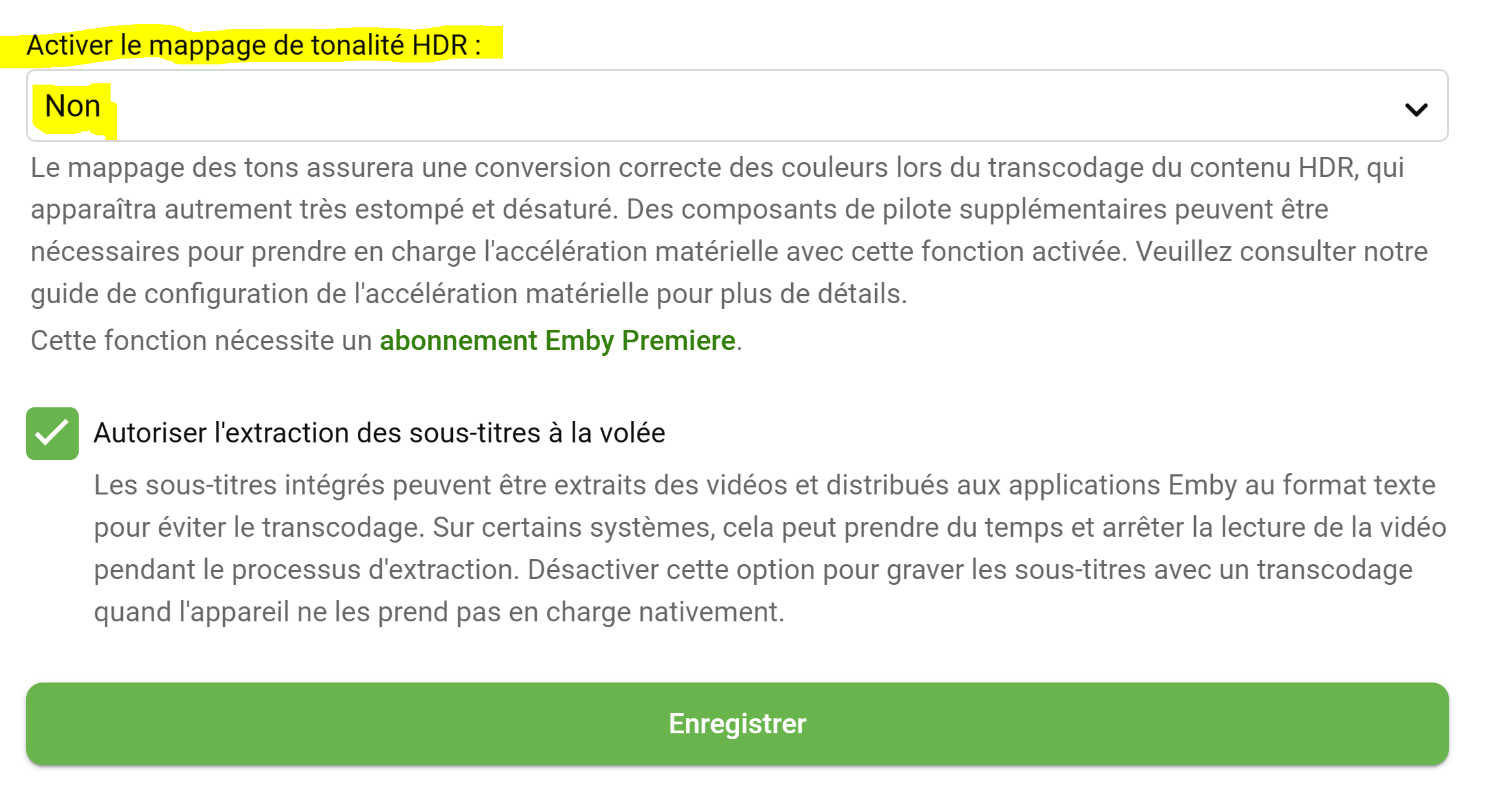
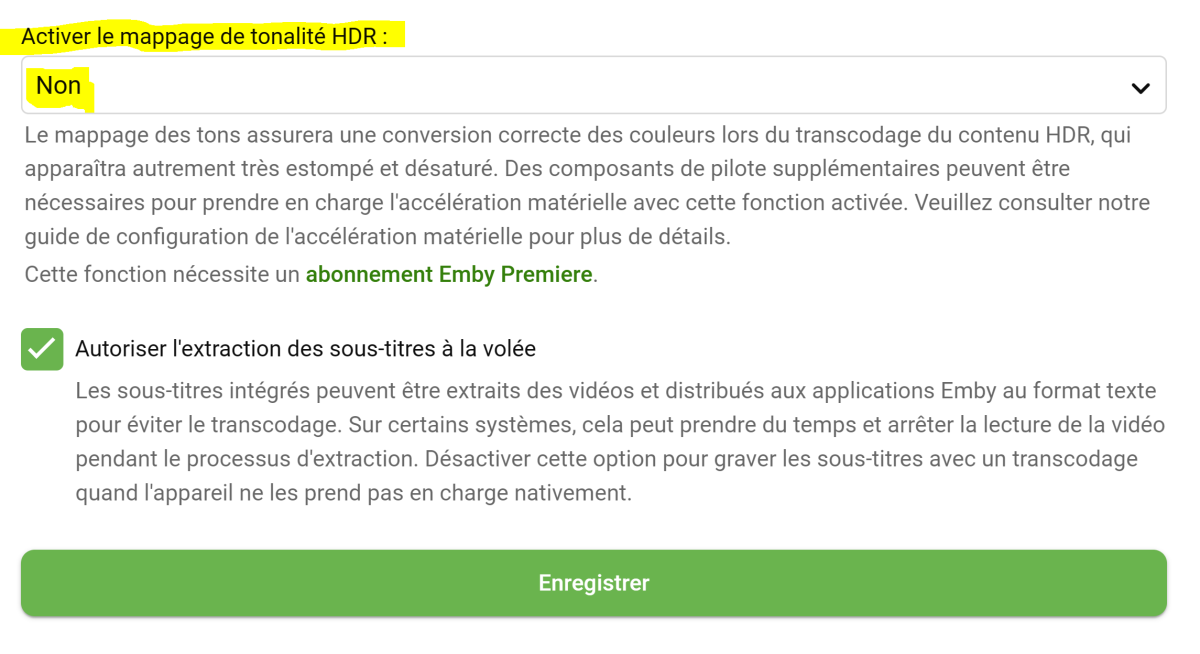
Je me réponds. J’ai changé l’option « Activer le mappage de tonalité HDR » à non et tout fonctionne maintenant.
 1 point
 -
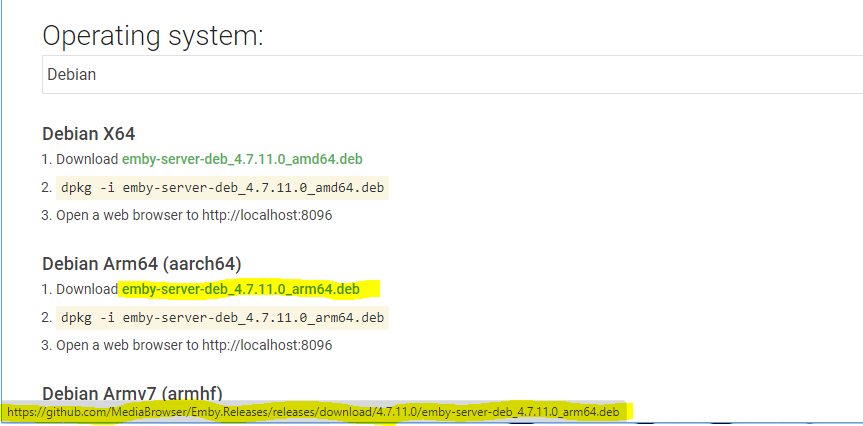
Did you try a different browser or wget? The download page looks fine to me.
 1 point
 -
Emby for LG TV's 1.0.37 has been released. Stay tuned to the blog for the release announcement. Can you please try out the new update and let us know how it compares? Thanks !1 point
-
OK i see the issue, thanks.1 point
-
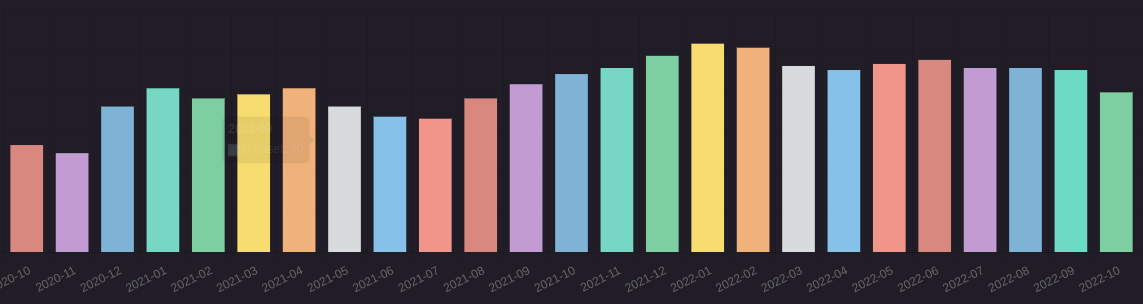
By the way, do any of you have any cool SQL queries? Here are mine: - Count unique users per day SELECT date(DateCreated) AS Date, COUNT(DISTINCT UserId) as Users FROM PlaybackActivity WHERE DateCreated between date('now', 'start of day','-6 months') and date('now', 'start of day', '+1 day') GROUP BY date(DateCreated) ORDER BY date(DateCreated) ASC - Count unique users per month SELECT DISTINCT strftime('%Y-%m', DateCreated) AS Date, COUNT(DISTINCT UserId) as Users FROM PlaybackActivity WHERE DateCreated between date('now', 'start of day','-24 months') and date('now', 'start of day', '+1 day') GROUP BY Date ORDER BY Date ASC If you want to display a graph like this you must set these options :
 1 point
 -
Hi, more book features are planned for future updates. Thanks1 point
-
Nope. Theater Desktop won't even start without internet connection, as you've found out yourself. Theater Store will require periodic validation, will run on cache in-between. Use web browser - local Web app.0 points