Leaderboard




Popular Content
Showing content with the highest reputation on 12/27/22 in Posts
-
Hiding it will be sufficient for me, thanks. I don't feel like having to wipe out and re-scan my video library. (it's quite large - takes HOURS for Emby to get everything done)2 points
-
If you are allowing remote access, you definitely want to put strong passwords on those user accounts.2 points
-
Because you've mapped your ports wrong, according your screenshots: it should be http External 8099 -> Internal 8098. You don't need https as you don't have SSL set-up on your server.2 points
-
Yeah for sure, I trust the comment's on this thread more than the so called critic rating/review.2 points
-
Well, at least this was figured out! I had to right click in MP3 Tag and go into Extended Tags, and found there was a duplicate album artist tag. (I'm not even going to guess why the hell....) There was ALBUMARTIST (which was still the old info) and ALBUM ARTIST (which MP3 Tag had up front as the tag I was editing originally). Got rid of the duplicate, and now Emby is reading it correctly. I thought I was going nuts trying to find this. Even Emby didn't know that tag was there.2 points
-
I agree backdrops and fan art are hugely important. Luke asked what I missed in regard to the plex UI (per conversation with the OP) and I posted a couple examples/differences. But I’m with you, backdrops and fanart are the most important artwork on a media server.2 points
-
Thank you! Emby 1.0.37 for LG has fixed another 2 MKV files that had the same problem (would not play at all, and had a repeated transcode loop between 0 and 1-12 seconds), and also made a 3rd file that had a pause of several seconds before it started up, now play almost immediately (transcoded).2 points
-
Hi, Stay tuned to the blog for the release announcement.2 points
-
Hi, we're hoping to submit any day now. Thanks.2 points
-
Yeah I’m looking forward to it. The critics are such nobs now, they completely degrade anything these days, like they are some sort of experts but they really don’t understand the purpose of a movie!2 points
-
I'd like to see a feature where on a piece of content there was a button to report a playback error or such. I have a lot of content that I haven't watched that friends have requested - if there was a simple button they could click that pings me a message letting me know there's an issue with the file that'd be great.1 point
-
Hello, I ran intoo a new "problem". I turned the option in Emby on, that I have no endless playback when im watching some tv shows. But I guess the same option is also for watching livetv. In my situation my TV is turned on for a long time, when I am doing some other things in my flat. So I do not get it, when Emby is asking if I am still here. If I dont push a button, than livetv stops playing. If I turn the "endless playback" option off, than it works fine, but I have endless playback if I am watching tvshows. Is there a way to seperate that? So, I want no endless playback on tvshows, but I want it with livetv. Is this possible? PS: I don't know how "endless playback" is called in english at emby, but I think you know what I mean by that. best regards1 point
-
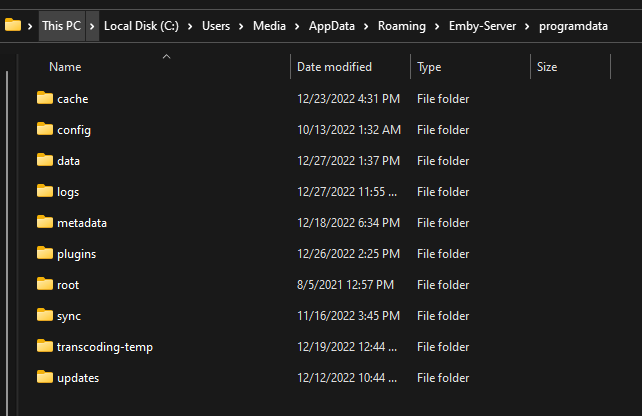
To my knowledge that folder is the equivalent of programdata folder on Windows.
 1 point
 -
Nope, you still have to pay to unlock.1 point
-
Hi. Thanks for the update. The Grey option is a little better than the white one, but still I find it too bright for HDR content. I currently create "ass" subtitles with the following header, but it's really cumbersome to do this each time: [Script Info] ; Script generated by FFmpeg/Lavc58.64.101 ScriptType: v4.00+ PlayResX: 1920 PlayResY: 1080 [V4+ Styles] Format: Name, Fontname, Fontsize, PrimaryColour, SecondaryColour, OutlineColour, BackColour, Bold, Italic, Underline, StrikeOut, ScaleX, ScaleY, Spacing, Angle, BorderStyle, Outline, Shadow, Alignment, MarginL, MarginR, MarginV, Encoding Style: Default,Univers 45,50,&H707070,&Hffffff,&H000000,&H181818,0,0,0,0,100,100,0,0,1,1,2,2,10,10,20,0 [Events] Thank you!1 point
-
But why? Can't you just not click on it, if you don't want to see a trailer? The trailer is not saved locally, if it's that you're worried about. It's just streamed in remotely. Anyway, you can hide the button by adding this to your custom CSS settings: .btnPlayTrailer { display: none; } But it'll only work in the web client. All other clients will still show the button.1 point
-
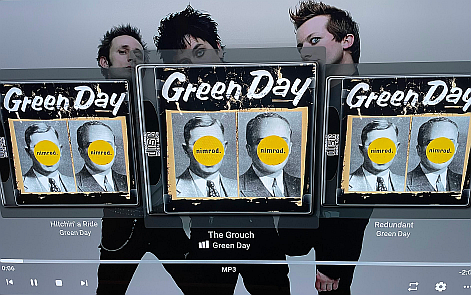
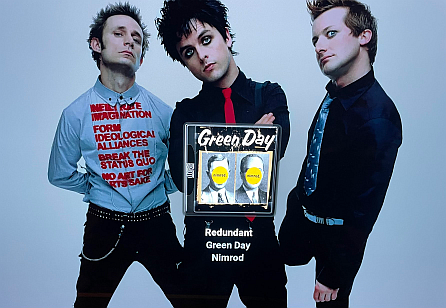
Slightly better, the grey background around CDs is now half transparent, not great yet After a few seconds it switches to a single song screen, that definitely is better for the background art, but contains no information about the progress nor buttons. The transparency is fine in this second screen.
 1 point
 -
Update, @Luke. I think I found it. I updated the user/pass/API key in both NZB and Sonarr and they seem to be playing nice now. It's a bit slow, but an episode I manually downloaded and tested worked properly and even updated Kodi/emby-next-gen so I guess it just needed a kickstart. Thanks anyway!!1 point
-
hi, thanks for the tech support, too bad I thought it could be fixed with some older version of the package.1 point
-
Yeah sorry, I'm renovating right now so I'm not watching any movie, but I'll keep you posted for sure. edit: Just to say I haven't rewatch a movie yet. It's also not something that happen everytime so it might take some time.1 point
-
I messaged Harry to see if I can join the Alpha. I'll report back once I get access and can test it.1 point
-
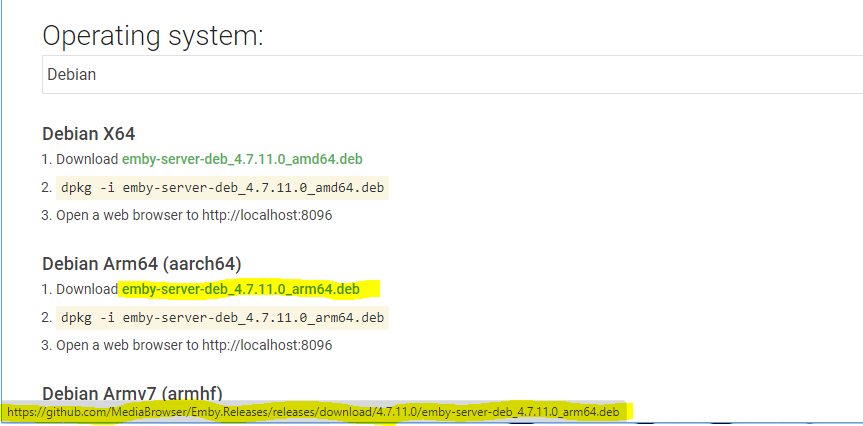
Did you try a different browser or wget? The download page looks fine to me.
 1 point
 -
1 point
-
Hi, Luke. Forgive my naivety, but that's where was losing the plot on the instructions. I finally located the settings and was able to adjust them. For anyone in the future searching for a similar answer, the settings are accessed through the avatar icon (little person) in the upper right of the home screen.1 point
-
thanks for the workaround, but i am using emby internally and i don't wanna set up nginx to workaround something the emby team should fix1 point
-
You have to set the settings theme to dark then the text will be white1 point
-
Ohh sorry ill make one today1 point
-
Yesterday I tried it out, the first time I tried it there were still playback problems. I will test it further and report back.1 point
-
Is this part of a bigger revamp of the home screen itself, or did you mean only the settings? Because in my opinion the home screen needs to improve drastically. More dynamic, more individualism, more interesting categories to show, maybe a configurable featured section etc. Basically, there should be something new to explore, every time I visit it. I mean, it's not even possible to put playlists or genre on the home screen, whether it's static or dynamic. I would really love to hear a little bit about your plans regarding the home screen, if you can share anything1 point
-
after having received the warning i tried to reset database manually. however, the addon's settings page wasn't working anymore either (menu would load but when you click an option, nothing happened). so i reset kodi and reinstalled the addon. same problemm i will try to update the server bc it is still 4.7.2.0 and report back :edit updated emby _server_ to 4.7.11.0, fired up kodi, addon immediatly reported in, reinitialized database -- everything is back to normal again tl;dr: update emby server = profit thanks for your awesome work @quickmic1 point
-
Now I had time to test it! And it is working. I switched to Live-TV, went to options there and I disabled the transcoding for sd- and hd-content. Now it direct plays all channels without transcoding.1 point
-
Yes, that's what I want, thanks!1 point
-
Ok. I was still talking about my specific problem/solution with one specific show.1 point
-
Why, wouldn't you prefer a personal media server that is actually personal?1 point
-
Thank you for the replies guys. Figured it out. I didn't have media sharing on, on my home network. It's a new laptop so windows always has everything set to off. totally forgot about that. Now it's seeing it the server. Its working.1 point
-
I just researched and realised that VOBSUB is a bitmap subtitle format... I thought old-school DVD subtitles were always text. I thought it was just bluray PGS that were bitmap. So that explains the first case transcoding the video. It doesn't explain why the second case decided to transcode the video when the audio format was incorrect, but happily direct-playing the SRT subtitles when the audio format was selected correctly.1 point
-
thank you I will give it a try then.1 point
-
No, it's not a problem at all (well - not anymore as it's mostly done already). I was asking for two reasons: Better knowing means better understanding of other cultures and I was personally curious. I was wondering whether it could happen another day, that Arabic users might come and say that they want the text being RTL but timelines being LTR. In that case, we would need to do a number of things differently right now, to provision for this possibility. Knowing that now, would help us to avoid reworking things once again later (but it wouldn't mean to revert RTL timelines for Hebrew). Thanks again, softworkz1 point
-
Hi, what exactly happens when you enter the address manually? And what did you enter? Are you able to connect from other devices such as a smart phone?1 point
-
working ok! Thx1 point
-
OK we'll take a look at it. Thanks for reporting.1 point
-
Please try this version: It disables the Kodi workaround (by default), I hope this solves the problem Also for @tomimc plugin.video.emby-next-gen-7.13.3-build 4.zip1 point
-
Hi. Sounds like most likely the firewall on your laptop is blocking it. https://support.emby.media/support/solutions/articles/44001849007-connectivity1 point
-
Saw "The Way of Water" last night with my daughter. I thought it was superior to the original (which I re-watched a few days ago) in just about every way. The animations are insane - especially when they get to the underwater stuff.1 point
-
Just released. Link in first post. Clear your browser cache since there is a UI change.1 point
-
I am facing same issue with Pioneet VSX-324 Receiver. This is an Emby issue and nothing else. Please fix it. This is a general DLNA issue with Emby. It is on Andorid mobile devices the same..1 point
-
Yeah I could probably add that and make it an option. Like "Commercial Skipped (20 sec)" or something like that.1 point
-
Shield is the BEST for playback, period, until Nvidia releases a firmware that breaks everything, then it's not. The other thing you have to take into consideration is does the other hardware you are hooking your device up to understand the codecs you are trying to passthrough. For example, are you passing it through to an AVR, or are you just hooking it up to your TV? Most older TV's can not passthrough DTS-HDMA or TrueHD nor will they decode it. https://www.rtings.com/tv/tests/inputs/5-1-surround-audio-passthrough and more info here https://www.avforums.com/threads/new-my-best-value-tvs-2021-2022-edition.2389508/1 point
-
yesterday I was doing the css code and I came across an obstacle, the css code that is placed on the initial screen of the emby administration only applies when emby is opened on the web, I will check now on the theme that also applies on android. But in the meantime I would like to know if more people have the same focus as me to get an improved appearance, a little similar to net flix but with the advantages of emby which in my opinion is a great server.1 point
-
I've figured out a way to edit the chapter images, it's a bit tedious but it works, you just have to figure out where Emby saves them when they are created. The images are stored in chapter folders within the /metadata/library folder of your server path (within this folder is a xx/random-character-sequence structure). Easiest way for something that is already in your library is to actually delete it and re-add it (assuming you have selected image extraction to occur immediately when you add new media). Then search the library folder for 'chapters' and sort by 'Date modified'. The most recent chapter folder will be for the media you just added and will contain the images. Then you can just edit them with your favorite editor (keep the resolution and file type the same). If you do this before you actually look at them in anapp then the change should reflect immediately. Hope that helps! I've used this method a lot to customize my chapter images, it's a workable fix until the devs implement the MUCH requested feature to be able to store such images with the media itself.1 point