Leaderboard




Popular Content
Showing content with the highest reputation on 12/03/22 in Posts
-
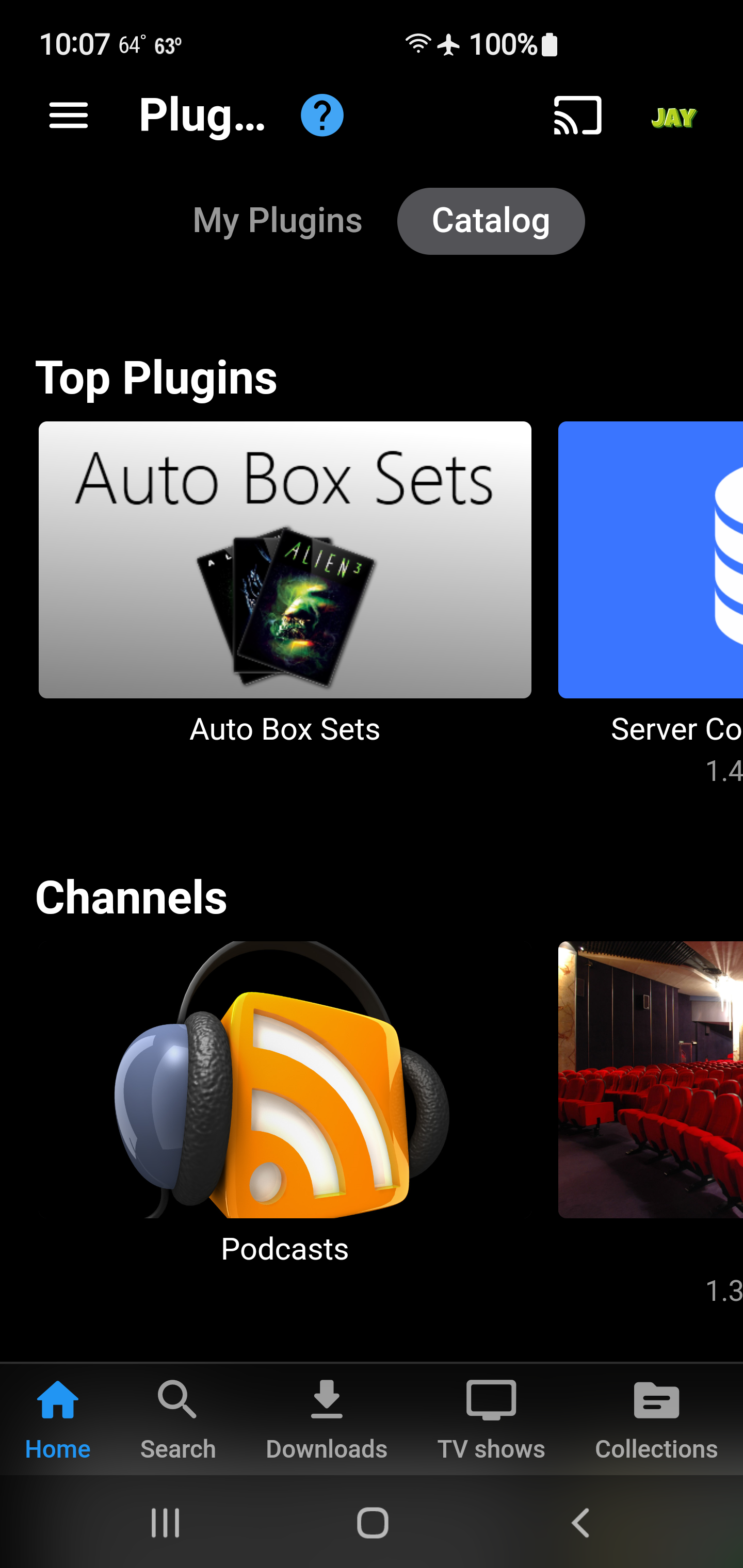
Starting from today, a new metadata plugin is available in the catalog: TV Maze Metadata Provider This is a highly efficient metadata provider for TV series which is safe to add as it has very low impact on library scanning performance. Features: A single API request per series provides all data: series, season, episode, seriesimage, seasonimage, episodeimage and extra images (banner, logo, backdrop) New 2-stage caching mechanism Single JSON file per series/person In-Memory Cache with auto-expiration Failed lookup caching (with auto-expiration) Uses TvMaze update checking mechanism Works by timestamp comparison Cached files do not expire by fixed interval Added episode matching by name and air date Metadata Providers TvMazeSeriesProvider TvMazeEpisodeProvider TvMazeSeasonProvider TvMazePersonProvider Image Providers TvMazeSeriesImageProvider TvMazeEpisodeImageProvider TvMazeSeasonImageProvider TvMazePersonImageProvider Limitations Provides metadata in English language only (but it is able to identify series and episodes by original title) Updates Version 4.8.0.20 (March 11, 2023) Now also provides crew information (people) for series Provides guest-cast and guest-crew information (people) for episodes
 2 points
 -
Out of nowhere it started working Sorry to bother2 points
-
Here is the latest list of versions for Emby software across the server and clients. Emby Server Stable: v4.9.5.0 (2026/05/18) Release Notes Beta: v4.10.0.14 (2026/06/04) Release Notes For other platforms, please refer to the download page. Emby for Android TV Google Devices Stable: v2.1.23 (2025/12/27) Beta: v2.1.46 (2026/04/15) Amazon Devices Stable: v2.1.23 (2025/12/27) Beta: v2.1.46 (2026/04/15) Stable Release Notes Beta Release Notes Universal Android app Stable: v3.5.16 (2026/01/26) Beta: v3.5.36 (2026/05/10) Release Notes Download the latest Beta here. Emby for Kodi See here for the latest information. Emby for Roku Stable: v4.1.63 (2026/05/04) Release Notes Beta: v4.1.64 (2026/05/13) Release Notes Emby for Windows (Windows Store for PC & Xbox One) Stable Release Notes Beta release notes Emby for Linux Beta Release Notes Emby for Samsung Smart TV (Orsay) E-series to H-series TVs only Release Notes Emby Theatre for Samsung Smart TV (Tizen) Release Notes Emby Theatre for LG Smart TV Stable: 1.0.50 (2026/01/19) Emby for iOS Stable: v2.2.53 (2026/05/16) Stable Release Notes Beta: v2.2.52 (2025/04/11) Beta Release Notes Emby for Apple TV Stable: v2.0.3 (2025/12/26) Announcement Beta: v2.0.6 (2026/04/11) Release Notes Emby for tvOS (Apple TV) Stable: 2.1.6 (2022/12/23) Release Notes - TBA Beta: 1.5.1 (10) (2021/03/02) Beta Release Notes Emby For MacOS Stable: 2.1.6 (2022/05/09) Details here. I will keep this post up-to-date as much as possible, but please send me a PM about anything I haven't updated, or is missing. Special thanks to @Borskfor supplying a lot of the updated information. Thanks.1 point
-
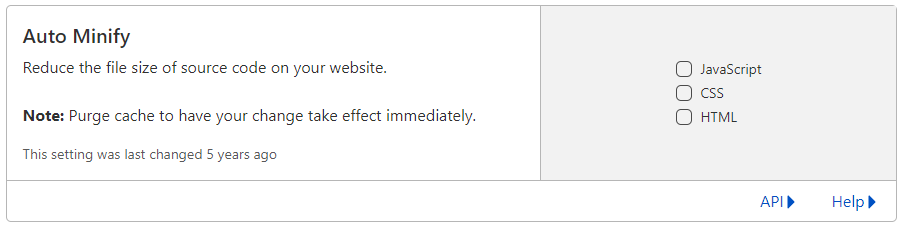
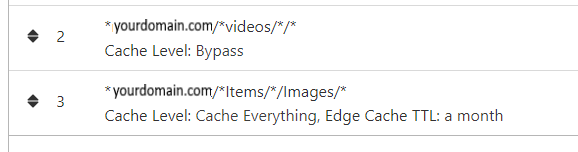
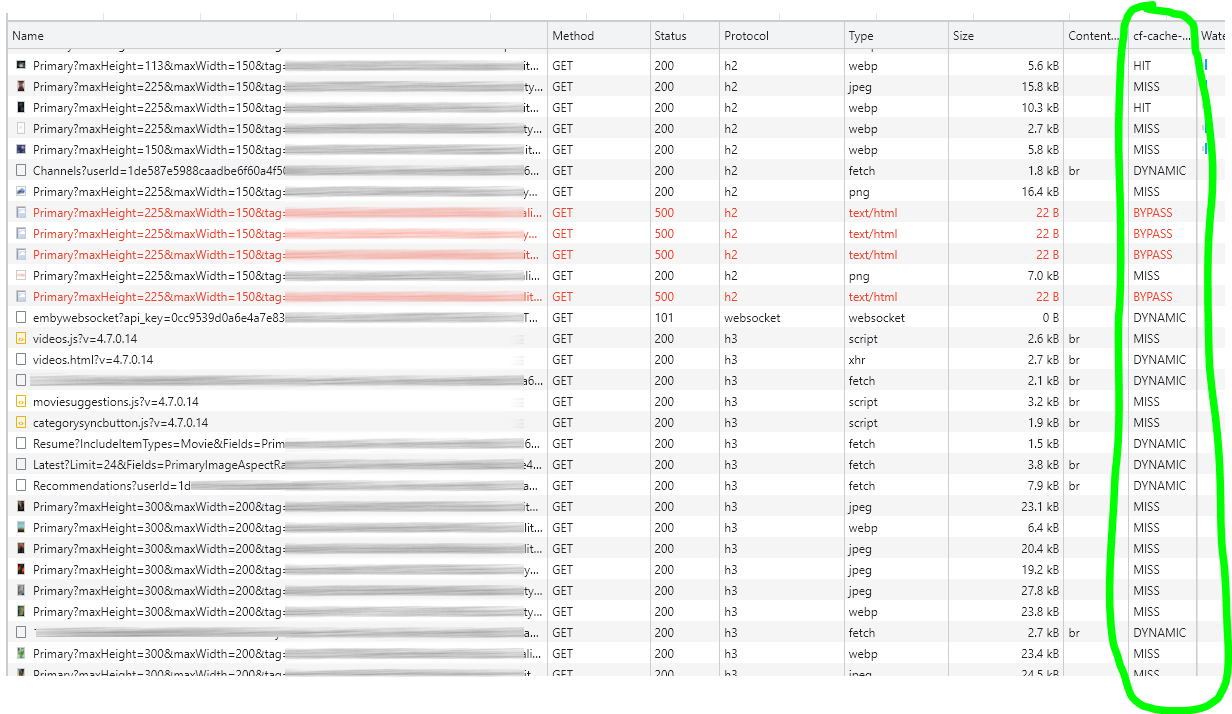
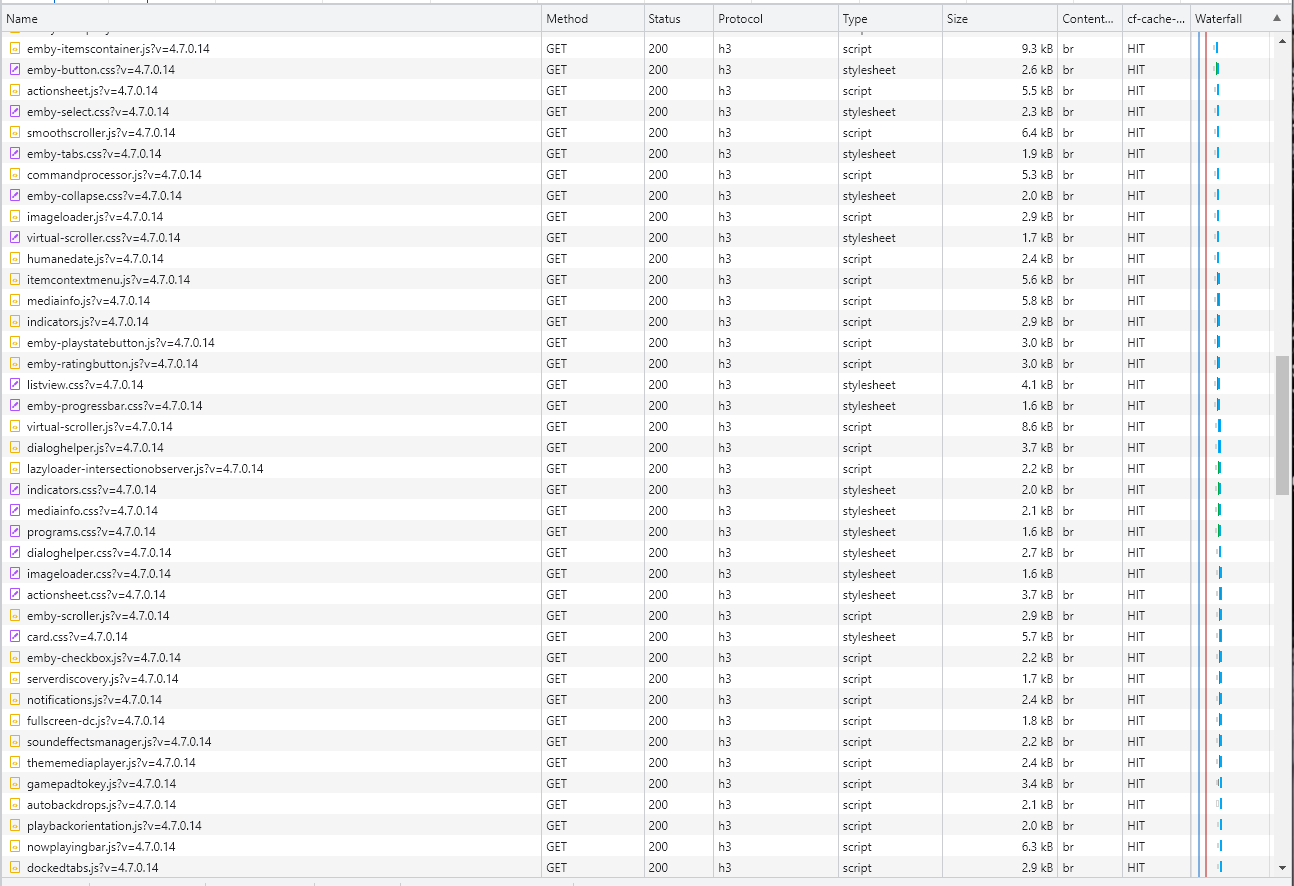
Cloudflare and emby Config Version 1.0.0 Last Update 02-25-2022 Update by Pir8Radio ** UPDATE: I AM HEARING OF EMBY USERS GETTING VIDEO FILES BLOCKED WHEN USING CLOUDFLARE (FREE TIER). IF THIS IS THE CASE, I NO LONGER RECOMMEND USING CLOUDFLARE. Even with the cache bypass rules, your video still passes through their system and is technically against their TOS. Use CloudFlare at your own risk if you choose to continue. I'll update if I get more info. Please post in this thread if you find you have video loading/playing/downloading issues while using cloudflare or have received an email from them about this. MESSAGE FROM CLOUDFLARE: Free, Pro, and Business Plans serving videos or a disproportionate amount of non-HTML content can be in violation of Section 2.8 of the Self-Serve Subscription Agreement (TOS). This will turn into a full Cloudflare how-to. Others are welcome to edit this or PM me with suggestions.. However right now I'm just going to post some recommended settings for people who already have Cloudflare setup. There are a few cloudflare settings that break emby, some break it in obvious ways, some only certain apps in certain situations.. These are the settings I found that work well as of today. I'll try to maintain this post and update the header info should new features come out, or the community discovers better settings than these. As of today, these are the settings available to us in Cloudflare FREE account: First disable the two main things that will break emby, go to the "Speed" tab then "Optimization" sub-tab. DISABLE Auto Minify and Rocket Loader! (screen shots are in the recommended state) Other options on this settings page are optional to enable, I suggest enabling Brotli compression. It's a good thing. Now head over to the "Caching" tab and select the "Configuration" sub-tab. Set your Caching settings as shown below. THIS IS OPTIONAL: Other settings in this settings tab are optional to whatever you like.. I have "Always Online" enabled, its kind of a neat feature that caches as much of your emby server as it can in case your server is down, users will at least see an emby splash screen, that's usually about it.. but its something... kind of useless otherwise.. Handy if you have other websites, it will totally cache normal html websites and users can continue to use your cached site when you have a web server outage. Next head over to the "Rules" tab. Create these two rules: Rule #2 here we will bypass caching 99% of all video. Caching the video will actually slow down the client experience. It screws with the chunks and often times has to fully cache 1 chunk before cloudflare sends it to the client, causing playback delays. Rule #3 here will cache all images on the edge servers for 30 days. We need this rule, because cloudflare only caches known file urls, like picture.jpg or poster.png emby serves up webp images with NO EXTENSION so cloudflare doesn't know to cache these items. But 99% of emby images come from the /items/XXXXXX/images directory so we will just force cache everything that comes from this URL, it should be only images. Keep in mind when you enable this it can take some time to build up cache.. emby serves up different sized images based on browser screen size, apps, etc.. so if you load a page that is minimized to a small window on your desktop emby will serve smaller sized images, if you make your browser full screen, now emby will serve up larger images and those images may load slow the first few times until they get cached too. Go below this screenshot and I'll show you how to check if caching is working. Check to see if Cloudflare Caching is working Well, how do you know Cloudflare is doing its thang'? Use a browser like chrome, or the new Microsoft edge (which is just a rebranded chrome). Open the browser, right click in the browser window and go down to "Inspect" (there is an F key for this too I forget what it is, I should add that here lol). Once the dev window pops up adjust it so you have a good view on the right, click the "Network" tab, hit the reload button on whatever page you are on so some info populates on the right dev screen. You should see something similar to this: Right click on the table header (Name, Method, Status, Protocol) anywhere, just right click the "Name" one. Go down to "Response Headers" then "Manage Header Columns". A little window will pop up hit "Add custom header..." and then add this header: cf-cache-status Now select the little sub tab that says "all" now surf your way to your emby server, and you should see something like the below screenshot. Hit is well..... a hit! this image came from cloudflare and was never requested from your emby server, saving you from sending this image to the client, saving time and bandwidth. MISS is also kind of obvious, it was a miss, either due to never being cached yet (first time Cloudflare has seen this image or document) if you hit refresh a few times, cloudflare will then cache it and it will turn to HIT. BYPASS I'm actually not sure why my server is returning server 500 errors below, this image is being called for by emby clients but the server has no image to serve, but usually you should only see BYPASS on playing video's if your rules above are correct. Or in my case, a server error will not be cached. DYNAMIC this is also a NO HIT response.. this is usually due to Cloudflare knowing this resource changes a lot and doesn't want to cache it so your clients don't get served stale data, or its a video, websocket, or some other format Cloudfare's great automated intelligence deems it should not be cached. That is the basics that will save you a lot of headache and blaming emby for things not working.. There are lots of cool options to enable outside of these basic settings above, ask questions here, send ideas that maybe I have missed that work great for you.. I just wanted to throw this up due to a lot more of you guys using Cloudflare. In the end you should start to see more "HIT" responses... and a noticeably faster loading time for the clients, less bandwidth usage for your emby server, and everyone is happy.. Well..... within reason....


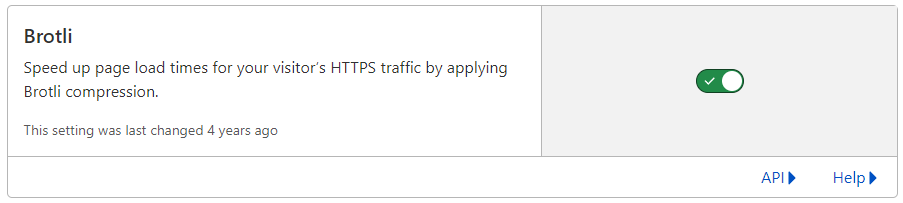
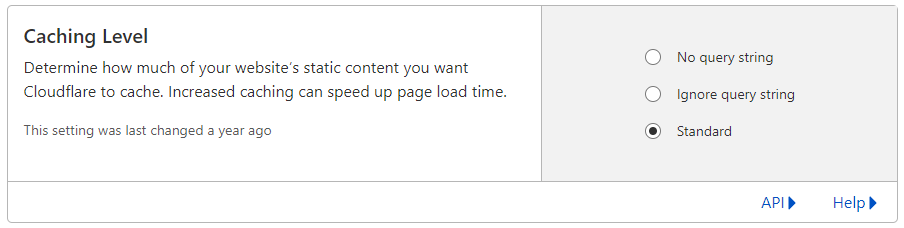
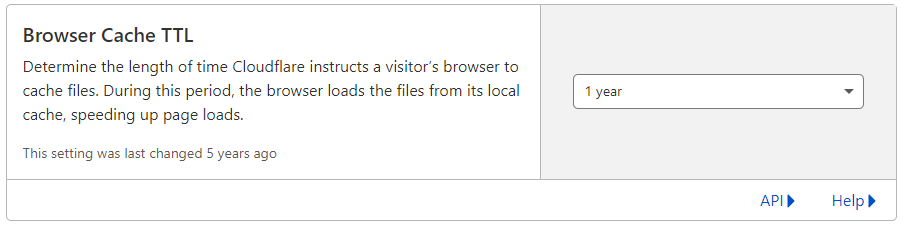
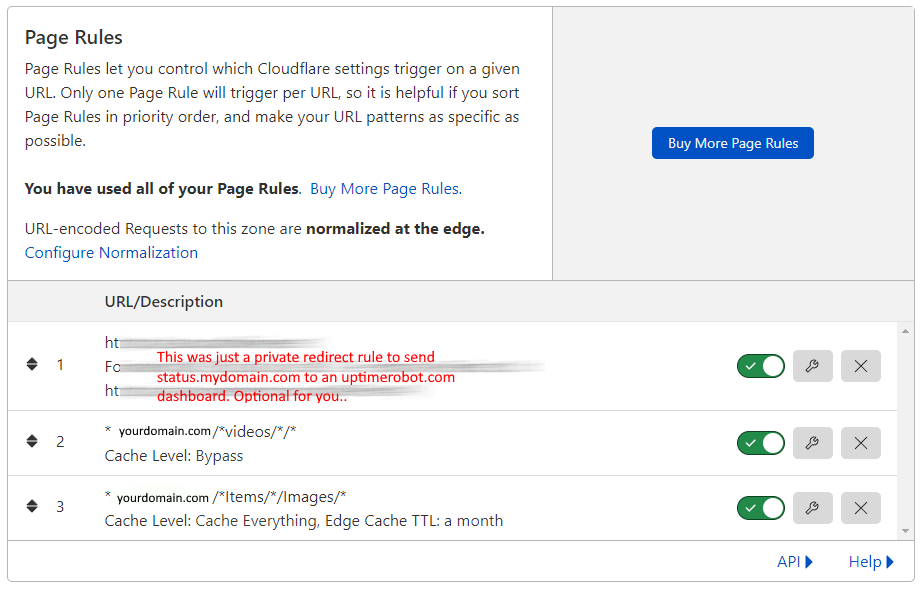


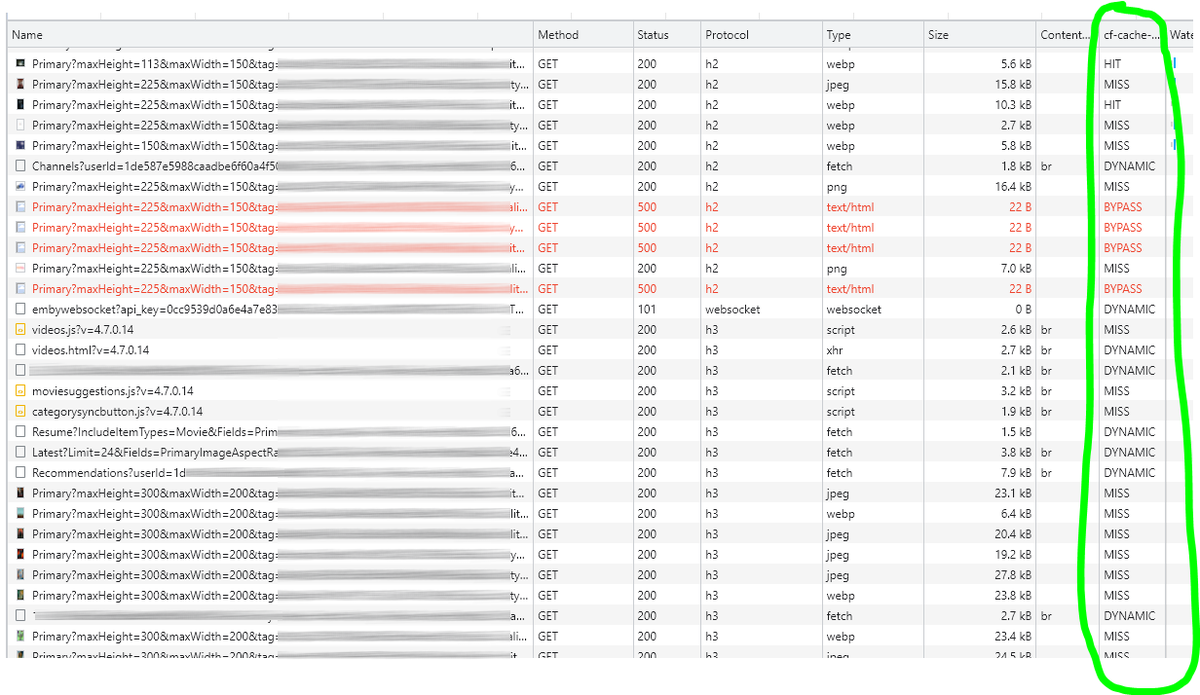
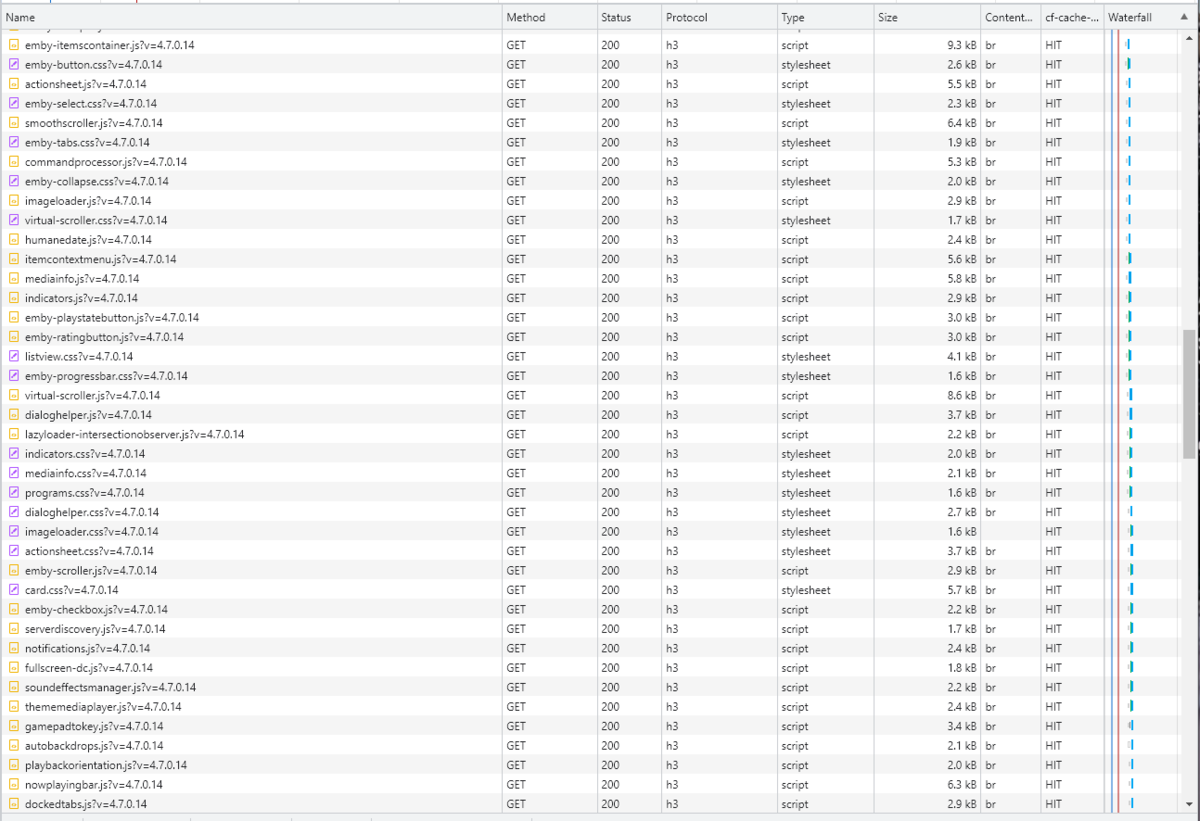
 1 point
 -
NGINX and emby Config Version 1.0.4 Last Update 1-1-2024 Update by Pir8Radio Why Use NGINX reverse proxy ahead of my application servers like emby? With NGINX or any reverse proxy ahead of an application server you have more control over your setup. You can do things the application servers were not built to handle, have better control over your security and logging, replace lines of code without editing the application server code, better control of caching, etc, etc.... One of the main reasons is so that you don't have to open a new port on your firewall for every application server you host, all you really need to open is 80 & 443 and the internet can reach all of your different servers through one entrance. Will NGINX work on my OS? Most likely, you can find various versions of NGINX for most OS's and they come in different flavors, with options baked in, or just the bare NGINX that you need to compile. See below for download links to get you started. Will NGINX break things on emby? Absolutely if you don't configure it correctly! I HIGHLY suggest when choosing a scheme to setup your domain URL you choose SUB-DOMAIN and NOT sub-directory, more below. Also if you come to the emby forum with things not working, or issues you have and you use a Reverse Proxy, PLEASE make sure that is one of the first things you mention in your forum post. ESPECIALLY if emby works on one platform or client, but not another. So many times people complain "but it works on chrome, so I didn't think it was the reverse proxy". Mention you have a Reverse Proxy please. If the reverse proxy is setup correctly it should be totally transparent to the user and the application server (emby). I'm not going to go into how to purchase and setup a domain name. Lots of how-to's on that out there. Once you have a domain name and its pointed to your IP address, you can go to that domain name and hit your server then continue on.... Sub-Domain vs Sub-Directory: Lets say your domain name is: domain.com there are two main ways you can direct traffic from the internet to your backend application servers like emby. One is sub-directory, something like domain.com/emby or domain.com/other-server This is doable in nginx, but there are some catches and you need to know how your reverse proxy and application server work in detail.. This often breaks different features in emby and other application servers.. To keep with our "Totally Transparent" goal sub-directory doesn't work well, it requires a lot of rewriting and work-arounds to make it work smoothly, if you choose sub-directory you will run into issues you will need to address. The other option is Sub-Domain, this is the cleanest, most transparent, easiest to setup and maintain, it's also what I highly suggest you setup. A sub-domain looks like: emby.domain.com or other-server.domain.com The below config is based on Sub-Domain I will include a sub-directory example as well. NGINX Downloads: Official nginx downloads(LINUX): nginx.org Official nginx downloads(Windows): nginx.org WINDOWS users I suggest this version: nginx-win.ecsds.eu download links are at the bottom of the page. This Windows version has lots of cool features compiled into it already, and is optimized for windows. They keep up with updates, its a FREE (for non-commercial) third party build that I highly recommend. Additional Links: Content Security Policy info (CSP) (For Advanced Users): A CSP WILL break your server if you don't know what you are doing, I suggest reading up, lots of googleing, and understand what a CSP's function is and is not prior to venturing into this area Example NGINX Reverse Proxy Config: 3-29-2020 - ADDED A LINE FOR CLOUDFLARE USERS SO THAT THE X-REAL-IP HEADER IS CORRECTED. THIS ONLY EFFECTS Cloudflare USERS. 4-11-2020 (V1.0.1) - MOVED proxy_buffering off; FROM LOCATION BLOCK TO SERVER BLOCK 12-18-2020 (V1.0.2) - ADDED 301 SERVER SECTION TO FORCE ALL TRAFFIC TO SSL. 9-23-2021 no nginx config change, but cloudflare changed how they cache video files, so emby users that use Cloudflare now need to add a rule like below to make sure video is seekable and playable. 8-18-2022 - added a line for photo sync to cover large uploads of videos and images. (client_max_body_size 1000M;) 1-1-2024 - changed http2 setting per @weblesuggestion in this thread post # 1309363. ** The below "Page Rules" are only needed for Cloudflare CDN users, otherwise ignore. worker_processes auto; error_log logs/error.log; events { worker_connections 8192; } http { include mime.types; default_type application/octet-stream; server_names_hash_bucket_size 64; server_tokens off; ## The below will create a separate log file for your emby server which includes ## userId's and other emby specific info, handy for external log viewers. ## Cloudflare users will want to swap $remote_addr in first line below to $http_CF_Connecting_IP ## to log the real client IP address log_format emby '$remote_addr - $remote_user [$time_local] "$request" ' '$status $body_bytes_sent "$http_referer" ' '"$http_user_agent" "$http_x_forwarded_for" $request_time $server_port "$http_x_emby_authorization"'; log_format default '$remote_addr - $remote_user [$time_local] "$request" ' '$status $body_bytes_sent "$http_referer" ' '"$http_user_agent" "$http_x_forwarded_for" $request_time $server_port'; sendfile off; ## Sendfile not used in a proxy environment. gzip on; ## Compresses the content to the client, speeds up client browsing. gzip_disable "msie6"; gzip_comp_level 6; gzip_min_length 1100; gzip_buffers 16 8k; gzip_proxied any; gzip_types text/plain text/css text/js text/xml text/javascript application/javascript application/x-javascript application/json application/xml application/rss+xml image/svg+xml; proxy_connect_timeout 1h; proxy_send_timeout 1h; proxy_read_timeout 1h; tcp_nodelay on; ## Sends data as fast as it can not buffering large chunks, saves about 200ms per request. ## The below will force all nginx traffic to SSL, make sure all other server blocks only listen on 443 server { listen 80 default_server; server_name _; return 301 https://$host$request_uri; } ## Start of actual server blocks server { listen [::]:443 ssl; ## Listens on port 443 IPv6 ssl enabled listen 443 ssl; ## Listens on port 443 IPv4 ssl enabled http2 on; ## Enables HTTP2 proxy_buffering off; ## Sends data as fast as it can not buffering large chunks. server_name emby.domainname.com; ## enter your service name and domain name here example emby.domainname.com access_log logs/emby.log emby; ## Creates a log file with this name and the log info above. ## SSL SETTINGS ## ssl_session_timeout 30m; ssl_protocols TLSv1.2 TLSv1.1 TLSv1; ssl_certificate ssl/pub.pem; ## Location of your public PEM file. ssl_certificate_key ssl/pvt.pem; ## Location of your private PEM file. ssl_session_cache shared:SSL:10m; location ^~ /swagger { ## Disables access to swagger interface return 404; } location / { proxy_pass http://127.0.0.1:8096; ## Enter the IP and port of the backend emby server here. client_max_body_size 1000M; ## Allows for mobile device large photo uploads. proxy_hide_header X-Powered-By; ## Hides nginx server version from bad guys. proxy_set_header Range $http_range; ## Allows specific chunks of a file to be requested. proxy_set_header If-Range $http_if_range; ## Allows specific chunks of a file to be requested. proxy_set_header X-Real-IP $remote_addr; ## Passes the real client IP to the backend server. #proxy_set_header X-Real-IP $http_CF_Connecting_IP; ## if you use cloudflare un-comment this line and comment out above line. proxy_set_header Host $host; ## Passes the requested domain name to the backend server. proxy_set_header X-Forwarded-For $proxy_add_x_forwarded_for; ## Adds forwarded IP to the list of IPs that were forwarded to the backend server. ## ADDITIONAL SECURITY SETTINGS ## ## Optional settings to improve security ## ## add these after you have completed your testing and ssl setup ## ## NOTICE: For the Strict-Transport-Security setting below, I would recommend ramping up to this value ## ## See https://hstspreload.org/ read through the "Deployment Recommendations" section first! ## add_header 'Referrer-Policy' 'origin-when-cross-origin'; add_header Strict-Transport-Security "max-age=15552000; preload" always; add_header X-Frame-Options "SAMEORIGIN" always; add_header X-Content-Type-Options "nosniff" always; add_header X-XSS-Protection "1; mode=block" always; ## WEBSOCKET SETTINGS ## Used to pass two way real time info to and from emby and the client. proxy_http_version 1.1; proxy_set_header Upgrade $http_upgrade; proxy_set_header Connection $http_connection; } } }

 1 point
 -
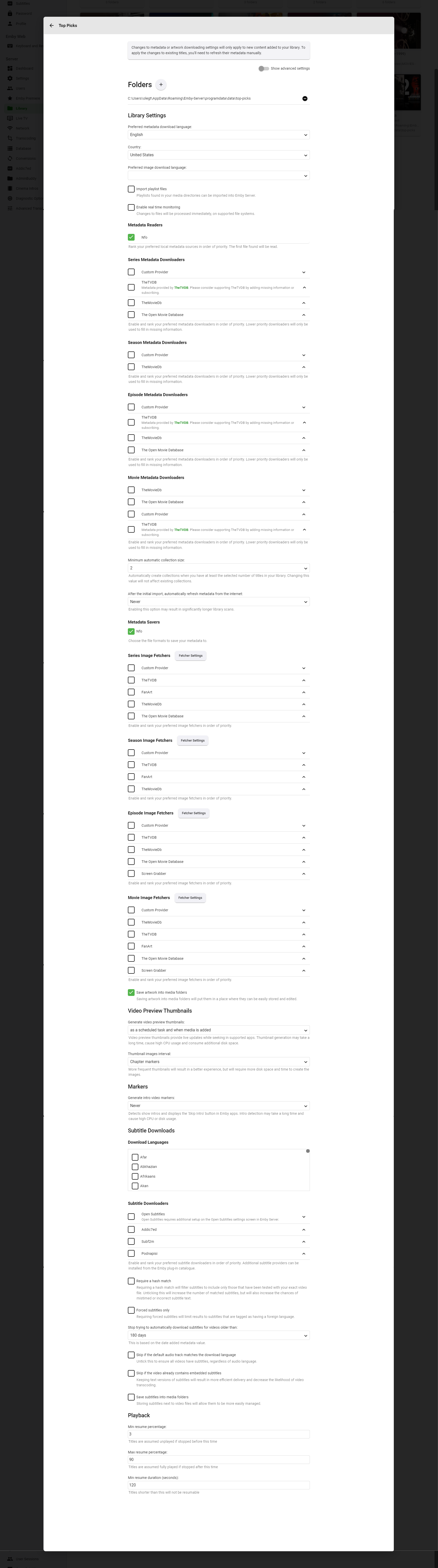
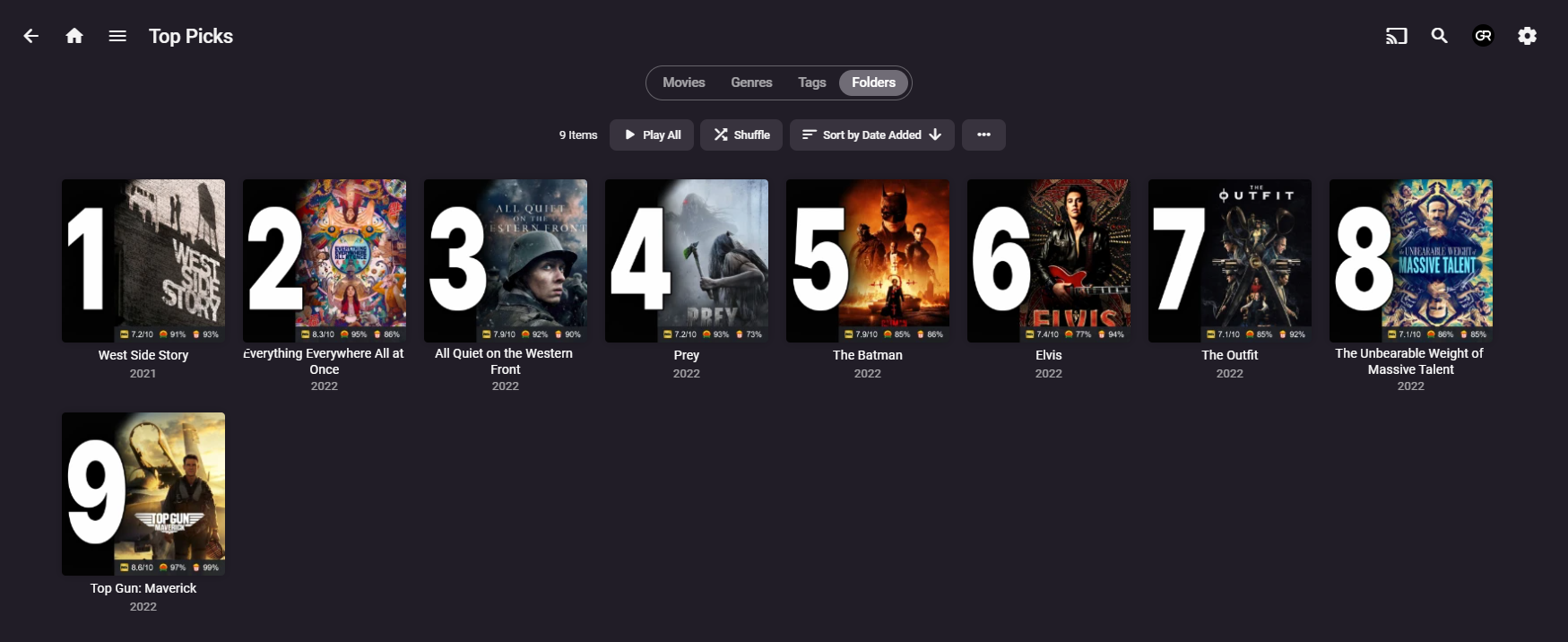
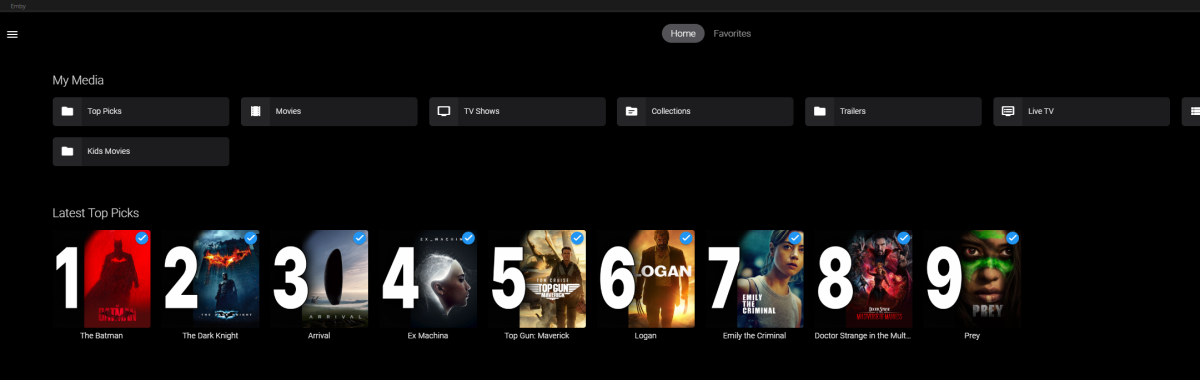
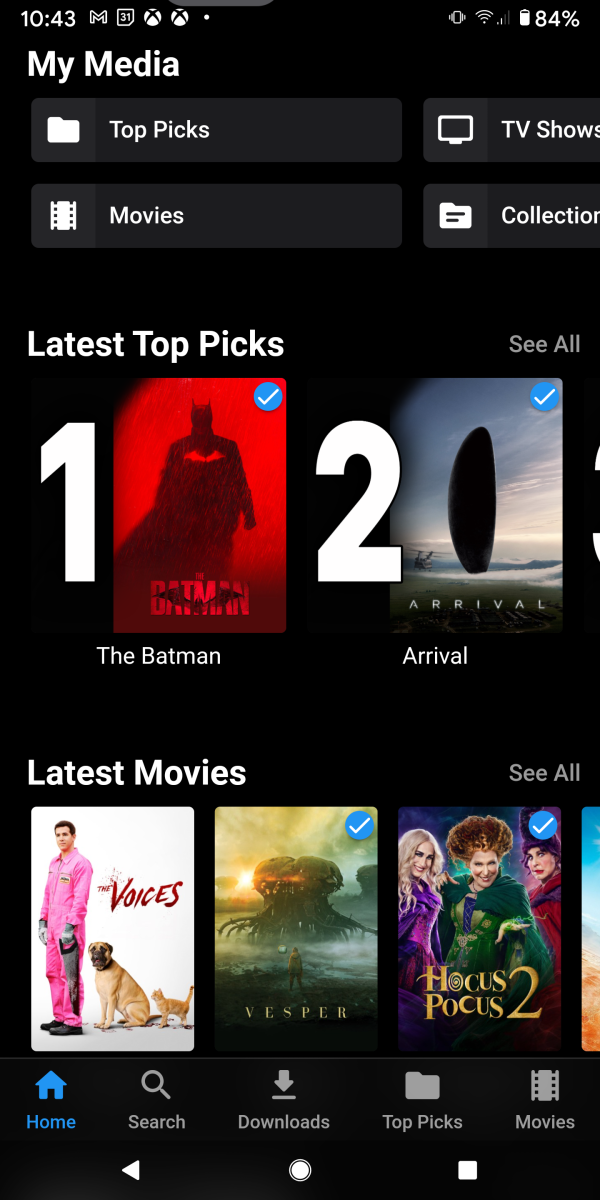
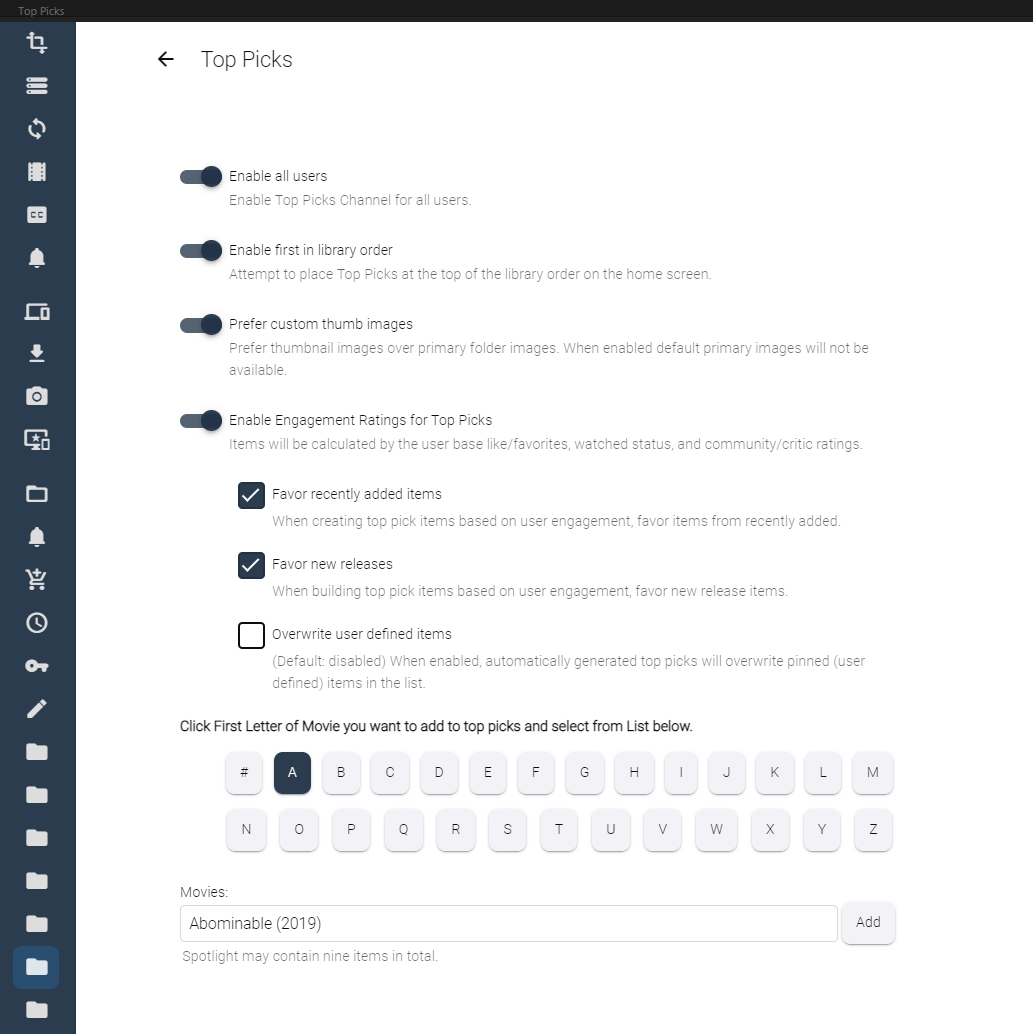
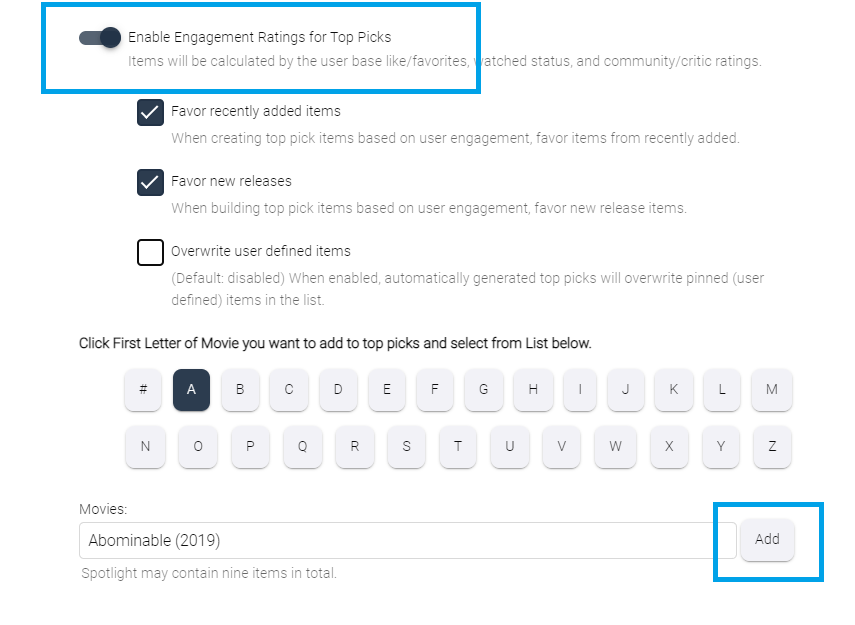
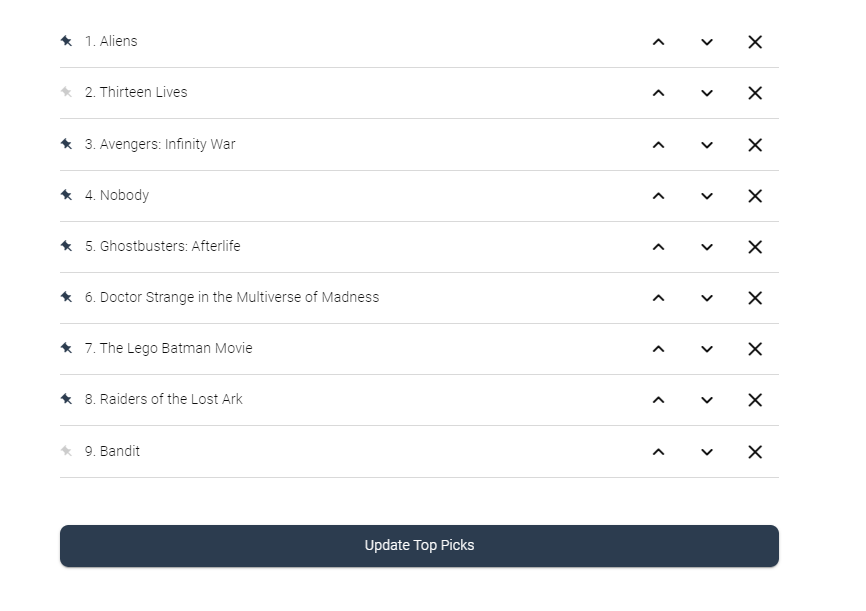
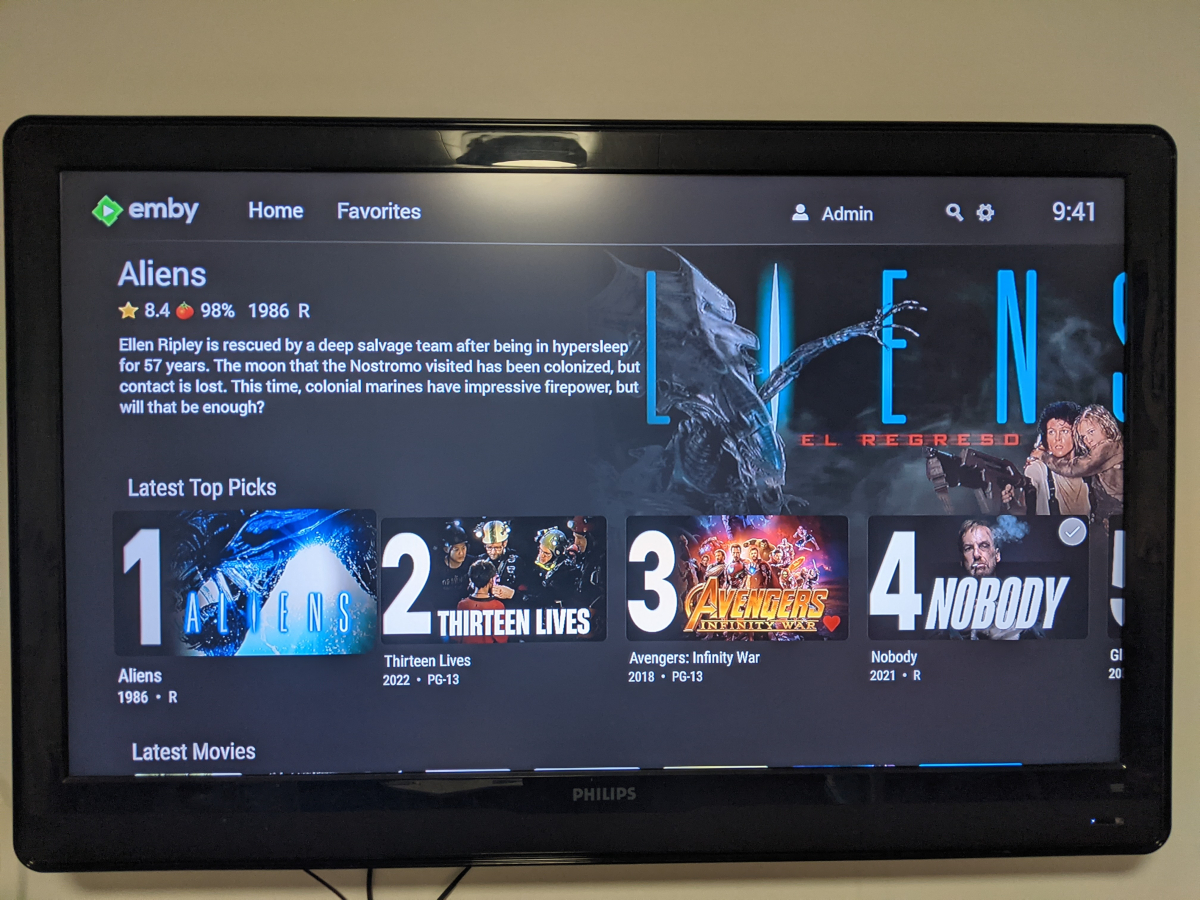
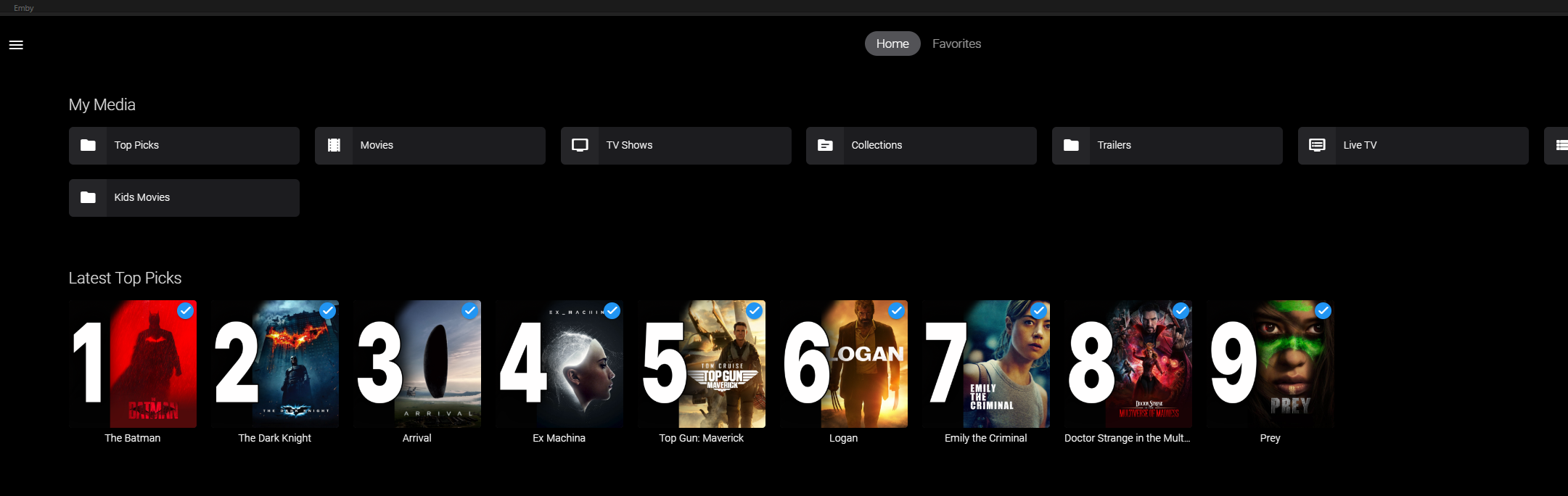
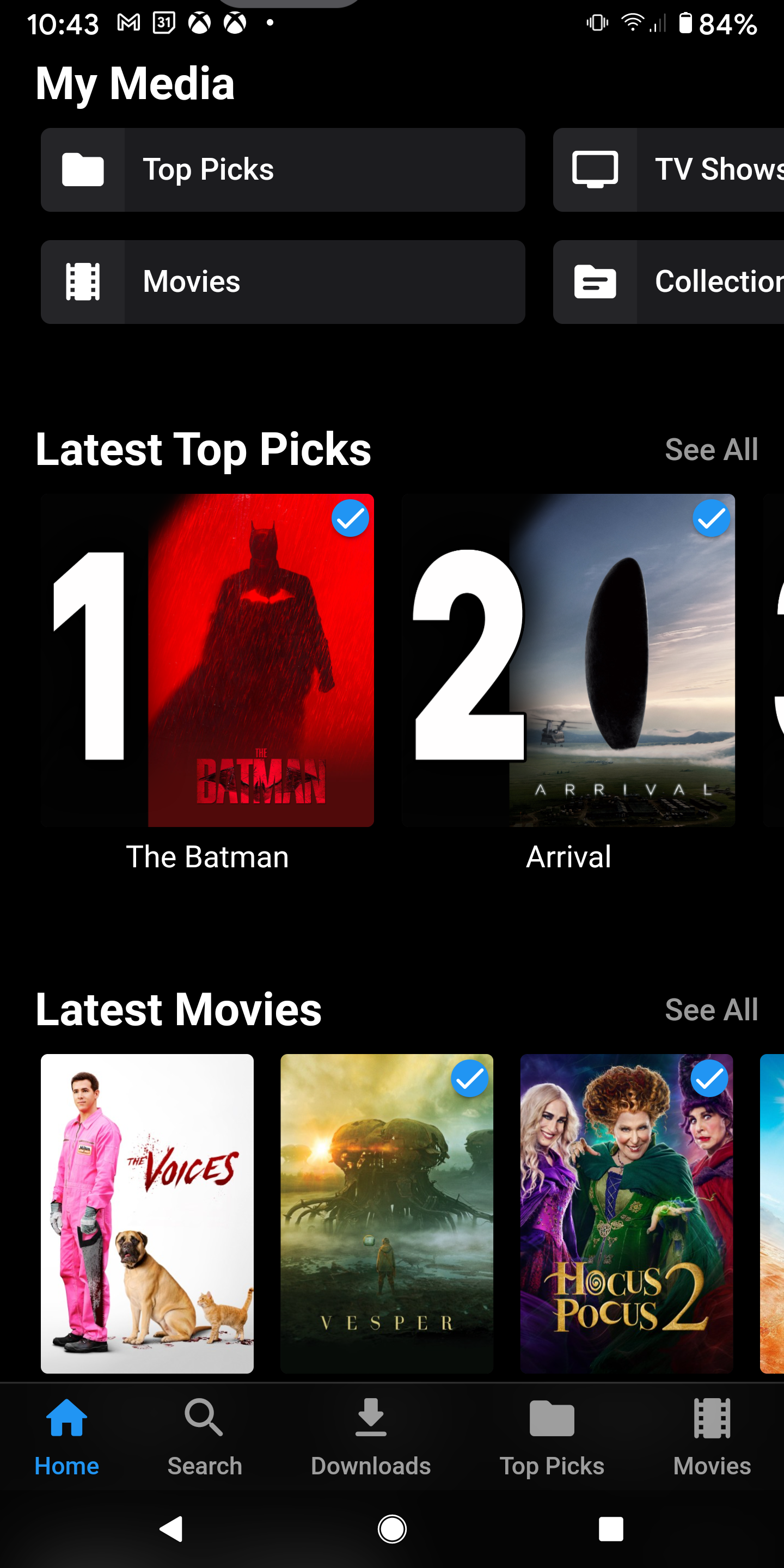
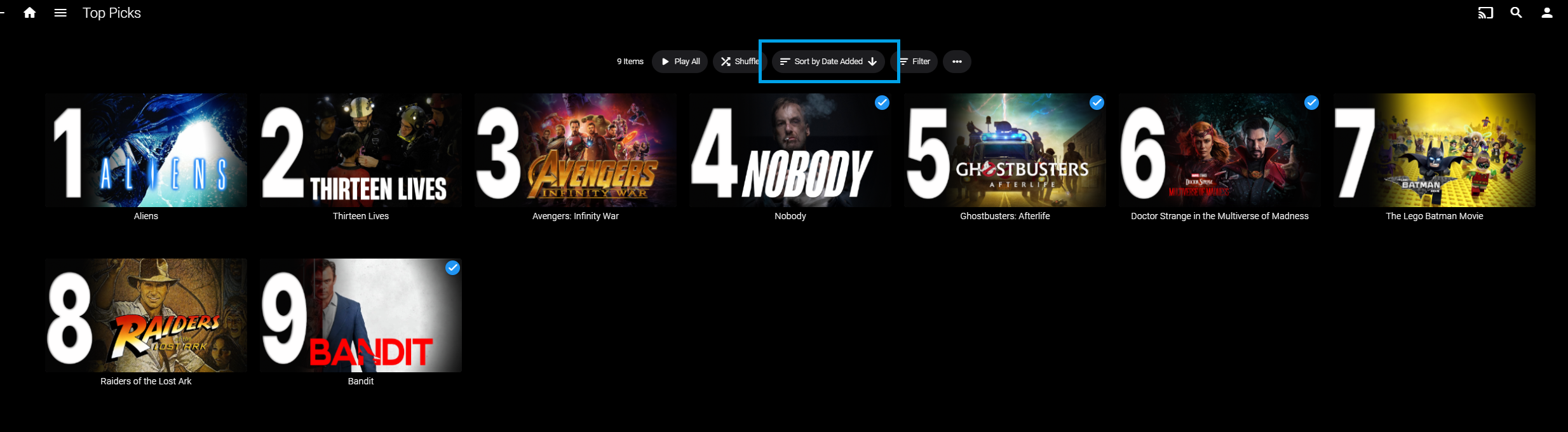
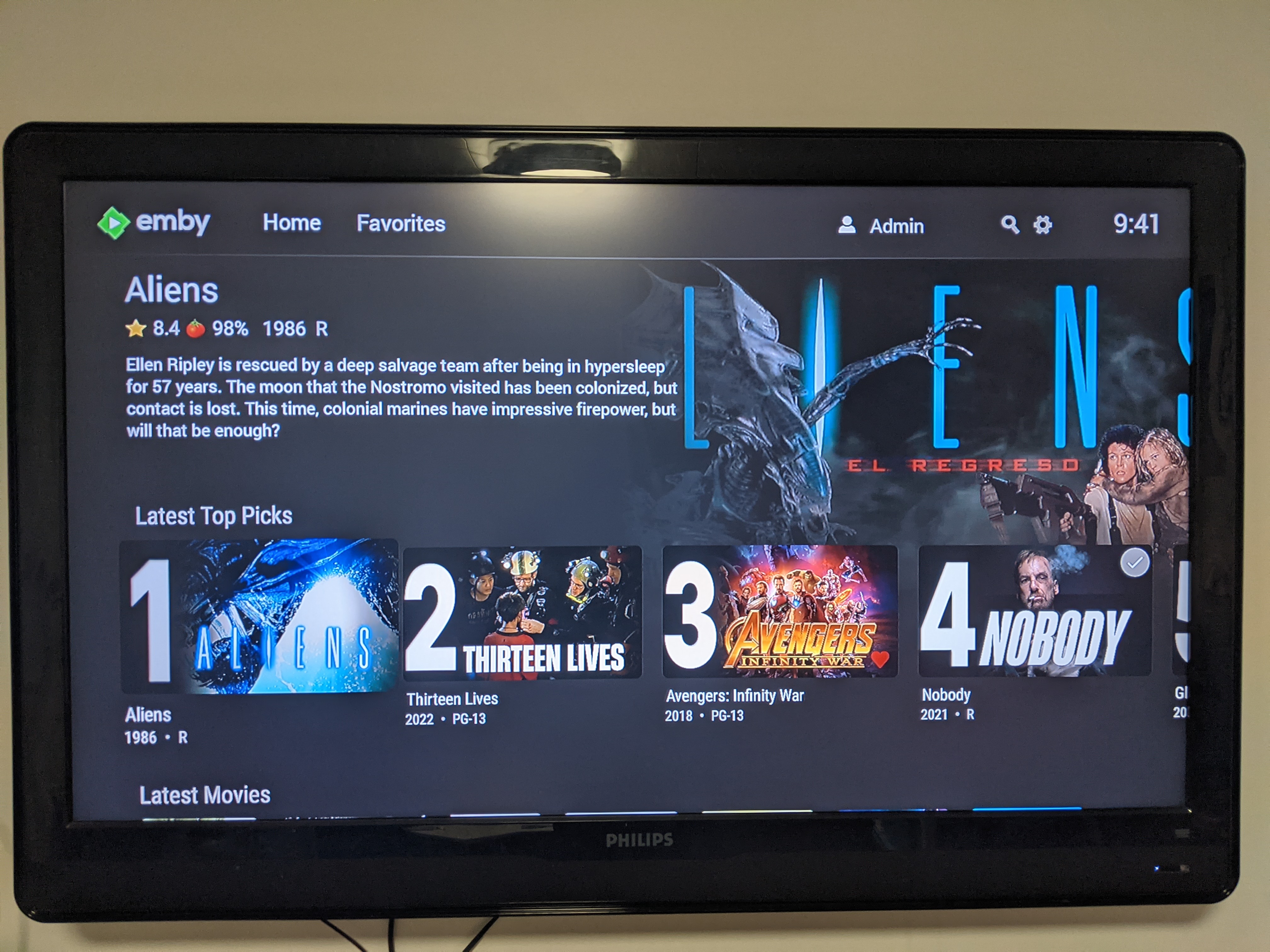
Welcome to Top Picks Top Picks will create a custom movie library with ranked items to share with your user base. Enabling settings in the top pick configuration will allow you to create a library based on your user engagement, and also customize what's being shown in the library. Note: Larger movie libraries will have the best chance at generating user engagement top pick items. Smaller libraries may only generate a couple top picks automatically. Critic rating, and community rating do play a part in choosing top pick items, along with User Likes/Favorited Items, and also Watched States. Creating, and editing the Top Picks List: After enabling, and running the scheduled task for user engagement (which will populate an initial list, but is also completely optional), you can also customize the library by adding movies of your choosing, and add-to/edit the top picks list to a maximum number of 9 items. It is important to note that users of the Top Picks library should not hide watched content from their home screen. This will ensure that all the content added to Top Picks is shown in the home screen layout. Pinning Items to the list: These items remain during the engagement rotation. This means that only auto generated items will be replaced weekly. Note: List item rotation will only happen when items are available in the library which meet the engagement criteria. This may lead to some manual up keep of the list. (In the image above, only the 2nd, and 9th item are allow to change, because they are not pinned to the list. However, the item changes will be based on the engagement results, and may not change based on the current state of the library and user engagement stats.) The more your users engage with the library, the more dynamic top picks will create lists. Favor custom thumb images over primary images: Favor custom primary images: Mobile: Android Enhanced Home Screen Layout Entering the Top Picks library you should choose to "Sort by Date Added" to have the images order themselves. There is a week long trial to test it out, after you install it from the catalog. If there are any questions please post them here in this thread. Please be kind, a lot of time, and work went into this. I'm open to further discussions regarding things that might make Top Picks better in the future as well. - chef Version 1.0.0.20 theme media is now added if it exists for a library item. Version 1.0.0.19 Current NFO files that exist in the library are now successfully used and properly altered for top pick items. This stops Emby from having to try and identify items which are already properly identified in the library. The ability to target a specific library for top pick creation. Version 1.0.0.18 Library items now have the option to show the top pick tag or not. Top picks drawing classes now attempt to draw custom thumb/primary images in memory without saving assets until complete. Version 1.0.0.17 Library is created with servers language for metadata retrieval. Top Picks will now search providers for missing resources to draw custom images for the library

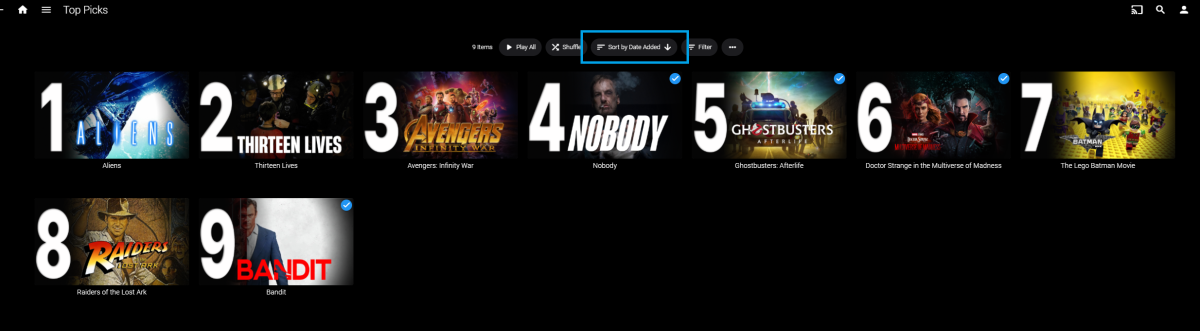
 1 point
 -
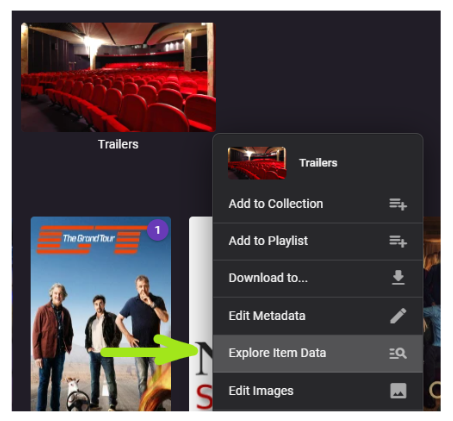
This is another brand-new plugin which is available in the catalog now: Emby Data Explorer Important Note Make sure to clear your browser cache after installation and restarting the server! History In 2016 I was working on Metadata Providers and wanted to see and better understand which metadata is coming from which provider and which information was actually taken by Emby Server. In turn, I had created the MetadataViewer Plugin. Later, it became outdated and I was no longer around to update, so eventually it had to be pulled due to incompatibilities after the server had evolved. Meanwhile, there had also been an idea for a "Backstage View" plugin with the purpose to provide some low-level insights into Emby item data, but it never took off. This month, I came back to some work on metadata providers and I had the same problems again, which ended up in creating this plugin. It's a fusion of the MetadataViewer plugin and the Backstage View concept - with a name that leaves room for more... Beta For now, it's available for the beta server only It's been done in two and a half days, so please report bugs in case you find any How it Works The plugin adds a new entry to the Item Context Menu: This will open a dialog for data display: This dialog is the one and only UI that the plugin provides. Everything is happening there. I will describe individual features in subsequent topics. ENJOY!

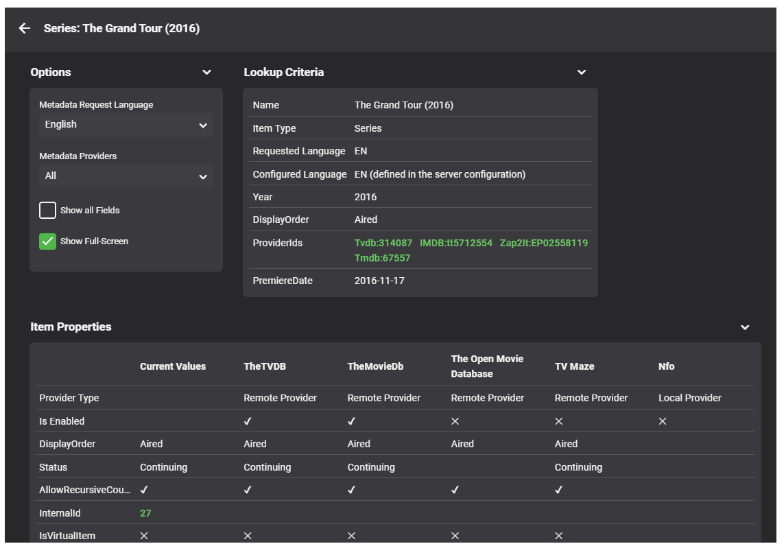 1 point
 -
I would like the ability to force themes on apps from the server side. Such as holiday themes, halloween and christmas. OR, I would like to be able to set my own date ranges for holiday themes. I would like to have them run for a week, instead of a single day.1 point
-
Not sure why the individual subnets didn't work but glad it is working now.1 point
-
Hello! with 192.168.0.0/16 I reach everything A thousand thanks!!!1 point
-
....and to also buy two, three, four of SAME Provider (different login Creds) and have Emby Combine into two, three, four, connections without duplicating the Channels. In other words, take a 1 connection service, buy 5, Emby combine and have our "5 Family & Friends" be able to watch different channels without 10 Zillion dupes.1 point
-
This is not what we are trying to accomplish. The goal is to use 2 different providers on the same channel to combine lines and for availability. If one of your providers goes offline in your scenario, half your users are down. TVheadend accomplishes this and is the solution. Anyone trying to cobble anything else together is really doing themselves a disservice to their users. Emby has said to use TVH.1 point
-
Okay, I'm on this today.1 point
-
yes, as said browser shows the 100 seconds timeout error code by cloudflare (code 524). Implementing some alphabetical list to choose a letter from before all movies are being loaded would solve the issue here I guess - not sure how much efford that would take to implement it. Btw top picks shows tv shows although Content type is set to Movies.1 point
-
fantastic, didn't know that. Hope it won't mess with my Kodi install. Will test later during the week end, that's all for now. Will come back to the forum later as i am (re)discovering Emby and have a few other things i haven't figured out yet. thanks again1 point
-
Update - Just checked on things today and there is great improvement. Most users are up to .71 and the transcode folder seems to be getting cleared up. Hopefully, this issue is something that can be listed as solved. The old habit of restarting Emby will be tough to kick, so will use it as a reminder to keep an eye on the folder. Will report back if it reoccurs.1 point
-
Hard agree on the above!!1 point
-
oh, ok, then everything is as I understand it. This is not ideal because a major point release typically takes 1+ months to stabilize, so it may be a while until this gets fixed on my system then. However, I understand that you have to look at the larger picture, and if this means that I have to wait, then so be it and I will stick with 4.7.9 in the meantime. Thank you again for a great software. Cheers!1 point
-
hey guys yes, I think this is the case for me. I tried to replicate the error but was not able to. Thus, what I did is schedule recording from only one channel from the m3u playlist; so far it has been working great. Everytime I would add 2 or 3 channels extra to record from same m3u playlist that has same streaming server, it seemed to crash and not record all the channels. From what I looked into it, it seems that the channels are working best if played one channel at a time. Yes i tried this in the past and it crashed faster, agree. Agree with this, yep, they should be separate recordings. Thanks a lot guys, I can't stress enough how awesome support you have, I am beyond impressed! You've all been super helpful and gave me very clear explanations, thank you! The issue that I have is that the streaming provider limits connections most likely. Since I first asked you guys, I tried to record only 1 x channel at a time, and it works just beaufully nice, no error. Thank you once again!1 point
-
You were correct. Hopped on to our test container last night & added the 2nd tuner, via a 2nd xteve container. Exact same channel line up, channels numbers, epg-id, etc. Showed duplicate channels.1 point
-
There is no issue, no crash, nothing odd reported in the log. Last was an Emby server http query Audio. Also I have nothing changed in the sync code in 7.11.1. Maybe Kodi 20 related? Probably they have changed the database schema.1 point
-
Yea cool I can live with that! Nfo's/images also get stale over the years, unless you do a total lib refresh (where nfo's are used to avoid that sort of thing ). No big deal, all good. Cheers.1 point
-
NFOs are the only way to preserve customizations. Yup, same principle as if rebuilding a library from scratch: if you store NFOs (and/or artwork) with your media, those will be read (including your customization) - if not, metadata is scraped from online providers and all your previous customization is lost. Top Picks items are new items as far as Emby is concerned, they're not copies of existing db items, they get their own db entry and are treated as such: read already available metadata (from existing NFO) or go online and fetch it.1 point
-
Yup. Is your preferred scraper order in your Top Picks library same as in your main libraries? Yup, and as per above question, if that order ain't the same it'll reach out to different provider first which might or might not have exact same data.1 point
-
Yea cool, my setup is a little different to yours. I think you use a external media manager and have images/nfo's stored with your media? I don't and just use emby's db. It still works out ok for me image wise (thumb). It seems to grab the right fanart/logo to create the image. The thing I find is the metadata for the "Top Picks" movie will be a bit different to the main movie.. eg. Parental rating and minor stuff like that. Not a big deal! I guess it's because I don't have nfo's with my media and it could have to re-scrape that sort of info? Or more like I had to edit Parental rating to match my region and it's not picking that up.1 point
-
Well it is definitely the little things that count. I changed it to "{path}" and all is working. Thanks for catching that!1 point
-
The option to play from start really shouldn't be any different whether you are using ComSkipper or Scripter-X or not. When you use Scripter-X is the .edl created? do you have live_tv=1 set in your comskip.ini? Also comskip does a much better job detecting commercials when it's done analyzing the hole recording, so much so that I don't use the live feature because of this.1 point
-
And if one does roll back, there is no guarantee that DFA will even work. I tried this with 2 2019 shield pro even diligently comparing all settlings both shield and nas with @FrostByte all to no avail.1 point
-
Per the original post the question would be are you depending on Port Mapper or manually configured port forwarding? As that error is related to automatic port mapping.1 point
-
Please ignore... solved. i needed to use a different URL from source provider for Emby.1 point
-
Currently is it so, that when I set up view times for my kids I've to delete them all during vacancy and have to set them by hand again during school time. I think it would be nice, if could activate or deactivate the plan I made.1 point
-
Good point. I do have 3 of the 4 NICs bonded already. I once ran it on a PC but quit that when I got a NAS. Now that I use Docker for everything, transportability to the PC for even a quick test shouldn't be difficult.1 point
-
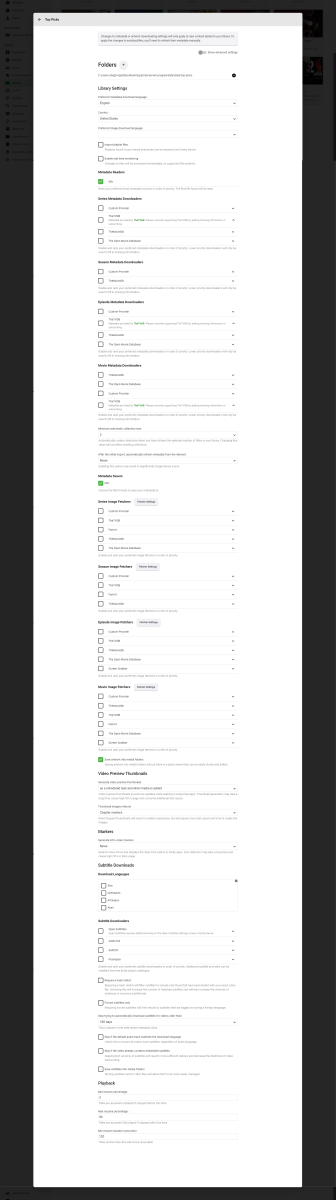
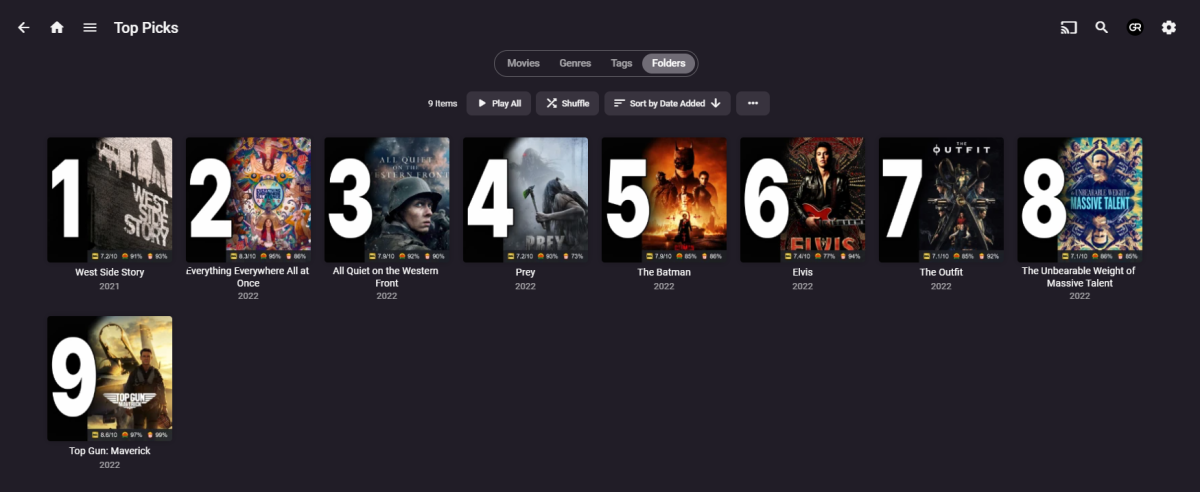
Having no issues with Top Picks pulling only local content (metadata/images), as all my library scrapers/fetchers are disabled and all my custom artwork is used.
 1 point
 -
Sorry but that is just how TVDB does it.1 point
-
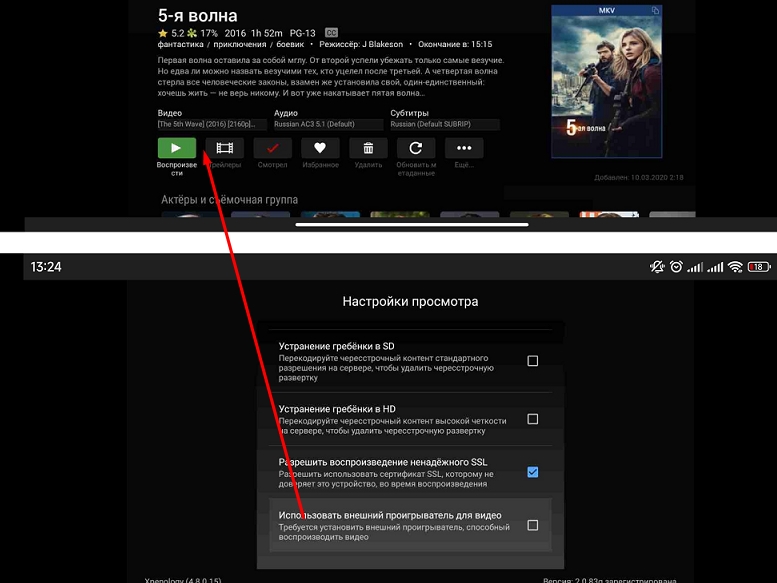
You can make an external player available before the movie starts. Otherwise, you have to go into the settings every time and switch between the system player and the external player.
 1 point
 -
+1 for this. Would be great to be able to turn on the holiday theme for all clients.1 point
-
Is it possible to change the defaults of these themes to show up more than 1 or 2 days a year. It would be nice if the admin could ether change how long they showed or make them at least 2 to 3 weeks each.1 point
-
Attn: Luke or whoever does this, I would love to have a section to request themes for our server on here or let us know how we can add the themes we want on our server. Officially I would love different carbon fiber style themes Luke black,grey,silver,blue,all the colors carbin fiber Officially comes in because I love carbon fiber texture look. This shouldn't take any time at all I hope Also it would take a lot of work away from you to let us know where we can add themes at in the files or please add a plugin to allow us to add themes I'm sure people would Like this as well I mean the themes you have to choose from are good but it would be awesome if we could use what we want you know. Thank You have a great day1 point
-
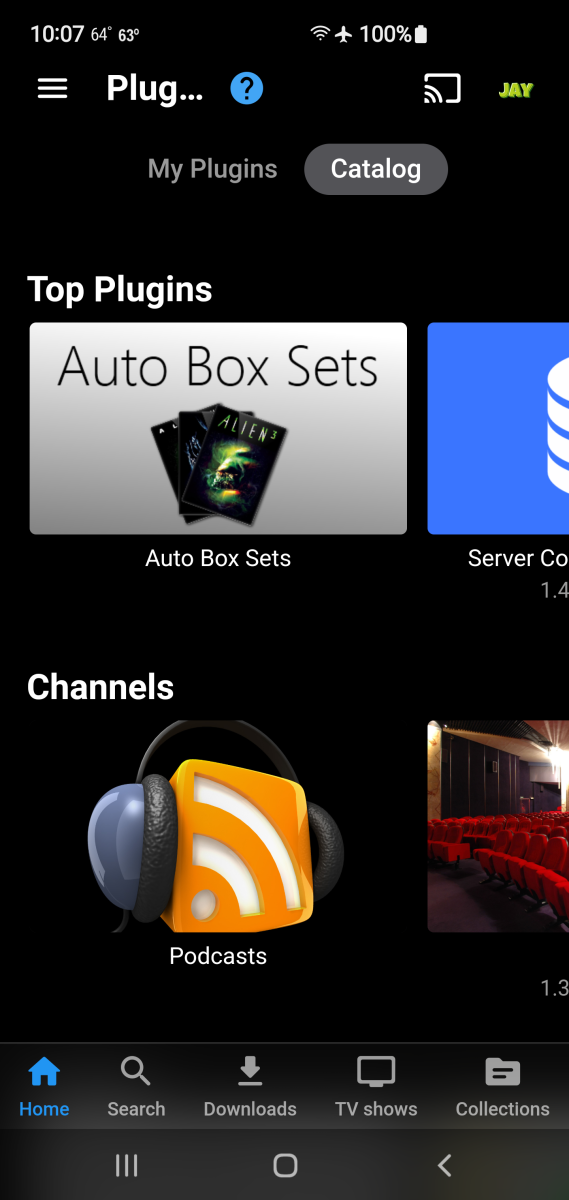
Was talking about a local plugin not an external one like outside of emby. Everything should be internal that way we know it would work for what it was built for and that's it
 1 point
 -
Custom css per app would be great and is feasible, because most apps share the same code as the web app of the server. An exeption is the Android TV app.1 point
-
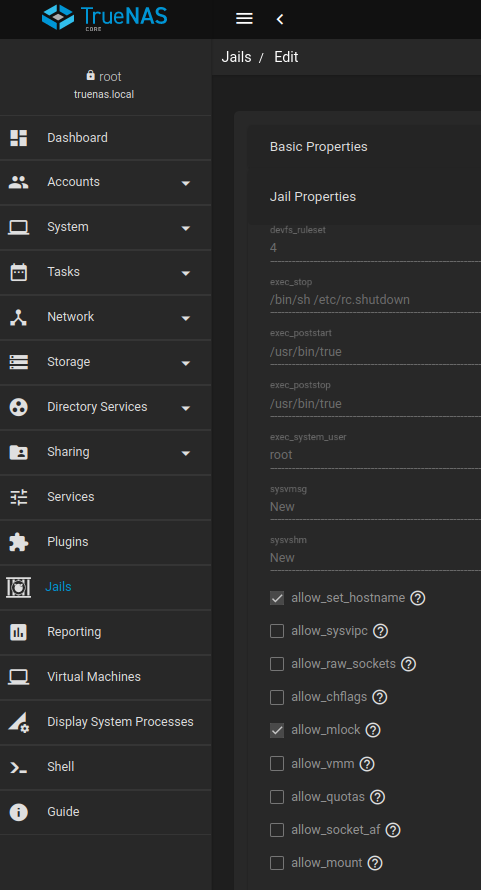
The mlock issue is killing almost any BSD installation. if you ran top you would see that emby is disabled something like nlnslp which means it can't be started. clicking the allow_mlock checkbox solves the problem
 1 point
 -
It's what I plan. But I can't manage to have the relationships in the database items to create the correct scripts. It would be a great feature for a future release to have the baility to "Move media files to a new location" in the Emby dashbord. Don't you think ? Even if I don't know if it does worth it since it's not an usual process....1 point
-
and thats why you should/can turn things like this off for your specific use case1 point
-
Please tell that to my users who call to complaint that something is wrong with Emby. And for the record Halloween is not an international holiday, meaning many users will not make the connection when Emby suddenly starts howling at them.1 point
-
Halloween theme works fine for me, showed up automatically a few days back when I went to watch a movie.....but this was on my Firestick 4K. I got the howling as I opened Emby, orange accents and buttons and suggestions on what to watch Halloween related from my collection. It's nice, if it didn't work that would be fine but it's a nice touch. My only suggestion for a theme like this is to have it all month so I can enjoy it longer. Every TV station has Halloween all month long so why can't we? (It's my favorite holiday....even though it's not actually a holiday)1 point
-
There is definitely an outstanding feature request for user control over holiday themes. I know cos I raised it The topic comes up annually at this time1 point
-
How about a write-up on how we could create these themes ourselves, and move the bit of code that fires off the seasonal theme to a scheduled task? That way, those of us that are so-inclined can create our own seasonal themes, share them on the site, and enable/disable them from the scheduled task?1 point
-
or, or, you could have implemented the request to give users more control over this. Expect to receive similarly harsh feedback until you do1 point
-
You only get negative feedback, because people who like them, don't say a thing.1 point
-
Meh... I love it, and people can turn it off, so forget 'em.1 point














.thumb.jpg.ef7a5c5053bd4685aeb82c5be20b79ad.jpg)