
Leaderboard




Popular Content
Showing content with the highest reputation on 12/01/22 in Posts
-
Yes this is reproducible as drawer is not affected by Library access.2 points
-
Actually it was this. I have a Thrustmaster TCA joystick and when I disconnect it the issue is gone.2 points
-
This is what bewilders me about Luke's question. It is like he has never seen the apps.2 points
-
Hi, Thank you for the great product. It is a pleasure to use it. I have seen some posts but they are years ago regarding my request. Is there a plan to have notification (when adding movies, shows, live tv etc.) from the emby app ? This means to get a push message on my android phone, iphone, windows app, etc. With 3rd party software its not so cool. Thank you.1 point
-
I'm a big fan of services such as Rifftrax, and I hate having to manually mux files every time I purchase another release. Much in the same way that external subtitle file support was added, it would be nice to have external audio track support for TV and movies added as well. I wouldn't expect Emby to handle the offset calculations needed to sync the audio. It's not too difficult for me to modify that now.1 point
-
I have a fairly large movie collection (5k+) starting with films from the 1920's and in the absence of "smart" playlists how about a filter by decade option? Filtering by year works, but if I want to watch something from say the 1950's I have to start navigating from the 1930's and work my up to the 1950's which is quite a few number of pages. Another option might be to have Years running vertically much like the alphabet when viewing by title.1 point
-
I've created the Playlist. You were right..... I could swear the time I tried it the items were deleted as I watched. The only view is the default list. Would be nice if you could choose the thumbnails like in movies. Maybe a wishlist item?1 point
-
Yes I have been thinking about that. I thought perhaps if it could see that the modified or perhaps created file date on the filesystem was sometime after the added date in metadata it could use that. Then perhaps later in the future it can be made more accurate by tracking some history in the database or something1 point
-
Right. That is not ideal, and I was hoping there was a way to just flip the bits in-place like you showed with MP4Box (thanks!), but the remux took just a few seconds so it doesn't bother me. You showed me another way.1 point
-
Yes, it is a good strategy to have fewer annoyed customers that you can work with to find improved solutions over time versus getting unilaterally and irreversibly kicked out of the stores (or attracting federal law enforcement) and angering and losing even more of your customers.1 point
-
1 point
-
I like adding this to hover for the library menu thumbnails. Try it and see if you like it. .verticalSection.section0.focusable.emby-scrollbuttons-scroller > div.padded-top-focusscale.padded-bottom-focusscale.padded-left.padded-right.emby-scroller.scrollX.hiddenScrollX.scrollFrameX > div > div > div:hover, .verticalSection.section3.focusable.emby-scrollbuttons-scroller > div.padded-top-focusscale.padded-bottom-focusscale.padded-left.padded-right.emby-scroller.scrollX.hiddenScrollX.scrollFrameX > div > div > div:hover { transform: scale(1.06); margin-bottom: -3% !important; border: 1px solid #7372e9; box-shadow: 0 0 10px #719ece; }
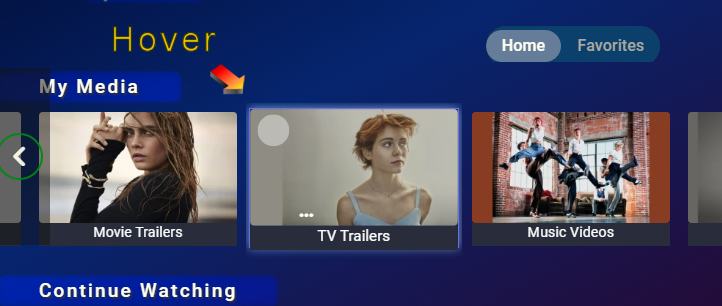 1 point
 -
And I just want to point out again that the device limits are not designed for us to make more money. Their primary purpose is to make it much harder for someone to use our platform for an illegal streaming service.1 point
-
Ok. Thank you so much for your help!1 point
-
I will try later aas im in the middle of a new library folder being added and scanned. Thanks.1 point
-
At least I found one issue, will be fixed in next version. I'll release it tomorrow.1 point
-
I can assure you have not been forgotten1 point
-
Unfortunately we can not predict future power outages and plan before the outage to run the app.1 point
-
Got it! I'd love to play around more with XAML to replace some of my PowerShell forms, but without external modules it's horrible to implement...even with some of the modules out there it's still no fun. There's subscription-licensed tools like PowerShell Pro, and perhaps I could give those a try.1 point
-
I need some reading glasses or something. Now that I look at it, its kerning is off a bit too. Not having much of a knack for JS/CSS, I assume there's a way to toy with it?1 point
-
Understood. Regardless, it visually stands out to pedants such as myself I have plenty of fixed width fonts that I use that are properly kerned. What they all seem to have in common is they're either full- or semi-serif fonts (typically full serif for uppercase). I've yet to see a complete sans-serif monospace font that looked good.1 point
-
Sry, for this weird description from my side, but I just wanted to mention this small difference between Emby and AppleTV, that when going back to the mediathek (by clicking "back" twice) that there is a small animated icon at the currently playing song in the album. But that's definitely not what I wanted to point out in this thread and possibly another, seperate topic. For me the more important point is an option to have a row-wise playlist, which I have e.g. on my iPhone with the Apple Music App. Would be interesting to know, why Apple did not integrate this on AppleTV...1 point
-
I agree. HW encoding result matches the specification. By experimentation I found that for SW the flow depends on and is controlled by the CRF setting. the lower the value the higher the flow of the SW encoder. Well, at least it is clear. Mystery solved. Actually Emby server still reported: Reducing bitrate due to quality setting. It was in plain sight, just missed to associate this message with the CRF setting. And the fact that the client application settings are ignored. In my opinion, this matter is not a high priority. It is enough to describe the limitations of the SW encoder implementation /controlling the flow via CRF and not by the client/ somewhere in the release notes. Thank you for your cooperation.1 point
-
TY, that fixed it! (no2)1 point
-
To do this 'properly' - you need to a) just target where language = Und. If you assume the first track, or all tracks - then you may well be overwriting correct metadata .. b) In single and multi-language files, assume all Unds will be the same language - as you have no way of knowing what they are. @Cheesegeezer and I had this conversation a while back when we created the mediatool box plugin - I wanted to include modifying the Unds to a specified language - but after some conversation / agreement - what is worse, not knowing the language (where you can do something about it - manually or take a guess if you are just playing it back), OR assuming a language and it then it be incorrect - not only for you, but all your users as well ? If you can guarantee the Und is lets say English - then great, you can script to find the Und track and change it's metadata - otherwise - just create a script to pull out/list the Unds and then check them imo. re the method to do this - absolutely - just change the file headers with mkvpropedit and mp4box as specified above. While you're at it - check the defaults etc as well.1 point
-
Wanted to give another update. Turns out I had the issue happen to me as well while playing through web on my desktop. Same similar crashes. Seeing that WdFilter is for Windows Defender, I've disabled it entirely and wasn't able to get the issue to happen again the few times I tried last night. I'm still on the beta as well. If the issue happens again, I'll dig some more but I suspect there's some conflict with the WdFilter driver and Emby. Unfortunately it's not so easy to update that driver or even remove it. This has been a wild issue and I hope it's going to be resolved finally. Will update again if it happens. Perhaps it isn't the Roku itself but the Roku was able to trigger it more consistently, every time we tried.1 point
-
With that naming scheme and all movies being in the same folder, it is possible that Parts 2 and 3 have been stacked, try putting each movie in it's own subfolder, rescan and see how does that compare. https://support.emby.media/support/solutions/articles/44001159102-movie-naming1 point
-
@Luke I can reproduce this one. When access to 'Playlists' is removed from the user, visibility is removed from the 'My Media' section of the home page , but it is still visible in the sidebar if you open it. Sidebar should have its 'Playlist' menu hidden/shown inline with user access.1 point
-
The problem with using FFmpeg to do this is you need to specify and input and an output file meaning the whole file is remuxed again (which takes time) The better solution would be to use something like MP4Box, which will perform an "in-place rewrite" within seconds (much like the way mkvpropedit just modifies the properties of the file) An example of MP4Box would be: mp4box.exe -lang 2=eng <filename.mp4>1 point
-
Hi Vic - I am sure that is NOT the case! I am a fairly regular user of the tool - Including up to 1.9 where I encountered issues which I PM'd you about. I saw no issue with logging on at all. Kenn1 point
-
The issue has been resolved. Thanks!1 point
-
If your files are in an MKV container, and you have the MKVToolnix pack - you can easily modify this with a simple command line: mkvpropedit <filename> --edit track:a1 --set language=en1 point
-
Sounds good. Thanks1 point
-
I'll add a option to tag library items as "top-pick-featured". But, I'm not sure about having an option to remove those tags from library items. Currently, top pick items are tagged in the top picks Library. We nuke that entire library everytime we refresh, so that is why those tags don't persist. If I tag library items, those tags will persist, and if a user wants to remove them, then that starts to generate code outside the scope of top picks.1 point
-
Still looking at the file but appears to be embedded metadata related as stripping tags file plays fine drag and drop into Chrome where original will not play.1 point
-
When things are inconsistent upon cert renewal there's a chance you left out the chain/intermediate certs from the configuration. Make sure you included the cert.pem + chain.pem or the fullchain.pem for the reverse proxy.1 point
-
In case anyone is still looking for a way to bulk edit NFO files to add a "Holiday" genre, I've accomplished this by using https://www.tinymediamanager.org/. 1. give it your movie folder(s) 2. filter on "Santa" or "Christmas" 3. Bulk Edit and add the Genre 4. PROFIT! (watch out though - "Life of Pi" shows up when filtering on "Santa" .. lol)1 point
-
For DSM7 the Emby server files are found in one of the two folders below. I'm not sure why Emby dashboard displays links or shortcuts to the actual files/folders /volume1/@appdata/EmbyServer /volume1/@appstore/EmbyServer Logs are in /volume1/@appdata/EmbyServer/logs1 point
-
You have a port mismatch. The Emby server is listening on the default ports within the container but you've specified 8098:8098. The quick and easy fix would be to edit the system.xml file and restart the Emby container. The file is in /config/config within the container or /volume1/docker/emby/config on the host if you followed the guide linked in your OP. 1. Change: <HttpServerPortNumber>8098</HttpServerPortNumber> <HttpsPortNumber>8922</HttpsPortNumber> Or: 2. Edit (recreate?) your container mapping: Local Port Container Port 8098 8096 8922 8920 The first method (system.xml) will make the Emby Dashboard settings match the container port settings. The second will show different ports between the Emby server and the container actual. Or you could do a dance starting with the default container port mapping, as #2 above. Change the ports (local) within Emby Network Settings. Then redo the container to match (8098:8098).1 point
-
Agree 100% - maybe add your thoughts to the thread I posted, but in all honesty, I'm not convinced anybody is listening on the topic ...1 point
-
....did some testing and it looks like the each episode in each season duplication thingy is again connected to my structure. With dedicated season folders in the series folder it works fine, without it seems to not know which season the episodes belong to.1 point
-
There is an entire thread with 1000's of comments as to why the current Android client is no way near the polished client the Android TV currently is. I agree 100% - the Android client is slow, sluggish, unpolished, garish, looks horrendous on an oled in a dark room etc .. and frankly doesn't warranty a place in my AV setup. It's an ongoing struggle... https://emby.media/community/index.php?/topic/89802-et-for-android-and-et-for-windows-ui-match-android-tv-app/ Back to your issue - the Android TV Client is capable of playing back 300-400 Mbit/sec media locally - I've tested this to death over years of usage on the client. It has zero issues playing back 100Mbit+ 4K DV with Full HD Audio - again, used over 1000's of hours of playback. So if you are replacing the 'LAN' with a 'WAN' you are introducing latency into the equation and that introduces variables that non-adaptive streaming simply does not cater for. Playback buffers go some way to addressing this - but ultimately, if you cannot fill these quick enough - playback will stall. If the Android App plays ok - then I suspect, it may have a bigger buffer. You used to be able to specify the buffer size in the android TV App - but I think that was removed. @ebr I don't allow my users to playback native 4k remux's for this reason - limiting them to 30Mbit/sec via the setting in Emby (to force transcoding/tone mapping if they try) but even though I have a 1000/110 connection, (the 110 up being the only thing that really matters, as I am the host/server) I would not want to go higher than this as you then open up other dependencies such as is their wifi strong enough ?, does their client HARDWARE accept this bitrate etc etc.1 point
-
ok good - I know it's now solved (and emby config problem) but you should see your connections/devices appear in this list (as established). It also proves that emby is 'listening' on the correct port. Turning off your firewall would have made no difference, because it wasn't the issue - the emby config was that Happy identified above. tbh, I was not aware that emby config in the xml even existed - so a useful post. Enjoy !1 point
-
The rules looks mostly correct as you are allowing all network type instead of just Private. You could try deleting your existing Emby Server firewall rules and reauthorize them Shutdown Emby delete Emby firewall rules Open your system.xml (C:\Users\aaron\AppData\Roaming\Emby-Server\programdata\config) Change <IsPortAuthorized>true</IsPortAuthorized> to false and save Launch Emby1 point
-
Hi Luke, thanks for replying, sorry that I hadn't really given you anything to think about... And funnily I don't have any evidence, because whilst setting up a debug session I discovered that actually the series 9 episodes of scrapheap challenge being broadcast at the moment ARE 576p, and the previous series 8 episodes that I was comparing it to were going out in 576i. They are being detected differently in the media info (in series 8 it says some are i some are p but they're all i), but the nvidia shield isn't caring about that information anyway and correctly managing the media regardless. In short, it's working great! Thanks. Ken1 point
-
Maybe you just have so many that it seems that way? The screen seems to be working ok for me, though it is overdue for a redesign.1 point
-
I believe @cayars and others have 920+ models and have mentioned 4K transcoding to be efficient1 point
-
Hi, this isn't supported yet I'm the emby apple TV app, but it's in on our to do list. Thanks.1 point
-
Emby Server 4.7.9 - Enhancements to Playlists, Webhooks & New Users... This is the latest point release of Emby Server containing new features as well as fixes for identified issues. New User Setup Features: Copy Policy and Configuration Data From Other Users: Emby now includes the ability to copy policy and configuration settings from an existing user on the system during user creation. You can pick a user to copy data from during creation of a new user, simplifying the job of the admin! Coping Policy information allows you to duplicate the settings from another user's access to libraries, Channel Features as well as Parental Filtering. User Configuration items that can be copied include items such as audio and subtitle language choice, ordering as well as default library order on the home screen. These new features make setting up new users quicker than ever. Admin's using specific library access, Rating Systems access as well as complex parental restrictions are sure to love this! TIP: You can create a user set it's properties then use it as a Template User. You could for example have a "Template-PG-13" user that has access to only the libraries and channels you want a 13 year old to have to. You would setup parent restrictions on rating as well as times of the day the user has access. You could restrict 3pm to 5pm viewing on weekdays to encourage doing homework for example. Playlists Now Support Sorting and Reordering Users can now reorder and sort playlists as shown below. This is a new handy feature that's easy to use by clicking the center button between Shuffle and Heart. Webhooks is More Powerful then Ever and Easier to Use Webhooks has been expanded with additional events at your disposal to choose from. The UI is streamlined and straightforward, making it quite simple to use even if you've never used webhooks before. The GUI makes it simple to filter based on the user as well as being able to only apply the webhook to specific libraries (for library events). You can view the webhook payload right from the GUI as well as send test webhooks to a destination of your choosing. The easy to use filtering options: The following Events are support by Emby Server: Server Server Restart Required Emby Server Update Available Library New Media Added Playback Start Pause Unpause Stop Users Add to Favorites Remove from Favorites Mark Played Mark Unplayed User Authenticated User Authentication Failed User Created User Deleted Password Changed Devices Camera Image Uploaded Plugins Plugin Installed Plugin Uninstalled Plugin Updated Live TV Recording Scheduled Recording Cancelled Series Recording Scheduled Series Recording Cancelled Recording Started Recording Ended External External Notification via Emby Server API Other improvements and fixes included in 4.7.9: Improve library scan handling of unavailable folders Fix regressions related to user device restriction management Improved right to left (RTL) support Update default subtitle font View the full article1 point
-
These plugin are very impressive, wish I had the brains, but think I'd prefer the years filter to be replaced with a decades filter with supplemental years sub filters.1 point












.thumb.png.225edb9636a79b10cd220c27f59990f3.png)










