Leaderboard




Popular Content
Showing content with the highest reputation on 11/14/22 in Posts
-
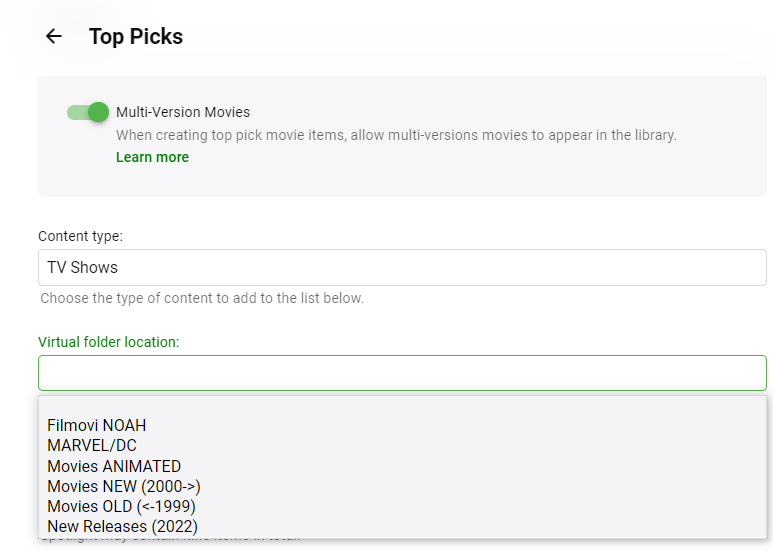
Yes, this needs to be fix. The virtual folder is not currently working. I will fix it. But, the content type does switch from. Tv to movies and back again?3 points
-
I should have this fixed for a release I'll out out shortly. I'm just going to double check the javascript doesn't do anything unexpected while loading the libraries.2 points
-
Will be great if every user can be limited to an amount of devices. I think this feature will be fantastic, especially for those of us who pay for a license since simultaneous streams do not block the login and consume a license even when the user already has their simlutaneous stream limits full. I know this can be done in "Access" tab, but is hard to select device one by one for each user, Why not only add a x number of devices allowed and then user can not login in another device? @ebr2 points
-
See the same as Virtual folder location: only shows Movie libraries.2 points
-
Additionally, if Content type is changed to TV Shows, Virtual folder dropdown still lists only Movie-type libraries.
 2 points
 -
Updated guide, thank you @KRULL for the feedback2 points
-
ChannelSwitching.mp42 points
-
Thanks Roodee... I appreciate your kind words. So many people have contributed ideas and recommendations that have improved this tool. Vic2 points
-
Hi, I have quite a lot of videos that were filmed vertically that I'd like to view on my iPhone. Unfortunately, when I click play these videos are auto-rotated into landscape mode, meaning that the content becomes small and hard to watch. There is no way rotate the video back into portrait as far as I can tell - no button on screen to force it to rotate; I've tried turning the phone with Portrait Orientation Lock Off and turning the Lock on - no luck Is there actually a way to watch portrait content vertically that I am missing? Versions: iPhoneX iOS 15.1 (19B74) Emby for iOS 2.1.11 point
-
If Auto is still transcoding, you would manually change the client's playback quality setting.1 point
-
Ok! Well I didn't see anything that suggested that was the problem, and I didn't have debugging turned on during any of the earlier scans, so I won't be able to find out what happened before. Regardless, it's working now, so I won't worry about it unless I see something similar happen again. Thanks!1 point
-
Premiere devices are different from the devices seen and controlled from your dashboard. https://support.emby.media/support/solutions/articles/44001173135-is-there-a-limit-to-emby-premiere1 point
-
Not originally. I have since deleted all the schedules for Saturday and re-created them, but added a 30 minute "before" padding so if it's still a problem, at least it'll record the bits I want. If rescheduling solved the problem, then I'll just get to skip through 30 minutes of junk. I'll report back next Saturday.1 point
-
1 point
-
Gotcha, suggestion, make it an "advanced" option that could be turned on, maybe in the logging area? Have it turned off by default. Also, depending on the error message (since it looks like you are simply redisplaying the system exception thrown by the application I realize this is harder than it sounds) you could highlight the error differently if you know its a "setup issue", "permissions issue", "do this to fix it issue". So that the tool becomes more self aware of how to heal itself , it doesnt do the healing of course it just recommends what the user can do to fix it. I realize that you have no idea if the person using it is a "I know where to download movies and can run chrome" type of user. Or a guy with 40 years of unix experience, who has been a professional software developer for 30+ years... So making it an advanced option for me, would be great. But I totally get what you are saying. To say the least, Ive been there done that with my products. Only because of what I have seen. Where I messed up and didnt set the perms correctly before I moved the file into the library area. Then when I change the perms, nothing happens (maybe your inotifywait isnt tracking attributes which makes perfect sense) But even when I do a "refresh media" on the directory, I dont see it create the BIF, thumb images or NFO files. it could be something else is in play, but that is why it seems to me there is some sort of flag1 point
-
The answer is that the search results need to be sorted by start date, so that the one you click on will be the one that airs the soonest. This is in 4.8.0.17 now.1 point
-
That's not intended. The top one should be the series title. Thanks.1 point
-
1 point
-
@Santrex Did you look at the server log when you scan a single library?1 point
-
There have been a few tweeks. See my most for changes:1 point
-
8 so far 2022-11-14 17:36:23.239 Info Media Info: MEDIAINFO TASK IS STARTING 2022-11-14 17:36:23.239 Info Media Info: Performing MKV Version Checks......... 2022-11-14 17:36:23.282 Info Media Info: MKVPropEdit Process Version: mkvpropedit v72.0.0 ('Minuano (Six-eight)') 64-bit 2022-11-14 17:36:23.282 Info Media Info: MKVPropEdit Process Version Check Completed with Exit Code: 0 2022-11-14 17:36:23.282 Info Media Info: MKVPROPEDIT VERSION OVERRIDE IS ENABLED - GOOD LUCK!!! EEK 2022-11-14 17:36:23.284 Info Media Info: No. of Libraries selected is 4 2022-11-14 17:36:23.284 Info Media Info: Getting Folder(s) Items 2022-11-14 17:36:23.313 Info Media Info: Total No. of items in Library 728 2022-11-14 17:36:23.344 Info Media Info: Actual Items to process = 8 2022-11-14 17:36:23.344 Info Media Info: PERFORMING MEDIAINFO EXTRACTION 2022-11-14 17:36:23.345 Info Media Info: PROCESSING OF I Am Legend HAS STARTED 2022-11-14 17:36:23.345 Info Media Info: Item FilePath = /data/media/Movies 1080p/I Am Legend (2007)/I Am Legend (2007) [imdbid-tt0480249] - Remux-1080p.mkv 2022-11-14 17:36:23.745 Info Server: http/1.1 POST http://192.168.1.225:8096/emby/ScheduledTasks/Running/690ac99ff2718c1ce852e0ee5777b09a?X-Emby-Client=Emby Web&X-Emby-Device-Name=Chrome Windows&X-Emby-Device-Id=7ff6d109-9f51-443d-9cd5-998f071aa345&X-Emby-Client-Version=4.7.9.0. UserAgent: Mozilla/5.0 (Windows NT 10.0; Win64; x64) AppleWebKit/537.36 (KHTML, like Gecko) Chrome/107.0.0.0 Safari/537.36 2022-11-14 17:36:23.746 Info Server: http/1.1 Response 204 to 192.168.1.191. Time: 0ms. http://192.168.1.225:8096/emby/ScheduledTasks/Running/690ac99ff2718c1ce852e0ee5777b09a?X-Emby-Client=Emby Web&X-Emby-Device-Name=Chrome Windows&X-Emby-Device-Id=7ff6d109-9f51-443d-9cd5-998f071aa345&X-Emby-Client-Version=4.7.9.0 2022-11-14 17:36:23.747 Info Media Info-HDRConvert: HDR Conversion TASK IS STARTING 2022-11-14 17:36:23.747 Info Media Info-HDRConvert: BIF Individual ID list has been cleared 2022-11-14 17:36:23.747 Info Media Info-HDRConvert: Getting All Movies in Library 2022-11-14 17:36:23.756 Info Media Info-HDRConvert: Filtering HDR Movies 2022-11-14 17:36:23.769 Info Media Info-HDRConvert: Total Movies in Library = 222 2022-11-14 17:36:23.769 Info Media Info-HDRConvert: NO NEW MOVIES WITH HDR FOUND 2022-11-14 17:36:23.769 Info Media Info-HDRConvert: Getting All Episodes in Library 2022-11-14 17:36:23.788 Info Media Info-HDRConvert: Filtering HDR Episodes 2022-11-14 17:36:23.819 Info Media Info-HDRConvert: Total Episodes in Library = 550 2022-11-14 17:36:23.819 Info Media Info-HDRConvert: NO EPISODES WITH HDR FOUND 2022-11-14 17:36:23.819 Info Media Info-HDRConvert: Total HDR Items to process = 0 2022-11-14 17:36:23.819 Info Media Info-HDRConvert: THERE ARE NO ITEMS TO PROCESS - STOPPING TASK 2022-11-14 17:36:23.819 Info Media Info-HDRConvert: HDR-SDR TASK HAS COMPLETED SUCCESSFULLY 2022-11-14 17:36:23.908 Info Media Info: Video Track successfully Written & Exited with Code 0 2022-11-14 17:36:23.908 Info Media Info: Video Track Title Set to HD 1080p VC-1 2022-11-14 17:36:23.970 Info Media Info: Audio Track successfully Written & Exited with Code 0 2022-11-14 17:36:23.970 Info Media Info: Audio Stream #1 Updated to: Dolby THD 5.1 (Default) 2022-11-14 17:36:24.019 Info Media Info: Audio Track successfully Written & Exited with Code 0 2022-11-14 17:36:24.019 Info Media Info: Audio Stream #2 Updated to: DTS 5.1 2022-11-14 17:36:24.031 Info Media Info: Item Tags found = 2022-11-14 17:36:24.031 Info Media Info: PROCESSING OF I Am Legend HAS COMPLETED 2022-11-14 17:36:24.033 Info Media Info: PROCESSING OF The Minute You Wake Up Dead HAS STARTED 2022-11-14 17:36:24.033 Info Media Info: Item FilePath = /data/media/Movies 1080p/The Minute You Wake Up Dead (2022)/The Minute You Wake Up Dead (2022) [imdbid-tt11833408] - WEBDL-1080p.mkv 2022-11-14 17:36:24.489 Info Media Info: Video Track successfully Written & Exited with Code 0 2022-11-14 17:36:24.489 Info Media Info: Video Track Title Set to HD 1080p AVC 2022-11-14 17:36:24.532 Info Media Info: Audio Track successfully Written & Exited with Code 0 2022-11-14 17:36:24.532 Info Media Info: Audio Stream #1 Updated to: Dolby Digital 5.1 (Default) 2022-11-14 17:36:24.575 Info Media Info: Only 1 Audio Stream - Removing *Default* from Title - Updated to: Dolby Digital 5.1 2022-11-14 17:36:24.575 Info Media Info: Item Tags found = 2022-11-14 17:36:24.575 Info Media Info: PROCESSING OF The Minute You Wake Up Dead HAS COMPLETED 2022-11-14 17:36:24.576 Info Media Info: PROCESSING OF Three Thousand Years of Longing HAS STARTED 2022-11-14 17:36:24.576 Info Media Info: Item FilePath = /data/media/Movies 1080p/Three Thousand Years of Longing (2022)/Three Thousand Years of Longing (2022) [imdbid-tt9198364] - Remux-1080p.mkv 2022-11-14 17:36:24.984 Info Media Info: Video Track successfully Written & Exited with Code 0 2022-11-14 17:36:24.984 Info Media Info: Video Track Title Set to HD 1080p AVC 2022-11-14 17:36:25.044 Info Media Info: Audio Track successfully Written & Exited with Code 0 2022-11-14 17:36:25.044 Info Media Info: Audio Stream #1 Updated to: Dolby THD Atmos 7.1 (Default) 2022-11-14 17:36:25.097 Info Media Info: Audio Track successfully Written & Exited with Code 0 2022-11-14 17:36:25.097 Info Media Info: Audio Stream #2 Updated to: Dolby Digital 5.1 2022-11-14 17:36:25.103 Info Media Info: Item Tags found = 2022-11-14 17:36:25.103 Info Media Info: PROCESSING OF Three Thousand Years of Longing HAS COMPLETED 2022-11-14 17:36:25.105 Info Media Info: MEDIAINFO TITLES Completed for 8 Videos1 point
-
Up +1 Unfortunately I don't expect to much from an emby alexa skill. I experienced the skill on Plex and was very disappointed. Not from a bad work of the development team but from the abilities the skill provided. You had to use the exact terms which are set in the skill which makes it really hard to enjoy it.1 point
-
Yup, it always did.1 point
-
I can confirm this, tho i already know how to quick fix this, just force close your emby app, then reopen, its gone tho it will appear again when you play any music in emby, since those small navigation bar will stay there for the rest of your emby app opened (even in background), just force close it to make it gone (for now) cc @Luke tho idk if this intended or bug1 point
-
Nope, same result. Note that Library item does change to the first TV Show/Movie and vice-versa upon each Content type change in real-time, however no combination of Content type switch and page refresh changes Virtual folder libraries listed.1 point
-
Okay, I'm looking into this further.1 point
-
is the wiki guide good - does it need any edits ? https://github.com/Cheesegeezer/MediaInfoWiki/wiki/Various-OS-Installation-Help#5-docker1 point
-
I have also updated to mkvpropedit v72.0.0 ('Minuano (Six-eight)') 64-bit, so far so good. Will leave it a while before i update the docker guide1 point
-
Linux is case-sensitive;) So "apt install mediainfo" You will find both mediainfo and mkvpropedit in usr/bin/1 point
-
Hey @Luke I just wanted to report back. The latest update seems to have fixed the issue. Not sure how that happened but I'll take it. lol1 point
-
FrostByte, 1. TV is a SAMSUNG QN75Q60BAFXZA, 2022 Model 2. Attached is the log from when I just browsed, exited, came back and browsed the photos again for a few minutes. Thanks. embyserver browsing samsung.txt1 point
-
HI, more options to control this are possible for future updates. Thanks.1 point
-
using 7.10.2, I agree that the show status update to watched after being played... But the season folder is not when this is the last played show of the season...1 point
-
1 point
-
Hi guys. OK, it seems to of cleared it and things seem to be running sweet. Will post again should it return!1 point
-
hi, mkvtoolnix V72 is out, i tested mkvpropedit on a few problematic files, without any issue. So far i can say its safe to use this version with mediainfo plugin.1 point
-
@Junglejim I have released a new version this morning that I believe will fix the items being out of order on the home screen. I think. Top Picks will now create it's own .nfo file for items, if there isn't a library nfo file to parse. I hope this will fix the issue. @LazyMonday91 User Engagement will now calculate best the best we get if the top overall items results are 0. We first attempt to locate items that have a really high overall rating based on community/critic and user scores. If nothing is found, then we take the highest ranked items we can get on your server specifically, and use them. I look forward to hearing back from you guys.1 point
-
Jim I'm seeing some interesting things in the log. Top Picks is unable to find NFO files for your library items. Does that seem correct? You don't use, or perhaps save NFO files? If not, that is okay, We do some coding magic on the files for top picks that places them in order. However, I'm not sure I added it to Series. So I'll work on that today. I should have this fixed up shortly1 point
-
I love the fact that you give credit (to Kanipek) ... I think that this is so important when people give things away for free, and if only their expertise! Thanks, and Cheers, Roodee1 point
-
Kanipek has been giving me suggestion on how to improve channel tagging. I learned a great deal from him, including that each channel has three logo images. The code below is the current implementation of the channel tagging code. The attached zip file is the latest code. Everything is working except playing IPTV from the Program Guide. Virtual TV content plays OK. Everyone, please let me know if anything isn't working as expected or if you have suggested improvements. Vic tool_1.6.zip1 point
-
This will be in Emby Server 4.8. New playlists going forward will be private to the user who created it, and there will be a new context menu option to share the playlist with other users.1 point
-
I stand corrected, when I got back home and on my local network it went back to distorted when direct streaming. Seems as though if it's transcoded it seems to work for me. But direct stream is a no go.1 point
-
Still happening for me on 3.2.82 on Pixel 7, not fixed yet.1 point
-
Are you sure it's fixed or is your test file just being transcoded or not MPEG2?1 point
-
I'm on 3.2.82 and the problem still occurs on my Pixel 7.1 point
-
This problem also exists on this Pixel 7 Pro1 point
-
The new apk still has the same type of image. As for getting the log files, I'm unable to get them on my Android. My phone is not rooted, and any of the explores I try from the play store won't allow to access the Android/data/ folder. Is there any other way of grabbing the Android logs, or will the server logs surface? I will note that this seems to only effect my Pixel 6 Pro, and only live TV, or recorded live TV. My other media plays just fine on it. I did test Emby on my Pixel 4XL and that plays live TV just fine.1 point
-
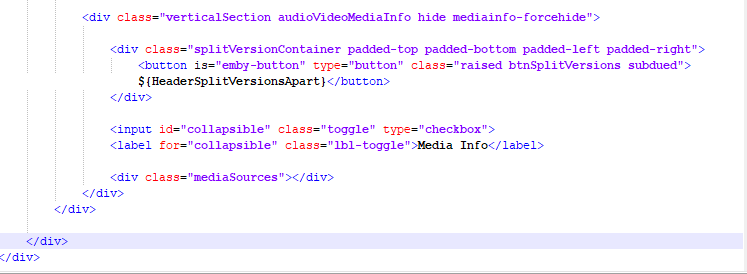
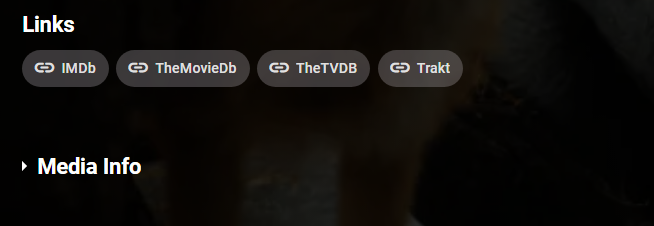
Can be refined but a quick mockup from online code. Edit item.html Custom CSS with some tweaks from online source. div.audioVideoMediaInfo input[type='checkbox'] { display: none; } div.audioVideoMediaInfo {-webkit-padding-start: 3.4%; padding-inline-start: 3.4%; -webkit-padding-end: 3.4%; padding-inline-end: 3.4%; } .lbl-toggle { display: block; font-weight: 700; font-size: 1.5em; margin-bottom: 1em; line-height: 1.3; transition: all 0.25s ease-out; } .lbl-toggle:hover { color: hsla(var(--theme-primary-color-hue),var(--theme-primary-color-saturation),var(--theme-primary-color-lightness)); } .lbl-toggle::before { content: ' '; display: inline-block; border-top: 5px solid transparent; border-bottom: 5px solid transparent; border-left: 5px solid currentColor; vertical-align: middle; margin-right: .7rem; transform: translateY(-2px); transition: transform .2s ease-out; } .toggle:checked+.lbl-toggle::before { transform: rotate(90deg) translateX(-3px); } div.audioVideoMediaInfo div.mediaSources { max-height: 0px; overflow: hidden; transition: max-height .25s ease-in-out; } .toggle:checked + .lbl-toggle + div.mediaSources { max-height: 100vh; } .toggle:checked+.lbl-toggle { border-bottom-right-radius: 0; border-bottom-left-radius: 0; } Or changing ":before" to ":after" and "margin-right: .7rem" to "margin-left: .7rem"
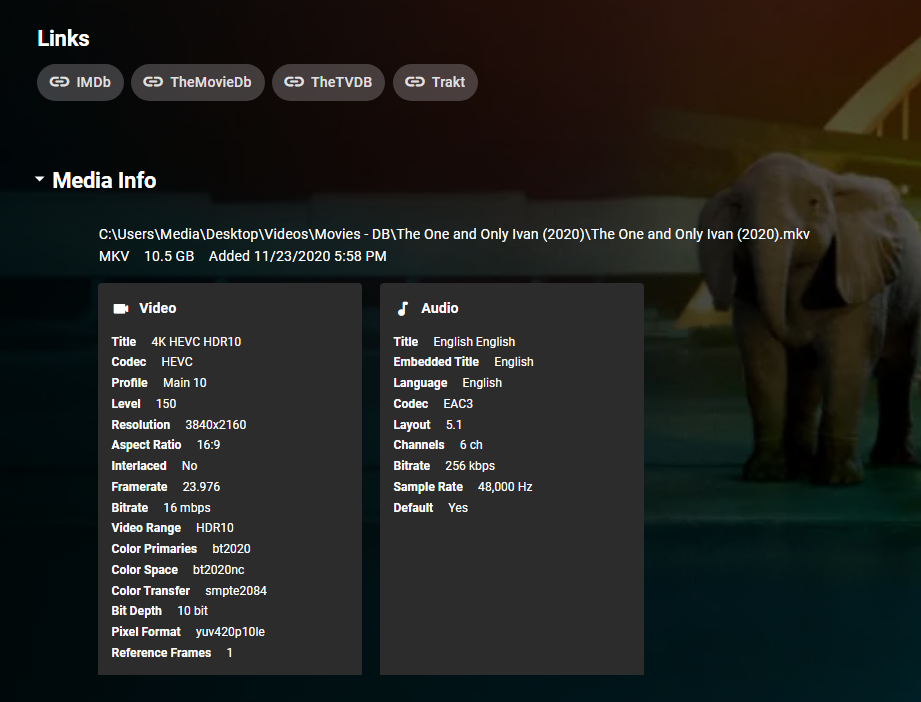

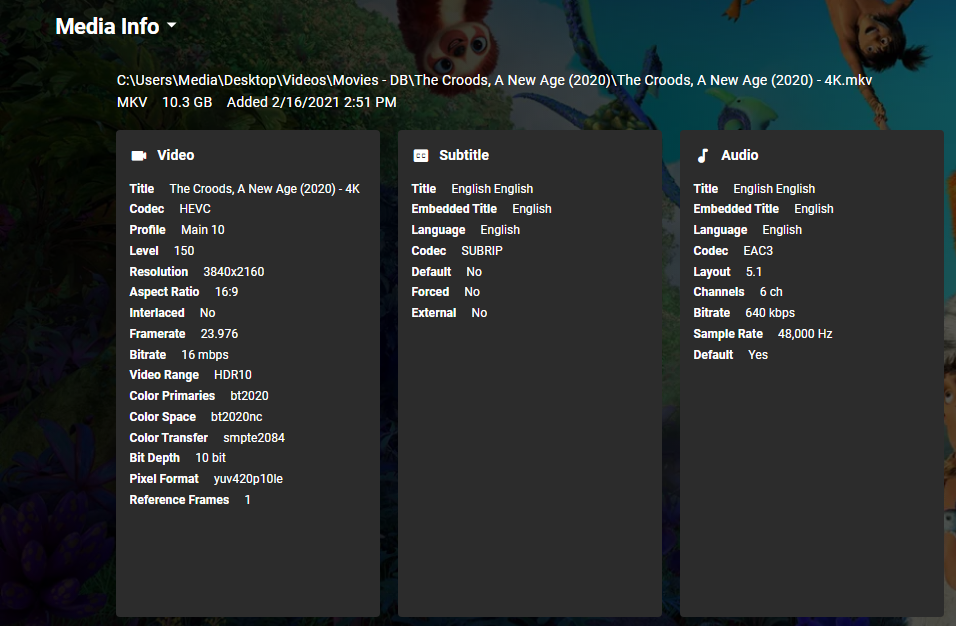 1 point
 -
you are a funny chap sometimes i feel they can't be added because they can't. i have a playlist with items in and i tried to add a movie extra. it did not appear. i added further episodes to confirm that items were still being added to the playlist and they werent being hidden because paging isnt being used properly. i added an extra to a new playlist and i get this the items being added is a Marvel One Shot - The Consultant from the Thor DVD. Now when i try to add the same thing to my MCU playlist it still doesnt appear but i get this at the end so, just a circular link between the two playlists. Why do you feel they can be?1 point
-
I just updated the wiki.1 point