Leaderboard




Popular Content
Showing content with the highest reputation on 11/08/22 in Posts
-
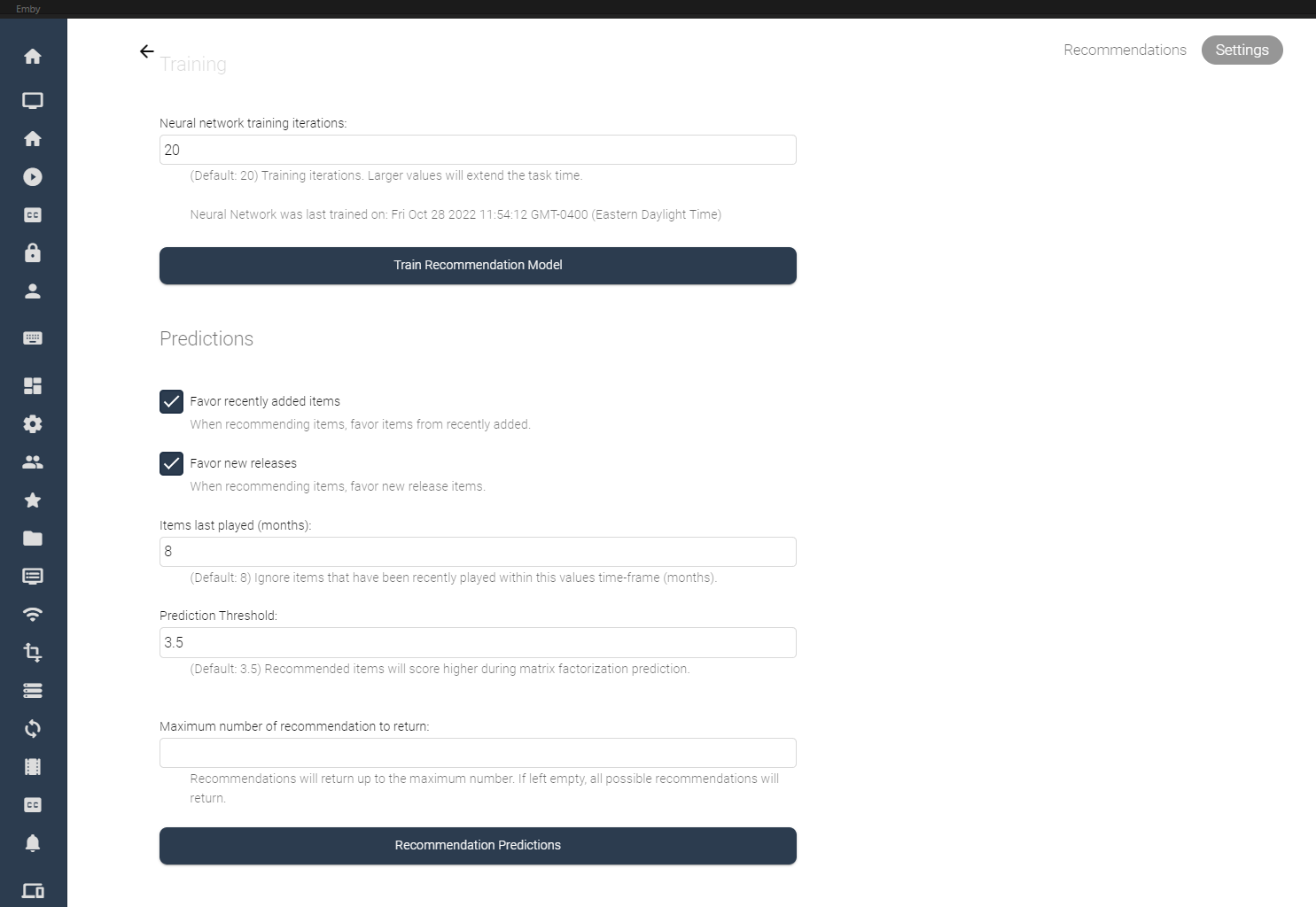
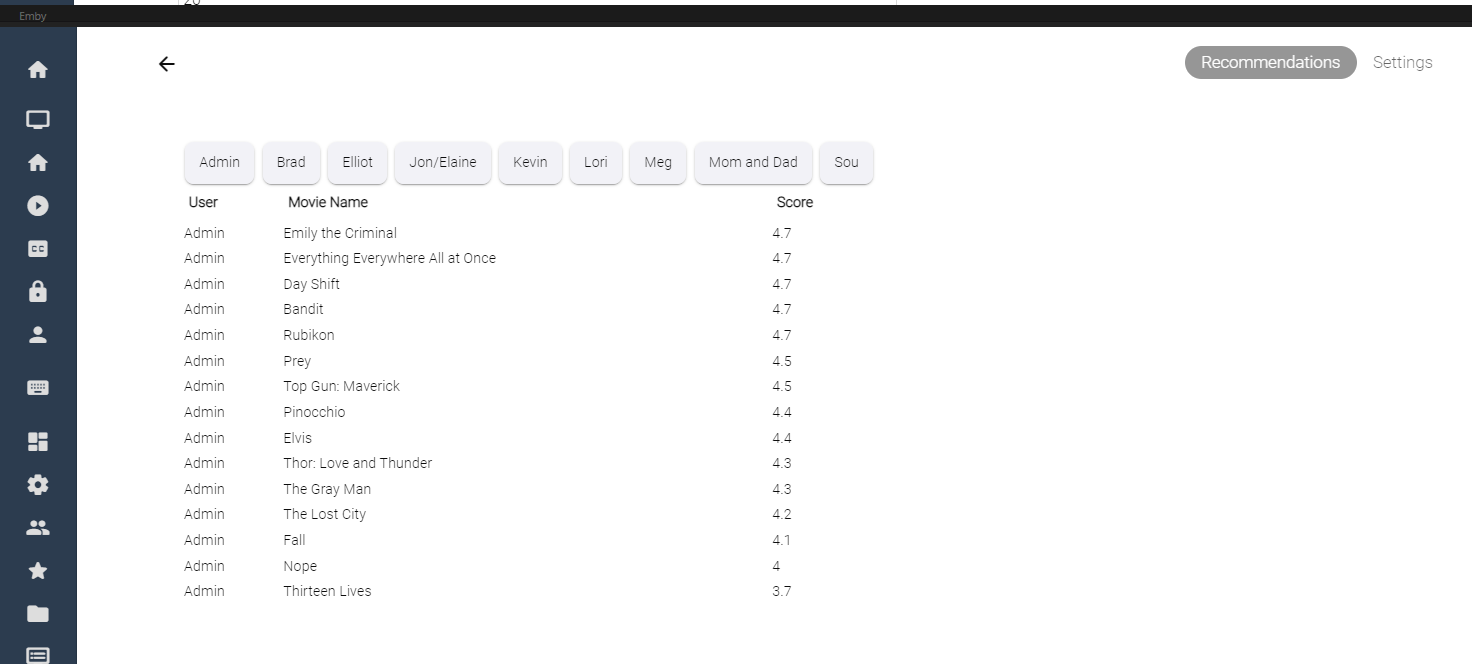
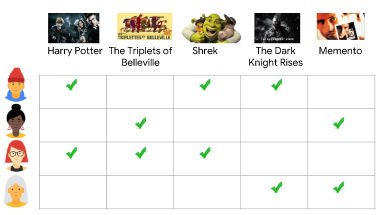
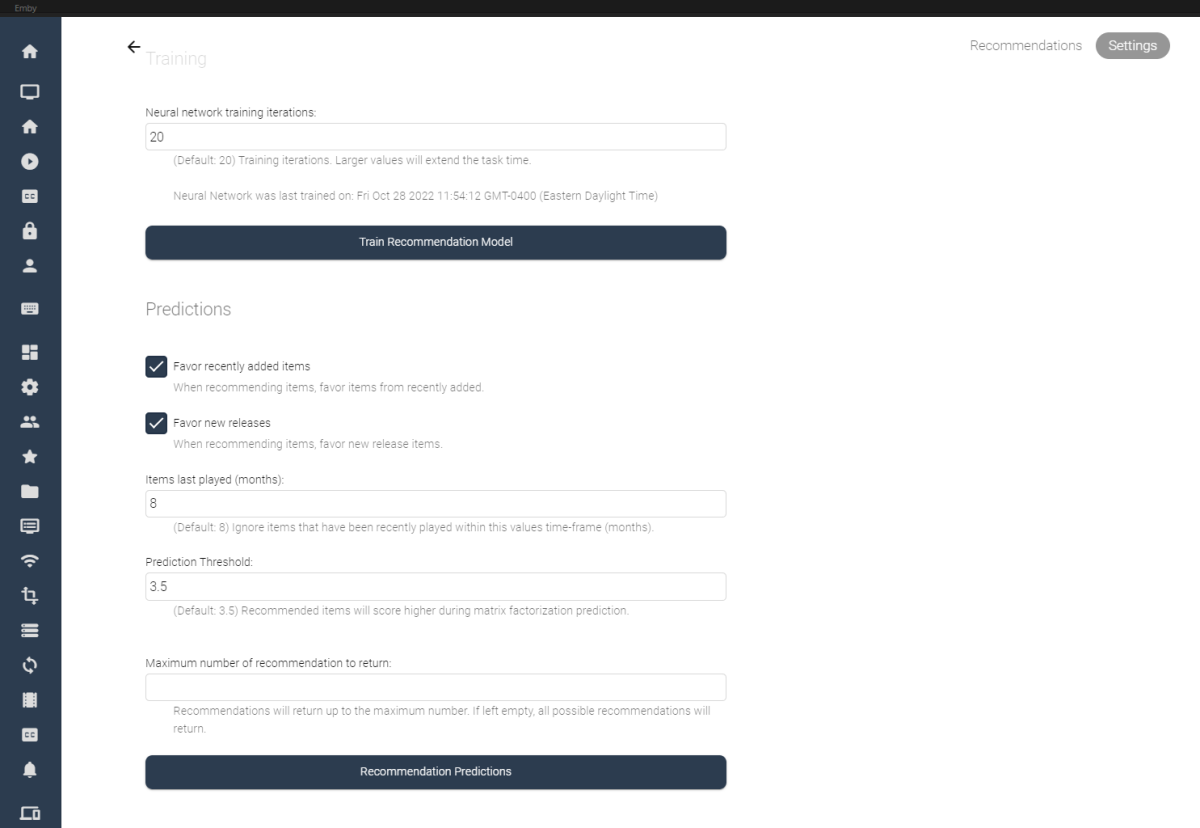
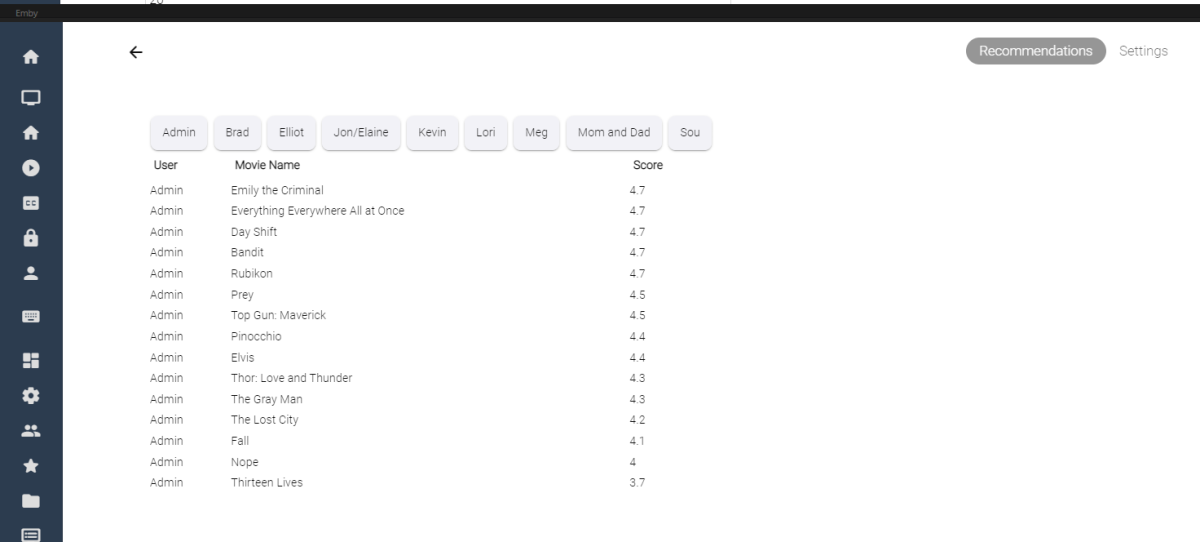
I've spent some of my spare time experimenting with machine learning, and applying what I've learned to some code for Emby. Using the massive dataset supplied by MovieLens (https://movielens.org/), I was able to create a machine learning plugin that loads a large set of data into a matrix factorization neural network, and can spit out recommendations for users in emby. Following this article by Microsoft: https://learn.microsoft.com/en-us/dotnet/machine-learning/tutorials/movie-recommendation and experimenting with their ML.Net libraries things started to get pretty interesting. The project itself is rather large, and I thought I'd share what I've come up with so far, maybe other people are interesting in how the neural network recommendation service is working when testing it against movies inside an Emby library. It's pretty cool. The idea could be to create an in-depth recommendation system for emby, or possibly utilize this as a way to create a new "Top Picks" style plugin that is user based. Which also might be really cool. I'll try and answer some questions up front if I can: What is Matrix Factorization, and How does it work in Machine Learning? In a nut shell, if you have similar tastes in movies as other people in the dataset, and they have rated a movie you haven't seen in a while, or have never seen, then that movie is recommended to you as a possible item to watch. The Neural Network will predict what you, or your users may rate the movie if it was watched. Is this plugin run locally on my machine? Yes, this plugin creates a matrix factorization neural network locally on your machine, which is trained in a scheduled task. Is any of my personal data shared during the training process of the neural network? No, your personal data is completely safe. no user data is shared with any data provider, and stays safely on your server. How does the neural network recommend items? The MovieLens dataset is an accumulation of almost 25 million data point on 27 thousand movies with almost 100 thousand users ratings. The ratings data is altered on your server to include your user data and then the neural network is trained on all the data points, allowing it to predict what movies in your library you and your users may want to watch. Once the "recommender" is trained it then saves a model and uses that to predict recommendations for users. The NN can be retrained when new users are added to your emby server, including them in the recommendation process. Asking your users to "like" or "Favorite" items in the library will certainly help factoring recommendations, however it is not entirely necessary. Does the Matrix Factorization Only look at "Liked/Favorite" Data? No, other columns are also feed into the neural network, like item genre. If one of your users do not "heart" the media on their account, their watched status and item play-states are factored into the recommendation predictions. If they watch more items that fit into a certain category, this is scanned in and calculated. It is best to have several movies marked as "liked/favorite" in the library form each user to get best results. Is it cross platform Yes, I believe it is. ML.Net is a cross-platform library using .netstandard 2.0. With regards to the runtimes associated with the plugin the following are available, and would be included in a dll: Linux64 Linux ARM Linux ARM64 OSX64 OSX ARM64 Win86 Win64 It is all fairly preliminary, definitely keep this in mind On the settings page it is possible to train the NN Model (top), and also run recommendation predictions (bottom). Once the network has created it's model, it is possible to run this model again and again against the library (due to it's 27 000 movie titles included). Selecting the "Recommendation Predictions" begins the second task of calculating what each user might like. Browsing back to the "Recommendations" tab, outlines each users predictions. It shows what the NN predicts your score would be out of 5. The results are definitely interesting. Sure, these are all new movies I should watch, and they are pretty much some of the most famous of the year so far. So the results seem to be pretty close to what I would expect. The training of the model also only use 20 iterations, to be honest I don't know if that is enough, or too much. It's all new. What I can say is that loading the ML.Net Assemblies work, and loading the MovieLens dataset into the NN also works. I have added toggles and inputs to try and test different training scenarios, but it's all kind of unexplored.

 2 points
 -
You have Unwatched only and Favorites only enabled - red icons along right screen edge. Disable those.2 points
-
Most of these requests exist, but should always be one request per post. 1. 2. What is a more humanized collection? 3. There is a tool on the forum that currently does this. Might have to look at posts at the end for updated version.2 points
-
I am very interested in this. Great work already and am looking forward to further developments, should they come.2 points
-
Say I have a custom collection of 56 Christmas movies. During the Holiday Season, I would like to show this on the main page as a Library. Now, I could make a drive folder called "Christmas" and put these movies in that folder. However, now we're getting away from using metadata for organization and moving back to using folders for organization. Something you've spent the last few years trying to get away from. So each collection should have a toggle to show it as a library on the Home Page. Then people can make collections for Christmas, Halloween, Summer Romance, Summer Slasher Films, whatever and show them on the front page where they are easily accessible. Don't want to show it anymore, switch the toggle off.1 point
-
Hi, yes there's room for improvement there. Thanks for the feedback.1 point
-
No, I delete it in the app menu... Now, If I go in the app menu, there isn't emby app It's very strange !!!1 point
-
No - that's the version of the http protocol which is in use. Paul1 point
-
The 'next episode' popup is awful. Over and above the arguments over the buttons and what they do and what they should be called, it's too high up so it'll sit above the OSD, except the OSD is disabled while it's onscreen so it's just hanging out in the middle of the screen for no reason. ATV has it right at the bottom. ATV also gives you the option to press up and it then gives you some info about the upcoming episode, ET has no such option.1 point
-
thank you all for your patience and assistance on this matter.1 point
-
The template can be custom made. I've spent most of the day learning the "ins and outs" of ffmpeg. It can totally be available. and more can be added.1 point
-
Whoops. It's my code. CSS custom style can make this happen. Ha! Sorry. here is the bad code that did it. The top:63% did it. It just moved the whole list down. @media not all and (min-width: 26em) .listItemBody { position: absolute; overflow: none !important; top: 63%; } Bad bad code! No soup for you...1 point
-
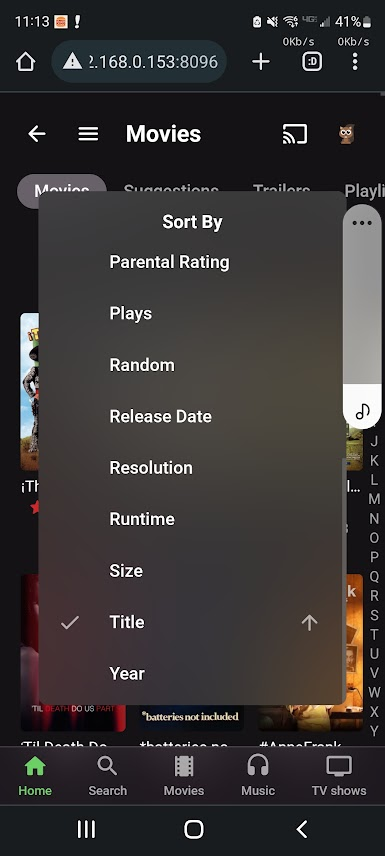
Mobile Web App with Chrome on Android 11. Works fine for me using 4.8.0.16 beta. You sure it isn't your CSS? I take issue with that razor thin scroll bar you can barely see on the right edge. Do you even notice that thing?
 1 point
 -
Apologies. I didn't suspect the plugin did bizarre magic you'd never seen before. I should have mentioned this.1 point
-
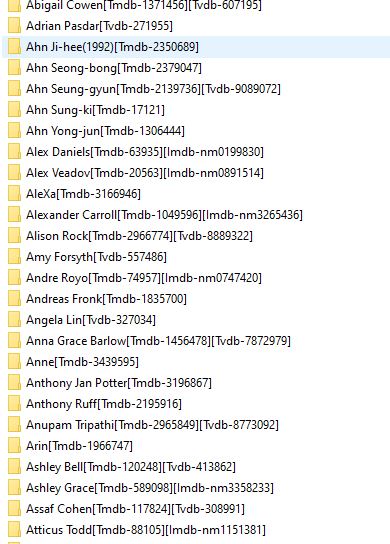
*UPDATED 9th Nov 2022 @ 5.30am GMT 1. Handle DirectoryNames with Invalid Characters (if persons name has a character in it that cannot be used to build the directory name) These are changed to _ (previously crashed the plugin) If it still fails on a person it will now continue after logging the failure. 2. Fix Correct Php generation for SearchById and add 3. Change searchNames in php as in fix 1, replace invalid characters with _ 4. Changed the php Names To PersonSearch.php etc to allow future export files without clasing. (updated this post examples) It might need some tweeks, but here is an Emby Exporter for your People (Not MusicArtist) to A local Backup Path to create a structured API Remember this is just a tool, you can create your own if you do not like the way this tool does it. The Plugin Exports an XML file and the Primary image (Only the primary image at the moment) into a folder named with the Person name, Year of birth and Provider keys like this: It also writes 3 PHP files for use on a php enabled webpage You can then use an api string with Search.php If no format is supplied, json will be automatically returned any of the elements can be supplied: Name Year Id http://<YourServer>/PersonSearch.php?Name=<Name>&Year=<Year>&Id=<Id>&Format=json examples: http://<YourServer>/PersonSearch.php?Name=Tom Cruise http://<YourServer>/PersonSearch.php?Name=Tom http://<YourServer>/PersonSearch.php?Name=Tom Cruise&Year=1962 http://<YourServer>/PersonSearch.php?Name=Tom Cruise&Year=1962&Id=nm0000129 The Api server will respond with a json result if it exists (XML is converted to json on the fly) The php is very basic, it gets a file list of this directory , searches the directory names for the Name, Year or Id provided and replies with the Person.xml inside the folder, building a json array if there is more than one result Currently only php is available, if someone can convert the php to javascript for me that would be awesome!! - as then it would work on the very basic websites. One thing to note is that I need to update the API Providers to allow and prioitise ID searches - this is a still to do! Download currently removed whilst I fix another bug! (wont be too long)
 1 point
 -
I hope you don't mind me asking, but is that a personal template for emby (sans text obviously), or is that available on the forum somewhere? Thank you.1 point
-
Yup, this will get done whenever we can figure out where the time keeps going... way too busy all the time.1 point
-
When i clone myself for the 4th time. Work is insane and that pays the bills1 point
-
Hi. It isn't as much about the images as it is about pulling all those items out of the database (and then potentially sending them across a remote connection) on each load of the screen. On many systems it may be fine but allowing people to configure large numbers could potentially cause some real slow downs loading these screens - depending on the exact content involved.1 point
-
Haha i have something similar in VantagePoint which i havent released yet but it adds the name of the Title to the rating slide. https://emby.media/community/index.php?/topic/98710-vantage-point-issues-bugs-thread/&do=findComment&comment=11410321 point
-
So, I've been messing the possibility of either adding a special command to Top Picks, or perhaps an entirely new plugin that creates custom cinematic intros ... Which would be also cool ... I think. But, if Top Picks handled its own, it would create custom inros kind of like the one below. The only thing it is missing is some text under the logo that says the Rank of the item, and some layout changes to help it look best.1 point
-
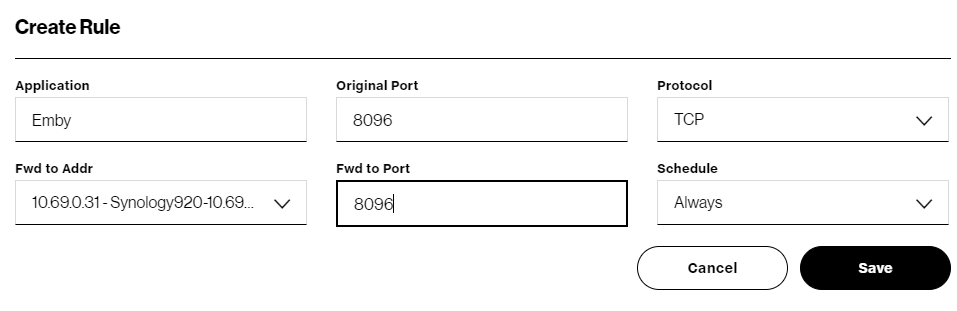
@howieT82You want to make sure you see both a local and remote address being shown on the Emby Dashbord. In the network menu settings you want to have: "Allow remote connections to this Emby Server" should be checked/enabled. "Enable automatic port mapping" should be unchecked/disabled Some builds of Emby Server (because of OS/requirements) do not allow changing the local ports and always use 8096 & 8920. Synology and some other NAS builds will not have local ports shown but are set already to 8096 and 8920. If Local http port number is shown, set to: 8096 If Local https port number is shown, set to 8920 Public http port number: 8096 Public https port number: 8920 Leave these fields blank External domain: Custom ssl certificate path: Certificate password: Secure connection mode: Remote IP address filter: Internet streaming bitrate limit (Mbps): Secure connection mode: Disabled Max simultaneous video streams: Unlimited Remote IP address filter mode: whitelist "LAN networks:" is likely already set to: 10.0.0.0/8, 192.168.0.0/24 and should be left alone "Local IP address:" leave this blank for now which will make Emby Server use the default IP of the machine. Can be useful but don't worry about that right now. Click the SAVE button. You can remove the "Port Mapper" plugin as we will not be using it. Restart Emby Server After Emby Restarts you should see both InHouse and Remote connections on the Dashboard, both using IPs and port 8096. If you do this on both the PC and the NAS, they should both show the same Remote address which is fine but only one will be in use with the other at the ready as a spare. How you perform the next step is going to be different depending on your router but briefly you want to: Login to your router, go to advanced settings, find the screen used to setup Port Forwarding. If there are other ports already setup for 8096 or 8920 remove them. You will now setup 1 new port forward. Every router does this it's own way but essentially you want WAN/External IP Port 8096 -> IP running Emby Server Port 8096 TCP Protocol Here is an example during Setup of a Verizon Router. Note the forwarding address is selected by a dropdown list where you can see the Synology 920 was chosen. NOTE: You can set the forward to Address as either the PC or NAS address. Ideally you will have the PC as the Primary Server running Emby but also have the Synology setup and working that is your backup system. If you ever have a problem with the PC you can quickly edit this Port Forward rule changing only the Forward to address pointing it to the NAS instead of the PC and it will get used instead. In a browser open a tab and go to either https://portchecker.co/ https://canyouseeme.org/ Change the port to 8096 and run the test. If it shows open then you should be all set. If you are going to have a primary and backup server test both IP after adjusting the port forwarding rule in the router. If the test shows closed port you need to reviews the steps again to see if you missed something. There are reasons you can fail the port test including: ISP has you behind a CGNAT You are running a VPN You have firewall rules in place on the router or local machine You are running some type of security software that is interfering Try the above and let us know how you make out.
 1 point
 -
Good, keep it like that. As a HiFi enthusiast, upsampling should not be done.1 point
-
ok. Thank you!1 point
-
Sorry for the late reply again, I'm not getting the e-mails for some odd reason. It's Pulling media info, before playback starts. The reason is, DSD is 1bit audio file that's why bitrate needs to be multiplied.1 point
-
@MrLinford Yes please do provide this info if you can - I can then add to the Wiki as currently it states Docker is not supported .. Thanks. https://github.com/Cheesegeezer/MediaInfoWiki/wiki/Various-OS-Installation-Help1 point
-
I’m sure french translation has been already taken by many people but if i can be of any help, do not hesitate to include me.1 point
-
Yes I did . I added a special storage in Emby config and it worked1 point
-
I manually group multi versions (I have a separate 4K folder) and extras work fine.1 point
-
Thank you all for replying. Thank you to @softworkzfor the very detailed reply. I now understand what I was trying to do! All I needed was simply this: File.WriteAllText(Path.Combine(config.CreatePersonApiServerString, "Search.php"), MyEmbeds.Search); As it was an embeded resource I was trying to reference it like the plugin does to the icon file, and then read the resx container. I didnt need to reference the path to the embeded resource , all i needed to do was write the file and use the RESX container and key as the string contents! (MyEmbeds.Search). So simple when you know how! I made this much harder than it needed to be. Many thanks!1 point
-
No all of these should work per the KB. But in the end, it is about requirement of Multi-versioning and Extras. extras specials shorts scenes featurettes behind the scenes deleted scenes interviews trailers1 point
-
My understanding of emby's watched function is it's either watched or unwatched. So an episode you've watched 100 and one you've only watched once, come back the same.1 point
-
Looking at an old topic I believe extras only work with core auto grouping naming scheme. They are not seen on other methods. https://emby.media/community/index.php?/topic/85845-movie-extras-not-showing-up If confirmed I believe we many need this added to the KB. @cayars1 point
-
Oh, sorry, I misunderstood. But yes, I think that'd be a great solution!1 point
-
I found the solution. (What I suspected after I noticed the server was updated the day before.) You are welcome for exposing the problem on Saturday.1 point
-
Im running "Auto Movie Version Grouping" 1.0.0.0, honestly I dont know if it ever worked.1 point
-
@mickle026 - you are mixing up two fundamentally different and separate ways of dealing with resources in C# I will show you how to work with your resource in both cases 1. RESX Resources You define RESX resource by adding a RESX file. You can add many different kinds of resources to a RESX files, like strings, images, icons, binary files and text files. Strings are stored directly in the RESX file. Assuming you have MyResources.resx and added a string with the key 'MyString' and the value 'abc', you can access that value at runtime with MyResources.MyString, which will evaluate to 'abc'. But you can also add files from your project to a RESX resource file, and depending on the type of file, it will be available in the same way as a property of the resource class, either of type string or as a byte array (byte[]) in case of binary files. In your case, you have done the latter. You have added the file Search.php to your MyEmbeds.resx file as text file. (I know that from your other snippets which wouldn't have compiled otherwise). And that means, that at runtime, The MyEmbeds.Search property already contains the contents of Search.php as string!. So, the code you are looking for is File.WriteAllText(Path.Combine(config.CreatePersonApiServerString, "Search.php"), MyEmbeds.Search); Note: For this approach you do NOT need to set the Build Action of the file to "Embedded Resource" - you just leave it set to "None". 2. Embedded Resources When you want to go the way of including the file as an Embedded Resource, There is no RESX file involved You set the Build Action of the file to "Embedded Resource" It is important where the file is located within the project folder structure (because this determines the resource name) The resource name of an embedded resource is determined by several components: The project's "Default Namespace" e.g. Softworkz.MyGreatPlugin The filename e.g. MyTextFile.txt The relative folder path, separated by dots assuming the file's relative path in the project is Web\Resources\MyTextFile.txt it would be Web.Resources Now, putting it all together, the resource path would be Softworkz.MyGreatPlugin.Web.Resources.MyTextFile.txt And that's the path you need to use for calling GetManifestResourceStream(). But as developers, we should always avoid hardcoding any strings (as they might stop working when making changes or refactorings). So, a better way would be to use an existing type for reference, ideally a type that resides in the same folder as your resource file (e.g. a class MyClass). Then you would be able to do like this: using (Stream output = File.Create(Path.Combine(config.CreatePersonApiServerString, "Search.php"))) { var type = typeof(MyClass); using (var source = type.Assembly.GetManifestResourceStream(type.Namespace + ".Search.php")) { source.CopyTo(output); } } Please note the Using for the resource stream to make sure it's getting closed after use. Also note the prefix dot for the resource name building.1 point
-
Something like this? using (Stream fileStream = File.Create(Path.Combine(config.CreatePersonApiServerString, "Search.php"))) { Stream resourceStream = Assembly.GetExecutingAssembly().GetManifestResourceStream(MyEmbeds.Search); resourceStream.Seek(0, SeekOrigin.Begin); resourceStream.CopyTo(fileStream); }1 point
-
Hi, pushed an update to the folder sync plugin to resolve this. Thanks.1 point
-
Thanks for the hidden path information, pulled out my hair looking for where is this media downloaded. I hope options to download to some custom folder will available, as phone nowadays are getting rare using sd card due big internal memory.1 point
-
Oh, I didn't know that I could select the order. Got it 3rd now.1 point
-
Just taking one step further, each top pick item is tagged with it's rank as well. So top pick 1, is tagged "top-pick-1", incase you wanted to get really technical and create specific intros for each top pick.1 point
-
I have an idea, what if Top Picks played a custom cinema intro for when you played a top pick item? https://support.emby.media/support/solutions/articles/44001848833-cinema-intros You would have to have cinema intros enabled, but this is totally possible. You could even create your own top pick cinematic intro, and have that play before the top pick movie/episode. Dunno, might be a cool addition. I would only write it, if it was actually cool.1 point
-
Not sure why you are getting scroll on My Media though unless it is resolution. But you could remove it. And it is all trial and error for me as I new nothing about css before playing around with it in Emby.1 point
-
Here's the best example I can think of for using this plugin. You want to keep your original folders "pure" without multiple versions sitting in the same directory. Yet you want to have on hand a 720 4 Mbps version and a 480 1.5 Mbps version. This way you have 3 versions in total of each movie with one targeted to mobile devices. Folder sync allows setting up a conversion job that will match your resolution and bitrate choices while using only codecs that allow it to direct play assuming proper bandwidth. You could for example, setup a synced folder for your movie library that creates a 720p HD version using 4Mbps and another synced library at 480 1.5Mbps. The original movie becomes a multi-selected movie meaning it has multiple versions available. When someone plays back the media there are 3 versions available the client can use. In general, the originali used if possible unless it will transcode. If the original can't play direct, a synced version is used that will play. It will determine this based on resolution/bandwidth that fits the current playback. All the 720 versions would be kept organized together. All the 480 versions would be kept together as well. Some people might keep one version local and the rest in the cloud or vice versa using rclone. You can have as many folder syncs as needed. If you had a collection of 2160 SDR movies you could use this plugin to create 1080, 720, 480 versions. Once you set it up for a particular library it does the work in the background and will process any new media added. So that is the multi-resolution part of this. When selecting the format, you could also choose "original" quality which would basically be a copy of the original. This to me would only make sense to do if this second folder library is offsite or cloud based. I myself personally would not use it for the original copy feature as there are far better ways to handle files syncs to one of more locations. Hope that helps, Carlo1 point
-
Hi, this should be improved in an upcoming update to our apple TV app. Thanks.1 point
-
Thanks for the kind words. If this plugin goes over well, we can use the same registration to create a companion in the future that can handle other media types in emby for sure.1 point
-
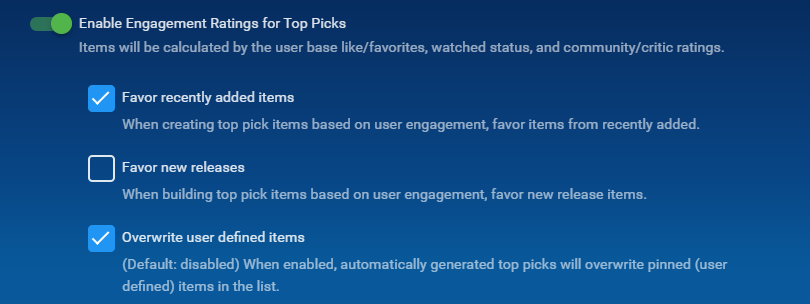
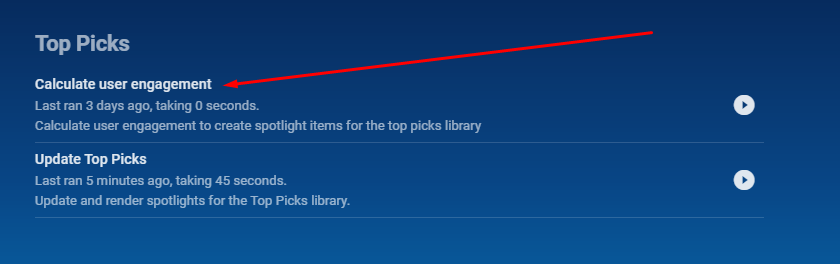
Just want to add. @chef has worked really hard with this and there were a hell of a lot of bugs to weed out and so much dedication from him to get this to Release. He never ceases to amaze me with his ideas and hard work. What's even better is you can set the schedule task for an interval to generate new top picks from the Engagement section, set this up in the UI how you want then set the Schedule task to run weekly, every 4 days or what every you want to generate new top picks that will interest your users That being said.... The plugin is available in the Catalogue under the General Section. Give it a go and you will be super happy.
 1 point
 -
The OP mentioned having the collection show up as a library, but I'd like to be able to pin a collection to the home page as a hub. Similar to how the "Latest Movies" and "Latest TV show" hubs work.1 point
-
Emby for Samsung Tizen SmartTV's (2015 J-series to Present) Download: https://emby.media/emby-for-samsung-smart-tv.html 2.3.7 (05/24/2026) Increase size of spotlight 2.3.5 (04/23/2026) Updates related to new home screen features with 4.10 server 2.3.4 (03/24/2026) Fix startup crash regression on older devices 2.3.3 (03/13/2026) Support new home screen features with 4.10 server 2.3.2 (02/11/2026) Fix regression with older devices 2.3.1 (1/29/2026) Improve error handling on audio track changes 2.3.0 (1/1/2026) Fix some dialogs being cut off on older models Fix volume control for youtube player 2.2.9 (12/11/2025) Merge Movies and Shows tab in mixed content libraries 2.2.8 (11/20/2025) Fixes for live tv guide rendering on older devices 2.2.7 (10/31/2025) Fixes for YouTube playback 2.2.6 (10/19/2025) Show person age Improve now playing music background 2.2.4 (09/17/2025) Fixes for horizontal home screen 2.2.1 (09/07/2025) Add new option to hide episode spoiler information Fix video being improperly stretched in some situations 2.2.0 (09/02/2025) Fixes for horizontal home screen 2.1.9 (08/24/2025) Fix detail screen regressions with collections and actors 2.1.8 (08/22/2025) Improve horizontal home screen 2.1.7 (08/21/2025) Support new 4.9 server features Various scroll fixes 2.1.5 (08/01/2025) Background fixes 2.1.4 (07/25/2025) Fix regression in metadata editor 2.1.3 (07/23/2025) General performance improvements 2.1.1 (05/26/2025) Add display option to automatically jump through folders containing single items 2.1.0 (05/01/2025) Fix various display quirks on older models 2.0.6 (04/26/2025) Fix regression causing app to not load on older models 2.0.5 (04/24/2025) Fix regression causing app to not load on older models 2.0.4 (04/21/2025) Add option to control video player long press behavior Improve support for fonts embedded within .ass subtitles (with 4.9 server) 2.0.3 (04/12/2025) Improve performance 2.0.2 (03/25/2025) Fix loss of focus in the video player when seek bar is disabled 2.0.1 (03/20/2025) Support sleep timer in the audio player 1.9.8 (03/03/2025) Add options to force transcoding for certain formats 1.9.7 (02/07/2025) Ensure 16:9 aspect ratio is shown fullscreen 1.9.6 (01/07/2025) Support Remove from Continue Watching under TV -> Suggestions 1.9.5 (12/19/2024) Fix playback settings screen not loading 1.9.4 (12/17/2024) Quality detection fixes 1.9.3 (12/12/2024) Increase default remote quality 1.9.2 (12/05/2024) Support sorting playlists and collections by date added 1.9.1 (11/06/2024) Bug fixes for music video screens 1.9.0 (10/07/2024) Resolve top portion of some screens being cut on specific devices 1.8.8 (08/26/2024) Improve general navigation performance Fix played indicators showing during backdrop screensaver Avoid stream copying interlaced video 1.8.7 (07/27/2024) Live TV Guide fixes for older devices Now playing screen layout fixes 1.8.6 (07/02/2024) Fix header background being lost on older devices 1.8.5 (06/25/2024) Add theme song volume setting 1.8.4 (06/18/2024) Live TV Guide scroll fixes 1.8.3 (06/12/2024) Fix regression in audio play queue screen 1.8.2 (05/30/2024) Support shuffle state in the audio player Support incremental seek speed Improve performance 1.8.1 (05/23/2024) Auto-scroll guide to last played channel Show more rows in video OSD guide Improve performance 1.8.0 (05/13/2024) Make subtitle offset dialog easier by converting to a slider 1.7.9 (04/26/2024) Fix unnecessary transcoding of flac audio files 1.7.8 (04/09/2024) Group collection items by media type 1.7.7 (03/15/2024) Fix add to play queue missing from context menus 1.7.6 (03/06/2024) New screen for music genres 1.7.5 (02/08/2024) Live TV Guide layout fixes 1.7.4 (01/22/2024) Fix seek bar regression 1.7.3 (01/20/2024) Fix seek bar regression 1.7.2 (01/19/2024) Fix regression causing some settings screens to not be reachable 1.7.1 (01/15/2024) Various user interface bug fixes 1.7.0 (12/27/2023) Various user interface bug fixes 1.6.9 (12/21/2023) Various user interface bug fixes Support channel up/down buttons to change channels during live tv playback 1.6.8 (12/11/2023) Improve dialog menus throughout the app 1.6.7 (11/12/2023) Fix startup error on older models 1.6.6 (11/10/2023) Improve Korean subtitle font Add release date to playlist and collection sort orders 1.6.5 (10/11/2023) General performance improvements throughout the application Support the new profile pin feature in conjunction with Emby Server 4.8 1.6.4 (09/14/2023) Make more fields available in lists 1.6.1 (08/14/2023) Fix regression with Emby Connect pin code sign in Fix regression causing home screen settings to display incorrectly 1.5.9 (08/12/2023) Fix regression on older devices causing lists to render with blank text 1.5.8 (08/10/2023) Add option to hide media info from detail screens 1.5.7 (07/12/2023) Various fixes and improvements with back button behavior and left nav menu Various performance improvements 1.5.6 (06/14/2023) Rework app exit menu Support left sidebar by pressing left on the left edge of most screens 1.5.5 (05/16/2023) Add flatten series display option 1.5.3 (04/06/2023) Add View Lyrics context menu option 1.5.2 (03/06/2023) Rework add to collections/playlists user interface 1.5.1 (02/10/2023) Various user interface bug fixes 1.5.0 (01/11/2023) Various user interface bug fixes 1.4.9 (12/13/2022) Support sorting playlists Fixed HLS subtitles not rendering correctly on certain models 1.4.8 (11/17/2022) Add Played filter for audio books 1.4.6 (10/20/2022) Subtitle selection fixes 1.4.5 (10/18/2022) Fix regression when playing H265 1.4.4 (10/17/2022) Various user interface bug fixes 1.4.3 (10/13/2022) Various user interface bug fixes 1.4.2 (10/05/2022) Various user interface bug fixes 1.4.1 (9/28/2022) Fix regression with 2015/2016 devices Various video OSD fixes 1.4.0 (9/28/2022) Various video OSD fixes 1.3.9 (9/20/2022) Fix nested dialog focus regression Various video OSD fixes 1.3.8 Various video OSD fixes 1.3.7 Various video OSD fixes Various subtitle fixes Add option to control rating information display at the start of playback Updated now playing design for music in the background 1.3.6 Various video OSD fixes Various subtitle fixes 1.3.5 Various video OSD fixes 1.3.4 Add home screen focus preview option Make play from beginning always visible Update runtime on detail screen when changing video versions Add ends at directly to video player Update video OSD layout to reduce button clicks Move subtitle offset feature into subtitle menu Update Live TV guide design Various right to left (rtl) fixes 1.3.3 Fix loss of header on certain devices 1.3.2 Updated design for Movie Suggestions and TV Suggestions tabs Various performance improvements Fix blue radiance theme not working on some models 1.3.1 Improved right to left (RTL) support Fix playback progress bar on older models 1.3.0 Initial right to left (RTL) support Various video playback fixes 1.2.9 Add new fields that can be selected for display in lists Improve video detail screens Add new theme options Various improvements to video OSD and audio now playing screens 1.2.8 Improve video detail screens Support new accent color display option (2018 models and newer) Support lyrics Support new manual recordings feature Various improvements to video OSD and audio now playing screens 1.2.7 Improve video OSD menus Improve visual seeking support in video OSD 1.2.6 (29/04/2022) Samsung store version 1.2.6 Improve visual seeking support in video OSD 1.2.5 Improve visual seeking support in video OSD 1.2.4 Improve visual seeking support in video OSD 1.2.3 Fix remote control regressions in certain models 1.1.1 Fix support for play button press on Live TV Guide slots Support keyboard input on search screen 1.1.09 Support A-Z picker with descending sort order 1.1.08 Fix regression with 2015 & 2016 devices 1.1.07 Live TV Guide layout fixes Video OSD layout fixes 1.1.06 Fix regression with playpause remote button Fix regression causing progress bar to not show on audio OSD 1.1.05 Add new option to display logos as titles on detail screens Improve audio book detail screens 1.1.04 Various subtitle fixes 1.1.03 Close chapter menu when selecting a chapter during playback Add workaround for 2022 models that don't support embedded subrip subtitles Add subtitle background color and opacity options Various subtitle rendering improvements 1.1.02 Various fixes with new video OSD features 1.1.01 Various fixes with new video OSD features 1.1.0 Add Info, Chapters, On Now and Guide sections to video OSD Minor adjustment of detail screen buttons Improve performance of playlist detail screen Add sort by track number option to folder views 1.0.99 Update top tabs design to support more than seven tabs 1.0.98 Improve WMC theme 1.0.97 Fix blue radiance theme background color Live tv guide layout fixes 1.0.96 Various subtitle fixes Fix navigational input occasionally skipping over certain form fields 1.0.95 Various fixes with horizontal home screen 1.0.94 Add more field options for display in lists Improve single channel program list display Improve list navigation performance 1.0.93 Various ass/ssa subtitle fixes for 2016 models Fix wrong subtitles being selected in certain situations 1.0.92 Various ass/ssa subtitle fixes for 2015 models Various fixes for new multi-select filters Support for new features in upcoming 4.6 server release such as Live TV channel grouping 1.0.91 Fix regression saving certain settings 1.0.90 Various ass/ssa subtitle fixes Support multi-select filtering 1.0.89 (01/15/2021) Restore preview feature for 2016 models and up Various ass/ssa subtitle fixes 1.0.88 (12/21/2020) Resolve click through problem on certain 2015 devices 1.0.87 (11/18/2020) New: modified Home Screen like web client New: modified Now Playing like web client Fixed: an issue where some TV models couldn't select certain folders 1.0.86 (10/20/2020) New: added new transitions found in other clients Fixed: navigational problem with photo albums 1.0.85 (09/29/2020) New: added feature to change subtitle offset New: added feature to download subtitles during playback' Fixed: navigational problem within settings 1.0.84 (09/10/2020) Various navigation fixes 1.0.83 (08/29/2020) Fixes an error preventing the app from loading on some model TVs 1.0.82 (08/27/2020) Navigation fixes and internal changes 1.0.81 Improve ass/ssa subtitle rendering Improve performance of text-based subtitles (srt, vtt, etc). 1.0.80 (07/01/2020) 1.0.79 (06/01/2020) Improve Live TV Guide 1.0.78 Improve Live TV Guide performance 1.0.77 Various performance and scrolling improvements 1.0.76 Various fixes for rendering ass/ssa format subtitles 1.0.74 Improved performance of navigating large lists 1.0.73 Redesign add to collections & playlists Fixed problem where subtitles weren't selectable when more than one audio track was present 1.0.72 (01/31/2020) Samsung store version 1.0.71 (01/01/2020) Added ability to change font size and color of SRT format subtitles in settings Added remotes with combined Start/Pause button can now start items from Home page Added selecting Info using remote on Home page brings up playback menu for highlighted item Added clicking Back/Return from Home page brings up the Settings/Exit page instead of exiting the app 1.0.70 (12/01/2019) Added support for internal ssa/ass subtitles 1.0.69 (11/01/2019) Updated music OSD Return/Back button on remote will remove OSD while playing movies 1.0.68 (10/3/2019) Fixed an issue on some models where the active poster wasn't being highlighted 1.0.67 (10/01/2019) Restored counts on list screens Added "Are you still watching?" in settings Fixed an issue which caused some models to start with just a black screen 1.0.64 (09/01/2019) 1.0.63 (08/01/2019) Update detail screen buttons to newer design Improve app performance 1.0.62 (06/30/2019) Fix spinning circle when pressing FF/REW on some TV models Fix check boxes not changeable on some TV models Fix a problem where the second video in a series would play shadowed if transcoding occurs Updated playback icons Added support for WMA music 1.0.61 (07/01/2019) Samsung store version 1.0.61 (2019/05/21) Improve app performance Expanded sorting and filtering options Improved subtitle support Support multi-version movies with version selection prior to playback Improved uniform design with other Emby apps 1.0.53 Fixes details pages not fully loading causing endless spinning circle 1.0.43 Fix double subtitles issue 1.0.42 (2018/07/06) Improve navigation performance Various subtitle fixes Update filters and sorting options on all list screens Improve Live TV recording layouts 1.0.34 Add filters and view settings Improve live tv guide layout 1.0.32 Add new theme feature 1.0.25 Improve automatic bitrate detection within local networks Improve navigation performance Announcement 1.0.24 Various subtitle fixes New DVR features - manage series recordings 1.0.23 Improve direct play of high bitrate & 4K content 1.0.22 Improve direct play of high bitrate & 4K content New vertical layouts Full support for Live TV Guide New Live TV features - view series recordings, better suggestions, improved recording layouts, and more 1.0.21 Improve direct play support for high bitrate content, including 4K video Update to latest Emby Theater interface 1.0.20 Resolve issues related to subtitles Improve direct play of high bitrate & 4K content 1.0.18 Fix next episode auto-play crashing the player Use native tizen fast-forward and rewind functions Update to latest Emby Theater interface 1.0.17 Add delete button to video detail screens Improve Live TV program detail screen Always show scenes at bottom of detail screen 1.0.16 Resolve video OSD staying visible permanently on certain models Improve external subtitle support Emby for Samsung Orsay SmartTV's (2014 H-series / 2015 J-series Entry) official app notes 0.122 (2018/10/29) Final release, Samsung is no longer taking inputs for their legacy OS as of Oct 2018 0.120 (2018/09/07) Fixed focus issue on subtitle selection screen 0.116 (2018/07/06) Improve navigation performance Various subtitle fixes Update filters and sorting options on all list screens Improve Live TV recording layouts 0.113 (2018/03/20) Added support for additional subtitle formats 0.112 (2018/02/19) Add new sort feature Fix a couple of issues on the add new server page 0.111 (2018/01/02) Improve navigation performance Add option to switch to vertical home screen 0.110 Add new themes feature 0.105 Initial release Announcement --------------------------------------------------------------------------------------------------------------------------------------------------------------------------------------------------------------------------- Emby for Samsung Orsay SmartTV's (2012 E / 2013 F / 2014 H / 2015 J-series Entry) community app notes 2.2.9 (2021/06/17) Fixed a problem affecting TVs that don't support 60fps Final release, no longer being developed. 2.2.8 (2020/09/18) Fixed a problem with selecting LiveTV channels 2.2.7 (2020/01/23) Fixed a couple navigational errors - thanks ogry 2.2.6a (2020/01/21) Fixed a problem where episodes were not being shown under season folder 2.2.6 (2019/07/05) Remove sha1 password Update authentication to use pw field Removes Genres itemcount from queries and overlays Fix bug preventing IME from showing Server by name will use default port 8096 if not entered 2.2.4 Modified max bitrate for transcodes 2.2.3 Fixed: Unsupported audio codec selected when transcoding. Added Live TV back in (beta) Prefer backdrop images to screenshots for episodes on the home screen. 2.2.2 Minor audio playback change to maintain server compatibility. See here. 2.2.1 Fixed: Menu Screen goes up and down when scrolling after a movie is finished (thanks @shorty1483 ). Corrected codec support for J4300, J5200, J5300, J5500, J6200, J6300, J6400 and K8500 (thanks @Jay204 ) 2.2.0 See here. Emby for Samsung Orsay SmartTV's (2011 D-series) third party app notes 1.0.10 (2019/07/05) Remove sha1 password Update authentication to use pw field Removes Genres itemcount from queries and overlays Fix bug preventing IME from showing Server by name will use default port 8096 if not entered Final release, no longer being developed. 1.0.8 Fixed DTS playback1 point