Leaderboard




Popular Content
Showing content with the highest reputation on 10/27/22 in Posts
-
This has been in contention since 2015. https://www.streamingmedia.com/Articles/ReadArticle.aspx?ArticleID=103042#:~:text=Here are the main points of the HEVC,content (as there was for H.264 and MPEG-2) The cost is $0.20/unit for all licensed encoders and decoders There’s a de minimis exception for units under 100,000 There’s an annual cap of US $25 million. There is no license on HEVC-encoded content (as there was for H.264 and MPEG-2) That could put Emby on the hook for 20 a client regardless of the client license (free or paid). Why not? The client has to be able to play the media and this is not nice and tidy but a mess in itself. H.265 is used differently when streamed vs a progressive or single file version. To stream with h.265 proper to Apple devices for example the format needed for h.265 is fmp4(CMAF) which is close but not the same as your typical mp4 file. HLS was developed by Apple and up to recently only supported MPEG Transport Streams (TS) but recently introduced CMAF (Common Media Application Format). CMAF used fragmented MP4 segments with specific criteria for the encoding. One problem with this is that CMAF wasn't designed with low-latency broadcasting in mind. As I mentioned earlier, pre-creating media for streaming is one thing, but providing real-time transcoding or broadcasting streams is quite another thing. Introducing real-time transcoding adds quite a bit more latency to the pipeline that already is on the high side for latency wise. Without having streams using low latency, you run into buffering and other issues such as stuttering or micro/macro freezes because the client and server can't communicate fast enough. Think about that and you'll understand why these streaming companies pre-process the media multiple ways, then push it out to be as close to the customer as possible. They make use of data centers, co-locate at large ISPs and use CDN networks. On the other hand, you want/need your Emby Server to "compete" with that type of pipeline and delivery network. You might be streaming to friends or relatives across the country vs a collation center where the clients ISP is hosted for super-fast delivery. So essentially, instead of lowering the latency in comparison to Netflix and Hulu's. Our packets will almost surely be traveling a greater distance over slower pipes then the big guys, for yet more latency compared to them. H.265 takes longer to process compared to H.264 even on GPUs so there is additional latency added by this step. Having to use Chucked Transfer Encoding vs a progressive file (as often streamed now) adds latency. All this latency makes it much harder for round trip communication to happen in a time period that allows for positive packet chains with positive ACKS or negative NACKs to acknowledge the ongoing transmission. There is an extension to CMAF that offers Low Latency CMAF but is even more restrictive spec wise. I've actually just broken the surface of some of the challenges doing this proper so you can understand what's involved. Anyone who thinks it's a simple process of changing a few parameters on the ffmpeg command line are surely mistaken. That works for creating local files but it's a whole other thing to do this for streaming. I haven't even touched on Live TV and how that could be affected with additional latency but with HLS packages you can't just start displaying data until you've acquired a certain amount of data. The minimum is normally 3 segments with a duration of 6 to 10 seconds each. If you have 18 to 30 seconds needed before playback can start and you're encoding at 10Mbps you have 60Mb per segment *3 =180Mb that needs to transfer before anything is shown. It takes time to send 180Mb to the client which as you guessed causes more latency. I could go on and on but I think that gives a bit of a picture into what a project like this entails. It's just not switching encoder settings or something as simple as that but a complete eco-system type of change that very much involves the client devices and what they will and will not be able to handle or process. I've personally been one of the original people wanting h.265 to happen but I also understand the magnitude of what this type of change entails. I just wanted to share of this knowledge with you guys to give you an idea what's involved and why it's actually much harder to do in real-time vs a Netflix or Hulu style. Carlo4 points
-
In the (probably - at some time) upcoming TV feature update, it will actually be possible to do the generation "live" (at a 3s interval, this means a max delay of 3s) - at least at the server side. The unfortunate part is the choice of the BIF format. Even Roku have deprecated it a while ago and we'll need a different mechanism for live tv thumbnail display...3 points
-
@cayars - very good and comprehensive explanation. I want to add one more point that is very important: Expectations Why do users think that they would need H265 so badly? Because they have heard that H265 provides the same quality at half of the bitrate. They do not know or understand that this is just the maximum edge what is achievable when throwing in all possible codec features and computing resources. Even content providers who do pre-encoding and have those resources available and no latency requirements for the process are not able to achieve that double/half target. This is for multiple reasons: for example when streaming (no matter whether pre-transcoded or live-transcoding) you need to maintain a certain frequency of key frames (which take much more bandwidth than all the frames in-between). For HLS streaming, each segment needs to start with a key frame and segment length is typically 3s (sometimes more, Emby uses 3). Those double/half demos are using very sparse keyframes only, but that's not suitable for streaming. Then there are client limitations with regards to how many reference frames (frames between key-frames which need to be kept in order to decode other frames) a client device can store. This doesn't matter much for computers, but for integrated devices (like TVs), it's a different story. A content provider obviously wants to make sure that the content can play on a wide range of devices, so it's not possible to go to the limits in this regard. But only at those limits, one could approach that double/half advantage. Then there are some codec features that have been tweaked for those double/half demos, but which can't be applied to all content equally and in general, so these won't be used in practical scenarios. What finally gets into play is the fact that with Emby, we are performing "live-transcoding", we do not pre-encode like content providers do. That fact imposes additional restriction with regards to how much we would be able to leverage the H265 advantages in practical cases. The points above are not even comprehensive but suffice to illustrate that the advantage that users are expecting or hoping for are not achievable at all. With each of the bullet points above, you are getting another step away from that double/half promise. At the end - there will surely remain an improvement over H264 - but it's a much smaller gain and far off from what people are thinking they would get.3 points
-
The Problem I have a reasonably aggressive automation system that can process new episodes relatively quickly. This means they can end up in Emby sometimes within 10 minuets or so of them airing. What this means is you are usually stuck with the metadata that was available at the initial import time, sometimes missing titles, ratings, overviews. Yes there is an refresh every 30 days option in the library but that was not fast enough for me and I did not want to refresh the 10K plus episodes I have in my lib, just the recently aired ones. The Solution Refresh the newly aired episodes, say in the last 7 days, nightly. That is what this plugin aims to do. Source here: https://github.com/faush01/EpMetaRefresh The plugin is now in the Emby Server Plugin Catalogue under the Metadata area.1 point
-
ability to be able to add a collection into another collection. ie: Spiderman Collection into a SuperHero Collection. like i could with mediabrowser with shortcuts. TIA1 point
-
I would love the option to store Emby's database in MySQL - I have a setup that serves around 30 people and I feel that there would be real performance gains by using a proper relational backend over SQLite (I'm presuming). On top of this it would make life easier for me when reporting on watched status a cross users.1 point
-
It would be nice if we could have an additional level in audio books for book series, rather than just author, book, chapters. It would be nice if they were listed in series order too. Author > (series) > Book > Chapters. I just realised.. this is probably not really doable if you're pulling data out of tags in the file... ah well. I guess it'd be more hassle than its worth, I dont see many people opting to add in series tags into each of their files...1 point
-
Hi, Emby's subtitle feature has come a long way since I started using MB3 and I think the next step is now possible. The OpenAI group has released 'Whisper' a python (there is also a cpp implementation available) module that can be run locally to generate subtitles in 99 different languages (although english is the most efficient from a resource perspective currently) for any file containing audio. This is a OSS model that can be implemented (maybe as a plug in) across many OSes and would allow the generation of subtitles for things that currently lack them. Without hardware support it can't run in real time but as a scheduled task could be run during slow periods for a server. https://arstechnica.com/information-technology/2022/09/new-ai-model-from-openai-automatically-recognizes-speech-and-translates-to-english/ for a overview https://github.com/openai/whisper for the Github of the project.1 point
-
My current setup with specific details obscured. Emby docker install running on Linux behind a nginx reverse proxy with ssl on my domain: https://embysubdomain.mydomain.id.au/ (not my real link but go with me) As mentioned this is a Nginx reverse proxy that uses a valid and up to date let's enecrypt SSL cert, loading Emby which is running in docker on the default port. Every few months or so Google will flag my Emby subdomain as being dangerous in Chrome (and any other browser that uses the same database). My other subdomains on the same domain are unaffected (eg https://sonarr.mydomain.id.au/). In the Google search console it claims it's a phishing site for logins or has been reported as downloading malicious files. I can click "issues resolved" and a few hours later it clears and the domain is "safe" again. But whats actually causing this? My best guess is Emby's landing page is a login page and Google is freaking out about it. In Emby's logs there's no mass incorrect logins. Just successful ones from me and my users (with the very rare incorrect password sometimes). And I don't have malcious files, just the usual movies etc. Has anyone run into this before? Any tips on how to prevent Google from hassling me? Some sort of robots.txt or hide the login page behind a differnt landing page?1 point
-
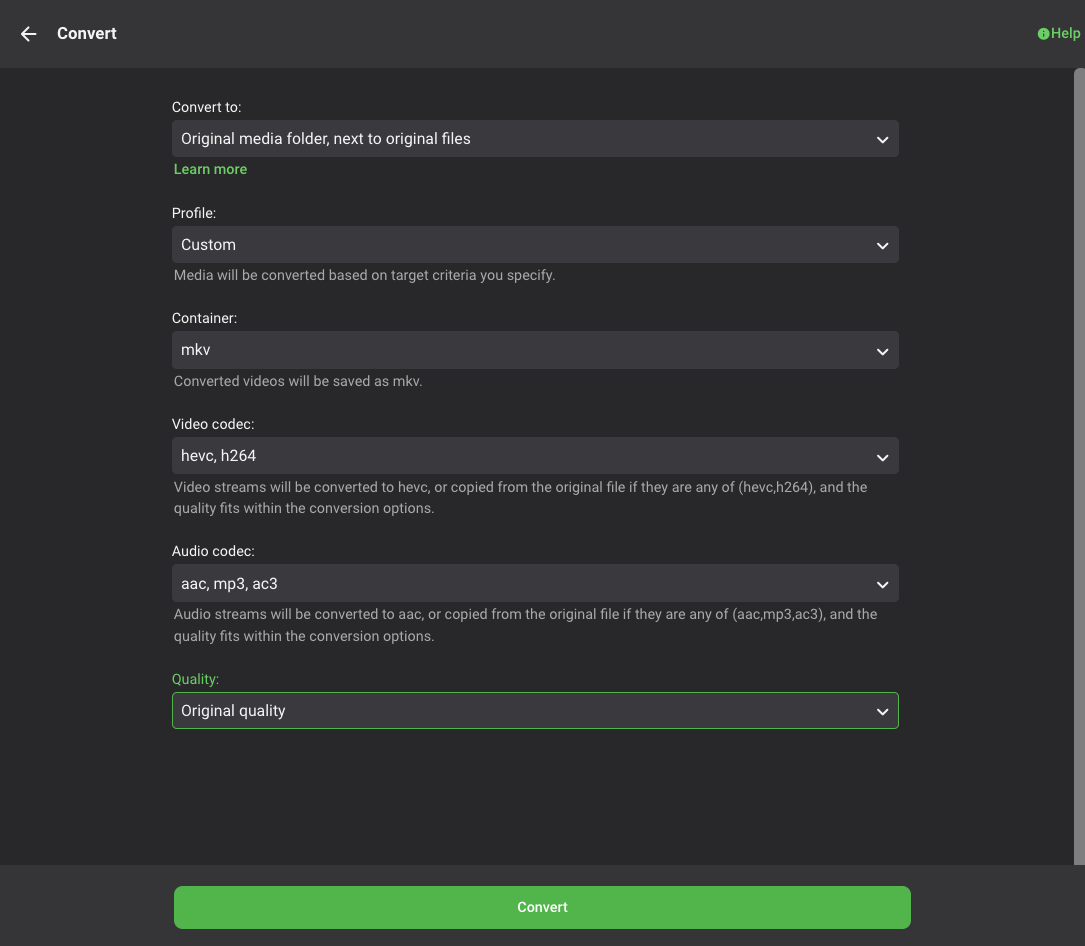
Conversions are not for just downloading, it pre-encodes it into different formats/resolutions at the codec of your choice for streaming it to the client instead of real time conversion.. you actually tried using it? Clearly Emby can Encode files in HEVC, my portable server is nothing but HEVC Conversions from my Main Emby server because it had such limited solid state storage space being portable... then it auto syncs from the main server to the portable one for viewing on the kiddos headrest TV screens on the road.. Even the cheap Aliexpress Headrest monitors play back the HEVC files Emby its self encoded just fine and dandy w/Hardware Decoders.
 1 point
 -
thats been implemented for eons now..1 point
-
This worked. I'm in! Thanks so much for all of your help.1 point
-
Just waiting on one tester to confirm all is good with restoring and it will be released1 point
-
Hi Luke, Thanks! Yes, this fixed the issue they were having. So we can now say this has been resolved, thanks to you and the great Emby team!1 point
-
Hi, yes this will be improved in Emby Server 4.8.1 point
-
HI, does this topic help?1 point
-
We'll get this straightened out. Thanks for reporting.1 point
-
Thank you!!1 point
-
HD Audio passthrough would be my #1 test ! (hint, hint..)1 point
-
I have one coming today will report back. My Wi-Fi usually outputs 400Mbps so no issue with that. edit - the 3rd gen FireCube that is.1 point
-
This is the point I mentioned above - emby doesn't do it in real time because it can't (the file is in use) - and thus maybe fails and then waits for the schedule to do it instead. Not 100% sure. A log would confirm this. You can always reduce the schedule to every 30 mins etc - if there is nothing to do, then it will move on - if stuff has been recorded with no previews, then it will generate them.1 point
-
I wasn't aware that my request would take away an administrator's options for how to securely access their server remotely. Right now there is great concern over the lack of encrypted connectivity for remote sessions. I suspect that lowering the barrier to entry (while still adhering to solid practices) is a potential win for everyone in these forums. The current options require sticking to a meticulous deployment plan, of which an error at any step will leave that user in a lurch.1 point
-
Have you turned on thumbnail previews in the TV library ? If not, then turn it on and then refresh the metadata on an item - that will also kick off the thumbnail generation process. You can do this at a library level as well (metadata refresh) so it will generate the thumbs for all the previously recorded shows.1 point
-
They should generate but I've noticed it seems to sometimes take longer. I recorded a 3 hour football game and after 6 hours I still didn't see thumbnails. The next day they showed up. Do you have thumbnails on ANY recorded content?1 point
-
Big Thanks1 point
-
Many thanks Luke - useful info. Only does it sometimes but it sounds like the best thing is to tab out of the field before scrolling to the Save button. Cheers!1 point
-
1 point
-
Hi, yes it will pick a random one from that folder.1 point
-
Do you have auto group plugin installed? This seems to be the cause of the memory leak1 point
-
HI, can you please try re-attaching the emby server log? I'm unable to download that attachment for some reason. @Abobader1 point
-
For further investigations i can confirm that on Apple TV 4K 2021 Edition with TV OS 16.1 combined with emby 1.6.5 videos are not playing! Otherwise Infuse (7) using emby server as media source everything plays fine and fluently. So definitely a bug of emby client on tv os that is not solved by version 1.6.5 greetz1 point
-
Ok, I’ll do a report later when I get home.1 point
-
I am having trouble trying to replicate this in the web app. Going to continue to try and replicate it. In the mean time, does the Android TV log help?1 point
-
posso ajudar com português do brazil.1 point
-
Currently no way around it as each has its own id and same id currently can not be in two libraries. As for Watched status there are several topics with lengthy discussions but userdata is tracked providerid but all versions are the same to me. It is in the Catalog.1 point
-
@chef I just read this thread from the first post all the way to now. What a wild ride. Just wanting to confirm two things: 1. The most recent NewReleases plugin you posted on 9/22 still has the duplicate search results, right? and is this being worked on or do we think its just how it is? Does everything else, like watched status or metadata changes, work across the different "copies" ? 2. The top picks plugin is still unreleased, right? Awesome work, thanks for everything!1 point
-
I haven't done this workflow in a while, so I really wouldn't know (and it is random). A quick, simple test of they keyword recording scenario did not display any errant behavior.1 point
-
I am finding Android 12 upgrade troublesome. Although the emby app now loads and casting is back play back of H264 direct play with mostly DOLBY audio plays badly until I force transcoding by lower bitrate below direct play mbs. This is through casting or through the emby app on google TV. Casting the same files though an older Chromecast 4K are perfect on Wi-Fi or directly network connected.1 point
-
Danke schon1 point
-
OK yes that's confirmed and we're looking into it. Thanks.1 point
-
Release 20221023: HDHR5/HDFX/HDVR/HHDD models: IPv6 support. HDHR5/HDFX/HDVR/HHDD models: Improvements to automatic reboot handling required for EU certification. HDFX/HDVR/HHDD models: Optimized handling of a new DVR request for the same channel from the same client. HDFX/HDVR/HHDD models: Fix problem where duplicates could start recording at startup while existing recordings are still being detected. ATSC3 models: Fix problem handling ATSC 3.0 stations missing media content type tag. ATSC3 models: Fix problem handling ATSC 3.0 stations where the sample duration was not specified. HDFX models: Use the first 17.6TB of the hard drive rather than failing to configure a hard drive 18TB or larger. HDVR models: Operate as a tuner only if the hard drive is removed or not functioning. HDTC: Fix reporting of codec tag in http response when transcoding. Add lineup.m3u for use with VLC and other apps that import m3u channel lists. Fix parsing of URLs without URI after the IP address. Improvements to URL generation so the URLs are valid from .local names or if port forwarding across private subnets. Don’t limit TTL for discover, control, or webpage access on private networks. Upgraded discover support. Security: Improved IP validation. Legacy models: Update lineup URL. Legacy models: Security: Limit TTL for non-private networks. Firmware Changelog1 point
-
Fair enough. Sometimes the internet sucks. It would be nice if someone would fix that. But I will say I think you are doing Cancun wrong.1 point
-
Emby Server 4.7.7 - Keyword Recording, Lock Screen, Mini-Dock & More This is the latest point release of Emby Server containing new features as well as fixes for identified issues. DVR: Support Keyword-Based Recordings Newly added to 4.7.7 is the ability to record based on keyword(s). One way to access this new feature is to use the Recording tab from the Live TV interface, clicking on the Add Recording button as shown below. This brings up the following menu allowing selection of Keyword. Selecting Keyword bring up the following: Example Keyword search to DVR all Eagles NFL games regardless of day, time, channel or other criteria. Add Lock Screen Function to Video Player for Mobile Devices Tired of accidentally touching the screen and having the video jump to a new scene or doing something you didn't intend? The new lock screen will put an end to this when-ever you choose to use it. Simple click the lock button highlighted in yellow in the picture below to activate this. Any screen touches from this point on during the video will briefly bring up the following screen but do nothing else. In order to de-active this feature you would click the lock icon shown on the picture below, then click the confirm after that. This new feature is straight forward and very easy to use. Support Three-Way Navigation Menu Toggle - Switch Between Full, Mini-Dock and Flyout Modes One of the coolest features in this new release is the mini sidebar docking option. This works on mobile (Android Mobile shown below) as well as it does for desktop modes. In order to access this, click the highlighted icon shown in the picture below. Now, click the following icon one-time. You will now have the mini sidebar open as shown below. The mini sidebar is scrollable so if you have more libraries then would fit on screen you can simply scroll this menu up or down to gain access to all libraries on your system. You can click the icon to cycle through all the modes as needed. Add Image Size Display Option 4.7.7 adds the ability for users to select the image size they wish to use on each device's Libraries. In order to use this feature enter a Library and click the 3 dot menu. This will bring up a dialog with information that is library specific that displayed. You now have several choices you can choose as shown above for image size! Other improvements and fixes include: * Various database performance improvements * Stop scanning at the top of a library when it's unreachable * DVR: Don't use episode title for comparison when it matches the series title * Improved RTL supported in the web interface * Add more fields for selection in poster views * Fix support for simultaneous music and photo playback * Add option to control display of rating information at the start of video playback * Change wording of transcoding reasons to be more user friendly * Improve filter menu indicator Please report any issues you may have in the General/Windows section of our Community Forums: Emby Community General/Windows Forum View the full article1 point
-
Do files with a higher bit rate play? I gave up on my Sony Bravia awhile ago and just got an nVidia Shield because of similar issues. High bit rates just wouldn't play.1 point
-
This was one of the hotly discussed topics as an Emby advantage. It is your server, the users are YOUR users and you control their access and details. Plex goes the other way and says NO they are OUR users. You needed to create an account with Plex to have users connect to your Plex server. This basically means Plex forces admins to loose control over their users and Plex wants to control these users forcing on them shitty advertisement and possibly monetize users that are YOUR users and not Plex ones. Well now the shit has hit the fan and they reap the results of that bad decision, just another reason to ditch Plex for Emby. Since I have a lifetime license for Plex it is just sitting there but not used because Emby is so far more likeable and suits my purposes perfectly.1 point
-
Save Time With Emby's Intro Skip Requires: Emby Server 4.7 or later One of the new features in Emby Server 4.7 is the ability to skip TV Show Episode Introductions segments. This allows you to jump right to the start of the action saving you a great deal of time allowing you to quickly get to the good stuff! Combine Into Skip with Automatic Play Next Episode for a superior binge-watching experience!. This guide will cover the following: Configure a TV Library in Emby Server Configure Emby Client for Automatic or Manual Intro Skip How to use Configure a TV Library in Emby Server In order to use Intro Skip a TV Show library needs to be configured. Edit a TV Library on the Emby Server console. Scroll down to the Markers section in the library and change the option from NEVER to either "as a scheduled task" or "as a scheduled task and when media is added" depending on your particular needs. Once setup go to Scheduled Tasks and you'll see a new option has been added: By default this task is set to run every 24 hours. You can adjust it to run at specific time if you like. To add a new Task click the + sign above. This shows a new schedule that starts at 3 AM and is allowed to run for 4 hours. After clicking Add: We can now click the trashcan icon on the 24 hours schedule ending with: From our Scheduled Tasks menu we can manually run this job clicking the arrow icon. You will then see a status bar showing the percentage complete. There is nothing more needed on the server to use Intro Skip except to give it time to analyze all episodes and build the Intro Skip indexes. This process may take a while depending on the number of episodes you have. Configure Emby Client for Automatic or Manual Intro Skip Each client can be set to ignore TV Show Intros, automatically use Intros, or to prompt use showing a button. You can set this option in the client option's Playback Menu. Using Intro Skip With the Skip Intro button selected you can clearly see the button on the OSD immediately at the start of playback. The timeline is still at 0:00 before the show has started to play and we can already skip the introduction of the show. Clicking the Skip Intro button immediately jumps right to the start of the Episode. With the client option set to Automatically skip intros our TV show intros have been put on auto pilot. Right at the start of playback it jumps to the end of the intro right at the point of the fade in. View the full article1 point
-
a way maybe can solve the problem edit /emby-server/system/dashboard-iu/modules/htmlvideoplayer/basehtmlplayer.js add the code maxBufferLength:6 after emeEnabled:!1 var hlsOptions={manifestLoadingTimeOut:2e4,debug:!1,testBandwidth:!1,emeEnabled:!1,maxBufferLength:6};1 point
-
@softworkzcan you comment on this as you mentioned the same in the referenced issue from (2017). // Some browsers cannot handle huge fragments in high bitrate. // This issue usually happens when using HWA encoders with a high bitrate setting. // Limit the BufferLength to 6s, it works fine when playing 4k 120Mbps over HLS on chrome. // https://github.com/video-dev/hls.js/issues/876 if ((browser.chrome || browser.edgeChromium || browser.firefox) && playbackManager.getMaxStreamingBitrate(this) >= 25000000) { maxBufferLength = 6; }1 point
-
To gauge interest... What if you had the ability to "Forget" a series for the purposes of Next Up display. That is, it would no longer show in Next Up - unless you watched another episode. Sometimes you maybe watch a series for a while and, even though there is more of it or more is made later, maybe it isn't as good as the earlier seasons or maybe you just don't have time for it anymore. So you'd like it to quit showing up in your Next Up list so it is less cluttered and you can focus on the series you are actually watching now. If you start watching it again, the "forget" would be forgotten and it would start to show up in Next Up again.1 point
-
Hi there, currently yes you need an EPG to record but we plan to support manual recordings in the future. For now there is software called xteve that you could look at to help you create a dummy EPG.1 point