
Leaderboard




Popular Content
Showing content with the highest reputation on 10/09/22 in Posts
-
Man, I don't know what happened to my brain... I was quite certain I'd tried that, but I tried again just now to make sure and it everything worked perfectly. Thanks for the tip GrimReaper, and sorry for the brain fart!2 points
-
This is so lame garage company. I think they dont know how to fix this.2 points
-
In my house, I would like to see a User Profile selection similar to Netflix. Using my single logon, I would like my family to choose between who is watching. That way each of us can watch shows without marking it watched for someone else. In this scenario, I would have a 4 users in a Family Group using the same username/password.1 point
-
When transcoding or direct streaming it currently throttles but it doesn't cleanup during playback so you can have a situation where your using lots of space. Can we have a custom setting to remove the transcoded parts minus 5 minutes of current playback? This would help it large libraries where there are multiple transcodes going on.1 point
-
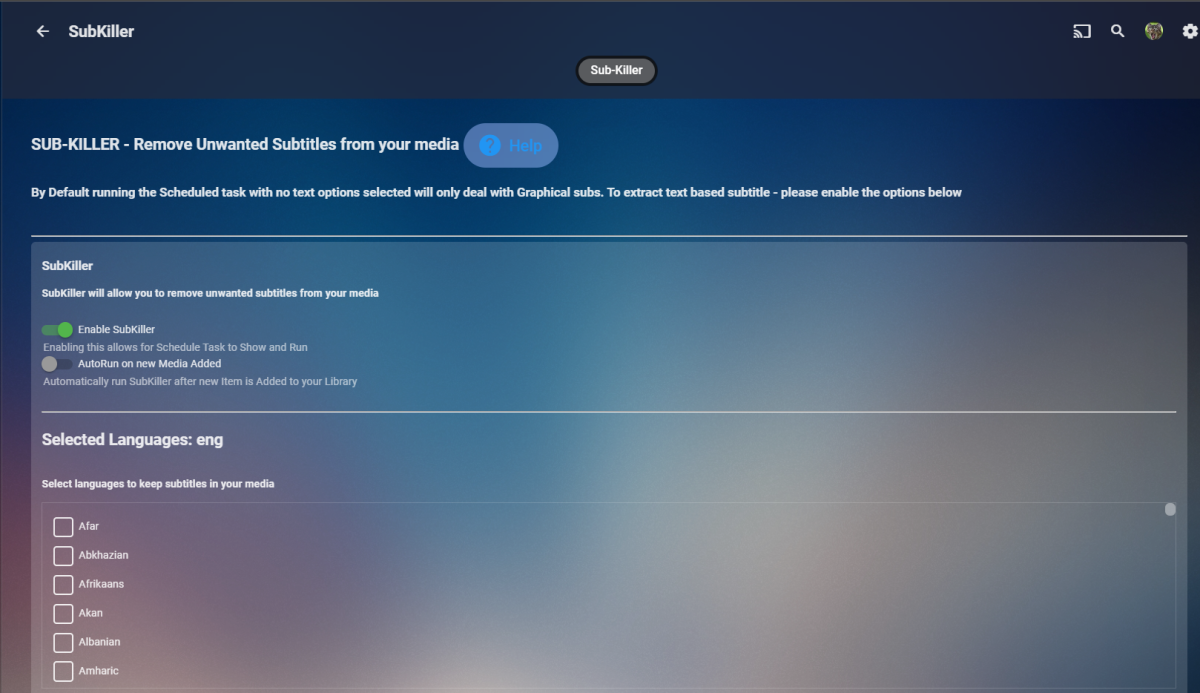
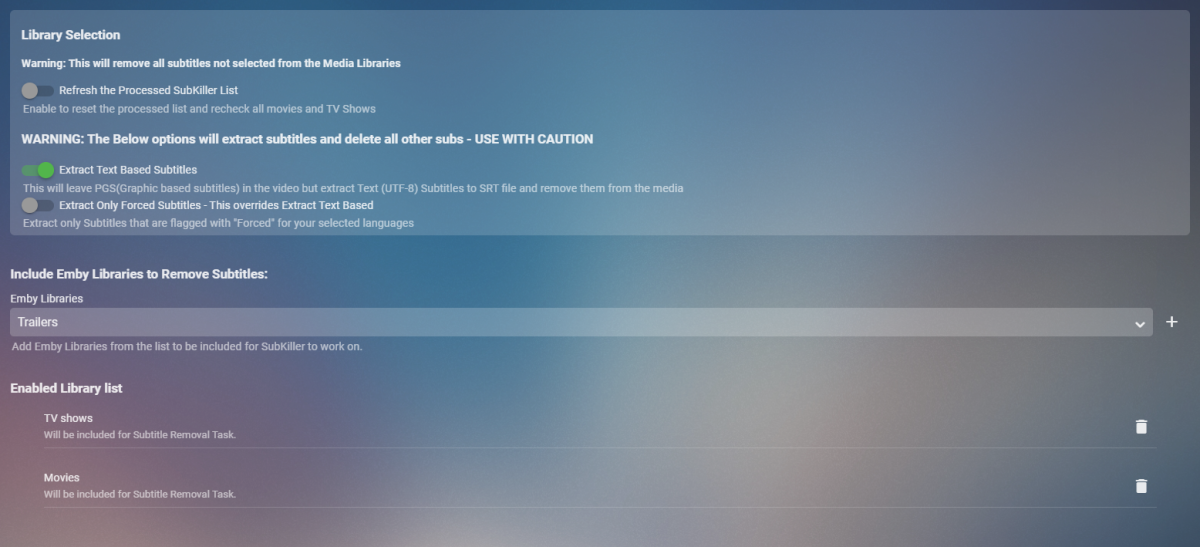
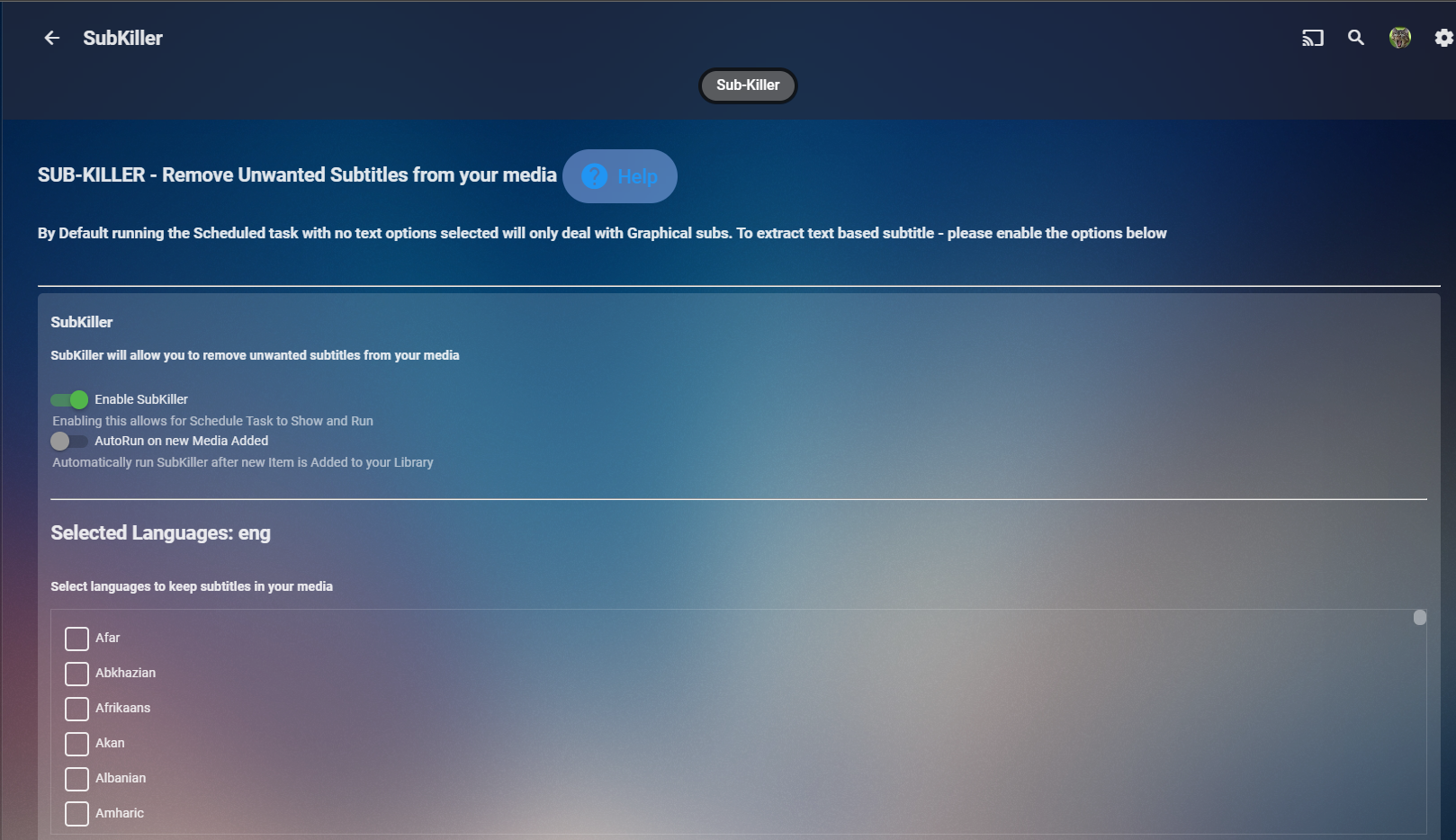
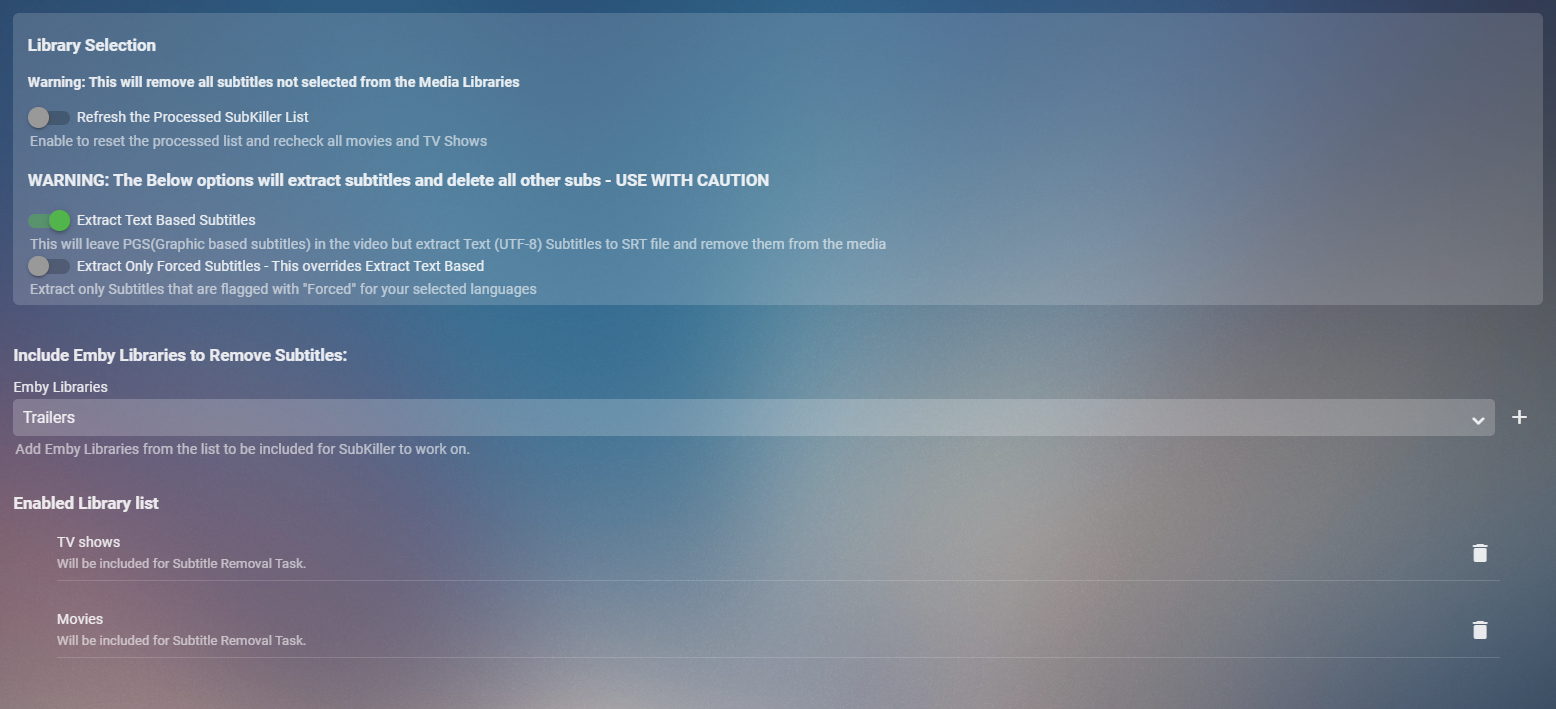
Cheesey Productions brings you SUB-KILLER for Emby Remove those unwanted subtitle languages Removes Graphical subtitles by default & can extract text based subtitles as an option Available from the plugin store A huge shout out to @rbjtech @FrostByte and @Dickydodah!for all their help with this. https://twemoji.maxcdn.com/2/72x72/1f44d.png Please read the wiki page available that will help you get set up. - currently under construction SUB-KILLER WIKI PAGE This plugin is destructive as it removes physical subtitle files from your media containers PLEASE USE A TEST LIBRARY FIRST Config Page

 1 point
 -
Some of us use the feature of putting shortcuts in media library folders for sharing media which is one way to share content without having a ton of libraries or folders for various purposes. It appears this is a deprecated feature that may go away or at least not considered an official feature that would be fixed if it fails to work (see http://mediabrowser.tv/community/index.php?/topic/14072-help-request-how-to-share-music-between-multiple-users-on-same-server/&do=findComment&comment=153275). I like the new tagging but the only control is to block content with certain tags. I wonder if there could be a new feature added that would only allow content with certain tags either at the user level under parental controls or even better tied to the user library selection (e.g. user gets all of library 1 but only content with a certain tag from library 2).1 point
-
The only difference in deleting 1 item vs multi-select is the dialog as 1 item can show you Name vs a generic statement. Emby does not delete items when you delete a collection it removes the item from the collection and deleted the virtual Collection from the Emby library and filesystem ie /metadata/collection/each collection. So yes removal from Emby and removal from filesystem.1 point
-
Think the buttons in the ATV app are better, they're a bit smaller and more square with rounded corners, and not just circular.1 point
-
Thats true. And because of that reason, a settings to change it to your favorite size, to be more flexible, would be great. sitting in front of a 77" TV is of course different of an 42" or something else.1 point
-
Thanks for the fast support!1 point
-
OK, currently that's what will happen, but it's on our list for review for future updates. Thanks.1 point
-
i can confirm with beta 2.2.0.9 i can acces the gui1 point
-
I tried ,it works, now KODI will accept ASS subtitle when dlna , I will open a pull request to kodi upstream later now dlna playback is working after upgrade to 1.0.89 ,thanks to @Luke the only problem is subtitle selection is broken ,and according to the sniff result of wireshark ,it's emby that always send a subtitle that I didn't select I will continue to discuss about that here1 point
-
I've asked the Emby chief developer for some help.1 point
-
Hi. It is just the devices.1 point
-
One thing that annoys me on the Android app is changing tracks, it needs a whole screen to select, very cumbersome.1 point
-
Hi there. Could you explain from where you are starting the play? Are you getting into Series detail view (click anywhere on poster BUT in the middle "Play" icon)?1 point
-
I can't recall, but it is quite possible that an internet connection is required.1 point
-
I Make some compare that the difference is <res protocolInfo="http-get:*:text/ass:*">http://192.168.69.12:8096/Videos/94/e2743f4f2d7c745e121e0e83a22178d7/Subtitles/2/0/Stream.ass?api_key=***</res> VS <res protocolInfo="http-get:*:text/srt:*">http://192.168.69.12:8096/Videos/34631/0f65e6dd1bf5dcc9ad2a6514b6403f1e/Subtitles/2/0/Stream.srt?api_key=***</res> so I look into kodi's source code and find this https://github.com/xbmc/xbmc/blob/0b3a2c0085717b0fdc1f5025cfeb70f96790d3ce/xbmc/network/upnp/UPnPInternal.cpp#L1158-L1162 It seems that kodi has a white list of subtitle , i will try to add `text/ass` and rebuild kodi to test if it works1 point
-
Ok. Never mind. it just started working again.1 point
-
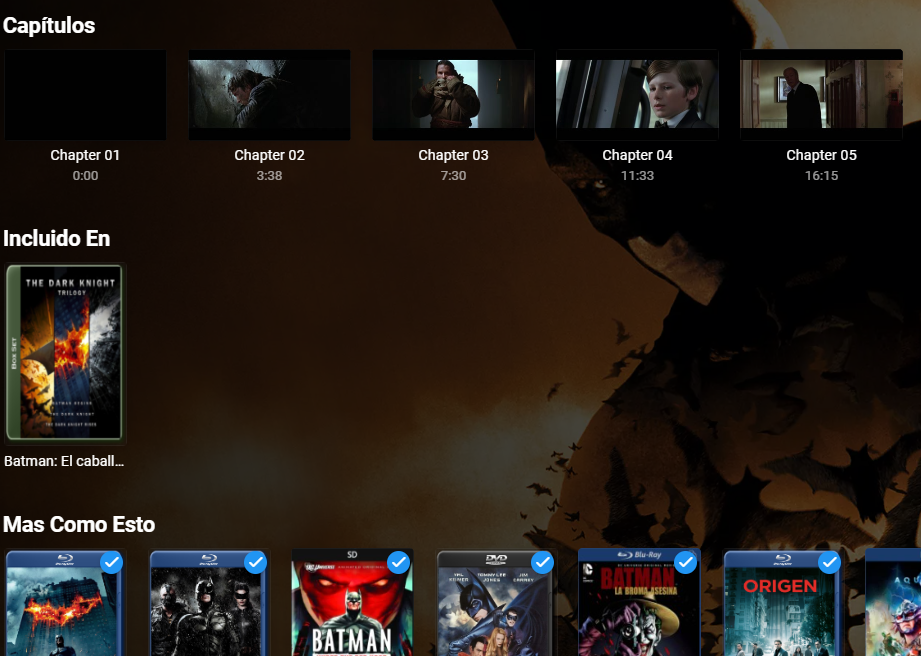
La manera mas sencilla que se me ocurre es que uses colecciones. Es muy probable que al descargar los metadatos haya descargado tambien el collection ID, por lo que si pones la biblioteca a que agrupe las peliculas en colecciones las muestre juntas y dentro de cada pelicula en la parte de abajo diga "incluido en" y te enviara a la coleccion correspondiente. Aqui puedes ver que pertenecen a una coleccion. Espero que esto te ayude
 1 point
 -
OK then yes you're right. They must have added a person provider but currently there is no way in Emby Server to control it. That's something we can look into though.1 point
-
Love to see it when it is released !!1 point
-
thanks @Luke for pointing out, the problem is in themoviedb, seed destiny is not registered there, so it took seed one instead, i just left it blank atm, hope it wont scrobble it, i'll mark as resolved for now then1 point
-
Hi, we are working on a new windows app and that this point we'll handle this issue there. Thanks.1 point
-
That's actually an even better idea, and much more achievable too. I've just gone and made up a script myself to catch the played events with webhooks and am then caling the api to mark played for those individual profiles. Works great. Even makes it easy when my wife drops off a show, I move it to my profile and it's already marked as watched for the episodes we've watched together. Thanks!1 point
-
Hello, Is it possible to add a time limit for the time period? Example: The Account of my Son can be used between 4 and 8 pm. I think it would be a great option to set a time limit for this period. So he can use emby 2 hours between 4 and 8 pm. Best regards1 point
-
The sync plugin is using a third party json database library. I really don't know it that well to pinpoint what causes this, whether it's just file corruption on your side or an actual error within that library. But I can update the code to recover a little better from it than what it currently does.1 point
-
Internally it's all id driven. The files use paths because that's what a normal m3u8 playlist would be based on, and also they will survive a re-install better than a database id will.1 point
-
I appreciate the response, but that part I already surmised and described earlier: My question is *why* do playlists in Emby use filepaths at all, as opposed to the item db ids or uuids that are more commonly used throughout Emby. It's fine if you'd rather not answer that specific question. I'm just curious.1 point
-
My apple TV is the "Apple TV HD" (4th generation - before the 4K models were released ) In Emby for Apple TV the "menu" button will work as a "back" button, and eventually exit Emby if you are on the main screen. So far so good. But, this "back" functionality sometimes only works if focus is on the very top menu bar (Home - Favourites - Search - Settings). If I'm on the main screen, pressing trhe menu button will exit Emby *only* if focus is on this top menu bar, if I have scrolled down anywhere on the main page the "menu" button will do absolutely nothing. THis makes no sense so please change this so that the menu button exits Emby (works as back) no matter where you are on the main screen. Similarly, if I go to "Movies" on the main screen, pressing the "menu" button will only take me back to the main screen if focus is on the very top manu bar. Again, if I have scrolled down on the "Movies" page, so that the top menu bar no longer has focus then pressing the "menu" button does absolutely nothing. Snd similarly if I go to other sections (Music, Recordings or whatever). Please fix this so that the "Menu" button taks you back to the previous screen even if "focus" is not on the top menu bar. I'm pretty sure that the current behaviour were introduced in some build not too long ago. My wife gets stuck in the menus now, and she used to be able to navigate back just fine.1 point
-
Only the filename1 point
-
Btw - I should add that I appreciate all the assistance!1 point
-
It's not really specific to playlist support. It's more due to just the way that multi-versioning works.1 point
-
My guess is that it's because playlist support is very old and the playlist spec itself is even older. That's why it uses direct paths even though Emby itself doesn't. So *probably* Emby just uses the path to de-reference back to library item, and at that point Emby uses its standard method to choose the 'best' file version for playback based on network conditions and all that. Which is where our constant requests for true multi *cut* support (Director, Unrated, Extended etc) versus multi version (4k, 1080, sd, etc) come in. On the bright side, Luke's response here is the closest I've seen to them committing to actually adding multi-cut support.1 point
-
@iiiJoe thanks for following up. I'm still going to look into this because I think it would be preferable to use the earlier airing instead.1 point
-
Hi, yes an option for this is certainly possible. Thanks for the feedback.1 point
-
Hi, yes we can add a sort by tvg-id to channel management.1 point
-
probably be handy if the main download page was updated to include the arm8 link1 point
-
thanks, i will test it1 point
-
I use 4.7.4.0. I have converted all files now to US Apostrophe 0x27. I think with Acute Accent it just doesn't work. Thanks a lot for the support. This has settled the issue for me.1 point
-
First of all, have fun in Indonesia, it's just fantastic!!! I can confirm that the error is gone and it is running better now. On your advice, I tried as best I could not to use Embuary next but to use the node via the library, but I still have an issue with the node updating. If I watch an episode until about 95% finished and go out, the episode is also marked as watched but there is no update to the next one. So the library then shows me the next one I have just watched. When I refresh the skin there is no change. But seeing Embuary next is clean. Could be an Embuary issue again, but somehow there was a different refresh form in the old version, it wasn't like that before. Hope the translation works and you understand. Thank you very much and see you in a few days.1 point
-
There's some grunt work that we have to go through first because you can't really customize the apple-provided OSD, so we're currently building our own that will be able to accommodate features such as this.1 point
-
Only for AVI Container for now is bug in always 35:47 min.1 point
-
I have the same issue on a FireTV stick. Several videos, maybe 1 in 6, begin accelerating video at 35:47. I've watched the racing for up to a minute and regardless of how long I watch it for, after I stop it, the resume position is always 35:47. I can play the same video on the web client without the racing. I'll read through the link above on how to submit diagnostic information and try and get something uploaded. In the meantime, I just wanted to add my two cents for posterity as this is definitely "a thing" and not an anomaly. Edit: Restarted emby server, began playing video, FF'd to 30:00 and then let it run to the problem at 35:47. I continued to let it run in the race condition for an additional 10 seconds, then stopped the video. Server log attached. embyserver.txt1 point
-
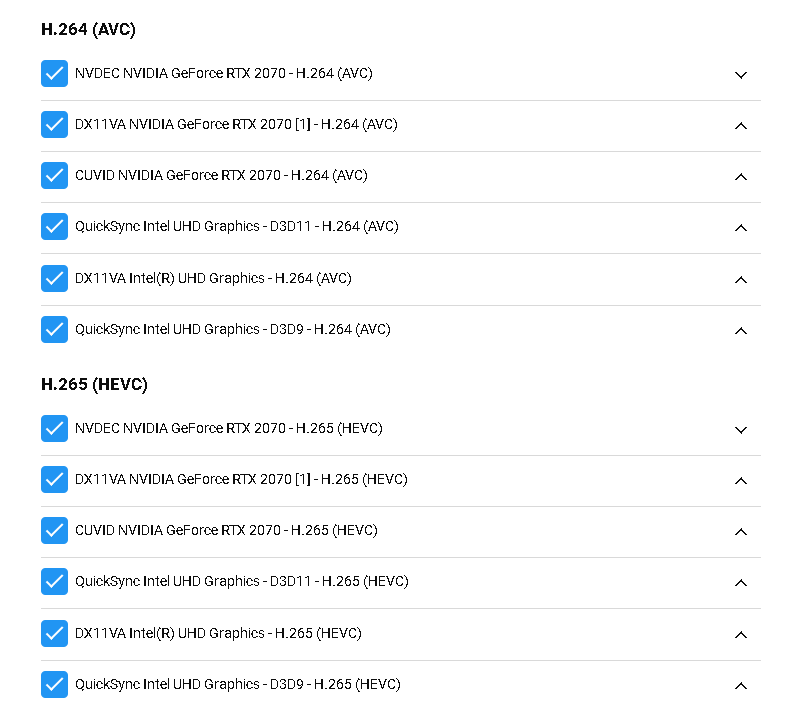
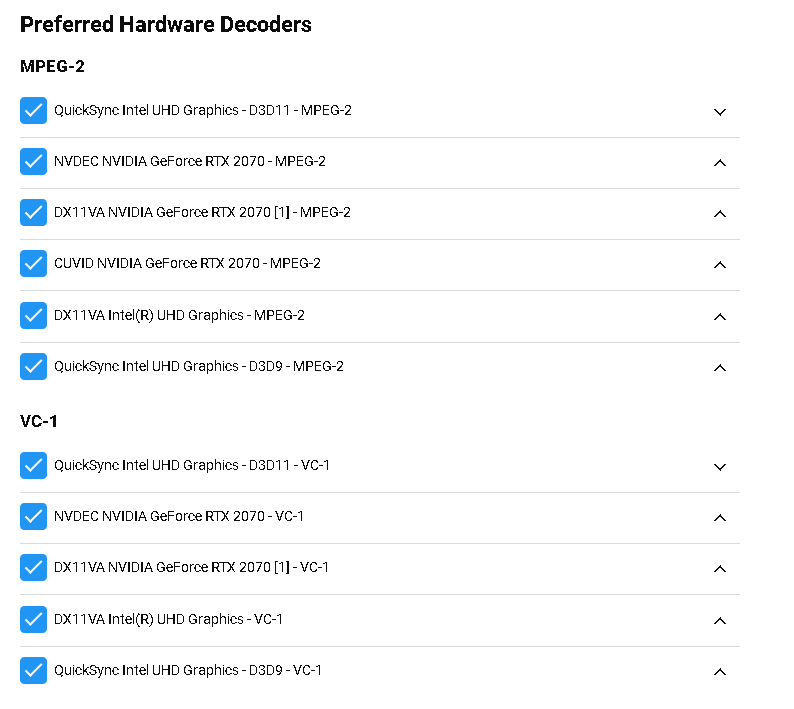
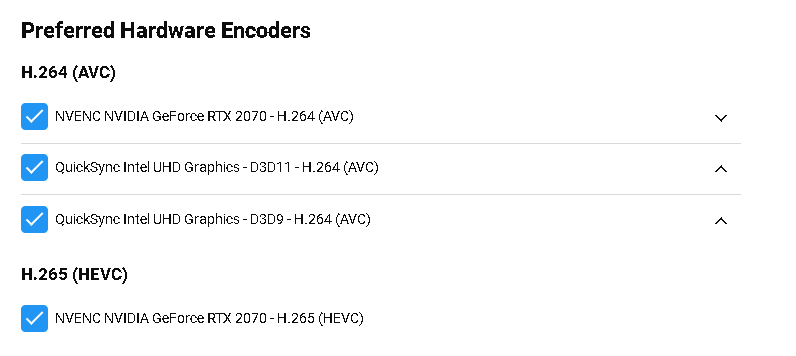
Emby does support multiple GPUs in the system but is not optimized to use them as such. There really hasn't been a demand for this. It's something we will probably add in the future but let me explain what you would see today. Here's a picture taken off my high end notebook which is also my dev system. It has both GPUs built in, QuickSync on the i7 and RTX 2070 on MB chipset. Here's my decoders for MPEG2 and VC-1 (changed for the screenshot). Here I'm making use of the QuickSync for MPEG2 which on my system is basically OTA and Cable TV as I have no videos in any libs using this other than a recording that I haven't processed yet. Here are my settings for AVC & HEVC: These will use the RTX NVIDIA NVDEC as the main source for decoding. These are my choices for Encoders Here you may notice I only show 2 choices. HEVC can be used when doing conversions but for real-time transcoding it's going to be using AVC at present. Encoding is also more resource heavy than Decoding so it's really the main factor to look for here. This is the part that you want to understand and a general overview (some exceptions can happen and not be 100% GPU based). No matter what I setup the Nvidia GPU will be used for the encode unless it fails and uses the next item on the list. So if you go back and look at the first picture I showed with QuickSync as the default you should realize I did this just for testing and the screenshot, but leave it set to also use NVENC NVIDIA for real use. If I do both decode and encode on the same GPU it's "off line" you could say. If a decode happens on one GPU but encoding on another GPU then the CPU and MB chipsets are going to be involved more in the process keeping the QuickSync GPU filled with data to process as well as receiving the data from QuickSync pushing it over to the Nvidia to encode which isn't optimal as CPU resources will higher. So I can more or less control what GPU is used to decode but will always be using one specific GPU for encoding. In the future we could possibly have an option to force the use of the decoding GPU to also do the encoding if possible or to roll over to the 2nd GPU after X amount of streams are in use or similar to that. Typically I just have Emby setup to use the Nvidia GPU and then setup windows itself to use QuickSync. Same with any playback clients (QuickSync) so I get use of multiple GPUs based on function this way. ----------------------------- Picking a GPU for transcoding is a bit different then picking a GPU for gaming or rendering. We're interested in the hardware setup/ram which for transcoding gives almost exact specs across a GPU chipset unlike the other parts of the GPU which can have different cores, speeds/freqs, etc... Knowing this you can often buy the "underdog" of the family that's less popular for gaming but every bit as good for transcoding at a nice discount. Diving a bit deeper, the 1070 TI (assuming 8MB) and RTX 4000 are going to perform very similar for Emby. Here's a table showing a few select GPUs and number of potential streams each can handle. These are all 8bit files. GPU Architecture/Model 1080p 10Mbit to 720 4Mbit 1080p 10Mbit to 1080p 8Mbit 4K 68Mbit to 720 4Mbit 4K 68Mbit to 1080p 8Mbit GeForce 1070 TI 4GB (3) Pascal GP104 14 13 3 3 GeForce 1070 TI 8GB (3) Pascal GP104 22 22 7 6 Quadro RTX 4000 8GB (u) Turning TU104 27 26 7 6 GeForce GTX 1660 6GB or GeForce GTX 1650 6GB (3) * Turning TU116 20 19 5 5 GeForce RTX 2070 8GB (3) Turning TU106 23 23 7 6 Quadro RTX 5000 16GB (U) Turning TU104 46 26 13 13 GeForce Titan RTX 16GB (3) Turning TU102 46 26 13 13 * The GTX 1650 is available with Volta or Turning chipset. Do not choose the Volta for Emby use! The early GTX 1650s were replaced with a new model (volta) and then returned as the GTX 1660 with the Turning chipset. Thus some of the early GTX 1650s for transcoding are the same as GTX 1660s. Notice a pattern looking first at memory first? Generally speaking, it's your first clue to number of transcodes (assumes same chipset). That chart has mixed consumer (GeForce) and commercial (Quadro) GPUs listed so prices could be wildly different for what appears to be similar cards. For transcoding purposes the hardware is the same but drivers are different. Consumer drivers have a limit of 3 streams while commercial is unlimited. A google search and 5 to 10 minutes implementation will remove this difference for home use. ----------------- For specifics to your system. You won't really benefit adding a 2nd GPU unless the computer is being used for multiple purposes and the 2nd GPU is used elsewhere. I have 99% of my library converted to HEVC/h.265 to save on disk space as well as bandwidth when not needing to be transcoded. For playback on certain systems and browsers it will need transcoding to AVC/h.264) so Nvidia GPU is needed. On any of my Emby test servers using Nvidia (1050, 1660, 2070) GPUs the playback is very quick. It could be a setting or two that needs adjustment on your system. You may need to reorder the choices for each codec to be optimal for your files. Your problem could be as simple as the top choice and first decode hitting a snag and erroring out. Emby then starts again using the 2nd choice and so on until there is nothing left to use but CPU or it finds something that works. A quick way to see if this is happening is to watch the log files being generated during playback. If you see multiple ffmpeg logs generated it errored out and tried again. So you would want to see what it used that didn't work and what did work and change your ordering/priority (as shown in my first pics). I typically test each variation looking at the framerate ordering them that way, then if the top choice has an issue move it down the list. Try the simple test I just mentioned playing back something that requires a transcode looking to see how many ffmpeg logs are generated for the playback. If you need help upload any/all logs generated from the playback including the top choice which is always the Emby Server log file. We should be able to see what's going on and help you correct this for fast starting playback. If need be I could remote in and help you correct this pretty quickly as well. Carlo
 1 point
 -
We are working on improving it. Thanks for the feedback.1 point
-
Just wanted to report same problem. It seems there is problem with sub font in android app which doesnt correctly display č, ž, š(czech letters with hook). But othres "hooked" letters ě, ň, ď, ť, ř are correct.
 1 point
 -
can use in url: /web/modules/themes/Netflix.fw.png work?1 point
-
Yes! It worked. thanks man. For all your help.1 point





















.thumb.png.a66fd8d47b1a98eec0eea334236f158a.png)