Leaderboard




Popular Content
Showing content with the highest reputation on 10/05/22 in Posts
-
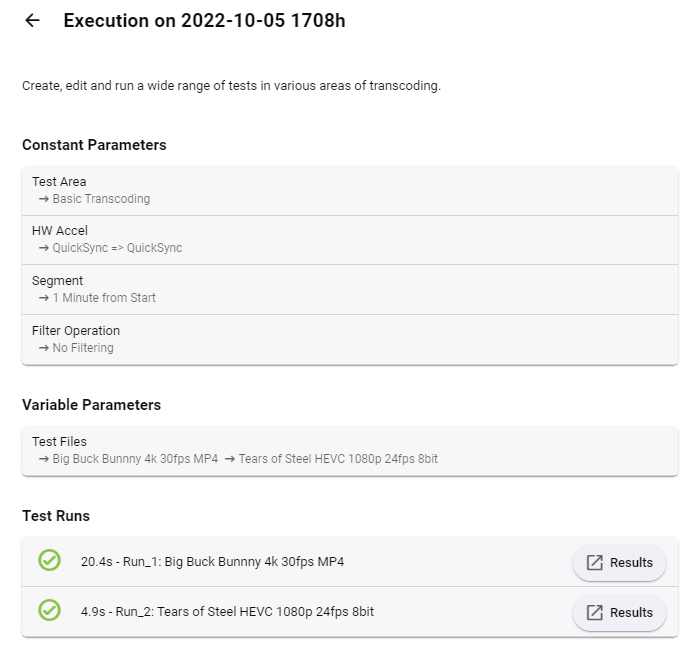
ok - so I did a few transcode tests - everything 'worked' Great job @softworkz ! As per the first post, this gives us a constant 'source' and 'parameters' to work with - which is good, but I would LOVE to see the results anonymized and with permission via an option - upload the raw performance stats, along with the hardware used. And then present that in a table from within the Plugin vs other users. An estimated max number of simultaneous transcodes (of the same type) could also be calculated. Not sure how to get the data uploaded - maybe use the forum login and store there (needs login creds obviously... ) ? The data upload should be tiny. Maybe that is on the cards ? The test below was on an Intel i7 12700K/UHD770 ..
 3 points
 -
Hi, Since I am using more and more TMDb, (since tvdb is more and more a mess), I am missing a very important feature. tvdb had the feature of grouping stuff into aired, DVD and absolute, which is supported by emby. TMDb had also this feature. See this example for "La casa de papel" (Money Heist, Haus des Geldes): The Original Order is allways the "aired order" of the original country. "La casa de papel" was originaly released by "Antena 3" and was taken over by Netflix, which results in different episodes ordering, which is a mess. They solved it in episode grouping. This feature is missing from emby, but it's integrated in their API and is allready supported in other apps, like kodi. At least, Banana a TMDb Mod claims it, that it's supported by Kodi: https://www.themoviedb.org/tv/71446-la-casa-de-papel/discuss/5e7032d84f9a99001152704f?page=1#5eb76872ca7ec6001f7c53cb Is it possible to add this feature into emby? It is the last scraping feature, I really really miss for TMDb on emby. It adds much flexibility and is overall a much better solution, than on tvdb with their aired, dvd and absolute order. Another great example is Dragonball Super: As you see, it adds much more flexibility for different regions over the world. It's in my own eyes a must have for emby!

 2 points
 -
I cannot reproduce by watching it but can by marking played. Just like if ET is open and watch a movie partially in web client it does not appear in ET without Refresh. Changing libraries will not refresh or back arrow, but Entering a library and click the Home button does do a refresh. At the same time this does appear to be specific to TV Mode Horizontal.2 points
-
Yes that's not intentional, I just haven't had a chance to rework it yet.2 points
-
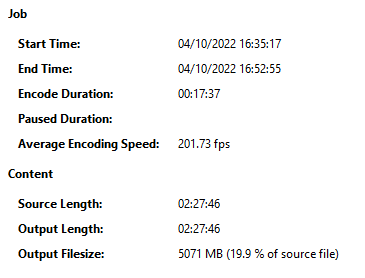
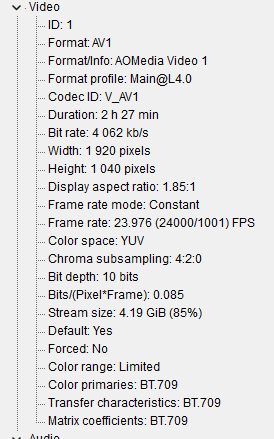
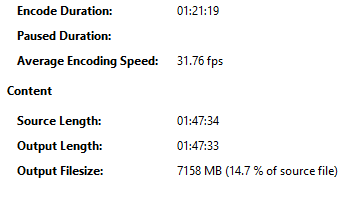
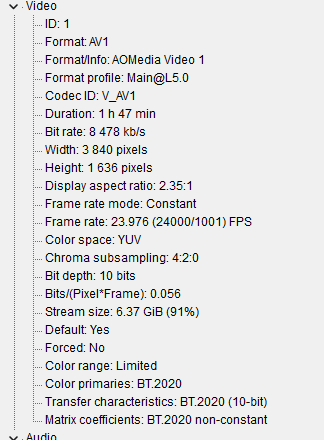
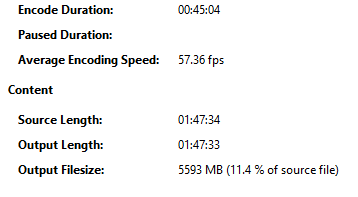
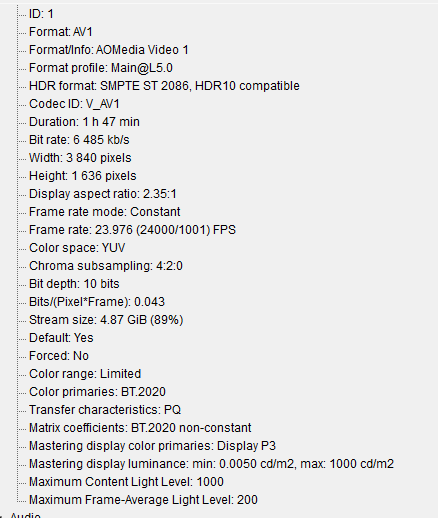
Yep, I have been using Handbrake Nightly (Prod release doesn't have QSV AV1 yet) AV1 10bit- ICQ 20 (28 for cartoons) Quality and I also use the automatic crop option, no other video options or filters. Blues Brothers Extended Cut: Quality and size pretty much comparable with x265 encodes I used to do a while back (from memory that is no side-by-side comparisons) Never thought while checking "Ah I could probably check a couple ICQ lower. I've not checked the PQ of this one yet, but I started 2 Fast 2 Furious (4K HDR) last night: Quite a lot slower, but still a LOT faster than software x265 - I'll edit post once I've checked PQ on my TV - To be fair I'm only expecting do to this for 4K films that I like to have in the format but aren't absolute musts. Edit -- Hmm even though it's carried over the BT.2020 It's not HDR, will have to check more Handbrake settings. Edit 2 - Ah so me manually putting the filter to BT.2020 enabled tone mapping, left that alone. Holy moly, surprisingly very watchable, watched the opening race and didn't notice any artefacts, I'd probably use ICQ 16 just for the sake of it though. Overall, very impressed.
 2 points
 -
Yes, everything in this feature request will be added: More aliases for Season 0 folder underneath series: extras specials shorts scenes featurettes behind the scenes deleted scenes interviews Support for special folders underneath season folder: extras specials shorts scenes featurettes behind the scenes deleted scenes interviews Support for specials right next to the episode files: Dexter S01E01 - Episode Title-featurette.mp42 points
-
Hi, I would like to have an option to choose H265 instead of H264 in the Transcode option. It will be smaller for all bad bandwidth (2~5Mbit ADSL), but will have a great quality. Mobile phone can benefit of it greatly too with the 4G and the limitation of download.1 point
-
Is it possible to have a banner on the front page, and/or popup to announce maintence going on with the MediaBrowser service. It would be nice to be able to announce a maintenance to family and my kids who are at their moms. Anyone else think this would be neat? thanks!1 point
-
I was searching to see if this was implemented and this comment encapsulated my idea fairly well. I enjoy being able to control during which hours viewing can occur each day. I would now like to take that to the next level by defining how much time can be spent. Ideally, it should track the time videos are playing (difference between when they start/stop) and not simply the length of the video(s). I wonder if this type of control has been considered.1 point
-
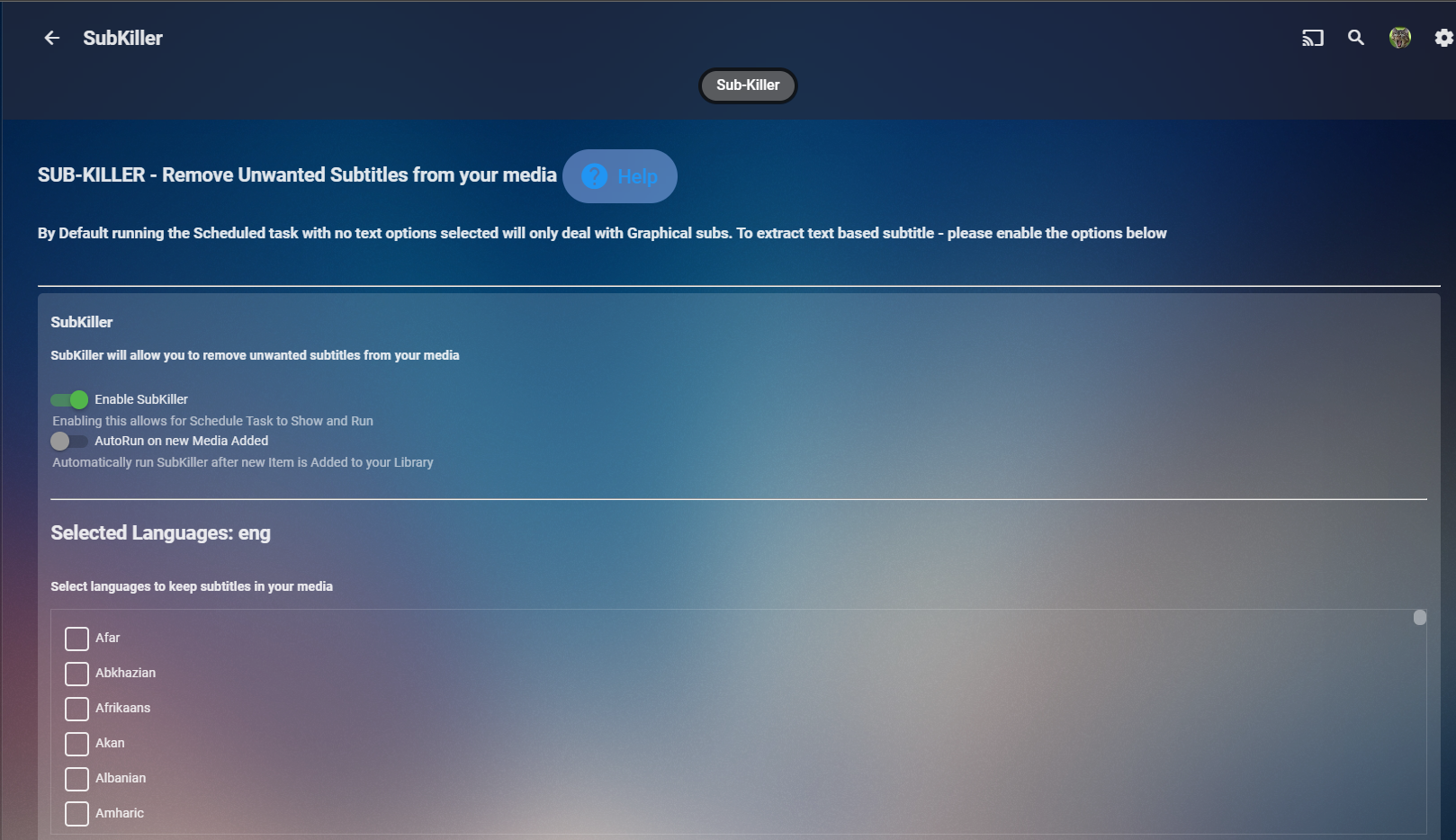
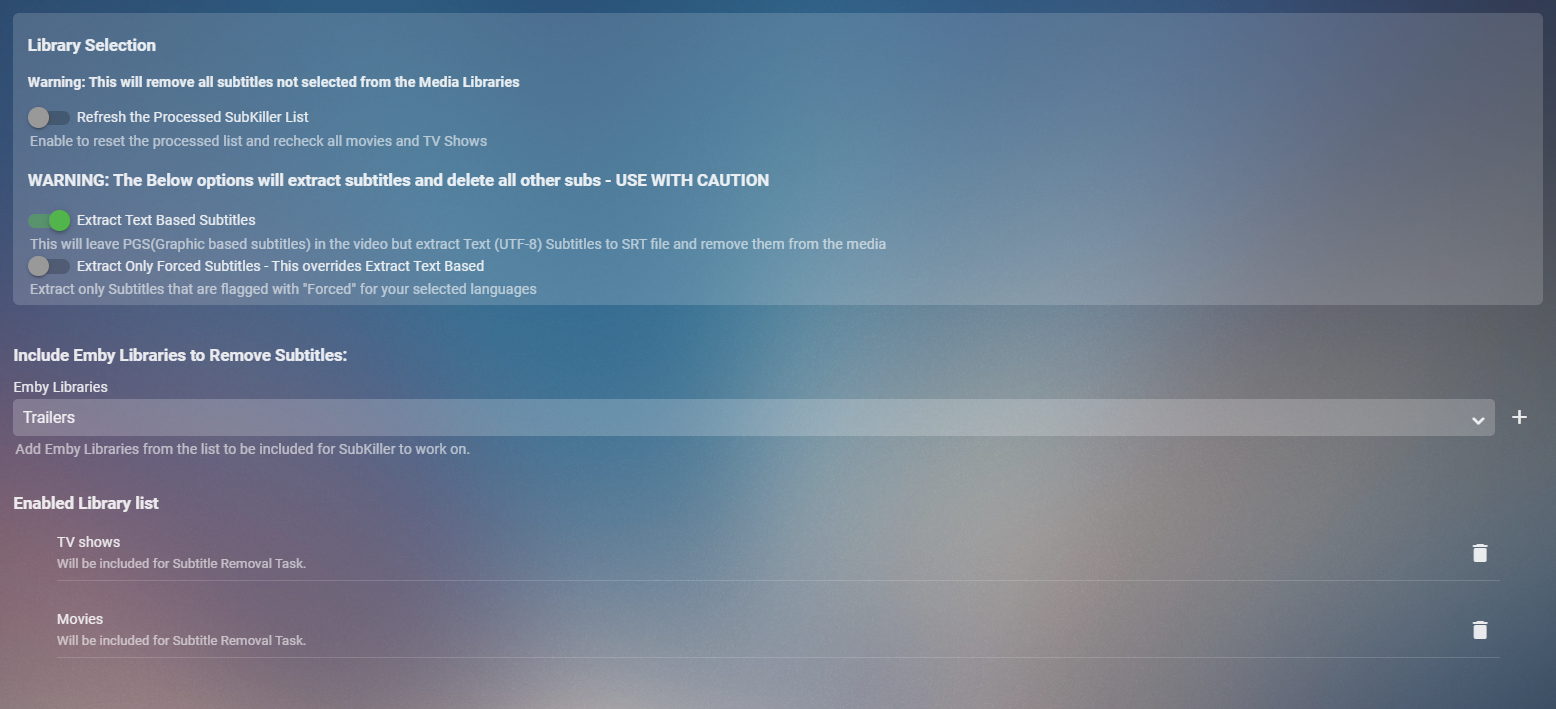
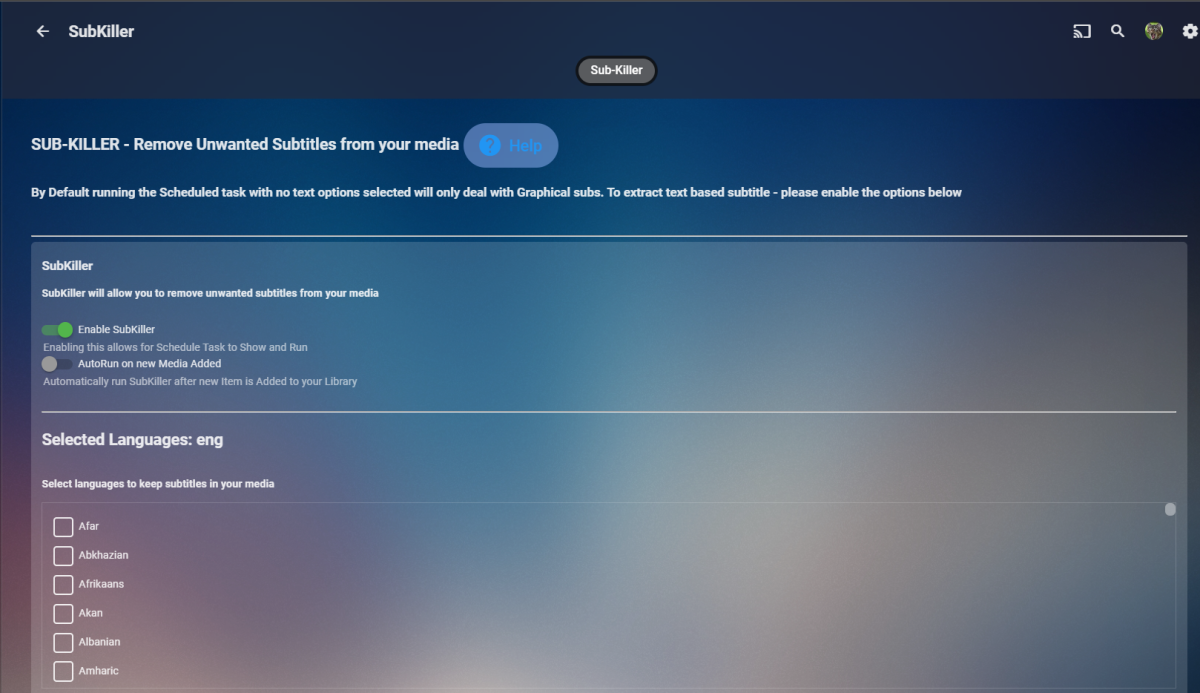
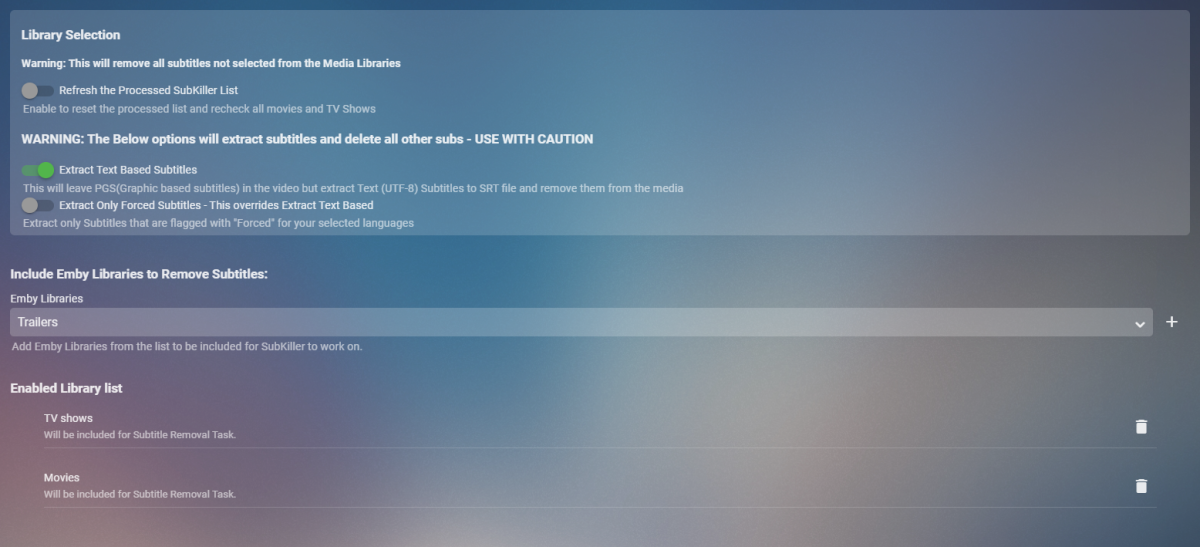
Cheesey Productions brings you SUB-KILLER for Emby Remove those unwanted subtitle languages Removes Graphical subtitles by default & can extract text based subtitles as an option Available from the plugin store A huge shout out to @rbjtech @FrostByte and @Dickydodah!for all their help with this. https://twemoji.maxcdn.com/2/72x72/1f44d.png Please read the wiki page available that will help you get set up. - currently under construction SUB-KILLER WIKI PAGE This plugin is destructive as it removes physical subtitle files from your media containers PLEASE USE A TEST LIBRARY FIRST Config Page
 1 point
 -
Could we have the TV shows suggestions be a bit more like movies and give us some, because you watched rows. Possibly a row of new recently added shows (I know you can filter the TV library for this but it seems fitting here). Only having the next up row and all your recently added episodes does not really feel like it is giving you suggestions.1 point
-
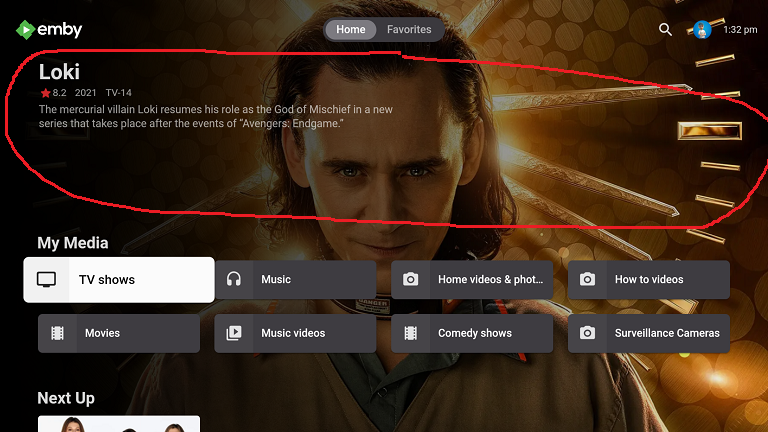
Request the enhanced area automatically rotate the randomly selected item when focusing on My Media libraries in vertical layout. Make the randomly highlighted episode/movie/song somehow playable from the enhanced home page Have the ability to add the highlighted media to Watch List This is sort of like it already does in horizontal layout where it rotates a random movie/episode, etc at about 20 secs and is clickable if the album/movie/episode, etc it picks catches your interest. Right now, you have to scroll around in order to force a refresh and there is no way to play the highlighted album/episode/movie, etc from the Home Page. This would apply to all ET based clients like Android, Samsung, Xbox, etc that use the new enhanced area for media libraries. Could use hard press or double tap in Android to bring up a menu
 1 point
 -
I sometimes enter my movie library with the desire to watch a movie but no real idea about what movie I would like to watch. Currently I can browse from a-z or z-a or by date added or by genre or by date released or maybe a few other choices but that means I am limited to seeing my movies in just a few orders and I see the same movies first in each sort every time. While that may seem like a good variety it really limits browsing and also means that some movies are always late in the browse. I have a library of well over 3000 movies and it sometimes takes a long time to find a movie to watch. What I would like to have is the option to present the movies in a random order that is different each time I browse. That way movies that I usually do not get to browse might show up earlier. I do NOT want random play I just want to be able to choose to browse my movies in a random order. I would really like this on the Roku client but I believe if it were implemented at the server then it would be easier for the clients to implement it.1 point
-
Thanks for the tip Happy2Play... Try the new code I think you will like it. Vic1 point
-
I've begun adding shows to that list1 point
-
not all tv shows have useful detectable intros, some are too varying or too short to worry about. the idea was for the community to come together and work this out for shows and use https://themeservice.azurewebsites.net To host all the info and data which could then be used by the plugin to auto detect all the intros that are worth trying to detect.1 point
-
No offense, maybe just some mild irritation!1 point
-
Hi, yes you're absolutely right. Apologies if any offense was taken.1 point
-
Another reason FR need to be polls instead of post Likes. As there is no way do dislike as that would really destroy one's reputation.1 point
-
Exactly. If you want all of your home screen options to be utilized, then you'll need to use the vertical home screen. For now at least.1 point
-
Thanks for the hint! The patch will be included in ffmpeg shipped with the next Emby beta. The current Emby stable releases are based on ffmpeg 5.0 and are unaffected.1 point
-
Still can't be that straight forward when there are multiple countries. Atomic Blonde <country>Sweden</country> <country>Germany</country> <country>Hungary</country> <country>United States of America</country> Gladiator (2000) So it could be a matter of whether first or all are written in your metadata as I know my xml metadata only contains first. But Emby writes all.

 1 point
 -
Interesting about it only TV Mode Horizontal, never thought to try Vertical. So that narrows it down even more. Great Job H2P EDIT: I also confirm that watching the video does remove it, so it's only isolated to the clicking the played/unplayed button now and in Horizontal View1 point
-
HI, yes I can reproduce this with manually marking watched, but I just tested playback and then going back home and it worked just fine.1 point
-
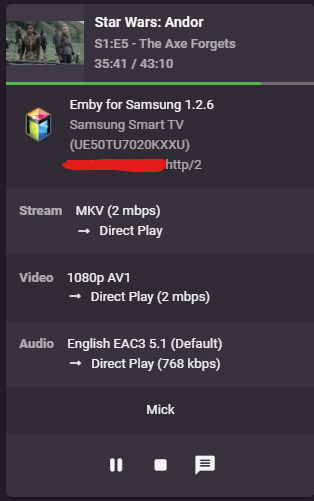
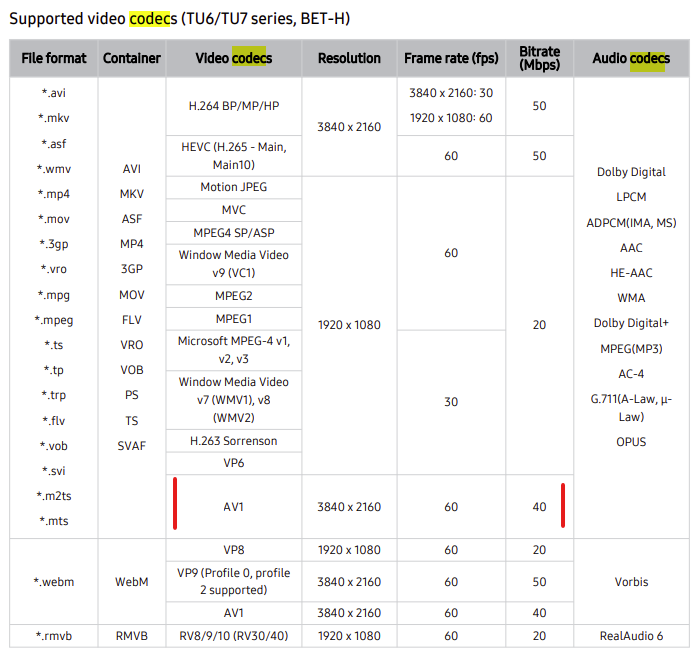
@rbjtech Are my eyes or emby lying to me or is this TV direct playing back AV1 10 bit? Wow it actually does support.
 1 point
 -
Ah, I see what you mean. It was configured like "as scheduled task and when media was added" (I translated that hopefully correct back to english, as the language of my Emby is german), though I don't remeber that this option was available and I thought I had configured only "as scheduled task". Will change that instantly and see tomorrow when I add new content whether that helps.1 point
-
thanks Kuzak84 for the kind words. I will add both of your requests if you agree to test them. The first one is easy. The second is more complex. Would it be adequate to add tag and genre editing at the bottom of the playing video? Vic1 point
-
In the interim, You could Add a field description to let the user know to disable it again after the update has completed.1 point
-
ok cheers i'll take a look when i get a chance fella1 point
-
Thanks all. All of my playback is on the Roku. I just streamed a movie that Plex was transcoding automatically and it didn't appear to do it with Emby. YAY!!!!!1 point
-
Hi, The folder layout is different depending on the OS Emby Server is installed on top of. As long as you backup and restore on the same OS the key to getting a good manual backup is first shutting down Emby Server, then making a copy of the root Emby Server folder and everything under it, followed by re-starting Emby. If you didn't stop the server before backing up the database files themselves are very suspect and shouldn't be relied on as the files would have been open at the time of backup. Typically you'll find the config xml files for some of the plugins in the config directory. For the Coverart plugin I would just reconfigure this one how you want it to look as it's going to have to process all your posters anyway. Carlo1 point
-
Thank you SO much, Vic, for all of your hard work, especially with everything that's been going on with you recently. You fill a huge void, IMHO, with Emby. Though I like it as a more low-profile alternative to Plex and others, it does lack so many basic features that one would think are no-brainers in 2022, especially when it comes to editing and using metadata. So thank you for your generosity in filling that void! My library is primarily made up of home videos, which I've spent a huge amount of time tagging with keywords and actors (names of family members), and yet, Emby seems to lack basic functionality in terms of being able to view a list of actors (family members) in its database, editing metadata on-the-go, enabling a quick "star" rating system (like Plex does), etc. To their credit, Plex does seem to be listening to feedback, but is incredibly slow to implement change, even going so far as to essentially say (in so many words) "you don't really need that feature," or "it isn't worth our time to do that." I get it, it's free, but again, in 2022, these just seem to be easy features to implement. Anyway, I'm done soapboxing Two suggestions for you as you develop the 2.0 version of your tool. 1. I know you said that more filter options are on the way, but the ability to filter by "No tag," "No actors tagged," "No studio," etc. would be incredible. WIth hundreds of videos in my library, I would really like the ability to quickly find those that need metadata added. 2. Having a live metadata editing form under the playing video. Unfortunately, Emby seems to have gotten rid of the "3-dot" context menu from its video player, so no more quick access to the "Edit metadata" screen. Again, thank you so much, Vic! Best wishes!1 point
-
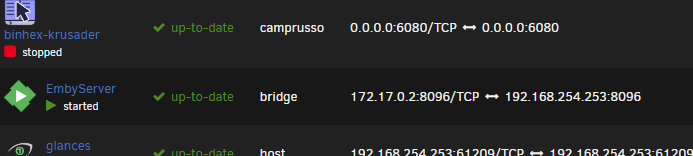
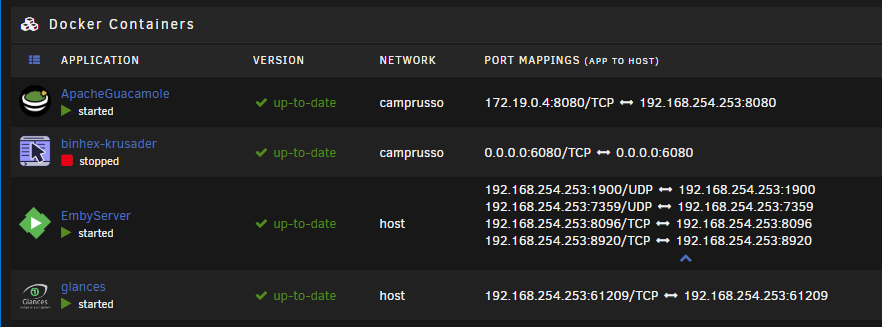
Hmm Bridge mode was not better. I made the container loose those extra ports. I put it back to Host mode for now.
 1 point
 -
Hey Luke, Just changed the container to host mode and now there are magically more ports showing up! The 1900 and 7359 were not there with the custom bridge. I loaded up kodi on my Win11 machine but the add-on did not show the server automatically. I'll try changing it to bridge mode next...
 1 point
 -
Apparently it was not able to authenticate using my email (which is normally use for singing in to last.fm), but it was able to authenticate using username (which is also what it asked for in the plugin UI to be fair)1 point
-
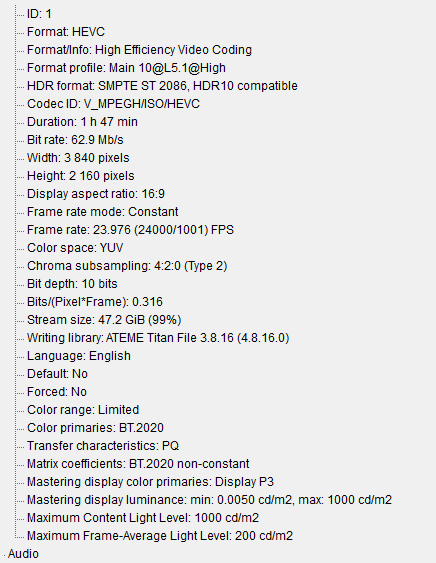
Source
 1 point
 -
I thought that was the case! Really appreciate the quick answer1 point
-
Emby no longer installs or uses anything in that folder under DSM 7. Unless you placed media in that folder it can be deleted once you're running on DSM 7.1 point
-
Yes, I've seen that. On Ubuntu, it cannot patch the files. You would need to grant write permission for genericedit.js and genericui.js - or wait for the next beta.1 point
-
Hmm, I found the setting I think I need. settings -> display-> display mode. I think maybe TV mode is needed. it seems like it is is actually autoselecting desktop. The problem is when I click the dropdown menu the cursor is stuck behind the menu and clicking again just closes it rather than selecting an item. I tried with a bluetooth keyboard and I still cannot select the item. Theres no way to force a display mode from the server is there? EDIT: Ok so the solution was to type "T" on my bluetooth keyboard and it selected the option. EDIT2: And it looks like the different display modes do not fix the issue. Luckily in TV mode the tab button and shift+tab on my keyboard seems to select through the movies/tv shows. So I guess that I have found a work-around.1 point
-
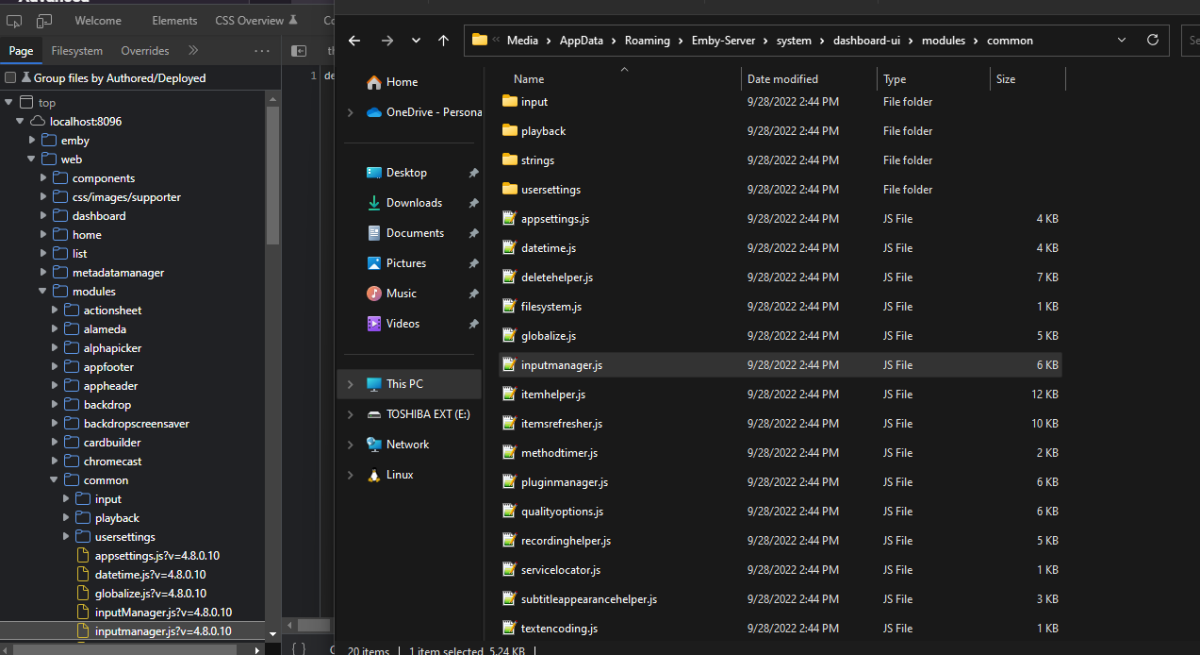
Is there a case issue somewhere? Both open the same file. Not so far. @SeekingWisdom Does the Source tab in console show the files?
 1 point
 -
And i think this is really enough for most of the people.1 point
-
And if you log into Emby with Admin user and go to App Settings-Plugins and then the Catalog, what do you see?1 point
-
@Roodee Yes it is checked as log shows librarymonitor watching and stopping as it sees change. But per the log their library issues on each new movie. System.IO.DirectoryNotFoundException: Could not find a part of the path --------------------------------------------- But with this being such an old version (May 19, 2021) it will/could be hard to provide support.1 point
-
In Emby Server 4.8, we'll add support for using all of the same names that you can use for video files: extras specials shorts scenes featurettes behind the scenes deleted scenes interviews Specials is already supported and will be detected as Season 0, but we'll make the others all aliases of Season 0 as well.1 point
-
Sorry to edit your post, I want to thanks you for your words for Emby, so the thanks for quoting above. I really need to explain one thing, the OP been registered here since Nov/2021, and if meanted to get help or not, we do not give any consideration to that here, what important to Emby Team that you happy about your purchased, that how things work here, Emby Team simply not about taking your money and run away. Thanks.1 point
-
Pretty sure this guy was a scammer. Hats off to the Emby team for your professionalism and patience. It was remarkable.1 point
-
Hi all, sorry in advance for the long winded post. I tried to keep it as short as possible while still acurately conveying my thoughts. This isn't necessarily a feature request, but it could be. You know the lovely Emby Server system tray icon? I was wondering how difficult it would be for the server coders to tweak its functionality, and if that's something they'd be interested in doing. Basically, here's the situation: I'm using the computer (which runs the server) for tasks unrelated to Emby, and I finish what I'm doing so I want to walk away. Like any power-conscious individual, I often want to put the computer to sleep/hibernate/off. First, however, I need to know if anybody is connected to the server, so I don't accidentally shut it off on them. So, I have to right click on the tray icon > Configure Emby > login and look. I don't keep the web browser perpetually open to the web interface, so it's become a routine that I have to do every time I want to power down the computer. I'd like to make this routine simpler. So, I thought of three options that could possibly make things a bit easier: 1 ) Change the system tray icon when a remote client connects, and change it back to the default when there are no clients connected. It could be something simple like little dots, as long as it's noticable: This way I could just glance at the icon before shutting the computer down. 2) Add info to the right-click menu. Just a number of remote clients currently connected: Or, a more complex option would be to list who is connected instead of a number. 3) Add popup notifications. Either the kind that integrate with windows notifications (letting windows decide how to display them) (demonstrated here on Windows 10): Or make more independent popups, like the kind you see with 3rd party firewalls/antivirus programs. (Avast puts ads in these types of notifications instead of windows notifications, so you can't stop them.). (Between the two, I'd suggest integrated over independent popups.) I'm aware that Emby Server has a few plugins available for Windows push notifications (like PushBullet), but that doesn't seem like a good solution to me. Those plugins are great if you want to notify a different device, but it seems like a waste when you don't want that message to be sent anywere, and just make a popup on the machine the event occured on. All three options have their pros and cons. For example, the icon change might be easiest, but for a forgetful user (such as myself), it might not be obvious enough to get their attention before shutting down the computer. The popup would be noticable, but I might miss the popup (afk or in fullscreen program) and shut off the computer, thinking nobody ever connected, or I just might forget that I saw the popup when it comes time to shut off the computer. Basically what I'm saying, is that a combination of two or more of these options might be best, but even one of these options would be much better than none. If anybody thinks of a better solution than these three, then I would love to hear it. If you think any of this is too complex to implement at this time, then I understand, it just couldn't hurt to ask about it. If this isn't viable, then I'll just write a program that reads the activity logs or something, and makes a little message of its own. Lastly, I wanted to leave a quick side note. Since this is my first time posting to these forums, I wanted to first say that Emby, its apps, and its supporting community are great. I've only been using Emby for a bit over a month now, but it's clear that you guys have a good thing going here. Thanks for all your hard work. It's very much appreciated.1 point
-
@TeamB A few observations / thoughts while uploading FP jsons. a) Is there a way to specify a range of episodes where the FP is applicable ? As an example - I've just uploaded the FP json for House of the Dragons - but it will only be applicable for Episodes 2-10 because Episode 1 does not have the Intro. I've added as a season FP - and Episode 1 is ignored because I have specified Emby to do so, but it's technically incorrect. Would it be better if I could specify all the episodes - maybe via a csv list (2,3,4..) or maybe via another method '2-10' ? b) Is there a way to list the latest (from a time perspective) 'IntroEnd' per Show/Season on the summary report page ? This would be really helpful to see how long the FP length should be. 10 minutes is usually ok, but some new shows need more than that, but a lot need 5 mins only for example. c) Maybe have a optional user comments field to explain further if required. 'This works with Game of Thrones S01E01' .. for example. -- I've started using this now - as it's ultra fast ! It did all 12 seasons of the Big Bang Theory in 16 mins (279 episodes..!) I'm gonna give it the ultimate test shortly - Game of Thrones Season 1 .. haha1 point
-
I use Ombi. I haven't heard of the other program. I don't believe the devs are big fans of OMBI based on past comments. I find OMBI to be decent enough in processing requests. The new V4 is much nicer looking.1 point