
Leaderboard




Popular Content
Showing content with the highest reputation on 09/30/22 in Posts
-
Emby Server 4.7.7 - Keyword Recording, Lock Screen, Mini-Dock & More This is the latest point release of Emby Server containing new features as well as fixes for identified issues. DVR: Support Keyword-Based Recordings Newly added to 4.7.7 is the ability to record based on keyword(s). One way to access this new feature is to use the Recording tab from the Live TV interface, clicking on the Add Recording button as shown below. This brings up the following menu allowing selection of Keyword. Selecting Keyword bring up the following: Example Keyword search to DVR all Eagles NFL games regardless of day, time, channel or other criteria. Add Lock Screen Function to Video Player for Mobile Devices Tired of accidentally touching the screen and having the video jump to a new scene or doing something you didn't intend? The new lock screen will put an end to this when-ever you choose to use it. Simple click the lock button highlighted in yellow in the picture below to activate this. Any screen touches from this point on during the video will briefly bring up the following screen but do nothing else. In order to de-active this feature you would click the lock icon shown on the picture below, then click the confirm after that. This new feature is straight forward and very easy to use. Support Three-Way Navigation Menu Toggle - Switch Between Full, Mini-Dock and Flyout Modes One of the coolest features in this new release is the mini sidebar docking option. This works on mobile (Android Mobile shown below) as well as it does for desktop modes. In order to access this, click the highlighted icon shown in the picture below. Now, click the following icon one-time. You will now have the mini sidebar open as shown below. The mini sidebar is scrollable so if you have more libraries then would fit on screen you can simply scroll this menu up or down to gain access to all libraries on your system. You can click the icon to cycle through all the modes as needed. Add Image Size Display Option 4.7.7 adds the ability for users to select the image size they wish to use on each device's Libraries. In order to use this feature enter a Library and click the 3 dot menu. This will bring up a dialog with information that is library specific that displayed. You now have several choices you can choose as shown above for image size! Other improvements and fixes include: * Various database performance improvements * Stop scanning at the top of a library when it's unreachable * DVR: Don't use episode title for comparison when it matches the series title * Improved RTL supported in the web interface * Add more fields for selection in poster views * Fix support for simultaneous music and photo playback * Add option to control display of rating information at the start of video playback * Change wording of transcoding reasons to be more user friendly * Improve filter menu indicator Please report any issues you may have in the General/Windows section of our Community Forums: Emby Community General/Windows Forum View the full article5 points
-
In the last update, image resizing was added. This is an excellent feature. But it changes the image sizes in all screen displays, which is not necessarily good!. On the home screen I like large image sizes. And on the movie screen I like small image sizes. Fix it to be an individual choice for each screen.3 points
-
Hi It would be great if these filters had a third option that hid it. Like if I would like to hide all 4k movies. Currently I can't use these to only view 1080p content and lower.
 2 points
 -
I apologise if this is the wrong place for this but I wanted to say a big thank you to the people who spend their time developing and supporting this. I recently moved from Plex and was surprised to see how customizable this is and also how much better it works. After a bug with the Plex app on my Samsung TV I decided to spin up a docker container with Emby and was pleased to find all my devices supported it. The hardware transcoding seems much quicker, the tone mapping looks great and even retrieving subtitles from opensubtitles works simply (I don't know why I could never get Plex to reliably find subtitles but decided it wasn't that hard to get them myself) and it nicely integrated into Home Assistant. I can now sit back and watch a movie without interruptions - Of course I've signed myself up to Emby Premier and uninstalled Plex. Thank you very much, cheers!2 points
-
Actually it's largely thanks to you that we have RTL support now in several apps. We didn't have that a couple months ago.2 points
-
hahahah lol the problem is that all my requests are not implemented... I must have impossible requests2 points
-
Yes it will.2 points
-
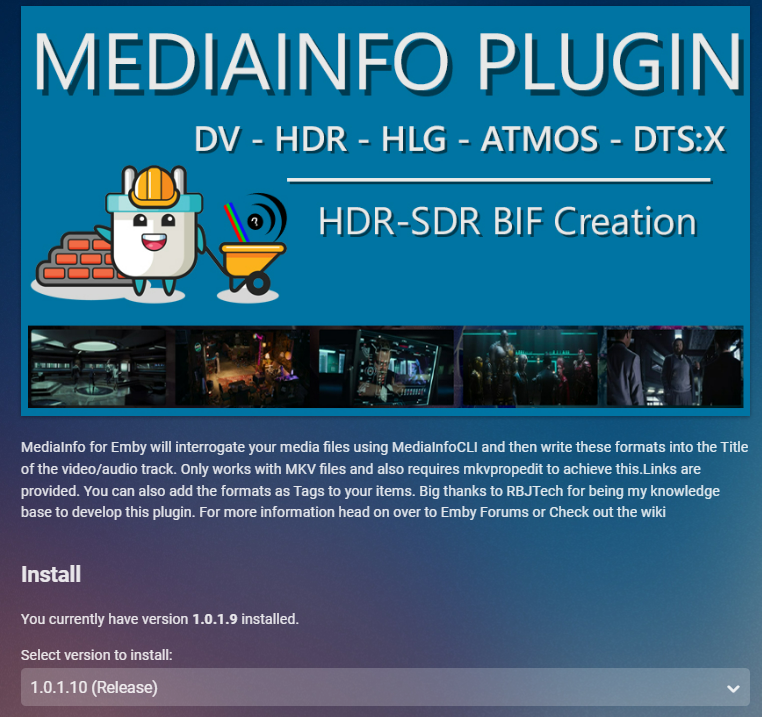
Version 1.0.1.10 just released to the plugin Fix Linux Library issues (i hope) in both MediaInfo and Bif Generator Ignore case sensitivity for file extensions. Added Identification of DV5 formats that are incorrectly identified with HDR (Shown as DV5** HDR)
 2 points
 -
Oh my. I can't believe this has been going on for this long. Being someone who does a bit of programming, I can't see this being that difficult. Emby doesn't have a feature to copy .bif files from media folder into the default metadata folder or vice-versa. I needed to do this because I was moving the metadata and cache locations to a faster nvme disk. Support had nothing for this and their solution was to let it re-create the files which would have taken over a month on my system. I found a solution by looking at the database and getting scrambled names and writing a program in Visual Basic .Net that went through my whole library and copied all the .bif and whatever left over poster and fanart files into the correct locations in the metadata folder. It took me a day to find and program a solution and it has saved me from wasting a month or more to recreate those (10,000+) files. I am not an expert programmer but do have some knowledge and experience writing smaller programs to solve smaller problems like this. I am in the IT field and work in management roles as well as consultant, network, system administrator. By looking at the structure of the database, writing a program to do something like setting order of homepage libraries for multiple users is not that hard. I don't even know why Emby had to hide all the config folders so that they are only accessible using SSH shell. So you have to stop Emby, go to SSH and copy database and whatever config files you need to somewhere that's accessible on the network. Work on the data and when done, put the files back using SSH shell. (I am using Synology DS920+) At least make it easier and give us easier access to files we need, so that we can do this type of work ourselves because some of the features we are asking for, should be basic and easy to implement. Why don't we have a sticky "Features to add" poll as the first thread in the forum so that everyone can vote on the most important features to them. This would show us what everyone wants to see. I am one of the people who only has about 15-20 users of closest friends and family and it's a pain to always have to go thought all my users and add the new library for each of them and then having to log in as all the users and sort the newly added libraries where I want them. It's a huge pain in the a$$. And "support" people are great here and I always worked with everyone with pleasure but, I still don't feel there is any transparency as to what's going on with features requested, what's being worked on at the moment, what's planned as in "to do list", how many people are working on these projects and features. It should be so easy to be more transparent and show us the progress and features and fixes being worked on. I don't think it's too much to ask. Sorry about the long essay but, my friends/family and I care about and use EMBY daily and it's a big part of our daily quarantined life and entertainment. Cheers!2 points
-
I'm requesting a feature addition to Emby Theater: a way to change the vertical positioning of subtitles in Emby Theater. I want to raise them up about one line height. I'm comparing native playback of subtitled movies as discs in PowerDVD to MKV in Emby Theater. Emby theater positions the subtitles significantly lower in the screen than the disc playback does, about one full line lower. This worsens the overall experience. For a letterboxed movie like "Amelie", the subtitles fall across the letterbox boundary in Emby while they're within the movie frame natively. And in all cases (also seen in a 1.85 movie like "Kiki's Delivery Service") the subtitles are too close to the bottom of the screen, farther from the natural viewing location, making it a bit harder to read and watch simultaneously. If subtitle height can't be made a user preference, based on my sampling of four or five foreign language films, subs should be about one line height higher to match native Blu-ray playback. The Emby Theater setting is too low, from my small sampling. Thanks1 point
-
Okay let's build this thing. We'll use ebr's idea of handling everything through user policy. - copy views (home screen layout) What else? we'll need a list. it's probably likely we can create a couple options. you'd create a use, then open the plugin config and choose which layout/template you'd want to use. does this sound like what we need?1 point
-
He means client apps that you have to install.1 point
-
Holy Rocket Rangers man! LOL. I'm gettin there. With the help of Arr automation and Ombi I am up to 30TB now.1 point
-
Here is one with same issue removing Tags with link to another topic.1 point
-
Yes there are similar topic on this editing nfo file directly cannot always remove something from the database once it exists.1 point
-
That would be very nice to expose it. For longer messages it is necessary to set the duration time by myself so that currently streaming users have enough time to read it. Thank you1 point
-
How did you delete, directly in the database? Delete the items for Emby UI or Move from filesystem.1 point
-
no problem. I will let it finish. We are in the P's now1 point
-
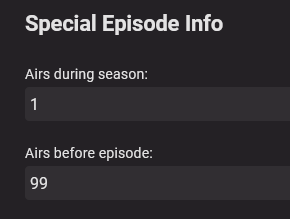
Ok, after nuking ST TNG and adding it back in with the structure below, everything works as expected. I'll now have to manually assign each Season 0 episode to its respective season, and entering 99 for Airs before episode makes it appear at the end of the list. I guess having the Season 0 episodes in subfolders of each season kind of worked, it just didn't pick up all of them correctly. Thank you both for your help! Folder PATH listing for volume data Volume serial number is EA65-C748 Z:. +---Season 0 | Star Trek - The Next Generation (1987) S00E01.mkv | Star Trek - The Next Generation (1987) S00E02.mkv | Star Trek - The Next Generation (1987) S00E03.mkv | Star Trek - The Next Generation (1987) S00E04.mkv | Star Trek - The Next Generation (1987) S00E06.mkv | Star Trek - The Next Generation (1987) S00E07.mkv | Star Trek - The Next Generation (1987) S00E08.mkv | Star Trek - The Next Generation (1987) S00E09.mkv | Star Trek - The Next Generation (1987) S00E10.mkv | Star Trek - The Next Generation (1987) S00E11.mkv | Star Trek - The Next Generation (1987) S00E113.mkv | Star Trek - The Next Generation (1987) S00E115.mkv | Star Trek - The Next Generation (1987) S00E12.mkv | Star Trek - The Next Generation (1987) S00E15.mkv | Star Trek - The Next Generation (1987) S00E16.mkv | Star Trek - The Next Generation (1987) S00E17.mkv | Star Trek - The Next Generation (1987) S00E18.mkv | Star Trek - The Next Generation (1987) S00E20.mkv | Star Trek - The Next Generation (1987) S00E21.mkv | Star Trek - The Next Generation (1987) S00E22.mkv | Star Trek - The Next Generation (1987) S00E24.mkv | Star Trek - The Next Generation (1987) S00E25.mkv | Star Trek - The Next Generation (1987) S00E26.mkv | Star Trek - The Next Generation (1987) S00E27.mkv | Star Trek - The Next Generation (1987) S00E29.mkv | Star Trek - The Next Generation (1987) S00E30.mkv | Star Trek - The Next Generation (1987) S00E31.mkv | Star Trek - The Next Generation (1987) S00E33.mkv | Star Trek - The Next Generation (1987) S00E35.mkv | Star Trek - The Next Generation (1987) S00E40.mkv | Star Trek - The Next Generation (1987) S00E42.mkv | Star Trek - The Next Generation (1987) S00E43.mkv | Star Trek - The Next Generation (1987) S00E44.mkv | Star Trek - The Next Generation (1987) S00E45.mkv | Star Trek - The Next Generation (1987) S00E47.mkv | Star Trek - The Next Generation (1987) S00E59.mkv | Star Trek - The Next Generation (1987) S00E63.mkv | Star Trek - The Next Generation (1987) S00E64.mkv | Star Trek - The Next Generation (1987) S00E66.mkv | Star Trek - The Next Generation (1987) S00E67.mkv | Star Trek - The Next Generation (1987) S00E68.mkv | Star Trek - The Next Generation (1987) S00E74.mkv | Star Trek - The Next Generation (1987) S00E76.mkv | Star Trek - The Next Generation (1987) S00E82.mkv | +---Season 1 | Star Trek - The Next Generation (1987) S01E01.mkv | Star Trek - The Next Generation (1987) S01E02.mkv | Star Trek - The Next Generation (1987) S01E03.mkv | Star Trek - The Next Generation (1987) S01E04.mkv | Star Trek - The Next Generation (1987) S01E05.mkv | Star Trek - The Next Generation (1987) S01E06.mkv | Star Trek - The Next Generation (1987) S01E07.mkv | Star Trek - The Next Generation (1987) S01E08.mkv | Star Trek - The Next Generation (1987) S01E09.mkv | Star Trek - The Next Generation (1987) S01E10.mkv | Star Trek - The Next Generation (1987) S01E11.mkv | Star Trek - The Next Generation (1987) S01E12.mkv | Star Trek - The Next Generation (1987) S01E13.mkv | Star Trek - The Next Generation (1987) S01E14.mkv | Star Trek - The Next Generation (1987) S01E15.mkv | Star Trek - The Next Generation (1987) S01E16.mkv | Star Trek - The Next Generation (1987) S01E17.mkv | Star Trek - The Next Generation (1987) S01E18.mkv | Star Trek - The Next Generation (1987) S01E19.mkv | Star Trek - The Next Generation (1987) S01E20.mkv | Star Trek - The Next Generation (1987) S01E21.mkv | Star Trek - The Next Generation (1987) S01E22.mkv | Star Trek - The Next Generation (1987) S01E23.mkv | Star Trek - The Next Generation (1987) S01E24.mkv | Star Trek - The Next Generation (1987) S01E25.mkv | Star Trek - The Next Generation (1987) S01E26.mkv | +---Season 2 | Star Trek - The Next Generation (1987) S02E01.mkv | Star Trek - The Next Generation (1987) S02E02.mkv | Star Trek - The Next Generation (1987) S02E03.mkv | Star Trek - The Next Generation (1987) S02E04.mkv | Star Trek - The Next Generation (1987) S02E05.mkv | Star Trek - The Next Generation (1987) S02E06.mkv | Star Trek - The Next Generation (1987) S02E07.mkv | Star Trek - The Next Generation (1987) S02E08.mkv | Star Trek - The Next Generation (1987) S02E09.mkv | Star Trek - The Next Generation (1987) S02E10.mkv | Star Trek - The Next Generation (1987) S02E11.mkv | Star Trek - The Next Generation (1987) S02E12.mkv | Star Trek - The Next Generation (1987) S02E13.mkv | Star Trek - The Next Generation (1987) S02E14.mkv | Star Trek - The Next Generation (1987) S02E15.mkv | Star Trek - The Next Generation (1987) S02E16.mkv | Star Trek - The Next Generation (1987) S02E17.mkv | Star Trek - The Next Generation (1987) S02E18.mkv | Star Trek - The Next Generation (1987) S02E19.mkv | Star Trek - The Next Generation (1987) S02E20.mkv | Star Trek - The Next Generation (1987) S02E21.mkv | Star Trek - The Next Generation (1987) S02E22.mkv | +---Season 3 | Star Trek - The Next Generation (1987) S03E01.mkv | Star Trek - The Next Generation (1987) S03E02.mkv | Star Trek - The Next Generation (1987) S03E03.mkv | Star Trek - The Next Generation (1987) S03E04.mkv | Star Trek - The Next Generation (1987) S03E05.mkv | Star Trek - The Next Generation (1987) S03E06.mkv | Star Trek - The Next Generation (1987) S03E07.mkv | Star Trek - The Next Generation (1987) S03E08.mkv | Star Trek - The Next Generation (1987) S03E09.mkv | Star Trek - The Next Generation (1987) S03E10.mkv | Star Trek - The Next Generation (1987) S03E11.mkv | Star Trek - The Next Generation (1987) S03E12.mkv | Star Trek - The Next Generation (1987) S03E13.mkv | Star Trek - The Next Generation (1987) S03E14.mkv | Star Trek - The Next Generation (1987) S03E15.mkv | Star Trek - The Next Generation (1987) S03E16.mkv | Star Trek - The Next Generation (1987) S03E17.mkv | Star Trek - The Next Generation (1987) S03E18.mkv | Star Trek - The Next Generation (1987) S03E19.mkv | Star Trek - The Next Generation (1987) S03E20.mkv | Star Trek - The Next Generation (1987) S03E21.mkv | Star Trek - The Next Generation (1987) S03E22.mkv | Star Trek - The Next Generation (1987) S03E23.mkv | Star Trek - The Next Generation (1987) S03E24.mkv | Star Trek - The Next Generation (1987) S03E25.mkv | Star Trek - The Next Generation (1987) S03E26.mkv | +---Season 4 | Star Trek - The Next Generation (1987) S04E01.mkv | Star Trek - The Next Generation (1987) S04E02.mkv | Star Trek - The Next Generation (1987) S04E03.mkv | Star Trek - The Next Generation (1987) S04E04.mkv | Star Trek - The Next Generation (1987) S04E05.mkv | Star Trek - The Next Generation (1987) S04E06.mkv | Star Trek - The Next Generation (1987) S04E07.mkv | Star Trek - The Next Generation (1987) S04E08.mkv | Star Trek - The Next Generation (1987) S04E09.mkv | Star Trek - The Next Generation (1987) S04E10.mkv | Star Trek - The Next Generation (1987) S04E11.mkv | Star Trek - The Next Generation (1987) S04E12.mkv | Star Trek - The Next Generation (1987) S04E13.mkv | Star Trek - The Next Generation (1987) S04E14.mkv | Star Trek - The Next Generation (1987) S04E15.mkv | Star Trek - The Next Generation (1987) S04E16.mkv | Star Trek - The Next Generation (1987) S04E17.mkv | Star Trek - The Next Generation (1987) S04E18.mkv | Star Trek - The Next Generation (1987) S04E19.mkv | Star Trek - The Next Generation (1987) S04E20.mkv | Star Trek - The Next Generation (1987) S04E21.mkv | Star Trek - The Next Generation (1987) S04E22.mkv | Star Trek - The Next Generation (1987) S04E23.mkv | Star Trek - The Next Generation (1987) S04E24.mkv | Star Trek - The Next Generation (1987) S04E25.mkv | Star Trek - The Next Generation (1987) S04E26.mkv | +---Season 5 | Star Trek - The Next Generation (1987) S05E01.mkv | Star Trek - The Next Generation (1987) S05E02.mkv | Star Trek - The Next Generation (1987) S05E03.mkv | Star Trek - The Next Generation (1987) S05E04.mkv | Star Trek - The Next Generation (1987) S05E05.mkv | Star Trek - The Next Generation (1987) S05E06.mkv | Star Trek - The Next Generation (1987) S05E07.mkv | Star Trek - The Next Generation (1987) S05E08.mkv | Star Trek - The Next Generation (1987) S05E09.mkv | Star Trek - The Next Generation (1987) S05E10.mkv | Star Trek - The Next Generation (1987) S05E11.mkv | Star Trek - The Next Generation (1987) S05E12.mkv | Star Trek - The Next Generation (1987) S05E13.mkv | Star Trek - The Next Generation (1987) S05E14.mkv | Star Trek - The Next Generation (1987) S05E15.mkv | Star Trek - The Next Generation (1987) S05E16.mkv | Star Trek - The Next Generation (1987) S05E17.mkv | Star Trek - The Next Generation (1987) S05E18.mkv | Star Trek - The Next Generation (1987) S05E19.mkv | Star Trek - The Next Generation (1987) S05E20.mkv | Star Trek - The Next Generation (1987) S05E21.mkv | Star Trek - The Next Generation (1987) S05E22.mkv | Star Trek - The Next Generation (1987) S05E23.mkv | Star Trek - The Next Generation (1987) S05E24.mkv | Star Trek - The Next Generation (1987) S05E25.mkv | Star Trek - The Next Generation (1987) S05E26.mkv | +---Season 6 | Star Trek - The Next Generation (1987) S06E01.mkv | Star Trek - The Next Generation (1987) S06E02.mkv | Star Trek - The Next Generation (1987) S06E03.mkv | Star Trek - The Next Generation (1987) S06E04.mkv | Star Trek - The Next Generation (1987) S06E05.mkv | Star Trek - The Next Generation (1987) S06E06.mkv | Star Trek - The Next Generation (1987) S06E07.mkv | Star Trek - The Next Generation (1987) S06E08.mkv | Star Trek - The Next Generation (1987) S06E09.mkv | Star Trek - The Next Generation (1987) S06E10.mkv | Star Trek - The Next Generation (1987) S06E11.mkv | Star Trek - The Next Generation (1987) S06E12.mkv | Star Trek - The Next Generation (1987) S06E13.mkv | Star Trek - The Next Generation (1987) S06E14.mkv | Star Trek - The Next Generation (1987) S06E15.mkv | Star Trek - The Next Generation (1987) S06E16.mkv | Star Trek - The Next Generation (1987) S06E17.mkv | Star Trek - The Next Generation (1987) S06E18.mkv | Star Trek - The Next Generation (1987) S06E19.mkv | Star Trek - The Next Generation (1987) S06E20.mkv | Star Trek - The Next Generation (1987) S06E21.mkv | Star Trek - The Next Generation (1987) S06E22.mkv | Star Trek - The Next Generation (1987) S06E23.mkv | Star Trek - The Next Generation (1987) S06E24.mkv | Star Trek - The Next Generation (1987) S06E25.mkv | Star Trek - The Next Generation (1987) S06E26.mkv | \---Season 7 Star Trek - The Next Generation (1987) S07E01.mkv Star Trek - The Next Generation (1987) S07E02.mkv Star Trek - The Next Generation (1987) S07E03.mkv Star Trek - The Next Generation (1987) S07E04.mkv Star Trek - The Next Generation (1987) S07E05.mkv Star Trek - The Next Generation (1987) S07E06.mkv Star Trek - The Next Generation (1987) S07E07.mkv Star Trek - The Next Generation (1987) S07E08.mkv Star Trek - The Next Generation (1987) S07E09.mkv Star Trek - The Next Generation (1987) S07E10.mkv Star Trek - The Next Generation (1987) S07E11.mkv Star Trek - The Next Generation (1987) S07E12.mkv Star Trek - The Next Generation (1987) S07E13.mkv Star Trek - The Next Generation (1987) S07E14.mkv Star Trek - The Next Generation (1987) S07E15.mkv Star Trek - The Next Generation (1987) S07E16.mkv Star Trek - The Next Generation (1987) S07E17.mkv Star Trek - The Next Generation (1987) S07E18.mkv Star Trek - The Next Generation (1987) S07E19.mkv Star Trek - The Next Generation (1987) S07E20.mkv Star Trek - The Next Generation (1987) S07E21.mkv Star Trek - The Next Generation (1987) S07E22.mkv Star Trek - The Next Generation (1987) S07E23.mkv Star Trek - The Next Generation (1987) S07E24.mkv Star Trek - The Next Generation (1987) S07E25.mkv
 1 point
 -
It is the exact same error everyone is getting "ValueGroup CalculateMovieQualities()" but has but deletes the rouge TV issue.1 point
-
Yes it would be uses full as it would basically be User templates. https://emby.media/community/index.php?/topic/21744-fr-copy-user-user-templates1 point
-
Known do to rogue Emby unidentified Shows. Lot of discussu in here above and below my post showing the query to see defective Shows in your database.1 point
-
@blairmc98 Correct as individual library scan does no have the same clean up tasks as full scan.1 point
-
I believe so. If you still have an issue then we'll have to look closer at it. Please provide an exact set of steps to create the problem. Thanks.1 point
-
Hi, if you click Trailer, does it play from YouTube?1 point
-
Maybe I got used to the preferential treatment from Luke at first? And that made me have high expectations??? Like in a new relationship that the girl makes a deluxe impression Then after a few weeks .... I don't want to say what I think1 point
-
This "someday" .... this is a serious problem bro1 point
-
FYI, there's already a FR for this here.1 point
-
Yep its not even in the metadata either1 point
-
Look at the http link in your browser when viewing the movie details page there should be the text "id=" followed by a number1 point
-
Sorry it's actually been available this whole time, but the link on the website has been incorrect. Please give it an hour or so and then try again, and it should be up to date. Thanks.1 point
-
Those aren't options for enabling passthrough though. They are for disabling passthrough or not allowing passthrough which are enabled by default. Your Shield will passthrough DTS whether your AVR supports it or not. If your AVR doesn't support DTS it will then hardware convert it PCM 2.0 As ebr said the standard app should passthrough. What it won't do is stop passthrough from happening because it doesn't have those options.1 point
-
Direct play no transcoding1 point
-
It should. Have you tried it?1 point
-
On odroid/linux, this command: Output: Log startup: 2022-09-27 23:59:58.787 Info App: Application version: 4.8.0.9 2022-09-27 23:59:58.787 Info App: Emby Command line: /opt/emby-server/system/EmbyServer.dll -programdata /var/lib/emby -ffdetect /opt/emby-server/bin/ffdetect -ffmpeg /opt/emby-server/bin/ffmpeg -ffprobe /opt/emby-server/bin/ffprobe -restartexitcode 3 -updatepackage emby-server-deb_{version}_armhf.deb Operating system: Linux version 5.4.211-407 (root@1604builderarmhf) (gcc version 11.2.0 (Ubuntu 11.2.0-19ubuntu1)) #1 SMP PREEMPT Fri Aug 26 16:27:02 UTC 2022 Framework: .NET 6.0.8 OS/Process: arm/arm Runtime: opt/emby-server/system/System.Private.CoreLib.dll Processor count: 8 Data path: /var/lib/emby Application path: /opt/emby-server/system 2022-09-27 23:59:58.787 Info App: Logs path: /var/lib/emby/logs 2022-09-27 23:59:58.787 Info App: Cache path: /var/lib/emby/cache 2022-09-27 23:59:58.787 Info App: Internal metadata path: /var/lib/emby/metadata 2022-09-27 23:59:58.787 Info App: Transcoding temporary files path: /var/lib/emby/transcoding-temp 2022-09-27 23:59:58.787 Info App: Plugins: Bluray Folder Support 1.0.0.0 Cinema Intros 1.0.40.0 Com Skipper 1.4.0.0 Dlna 1.0.87.0 Dvd Folder Support 1.0.0.0 Emby Guide Data 1.0.7.0 Fanart.tv 1.0.13.0 Iconic Image Enhancer 2.2.0.7 Listify Playlist Pruner 0.0.1.0 M3U TV Tuner 1.0.13.0 MovieDb 1.6.2.0 MusicBrainz 1.0.21.0 Nfo Metadata 1.0.69.0 OMDb 1.0.18.0 Open Subtitles 1.0.31.0 Port Mapper 1.1.8.0 Server Configuration Backup 1.4.9.0 Studio Images 1.0.3.0 TheAudioDb 1.0.16.0 TheTVDB 1.3.1.0 Trakt 3.5.9.0 VirtualTV 1.1.2.0 Webhooks 1.0.19.0 XmlTV 1.0.8.01 point
-
Early next week I will post a complete rewrite of the tool. It's much faster and the code is more organized. The GUI is a little different. I think its a lot better. The new code is much easier to understand and modify. It will simplify adding new features that users request. It also gets me caught up on many of the requests already made. Vic1 point
-
It's possible for the future. Thanks.1 point
-
Hi, not yet. We're currently laying the required groundwork to be able to add features such as that.1 point
-
@Lukelooks like you added "MinPremiereDate" limiting older trailers from displaying in this tab.1 point
-
See if the beta server version 4.8.0.10 is available on our site https://emby.media/download.html This has a fix for just this issue.1 point
-
Well for me I am sick of being tied down by corps trying to bleed me every month of a fee so I do like the lifetime membership. I also live off grid sometimes and do not have access to the internet but would would still like to access my media collection in a home theater setting which unfortunately does not include an internet browser experience. I am currently with Plex right now and their lifetime license and it's restrictions, meaning it has to check in periodically, is not working for me. I was going to buy a Emby "Lifetime Premiere" license as I heard it does not need the internet to work completely but apparently that is not correct as it apparently has the same restrictions as Plex's license. If you were to provide a "Lifetime License" for a comparable price that does not need the internet to work I would buy it in a heartbeat. Can you think of a better way to get some Plex users to jump ship and swim on over? A good business knows when to take advantage of a weakness in its competition. Just my 2 cents.1 point
-
I think I figured it out, it looks like my embedded tags were mucked up. Having the tagged restored updated correctly is allow Emby to show the correct artwork with Artists and Albums. Did a few test runs on a few albums and all looks good. Going to try and have my full music library updated and see how that works. Thanks for your help.1 point
-
To answer the question on the episode detail screen, yes we can make that change. Thanks.1 point
-
It will not work as you are using an online client and not your server client but are proxied to your server. As you can see the online client is a different version number also. So only direct connections to your server will work ie WANIP:port or DDNS:port.
 1 point
 -
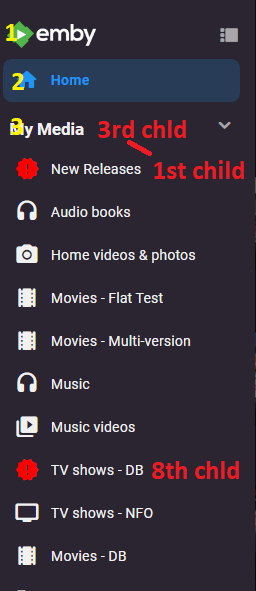
Did you look at the code first code has div:nth-child(3) > div > div:nth-child(3) recent posted code has div:nth-child(3) > div > div:nth-child(8) So this works on 8th child in 3rd section ie first 3rd child. body > div.mainDrawer.focuscontainer-y.emby-scroller.scrollY.hiddenScrollY-hover.scrollY-mini.drawer-open > div > div:nth-child(3) > div > div:nth-child(8) > div > div.navDrawerListItemImageContainer.listItemImageContainer.itemAction.listItemImageContainer-square.defaultCardBackground.defaultCardBackground0 > i { visibility:hidden; content: ''; } body > div.mainDrawer.focuscontainer-y.emby-scroller.scrollY.hiddenScrollY-hover.scrollY-mini.drawer-open > div > div:nth-child(3) > div > div:nth-child(8) > div > div.navDrawerListItemImageContainer.listItemImageContainer.itemAction.listItemImageContainer-square.defaultCardBackground.defaultCardBackground0 > i:before { visibility: visible; position: absolute; color: red; content:"new_releases"; }
 1 point
 -
Hi, I upgraded to 5.0.1 again for more testing. It look like that after Driver Upgrade from QNAP, one special folder is missing: /dev/nvidia0 I created a ticket by QNAP right now and will kepp you inform Thanks ALex1 point
-
Hi, try movie.en.forced.srt. I would not use English. The server should display it as forced, but there's no way at this time to provide a custom description.1 point
-
Hi. It is not possible now. Lend your support here:1 point
-
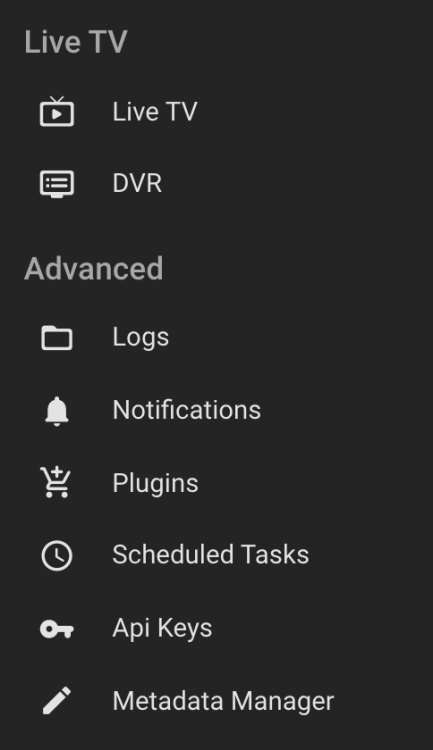
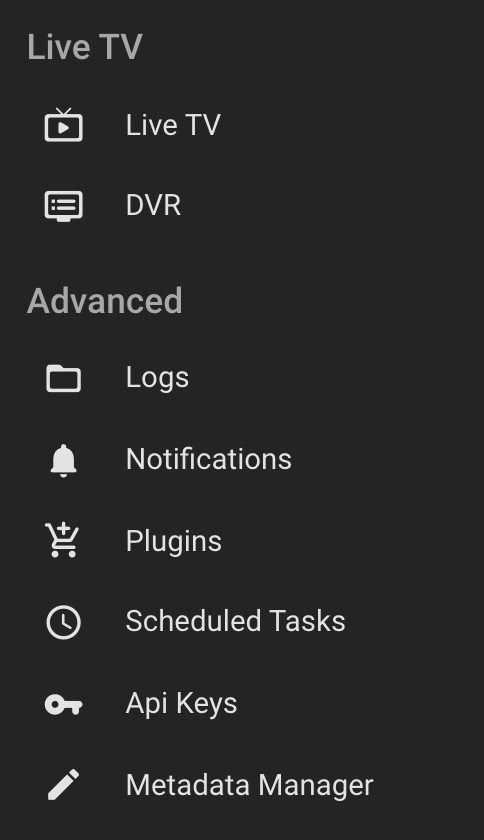
Emby Admin -> Under Advanced you have Scheduled Tasks
 1 point
 -
I'm running the latest version of Emby server on my synology (x64 ds918+) with emby premerie Yesterday I'd installed the plugin: Server Configuration Backup Version1.4.5.0 Finally worked out how to set the target: external sata drive, and hit the button "Save" a message pop up in the left bottom corner "setting saved" But nothing happens, even after more than 20hours for now still nothing on the sata disk .. Or? is that also hidden data or folder(s)?
.thumb.png.4f7f8a68c27f554445a51c815a3fea7d.png) 1 point
1 point




















.png.9fcc643802508766db8ebc311ab30f60.png)