Leaderboard




Popular Content
Showing content with the highest reputation on 09/29/22 in Posts
-
I ordered one, for science haha.. Will let you know how it goes.3 points
-
I got it. sudo chown emby /volume1/@appdata/EmbyServer/plugins/MediaBrowser.Plugins.GotifyNotifications.dll sudo chgrp emby /volume1/@appdata/EmbyServer/plugins/MediaBrowser.Plugins.GotifyNotifications.dll sudo chmod 644 /volume1/@appdata/EmbyServer/plugins/MediaBrowser.Plugins.GotifyNotifications.dll Now the file is in the right group, got the right permissions and its owned by the right user (?) restarted the server and the plugin is showing up.
 2 points
 -
I also have seen this since upgrading to tvOS 16. I think it only affects the MPV player because using the native player it has never happened to me (maybe it is a coincidence)2 points
-
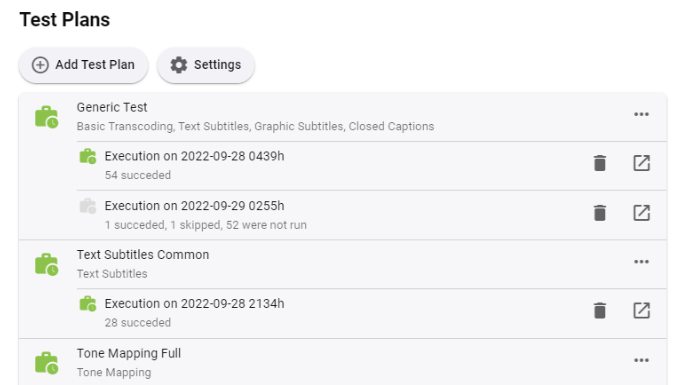
Starting from today, you can find a new plugin in the catalog: Transcoding Tests The plugin allows to perform a wide range of tests using a defined set of source files. These tests will help to better understand user issues, compare the behavior on different systems, while it rules out many of those factors which are often hard to impossible to rule out. Another use case is benchmarking and/or comparing the effects of different settings on performance and quality. Finally, this allows to recognize and analyze regressions and differences across versions more reliably. The results are stored outside the log folder and are not subject to regular cleanup. Each job execution is archived as a single file and those can be kept even when the actual output is cleared. The initial version includes essential functionality. From here on, we will see what else might be needed or useful. Updates Version 4.8.0.16 This version allows opening local output files or folders from Chrome (Windows) (see end of second post) The checkbox "Run this plan right now" is working now
 1 point
 -
I have found that many movies return 'no subtitle found' when searching because of the existence of spaces, dashes, semi-colons, etc. in the movie name. The actual movie file name must then be played with to try to find the proper subtitles, which then messes with the other files and the database itself. A simple solution would be a new textbox included on the subtitle search page with the normal movie name info defaulted in, but then could be edited to aid in finding a subtitle if the normal name returned no results. This should be a simple fix, but would greatly add to the ease of use for retrieving subtitle files.1 point
-
Request the enhanced area automatically rotate the randomly selected item when focusing on My Media libraries in vertical layout. Make the randomly highlighted episode/movie/song somehow playable from the enhanced home page Have the ability to add the highlighted media to Watch List This is sort of like it already does in horizontal layout where it rotates a random movie/episode, etc at about 20 secs and is clickable if the album/movie/episode, etc it picks catches your interest. Right now, you have to scroll around in order to force a refresh and there is no way to play the highlighted album/episode/movie, etc from the Home Page. This would apply to all ET based clients like Android, Samsung, Xbox, etc that use the new enhanced area for media libraries. Could use hard press or double tap in Android to bring up a menu
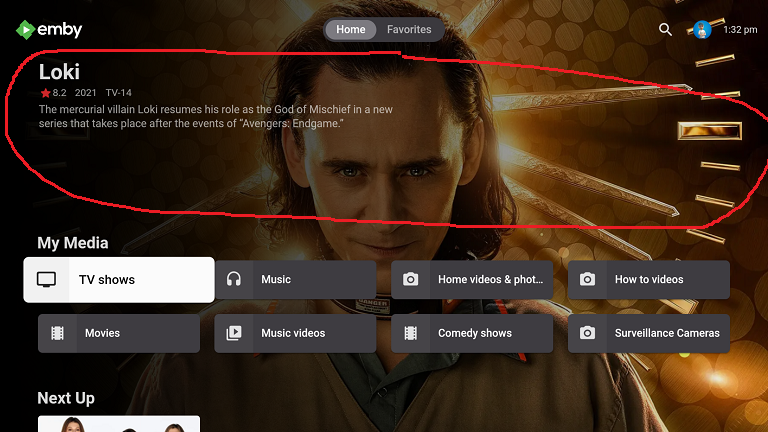 1 point
 -
Skipping in the client is now handled by the clients. Also the core intro detection function and most clients require a Premium subscription to Emby for it to work. The only client I know of that does not require Premium is Kodi with either of the kodi addons. This is not entirely correct, the Emby ChapterAPI plugin also has a way of auto detecting intro segments. It uses the same base approach of extracting audio chromaprint info and matching that to known intro theme audio segments.1 point
-
To answer the question on the episode detail screen, yes we can make that change. Thanks.1 point
-
For music, it's best, maybe even necessary, to use a tool like MusicBrainz Picard to embed the album art and get all the metadata exactly right, then let Emby just scan the music files.1 point
-
Thank you and Luke for those helping hands!1 point
-
Great. You beat me to it. I was just about to reply. Glad you got it working.1 point
-
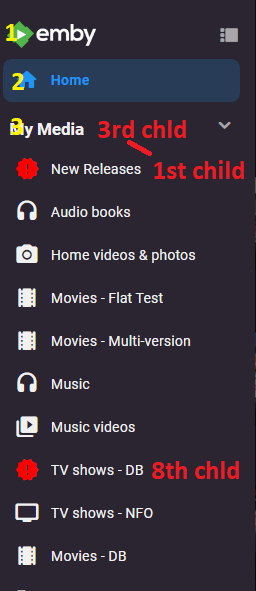
Did you look at the code first code has div:nth-child(3) > div > div:nth-child(3) recent posted code has div:nth-child(3) > div > div:nth-child(8) So this works on 8th child in 3rd section ie first 3rd child. body > div.mainDrawer.focuscontainer-y.emby-scroller.scrollY.hiddenScrollY-hover.scrollY-mini.drawer-open > div > div:nth-child(3) > div > div:nth-child(8) > div > div.navDrawerListItemImageContainer.listItemImageContainer.itemAction.listItemImageContainer-square.defaultCardBackground.defaultCardBackground0 > i { visibility:hidden; content: ''; } body > div.mainDrawer.focuscontainer-y.emby-scroller.scrollY.hiddenScrollY-hover.scrollY-mini.drawer-open > div > div:nth-child(3) > div > div:nth-child(8) > div > div.navDrawerListItemImageContainer.listItemImageContainer.itemAction.listItemImageContainer-square.defaultCardBackground.defaultCardBackground0 > i:before { visibility: visible; position: absolute; color: red; content:"new_releases"; }
 1 point
 -
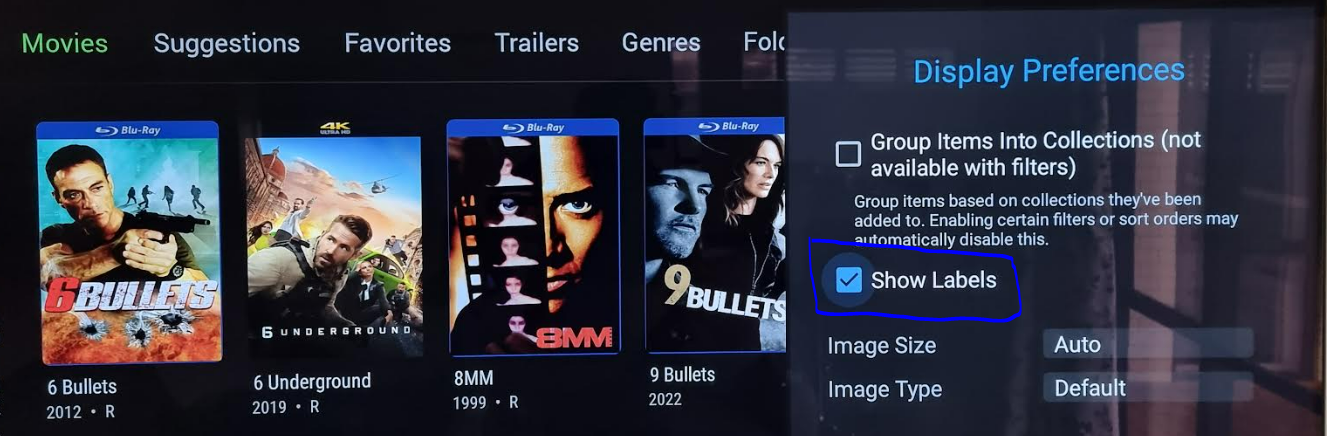
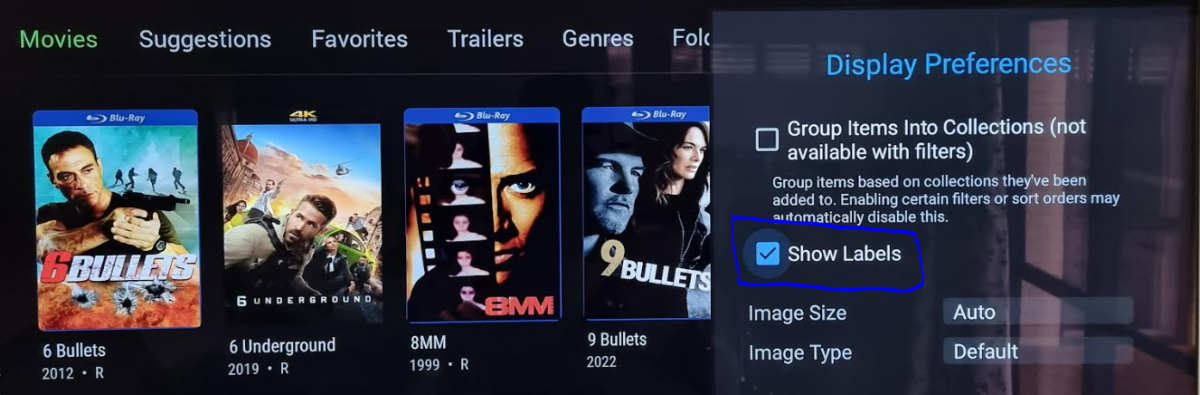
Thanks @ebr. That solved my issue Appreciate it. For anyone who is following this issue in future, you need to turn off "Show Labels" option under each library in the NVIDIA Shield app to get this useful banner. Thanks again, awesome!
 1 point
 -
I have figured out why the library data can't be backed up from server on PC and restored to server on NAS. The library paths on the PC are \\server\share where as it seems the library paths on the NAS have to be /Volume1/Folder. It does not see my original \\server\ paths. Carl.1 point
-
If a client update has went out it may or may not resolve your issue. But troubleshooting issues like this that do not affect everyone can be problematic if not impossible if it cannot be reproduced by the devs. Devs try to comment on ever topic unlike any other forum I have ever been on. I guarantee support on other sites is nowhere near what devs provide here. Just because you don't get a response on every post doesn't mean it hasn't been seen.1 point
-
Ah ok - I wasn't aware they were available yet. thanks. tbh, I was waiting to see if the intel gen 13 cpu's included AV1 encode from the ARC, but was surprised to find out the other day that they are just re-using the UHD 770 in them A real shame .. I don't need the 3D stuff at all - so even at 'just' £150 - that is an expensive 'play' .. I'll wait until the prices drop I think ..1 point
-
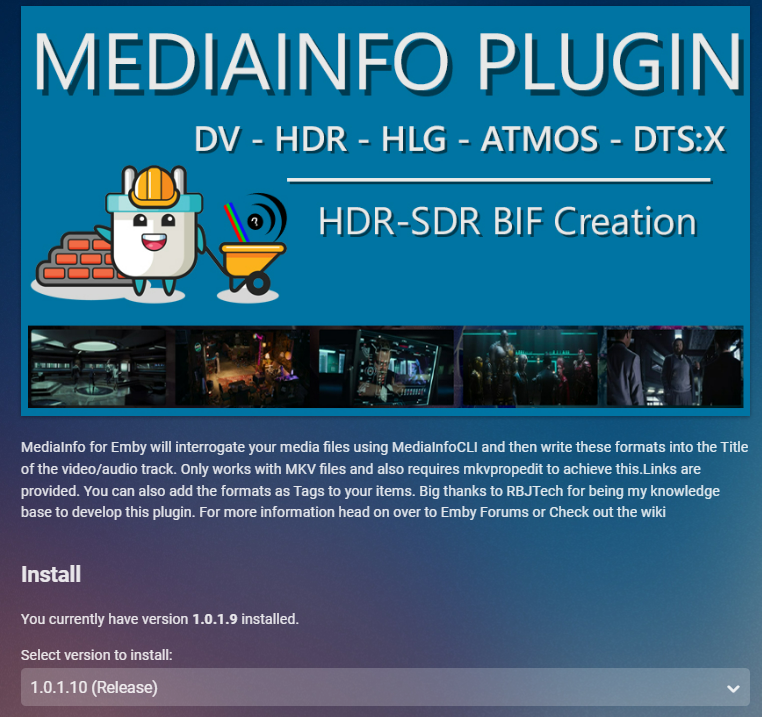
Version 1.0.1.10 just released to the plugin Fix Linux Library issues (i hope) in both MediaInfo and Bif Generator Ignore case sensitivity for file extensions. Added Identification of DV5 formats that are incorrectly identified with HDR (Shown as DV5** HDR)
 1 point
 -
It won't break anything as long as the new file is named properly (matches the existing directory name before the multi-version dash). Adding a new file that *doesn't* match the directory name causes Emby to stop seeing the parent folder as a container for the item. It becomes a 'dumb' folder that hosts multiple, unrelated items. That's why you start seeing '[item]-poster.jpg' per movie file instead of just one 'poster.jpg' for the entire folder. The 'theme-music' folder is associated with the 'smart', multiversion parent folder. When the parent directory is 'dumb', the theme-music folder becomes 'dumb' too. Edit: And I'm just speaking from personal experience using this feature. Devs/testers/etc. are welcome to correct any of my inferences.1 point
-
You are triggering multi-version mode based on your filenames. This *requires* that the filename before the '-' match the directory name. When you fail to meet this requirement, you break things. This isn't a bug.1 point
-
Hi, yes we probably should ignore theme videos from this.1 point
-
Haha I ended up figuring that out, somehow I had 300gbs of random data downloaded to my ssd and my ssd was basically full, causing the transcoder to choke and quit. Although now I have new issue of super super buffering and fps during transcoding of like 13 and 14. Gonna play with the transcoding settings before I submit a new ticket for that one.1 point
-
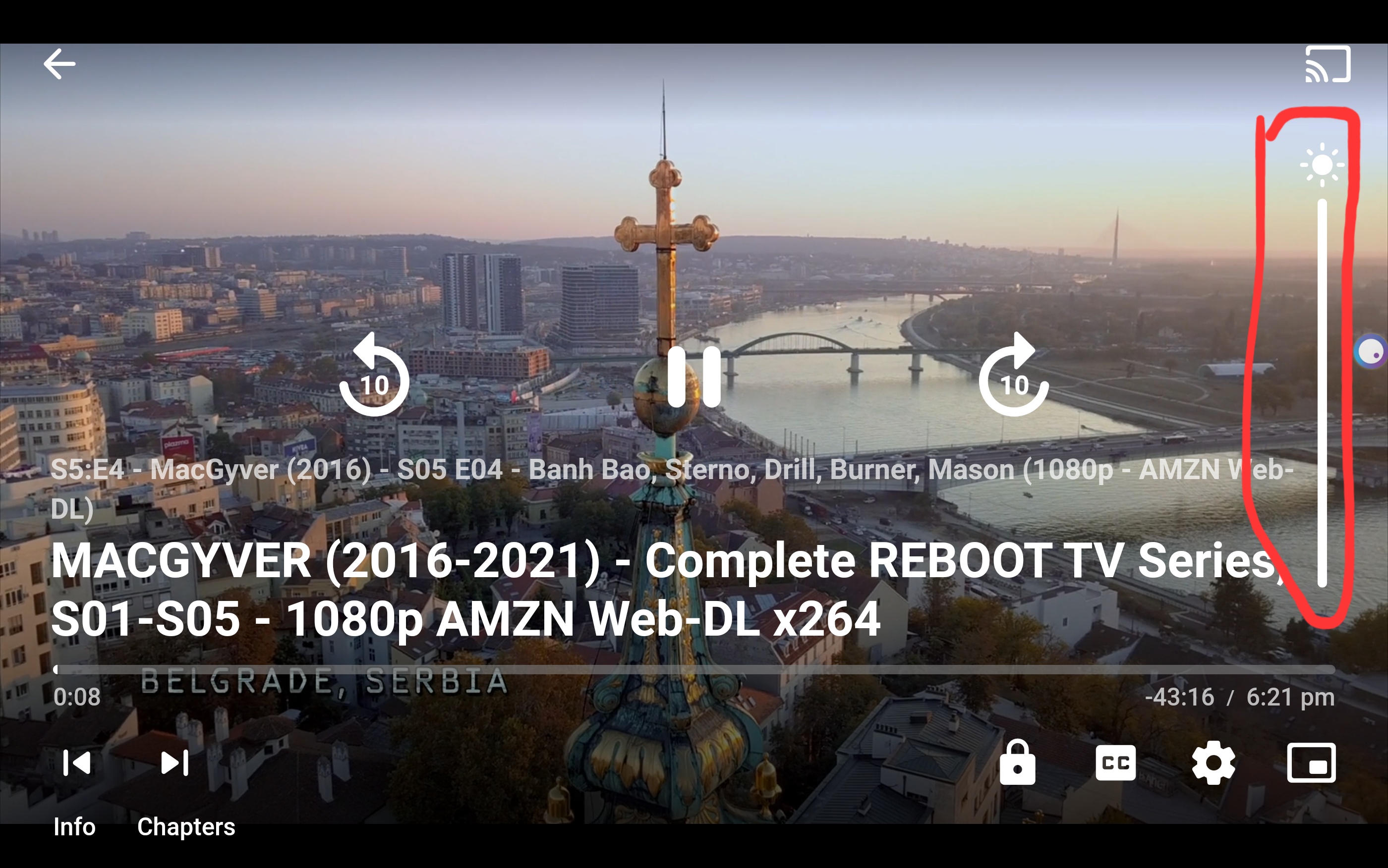
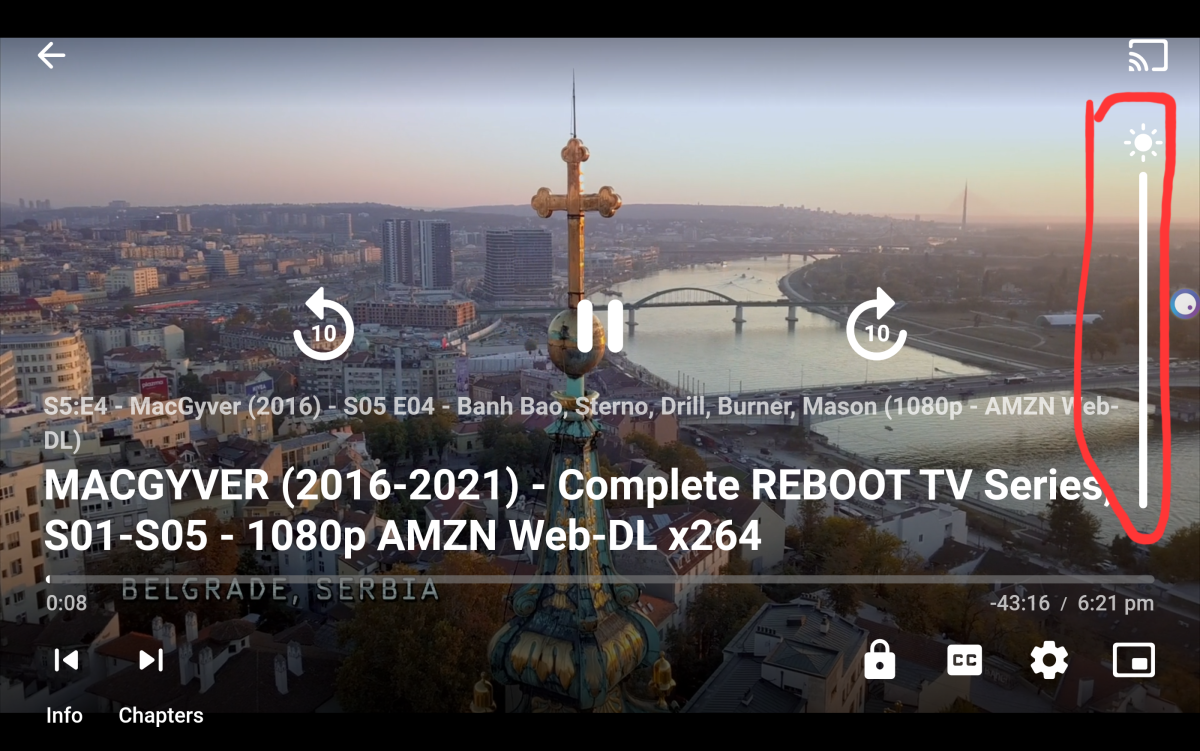
I just updated from 3.2.75 to 3.2.77 and it works now even tough the "cant adjust brightness in the quick panel" toast still shows. I also went beta to see if it changed anything. I noticed that i have a bar for changing brightness (picture) but i only see it if i am using my tablet. Its not there on the phone. I also noticed that on tablet the quick panel brightness works until i use the bar thenthe toast appears "cant adjust brightness in the quick panel" and i cant use the quick panel after.
 1 point
 -
I would say that this has been fixed Many thanks @AndreaXheli raised this issue so I can't mark it as the solution but I think the issue was fixed for them in a earlier release.1 point
-
Hi. That header only shows when the option to "Show Titles" is turned off for the individual items.1 point
-
Did you ever get your hands on an ARC? I see that Ebuyer have the A380 for £149.99 thinking about getting one to test out HW AV1 encoding along with that hyper encoding deep link stuff. Even if I have to make my family members who watch remotely to buy the Firestick 4K Max haha1 point
-
Ok you got me , my guy did't updated the web xml , so it stops at 20220924.. so dumb... Thank you Luke I send him alert on github, and he was aware, doing some changes and he will post it back. So he said .... I know and I'll fix it. I'll write some new code for all this1 point
-
For clarity, don't confuse the Chapter API plugin with the actual core IntroSkip feature, they are two separate things - the former is just a visual UI for displaying (and editing) the chapter markers that the core's IntroSkip feature finds after scanning your library. So yes, the built-in IntroSkip feature has Auto Skip, but as @neik said the Apple TV app is currently missing support for it. So you will not see this working in that client until it is updated to support it. No one knows when that is just yet.1 point
-
Hi, try movie.en.forced.srt. I would not use English. The server should display it as forced, but there's no way at this time to provide a custom description.1 point
-
Is this feature request complete?1 point
-
When I first installed 3.2.77 I still did not have the controls. I then remembered that a while back I had kicked up the Display Size setting. When I reset that everything shows.1 point
-
@Lukecan confirm , works perfectly on my s22 ultra1 point
-
Luke, I think I may have figured this out. It appears the shows in question are repeated early in the morning the following day and even though the "airtime" said anytime the recording was defaulting to the second showing of the program. So I just stipulated that the recording be done on the first showing and everything seems to be working. Fingers crossed, lol. Thank you again for responding and sorry to have bothered you.1 point
-
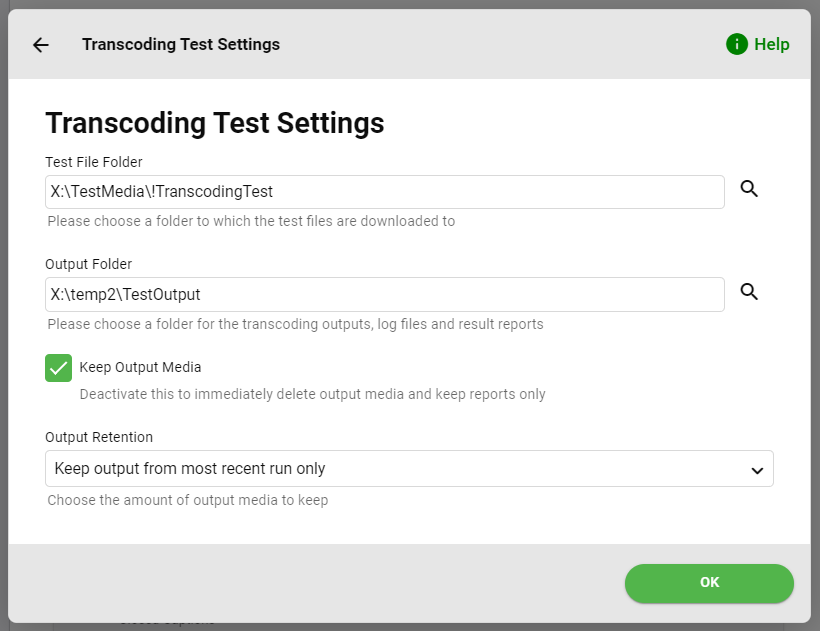
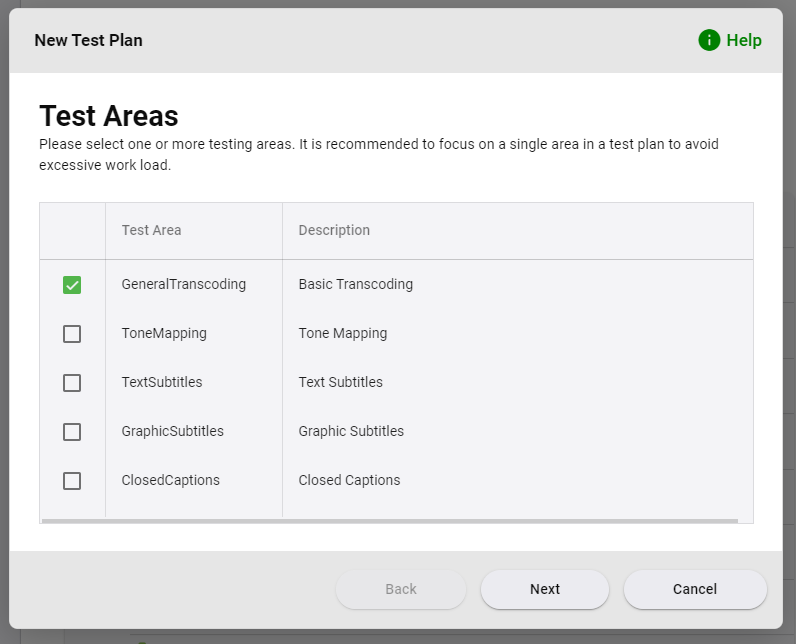
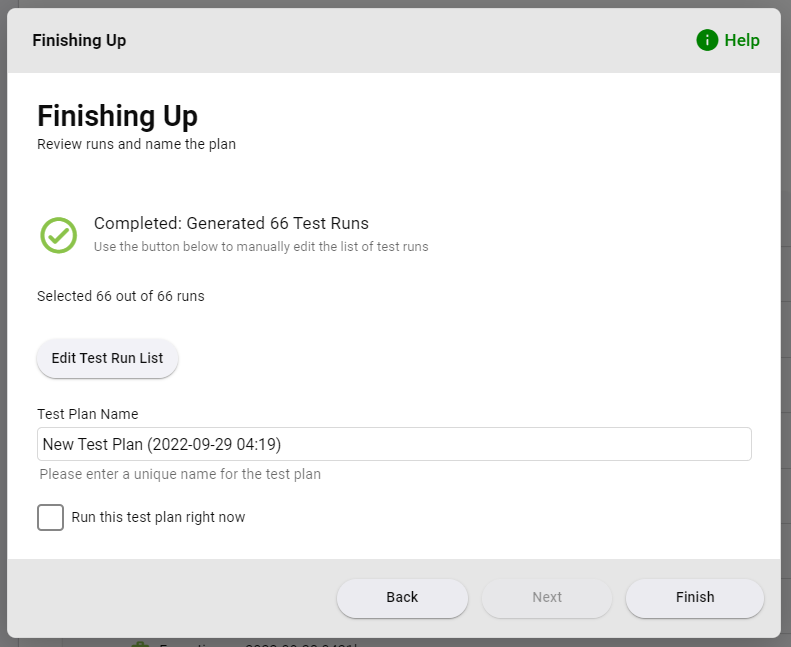
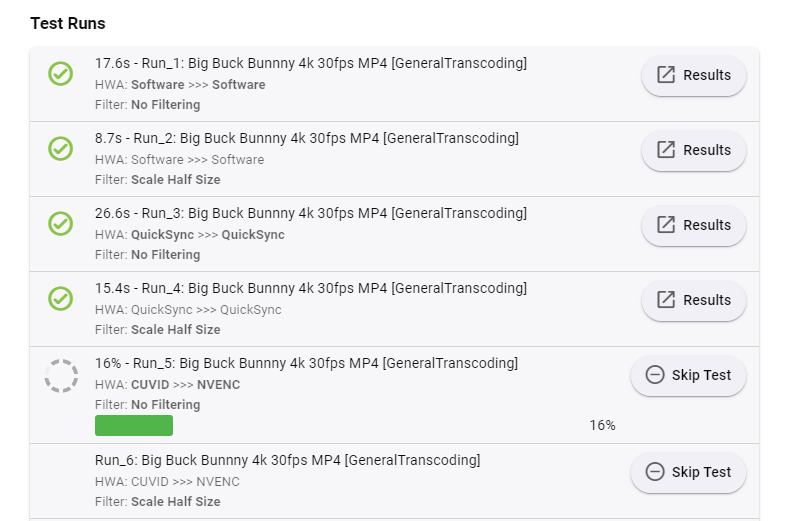
Instructions Install the plugin from the catalog, then reboot Emby Server. On the server dashboard, find the navigation menu entry "Transcoding Tests" somewhere among the last entries. First of all, you need to Configure Settings Please enter two different paths for test files and the generated output The output can take quite an amount of storage, most of which is taken by the transcoded output files. I would recommend the setting above, as it is sometimes useful to be able to inspect the results, but you can choose to "Keep output from most recent run" to save space. Create Test Plan A test plan defines a certain set of tests which can be executed as often as desired. Click "Add Test Plan" to run the test plan wizard. For starters, it makes the most sense to create a plan that is focused on a certain area, so choose "Start by Choosing Test Areas", which will show the following screen: Choose an area of interest and click "Next". Test File Selection You will see a list of files which are applicable for the selected area(s). Accept the default selections or make your own and click next Detail Selections In the following wizard pages, you will be presented a number of selections. Which ones you'll see depends on your previous selections (test files and areas). You will see only those selections that are applicably to at least a subset of the selections that are already made. BE CAREFUL: All those selections are MULTIPLIERS, so you can quickly end up with a huge list of tests Transcode Segment Selection For initial experiments, I would recommend to choose either(!) "1 Minute from Start" or "3 Minutes from Start" - to make it less boring to watch the executions. Wizard Finish I would recommend to enter a descriptive name instead of the default test plan name. The checkbox "Run this plan right now" is working in the latest plugin version now. If you made it that far - great! You have created your first test plan. Execute Test Plan To execute your test plan, click the three-dot menu next to the test plan in the list and choose "Execute Test Plan". A new wizard will open. You can choose to execute specific runs from the plans only, or simply click "Next". Test File Download In this step, the required test files will be downloaded. You can only wait until completion and click "Next". Probing Test Files 'Now, the test files get probed quickly and you may choose whether to extract images from the output files. To minimize delay, choose "No image" or "Single Image". Press "Finish" and the execution will start. It will look like this: TIP It's often interesting to open the "User Sessions" view in a separate tab or window to watch during execution. Opening Output Files The latest version of the plugin allows opening output files by clicking on them on the result pages. Folders are shown in the file explorer, and files are opened directly in the registered application. This works on Windows only with Chrome (probably Edge as well) and after installing the following Chrome extension: https://chrome.google.com/webstore/detail/local-explorer-file-manag/eokekhgpaakbkfkmjjcbffibkencdfkl
 1 point
 -
Have you checked the contents of your xml tv to ensure it has data for the channels, as well as checking the timestamps in the xml? A very common reason for this is the xml either not having program data or having old program data.1 point
-
1.4.1 seems to have fixed it the black screen looks fixed as well. I'll test some more tomorrow. Great work1 point
-
ok, thanks...found it. I went ahead and enabled those two. All is working great Thanks for the quick reply1 point
-
I vaguely remember this but I think it was intended for the opposite use as you are wanting . I think it had a name targeted more towards that use but I cannot remember it...1 point
-
UPDATE - Couldn't get it working no matter what I seemed to do. Decided to give unraid a try and it work perfectly so I will probably be sticking with emby on unraid and just a quick thanks for not sticking to just one platform and letting people choose what they want to have emby on. having fun with it and cant wait to see what you add in the future saying that though I have one small request that I would like to see added to emby. Which is the ability to choose which metadata. e.g if I have a folder with tvdb as one of the site to collect metadata from. It doesnt mean that I have to use tvdb for the video next to it in the same folder for metadata. even just something like a checkbox next to where you put the metadata entry for that site would be good to just disable it for that video would be a big help because eve n locking the metadata didnt seem to work sometimes and just went back to the video it wasn't but many thanks again1 point
-
What account are you logged on with when you use SSH? I don't see a security error though Never used this script, but I can move your posts if you wish, or you can start a new one1 point
-
"maybe moving this issue to a thread [in the Synology forum] would get more help"1 point
-
@crusher11 Since this seems to be a issue with the post processing rather than comskipper, maybe moving this issue to a thread with a wider audience would get more help.1 point
-
Roger. It was a general statement only in response to what cayars said and based on what I see a lot, nothing to do with you. Most of the problems in the forum when upgrading DSM 6-7 are the steps using Putty and shared folder permissions.1 point
-
here is the code for the channel plugin. Maybe someone will find it useful and make some more awesome plugins for everyone to use https://github.com/chefbennyj1/Emby.NewReleases If you do find the code useful, send a star on the repo1 point
-
I don't think you should have to navigate anywhere though. All you should have to do is click the Play button while the focus is on that library, and it plays the show which is shown. Right now, I just tested it, and it actually plays something already from that library when clicking Play. So its kind of working now. I'm just not sure how it picks what it's going to play. It's not show which is shown in the enhanced area. It always wants to play the Daredevil series for some reason.1 point
-
And it should be clickable and/or playable (as no doubt mentioned somewhere else...)1 point
-
The key here is, if you used that same password anywhere else, you need to be sure and change it there. These guys don't break into a Plex server to gain access to your Plex setup. They are looking for passwords to use elsewhere and the horse has already left the barn so changing it at Plex won't help much if you use it anywhere else too. They may also just be farming emails since the passwords are hashed and should be difficult to obtain.1 point
-
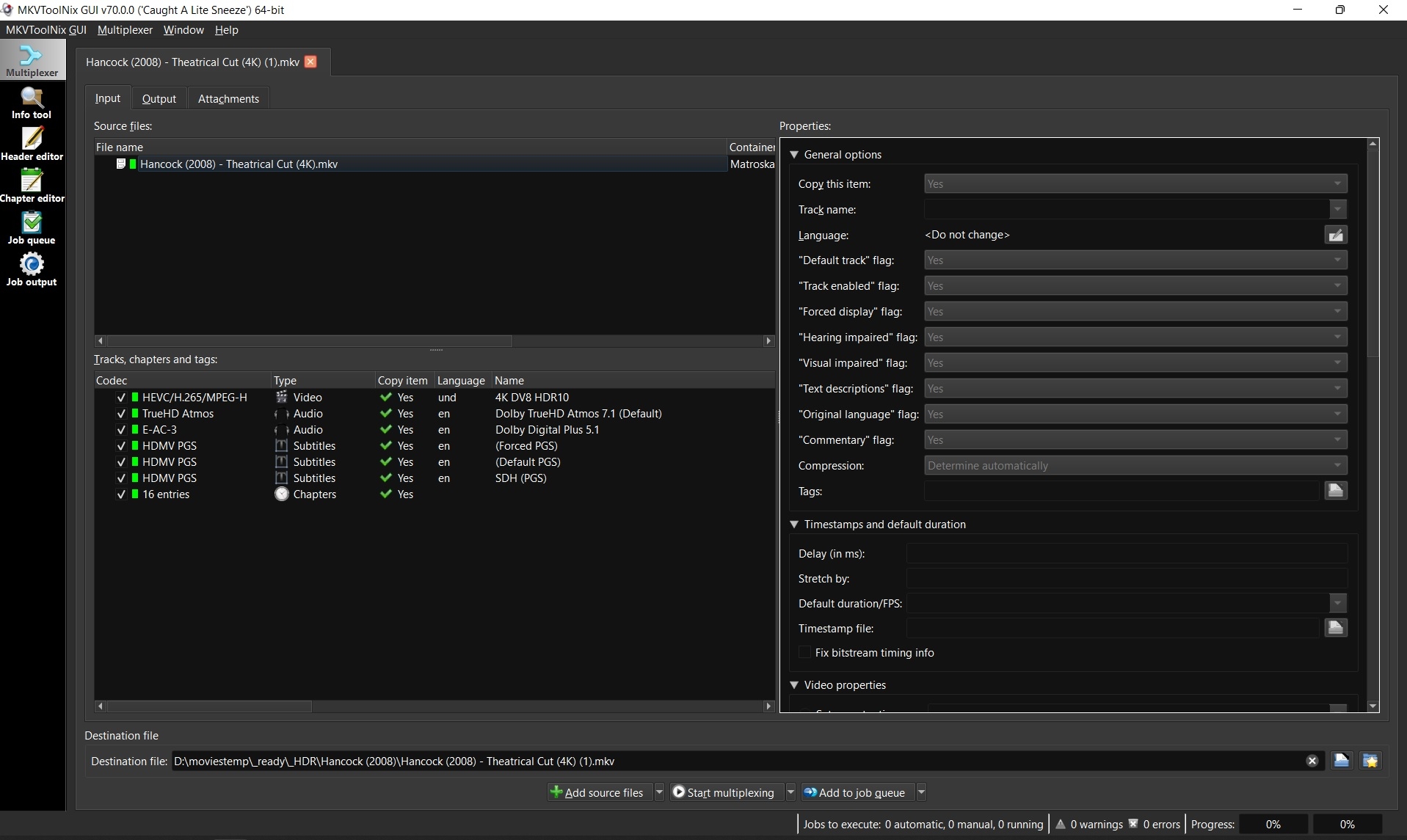
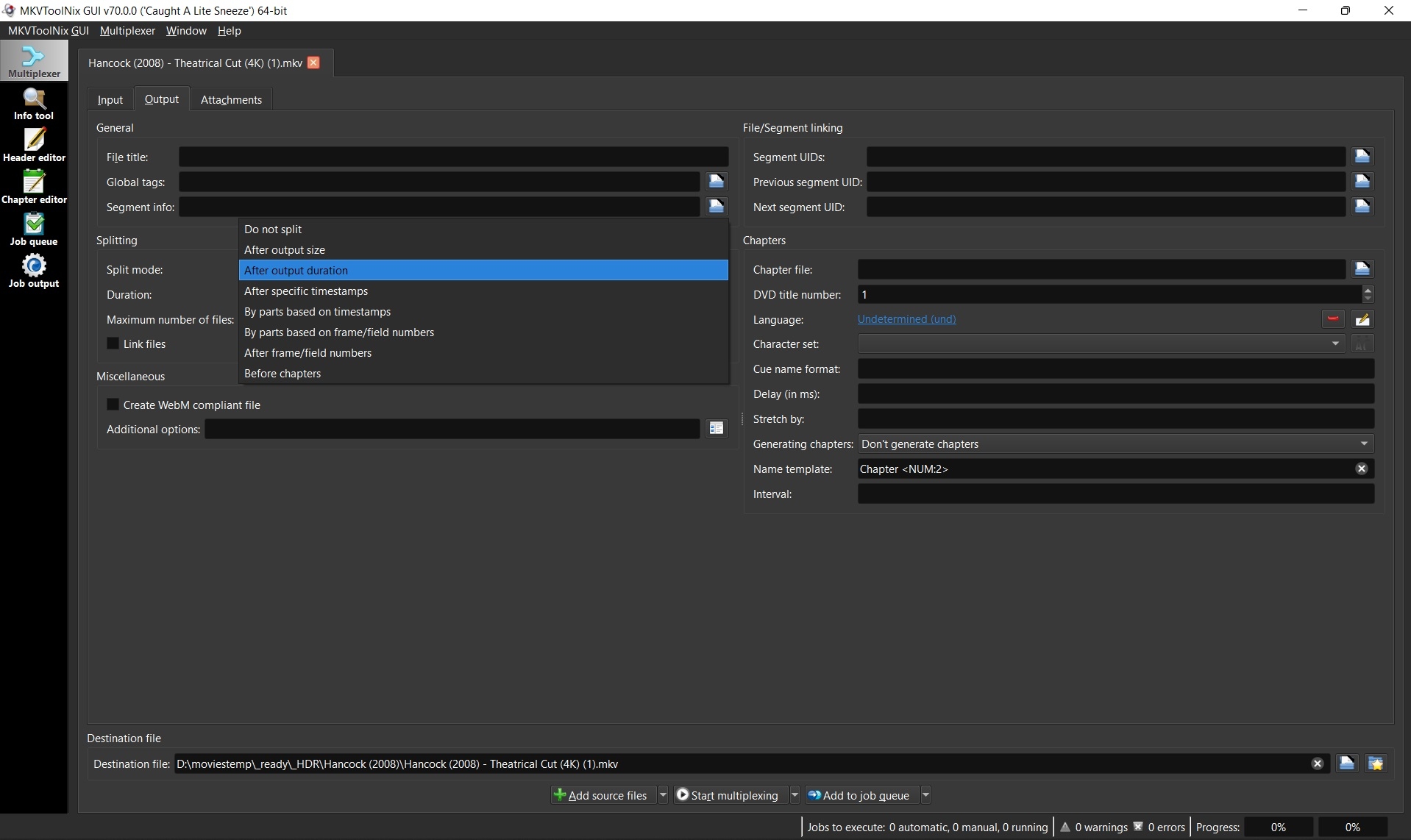
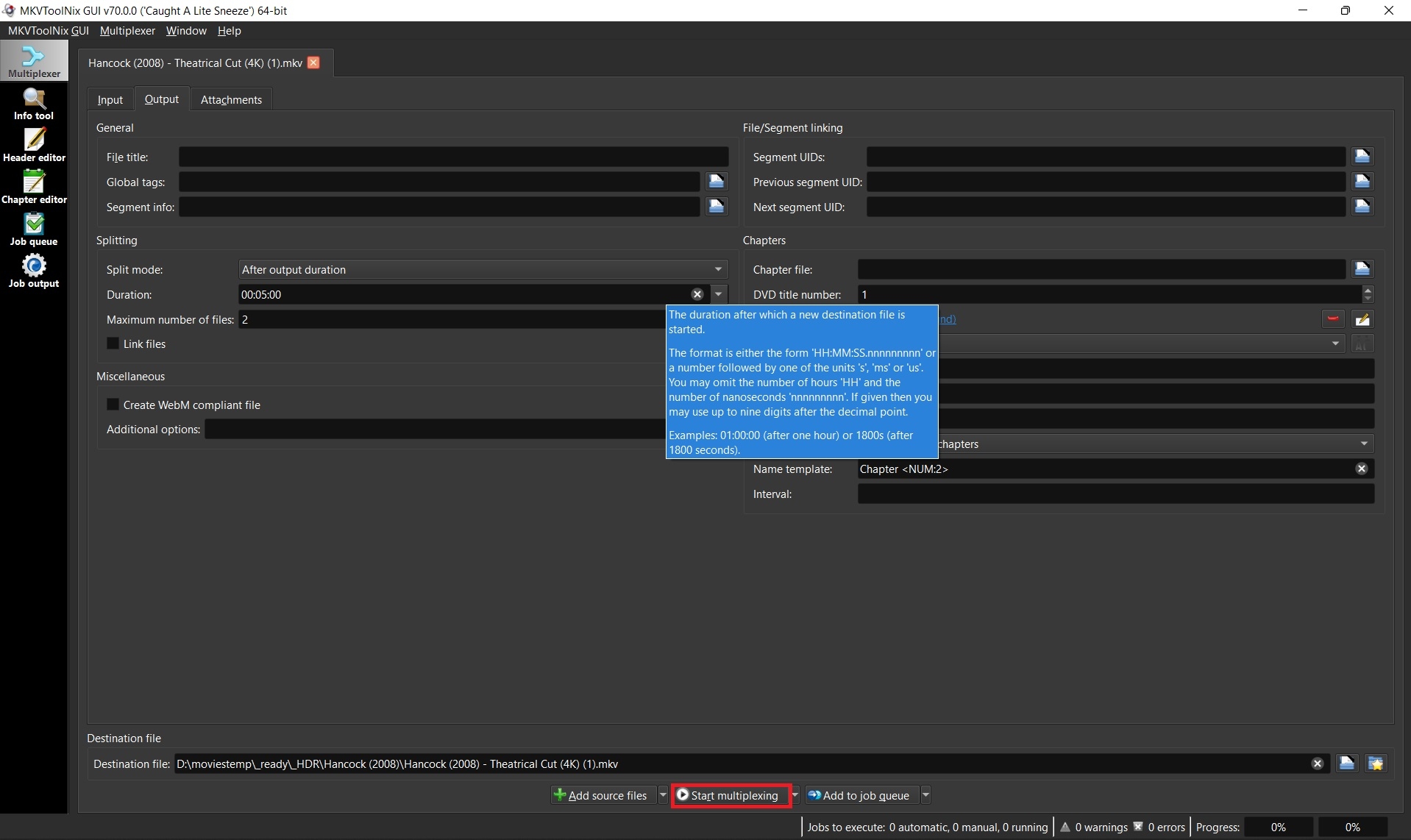
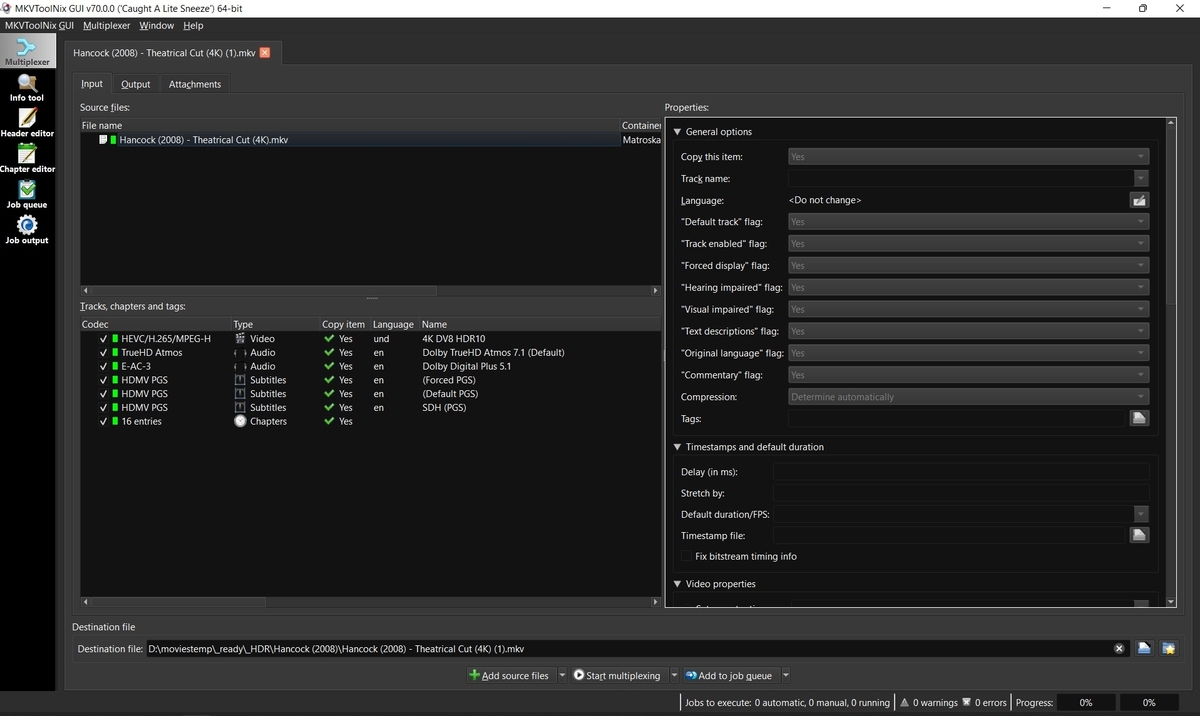
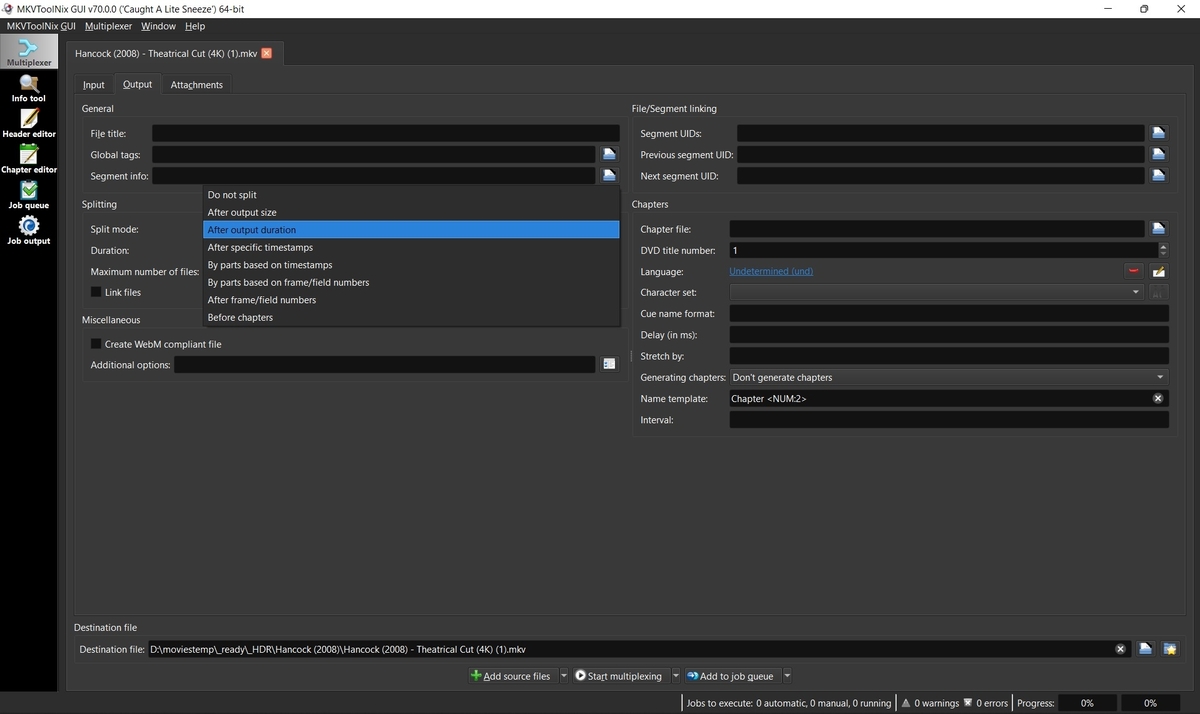
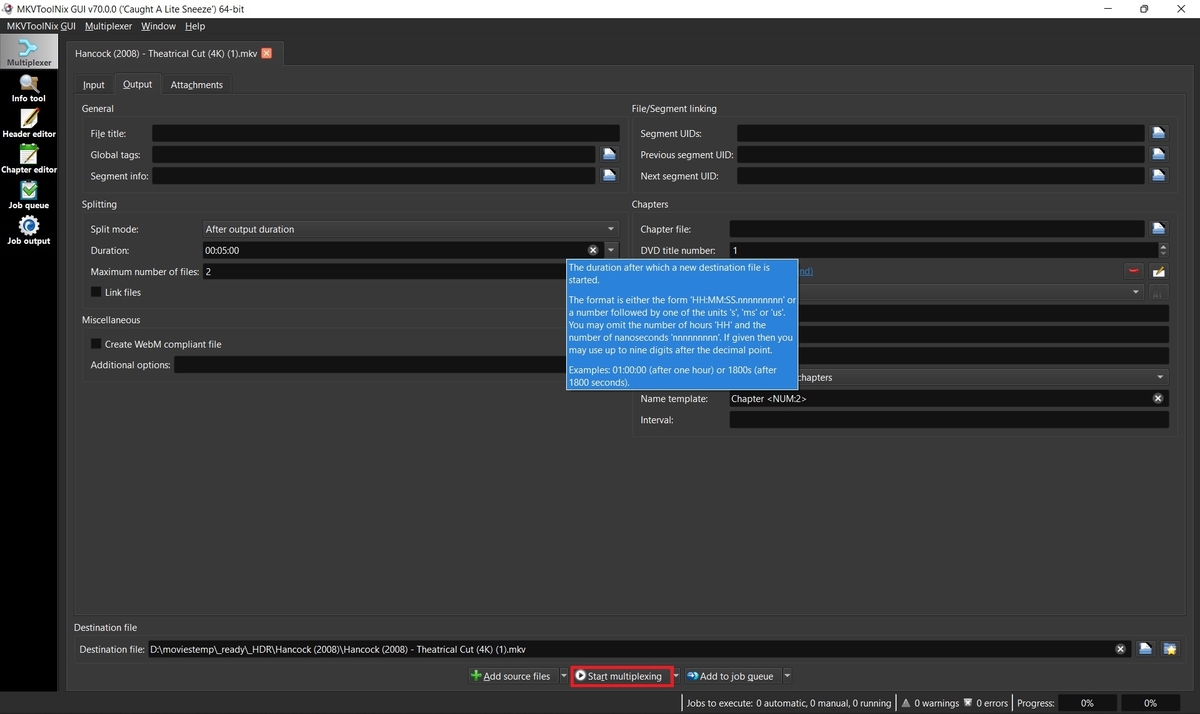
Sometimes the developers will ask for a small sample of your media to test on their end in order to troubleshoot a problem. If the file size is too large to upload somewhere, then you may want to provide a smaller portion of that video which still exhibits the reported error for testing. MKVToolnix can input other extensions than MKV, but output will always be MKV and changing the extension may not produce the same issue. 1. Download and install MKVtoolnix Click the link below if you don't already have MKVToolNix MKVToolNix Downloads – Matroska tools for Linux/Unix and Windows 2. Open video with MKVToolNix Start MKVToolNix Drag-n-drop video file to the "File name" box 3. Choose method to split video Click the "Output" tab Click the dropdown box next to "Splitting" and choose to split by output size or duration depending on what you think will get the developers just enough video to troubleshoot your problem. 4. Enter size or duration and max number of files before starting place mouse over the size or duration box to see a popup for format of options. Ex: 00:05:00 for 5 minutes Set max files to 2. You only need the first file so you can abort after the second file starts to be created if you want. Click "Start multiplexing" 5. Test your sample file Add your sample which you just split to an Emby library and test it before submitting. Ex: Hancock (2008) - Theatrical Cut (4K) (1)-001.mkv It's very possible that remuxing while splitting your file fixed the problem and then sending your sample won't help. If your sample plays good, then try just remuxing the original file and testing that. Remuxing sometimes fixes problems with bad headers, etc. 6. Upload the sample to a cloud server If your sample still exhibits the original problem, then upload your file to a cloud share such as Google Drive or Dropbox. Send a PM to the developers with a shared link to your file and a link to your post in the forum so they know what issue the file is for.
 1 point
 -
I am no engeineer but i think this is exactly what i want emby to have too. I use my emby for both videos and photos and i have a massive library of photos (nearly 2 million). Emby is not usable with my library indexed, searching becomes.. yeah you guessed it not possible. Opening the shares that have any of the photo paths setup takes a massive amount of time etc. My guess is that it is the limitations of SQLLite (my database is vacuumed and over 11gb) that gives me this terrible performance while a real dedicated database host would be able to do more complex and smart filter queries making it possible to gain massive amounts of performance for users like me.1 point
-
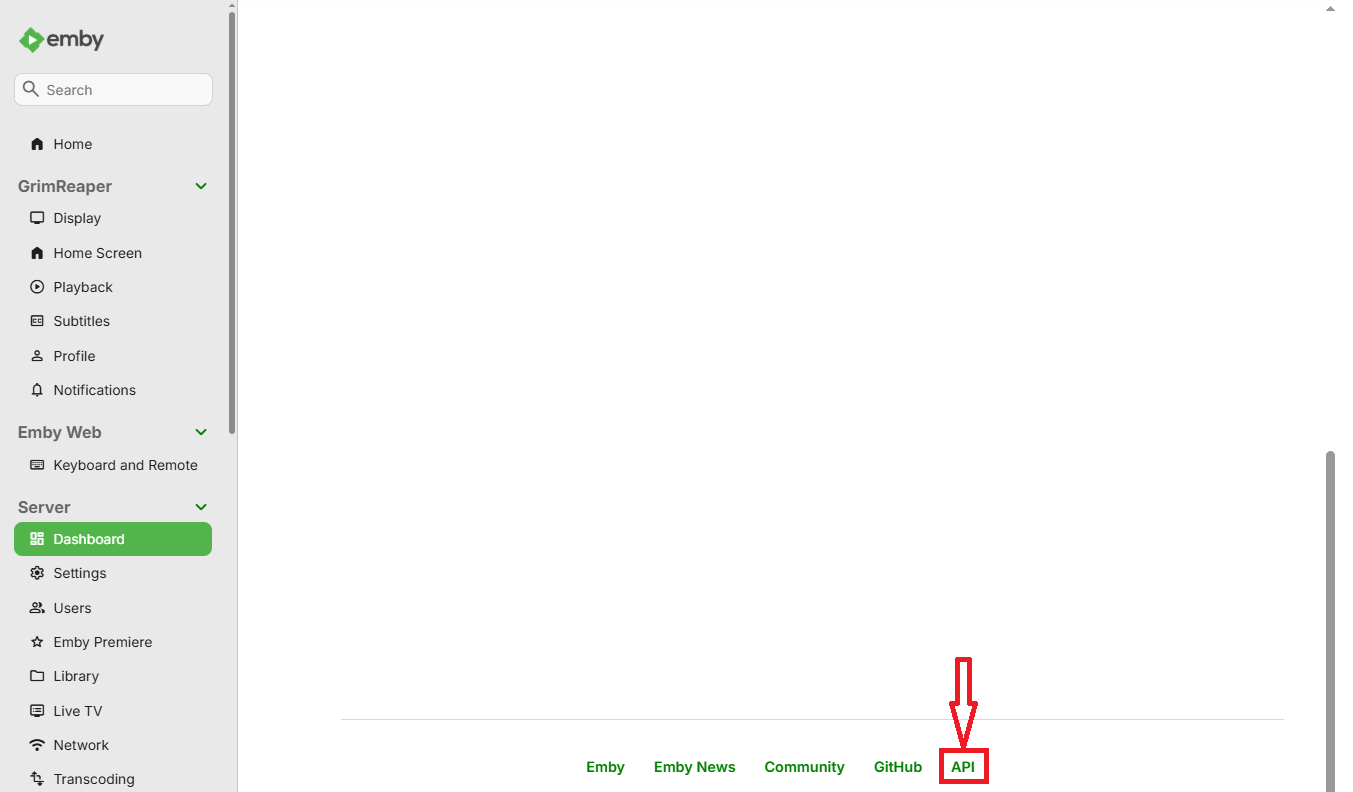
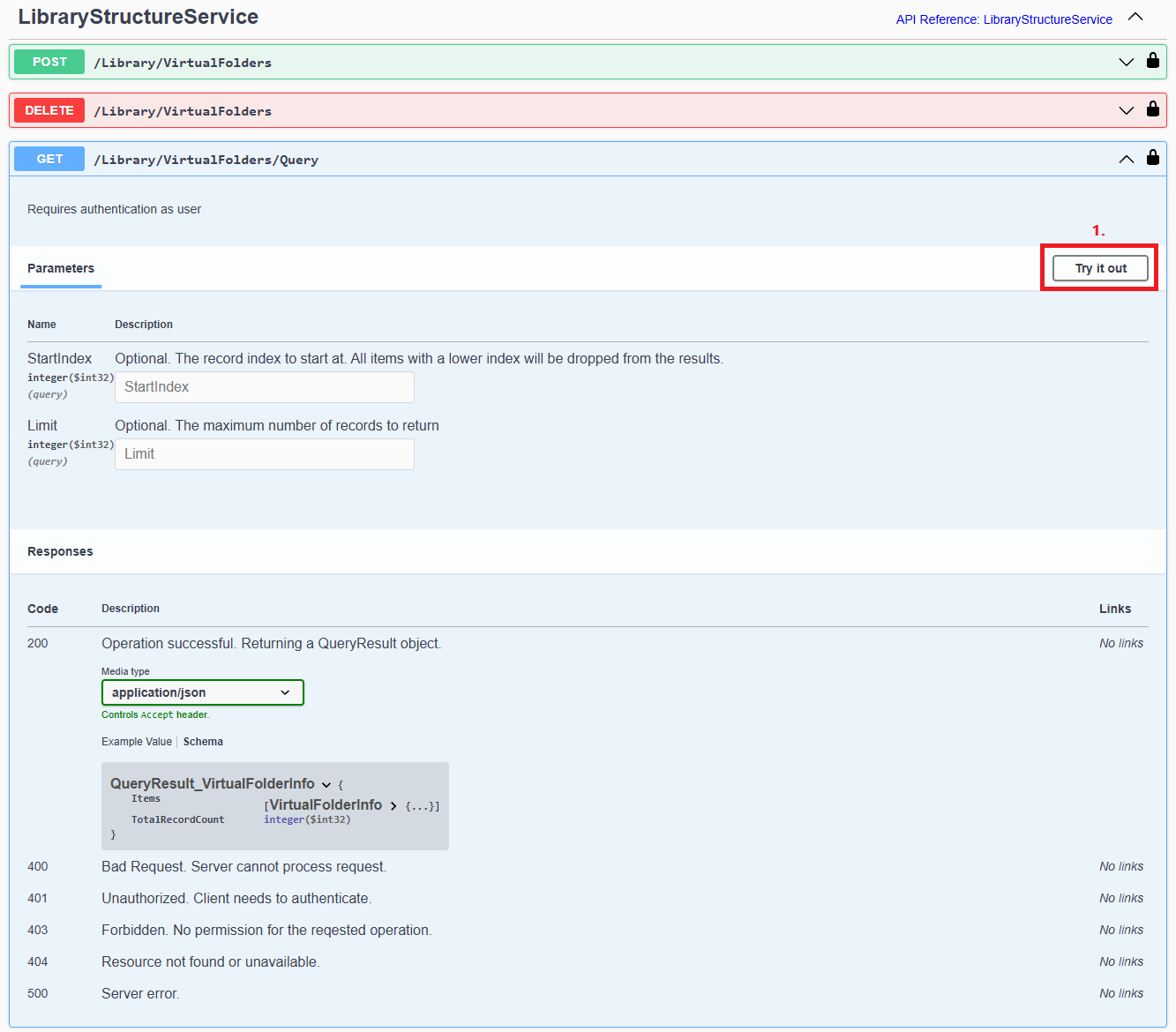
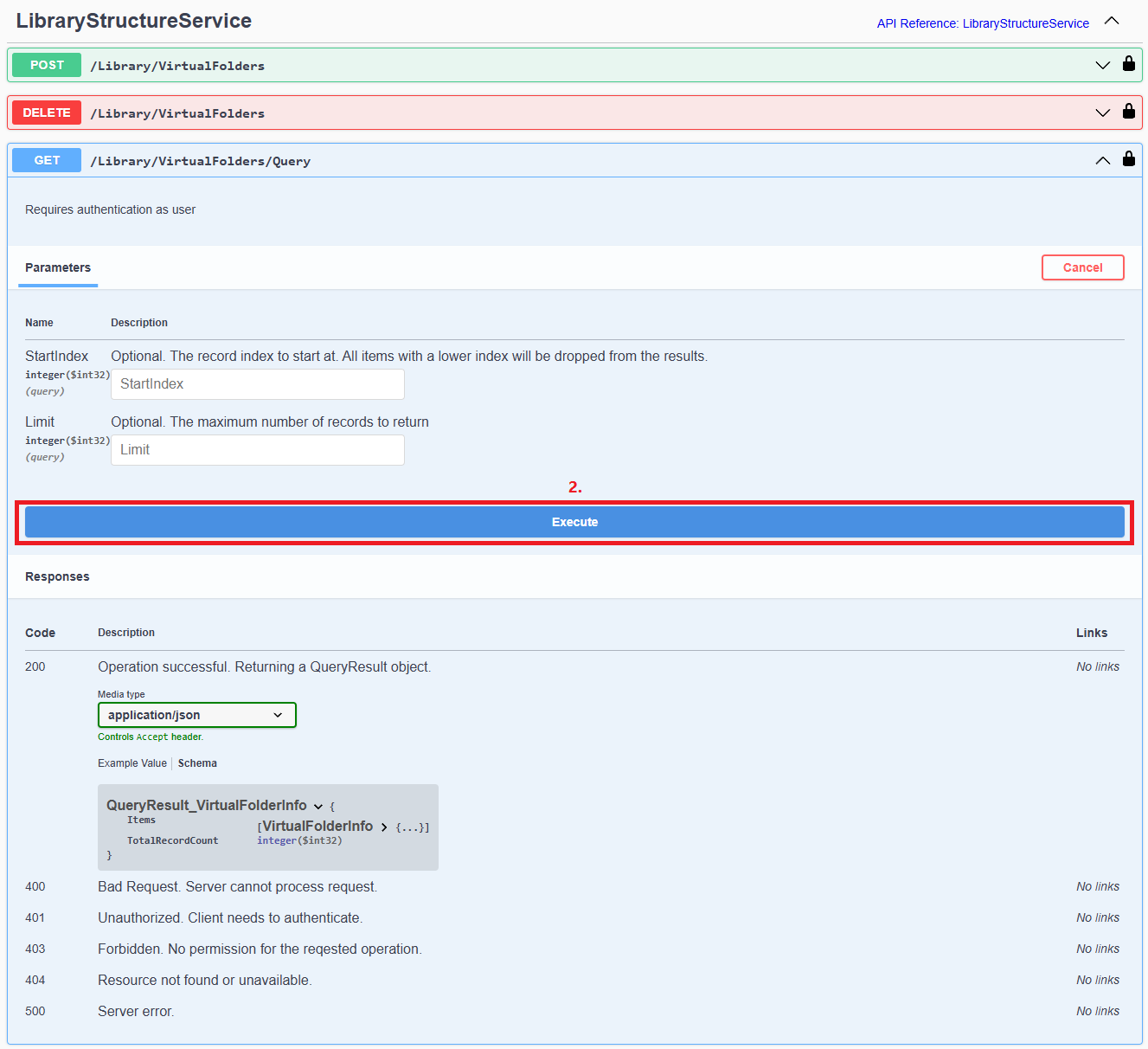
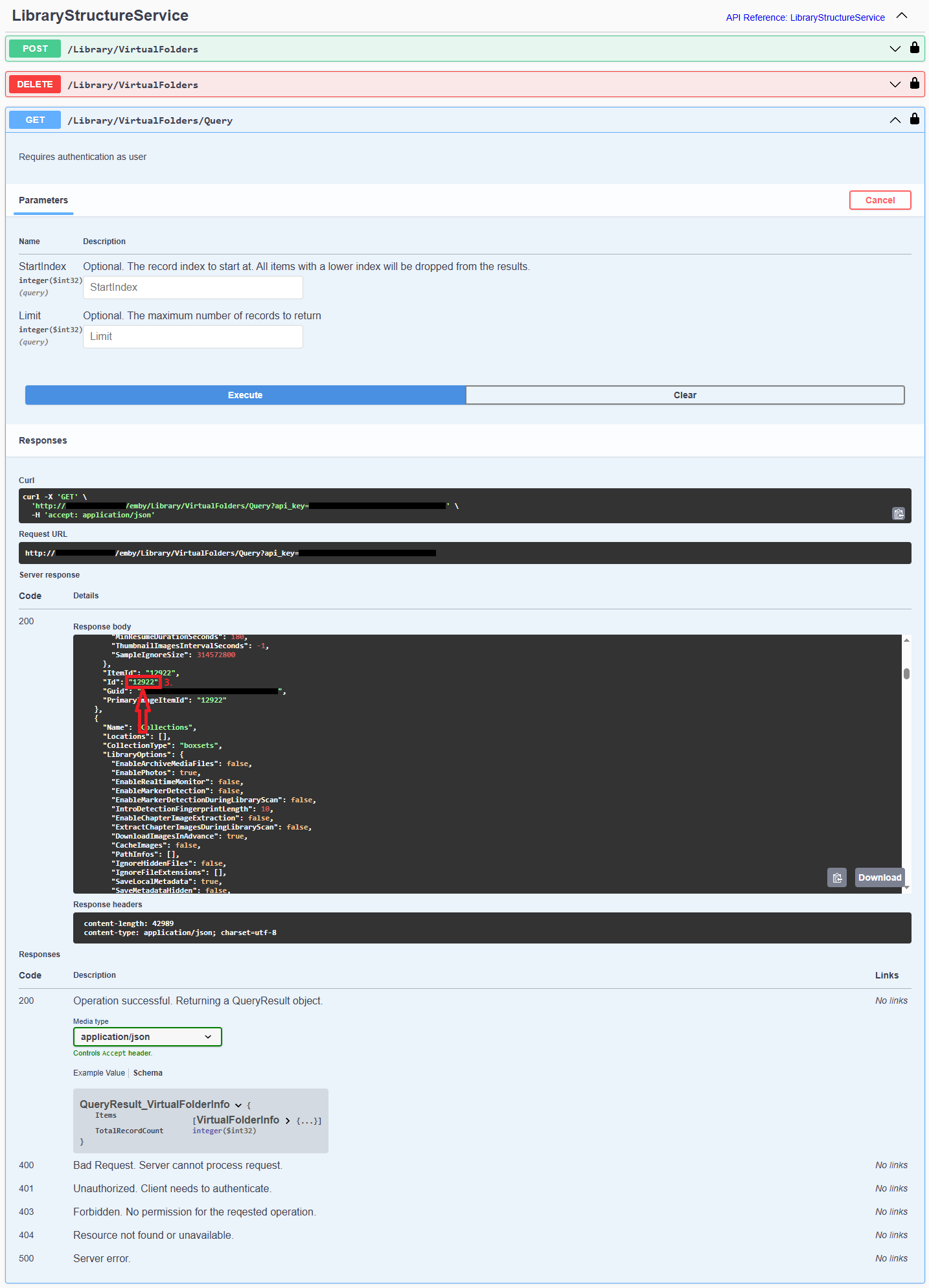
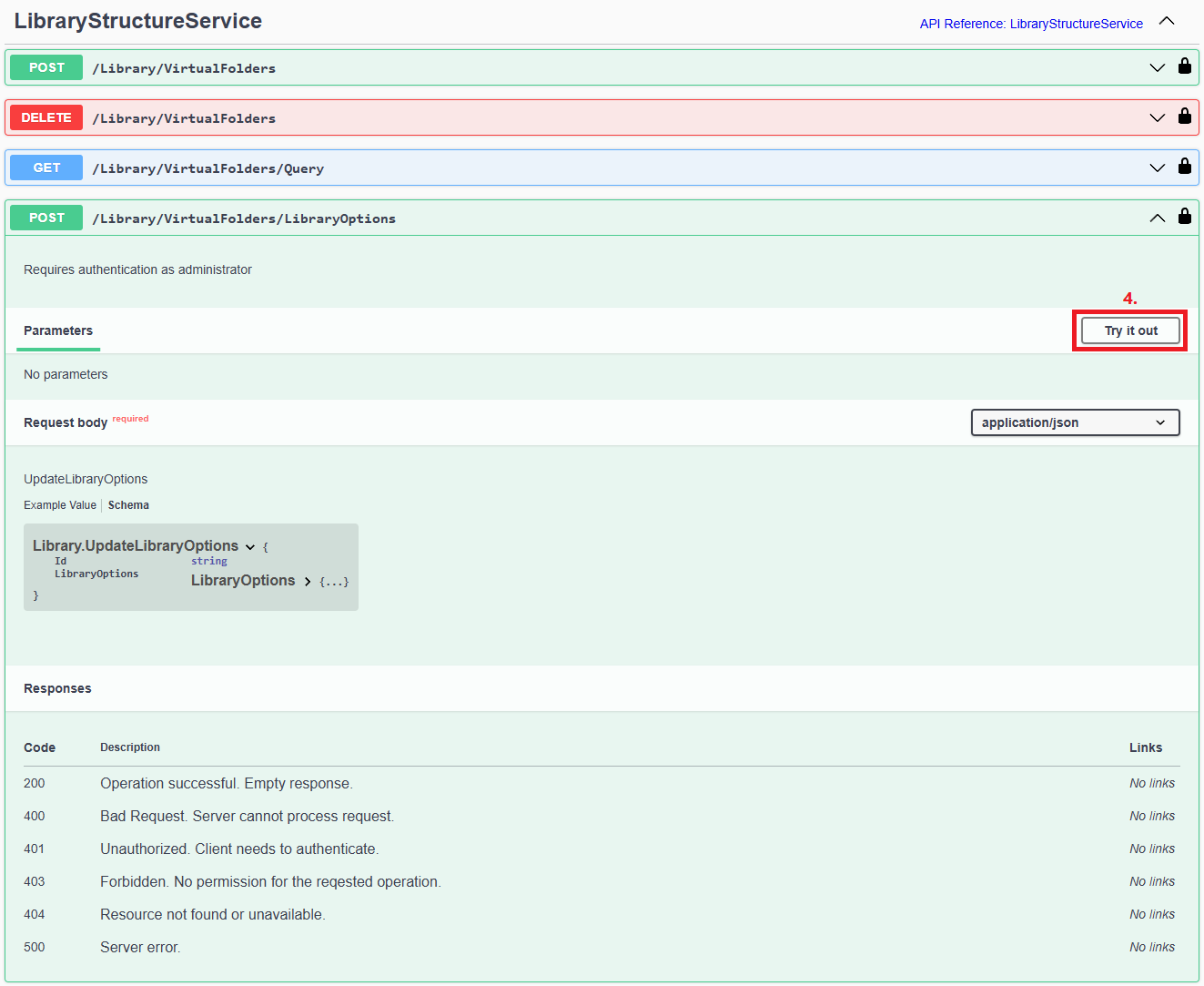
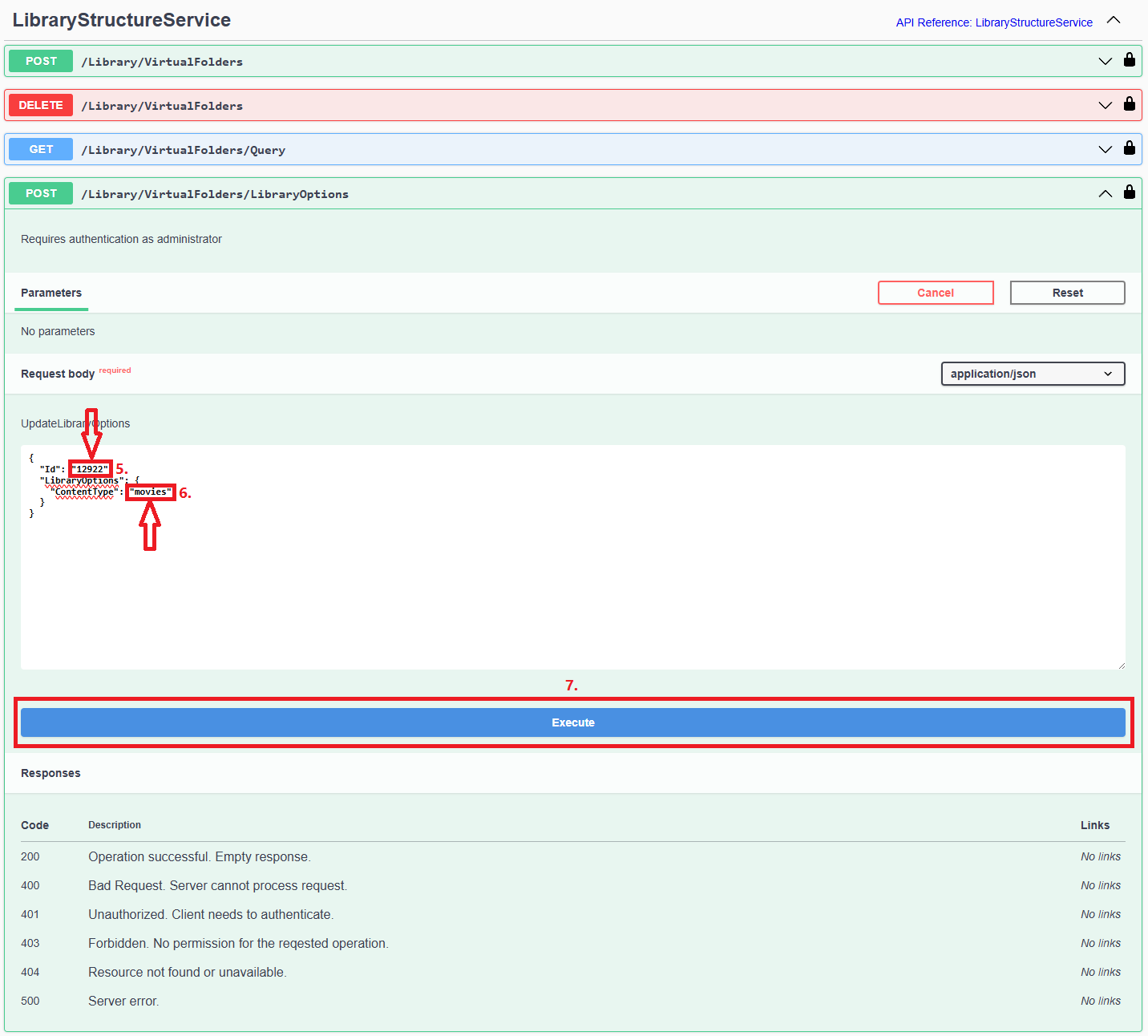
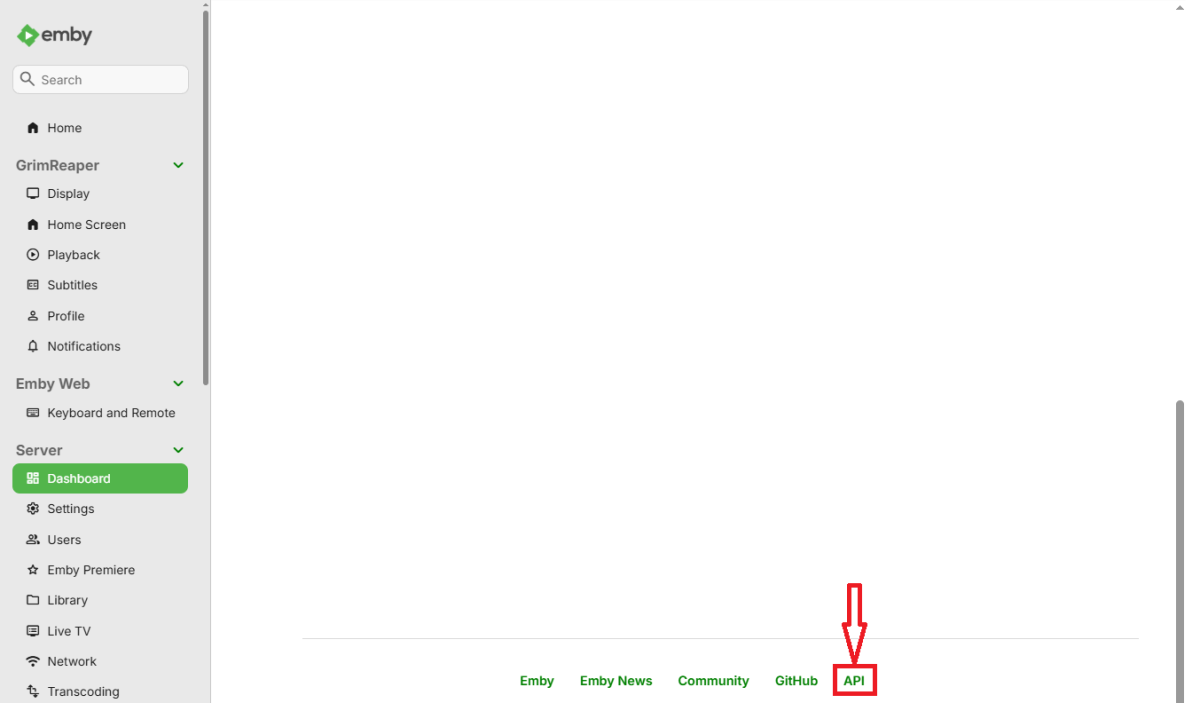
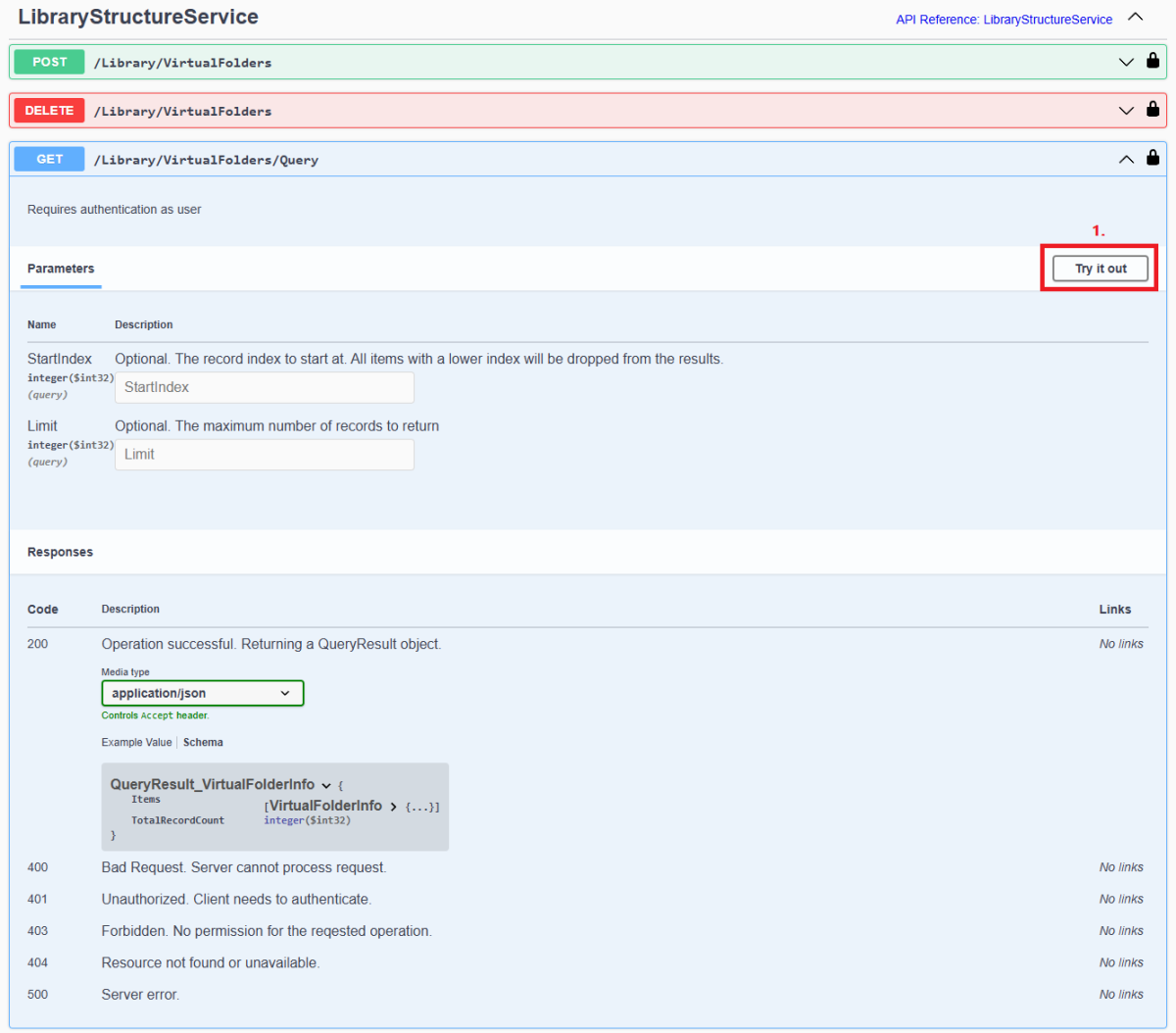
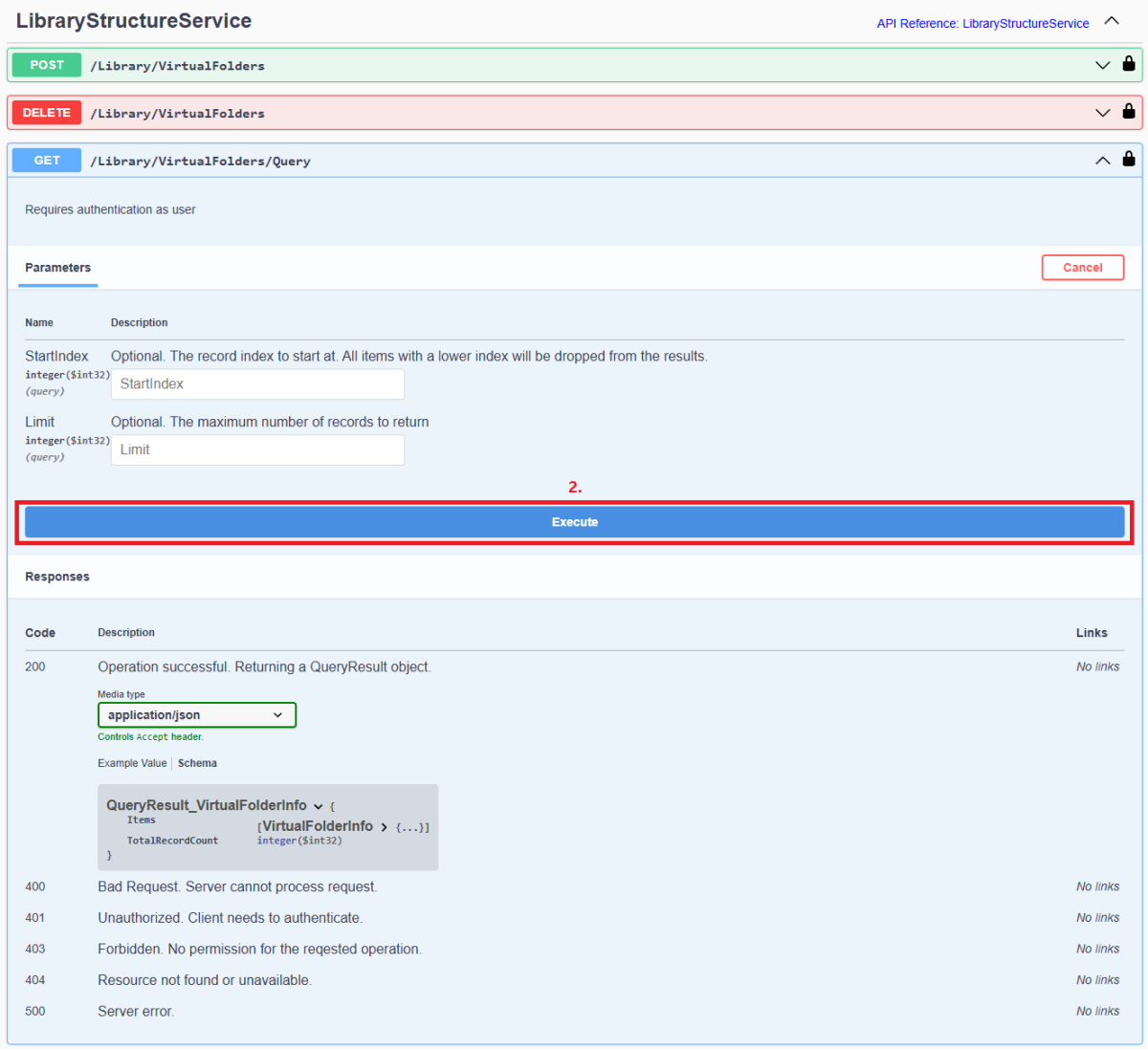
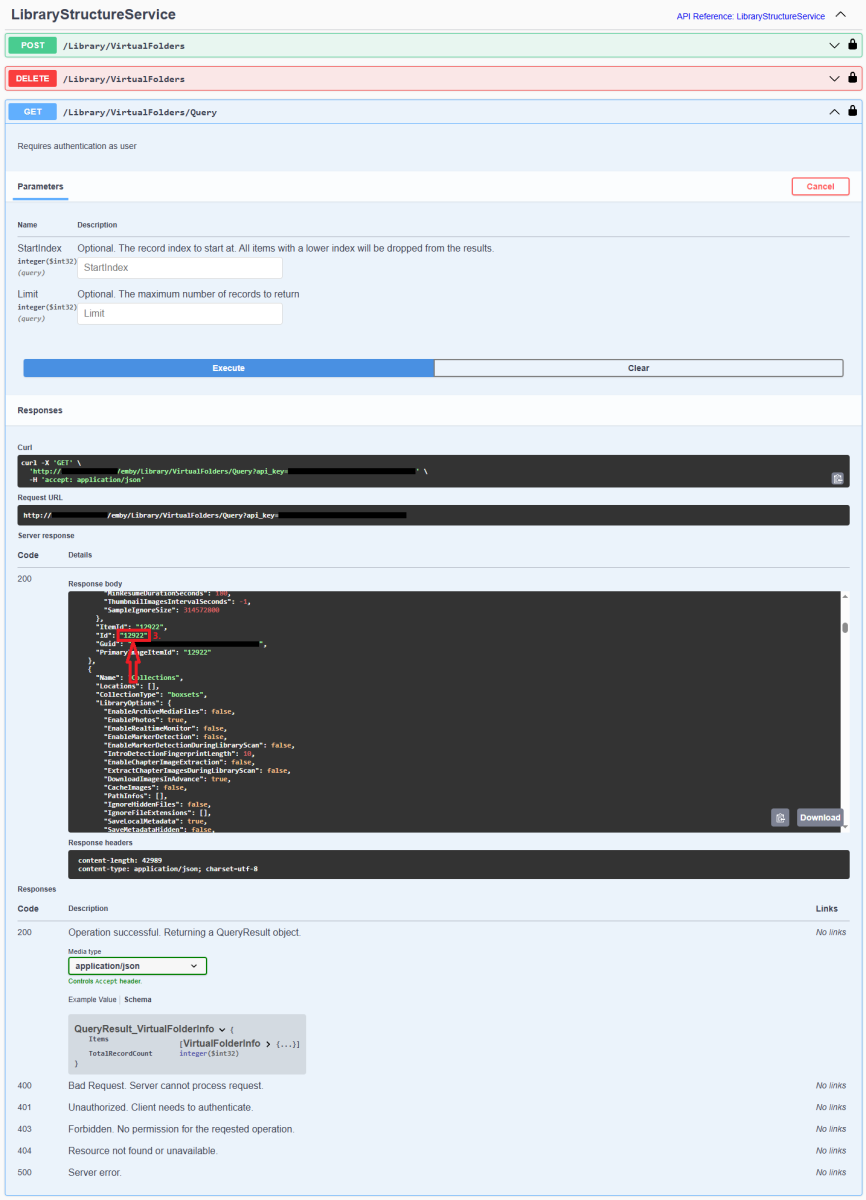
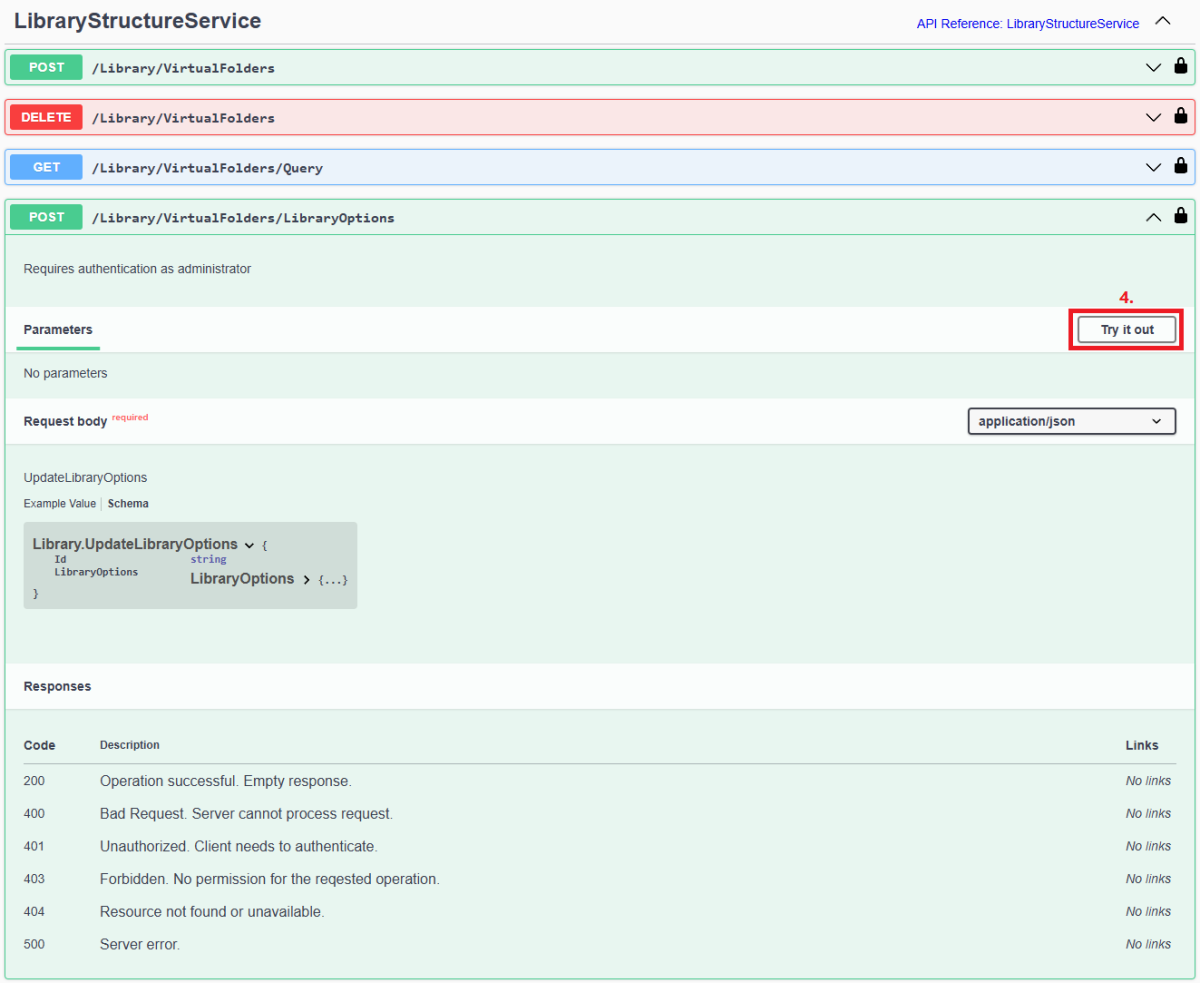
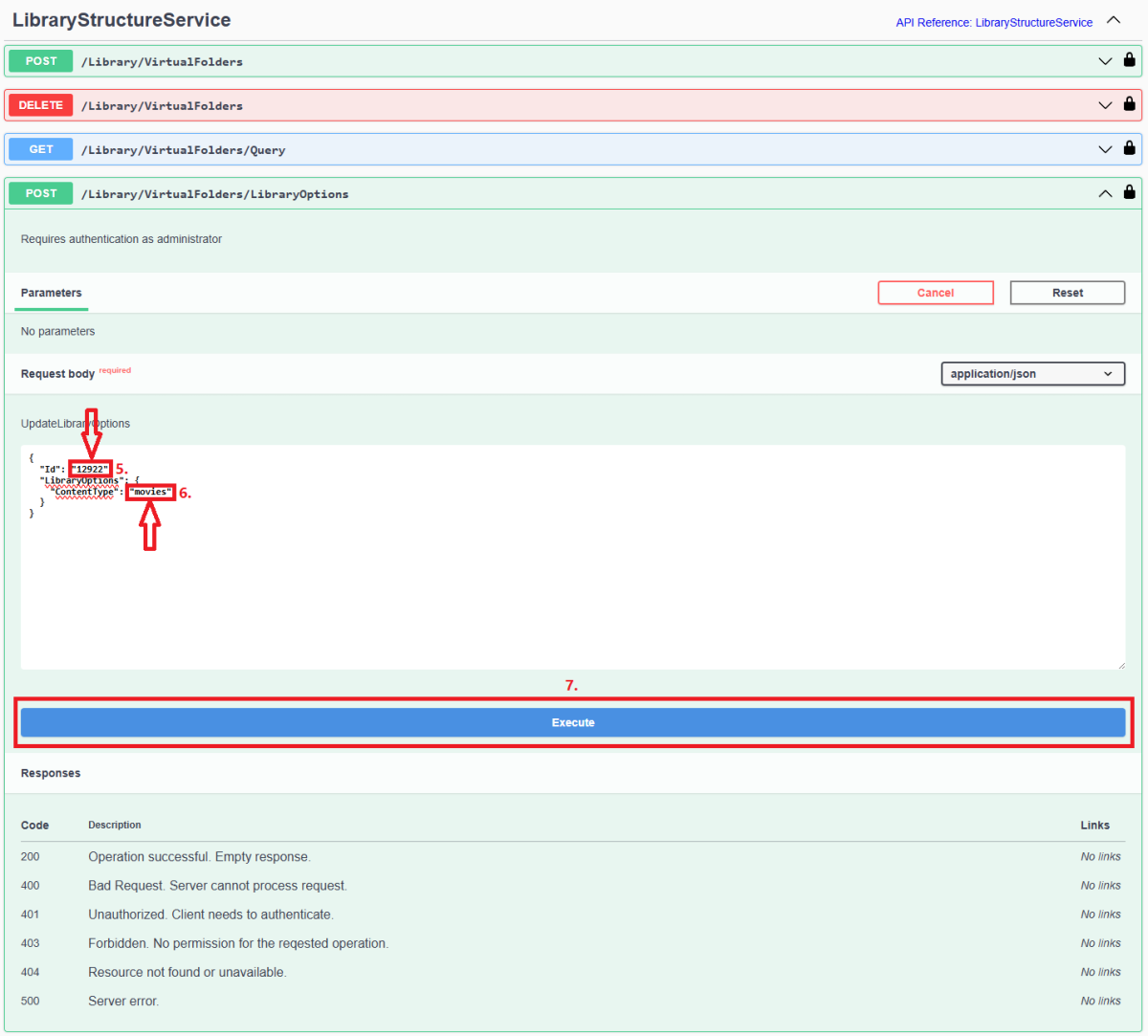
Since server version 4.8+, all library options (including library Content Type) are db-only and any desired changes need to be done via Emby Server REST API service (previous method of changing options via options.xml files is deprecated). Method below describes using Swagger: 1. Access Swagger by navigating to your Dashboard>scroll to the bottom of the page>select "API" hyperlink 2. Obtain library "Id" from /Library/VirtualFolders/Query endpoint: Find relevant library "Id" in the response: 3. In /Library/VirtualFolders/LibraryOptions, change "Id" to the one obtained above and "ContentType" to desired type (valid ContentType strings listed below). Execute. 4. You can check Settings>Library tab or query /Library/VirtualFolders/Query endpoint to confirm Content Type change Valid Content Types Audio books "ContentType": "audiobooks" Camera Uploads "ContentType": "homevideos" Collections "ContentType": "boxsets" Home videos & photos "ContentType": "homevideos" Movies "ContentType": "movies" Music "ContentType": "music" Music Videos "ContentType": "musicvideos" Playlists "ContentType": "playlists" TV shows "ContentType": "tvshows"
 1 point