Leaderboard




Popular Content
Showing content with the highest reputation on 09/25/22 in Posts
-
Thanks that works, now just need to add all my users!2 points
-
OMG. I got it back. I had to erase the stored LAN address and let Emby auto-connect which it did. Then my username and password worked, and it's all back. Thank you to everyone for your patience and suggestions!! Dave2 points
-
While being able to logically move media from one library to another would be a nice first step. Ultimately it would be nice for the move to physically move the media from one folder to another (since doing a logical move for a bunch of media from say, kids to not-kids, and vice versa will make physical locations pretty confusing). Trying to avoid having to drop into the cli to do it... I don't mind, pure convenience factor, just thought I'd throw it on the queue. Thanks Latest ATV update is sick, btw. Well done.1 point
-
Ok Thanks I wasn't aware it had been blocked. Although using the browser (without a VPN) I can log in to the https://www.opensubtitles.org/ website? It must be the api call that is blocked. I will try some other subtitle options.1 point
-
yes, i kinda fixed it by changing the uid and guid in the fstab to the emby user 999 & 998 but thx1 point
-
@Luke found out I am an idiot. I had the file permissions setup wrong, I never thought to recheck it since it was 'set right' False alarm folks!1 point
-
Oh, that's wonderful! Thank you!1 point
-
Hi, some positive feedback, no performance issue or other problems here with emby server 4.8.0.9 beta and 7.9.1 (1x Kodi 19.4 Windows, 3x 19.4 on Coreelec)1 point
-
Hello, I'm not sure yet why or how, but I managed to restore my Emby setup. I followed this tip about stopping Emby through UI instead of DSM and the redoing the cp and chown operations: After that, it started with all my libraries fine. I've checked users, libraries, metadata... and everything looks fine. Just in case a future reader has a similar problem. I don't know why this migration to DSM7 was as painfull, and it worries me not knowing why this step fixed it, and what happens with the re-scrapping the library scanner was doing before re-doing the cp and chown operations, I guess that has been overwritten and it will not appear again as a future problem, but everything seems to be working fine. Greetings.1 point
-
OK... there was no Emby folder anymore, so I followed the rest of the steps and it is working again. Although, I lost hours of work in organization that I had to do over. Appreciate the quick responses here in the forum.1 point
-
Yes I have posted that code multipe times in css forum. So with that you don't have the option to see the info when needed. So a toggle is needed more than complete removal. div.audioVideoMediaInfo {display: none;}1 point
-
hmm, funniest thing happened. U just set uo an additiona lserver and did some switching between them and now I see the Delete option everywhere.. weird.1 point
-
I'll check it.1 point
-
Hi, I have a first prototype Mycroft skill which drives Emby by voice commands. It is a fork of the existing Emby skill by Ricky Hewitt. Here's a video: https://www.youtube.com/watch?v=Crre3LWnQ0Q Here's the code: https://github.com/mike99mac/emby-skill-mike99mac Enjoy! Feedback is welcome. -Mike (Boomboks) Mac P.S. Thanks to all who helped here to make this possible!1 point
-
It will be decoding hevc and converting to h264 (encoding).1 point
-
Hi, yes there's an issue here with the beta server. We'll push out an LDAP plugin update to resolve this. Thanks.1 point
-
@OumarK Please post server log to show the actual error. How to Report a Problem But a guess would be Corrupt: malformed database. Steps to Reset Library Database & Load Fresh Note all userdata exist in that same database.1 point
-
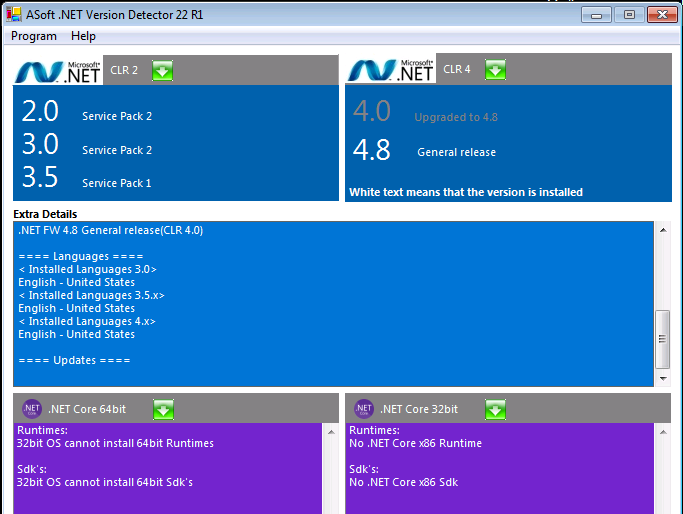
Thought the only dependency was Visual C++ as that would pop-up if not installed. May have to look at a clean install when I get a chance. But going forward I believe the Devs should update minimum requirements for Windows. @Lukewhat is the hotfxr.dll that shows failed above?
 1 point
 -
.net 6 is not .net framework. ".net 6" was what .netcore began calling itself. Lookup .net 6 specifically, and not .net framework.1 point
-
Neither am I, but I will install 4.8, and give it a go. *There is the req: .NET 4.8 & a security update: KB4457144, which resolves an occasional problem launching the hostfxr.dll Now the server launches and can be seen in my browser and set up. As for the features working, that remains to be tested.1 point
-
@gumberculesyour mounting the drive with user and group of 1000 (which would be your user you setup linux with usually) then you set the file / folder permissions to 755. This means that your uid 1000 can write to the folder but group 1000 / others can only read or execute files. you may want to change it to 766 for the group / others to have read + write permissions.1 point
-
I hope so... Thank you a lot! Best regards1 point
-
@rbjtech thanks for your comments and testing, ignore questions in other thread as you answered them here, so we will keep it lively until release core version hits @Luke @softworkz let me know when this goes live in stable version so i can remove from plugin.,1 point
-
Support for Windows 7 ended on Jan 2020 Why not use an up to date Operating System ? I believe you can still get a 'free' upgrade to at least Windows 10 ...1 point
-
New version available 7.9.0: Delta changelog: Fix coverart issue Invert the option to assign TVShow posters to episode artwork. Default is off. change plugin startup code fix dynamic nodes cast view for episodes dynamic nodes tries query content data from internal (Kodi's) database, fallback is Emby server (performance improvement for some nodes) remove all Kodi jsonRPC calls and substitude them with faster (direct DB) queries (also could improve (skin) stability) Comment: Database reset is mandatory The changes in dynamic nodes is now a sort of hybrid mode. Nodes queries which are not possible with Kodi's internal functions (due to limitations) uses (for subqueries) Kodi database where possible. e.g. Boxset for TVShows not possible in Kodi, but is on Emby. This node will query content selection from Emby server, once received Kodi's database takes over from here. Todo: (startup) nodes reset, code-rewrite library repair sometimes needs a Kodi restart to continue sync1 point
-
Sorry hab schon länger nicht mehr reingeschaut , aber du findest mich ja bei den Piraten Neue Version kommt auch bald vom EmbyDream Plugin.1 point
-
It is one of the other rules. It's called Release Date. It uses the Premiere Date metadata field, not media stream information.1 point
-
Mark, thank you for the response. I will be trying out your ideas when I get back home. I have one question... What exactly does this mean? I am already using their xmltv link. Are you referring to something different (EPG file)?1 point
-
https://www.nvidia.com/en-us/geforce/news/rtx-40-series-graphics-cards-announcements/ Mentions the dual NVENC. My mistake about NVDEC. Both product pages only make mention of NVDEC 5th gen (4090 and 4080, click on Specs then Full Specs). Since this topic is about transcoding to AV1, the capabilities of the decoder are of second-order importance (IMO).1 point
-
Hi, this is resolved for the next release. We'll have a 4.7.7 update out soon to resolve it. Thanks.1 point
-
I have used Emby for a number of years and have settled on AppleTV as my main streaming device, for both the TV-sized interface and (arguably) for the picture quality. As I've been on Emby for a long time, my movie and music libraries are fairly large, which means scrolling down the tiles in order to scan for a movie, music artist, etc. that I'd like to play is not at all functional. Is there any way to do the equivalent in the app as it is? Otherwise, could the search screen have this as an option? Choose "e" click a button and all movies beginning with "e" are displayed? Thanks!1 point
-
In case someone is trying to do the same. It does handle this situation beatifully. Here is what I do: At night when I'm sure nothing is getting recorded I have a script that will post-process every .ts files in my recording folder. It extract subtitles and create a nice srt file. It then checkif the codec is mpeg2video and if it is it's transcoding to HEVC using my GPU if it's not a mpeg2video I just repack to a mkv container and then I move the .ts file away for me to delete manually for now and later I'll automate the deletion of the .ts file also in case something goes wrong with the transcoding. As soon as the file are changes Emby will some minutes later reindex the file and adjust its database. The look and feel of the recordings library and the recording section in Live TV are unchanged and all the functionality are the same. Emby is WAYYY faster at skipping ina mkv container than it is with TransportStreams, skipping on a transcoded file is so fast I really like it. Most of my mpeg2 are getting half the size when in 1080p and the channels that are 720p60 are getting transcoded to 720p30 and they get about 25% of the original size. I'm sure I could fine tune the compression, but I wanted a one command fit all and I found that this command I'm using doesn't really change the way the video look and save half the space. I'm happy with that! I tried to process the commercials with ComSkip, but the result wasn't really satisfying it didn'T detect the commercials really well enough to be usable. Skipping is so much faster on mkv that I'm not sure I would even bother trying to skip with chapters and end up having to skip manually not knowing where I'm at in the video. At least manually it's fast and almost always the same number of clicks.1 point
-
Another update: I did change privileges for Emby to READ only on my Music share where my music files exist. Everything seems fine so far. I also signed up for a month of Emby premier since playing on CarPlay is a big deal for me, especially managing and playing downloads. I’m looking forward to trying this. I also found in the forum how to set up a library to use embedded tags — this is also working now. So the first day of Emby had a rough start but seems to be winding up in a good spot. I remain unfamiliar on how to kill a process on Synology without a terminal and root access. That seems really odd to me given how easy it is to do on a Mac. Does anyone out there know an easier way on Synology to kill a process?1 point
-
Yeah I agree with that. But for watching content from streaming platforms, Samsung supports all lossy audio codecs (AC3, EAC3 atmos) and can passthrough them to the soundbar.Even Bluray remuxes with lossy AC3 audio tracks can be watched. For lossless audio formats like TrueHD, it would be necessary to connect the media box directly to the soundbar or via earc although I'm not sure whether Samsung can passthrough multichannel LPCM via earc which would be necessary because there is no support for DTS codecs .1 point
-
That's not entirely true. Samsung TVs support dynamic HDR10+, and only since 2020 have Samsung TVs started getting hdmi 2.1 ports, which are needed to play HDR10+ content, and I also don't believe that many media boxes have it. Content with HDR10+ is most often from Amazon, and HDR10+ Blurays are appearing more and more. Even though I have an Android Box, I often use the Tizen app because it's very practical to use.1 point
-
You could put a usb extension cable on the back of your tv or something so you dont have to move it but honestly this whole topic should be dropped and just invest in a media box which can run the emby app, those auto-update and have better codecs then a TV.1 point
-
Just curious if this is a cost issue or some kind of weird licensing thing. It's a really big hassle to download, unzip, copy the files, uninstall existing version from my TV, re-install, and re-enter credentials each time there is a new version. Worse for me, I have a Samsung UST TV that has to be positioned and calibrated properly against a tight space, and since its USB port is located on the back which is really hard to get to, each time I have to just "update" the app, I inadvertently will bump the UST TV and lose the positioning/calibration! This whole process involved in "updating" an app is so unacceptable in the year of 2022. It's one thing I just leave it as it is choose not to upgrade, but eventually the app reports that "Your version is too old to use" so I am FORCED to go through the above frustration. Is there something that can be done, Emby team?1 point
-
I don't wanna be a negative nancy but no, based on all the information given on this fora, it will never happen. Same goes for alot of (simple and basic) requests. Don't get me wrong Emby is a great app but the dev team have their own agenda and doesn't really give the customers what they need/require.1 point
-
A decent option for those that only use their TV for Emby, but I'm sure I'm not alone in this not being an option due to having other apps that are only available in our own region.1 point
-
As usual, u just don´t get any useful information, that´s really a annoying thing with emby, u always get "we are on it", or get an answer like "Unfortunately, we also have to consider the costs and resources of us building and administering such a capability" Sure, keep wasting ur time on PS3 or similar old boxes makes much more sense instead of supporting the biggest TV Brand. Whatever, to be honest, I would not buy Emby again, not just because of the Samsung thing, more because of the "we are working on it" statements, u can read them all over the board, with exactly nothing happening in reality.1 point
-
Admins can do as they wish, but I hate to close the thread myself if someone wants to express their feelings and things don't get out of hand. Nothing has changed much over that past 7+ years though since it was first brought up and now that Samsung isn't even publishing updates for TVs older than 5 years even the folks in the US and UK with older Tizen TVs have to use usb if they want to stay current. If loading a usb or changing app region wasn't a desirable solution for me though, then I would have found another solution by now. Firestik, Roku, Shield (my preference), or something else. At least with an external box you can get things like TrueHD, DTS, PGS subs, etc which you will never get with any of the TV apps. To me, it's a shame to spend so much on a nice TV and soundbar/AVR and not get the most of them. If the cost of publishing in the Samsung store is so high, then maybe making Premiere a requirement would be a good idea if that were enough to cover their costs.1 point
-
As a video game developer I personally know the pain of handing over some % of rev to platform holders, but that is the state of things for us and at the end of the day we make more money by supporting those platforms for users. Here is my case in point: I have been a relatively happy Emby user for about 3 months now and I'm downloading Plex right now - I'm just not going to update Emby every 30 days from USB as that's insane to expect my family to do so. I just can't deal with the constant issues like this so I'm going to have to switch I'm afraid.1 point
-
What I saw in this thread is that folks from Emby were quite evasive around this topic all the way. And only sometimes there were some answers hinting that Emby developers don't want to agree on Samsung's terms about revenue sharing. I'd say that this thread should be closed with some summary about the fact that this most likely will not happen and opened if something changes. I've subscribed to this thread to get some news, but the only thing I'm receiving for ~four years is the same question and the same answer each time. UPD: I'm not trying to say that Emby devs are lying or greedy. We all know how unreasonable corporate agreements could be. It just doesn't make much sense to me to keep this thread open in this situation.1 point
-
As @EFEris mentioned, this isn't the point. It might be an acceptable or even preferred solution for some users but it is not for me.1 point
-
I think that's not the point, we all know that there are workaround. But if you buy a screen for € 1000+ which has smart tv support and "all" the other media apps are available (incl. media centers) you don't want the switch to a stick only for one media source. (at least I wouldn't like to buy for each screen in my house an own stick). And still the real problem is that we don't get a "No we will never support this" but only a here do it with usb and be happy.1 point
-
I'm a new emby user (started roughly 40 days ago) and though of purchasing emby premiere to be able to run it on iOS (my iPad) as well. I basically ran into the 30 day update side-load required with my Samsung Tizen TV (The Frame) just this weekend and I'm baffled to find out I either have to update it every 30 days via USB or switch the region (which basically renders other offerings/apps I use useless). So I decided to register on the form and provide feedback. I completely understand that you can't finance Samsung's greed for free users but with premiere I'd expect this to be a non-issue. I've just updated it via USB again and went through the setup process. I don't see myself doing this again and again. I would happily become a premiere user but my requirement would be to see emby in the EU/German Samsung store. My alternative is to switch to another app, readily available on the EU/German store. I'll watch this thread for the next 2-3 re-installs of the emby app and will make a decision then. Other than that my experience with emby has been great and I'd look forward to keep this experience.1 point
-
BS by omission is still BS. 5 years and still no Samsung app tells me there will never be one.1 point
-
Hi, I agree with EFEris, a "premiere only" option is better then none and saying "working on it" is way too often used in this Forum, but without delivering results (Sorry, sounds hard, but that's how I feel about it) And Samsung is the most common TV Brand in the EU, there is no doubt about it. Maintaining is a point, but to be honest, I can not imagine, that this will get out of control, Tizen is Linux based and u got a client for US already, as a plus, just quit the support of some useless old devices like a PS3? which will be used by a max of 1 % ? And in my opinion it's a waste of energy using such a power consuming device for streaming. Anyways, we got ur point, but ignoring the biggest Brand of TV Manufacturers is not a good idea I guess. And of course we could use Roku, Fire-tv etc. but its another device, another remote etc. pp And if it's about a few euros once, everyone can make it's own decision.1 point
-
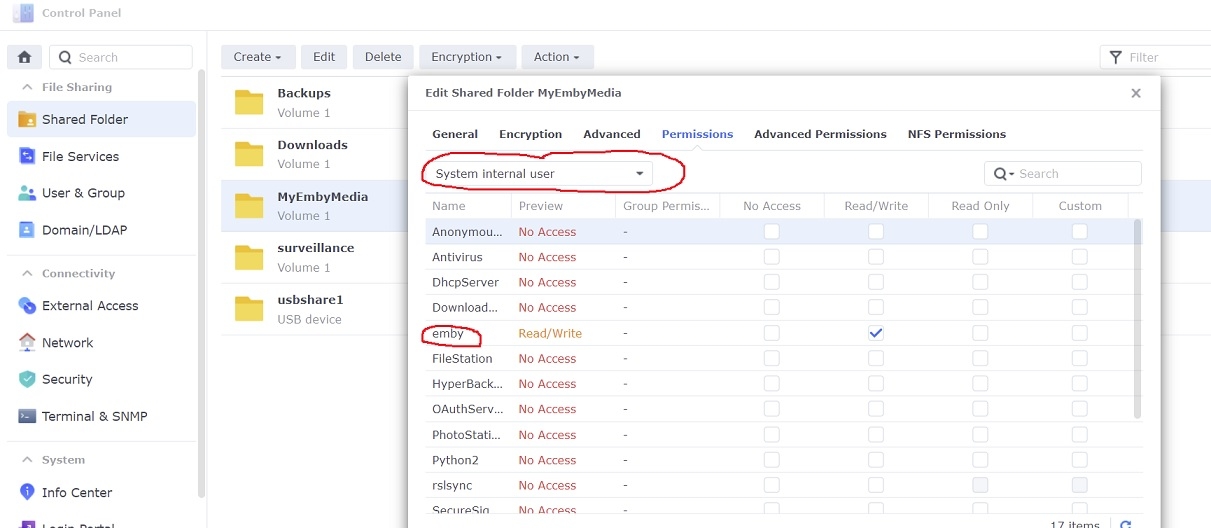
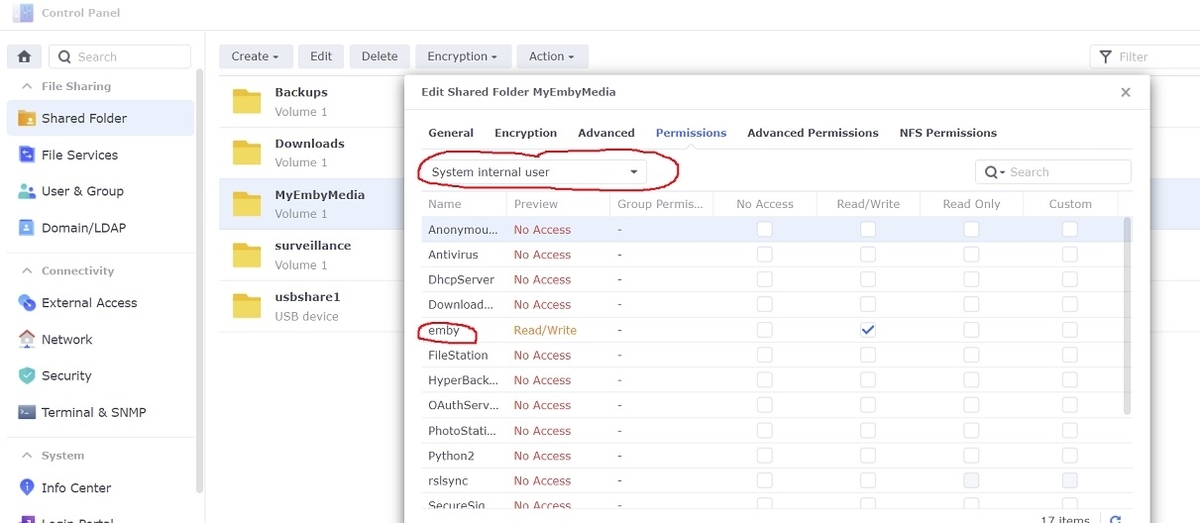
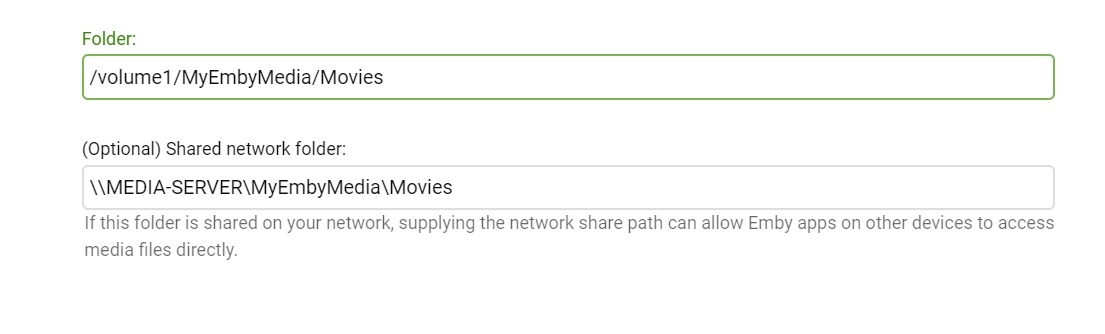
Adding libraries to Emby server is a little different under DSM 7 in that setting permissions for the shared folders has changed some. If you've ever tried to add a library to Emby and it wouldn't accept, then the permissions might be wrong 1. Give emby read/write permissions to the shared folder Open Control Panel...Shared Folder in DSM on your NAS Select your shared folder...Edit... and then under the Permissions tab select the dropdown box and change it to "System internal user" Check Read/Write next to the user 'emby' and then click Save 2. Add libraries in Emby server Settings...Library...New Library Select the library type and enter library folder information Example:
 1 point
 -
MediaBrowser.Controller.LiveTv.LiveTvConflictException: MediaBrowser.Controller.LiveTv.LiveTvConflictException: M3U simultaneous stream limit has been reached. I only have one stream going. Only one is showing in the dashboard. Simultaneous stream limit is set to 5. Normally I can use all 5 streams but when this happens, I have to restart Emby. Is this a common issue? How should I troubleshoot? This has always been an issue for me, across two different servers. Thanks!1 point