Leaderboard




Popular Content
Showing content with the highest reputation on 09/24/22 in Posts
-
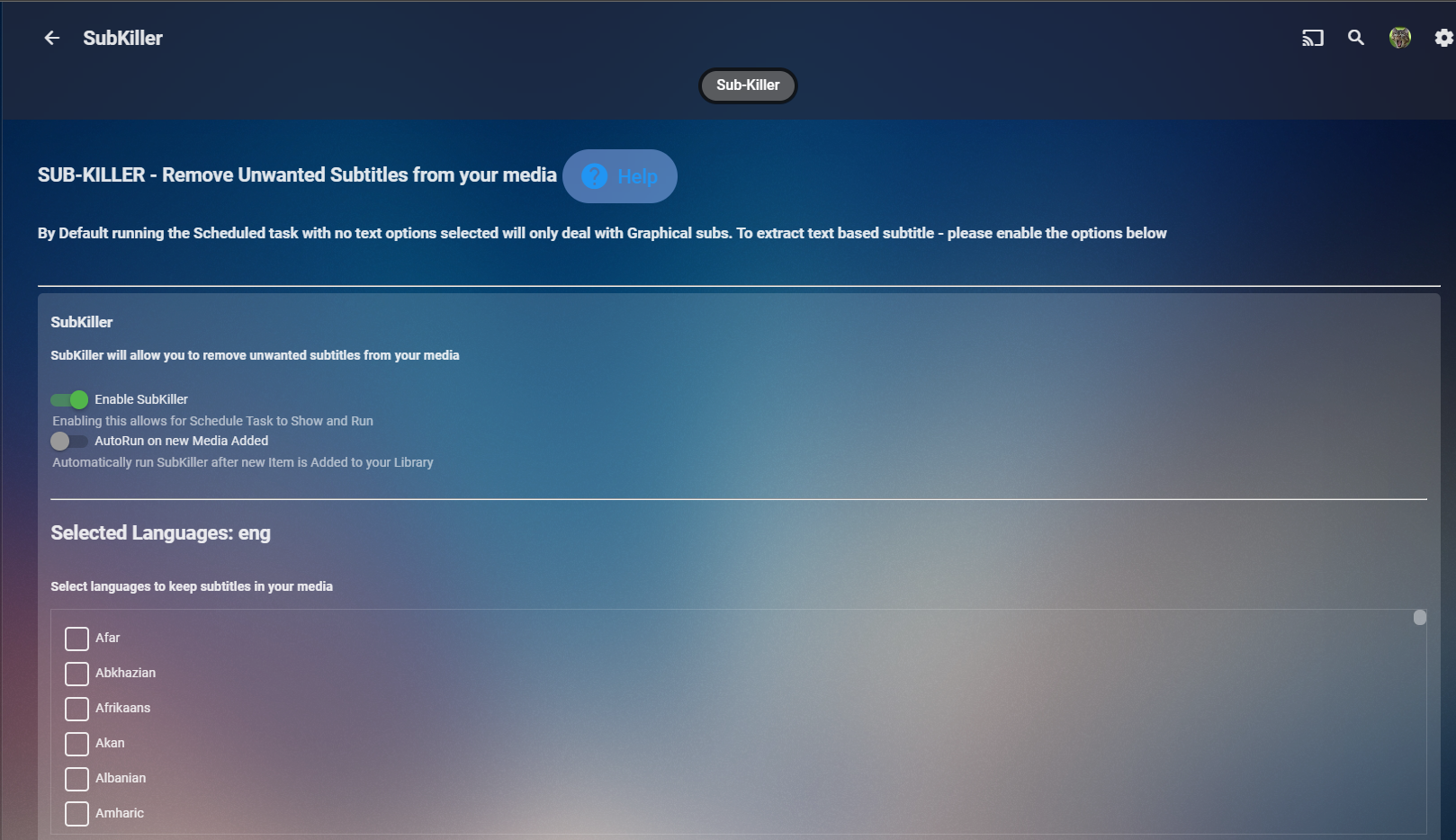
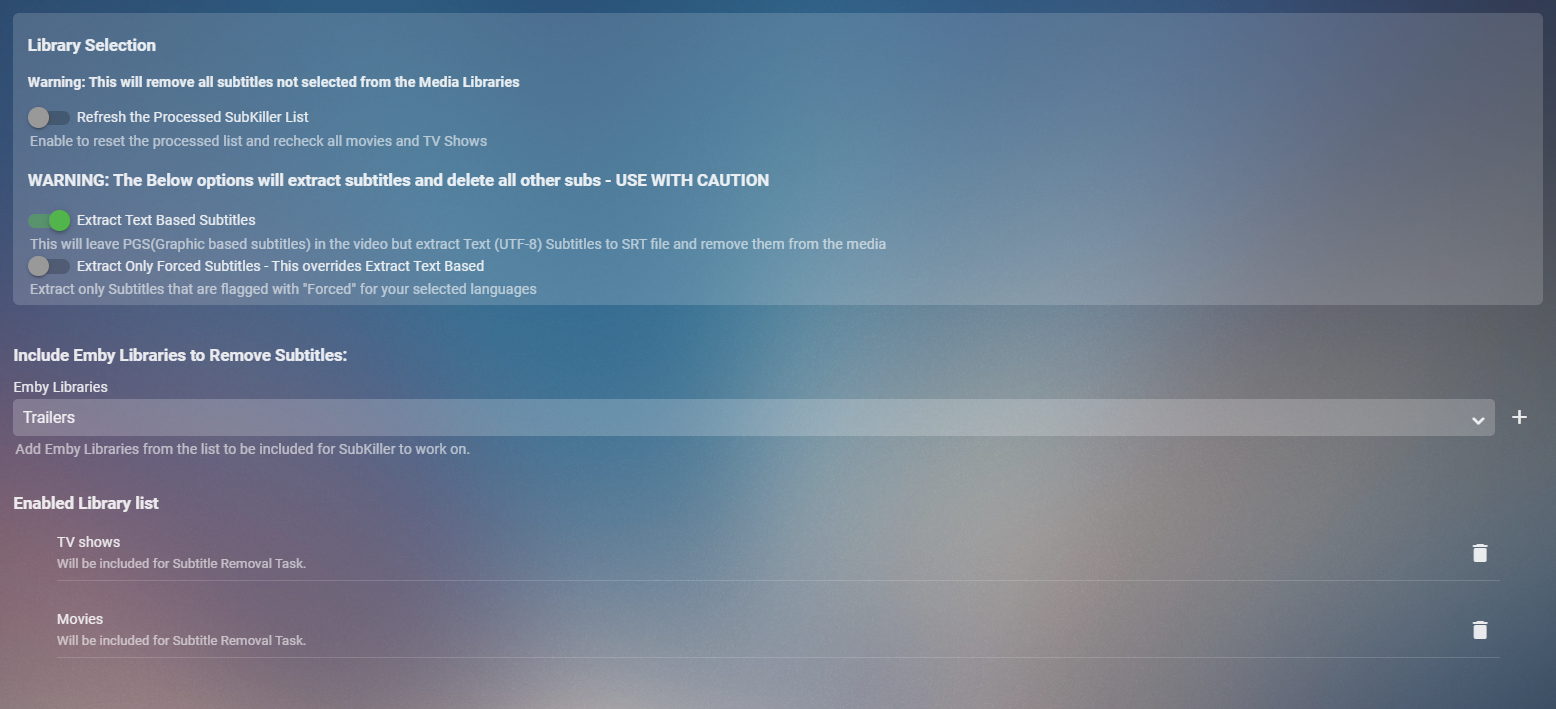
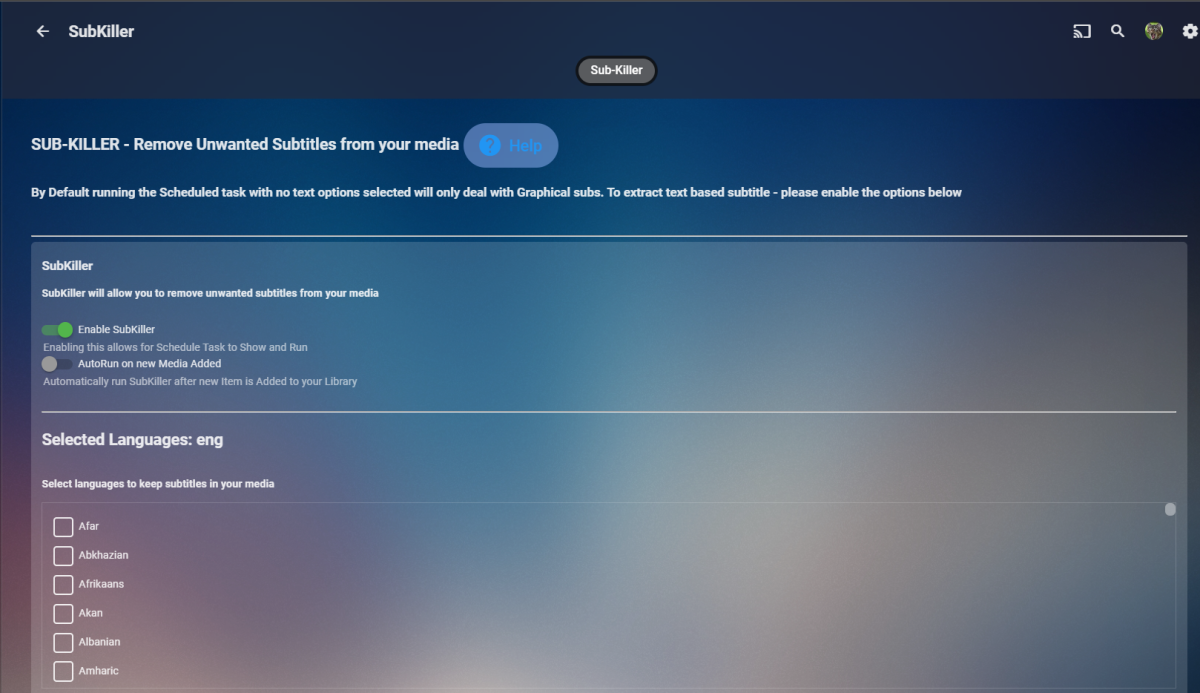
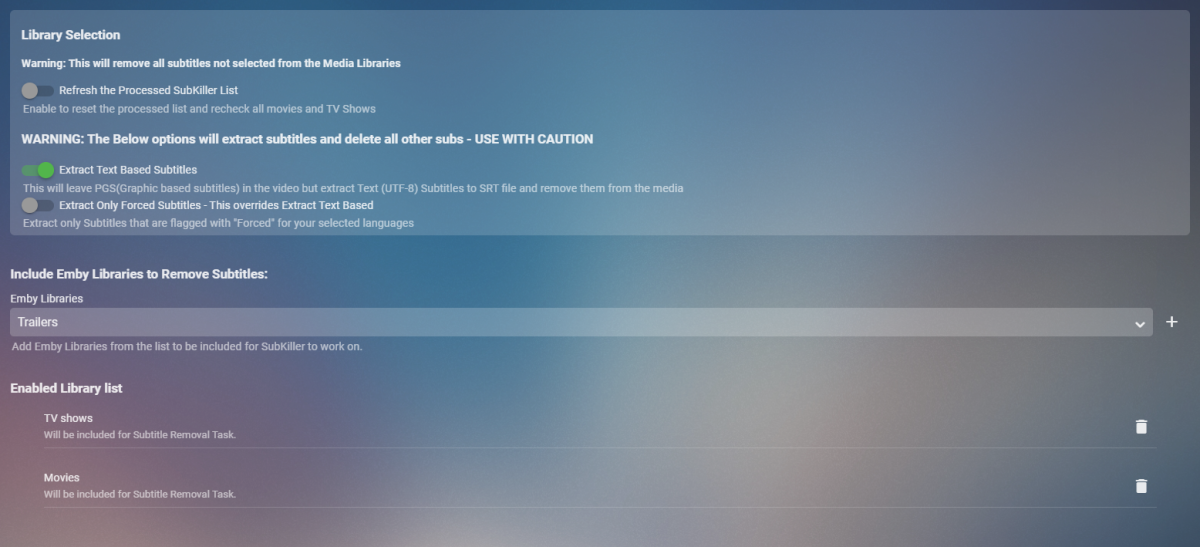
Cheesey Productions brings you SUB-KILLER for Emby Remove those unwanted subtitle languages Removes Graphical subtitles by default & can extract text based subtitles as an option Available from the plugin store A huge shout out to @rbjtech @FrostByte and @Dickydodah!for all their help with this. https://twemoji.maxcdn.com/2/72x72/1f44d.png Please read the wiki page available that will help you get set up. - currently under construction SUB-KILLER WIKI PAGE This plugin is destructive as it removes physical subtitle files from your media containers PLEASE USE A TEST LIBRARY FIRST Config Page

 3 points
 -
Thx Frostbyte Well it seems my usb was broken. Found another one with same Fat file system and it worked with that one. Phew. Movie night tonight with friends lol. Thx for great and fast feedback. U guys rock!3 points
-
New version available 7.9.0: Delta changelog: Fix coverart issue Invert the option to assign TVShow posters to episode artwork. Default is off. change plugin startup code fix dynamic nodes cast view for episodes dynamic nodes tries query content data from internal (Kodi's) database, fallback is Emby server (performance improvement for some nodes) remove all Kodi jsonRPC calls and substitude them with faster (direct DB) queries (also could improve (skin) stability) Comment: Database reset is mandatory The changes in dynamic nodes is now a sort of hybrid mode. Nodes queries which are not possible with Kodi's internal functions (due to limitations) uses (for subqueries) Kodi database where possible. e.g. Boxset for TVShows not possible in Kodi, but is on Emby. This node will query content selection from Emby server, once received Kodi's database takes over from here. Todo: (startup) nodes reset, code-rewrite library repair sometimes needs a Kodi restart to continue sync2 points
-
Unraid is built on Slackware, guidance here https://mediaarea.net/lt/MediaInfo/Download/Slackware - I do not use Unraid so cannot offer any experience based advice on whether building from source will work or not. Maybe start here https://slackbuilds.org/result/?search=mediainfo and see how it goes.2 points
-
Can still measure logo size in nanometers.2 points
-
Cheers - I still like the other functionality of the tool, and am looking forward to the subkiller function if it comes out - so much of my older content has smatterings of random subs from years ago I didn't really feel like trawling through the files to find them2 points
-
I recommend removing the stock playlists and use only the next-gen plugin nodes. rm /home/osmc/.kodi/addons/skin.estuary.modv2/playlists/* They are slow and loading in the background. Each time the skin is updated (new version) it must be done again. (I use a startup script for that) It's up to you keeping them or removing, on smaller libraries where is not much difference, but on large libraries it has an significant performance impact.1 point
-
Hi, Setting this up for my mom, the description text for any Movie is too small for her, and to be honest even for me. It's a 50inch TV at about 7 feet back. I've looked through settings and can't find an option. Everything else works great. Hope there's a solution, Brian1 point
-
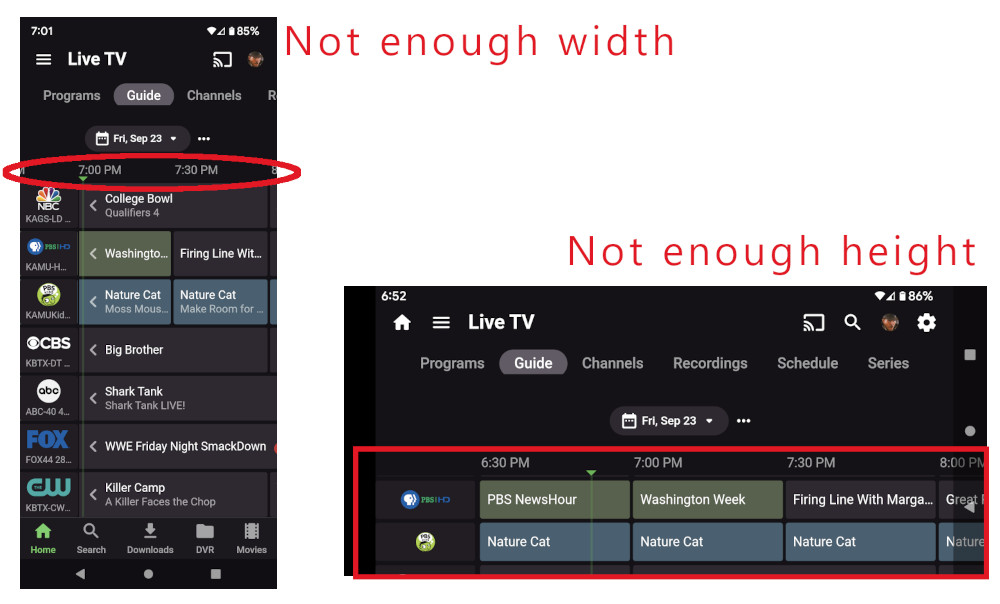
When setting recordings, I mainly use the guide through my phone, and I find myself instinctively rotating to landscape because there isn't enough width to show as much of the time bar as I'd like. But then, I'm confronted by the fact that there isn't enough height to show as many channels as I'd like. It would be great if the header would scroll up in the same way that the home view does in landscape mode, then the landscape guide would be just right.
 1 point
 -
Wouldn't that also break programs the uses that info? But Emby itself writes that info but does not use it from nfo file, as media info is written directly to the database. Now without that info the item becomes unplayable as playback method cannot be determined. So required media info and UI display of that info are two totally different things. But Media Info collapsed or link pop-up sound like best options to me.1 point
-
That is the document I used when designing the TV app. Our text sizes line up with those.1 point
-
Supposedly free upgrades ended years ago. However, when I last tried (about a year ago) I simply installed Windows 10 and gave it my old Windows 7 Pro key and it accepted it. Paul1 point
-
HI, thanks for reporting. We'll take a look.1 point
-
@Cheesegeezer Hi Dave, Yea the Core has now replicated what the plugin does for the HDR BIF's - it uses the system specified software tonemap algorithm to create the images, almost exactly the same as we did it using the plugin. We have the extra ability to change the image frequency but personally I'm not seen the need to ever change this from the default 10 seconds. Re-processing was added (thanks) but you can now do this by just deleting the BIF and refresh the metadata within Emby. To note, the core does not REPLACE old HDR BIF's with new tonemap ones - it only works on new files, or those you have manually deleted the BIF's for and then refreshed the data. So .. I think the life of the HDR BIF generator still has a valid use - for those that want to replace all their HDR BIF's - OR they can just delete the BIF's and leave the core to regenerate them. I would keep it for the time being - and maybe sunset it once the Release system has been using HDR BIF's for a while and there is no more noise on 'how do I convert all my old BIF's' ..1 point
-
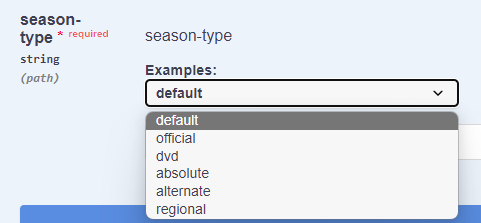
The additional orders have not been added yet as they have 5 orders, and we still only support 3.
 1 point
 -
AV1 initial licensing appears to be royalty fee, but any future development may cost some fees. See: https://ipeurope.org/blog/royalty-free-standards-are-not-free-of-costs-av1-as-a-case-study/ The article urges caution, because there could be hidden fees coming. What kind of additional costs might happen? === Here is a 3rd party encoder and cloud service that already sets fees for AV1. They are making profit, but it is not clear if they are also paying for bulk licensing to AV1 or not. The example 3rd party service fee structure: See: https://www.sisvel.com/licensing-programs/audio-and-video-coding-decoding/video-coding-platform/license-terms/av1-license-terms AV1 licensing appears to be EUR 0.168 per media playback and Eur 0.32 per hardware that plays AV1 media. Once a computer / phone pays the Eur 0.32, then apparently the license fee would just be Eur. 0.168 per media that is played back. Playing something back twice might not have any extra charge, but I don't find that info anywhere. You could play back if the movie is still cached, otherwise pulling it again from the server might create a new fee. This would mean for say 500 media plays anywhere in the world in a day, this 3rd party service monthly license fee for AV1 would be about Euro 7,320... This all 3rd party fees, supposidly not payments to the license owner of AV1. === Hmmm, Still, I would be a little cautious.1 point
-
oh boy, u have much to learn here1 point
-
Sure, it's https://github.com/DanielFrankDK Y'all enjoy your evening. We'll talk later1 point
-
Very far, in fact too far.1 point
-
Working great! Thanks @Luke!!1 point
-
FYI - link to Sub-Killer thread1 point
-
No, sorry. I'm sure Luke is on it as he now knows how to reproduce it.1 point
-
I just added the GitHub date to the release notes. Maybe the compiled date on the app settings page too? You wouldn't want the expiration date for those who use the store. Or, some apps use the date as the version. So version 9.20.2022 would be the latest and you would know that by 10/20/2022 you would need to start looking for a new version if using usb.1 point
-
Unfortunately, as he is using Unraid I can only comment on what I am using: I'm on Ubuntu 22.04 LTS and am using mediainfo 22.03 CLI. I couldn't find anything for Unraid on the official download page of MediaInfo.1 point
-
Ok, thank you guys.1 point
-
Version 4.8.0.9 beta solved this, the thumbnails are working ATSC3.0 channels are recording and playing back properly too. Thanks1 point
-
Yeah its simple thing to copy I suppose, I do like EMBY I am trying to have emby and plex atm. I like and Know Plex is a dead end. I dont think this is a ass severe copy of details. waiting on rescan of data to see if it worked I swapped it to [tvdbid=#]1 point
-
As it stands right now, they would be the same unless you wanted TM'd bifs at something other than 10 seconds. There is talk of possibly adding some other features, but I don't think Cheese has decided that yet.1 point
-
That’s awesome. what I am trying to accomplish is a multi-tenant virtual DVR. I am collecting tons of shows for my user base. my wife has a ton of stuff she watches I couldn’t care less to have clutter up my Home Screen with new episodes. in my system everything TV is stored in Disk Array/TV/Series after it’s grabbed via Sonarr and then processed through Unamic to standardize codecs I have about 14 active users and some will evidently want to track the same shows, for example I don’t want to see any of the “Chicago” shows currently airing because I don’t watch them, but they show up in my Latest TV row because they are indeed latest acquired shows. But since each user has their own favorites for movies and tv, I just keep thinking why not adapt a Home Screen row to be a users favorited tv series that meet certain configurable criteria like is Continuing and has unwatched episodes and would ignore everything else. I’ll leave it at that. thanks for listening everyone!1 point
-
Making it collapsed by default would be nice. I don't normally want to see it in TV mode either but wouldn't want to go back and forth in settings to toggle it either. Then if I want to see it, I could just click on "Media Info" to expand1 point
-
No, I'm saying the description text is to small. Year, Audio, ratings, time aren't important. Title can be seen in larger print on the movie poster or tv title card. So the description text enlargement is all that is needed. I love Emby, works perfectly for me. Maybe this accessibility feature could be added in the future. Thanks, Brian1 point
-
I fully understand everything about the web client side. I'm not asking to eliminate emby from accessing mediainfo in any way, I'm just looking for a way to not show so much unnecessary info to viewers who have absolutely no reason or clue to what it even is. The media info section actually takes up MORE visual real-estate than my movie poster and description! (I'm using a custom "home" folders setup for local football league videos) All of this tech data / specs for video AND audio.. why even show this if not Admin?1 point
-
Well the change to Collections was done for the exact reason. To all media to be movied without affecting Collections. But this assumes your update migrations happened correctly and item metadata was updated with <set> node. If you write nfo files with media then you can check this in any item that belongs to a Collection nfo file. So the Alien movie nfo will have this causing it to create and be part of the "Alien Collection". <set tmdbcolid="8091"> <name>Alien Collection</name> </set> Now if you do not write nfo files they yes the collection will/could be lost as the database entry will be deleted when moved.1 point
-
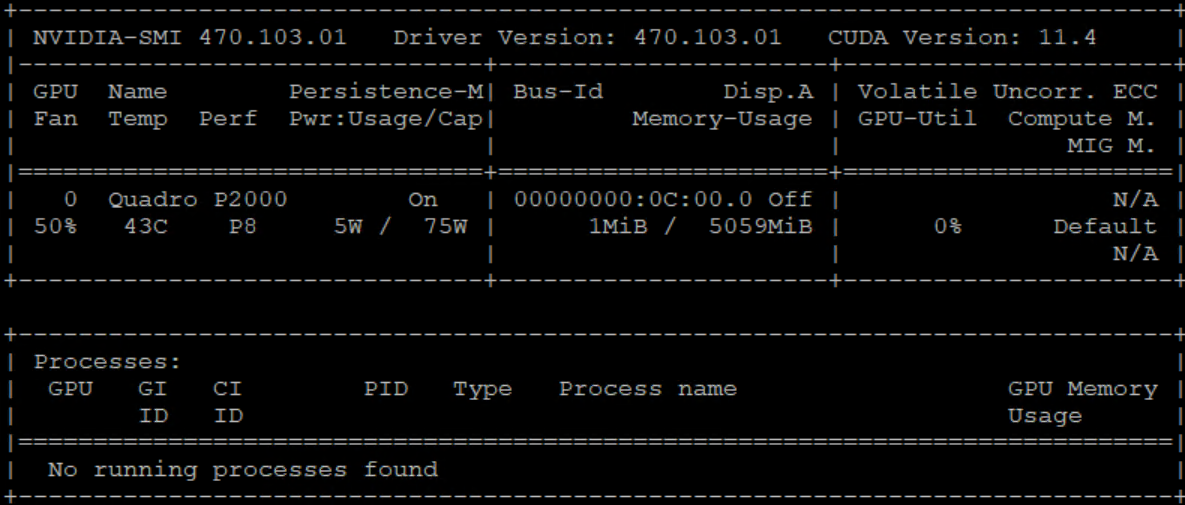
@Luke So far I can give a first update: I have installed on a Ubuntu VM machine the nvidia driver sucessfully using this tutorial (https://forum.openmediavault.org/index.php?thread/38013-howto-nvidia-hardware-transcoding-on-omv-5-in-a-plex-docker-container/#codeLine_3_com_woltlab_wbb_post_313378_432646) I can also confirm that a Quadro P2000 looks so far good concering my plan to recieve hardware encoding in docker. This is a HP DL380 G9 and I'm not using an original HP part. So the GPU is not HP labeled but the numbers are very close. Here is a first image, until now it has nothing to do with docker and Emby.
 1 point
 -
Thanks for letting me know. I put in a feature request for it.1 point
-
If the description text matches the rest of the text, then by extension are you saying that all text in the application is too small?1 point
-
I agree with Max92. The Android TV app is far better on a TV. Much easier to navigate, search and change settings. I use a keyboard. The Android app works ok on a mobile or tablet but is a real pain to use on a TV. I hope you don't drop the TV version.1 point
-
Yes I can but I will say less can be better. UX is very important, you can have so many thing that finaly, you see nothing. If you have only what is necessary, it is better. My opinion.1 point
-
Can't you just ignore those and pretend that they're not there?1 point
-
[09-22-2022] update https://pastebin.com/dR1wDdUy
 1 point
 -
@Roodee Do you use anything like Sonarr or Radarr to manage your shows or movies? If so, what are the challenges you have with using that to move shows/movies as opposed to Emby? The reason I ask is that for me (and I'm sure many others), I treat a Library as an abstraction of one or more paths (in my case shares, but it would equally apply to drives), so my first inclination would be to use one of the aforementioned products to handle the moves for me. I can appreciate the simplicity of doing this from the comfort of your couch, however one of the annoyances will be trying to watch the media as it's being moved...there will be performance issues (this can be just as much a problem with Radarr/Sonarr), which kind of negates some of the benefits of said couch-based administration.1 point
-
La seule chose à laquelle je peux penser est que si vous écrivez des fichiers ninfo, vous pouvez les supprimer. Mais pas sûr ou la regex nécessaire pour supprimer les nœuds imbriqués <actor> dans quelque chose comme notepad++ faisant une recherche et un remplacement. Director serait quelque chose comme ça "<director.*>(.*?)</director>" Si vous n'écrivez pas de fichiers ninfo, je ne connais pas de moyen de le faire car toutes les informations sont liées dans la base de données. Only thing I can think of is if you write nfo files you could remove there. But not sure or the regex needed to remove the <actor> nested nodes in something like notepad++ doing a find and replace. Director would be something like this "<director.*>(.*?)</director>" If you don't write nfo files I don't know of a way to do this as all info is linked in the database.1 point
-
Only on windows and linux desktop, and windows won't be using it for too much longer.1 point
-
@Luke Any chance we might see the M1 release soon?1 point
-
Hi Then I will try IPTV. I will let you know how it goes. Thanks1 point
-
I wrote this code just because I enjoy programming and learning. I was also planning to add features to simplify my Emby experience. Vic1 point
-
-1 How hard is it to use file explorer to cut and paste a folder?1 point
-
You could also run an FTP server on your machine and use FTP or web browser to upload via the FTP server. This would be for "off net" access for the most part.1 point
-
Just to add a bit here and to offer my $0.02 or less , HEVC encoding does use quite a bit more resources and really heavily depends on the CRF/VBR settings used and the encoding preset. I did a lot of research on this and the claim that a CRF of 23 when encoding a Blu-Ray source is visually lossless is just not true. If you have a good display, like a 4k with a larger screen, you can certainly see the difference. I ended up going with CRF 12 to get to visually lossless with my setup when encoding my collection to HEVC. CRF 23 with the Ultra Fast preset does encode pretty quickly, but you can see the difference between source and destination material. This is fine for smaller devices, but any larger device that can handle the output will suffer in quality with transcoding. For those with hardware accelerated HEVC support, there won't be much of an issue until the transcode tries to output at a 4k resolution because the device is 4k. The output resolution would need to match the source. Also, some source material encodes much faster than others, depending on CODEC, picture quality, motion, etc. VC-1 for instance normally went at about 15 FPS (some lower and some higher) on my server with 2x E5-2660 Xeons. The 32 logical cores struggled greatly without hardware encoding support. Those titles take nearly twice as long as the source video length to transcode with output being 1920x1080. Titles with HEVC typically ran at about 28 FPS but still very CPU intensive and it would never be able to encode fast enough to handle 2 encodes at once if it were on-the-fly. HEVC is great for reducing the size of your video library, even though at CRF 12 some few files end up being larger than the source. Even at that CRF, the overall size of my library was reduced by slightly more than 50%. However for on-the-fly transcoding, this would not be a viable option for me without some significant hardware assistance.1 point
-
Also, encoding to hevc will require quite a bit more resources on the server end. Most people's setups wouldn't handle it well I imagine. We try to limit the number of options we put in that would only benefit very small audiences and have the potential to cause large audiences to make problems for themselves . Eventually, I'm sure this will be the norm but I'm not sure it is ready yet.1 point