
Leaderboard




Popular Content
Showing content with the highest reputation on 09/23/22 in Posts
-
Ok, thank you....just found this in my plugin catalog and trying it out...really liking the ability to see atmos and dtx information now, that's a game changer2 points
-
Since there isn't a great place for Emby related "off topic" discussion, and this probably doesn't warrant it's own topic... but I officially deleted Plex off my NAS this morning. I've had it disabled for probably the last month or so just to make sure Emby could live on it's own and do everything that I need from it. Very happy to say I'm a "one media server software" user now finally. Thanks to the team here for all the help over the last, probably, year or so! For my purposes, it's like night and day how far Emby has come in that time. It's always been pretty good with the video playback and client support, but was unusable before for casting music around my house and it's darn near perfect now. Hopefully continue getting even better.2 points
-
Mainly because you have only options for watching video and no option to modifie metadata, pictures.... When you are on TV, you need what is necessary. If you want to modify you have your smartphone. I thinjk poster is bigger to on TV.2 points
-
Yea that's always been the case, just @horstepipe was hoping it wasn't. Thanks for your work on this. I'm still hoping for the "Top Picks" .. Paypal is itching to spend! I read that your waiting for some core update, that's cool. I'm sure you learned a bunch with this channel.2 points
-
Tested on iOS 16.0.2 on my iPhone 12, using Emby for iOS Beta 2.2.6 (1), h265 content appears to be direct playing. I am also not seeing any issues with direct playing h265 content using Emby for iOS 2.2.5 either. The issue could be specific to certain media files or something with OP's setup.2 points
-
As I mention in a related post, I love the additional subfolders for Movie Extras (eg, Shorts, Scenes, Interviews, etc.)! It would be awesome to extend this functionality to TV Series as well. Specifically to add support for many/all of the same folders supported for Movie Extras, eg, extras specials shorts scenes featurettes behind the scenes deleted scenes interviews trailers As well as any additional folders that get added in the future (eg, hopefully Galleries). Support Placement of "Extras" Folders Within Each Season Folder, Plus A Naming Scheme to Link A Particular Extras Folder with a Specific Episode (eg, "\Season 1\E1 - Deleted Scenes\" for episode 1 deleted scenes): I want to clarify that it would be great if these various "extras" folder types could reside within each Season folder. So for example, within a Season 1 folder we could then have an "Extras" folder, a "Deleted Scenes" folder, a "Featurettes" folder, etc. And furthermore, that we could designate a particular folder to refer to a specific episode (eg, "\Season 1\E1 - Deleted Scenes\" for episode 1 deleted scenes). See more below, particularly why I think this would be so useful: https://emby.media/community/index.php?/topic/55915-emby-server-theater-additional-extrasspecial-folder-types-for-tv-series-similar-to-movies/&do=findComment&comment=587195 Thanks for your consideration! PS - If this is something you might like to see implemented, be sure to "Like" this top/first post (as well as any subsequent posts in this thread that highlight particular aspects of what you are interested in) -- "Liking" the top/first post helps the Devs to know how much interest there is in a given Feature Request.1 point
-
Making it collapsed by default would be nice. I don't normally want to see it in TV mode either but wouldn't want to go back and forth in settings to toggle it either. Then if I want to see it, I could just click on "Media Info" to expand1 point
-
@BGman Thats the point of feature requests but I can say even as admin 99% of the time I never see this info as I have no reason to scroll and see it. But looking now at say Home videos the do not contain all the additional rows that pushing media info off screen I can see it stand out. But I could care less but others don't feel that way. I would say a fix would be make the Media Info header clickable to pop-up this info or collapse and expand defaulted collapsed.1 point
-
You need to add the skinheader. div.videoOsdBottom-video, div.skinHeader.semiTransparent::before { background: transparent; }1 point
-
Think this works - /* Remove fade from video OSD when visible */ div.videoOsdBottom.flex.videoOsdBottom-video {background: transparent;} Just in case, beware of unintended consequences...1 point
-
Ok there's no option for that so you'd have to use custom css. But that drop shadow also makes the text easier to read.1 point
-
Vote for a better way by liking the first post here:1 point
-
Hi. The Roku app needs to be brought up to present as far as the sorting options to bring it up to date to the web app. Stay tuned. We will work on updating this section to get us there. Thanks for reminding us.1 point
-
1 point
-
It doesn't really need to be a row though. You can already click Play now. It just doesn't start the movie which is being highlighted. Seems like an easy fix to me1 point
-
I am not able to replicate an issue with this one either. But can say your example does not look like this character. Livin’ on a Prayer Livin´ on a Prayer (using acute accent keyboard and charmap) Unless this is a specific/regional issue, I cannot replicate it.1 point
-
yeah C#, for whatever reason I have never had any desire to touch it. Oh well. I've used Emby for years, it's not like I am changing platforms or anything. Just figured I would toss my idea in to the ring and see what happens.1 point
-
You can also enable tags and this can help you filter media also. I made this along with some very knowledgeable chaps like @rbjtech and @FrostByte, who know this kinda stuff inside and out and were my rock during the development. I think we have pretty much everything covered and please check out the help icon. Rich has written brilliant guides to help the user base. if you find anything then please let me know and we can always improve1 point
-
It only replaces the Audio and Video track Titles within the MKV - this plugin does not touch any other metadata associated with the media.1 point
-
here is the code for the channel plugin. Maybe someone will find it useful and make some more awesome plugins for everyone to use https://github.com/chefbennyj1/Emby.NewReleases If you do find the code useful, send a star on the repo1 point
-
And it is speeder in Android TV1 point
-
Seems to be Fixed for me as far as I can see with the latest 1.3.9 But I will keep my Eyes open.1 point
-
I agree with Max92. The Android TV app is far better on a TV. Much easier to navigate, search and change settings. I use a keyboard. The Android app works ok on a mobile or tablet but is a real pain to use on a TV. I hope you don't drop the TV version.1 point
-
Hi, the answer is that it's automatic based on the bitrate you select, although more control is possible for future updates.1 point
-
Can't you just ignore those and pretend that they're not there?1 point
-
Hi, yes it's possible for future updates. Thanks.1 point
-
It looks like it uses a string contains or greater in the query result. So, yeah there isn't much to do about the multiple search results.1 point
-
@horstepipe Don't believe it is possible as Channels add database entries for existing items, so search is double along with Continue Watching.1 point
-
Hey chef, I just tried out your plugin and noticed that if searching for movies the plugin channel lists, I'm getting doubled results (tested on WebUI). Is this a restrictions of these "channels" or is it something you can eliminate? Thanks and best regards!1 point
-
Sorry there currently is no way to search specific libraries.1 point
-
@ProNetGuruSplit to own topic as this error have nothing to do with plugins as you need to change inotify on the platform. But if there is further issues, we can change the title and provide server log for further investigation.1 point
-
Emby's format for the id data is: [tvdbid=79173]; your format won't be recognised as the id value. The year is expected to be in round brackets after the name (I'm not sure how flexible that might be). https://support.emby.media/support/solutions/articles/44001159102-movie-naming https://support.emby.media/support/solutions/articles/44001159110-tv-naming Paul1 point
-
@Luke It is more simple and I think for a TV. It is what I am searching. We have only option for how to play videos and see it. I think it is done more for a remote than the Android version which is use with a finger. So is it the end of TV version ?1 point
-
Not sure why you would be getting that error as it is working here. If you're getting "Corrupt: database disk image is malformed" in your server log you will need to reset your database. Steps to Reset Library Database & Load Fresh 1. Shutdown Emby 2. Change to the database location found above containing your database files 3. Rename library.db to library.corrupt 4. Restart Emby 5. Run a Full Library Scan If you are getting something different, we will need to see the server log.1 point
-
Its wonderful that we're blessed with companies like Google who take on the big companies for the common good. Oh hang on...1 point
-
The standard app will be adding size control options in upcoming updates. Thanks.1 point
-
Added making the randomly chosen media file playable to the original request. I also added a comment that maybe clicking PLAY would start the file1 point
-
Oh! I have finally done it! The method in the IChannel interface named "GetChannelItemMediaInfo" should be called "GetAdditionalChannelItemMediaInfo" If anyone comes across this in the future of IChannel development, this seems to work: First check to see how many versions are available. If there is more then one version available, skip the first source (the first source seems to be some kind of default that emby already knows about... somehow...), Then send MediaSources index 1 (which is the second item in the zero based index of media sources) to item.MediaSources.Count -1 I dunno... I'm the worst at explaining programming... I just works now... except on ATV. I only see the first media source listed. But that is fine. Emby.NewReleases.zip
 1 point
 -
Update: It has started randomly working. Not sure what changed as I didn't make any changes. But solved for now1 point
-
It seems like there are only 4 days of logs and it was earlier last week when I discovered it. It took me a few days to get around to posting the question. After discovering the weirdness last week, and poking around trying to find where it was getting 2017 from, I finally ended up manually renaming all the NFO files to match the file name and then locked the show. Today I don't seem to be able to recreate the problem. I unlocked the show and deleted all the nfo files and it rebuilt them correctly this time.1 point
-
Thank you! It is really helped me.1 point
-
Moving some of the conversation from PM to the forum. Which of the files are you using for Croatia? What is the entry you have for the tuner setup in Emby Server? I'll try and reproduce on my side first before we setup a remote session. Often times the m3u files you find publicly aren't the best streams and are often out of spec. A media only player can often throw out bad parts or drop frames in order to playback the media depending on how out of spec the files are. Emby Server's use of such streams is far more complex as it doesn't just play them but might transform them, record them, share a stream with multiple clients, etc so it will naturally have a tighter tolerance on how much a stream can deviate from standards it would normally expect. It could be a device specific issue as well. Possibly the stream might play back with a different Emby Client or device. What clients/devices have you tried playing back HRT1/2/3/4? Do you have issues with other channels in the feed or just these 4? Any other info you can supply along these lines you can think of? Carlo1 point
-
Hello to the best dev on the forum. I was just wondering... Is it possible to integrate an option "run script" into context menu? Like I select a video or multiple videos and on right click, context menu shows option to run script and expands to a list of scripts. IT would be useful to move files, create screenshots if missing, rewrite nfo if not correct, upload hardcoded meta or subtitles, possibilities are endless. Thank you.1 point
-
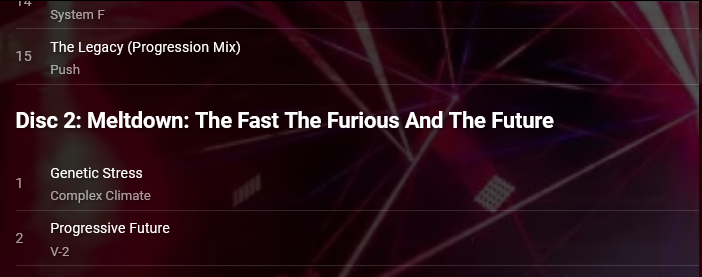
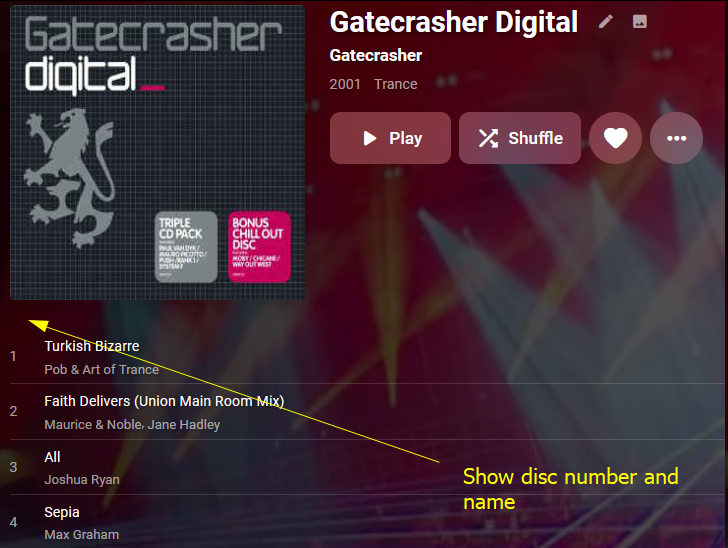
Hi Please add support for storing and displaying the title of a disc, as well as it's number. Here is a mock-up of how it might display, but I'll leave that to you. Disc title are supported by mp3s, flacs, and other formats: https://www.blisshq.com/music-library-management-blog/2018/03/27/lamentable-state-disc-title-support/ I think this also means that Disc 1's number and title will need to be shown (currently it is not). The album in my screenshots is an example of an album with disc names: https://www.discogs.com/release/77493-Various-Gatecrasher-Digital Many Thanks Stephen
 1 point
 -
Hi, sorry for not replying to you after such a long time. I guess I didn't end up solving it and I deleted it after I finished watching the episodes. These two episodes are also the only ones I've encountered that have this problem. I think it may not be a problem with emby's program. It could be a problem with the scraping metadata. In any case, thanks for your patience and answers.1 point
-
Hey sorry I finally got around to changing it to the beat version and now it is working a treat. I dont know why I persisted with itunes for so long.Many thanks1 point
-
Hi, yes we plan to improve the backup and restore process for this in future updates. Thanks.1 point
-
I've been away for a while, but I will fill these requests soon.1 point
-
Neither of those are palatable options for us (or our users I imagine). The first is forcing people to constantly re-pay for new versions - which used to be the model for software 20 years ago but really isn't anymore. The second also was a widely used method in the early days but it is so much of a hassle when one needs to transfer machines or upgrade or a hard drive goes out or whatever that it is rarely used anymore. Honestly, I think we'll all have much bigger concerns in that particular instance than whether or not we can watch our movies . However, it is only Premiere features that would be disabled. You could always use the web app to watch your local media in your bunker (if you have power).1 point
-
For users with Samsung Tizen SmartTVs (2015 - Present) who want to test the latest version of the Emby client app before it's submitted to Samsung for release in their app store. These installs should be considered beta until approved by Samsung, however they are the same ones submitted to Samsung monthly for inclusion in the Samsung store. Samsung's policy is that the only official way to distribute apps is through the Samsung store and that usb installs should be used for testing purposes only. Because of this policy Samsung has mandated that usb distributed apps must expire within 30 days of compiling. To help with testing you will be remined to update to the latest beta release as the app expires to ensure you are using the latest version when reporting issues. This install will also work for those who don't have access to the official client app in the Samsung app store. However, the same rules must be followed as indicated above. Release notes and version number For the latest release notes and version number click on this post https://emby.media/community/index.php?/topic/31461-emby-for-samsung-smarttv-release-notes-tizen-orsay/ Installation instructions Download this zip file: https://github.com/MediaBrowser/Emby.Releases/raw/master/tizen/tizen.zip Format a USB 2.0 stick using FAT16 (some larger USB 3.0 hard drives have been found to not work) (newer models may support other formats, check your users manual) Copy the tizen.zip file to the root of your USB stick Extract the contents of the tizen.zip file to the root. (This should create the folder 'userwidget' in the root of the USB stick and the folder should contain the two files needed) Turn on the TV Make sure your TV is connected to the Internet Plug the USB stick into the TV's USB port. Installation should start automatically. (There will be 3 quick messages in the upper right corner of the TV) Click 'OK' once the installation is complete. Optional, add the Emby app as a shortcut to Home Start the app from the Smart Hub or installed apps section of your TV. Troubleshooting If the installation does not start automatically, then please ensure your TV firmware is up to date and try again. If you get an installation error, try the process again with the USB stick formatted ass FAT32. We've received reports from users that installing from USB 3.0 hard-drive devices does not work, so please make sure to use a USB 2.0 thumb-drive device. Also, make sure the thumb-drive is unlocked/writable before plugging it in. The TV will need to write to your thumb-drive. Users with 2015 Samsung SmartTVs may experience an issue where the USB version of the app deletes itself upon restart of their TV. This is a security measure implemented by Samsung in which we have no control. If this is the case you may have to leave the thumb-drive in the TV and reinstall upon reboot, or install the latest release version of the client found in the Samsung app center. Updating from a previous USB install The app will notify you when an update is available. To update a previous USB install just repeat the instructions above. Notes: Certain Samsung SmartTVs have an issue where the app won't upgrade from USB drive if there is already a USB version installed. If this is the case you'll simply delete the old version before inserting the USB and then repeat the same installation process to install the new version. Also, try power cycling your TV after deleting the previous version if you have problems.1 point





















.thumb.jpg.38c63fff6d2e7e2b382b29ddfe9f8578.jpg)


