Leaderboard




Popular Content
Showing content with the highest reputation on 09/22/22 in Posts
-
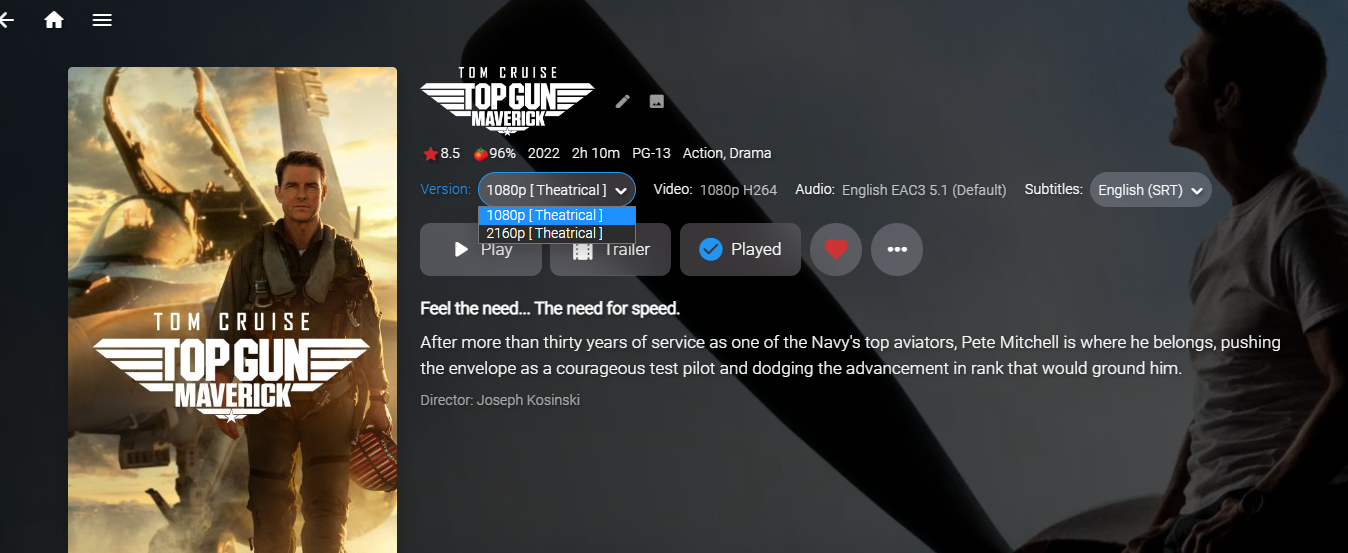
Oh! I have finally done it! The method in the IChannel interface named "GetChannelItemMediaInfo" should be called "GetAdditionalChannelItemMediaInfo" If anyone comes across this in the future of IChannel development, this seems to work: First check to see how many versions are available. If there is more then one version available, skip the first source (the first source seems to be some kind of default that emby already knows about... somehow...), Then send MediaSources index 1 (which is the second item in the zero based index of media sources) to item.MediaSources.Count -1 I dunno... I'm the worst at explaining programming... I just works now... except on ATV. I only see the first media source listed. But that is fine. Emby.NewReleases.zip
 3 points
 -
That's why you get paid the big bucks. Yes, it's underneath now. Maybe the request should be more specific. Add it underneath when in Legacy AND enhanced view is off like in ATV.
 3 points
 -
And it should be clickable and/or playable (as no doubt mentioned somewhere else...)2 points
-
The second 9.1+ HotFix has deployed on 9/21/2022 as 33.2.0.149 with the following changes: Fixes bug where region specific apps could not be end user disabled/enabled Fix for "Select a home app" show up after 9.1 upgrade Fixes bug where region specific apps would not be visible after disabling Disables anonymous access to smb server by default and adds developer option to allow anonymous access “Enable Dolby Vision” notification will be suppressed after dismissing Resolves issue where SHIELD would be unresponsive to BT devices up to 60 seconds after startup Adds developer option to force Low Latency Dolby Vision if available Resolves FFWD RWD crashing Plex Playback https://www.nvidia.com/en-us/geforce/forums/shield-tv/9/498676/shield-experience-upgrade-91-hotfix-image/3283401/ To enroll in the hotfix program. https://docs.google.com/forms/d/e/1FAIpQLScr6ajMU9H2YIRPSdpWSw5M59e_QoiyiLbTaVHd3yP9UkawrQ/viewform?usp=pp_url&entry.1352533101=DONTDELETE-2 points
-
OK, you're talking about whether or not the item is in focus then so you can scan the whole row. Because in enhanced view and Legacy everything is already there in one place only for the episode in focus.
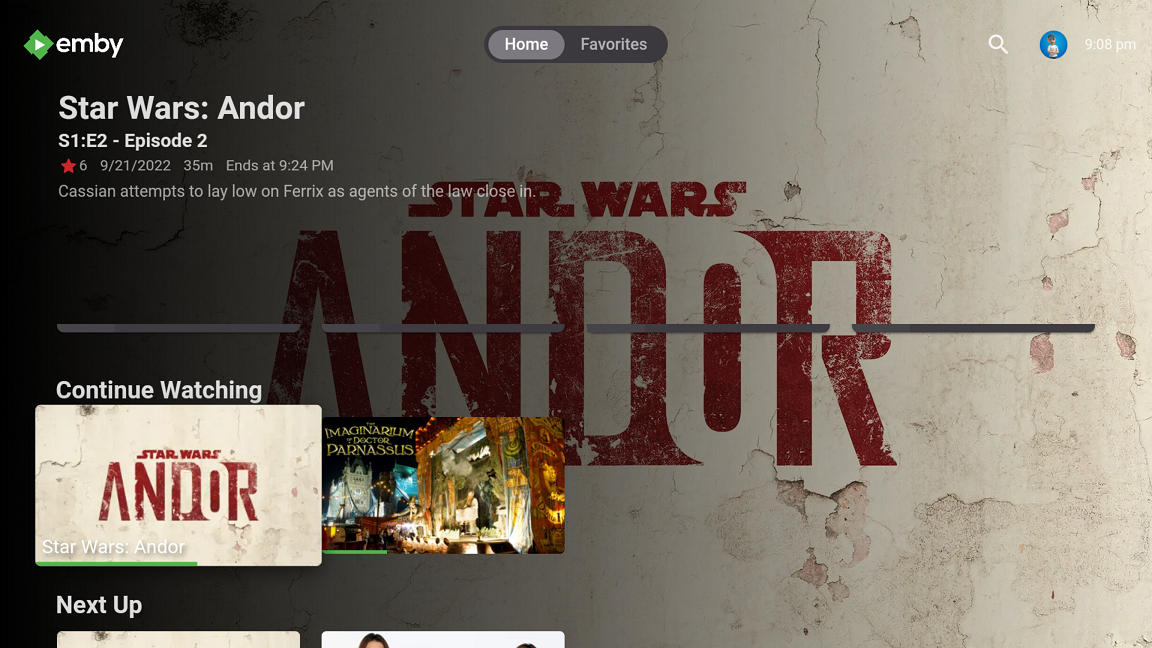 2 points
 -
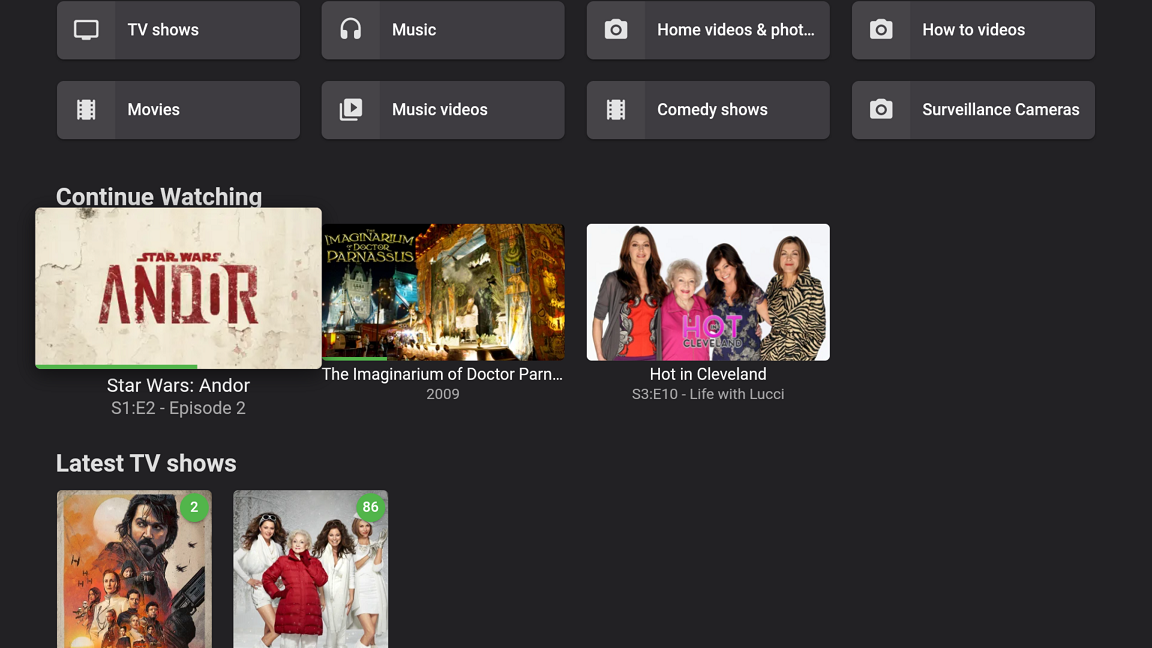
Having the name of the show overlayed on top of an icon that already has the name of the show doesn't really help me much either.2 points
-
It happens, you weren't the first and surely won't be the last to do that. Many things are done to strike a balance that hopefully works as well for new users as it does for experience users. The download page could be "fool-proofed" a bit by having to select a NAS model then only getting files specific for that NAS. That would make updating the website more tedious as well as likely frustrate "pro-users" who know exactly what architecture they need and can access, and download needed files quickly from our site using the present format. Other users who don't know what specific file is needed can follow step one instructions to find it. After doing that once or twice it will become second nature for them as well so the download pages while not perfect are sort of the best of both worlds from that perspective. We are always open to advice so if you can think of a change in wording or something on that page that would have helped let us know. We're constantly improving things from code to documentation to website and support sites which all combine to be part of the Emby Experience. User feedback on anything like this is always appreciated. Carlo2 points
-
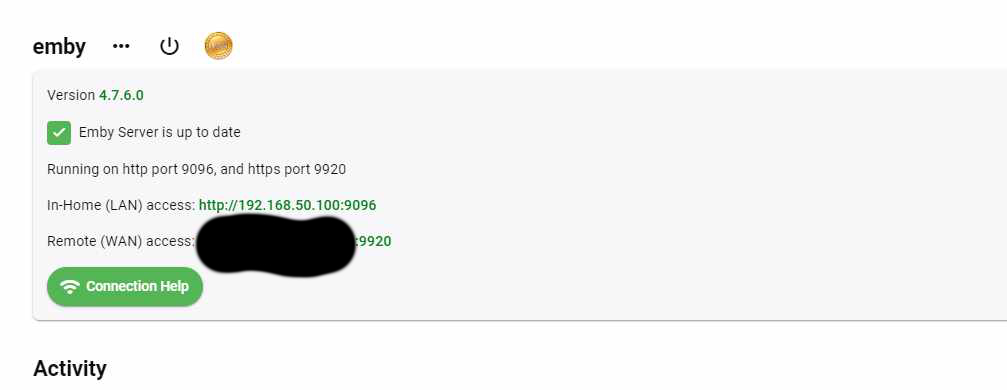
UPDATE 12/1 After Emby app going to 4.7.11.0 and truenas scale to Bluefin, all is fixed with ought my modification, host networking works with 8096 8920 ports, and the official chart install have all options working and install is easier than ever. All options working just know the requirement to use cast on chrome has changed to SSL, no ssl, no cast. That's why using http the menu to cast is empty. My suggestion is if you want to expose on web, your server, to use nginx reverse proxy and ssl with certbot in a raspberry PI. That way you select in networking setup handled by reverse proxy and you forget about certificate updates, it is handled by certbot and lets encrypt. you can see port 1900 is exposed! Ok, host networking is not working by default if you don't do some editing on 2 files first deployment.yaml in /mnt/your Storage/ix-applications/releases/emby/charts/1.0.11/templates replace all 8096 to 9096 and save! then on emby wherever you setup the config to be /config/system.xml replace 8096 to 9096 and save, (btw i had replaced also the https to be above the 9000 requirement in scale. stop emby, and do a redeploy with host network checked. Voila , hope i helped you! Just make sure no other app asks for the same ports, that's the only limitation of using host networking and for this to work you had to have installed emby first with ought clicking the host networking @ first install, so the files are generated. regards Dinos
 1 point
 -
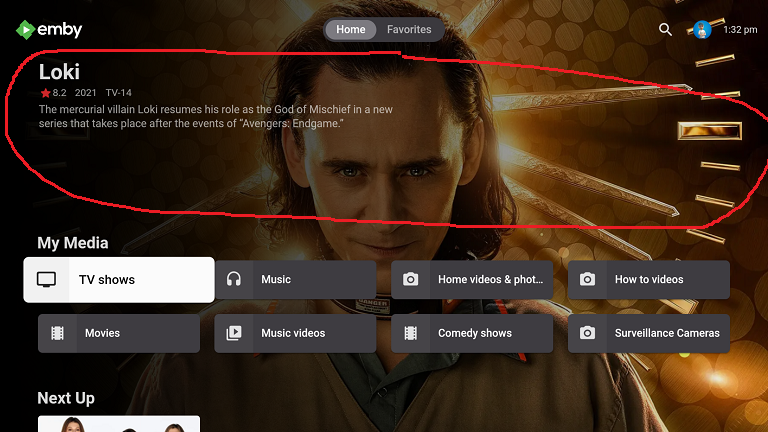
Request the enhanced area automatically rotate the randomly selected item when focusing on My Media libraries in vertical layout. Make the randomly highlighted episode/movie/song somehow playable from the enhanced home page Have the ability to add the highlighted media to Watch List This is sort of like it already does in horizontal layout where it rotates a random movie/episode, etc at about 20 secs and is clickable if the album/movie/episode, etc it picks catches your interest. Right now, you have to scroll around in order to force a refresh and there is no way to play the highlighted album/episode/movie, etc from the Home Page. This would apply to all ET based clients like Android, Samsung, Xbox, etc that use the new enhanced area for media libraries. Could use hard press or double tap in Android to bring up a menu
 1 point
 -
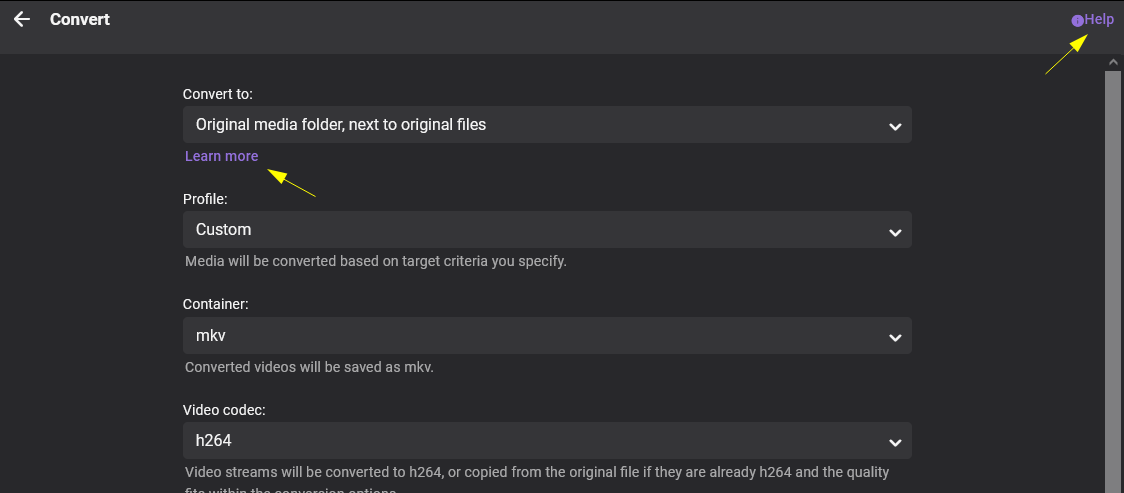
Hello The help links on the convert modal go to the wrong help page. Both links go to https://support.emby.media/support/solutions/articles/44001162174-sync instead of https://support.emby.media/support/solutions/articles/44001849018-convert-media Cheers Stephen
 1 point
 -
Thanks, that's perfect. Jumping back is great and shows the inconsistency. Let me see what I can come up with. For DirectPlay, it's all in the client. For internal subs we normally take the timing events directly from the player to show and hide the sub. As you can see from your video, it's inconsistent. After you skip back it works the correct way, but not initially. I have some thoughts on how we can work around this.1 point
-
Added making the randomly chosen media file playable to the original request. I also added a comment that maybe clicking PLAY would start the file1 point
-
Agree to the request and also to arrbee's statement. IMO there should be some sort of shortcut to the item that is being shown in the enhanced area.1 point
-
The second one.1 point
-
I found solution to the official , i posted here on forums1 point
-
This now works in the Android and Samsung apps. Start music playlist, then go over to Photos and click to start random slideshow. I'm listening to music and seeing photos right now. The Xbox also has a screen saver option that will randomly display photos which works when listening to music. I would assume that Samsung apps updates eventually make it to LG, but I don't know1 point
-
Hi Version 2.2.8 released. * Upgrade MediaBrowser.Server.Core package to latest version https://github.com/nRafinia/Emby.Subtitle.Subscene/releases/latest https://github.com/nRafinia/Emby.Subtitle.Subf2m/releases/latest1 point
-
Hi New version is released * Upgrade MediaBrowser.Server.Core package to latest version https://github.com/nRafinia/Emby.Subtitle.Subf2m/releases/latest1 point
-
Done. it is a bit longer (53 secs) but watch till the end when i jump back for 30 secs and it works fine. So i think it is the server, not the client, but just guessing Assassins_Creed_4k_subs.mp41 point
-
Problem SOLVED. The first page that opens in theatre is for a library called "Coming Soon" that contains movies that I don't have yet. They have dummy files ie "Mummy Movie (2021).disc". None of there movies are made part of a collection until I have actually added the video to the file. Therefore the "coming soon" library has no movie in it that are part of a collection and there for no backdrop to show. All of the other libraries are fine. Sorry for the use of your Time. Johnny1 point
-
Ah-ha - I hadn't seen that before in the release details - thanks - that's useful to know. So two AV1 encoders - I wonder if those work in parallel to double the throughput? Intel are claiming a 40% speed improvement with their deep link technology - I wonder if Nvidia's is better than this considering it's on the same silicon... For the encoding engine only - it's still far too expensive imo - considering for AV1 encoding, Intel have the ARC gpu card at a fraction of the price. Interesting times ..1 point
-
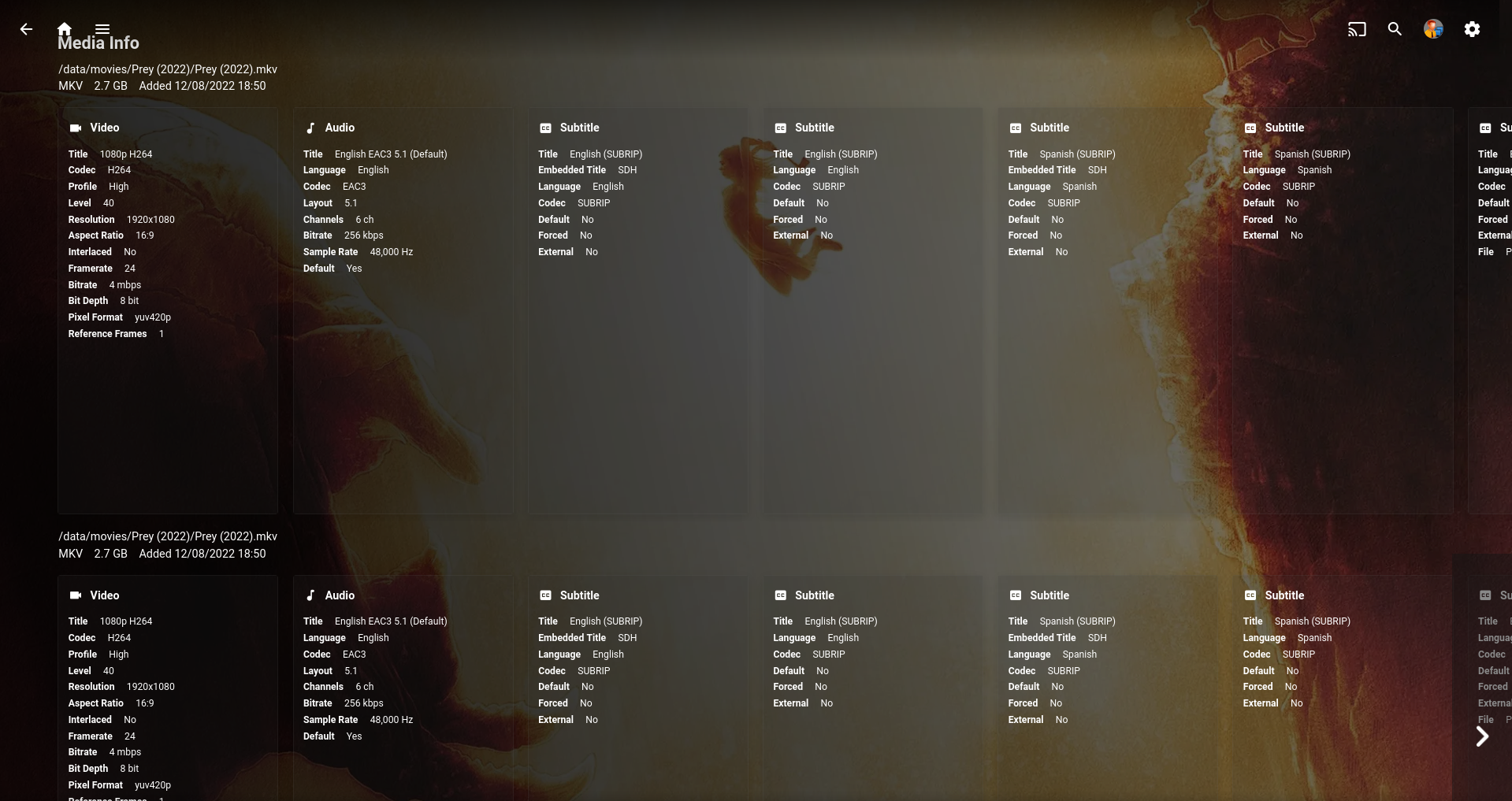
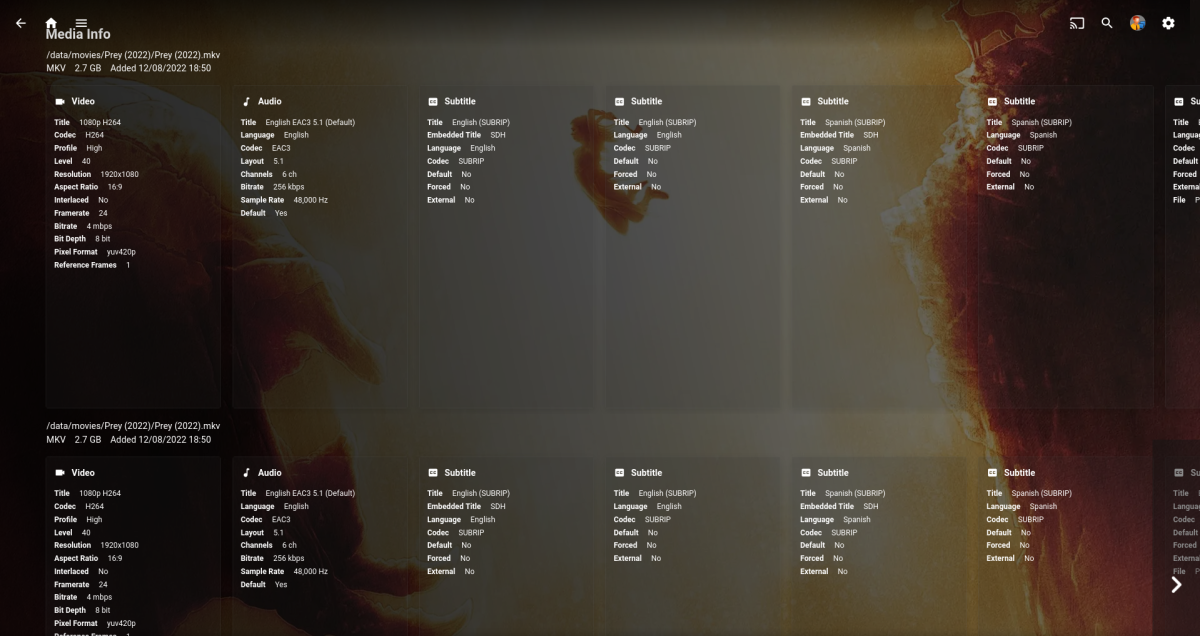
Just noticed this in "New Releases", I scrolled down to the media info in the web app.. Two sets of identical media info, obviously the library version only has one. The only other channel that I have that I can compare this with is "Trailers" which is totally different not being local media like this, it doesn't have any media info like you have added it just scrapes the artwork and general movie info. I suppose "Trailers" could be local but who would do that.. I'm not sure if you based this off any other plugin but maybe there could be a double dip of code doing the same thing? I wouldn't stress about it too much, it could be a bug out of your control. It works and that's what counts. I'm sure you'll figure it out.
 1 point
 -
the plugin just uses the text from the session it gets from Emby, it is using what emby server thinks it is doing, it does not try to apply any logic itself. https://github.com/faush01/playback_reporting/blob/54bfa5ab97452d8ad6e65492e9b2d2a822c39e7d/playback_reporting/EventMonitorEntryPoint.cs#L270 play_method = session.PlayState.PlayMethod.Value.ToString(); As you can see it is not applying any logic to the session info.1 point
-
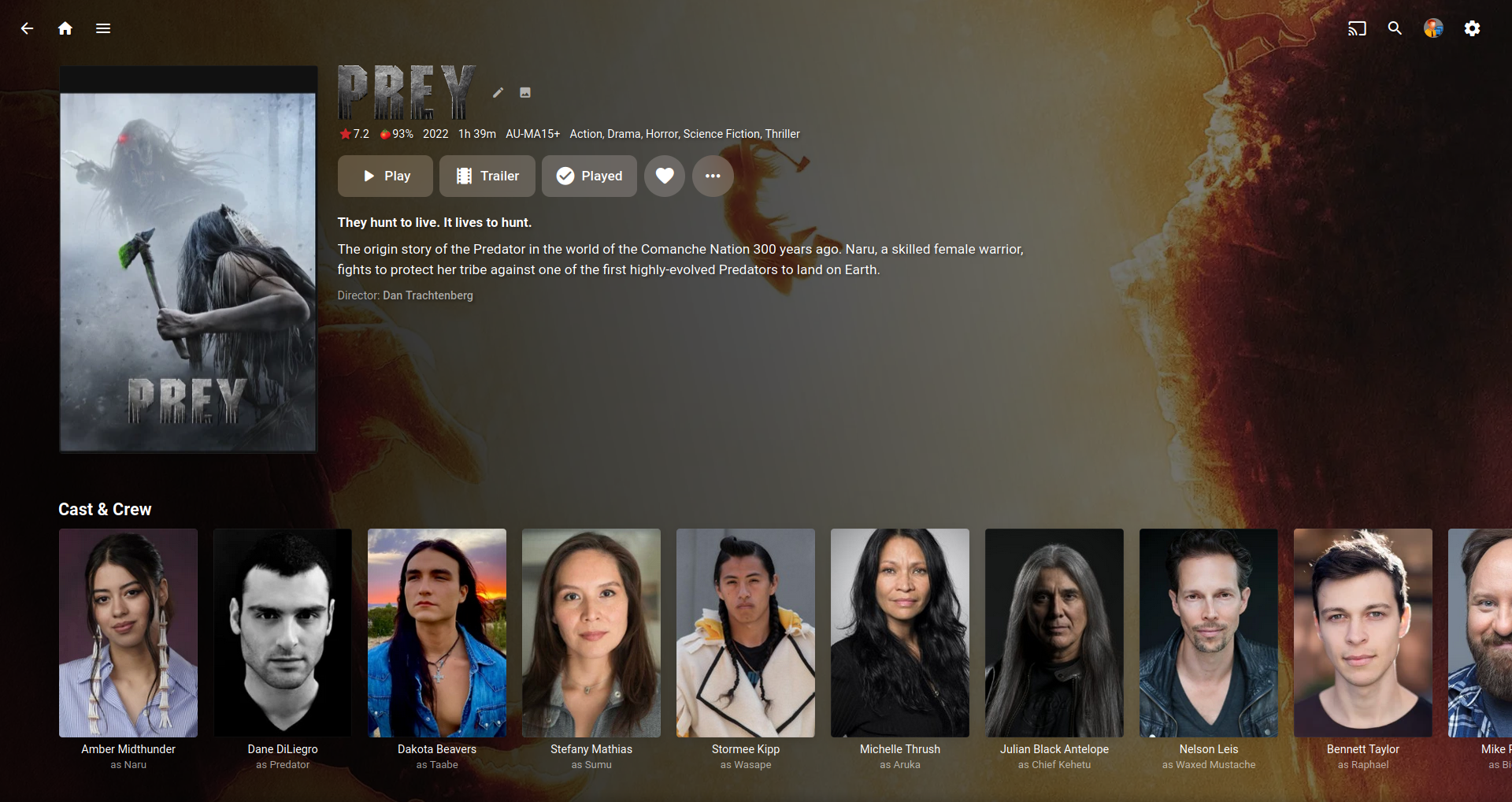
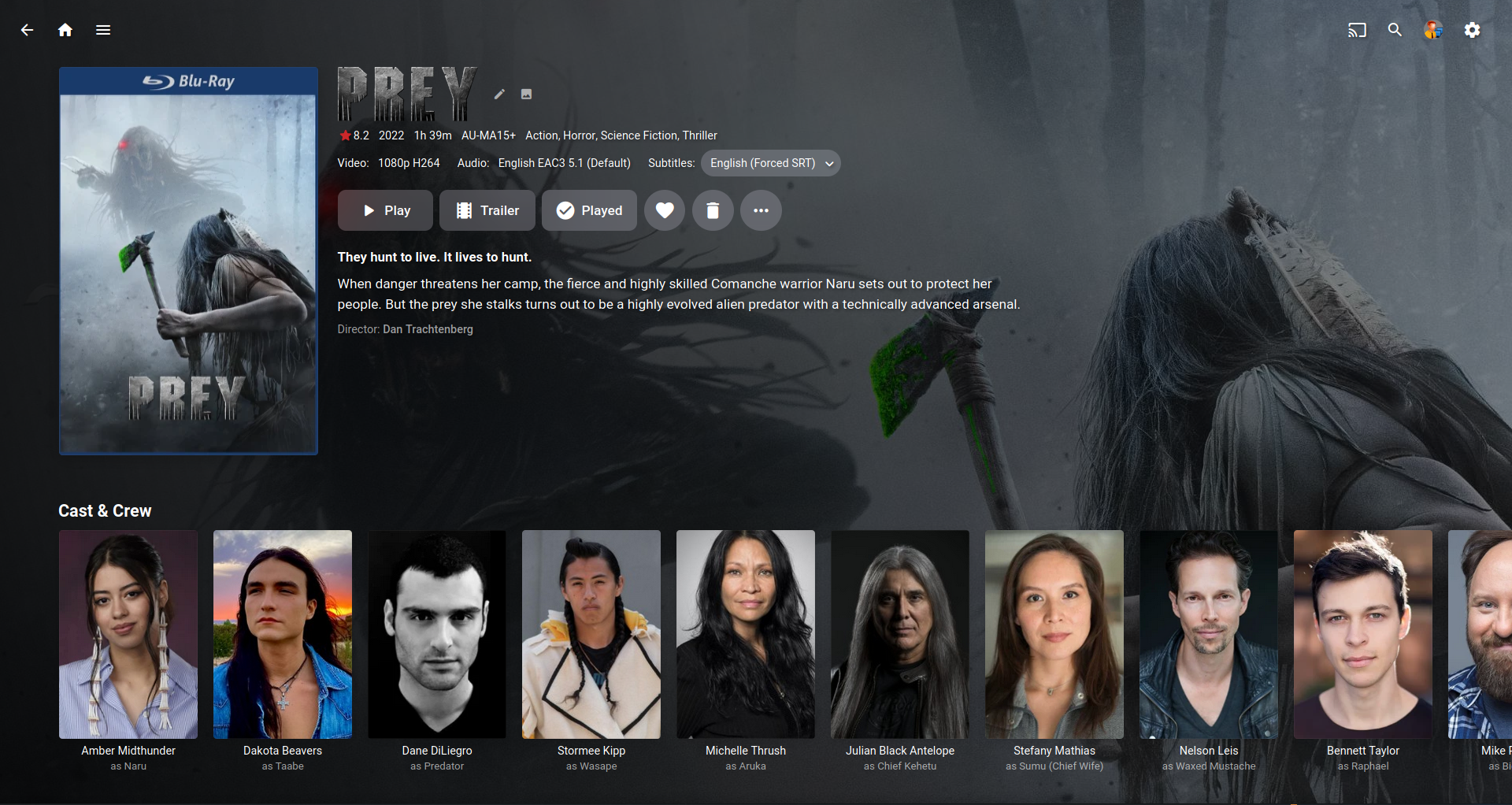
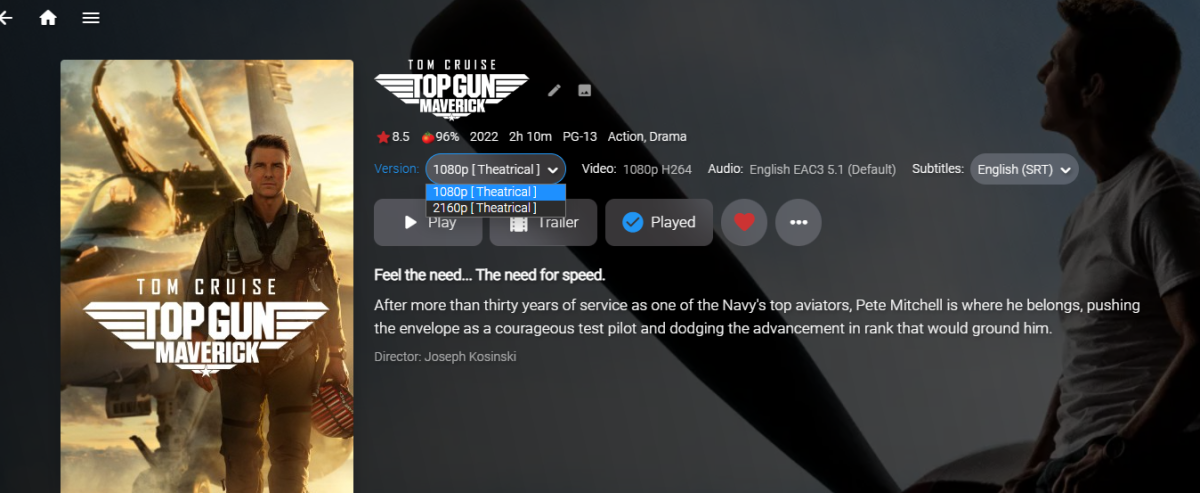
Cheers mate, it's working great now. I have the versions menu still as mentioned above even though I don't have any double versions of anything in my library. As for tvdb I don't have them enabled for my movie lib so not sure what's going on there. It's the only site that has that plot and genre info though for the movie in question (Prey). I have ATV but as I said above I don't have different versions of anything so I don't see the versions drop down menu usually. I can see the double version on my Samsung tablet that I'm using now but that's the mobile app. I'll double check my ATV later and get back to you. EDIT: Just checked my ATV and I don't see any double version menu in "New Releases". As mentioned I've never seen the version menu in ATV but I also can't see any setting for it either.1 point
-
No worries mate! I will check back if I am still having problems after that time.1 point
-
Thanks for registering. It can take up to 24 hours for the Emby systems to fully recognize new registrations. Sorry for the inconvenience.1 point
-
My 'Continue Watching' row looks like your 'Next Up', ie. showing the ep details under the thumb. I don't have anything overlayed. Is it because you have Next Up Legacy showing?1 point
-
However, if not in enhanced view none of that is available. Would you be able to add it underneath when not in enhanced mode?1 point
-
Yup, understand the request - just pointing out an additional difference for future development.1 point
-
Correct It is just a matter of where images come from as FanArt.tv does not provide metadata but is my first image provider. Metadata really does not have anything to do with images. Personal preference as Kodi is possibly the only client that may use all images. Don't know of anywhere that uses Art, but Poster, Banner, Disc, Logo, Thumb are all self explanatory. But Views has options for all of them assuming you you have the image to present.1 point
-
@Lukeis this the issue? OpenSSL error with Ubuntu 22.04 on Arm32 architecture · Issue #66310 · dotnet/runtime (github.com)1 point
-
Actually, the TV app text size looks to be slightly larger. Don't you find that text size to be in line with other similar displays on the device home screen and in other apps on the device?1 point
-
Star wars andor is next level! First 3 episodes are amazing. Wow.1 point
-
https://www.nvidia.com/en-us/geforce/news/rtx-40-series-graphics-cards-announcements/ Mentions the dual NVENC. My mistake about NVDEC. Both product pages only make mention of NVDEC 5th gen (4090 and 4080, click on Specs then Full Specs). Since this topic is about transcoding to AV1, the capabilities of the decoder are of second-order importance (IMO).1 point
-
If the entire mount is unreachable, then it stays in the library and the server assumes it is offline. But the mount is reachable and some folder underneath that is gone, then the server treats that as content having been deleted.1 point
-
Sorry I don't use any Android devices.1 point
-
Hi, the problem is you can't have one library that's a subfolder of another library. So you have your movies library pointing to /mnt/public/media, and your music library underneath that. Try changing the movies library to one level lower, for example, /mnt/public/media/movies1 point
-
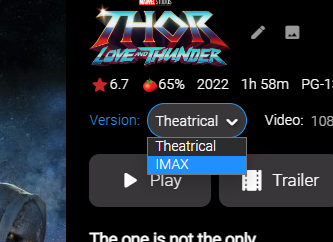
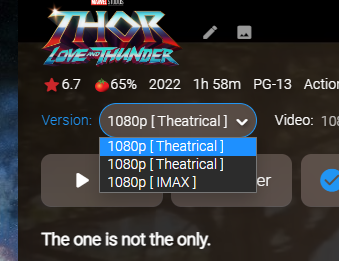
I've added some logging when the channel is sending back media sources to a client UI. When the item gets created in the channel, we map all the values from the library item over. This also includes mapping the entire media source from original item. It's a mystery why the item would be using tvdb data. new ChannelItemInfo() { DateCreated = item.DateCreated, Name = item.Name, Id = $"new_release_{item.InternalId}".GetMD5().ToString("N"), //Give it a new Id. RunTimeTicks = item.RunTimeTicks, ProductionYear = item.ProductionYear, ImageUrl = item.PrimaryImagePath, Type = ChannelItemType.Media, ContentType = ChannelMediaContentType.Movie, MediaType = ChannelMediaType.Video, IsLiveStream = false, OfficialRating = item.OfficialRating, Overview = item.Overview, PremiereDate = item.PremiereDate, Genres = item.Genres.ToList(), CommunityRating = item.CommunityRating, OriginalTitle = item.OriginalTitle, ProviderIds = item.ProviderIds, Studios = item.Studios.ToList(), People = LibraryManager.GetItemPeople(item), MediaSources = item.GetMediaSources(false, false, LibraryManager.GetLibraryOptions(item)) }); Stranger still, the channel Item will show all the media sources (versions) in the webapp, but ATV will only show one. The other thing that would be nice to solve is why in the normal library the Versions are named by parsing the brackets, but the channel doesn't do that. example: Library: Channel: Maybe the log it will tell us why. Fixes no compatible streams problem. I took an "all-nighter" trying different things to learn how channels really work, but I ended up with more question I think LOL! Emby.NewReleases.zip
 1 point
 -
I use Sonarr for maintaining structure and renaming files. It also keeps track of what's there, what's missing and when shows are on.1 point
-
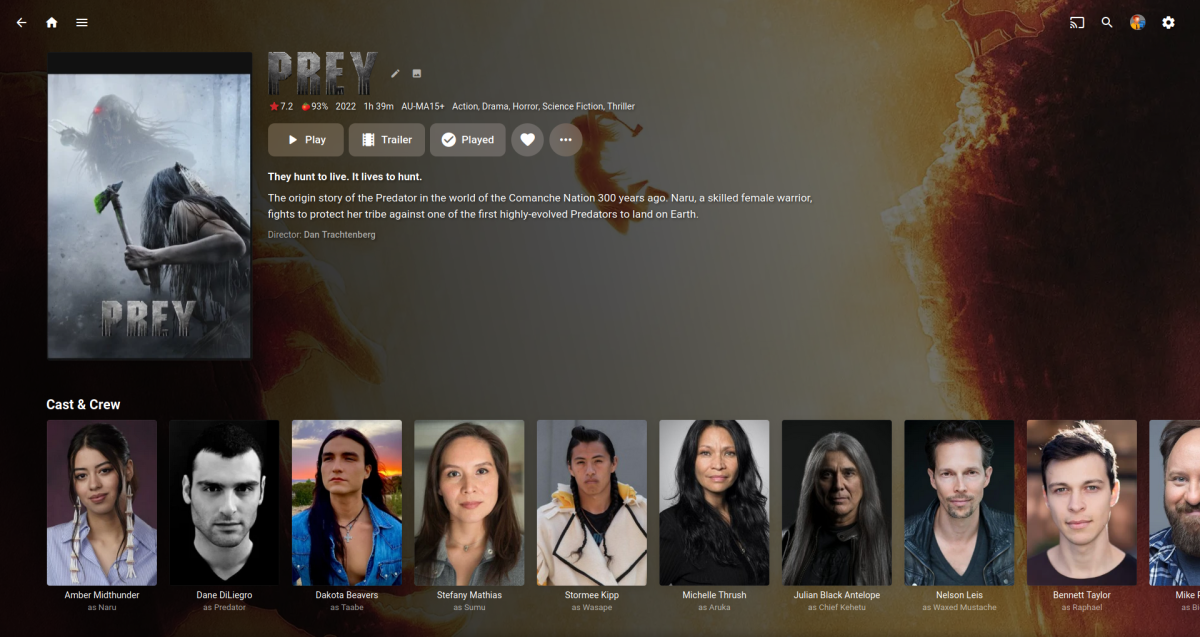
Yep same here Channel (Notice blu-ray cover is missing and video/audio/subs info) Library EDIT: Also there are a few differences in the "New Releases" meta, like rating/genre/plot/background but I scraped this movie a while ago so if I refreshed the lib movie they would prob match up. EDIT: I was wrong about the refresh of the lib movie matching the "New Releases" meta. On further investigation it looks like "New Releases" is getting it's meta from TVDB (genre/plot at least) where as the lib movie is using TMDB. So that's why some meta is different, that's all good. EDIT: When I try to play a movie from "New Releases" I get.. "Playback Error No compatible streams are currently available." I have a intro that plays fine before the "New Releases" movie so I thought it was all good, maybe something to do with the video/audio meta missing? It plays fine from the movie lib. I'm sure it was working before the latest update, I got past the intro and into the movie.
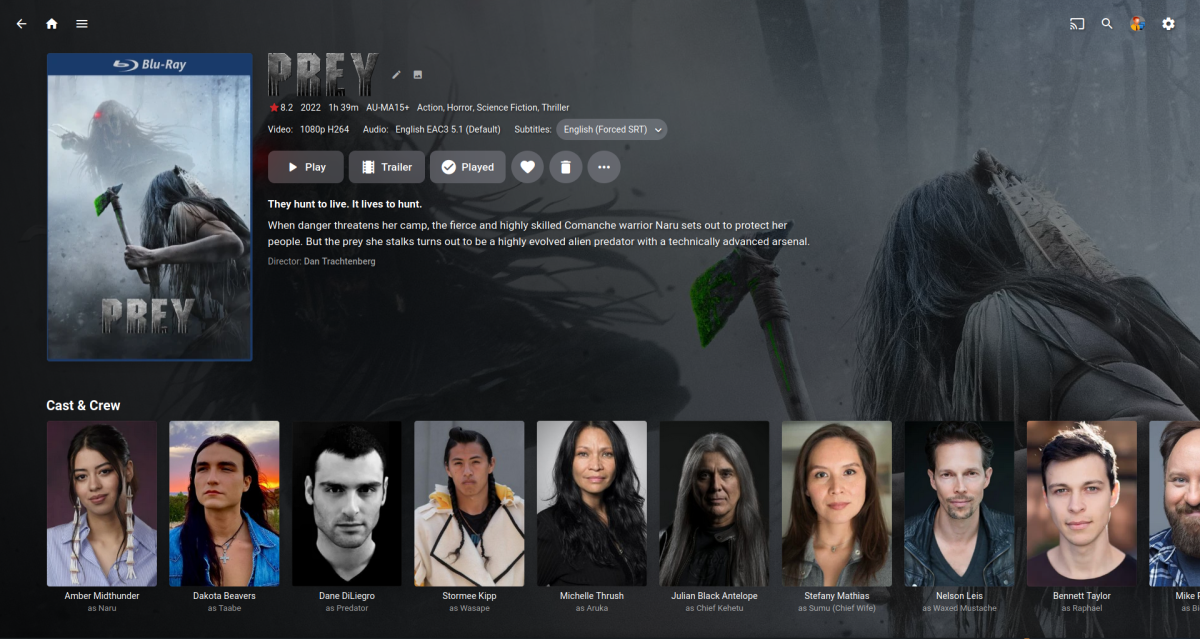 1 point
 -
I don't remember who turned me on to this program, but it has made all the difference for me! "Rename My TV Series" by www.tweaking4all.com The other one I use a lot is "Bulk Rename Utility" They both have been extremely helpful in getting things named so Emby can do its job... and Emby really does a great job! Thanks for the Program!!1 point
-
@chef a mediasource is a version of an item. Each mediasource will have multiple mediastreams (video, audio, subtitle, etc.)1 point
-
For anyone else struggling with the same issue. Apparently Android still formats SD cards with FAT32... which if you aren't familiar has a 4GiB filesize limit. The transcoded media was coming in just over 4GiB and once it hit the limit, Emby would re-download (over and over and over again.) I changed the target bitrate from 8mbit to 4mbit, and there's already 8 items downloaded. I'm not sure how to make this more user friendly other than perhaps a warning if you choose 'External storage' for the download location in the Emby app? Or maybe a warning if the download fails? There weren't any notifications regarding failed downloads. I wouldn't expect most people to be able to figure this out themselves unless they were familiar with the limitations for FAT32. (Why this is the default for Android still??? EXFAT was released in 2006...) Hopefully this helps someone else save a few hours of troubleshooting!1 point
-
This where the reputation system was never meant to be used for this as a user's reputation is now skewed by a feature request. I believe they all should be polls as the is specific to the Feature not the user.1 point
-
This is still in the pipeline - but 'life' has got in the way for a few of us on Plugin development and testing. Hopefully things calm down a bit and we can get back into the improvements soon.1 point
-
We have an auto-organize plugin that does that.1 point
-
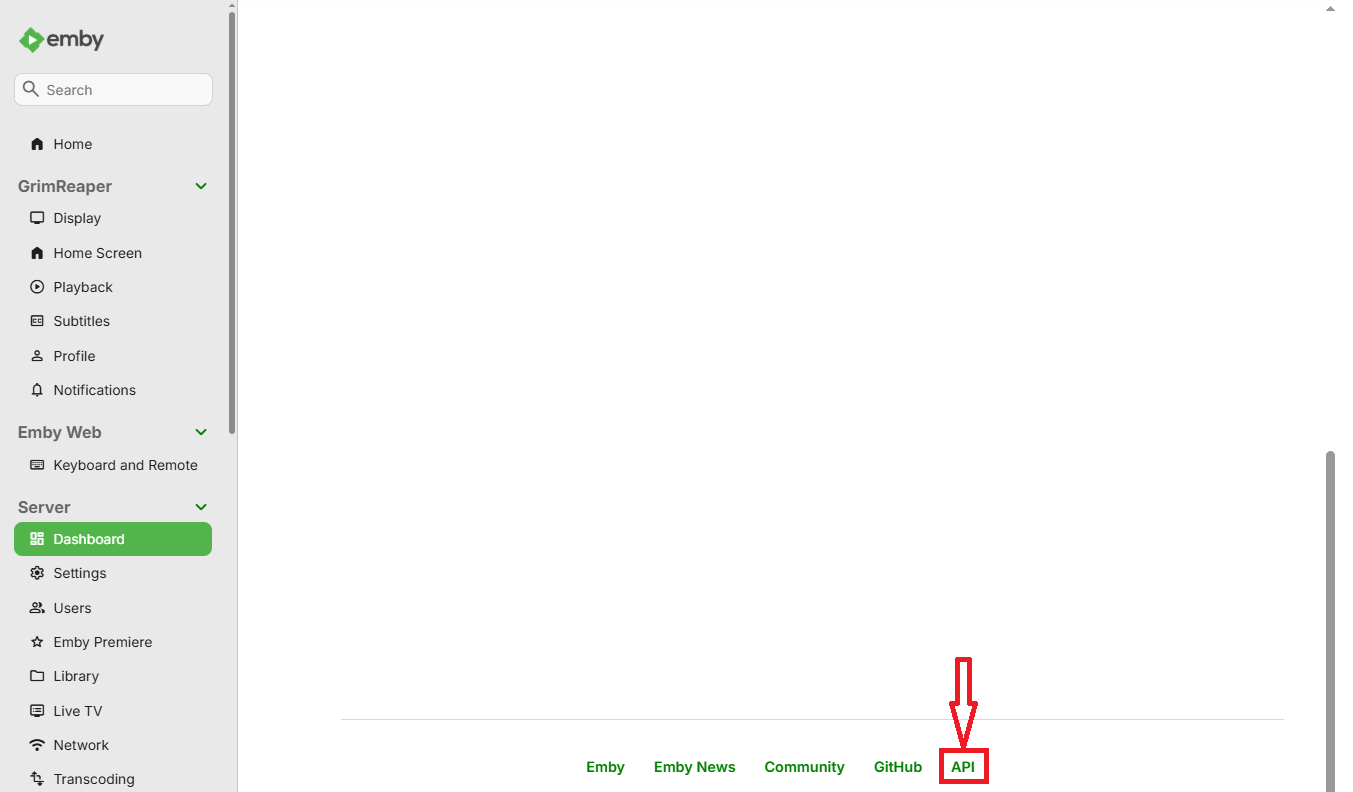
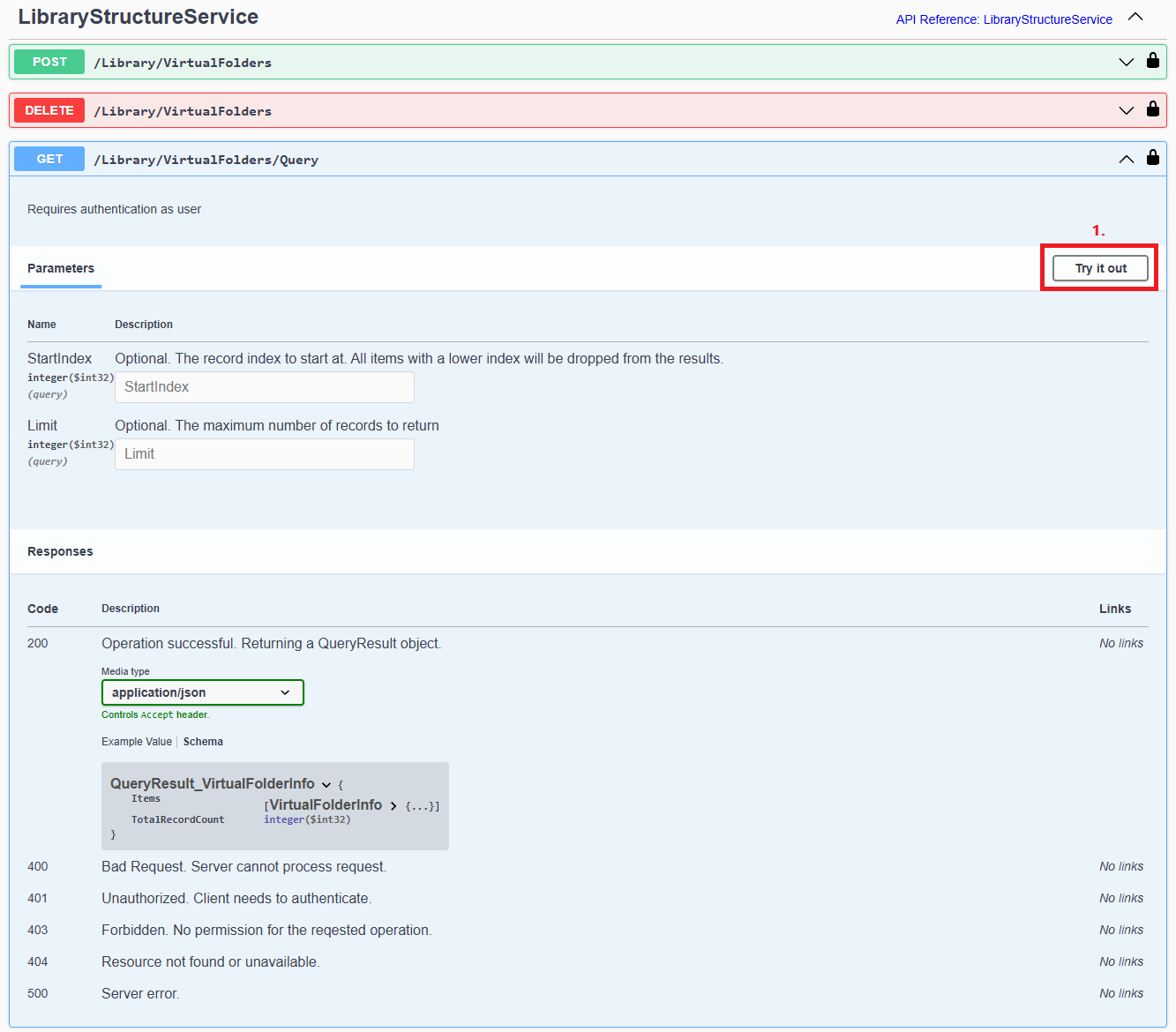
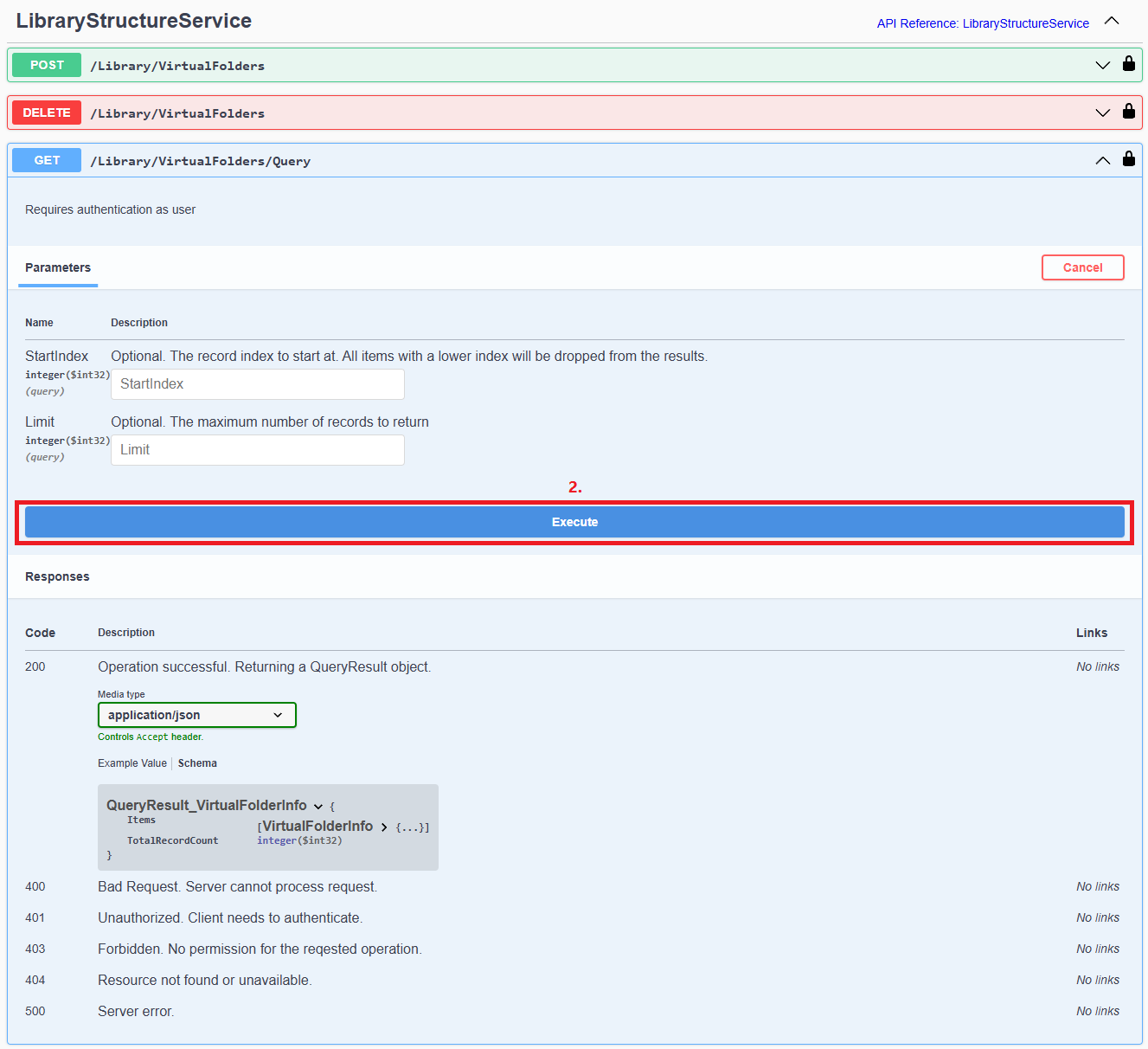
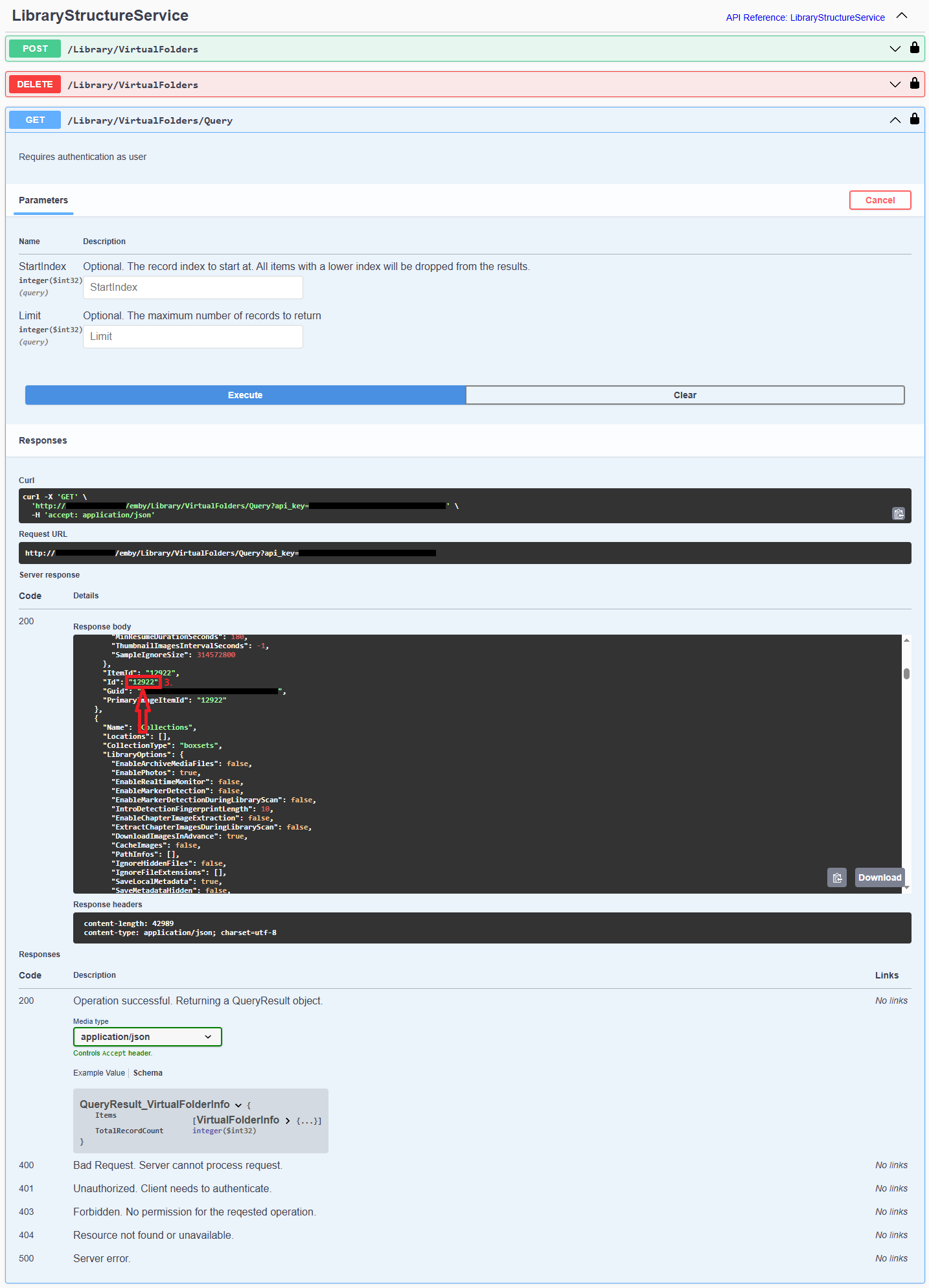
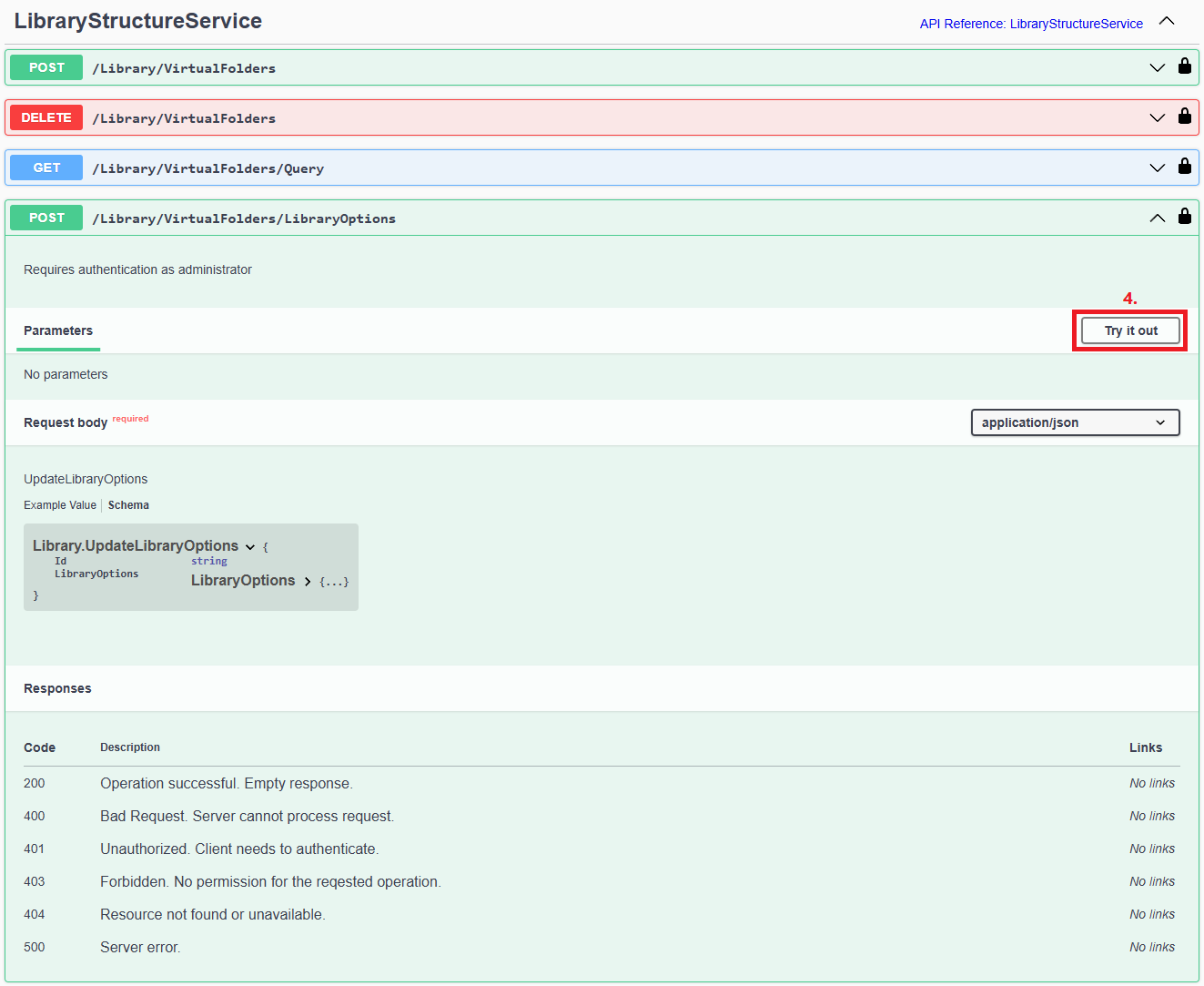
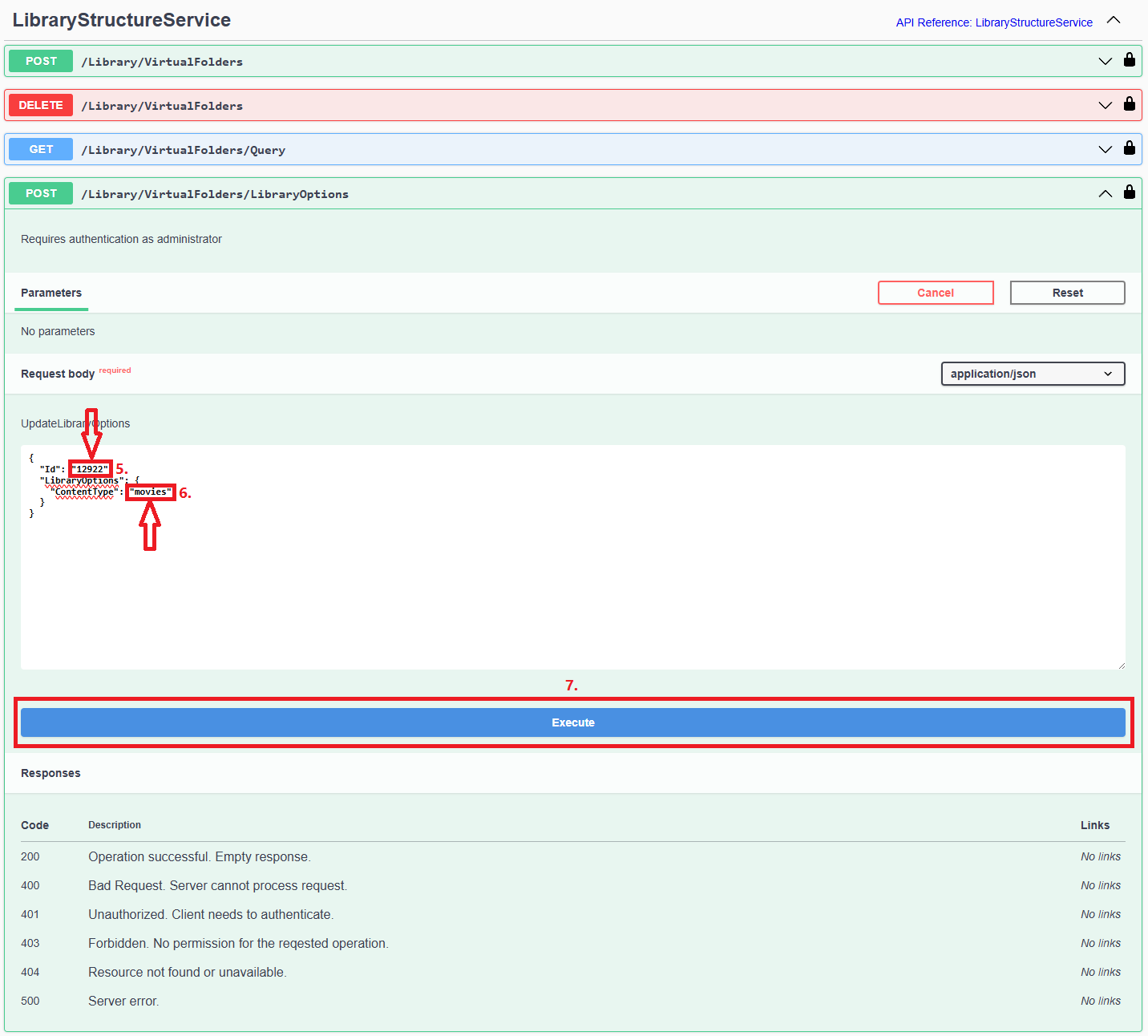
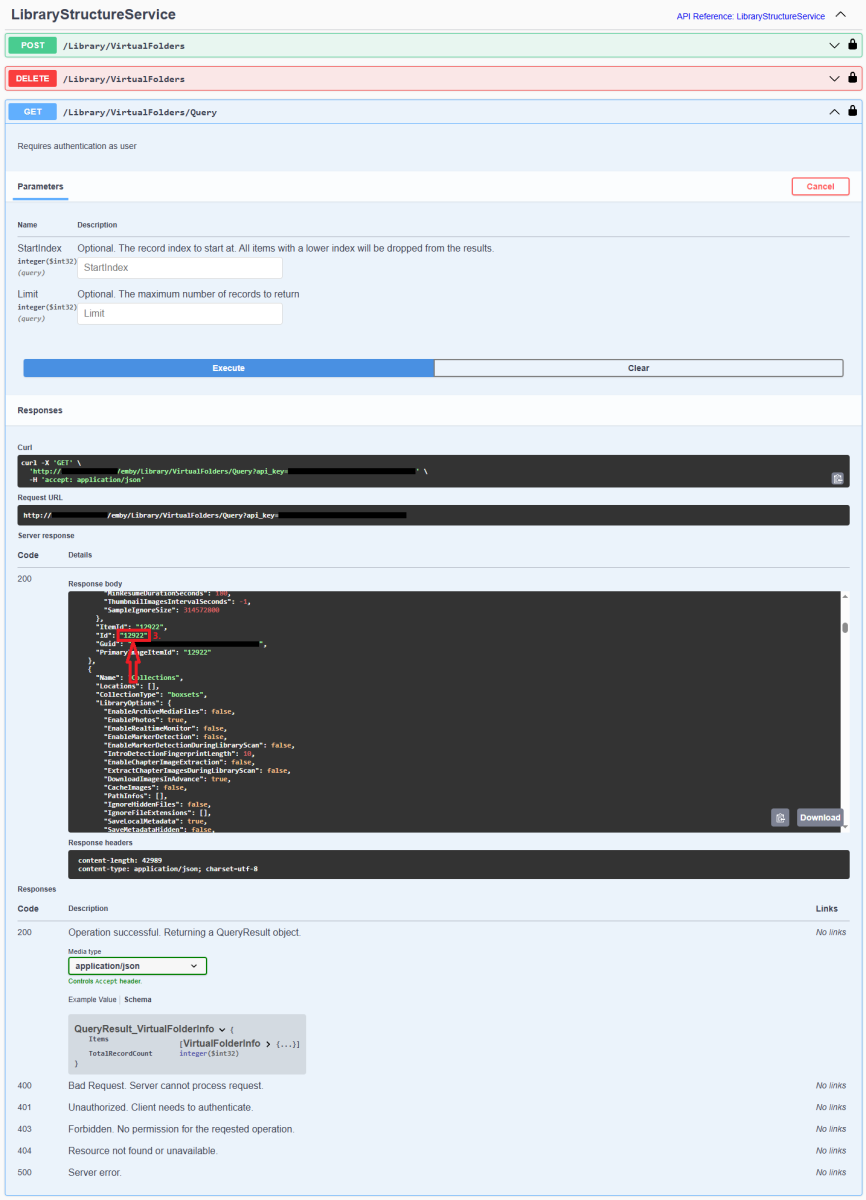
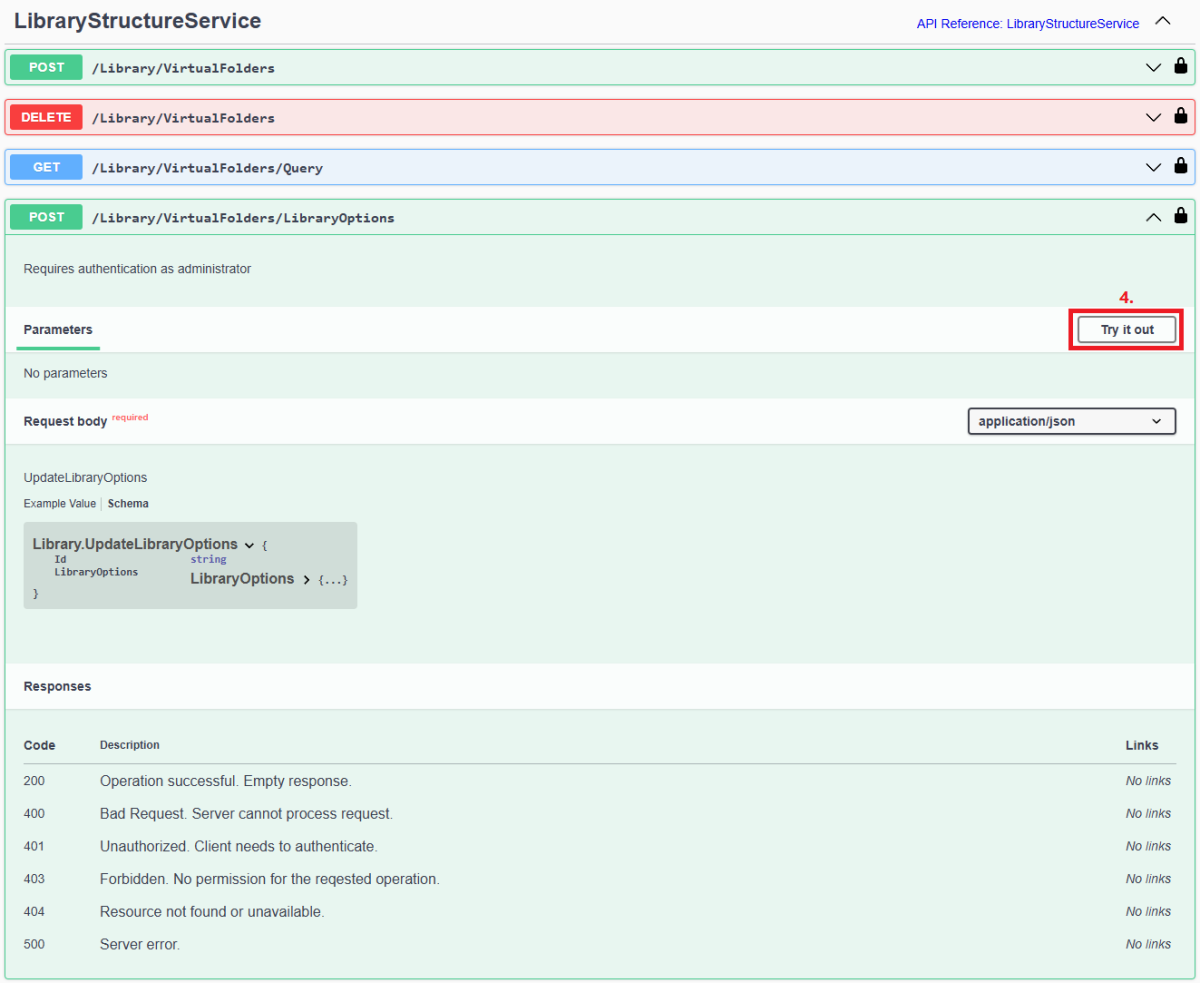
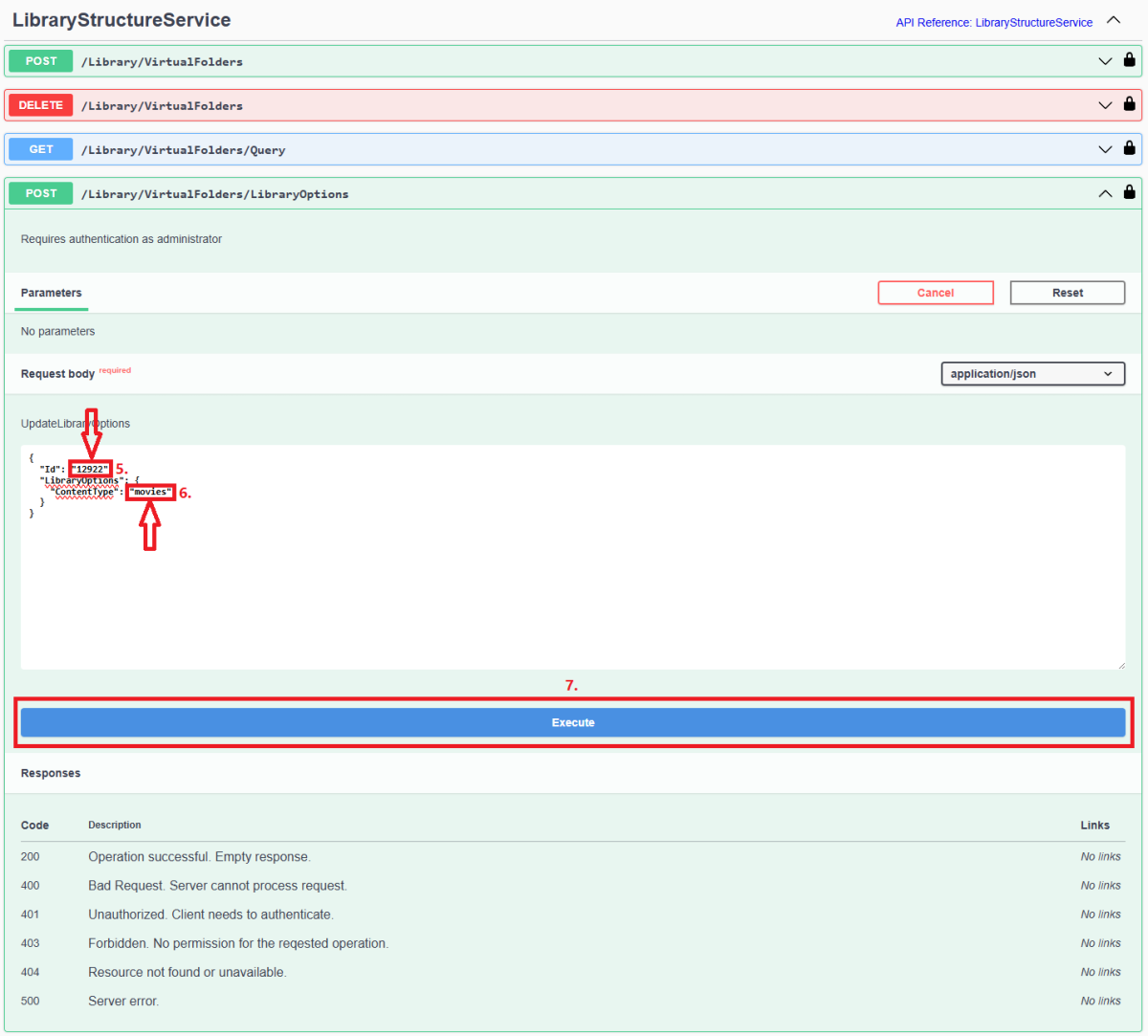
Since server version 4.8+, all library options (including library Content Type) are db-only and any desired changes need to be done via Emby Server REST API service (previous method of changing options via options.xml files is deprecated). Method below describes using Swagger: 1. Access Swagger by navigating to your Dashboard>scroll to the bottom of the page>select "API" hyperlink 2. Obtain library "Id" from /Library/VirtualFolders/Query endpoint: Find relevant library "Id" in the response: 3. In /Library/VirtualFolders/LibraryOptions, change "Id" to the one obtained above and "ContentType" to desired type (valid ContentType strings listed below). Execute. 4. You can check Settings>Library tab or query /Library/VirtualFolders/Query endpoint to confirm Content Type change Valid Content Types Audio books "ContentType": "audiobooks" Camera Uploads "ContentType": "homevideos" Collections "ContentType": "boxsets" Home videos & photos "ContentType": "homevideos" Movies "ContentType": "movies" Music "ContentType": "music" Music Videos "ContentType": "musicvideos" Playlists "ContentType": "playlists" TV shows "ContentType": "tvshows"
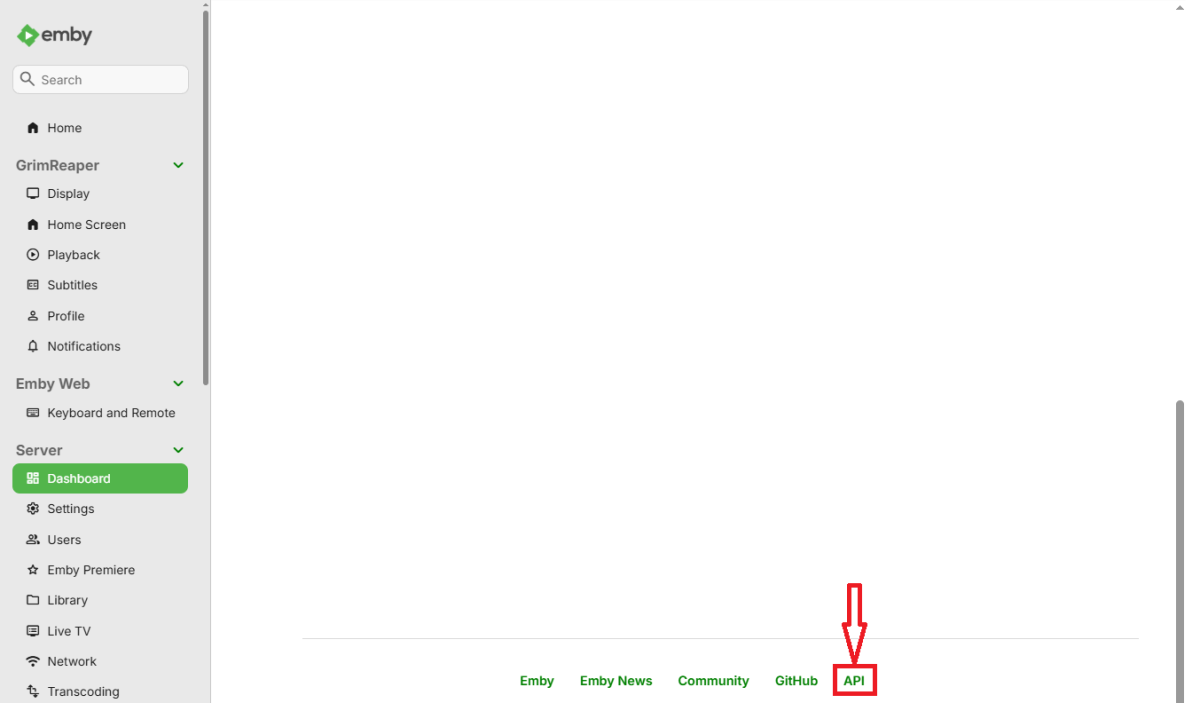
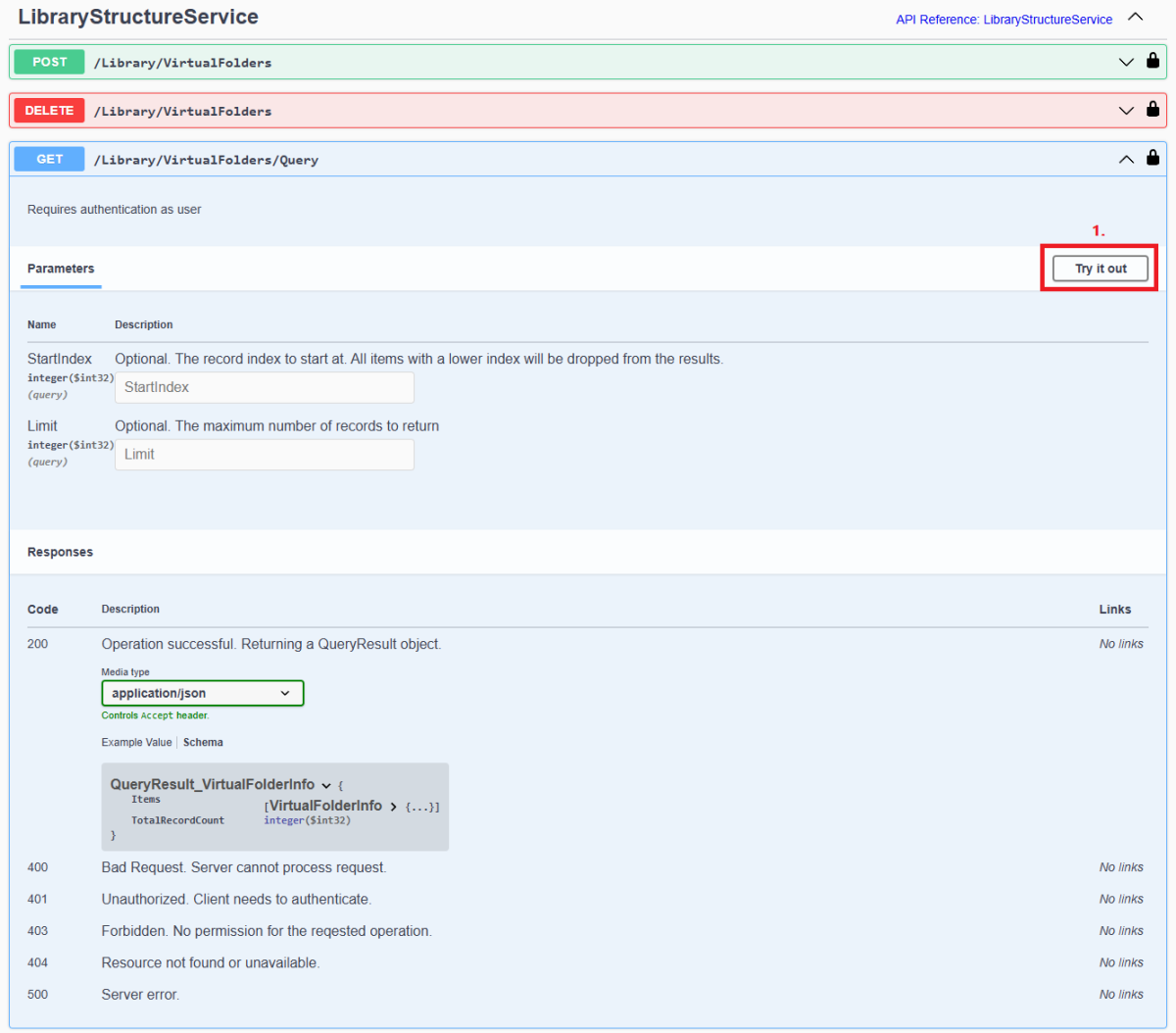
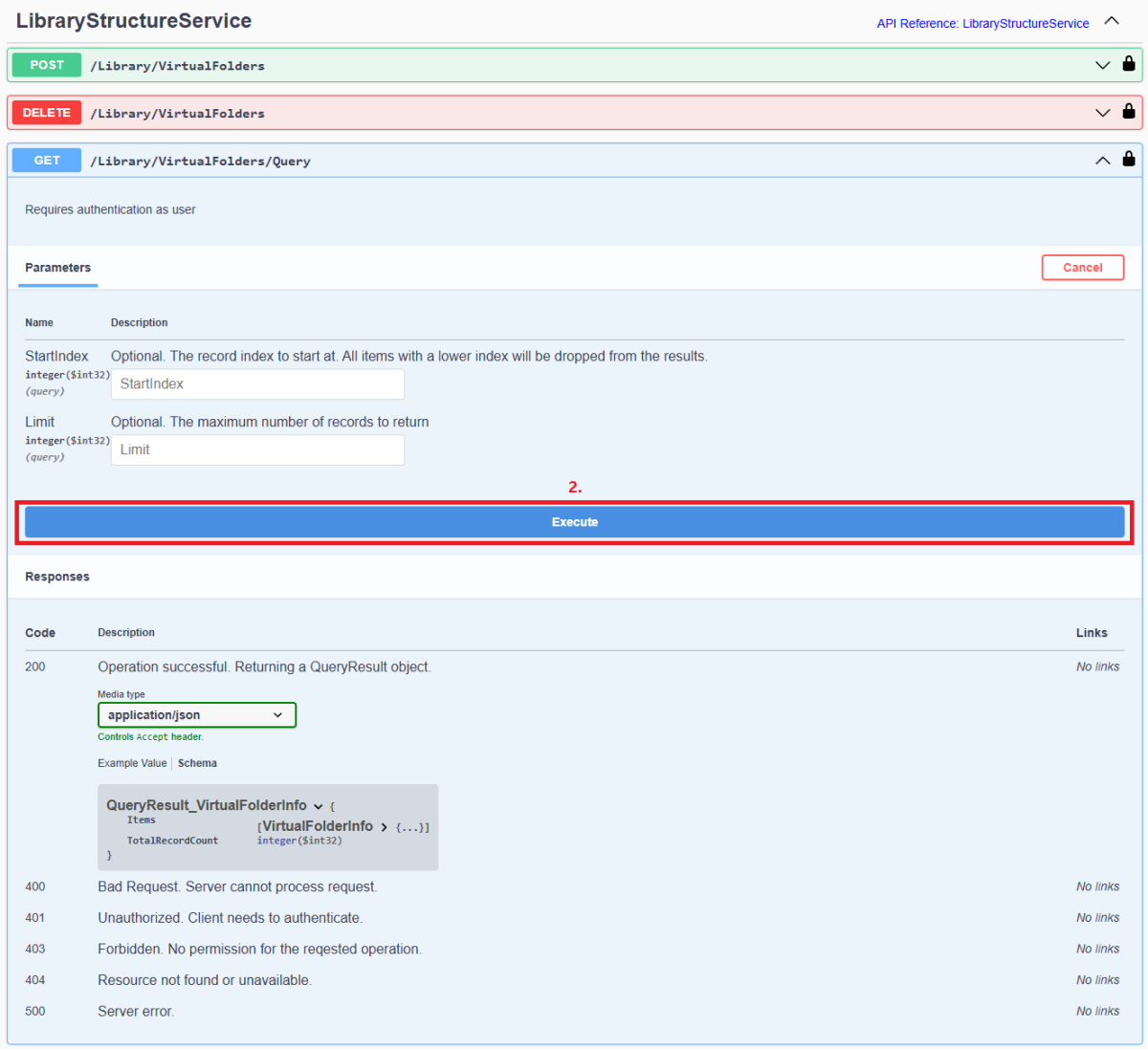
 1 point
 -
You guys prefer the green play icon?1 point
-
Without scrolling through this entire thread, I'm not sure if anyone else has posted a temporary fix for this. You are able to give the playlist a tag, then hide that tag from all other users. The way I use this workaround is to add every other username into the blocked tags list for each user. Then when I create a playlist, I immediately add my username into it's tags. I've instructed all my users to do the same if they want to keep their playlists private.1 point
-
Options confuse the hell out of people. I manage tech support for a product that has a plethora of options. There are oftentimes 2-3 ways to accomplish the same task. The sheer volume of confusion and support questions generated by that design decision is appalling. I'm a big of keeping things simple and testable.1 point