Leaderboard




Popular Content
Showing content with the highest reputation on 09/14/22 in Posts
-
This is still in the pipeline - but 'life' has got in the way for a few of us on Plugin development and testing. Hopefully things calm down a bit and we can get back into the improvements soon.3 points
-
Hi, i have another "feature" request (or found a bug). It looks like the media info plugin processes only files with (lowercase!) .mkv extension. I had for some reason some files with a uppercase .MKV extension. This isent a problem on windows systems, but for linux this result in an completeley different file, and the plugin ignores it. Maybe the plugin should look for .mkv, .MKV and all variations ( case-insensitive) of this;) Andreas2 points
-
Simple really when you finally spot a pattern… Virgin uses 192.168.0 range. NETGEAR uses 192.168.1 range. My NAS static ip was in the virgin range. Unbelievable! Changed the static ip and plugged it into NETGEAR. I now see it in my network as well as all other access now working. Sorry to have essentially wasted your time on this.2 points
-
Father's Day was a couple weeks ago in Australia (yeah, us antipodeans have it on a different day) so we (re)watched 'Commando' with Arnie. Just a great, fun popcorn flick. Loved every second of it.2 points
-
i have thousands of obscure things... lots of shorts, things not on imdb, alternate versions of things etc.. and every time i have to move and redo my setup/re-import everything i have to spend days identifying things in my movie library... but there is no real way to do it... have to manually add an image and name etc... with plex i can just click one button UNMATCH and it removes the usually misidentified match/metadata and replaces it with the thumbnail and filename. just finding the mismatched items that aren't on imdb is a full days work ; ) : ( i'd kill for an unmatch button : )1 point
-
For some reason under v2.0.77g when I start a movie with rating information (rated R, PG, etc), it is now showing on the screen for a few seconds. I don't need to see this, how do I turn this off?1 point
-
Couple of extra things to try a) - Untick use Automatic Port Mapping b) - uninstall the port mapper plugin if you are manually port forwarding in your router (advisable - upnp is a security risk) c) - ensure emby service account has access to the SSL folder - maybe put the pfx in the emby system folder for testing. d) - check the cert using 'cerutil' to check the password etc1 point
-
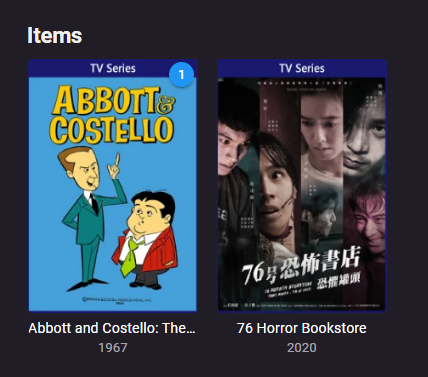
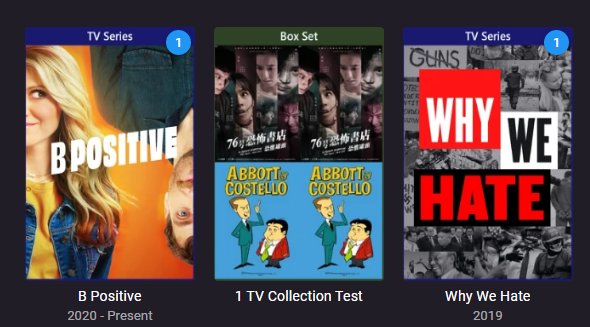
@LukeWill have to comment here but Collection is a virtual item, and its year is irrelevant and is sorted by the item within the Collection. But do not know the specifics but this example is sorted to 2020. Will have to look but believe there are FR for preferred fallback languages like this.
 1 point
 -
I will let him test it.1 point
-
Please add this feature. Would really come in handy with new shows in the fall TV season.1 point
-
The server is not able to open your certificate store. Could be permissions or password. 2022-09-14 18:33:32.324 Error App: Error loading cert from F:\SSL\Emby.pfx *** Error Report *** Version: 4.7.6.0 Command line: E:\system\EmbyServer.dll -noautorunwebapp Operating system: Microsoft Windows 10.0.19043 Framework: .NET 6.0.7 OS/Process: x64/x64 Runtime: E:/system/System.Private.CoreLib.dll Processor count: 12 Data path: E:\programdata Application path: E:\system Internal.Cryptography.CryptoThrowHelper+WindowsCryptographicException: Internal.Cryptography.CryptoThrowHelper+WindowsCryptographicException: Access denied.1 point
-
@Luke: Yes...I restored and now it's running at 94%....Let's see if ok... @Happy2Play : Wait..When it's 100% done, I'll let you know...1 point
-
You can make your own decision but the standard app is a little bit ahead in terms of video playback updates.1 point
-
Hmmm...the Android TV app is ... "flaky" at this again. Not sure what's going on, but the standard android app works great for nearly everything (especially FF/REV) so I've been sticking with that one. One big thing that the Android App seems to be missing is the ability to rewind live TV. The Android TV app did this but I can't figure out how to get the Android App to do it too. Thanks! Jeff.1 point
-
This would be beneficial in discovering new shows and episodes.1 point
-
Hi, currently no but this would be easy enough to add.1 point
-
Hi, yes we can certainly look at improving that. Thanks.1 point
-
As it uses a different port from http, have you remembered to provide the additional port-mapping required? Paul1 point
-
Emby Server 4.7.5.0 running on i5-3470 with Intel HD graphics. Windows 10 H1H2. 8gb RAM. Emby Theatre 3.0.15 on direct wired Windows 10 client Direct Play stream from HD Homerun Quatro Premier subscriber with Hardware Transcoding turned on. Changing channels, particularly HD channels can take up to 9 seconds to commence playback. Painfully slow when compared to the native HDHomeRun Windows app which starts the stream within 4 seconds. I get this issue across the board with all of my client devices, although I use Emby Theatre the most. Stats for nerds is showing that the stream is being Direct Played - 10mbps @ 25fps. Lipsync is pretty terrible too. Network is gigabit ethernet between all devices. Network switch is Ubiquiti. Dropped frames is 0 I snapped the specific log file entry from the point I clicked play, to the point the stream started playing properly. Attached. I've also attached the full log as required. I've never had this working well on my system. Thoughts? emby.txt embyserver - full.txt1 point
-
Hi there, let's look at an example. Please attach the information requested in how to report a media playback issue. Thanks!1 point
-
1 point
-
Wow. .I didn't get this until now. Let me get you the info.1 point
-
Had the same issue, enabled "allow_mlock" after the upgrade and everything is working great now. So it appears that you can still save your install if you forgot to snapshot before updating stuff like I did.1 point
-
Ok in reviewing the logs I found the error. I had an old path that no longer exists. Removing that and doing a rescan fixed it.1 point
-
Could try some of the suggestions in the Synology kb I cannot access a shared folder on my Synology NAS via SMB or AFP. What can I do? - Synology Knowledge Center My Synology NAS doesn't show up in Windows File Explorer. What can I do? - Synology Knowledge Center1 point
-
Hi - thanks for coming back to me. All fixed. It was basically the emby config, it had nothing to do with nginx. For some reason I had not set emby to allow remote connections using the 'use reverse proxy' setting (I had naively removed all remote connection on the emby config..) - thus any X-Real-IP was being blocked by the emby web server as a non-local IP. By leaving out the X-Real-IP config - it returned the local emby gateway address which of course would be allowed.... doh! Thanks again.1 point
-
I managed to sort it out by going to each folder and resetting permissions.1 point
-
Ok, then I'll do what I think you want but please don't tell me next time, it's will be wrong again. btw, my research indicated, the view shows kodi-tvshow-thumb as default and if not available it uses should use kodi-tvshow-fanart but currently uses kodi-episode-thumb.1 point
-
thanks this seems to be fixed1 point
-
thanks for fixing this1 point
-
After testing the interface for a few days, the worst behaviors appear to be corrected. There is still a bit of a hiccup that occurs arbitrarily, but often, when using a remote to skip backwards. With the skip backward time set to 5 seconds, the progress bar skips less than 5 seconds and then continues playing as normal. Skipping back again results in the same behavior and appears to skip back to the exact same shortfall point. By pressing the skip back button multiple consecutive times, the progress bar goes past the "sticking" point, but this takes the progress bar bar farther than desirable. Minor but annoying. Another issue with skipping forward/backward is the rate of continuous skipping when the remote button is held. For TV episodes it is acceptable, but for movies,, it just takes too long. This would seem to be a different setting from the 5/20 second skip times, as it applies to repeating the skip. Previous incarnations of the player were not so slow.1 point
-
a good place to have a look at are some of the plugins in the MediaBrowser GitRepo The Nfo one might be something you can use to model your plugin: https://github.com/MediaBrowser/NfoMetadata there is also the anime one: https://github.com/MediaBrowser/Emby.Plugins.Anime/tree/master/MediaBrowser.Plugins.Anime I think the main service logic is in the ILocalMetadataProvider interface: https://github.com/MediaBrowser/NfoMetadata/blob/master/NfoMetadata/Providers/BaseNfoProvider.cs1 point
-
Glad you got it working again. No idea why anything like this should happen but you can see your userid in the url on the web client if you enter any of the user settings.1 point
-
We just finished watching The Bear. It is fantastic, and super short (there are 8, 30 minute episodes). There is an episode which - apart from the very beginning - is done in a single take, it's chaotic and stressful. I will add that this is the only show which my wife has ever commented on swearing - it's pretty unrelenting at times - so if you have little ones and you're concerned about expanding their vocabulary, save this for when they're asleep.1 point
-
No. It should clean itself up. If it happens again provide the devs a log for the time it occurred.1 point
-
this forum is https://emby.media, the emby connect url is http://emby.media/pin my emby server url is app.emby.media my password manager had 1 password for url=emby.media and another for url=app.emby.media i reset all the passwords on all sites and my local server to be the same, emby connect works. Thanks1 point
-
I see the same thing for MPEG2VIDEO testing with 1080i and 720p. It's direct playing. H264 and H265 both play back normally. This is on a Pixel 6a with Android 13. My old Essential Phone with Android 10 is playing the same MPEG2 content without issue.1 point
-
This all makes perfect sense. Ty for spelling it out, really helps a guy Iike me, lol. Wondering if an m3u editor might be beneficial? I’ll hit you in PM with some more detail1 point
-
I’m not sure why you don’t have access anymore. Is there a time limit on GitHub? i will need to update it, but will add you tomorrow at some point so we can get this resolved for the guys thanks for your support chief1 point
-
He is our arch linux package developer and he is just trying to help.1 point
-
Hi Luke. Sorry for the delay in responding. I've updated to 4.7.6 and whilst the lipsync issue I mentioned previously appears to have been resolved, the stream load times remain high. It's possible that this update improved things a little. A second, maybe half a second improvement but hardly statistically significant. Happy to pull more debug down if anyone wants to piece through log files. Rich1 point
-
Thank you. I thought that I had all of my ducks in a row until your message. Then, I decided that I didn't want to embarrass myself, so I went over everything with a fine-tooth comb and reviewed everything in the 'remote-setup' section. Made a few tweaks and, Voila, everything is good again.1 point
-
the channels are back but lost all the guide setup that I made. how does the server stores this info?, Is there any way to make a backup of this? or manually edit it outside of emby?, is the 3rd time in a year that Loose all the work fixing my guide. That external guide was pointing only at 2 channels. I have to manually to fix 700+ channels one by one and delete logos to get the correct ones.1 point
-
Hey, I'm a recent switcher from Plex to Emby. The main reason for me was the support for the Live TV and DVR. This is just not reliable in Plex. In that regard Emby is miles ahead. Well done! One thing i did like in Plex though, was the different lists it has for live tv. Such as "Upcoming movies" (this is not a list of just movies airing soon, but movies with good ratings that could be worth watching/recording), or "Recommended for you" with a list of tv series or movies that could be interesting based on what i already have in my collection. It also has a section "New episodes tonight", showing tv shows that have new episodes upcoming. I'm not asking you to just copy what plex has, but if you have access to a lot of TV channels, it can be bothersome to find things that could be of interest. These suggestions could help with that. One requirement would probably be to have Schedules Direct linked to your TV, so all meta data is available to generate a list like this.1 point
-
OK i understand. There is currently no way to do this other than the per-user simultaneous stream limit, which will apply to all forms of video playback, although this question has come up before and is possible for the future. Thanks.1 point
-
Well they have to be played in the right order, especially side 2 of Abbey Road I'll have to sort them on my side (sigh ...) -Mike Mac1 point
-
Sorry, what I meant is "technically achievable", not with Emby at this time, though.1 point
-
Hi @Lukeand @CodeCat5I wanted to update with my logs and a short video. I have a Quad HDHomeRun in the UK, and my tuning also take 10 seconds from selection to playing as you can see from the video, is this normal? I have also attached the logs from the play (started at 2022-08-27 19:15:09.108). You'll notice that it tunes to the channel pretty quick, but then waits 6-7 seconds to actually start playback. embyserver.txt1 point
-
OK. We're going to have a new app update out soon that will resolve it anyway. Thanks.1 point
-
Hey @bandit8623 thanks for posting this. I used your post to successfully create the certificate and get SSL working. I've been using the free ddns service and (coincidentally) in the last week I was offered a free SSL certificate from them to use, just as I am testing Emby as the Plex replacement and realized that I needed a certificate for remote connections. The instructions on NOIP for the free certificate asks for the format of the web server to use (i.e Apache, IIS, etc), but in this case can just select OTHER and then paste in your CSR info, then you have the option to export PEM and several other formats once the cert is created. +In your instruction there were a couple of steps that for me weren't clear/documented and I sort of guessed, and it worked out fine, like here: Now the Export File Format window will open. Make sure that the option for Personal Information Exchange — PKCS#12 (.pfx) is selected. Tick the box for Include all certificates in the certificate path if possible. Now, de-select Require Strong Encryption. Enter a password for protecting your PFX file and click Next. remember this password! >So I did not have an option to "de-select Require Strong Encryption" >Also, there was a selection on how to encrypt using SHA-256 or something higher, but I recall seeing that you need to use 256 here. Cheers and thanks for sharing this!!!1 point