Leaderboard




Popular Content
Showing content with the highest reputation on 09/13/22 in Posts
-
For some reason under v2.0.77g when I start a movie with rating information (rated R, PG, etc), it is now showing on the screen for a few seconds. I don't need to see this, how do I turn this off?2 points
-
I’m not sure why you don’t have access anymore. Is there a time limit on GitHub? i will need to update it, but will add you tomorrow at some point so we can get this resolved for the guys thanks for your support chief2 points
-
This issue has been addressed with2 points
-
Moved to Samsung TV section. Assuming you are using the TV app it should just receive the media from the server. What issues are you having? Can you go over a specific example with server and ffmpeg log is created for that example.2 points
-
Yes this is similar to the same thing Downloads do. That screen does not update but others do.

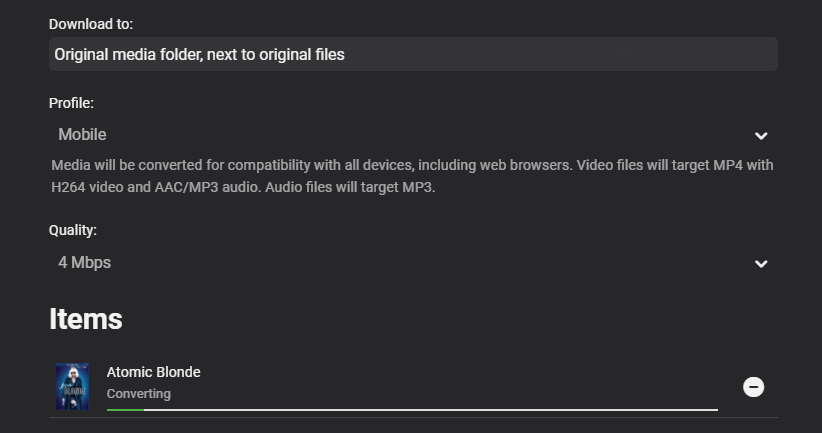
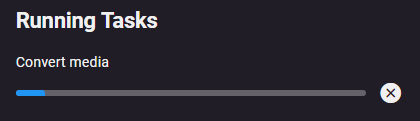
 2 points
 -
As I mention in a related post, I love the additional subfolders for Movie Extras (eg, Shorts, Scenes, Interviews, etc.)! It would be awesome to extend this functionality to TV Series as well. Specifically to add support for many/all of the same folders supported for Movie Extras, eg, extras specials shorts scenes featurettes behind the scenes deleted scenes interviews trailers As well as any additional folders that get added in the future (eg, hopefully Galleries). Support Placement of "Extras" Folders Within Each Season Folder, Plus A Naming Scheme to Link A Particular Extras Folder with a Specific Episode (eg, "\Season 1\E1 - Deleted Scenes\" for episode 1 deleted scenes): I want to clarify that it would be great if these various "extras" folder types could reside within each Season folder. So for example, within a Season 1 folder we could then have an "Extras" folder, a "Deleted Scenes" folder, a "Featurettes" folder, etc. And furthermore, that we could designate a particular folder to refer to a specific episode (eg, "\Season 1\E1 - Deleted Scenes\" for episode 1 deleted scenes). See more below, particularly why I think this would be so useful: https://emby.media/community/index.php?/topic/55915-emby-server-theater-additional-extrasspecial-folder-types-for-tv-series-similar-to-movies/&do=findComment&comment=587195 Thanks for your consideration! PS - If this is something you might like to see implemented, be sure to "Like" this top/first post (as well as any subsequent posts in this thread that highlight particular aspects of what you are interested in) -- "Liking" the top/first post helps the Devs to know how much interest there is in a given Feature Request.1 point
-
Is now available in the Emby catalog. Send media to your Sonos devices and remote control them. It even supports Sonos groups. Please try it out and report your experience. @@CBers1 point
-
I spent quite some time, maybe watched 4-6 shows using the new app and not even once the stream stopped. I have a completely different watch experience, a lot better than the Android TV version.1 point
-
The bottom line is I out smarted myself and filled in a field that I should have left alone. One would think that after 83 years, I would know when to leave things alone. I do like the new screen setups. Impressive. Thanks again. Charlie Bishop1 point
-
it seems the latest atv app update 1.6.3 solved it for me1 point
-
Hi there, the Kodi App for Windows and AndroidTV has a built-in zoom function for photos. So, if I press 1, 2, 3 ... on a keyboard or compatible keyboard app, the photo zooms in respectively. Could we get that for the Emby App on Android TV? That way, by pressing the numbers - let's say on the Nvidia App for the Shield - the photos can zoom in accordingly. Or maybe we could do the same with the pop-up keyboard in the emby phone app. Apologies, if this has already been requested. I tried the search, but only found topics regarding zoom not related to this. many thanks and regards iamthedude1 point
-
I’m all for it, it’s a great idea. I don’t think it matters how it’s achieved. It’d be great if we could just zoom in on a photo while viewing on a TV screen. I’m sure there are plenty of ways to achieve that1 point
-
Just open the libstd(...) with an editor search for GLIBC & CXXABI then you will find some entries within the library, there I just added the version that the log showed me as missing.. I know, it's quite a dirty workaround but if it works I won't complain. Maybe Cheese will figure out what softworkz pointed out, let's give them some time..1 point
-
Yes, you are right. Every episode widget/node even custom episode playlists used as widget will show the episode title in the first row. This seems to be Kodi standard. I guess...1 point
-
I hope this decoding problem when there is an unsupported main audio track is fixed somehow. Also because, unfortunately, the shortcut I found (edit heading with MkvToolNix) works only for external device (CCwGTV) but has no improvement in the Emby app on Sony Bravia TV. In fact I am forced to use Kodi which allows the passtrought correctly.1 point
-
So this solution worked for me if I disable the TRUEHD track and only keep the 5.1 sound active in mkvtoolnix. Now I need to figure out why the video keeps pausing every few seconds like it's buffering1 point
-
I just saw that I have two apps, "Emby" and "Emby Android TV". Emby for Android" is 3.2.70. Testing with this new app.1 point
-
According to this, Collections do not support sorting. https://github.com/ShanePe/Emby.SmartPlaylist.Plugin/releases/tag/v2.3.0.0 Removed "Sort newly Added Items" for Collections as Collections cannot be sorted.1 point
-
Please try the 1.3.6 update that just went up and let us know how that compares. Thanks.1 point
-
But in this case I would remove the episode artwork completely and let the skin use it's fallbacks (I assume skin fallbacks are tvshow artwork). Assigning images from different content is not easy once it's synced and I cannot/will not (globally) overwrite while sync cause every node/view will be affected and this messes up everything. Yes, artwork is a nightmare. Global fallbacks are already bad enough but on node bases it's even more tricky. Therefore you and Seger must provide me with instructions.1 point
-
Overwrite means even if an a specific artwork exists e.g. thumb, overwrite by something else e.g. fanart. Fallback means only use fanart if thumb not available .1 point
-
Ok, he should please confirm that. Also it's open if it should be a fallback or an overwrite.1 point
-
There is no setting in Emby to turn on/off HDR. On my TV if you bring up the Smarthub and scroll to Quick Settings the word "HDR" will appear on the left side. Every TV is probably different though. It looks like you were trying to play a TrueHD audio file. Samsung TVs don't support TrueHD so to prevent the app from converting on the fly select an alternate audio track such as AC3 before pressing Play if there is one. Any conversion can sometimes cause what looks like a buffering effect1 point
-
PW is correct. If the device is not used for 7 days, it will no longer be counted.1 point
-
Yes that will likely be exactly what you will need to do. This is a fault of the m3u file and not really an Emby issue. Emby's guide matching can use a few different things to match) channels such as channel number (ie OTA for Atlantic City, NJ) but won't be of use for matching m3u files. To get automatic matching the provider of the m3u would need to use official stationIDs like real guides use (ie WPVIDT) vs "ABC6 Phila". Emby won't know how to match the stationID of "WCAUDT" to "NBC PHI" and that's the general problem. If your provider's m3u file doesn't have the stationID or some other field Emby can use to reliably do the matchup it won't auto-match leaving it up to you to handle. You could change the m3u file to have the stationids or manually map the channels as you did above. If you want to contact me via PM I might be able to assist depending on the provider which I'd not post here.1 point
-
Go with mkv container (along with srt based sub) for your media files, Samsung Tv can direct play those, hence no need for transcoding at NUC.1 point
-
why do I need this when I have Vantage Point displaying a BBFC Ratings video based on the metadata rating? Its duplication for me. Much better as "Show ratings warning" option.1 point
-
There are problems playing audio using the native player, and the Emby team, instead of fixing them, has decided to force us to use the MPV player for audio.1 point
-
I'm on out of town for the next week and a half. While I can't promise anything. If I get some free time, I'll review your findings and see what I can do.1 point
-
looks like i was mainly the shield. maybe the last update. i had to a delay on the video 120ms. never had to that before, but it looks like its consistent accross all apps. my bad1 point
-
@Happy2Play I want to thank you for your patience with me working through this problem. I am happy to report that your little block of SQL was exactly what I needed to locate 1 "rogue" media file that was sitting in the root directory of my TV shows folder. Apparently, this resulted in Statistics going ... haywire and failing at 88%. once I deleted that rogue media file (and the 2 associated metadata files), refreshed the TV shows library, statistics was able to complete to success. Cheers!!! Karpana1 point
-
BUMP... Sorry... just wanted to bring this back up. I really would love this and not just for the web interface, the Android/FireTV interface as well (or especially to be honest) - it stinks not being able to see details or even just play a trailer with the way it is now. Thanks! j1 point
-
None of them need a $. That is an error in the help text.1 point
-
HI, yes we plan to improve on this in future updates. Thanks.1 point
-
I figured it out! You have to go to the terminal and run command: systemctl start emby-server1 point
-
Hello! Yes, let me get one for you1 point
-
Why Samsung? Why you make the things so difficult? Uninstall/Re-install is still okay, however after every re-installation, re-doing the settings is annoying.1 point
-
Version 1.3.5 was already released when SamES mentioned that. So he's probably saying he's already made the fix and whenever Luke compiles the "next" release 1.3.6 you should have it.1 point
-
I am using openssl to create the pfx file. openssl pkcs12 -export -out /certs/emby_ssl.pfx -inkey /etc/letsencrypt/live/domain/privkey.pem -in /etc/letsencrypt/live/domain/fullchain.pem -keypbe NONE -certpbe NONE -nomaciter -passout pass:1 point
-
Hi, can you try installing the latest apk from our website and let me know how that compares? https://emby.media/emby-for-android.html We should have it in the store soon. Thanks.1 point
-
I too have both shields and 2 apple tv. One is running 15.6.1 and the other 16. Both run emby about the same and that is terrible concerning hdr DV content. Sdr is ok and streaming apps on the apple tv. For all things 4k hdr/dv passthrough i use the shield.1 point
-
Hey @nuentes, Next release will have Resolution Height and Resolution Width which should give you what you need. Hey @koopa8840 I've changed a few things around how this works now, I was unable to replicate it though. So if the next release doesn't fix please can you give me more details... i.e. are you moving the across libraries ... etc... Hey @Emmanueld What's the use case here? And Thanks!!! Hey @chowbok Sorting on the playlist will only sort the new items that being added, as playlists could be large and sorting resource expensive it's best to set up a sort job to handle this in the background. Correct.1 point
-
This should be taken into consideration when calculating the top items. Luckily, you do have the option to add or remove items from the list. I'll take a look at it and see what we can do about it. On the flip side, I am now realizing that for accounts that can't see higher rates items, I might have to also handle that. For instance if the top three picks are rated PG-13 then the account with the parental control will only see pick four through nine. I think I know how to handle this. But It is now on my radar.1 point
-
Hey I vote either way as long as its functional thats all that matters. Whatever way u see fit @quickmic I am good with. Mook1 point
-
@ebr Just wanted to chime in on this and echo my support for an option to disable this feature. After searching endlessly in the settings, I am somewhat happy to see this wasn't just a case of me missing something obvious. I am sure there are users that find this feature to be informative, but for those of us wanting to outright disable this feature across the board, that option should also be made available. If this is a matter of users inadvertently playing a movie above an age appropriate category, I would merely point them toward the media filter option or the parental controls under the user profiles.1 point