Leaderboard




Popular Content
Showing content with the highest reputation on 08/09/22 in Posts
-
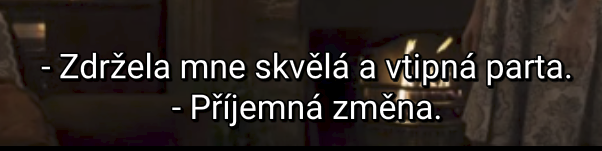
So I did an experiment and recompiled the latest Emby apk file replacing the assets/subfont.ttf file with same file from older Emby apk that didn't have this issue. After using the recompiled version, I can confirm the subtitles render correctly using latest Emby for Android 3.2.62: This obviously does not fully solve my problem as I can't use the same approach on devices that do not support sideloading. But I think this pretty much confirms that the issue is within the used font. The working font is Roboto, the new (broken) font seems to be Noto Sans. You can actually test the font pretty easily here, just type in some test text and drag the font you want to test. Here is how the old font renders my test string at 36px (note there is some slight kerning issue around the ť character, but otherwise it seems OK): The font in the latest version renders the same text very incorrectly: Here's the test text, I've used for testing, just copy/paste it into the tool: Příliš žluťoučký kůň úpěl ďábelské ódy I understand that reverting the font might not be super easy as it might break international characters in other languages, however this should be considered the same as broken playback on all devices within regions using this characters sets. (Czech, Slovak, possibly others) This renders Emby almost unusable for those languages. (Which is made even worse by the fact, that using subtitles is much more common as a lot of content isn't dubbed in local language) Hope this info helps to fix this ASAP.

 4 points
 -
Lots of content has audio levels designed for theatre sound systems. When played through lots of home systems, by the time you turn up the level to the point where you can hear the conversations (especially the conspiratorial whispers), the M&E tracks reach window rattling levels. There is a loudnorm parameter in ffmpeg that may help, and there is a python program ffmpeg-normalize that may perhaps be better. I've not yet experimented with either, but I will report back when I know more. Adding the ability to normalize audio in conversions, preferably by adding the normalized audio as a SAP would seem like a worthwhile feature. Please consider it future revisions of Emby Server.3 points
-
Just click on 'Season 1' again - where your arrow is - and it refreshes the items I believe.3 points
-
I have fixed this here: Emby.AutoOrganize_v1.6.41.35.zip Also: While bulk organizing, items might get stuck in a 'checking' state. If this happens simply press the "Re-process" button to do just that. Fixed While organizing with corrections a movie parent folder was always created. Now it honors the settings. Searching queries the database instead of what is loaded on screen. visual enhancements for action buttons. Other small bug fixes.3 points
-
Something certainly for the future2 points
-
As a video game developer I personally know the pain of handing over some % of rev to platform holders, but that is the state of things for us and at the end of the day we make more money by supporting those platforms for users. Here is my case in point: I have been a relatively happy Emby user for about 3 months now and I'm downloading Plex right now - I'm just not going to update Emby every 30 days from USB as that's insane to expect my family to do so. I just can't deal with the constant issues like this so I'm going to have to switch I'm afraid.2 points
-
Seems rebooting the TV the next day more or less solved it. It is performant enough now.2 points
-
Unless I'm being a bit blind (highly possible!), I'd love a way to hide a couple of the top green navigation items without hacking it in myself. For example, in Movies I don't want the 'Trailers' item to appear for any profile and for TV I don't need the 'Upcoming' nav link. Obviously not a major issue but thought it would be a nice thing to have, perhaps allowing them to be re-ordered like the home page items but again just a nice extra,1 point
-
While being able to logically move media from one library to another would be a nice first step. Ultimately it would be nice for the move to physically move the media from one folder to another (since doing a logical move for a bunch of media from say, kids to not-kids, and vice versa will make physical locations pretty confusing). Trying to avoid having to drop into the cli to do it... I don't mind, pure convenience factor, just thought I'd throw it on the queue. Thanks Latest ATV update is sick, btw. Well done.1 point
-
At the moment once themes finish, silence ensues. I'd rather have the theme start playing again. It also doesn't play after the film/show, I don't think? I love having it, it approximates the mood-setting of a DVD or Blu-ray menu, and avoids horrible silences, but it shuts off too much.1 point
-
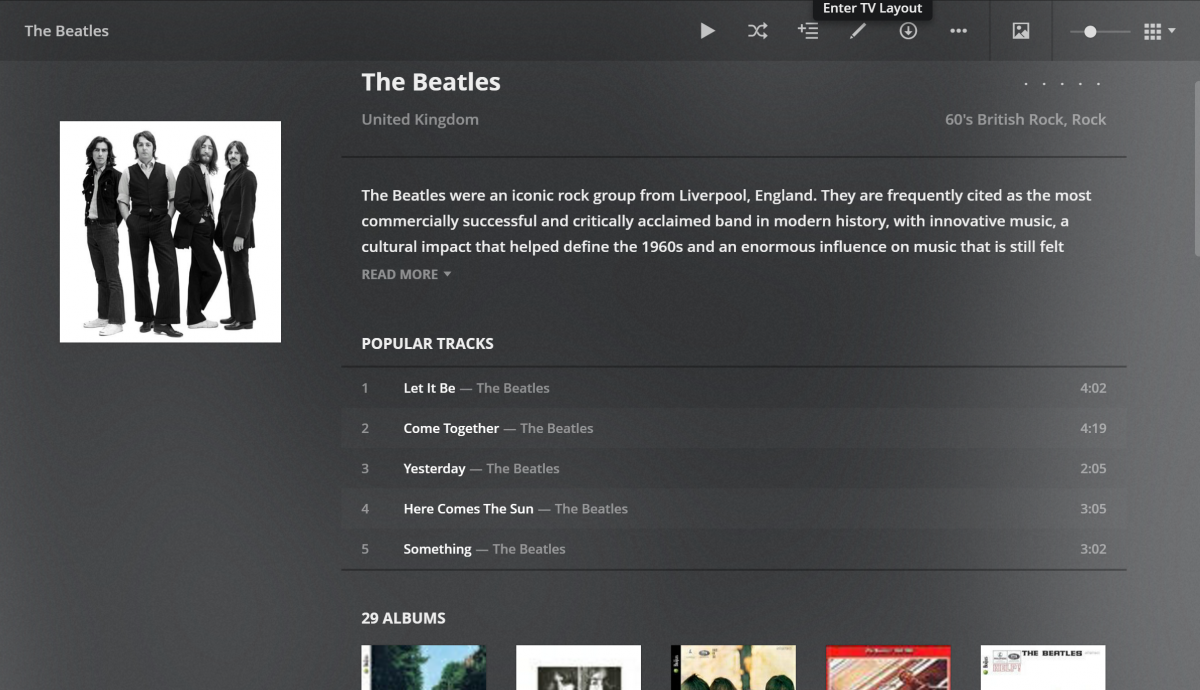
I was just checking out Plex and noticed a feature in Music that I love (see screenshot). In Music when you open an Artist it shows popular songs. This comes in real handy when you don't know all the names of the songs or what albums they are on. Can we please add this to Emby? Thanks
 1 point
 -
Hi I have a large library of files and i want to know if there is any addon or trick to find duplicates of movies and tv episodes?1 point
-
I have an app working, that Im happy with the functionality of. It syncs user data (play status, favorites etc) between two servers. I would like to convert this into an Emby Plugin. Right now its a desktop application. Im looking to get some help in the conversion. All of it is open source, none of it is proprietary, and I have no desire to use it for any financial gain. It started as a personal need, and I figured it might be useful to others. Feel free to check out the current project here: https://github.com/towel42-com/EmbySync Thanks in Advanced -hawk1 point
-
Glad you got it sorted out, building an intuitive user interface it actually really hard. Even just from a code complexity point of view. For example the code in this plugin that can detect the offset of an audio fragment fingerprint in an episode is about 60 lines of code, compared to hundreds of lines of code to get the data displayed and interactable in the user interface.1 point
-
Thanks Luke. I do appreciate Embys' existence. I'm just going to scream internally a little bit and remember that if this was really that big an issue I'd've run into it before now...1 point
-
It's in-progress. There are steps that need to be taken first, such as having the ability to switch back and forth between the native Apple player and our embedded player (mpv). So that groundwork is what we're currently working on.1 point
-
Hi, there is currently no way to disable this, but more control is planned for future updates. Thanks for the feedback.1 point
-
okay sorry false alarm. Just checked again and subtitle download indeed works. Anyway the content of the strm file shouldn't be shown there - Seeing the same on the WebUI. Best regards1 point
-
I don't think it's necessary. The font absolutely can support all of the languages. (Besides having "region" versions would still not work for people that require working subtitles in multiple regions at the same time.) It's really just single font issue. In fact, if you fetch Noto Sans from Google Fonts, the same font does have correct implementation of those extra characters used by some eastern European languages. So it's not any technical limitation as far as I can tell. The included font in the app is just broken for whatever reason.1 point
-
Confusing!1 point
-
I hope I can do it... See you later...1 point
-
Hi. You would setup the m3u as a Live TV tuner in your server and then the Roku app (and all others) would be able to access it from there. You must have a server. https://support.emby.media/support/solutions/articles/44001848795-m3u-tuners1 point
-
I could have sworn I tried that but yeah seems to work. Thanks a lot!1 point
-
Hi. Actually, I would say this function is normally handled at the audio output end because modifying the actual media is global and permanent and this issue (too high of a dynamic range) is usually environmental and, therefore, conditional on exactly where/when you are playing the item. Many TVs and most receivers have a way to do this type of compensation which means the audience for the feature within Emby is fairly small (only those without devices that already account for this). It is also not a simple thing to implement (well) so the cost/benefit is a bit difficult right at this time. This may be easier to do in some apps than others as well (Roku would be one of the harder ones). There is an open feature request for this though so please lend your support there. Thanks. And related:1 point
-
Hi. Those devices you see in your server dash are not the ones counted for the Premiere limit (see below) and what you describe would not be the result of the device limit either. If it happens again, please provide details of an example. Thanks. https://support.emby.media/support/solutions/articles/44001173135-is-there-a-limit-to-emby-premiere1 point
-
@Cheesegeezer FYI1 point
-
See my post on 2nd Aug - directly above this - I mentioned this EXACT issue you are having and a way around it...1 point
-
Bumping this topic up again. Emby needs a way to display and allow for media deletion of duplicates. I keep a Plex docker container on standby and fire it up every few weeks to check for duplicates. It takes 23.6 GB (and growing) of drive storage just to have that container on standby for the duplicates detection feature. Granted there are more cumbersome ways of finding duplicates outside of Plex but nothing is as elegant or simple as Plex's method. Surly the Emby dev's can build something to show duplicates of TMDB or IMDB codes and provide a delete button or a trash can for safe measure.1 point
-
Let me check tomorrow and get back to you1 point
-
Hello Segar... I ran some tests and I think the "parental rating" pulldown box is blank because the movie chosen has a parental rating assigned that is not in the available pulldown list selections. What ratings are you using? I know my list is not complete. I have added ratings for different countries as users have needed them. I know this is not optimal, but my knowledge of rating systems for other countries is severely limited. Please explain the ratings that you are using and I will try to add them to the list. I tested the filters for min and max parental ratings and they work ok. Please explain exactly what problem you are experiencing. Once I understand what your problem is then I can fix it. Keep in mind that I use the filtering provided by the Emby API. I can only do what they support. Segar, I apologize for being so slow. Thanks for bringing these issues to my attention. Vic P.S. the latest code is attached below... emby_new_tool_38.html1 point
-
Working on a fix now, for both versions to work..... fingers crossed i have found it..... testing now1 point
-
wow, tricky bug you found there. It was hiding in a condition which ignored options. You'd have to know how the entire solution works to actually spot it. Interestingly enough it has opened another bug which will mark an "Existing Item" as "New Edition" if you change that option after initially sorting an item, and attempting to re-process it. So... I will look at that, however this should fix the movie folder options bug here: Emby.AutoOrganize_v1.6.41.36.zip Good work finding this. Thank you.1 point
-
Very nice commitment, I can confirm that characters are also incorrect in Serbian,as well as every other Eastern European language.1 point
-
Same way you create a shortcut to any app really. There are many ways, but what I did it was to pin WinSCP to my taskbar and then right clicked the icon and chose Properties to modify it like above.1 point
-
Same issue: (i have copy the updated dll and delete fileorganization.db) When "create folder" is unchecked and folder pattern is set then it "auto organize" automatically but create folder. <CreateMovieInFolder>false</CreateMovieInFolder> <MovieFolderPattern>%mn</MovieFolderPattern> When "create folder" in unchecked and folder pattern is blank then it can't "auto organize" you have to do it manualy but it works and don't create folder <CreateMovieInFolder>false</CreateMovieInFolder> <MovieFolderPattern /> thx1 point
-
FYI... I had to remove the database but was also on an older version.1 point
-
It doesn't look to me like you need to remove the DB. If it does, I've done something wrong apparently.1 point
-
@mbuhmann As long as you mount your programdata folder to /config you shouldn't lose anything. Make sure to set UID, GID and GIDLIST accordingly, see our documentation: https://hub.docker.com/r/emby/embyserver/1 point
-
Promising to not delete anything isn't really a solution though.1 point
-
I agree! The admin doesn't want to solve it... We waited a year and a half.... The admin keeps making excuses that he will solve it and nothing....i also remain version emby 3.1.73....It's not hard to fix..They don't want to deal with it..why do we pay emby when subtitles don't work..1 point
-
The problem is still there. I don't understand why is it hard to fix it, since everything was fine until version 3.1.73 and that's why I'm forced to stay on it and not update the app. I think you should add an option to change the subtitle font or revert to the old one, as this could be a potential cause of the problem.1 point
-
I'm sure we'll get most of these features to make public/private playlists easier to work with and manage. I can't say when, but I'd imagine a lot of playlist feature requests will all fall into an upcoming revamp of the playlist functionality.1 point
-
@wonderwond has this helped?1 point
-
@LukeThanks for moving it and thanks for thinking about it. @Happy2Playjust thanks again! For a better overview of the English ratings vs: Rated G („General Audiences“): These films are released for all age groups. The rating corresponds to the German FSK rating "released from FSK 0". Rated PG („Parental Guidance Suggested“): Parental guidance for young children is recommended for these films. The rating essentially corresponds to the German FSK rating "released from FSK 6". Rated PG-13 („Parents strongly cautioned“): For these films, parents are warned that some content may not be suitable for children under 13. The rating is thus somewhat stricter than the German FSK rating of "released from FSK 12". Rated R („Restricted“): These films may only be seen by young people under the age of 17 in the company of a parent or guardian. The rating is thus somewhat stricter than the German FSK rating of "released from FSK 16". Rated NC-17 („No one 17 and under admitted“): These films have not been given a youth rating and may only be seen from the age of 18. The rating therefore corresponds to the German FSK rating "released from FSK 18". As you can see in the screenshot, there are of course other countries that can be found in the metadata, such as "8;15;14", which may have to be assigned individually or permanently. e.g. 6<8.9 = FSK 6 ; >9<12 = FSK 12 etc....1 point
-
You need to be careful on how you add these SMB shares - as if I understand your first post, the 2nd film server is not necessarily connected to the i3 NUC all the time. Thus emby will 'see' the smb shares - and add the items just fine. But if during a scan it no longer has access to those shares - then it will remove them all again... You may have to turn off the 'scan library' schedule - and manually fire the scan when the film server is available for updates.1 point
-
Running a script to do that against my entire library is impractical at best. For me the best solution is on the fly and if that has to be by transcoding on the server then so be it. Transcoding audio is not an intensive task and "should" be pretty easy to implement for normalization. But, as I have said, it is not really important for me because my Rokus do a good job.1 point
-
But it is the one that involves the least money for the user. It is one solution that extends throughout all, or at least most, hardware combinations. I am not saying that some people will not want/need a hardware solution but it is expensive for people to buy capable hardware for every room they wish to use Emby in. In my case it is only two rooms but even then I would have to buy hardware for each room. Of course, in my case, it is solved because I have Roku Ultras and they do a good job normalizing volume but I have friends with only Fire TVs and they are not so well served.1 point
-
Then leveling should be done in the client software, in this case Emby.1 point
-
This is part of my pipeline for loading movies/shows into my system. Previously before this I'd get one movie with low volume and another that was way to loud. So I started to copy audio track but write a new 2 channel audio track that's normalized. Solved the problem as I also preserve and can use the original sound track as well.1 point
-
In LAV filters there is an option to Normailze Matrix which globally attenuates volume. This makes for a good "night mode" option when I don't want to wake the family. There isn't an option for this in Emby Theater, but if I go into the directshowplayer.xml file and turn on the LAV tray icons, I can enable the option. However, the option does not persist through updates so I have to repeat the process. It would be nice to have a persistent setting for this in ET.1 point