Leaderboard




Popular Content
Showing content with the highest reputation on 07/27/22 in Posts
-
Looks like FF v103 has been released so this issue should be resolved.3 points
-
And now for something completely different... I'm really enjoying "The Offer" but "The Godfather" is one of my all-time favs.2 points
-
Not in the Web UI, but the only option I know of is in the current ATV client app
 2 points
 -
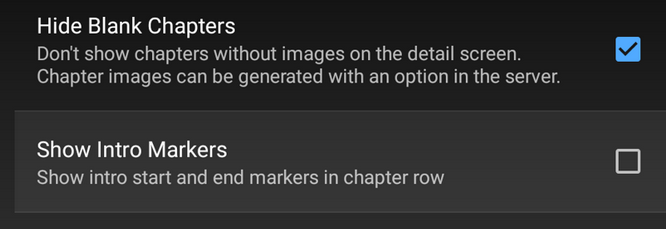
Unless I'm being a bit blind (highly possible!), I'd love a way to hide a couple of the top green navigation items without hacking it in myself. For example, in Movies I don't want the 'Trailers' item to appear for any profile and for TV I don't need the 'Upcoming' nav link. Obviously not a major issue but thought it would be a nice thing to have, perhaps allowing them to be re-ordered like the home page items but again just a nice extra,1 point
-
So the Steam Deck is pretty hyped now. They showed it as a streaming device in some videos today. It's powerful enough to play pretty much anything directly, heck it could even be a server quite easily with it's specs. A lot of people got to talking and now people are saying Plex is going to release a version to Steam so that it'd just run through that and play onto SteamOS without the user having to muck about outside of Valves ecosystem. There are plenty of free tools / video players in Steams Software section, so it'd be a pretty neat little thing I imagine.1 point
-
I will have to try and remember which ones I fix already or find a new example. Might be a day or two.1 point
-
I have used trial Cert from https://www.gogetssl.com/; and yes now it works with/without Nginx. So the issue from Let’s Encrypt with GN5. I hope any body can help to make Let’s Encrypt! work with old device Many thanks @Luke1 point
-
Vou ver se eu instalo o aplicativo Obrigado!1 point
-
Okay great! Thanks for the reply...1 point
-
HI, best thing to do is look at your xml data and see the categories that it uses, and then update the settings in Emby Server to match.1 point
-
Hi, yes we'll be releasing a 4.7.6 release any day now and then we'll submit that to Asustor. Thanks.1 point
-
@FrostByte, you're absolutely right! Turns out I have two Synology boxes, an older one running DSM 6 and the newer one running DSM 7.1 and I tried to use the same installer for both. Nice catch, thanks for the assist here!1 point
-
Yea I totally agree. Strange New Worlds has that original vibe as well as the episodic tempo, I like it! Discovery not so much for all the reasons you mentioned. I must admit I watched it (because I love sci-fi) but It didn't hold true for me personally. The first seasons was watchable but then it degraded into a total mess.1 point
-
Hi. I agree - which makes a user-based option kind of curious here. The necessary EQ is dependent on the playback environment, not the user.1 point
-
I also thought that Strange New Worlds was written and produced really well. I was worries initially because when I watched Star Trek Discovery, it put a sour taste in my mouth. Discovery has great sets, and makeup. They even have some great sci-fi actors. But, the writting on the show is absolutely horrific. The story line is bad, and why is the main character always "whisper-crying"? It's just a very odd take on Star Trek. But, I have really grown to love Strange New Worlds. They seem to be following a more standard Star Trek type of writting. Its great!1 point
-
Yea that's cool, looking forward to season 3 of Star Trek: Picard! I enjoyed Star Trek: Strange New Worlds too, based on the original Star Trek pilot episode The Cage. It also looks like Strange New Worlds will use the more traditional Klingon style for the 2nd season.1 point
-
You should test with 'Scrape... -force best match' with TMDB scraper only, without deleting anything, see what gives. Or use TMDB for Actors field in Universal movie scraper and 'Scrape... -force best match' with your default.1 point
-
Nope. Yes.1 point
-
Thanks for your help!1 point
-
I added the link to download probably while you were typing. Yes, just download the correct spk for your model NAS and in PC click "Manual Install" There is no repository for packages, they are just on GitHub.1 point
-
Or you could just download it and upgrade yourself. After it's submitted it takes Synology time before you will see it in the store. Emby Server for Synology NAS - Emby1 point
-
I have tested the script in ubuntu 18 to 22, as well as debian 8-13 and it works. Have you solved the problem?1 point
-
Hey look! They didn't change Worf's Klingon style to crappy Discovery style Klingons! Horray! https://youtu.be/cqApTpJMWOk1 point
-
You need to revise your TMM settings, and make sure you use only TMDB scraper for actors; for existing items that used IMDB, you need to rescrape/rewrite NFOs (right-click Enhanced Editing submenu).1 point
-
Actually my work flow is slightly different but still the same as .77 essentially. I do not run thumbs. Play tap FF and hold (now wait for a day or two if you wanna) Play - nothing happens Play again - it plays1 point
-
Confirmed, removing just the corrupted settings file allowed the CEC commands to work on the next prompt again.1 point
-
Since nfo metadata has bad ratings, library metadata will have to be Refreshed to correct the defective metadata. <rating>8.323</rating>1 point
-
I had very similar problems the this on windows 11. I found a setting on windows apps>video playback "process video automaticaly to encance it" I switched this off and my playback issues went away. Stupid windows getting involved in everything1 point
-
No, you're using the wrong file for DSM 7. The correct file will have the number 7 immediately after the word synology in the filename. You're trying to install the file for DSM 6. Click the other DSM link and download this file emby-server-synology7_4.7.5.0_x86_64.spk1 point
-
@smernt Thank you! My plan is to stabilizes this release. (No more new features). Once it all looks clear, I'll submit to the Emby plug in gallery which would make it a little easier to install and more visible.1 point
-
Hi, what do you have set as your default player? Have you tried telling Alexa a specific player to use for video? @cayars1 point
-
Решено Надо обновиться до TrueNAS-13 и следовать инструкции https://emby.media/freenas-server.html1 point
-
Thank you for the definitive answer, that is all I needed to know, as in it will never work.1 point
-
hey could some of the work thats been put into introskip/credits, mainly the credits part be used to find the right part to call a new scene ( Movies Credit Scene) and get the right timing for each movie/series credits (Movies Credit Length). i know it doesnt work 100% right now because blackdetect cant work in all cases. but what if we combine it with scene change (sc_detect) blackdetect + scene change. plus the text recognition proof of concept could work great aswell along will blackdetect + scene change . what do you think just thinking out loud here?1 point
-
Same place as we have been for too long. Give it up. No one is listening. Plex has it. It’s just too hard for the Emby Team or they just don’t care. Shame really; considering that Apple is quite a big company with quite a big user base. Use Plex instead.1 point
-
@Lukeyou're right, I'm sorry I didin't see it sooner. The external sub is downloaded with the video file. Every thing is ok. My mistake. Thank you for your replies and have a nice day ! P.S : Can you now look at my request on the LG Smart TV to improve the use of magic remote with emby client app ? Thank you1 point
-
Hi, the apps can handle this automatically when you're just browsing around. Currently they can't handle this in the middle of media playback and that's something we'll look to improve in future updates. Thanks.1 point
-
Lets get Introskip all wrapped up and working in the Core (with editor blah blah) - and then we may be able to add new capabilities such as adding markers for Recaps (manual edit) and even Commercials (from EDL imports from ComSkip?) if there is sufficient interest for it. Movie End credit markers are also starting to be discussed. Things are moving relatively quickly on Introskip so I think it's really just a matter of waiting until it all comes together.1 point
-
Bonjour, Pour celles et ceux qui ont un serveur Emby sous Ubuntu et veulent sécuriser leur connexion grâce à un reverse proxy, voici la démarche à suivre. Même si un reverse proxy est un serveur indépendant, servant à sécuriser les serveur web des requêtes malveillantes, l'avantage de le créer sur votre serveur Emby vous permettra de laisser ouvert en entrée, sur votre pare-feu, uniquement les port 80 et 443. Le port 8096 pourra rester fermé. De plus, les communications entre vos client et votre serveur seront encryptées. Installation d'Apache Apache est le serveur Web le plus utilisé au monde. il doit être installé au préalable pour permettre faire fonctionner le reverse proxy. Pour se faire, vous devez l'installer en tant qu'utilisateur non-root. On commence par mettre à jour les paquets : sudo apt update Puis on installe Apache sudo apt install apache2 À la fin du processus d’installation, Ubuntu démarre Apache. Le serveur Web doit déjà être opérationnel. Vérifiez auprès du système d’init pour vous assurer que le service est en cours d’exécution en tapant : sudo systemctl status apache2 Vous devez obtenir un résultat semblant à : Afin d'éviter d'utiliser le fichier de configuration par défaut d'Apache, nous allons en créer un nouveau : sudo nano /etc/apache2/sites-available/emby.conf Recopier dans le fichier emby.conf, les lignes suivantes : <VirtualHost *:80> ServerName mon.domain.com ServerAdmin youremail@address.com RewriteEngine on RewriteCond %{SERVER_NAME} =mon.domain.com RewriteRule ^ https://%{SERVER_NAME}%{REQUEST_URI} [END,QSA,R=permanent] </VirtualHost> Remplacer mon.domain.com par le nom de votre domaine (qui peut être aussi de type NoIp - Exemple : monserveuremby.ddns.net) Remplacer youremail@adress.com par votre adresse mail (qui peut être aussi webmaster@localhost) Enregistrez et fermez le fichier lorsque vous avez terminé. Activons le fichier avec l’outil: a2ensite sudo a2ensite emby.conf Désactiver le site par défaut défini dans :000-default.conf sudo a2dissite 000-default.conf Ensuite, testons les erreurs de configuration: sudo apache2ctl configtest Vous devriez recevoir la sortie suivante : Redémarrez Apache pour implémenter vos modifications : sudo systemctl restart apache2 Installation du certificat de sécurité (Let's Encrypt) Afin d'obtenir un certificat SSL avec Let’s Encrypt, nous devrons d’abord installer le logiciel Certbot sur votre serveur. Nous utiliserons les référentiels de paquets Ubuntu par défaut pour cela. Une seule commande suffit : sudo apt install certbot python3-certbot-apache Vous serez invité à confirmer l’installation. Certbot est maintenant installé sur votre serveur. Obtention d’un certificat SSL Certbot fournit une variété de façons d’obtenir des certificats SSL via des plugins. Le plugin Apache se chargera de reconfigurer Apache et de recharger la configuration chaque fois que nécessaire. Pour utiliser ce plugin, tapez ce qui suit : sudo certbot --apache Ce script vous invitera à répondre à une série de questions afin de configurer votre certificat SSL. Tout d’abord, il vous demandera une adresse e-mail valide. Cet e-mail sera utilisé pour les notifications de renouvellement et les avis de sécurité : Après avoir fourni une adresse e-mail valide, appuyez sur pour passer à l’étape suivante. Vous serez ensuite invité à confirmer si vous acceptez les conditions d’utilisation de Let’s Encrypt. Vous pouvez confirmer en appuyant sur la touche A et confirmer en appuyant sur la touche ENTER Ensuite, il vous sera demandé si vous souhaitez partager votre courrier électronique avec l’Electronic Frontier Foundation pour recevoir des nouvelles et d’autres informations. Si vous ne souhaitez pas vous abonner à leur contenu, tapez N et confirmer en appuyant sur la touche ENTER L’étape suivante vous invitera à informer Certbot des domaines pour lesquels vous souhaitez activer HTTPS. Les noms de domaine répertoriés sont automatiquement obtenus à partir de votre configuration d’hôte virtuel Apache, c’est pourquoi il est important de vous assurer que vous avez les paramètres corrects et configurés dans votre hôte virtuel. Si vous souhaitez activer HTTPS pour tous les noms de domaine répertoriés (recommandé), vous pouvez laisser l’invite vide et cliquer pour continuer. Vous verrez une sortie comme celle-ci : Ensuite, vous serez invité à sélectionner si vous souhaitez ou non que le trafic HTTP soit redirigé vers HTTPS. En pratique, cela signifie que lorsque quelqu’un visite votre site Web via des canaux non cryptés (HTTP), il sera automatiquement redirigé vers l’adresse HTTPS de votre site Web. Choisissez 2 pour activer la redirection HTTP vers HTTPS Après cette étape, la configuration de Certbot est terminée et les remarques finales sur votre nouveau certificat, où localiser les fichiers générés et comment tester votre configuration à l’aide d’un outil externe qui analyse l’authenticité de votre certificat seront affichées : Vérification du renouvellement automatique de Certbot Les certificats de Let’s Encrypt ne sont valides que pendant quatre-vingt-dix jours. Il s’agit d’encourager les utilisateurs à automatiser leur processus de renouvellement de certificat, ainsi que de s’assurer que les certificats mal utilisés ou les clés volées expireront le plus tôt possible. Le paquet que nous avons installé prend en charge les renouvellements en incluant un script de renouvellement à , qui est géré par un service appelé . Ce script s’exécute deux fois par jour et renouvelle automatiquement tout certificat dans les trente jours suivant son expiration. Pour vérifier l’état de ce service et vous assurer qu’il est actif et en cours d’exécution, tapez la commande suivante : sudo systemctl status certbot.timer Vous obtiendrez une sortie similaire à celle-ci : Activation des modules Apache nécessaires pour le reverse proxy Apache a de nombreux modules fournis avec lui qui sont disponibles mais pas activés dans une nouvelle installation. Tout d’abord, nous devrons activer ceux que nous utiliserons dans ce didacticiel. Les modules dont nous avons besoin sont lui-même et plusieurs de ses modules complémentaires, qui étendent ses fonctionnalités pour prendre en charge différents protocoles réseau. Plus précisément, nous utiliserons :mod_proxy mod_proxy, le module proxy principal Apache module pour la redirection des connexions; il permet à Apache d’agir comme une passerelle vers les serveurs d’applications sous-jacents. mod_proxy_http, qui ajoute la prise en charge de la transmission par proxy des connexions HTTP. Pour activer ces deux modules, exécutez successivement les commandes suivantes. sudo a2enmod proxy sudo a2enmod proxy_http Pour mettre ces modifications en œuvre, redémarrez Apache. sudo systemctl restart apache2 Configuration du reverse proxy pour Emby La dernière étape consiste à configurer le reverse proxy pour emby. Pour cela, éditer avec nano, le fichier qui se trouve dans /etc/apache2/sites-available et devrait s'appeler (dans notre tuto) emby-le-ssl.conf sudo nano /etc/apache2/sites-available/emby-le-ssl.conf et modifiez le comme suit : <IfModule mod_ssl.c> <VirtualHost *:443> ServerName mon.domain.com ServerAdmin youremail@address.com <proxy *> AddDefaultCharset off Order Allow,Deny Allow from all </proxy> ProxyRequests Off ProxyPreserveHost On ProxyPass "/embywebsocket" "ws://127.0.0.1:8096/embywebsocket" ProxyPassReverse "/embywebsocket" "ws://127.0.0.1:8096/embywebsocket" ProxyPass "/" "http://127.0.0.1:8096/" ProxyPassReverse "/" "http://127.0.0.1:8096/" SSLCertificateFile /etc/letsencrypt/live/mon.domain.com/fullchain.pem SSLCertificateKeyFile /etc/letsencrypt/live/mon.domain.com/privkey.pem Include /etc/letsencrypt/options-ssl-apache.conf </VirtualHost> </IfModule> Remplacer mon.domain.com par le nom de votre domaine (qui peut être aussi de type NoIp - Exemple : monserveuremby.ddns.net) Remplacer youremail@adress.com par votre adresse mail (qui peut être aussi webmaster@localhost) Pour mettre ces modifications en œuvre, redémarrez Apache. sudo systemctl restart apache2 Tester votre configuration et configurer un client Emby Il vous suffit de taper mon.domain.com dans la barre de votre navigateur sans rajouter 8096. Pour configurer un client Emby (Android, Smart TV, etc.) il vous suffit juste de rentrer l'url en https de votre votre serveur (ex : https://mon.domain.com) et de laisser le champ port vide.1 point
-
Simply because I'm a moron who didn't RTFM.1 point
-
Hi. Can you try sideloading our standard android app on the same device and see how that compares? https://emby.media/emby-for-android.html Thanks.0 points